





26 Jun Is My Business Network Secure? A Proactive Security Audit for 2026
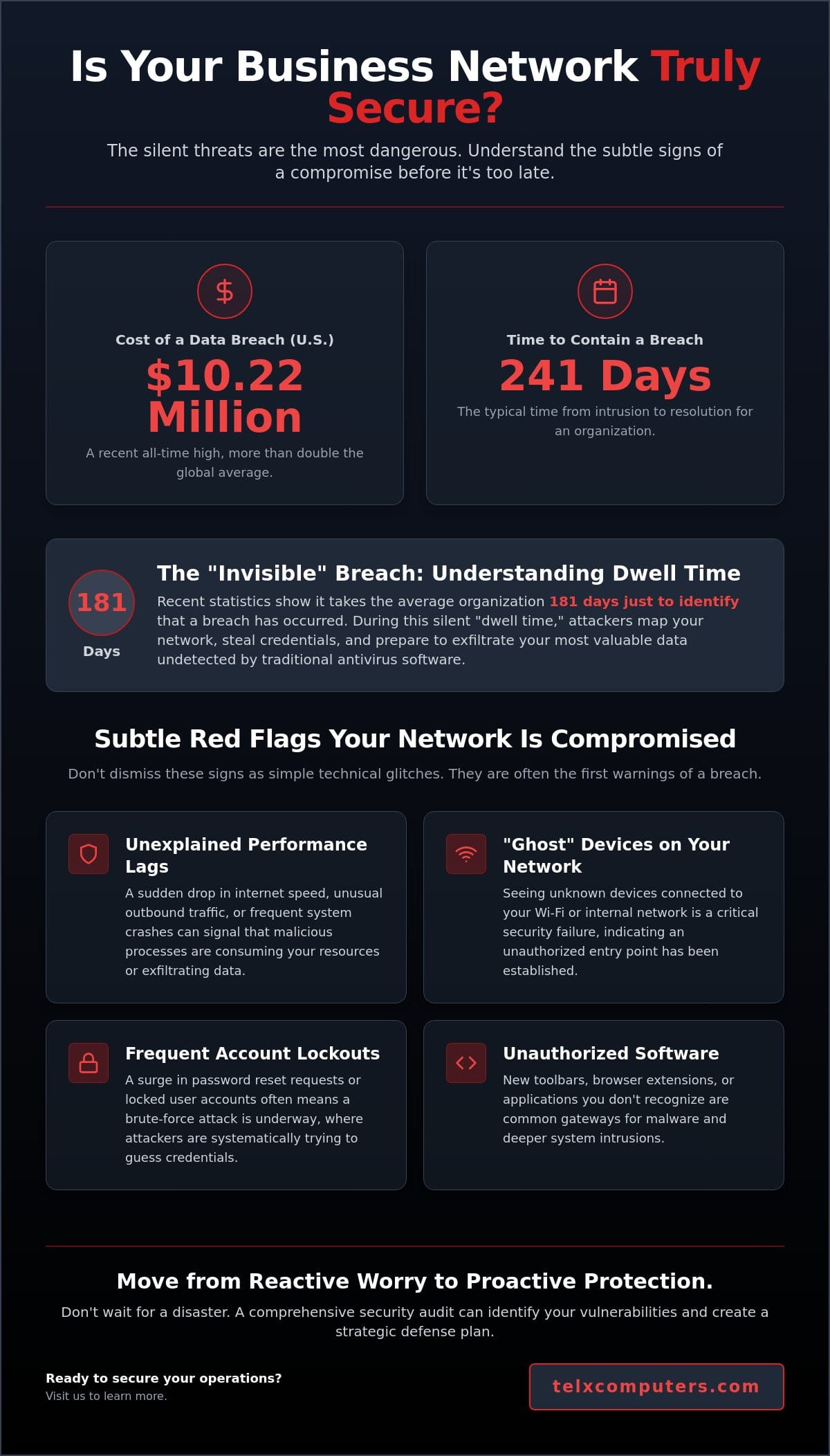
The average cost of a data breach in the United States has reached an all-time high of $10.22 million in 2026, which is more than double the global average. Even more concerning is that it takes the typical organization 241 days to identify and contain a single intrusion. If you’re asking yourself, “is my business network secure,” you’re already thinking like a proactive leader. Most business owners live with a nagging uncertainty about ransomware attacks or whether their remote employees are safely managing company data. You shouldn’t have to wonder if your IT provider is actually doing what they claim in their monthly reports.
We believe your technology should be a source of stability, not a source of stress. This article provides a clear strategy to audit your current infrastructure and identify the specific vulnerabilities that could put your operations at risk. You’ll gain a prioritized list of fixes and a definitive understanding of your current security status. We’ll preview the steps needed to build a proactive defense that protects your bottom line and restores your peace of mind. It’s time to move from reactive worrying to a state of confident, strategic protection that keeps your business running smoothly.
Key Takeaways
- Identify subtle red flags, such as unexplained performance lags and frequent account lockouts, that indicate your network perimeter may already be compromised.
- Strengthen your core infrastructure by implementing Next-Generation Firewalls and network segmentation to isolate your most sensitive financial and customer data.
- Modernize your remote work strategy by transitioning to a Zero Trust Network Access model and deploying Endpoint Detection and Response for all mobile devices.
- Learn the exact steps to determine “is my business network secure” through a systematic device inventory and comprehensive vulnerability scanning.
- Discover the operational and financial benefits of moving from a reactive “break-fix” approach to a proactive managed IT service model.
Signs Your Business Network Security Might Be Compromised
Identifying a security breach isn’t always as obvious as a flashing red screen or a locked workstation. Often, the signs are quiet and easy to dismiss as routine technical glitches or hardware aging. If you’ve ever paused to ask, “is my business network secure,” you need to look beyond obvious failures and start observing the subtle shifts in your system’s behavior. To build a truly resilient operation, you must understand What is Network Security? and how it manifests in your daily workflow.
To better understand this concept, watch this helpful video:
The “Invisible” Breach: Why You Might Not Know You are Compromised
Hackers rarely announce their presence immediately after gaining access. They prefer to stay hidden using a tactic known as “dwell time.” Statistics from 2026 show that it takes the average organization 181 days just to identify that a breach has occurred. During this silent period, attackers map your infrastructure, escalate their privileges, and harvest credentials through sophisticated phishing attempts. Modern malware is designed to bypass traditional, signature-based antivirus software by using fileless techniques that live in your system’s memory. This makes it nearly impossible for basic tools to detect them without advanced network IT support and behavioral monitoring.
Subtle Performance Red Flags
Don’t assume a sluggish internet connection is just your provider having a bad day. A sudden drop in speed or unusual outbound traffic patterns during non-business hours often indicates a data exfiltration event. This is when massive amounts of sensitive data are being uploaded to an external server controlled by a third party. System crashes and frequent software freezes can also be linked to malicious background processes competing for your CPU resources. You should also remain vigilant for these specific red flags:
- Ghost Devices: Seeing unknown devices on your Wi-Fi management console is a critical security failure.
- Account Lockouts: Frequent, unexplained password reset requests or locked accounts suggest a brute-force attack is underway.
- Unauthorized Software: New toolbars or programs you don’t remember installing are often gateways for deeper intrusions.
Distinguishing between old hardware and a network under stress is a core part of a proactive defense strategy. While hardware eventually fails, a sudden, widespread drop in performance across multiple workstations is rarely a coincidence. It’s usually a signal that your perimeter has been breached and your resources are being diverted to illicit activities.
The 5 Essential Pillars of Modern Network Infrastructure
Building a resilient defense requires more than just a single piece of software. If you’re still asking, “is my business network secure,” you need to evaluate the five foundational pillars that support a modern, proactive infrastructure. These pillars work together to create a unified system where every layer reinforces the next, ensuring your data remains protected even as threats evolve.
Advanced Perimeter Defense and Next-Gen Firewalls
A standard consumer router is insufficient for modern business operations. A Next-Generation Firewall (NGFW) serves as your first line of defense, utilizing deep packet inspection to analyze the actual content of data entering your system. Unlike basic firewalls that only check where data is coming from, an NGFW can identify and block sophisticated malware hidden within legitimate traffic. Implementing intrusion prevention systems (IPS) allows your network to block these threats in real-time, preventing them from ever reaching your workstations. Proper configuration is vital, which is why many local firms rely on expert network IT support in Miami to manage these complex security rules.
Network Segmentation: Containing the Threat
Flat networks are the primary reason ransomware spreads so quickly through an organization. In a flat environment, once a hacker gains access to a single laptop, they can move laterally to your financial servers or customer databases. Network segmentation solves this by using Virtual Local Area Networks (VLANs) to isolate different departments and device types. For instance, your guest Wi-Fi should exist on an entirely separate segment from your internal business operations. This isolation ensures that even if one area is compromised, the rest of your business remains safe. This approach aligns with current FTC cybersecurity guidance, which emphasizes the importance of limiting access to sensitive information.
The remaining pillars of a secure foundation include:
- Universal Multi-Factor Authentication (MFA): You must enforce MFA across every entry point, including email, cloud storage, and remote access tools.
- Automated Patch Management: Maintaining a rigorous schedule for firmware and software updates closes the security holes that hackers exploit most often.
- 24/7 Server Monitoring: Continuous visibility allows you to detect and respond to anomalies before they manifest as downtime or data loss.
Building this infrastructure doesn’t have to be overwhelming. If you’re unsure where your current setup stands, a professional cybersecurity audit can provide a clear roadmap for these essential upgrades. By focusing on these pillars, you move from a reactive posture to a position of strength and stability.
Securing Remote Access and the Endpoint Vulnerability
The physical perimeter of your business no longer ends at the office door. With hybrid work now a permanent fixture for most organizations, the question “is my business network secure” must extend to every employee’s home office and mobile device. Traditional defenses that rely on a hard shell around a central office are obsolete. You need a strategy that secures the user and the device regardless of their location, ensuring that remote access doesn’t become an open invitation for intruders.
Beyond the VPN: The Rise of Zero Trust
Virtual Private Networks (VPNs) were once the gold standard for remote connectivity, but they often grant too much trust once a user is inside the system. Modern security has shifted toward Zero Trust Network Access (ZTNA). This model operates on the rigorous principle of “never trust, always verify.” Every request for access is scrutinized based on identity, device health, and real-time context. By using identity-based access, you prevent an attacker from moving laterally through your systems if they manage to compromise a single set of credentials. Conditional access policies ensure that users only reach the specific applications they need to perform their duties, significantly reducing your overall attack surface.
Endpoint Security: Protecting the Edge
Your employees’ home offices are currently the most vulnerable entry points into your corporate environment. Traditional antivirus software is insufficient against modern, fileless threats. You must deploy Endpoint Detection and Response (EDR) to monitor laptops and mobile devices in real-time. EDR doesn’t just look for known viruses; it identifies suspicious behavior, such as a laptop suddenly attempting to encrypt thousands of files or communicating with an unknown server. This technology provides critical ransomware protection for remote workstations by isolating infected devices before the damage can spread. When paired with a 24/7 help desk, these alerts are managed by experts who can intervene at any hour to stop a breach in its tracks.
Technology is only half of the equation. A strict “Bring Your Own Device” (BYOD) policy is essential to manage how personal phones and tablets interact with company data. Mobile Device Management (MDM) allows you to wipe corporate information from a lost or stolen device without touching personal photos or apps. Finally, you must address the human risk. Since 68% of data breaches involve a human element, ongoing, simulated phishing tests and security training are mandatory. These exercises transform your staff from a potential liability into a vigilant first line of defense, creating a culture of security that supports your technological investments.
How to Audit Your Business Network Security (Step-by-Step)
Determining “is my business network secure” requires a systematic approach rather than a series of random checks. A formal audit reveals the hidden gaps that standard monitoring might miss, providing a clear picture of your actual risk profile. This process isn’t just about finding what’s broken; it’s about validating that your existing defenses are performing as intended. By following a structured sequence, you can move from uncertainty to a state of verified protection.
The first step involves creating a comprehensive inventory of every device connected to your infrastructure. This must include often-overlooked hardware like smart thermostats, security cameras, and office printers. These IoT devices frequently run on outdated firmware and serve as easy entry points for attackers. Once you have a complete list, run a vulnerability scan to identify unpatched software and open ports. These scans act like a digital stress test, highlighting exactly where a hacker would likely strike first. You should also audit your user permissions to delete “orphaned” accounts from former employees and ensure that current staff only have access to the data required for their specific roles.
Finally, you must test your data backup and disaster recovery speed. Having a backup is only useful if you can restore it quickly enough to maintain business continuity. If it takes three days to recover your systems after a crash, your business will suffer significant operational and financial damage. Regular testing ensures that your recovery time objectives are realistic and achievable.
The DIY Security Checklist for Business Owners
While deep technical audits require expertise, you can perform several high-level checks immediately. Verify that your Wi-Fi is using WPA3 encryption and that all admin passwords are unique, complex strings rather than factory defaults. Open your cloud storage dashboard to confirm that backups are syncing correctly and without errors. You should also take a quick look at your firewall logs. While they can be dense, you’re looking for repeated login failures or high volumes of traffic from unfamiliar geographic regions, which often signal an automated attack attempt.
The Value of a Professional Cybersecurity Audit
Internal IT teams often struggle to identify their own blind spots or may be too close to the daily operations to see systemic flaws. A professional cybersecurity audit provides an objective, third-party perspective on your environment. When we conduct an audit, we don’t just hand you a list of problems. We provide a prioritized roadmap that links technical fixes directly to your business goals. This ensures your security budget is spent on the most critical vulnerabilities first, giving you the greatest return on your investment.
Stop wondering about your vulnerabilities and start fixing them. Request an instant quote to see how a professional assessment can secure your operations.
Strategic IT Management: Moving from Reactive to Proactive
Transitioning from a state of constant worry to a position of strategic confidence requires a shift in how you view your technology. If you only address your infrastructure when something breaks, you’re stuck in a cycle of high-stress emergency repairs and unpredictable costs. The ultimate answer to the question “is my business network secure” lies in your management philosophy. A proactive approach transforms your IT from a defensive cost center into a stable platform that drives business growth.
Proactive Monitoring vs. The Break-Fix Trap
The “break-fix” model is a financial and operational trap. Waiting for a system failure to occur before calling for help leads to extended downtime and inflated repair bills. In contrast, fixed-price managed IT services align our interests with yours. We succeed when your systems are up and running perfectly. By utilizing advanced server monitoring systems, we catch potential threats and hardware failures before they manifest as downtime. Telx acts as your expert guardian, performing the silent, behind-the-scenes maintenance that prevents crises from ever reaching your desk. This proactive stance replaces technical anxiety with the peace of mind that comes from professional reliability.
Disaster Recovery and Local Resilience
For businesses in South Florida, resilience isn’t just about stopping hackers; it’s about surviving the unique environmental challenges of our region. A secure network must include off-site, geo-redundant backups that keep your data safe even during severe weather events. Beyond physical threats, local organizations must navigate a complex landscape of regulatory requirements. We specialize in maintaining strict compliance for healthcare providers and law firms, ensuring that your data handling meets all industry-specific legal standards. This localized focus ensures that your security strategy is tailored to the specific business community where you operate.
A secure, well-managed network is the silent engine behind your company’s success. It allows your team to focus on their core objectives without the distraction of technical failures or security breaches. When you invest in a proactive defense strategy, you aren’t just buying software; you’re securing your company’s future and its reputation. Don’t wait for a breach to reveal the holes in your defense. Take the first step toward a more stable and predictable IT environment today. Get an instant quote for a secure network evaluation and let us help you build a resilient foundation for the years ahead.
Secure Your Business Future Today
Securing your digital environment is an ongoing commitment to your company’s stability and growth. By moving away from reactive emergency repairs and embracing a proactive defense strategy, you eliminate the technical anxiety that hinders your operations. You’ve learned how to identify subtle red flags, implement the five pillars of modern infrastructure, and secure your remote workforce through Zero Trust principles. The definitive answer to the question “is my business network secure” comes through consistent auditing and strategic management.
At Telx, we serve as your expert guardian, bringing over 20 years of South Florida expertise to every partnership. Our fixed-price unlimited support plans and 24/7 proactive monitoring ensure that your systems remain resilient against evolving threats. We handle the technical complexities so you can focus on leading your business with confidence. Don’t leave your data to chance when professional reliability is just a click away.
Get Your Instant IT Security Quote Now and take the first step toward a more secure, predictable technology landscape. We look forward to helping you build a resilient foundation for your continued success.
Frequently Asked Questions
How can I tell if someone is currently on my business Wi-Fi?
You can identify unauthorized users by accessing your router’s administration console and reviewing the “Connected Devices” or “DHCP Client List.” Compare this list against your company’s physical device inventory to spot unfamiliar MAC addresses. Professional network monitoring tools provide even greater visibility, alerting you instantly when a new, unrecognized device attempts to join your business Wi-Fi network to ensure your perimeter remains uncompromised.
Is a basic firewall enough to protect my small business in 2026?
A basic firewall is no longer sufficient to protect a modern business. You require a Next-Generation Firewall (NGFW) that utilizes deep packet inspection and intrusion prevention systems to analyze the actual content of data. Basic routers only look at the source and destination of traffic, while modern malware often hides within legitimate-looking packets that only an NGFW can detect and stop before it reaches your servers.
What is the #1 cause of network security breaches for businesses?
Human error is the primary cause of network security breaches. Data from 2026 shows that 68% of breaches involve a human element, including social engineering, phishing, or simple configuration mistakes. This is why a holistic security strategy must include regular employee training alongside technical defenses to ensure your staff acts as a vigilant first line of defense rather than an accidental vulnerability for your organization.
How often should I perform a full cybersecurity audit of my network?
You should perform a comprehensive cybersecurity audit at least once per year. If your organization handles highly sensitive financial or healthcare data, semi-annual assessments are a better standard. Regular auditing is the only way to provide a definitive answer to the question, “is my business network secure,” as it identifies new vulnerabilities that emerge as your technology and the global threat landscape continue to evolve.
Can my employees use their own devices for work safely?
Employees can use personal devices safely if you implement a robust Bring Your Own Device (BYOD) policy and Mobile Device Management (MDM). MDM software creates a secure container for business applications, allowing you to manage corporate data without accessing an employee’s personal files. This ensures that a lost phone or a compromised personal app doesn’t grant an attacker a backdoor into your internal corporate network or databases.
What should I do immediately if I suspect my network has been hacked?
You must immediately isolate the suspected system by disconnecting it from the network to stop the spread of malware or further data exfiltration. Do not shut down or restart the machine, as this can erase critical evidence stored in the system’s memory. Contact your IT security partner immediately to initiate a professional incident response, preserve forensic logs, and identify the specific point of entry to prevent a secondary attack.
Is cloud storage more secure than an on-site server?
Cloud storage is generally more secure than on-site servers because providers maintain rigorous, automated patching and high-level physical security. However, your data is only as safe as your access policies. If you don’t enforce multi-factor authentication or proper permissions, cloud assets are just as vulnerable as local ones. A well-configured cloud environment typically offers superior resilience and much faster disaster recovery for most modern businesses.
How does managed IT service improve my overall network security?
Managed IT services provide 24/7 server monitoring and proactive maintenance that internal teams often lack the resources to maintain consistently. This model shifts your security from a reactive “break-fix” approach to a predictive one. By identifying and resolving vulnerabilities before they are exploited, managed services provide the stability and reliability required to protect your operations and ensure your business continues to grow without expensive technical interruptions.