




13 Sep Windows 11 Pro Security Features for Business: A Strategic Security Overview
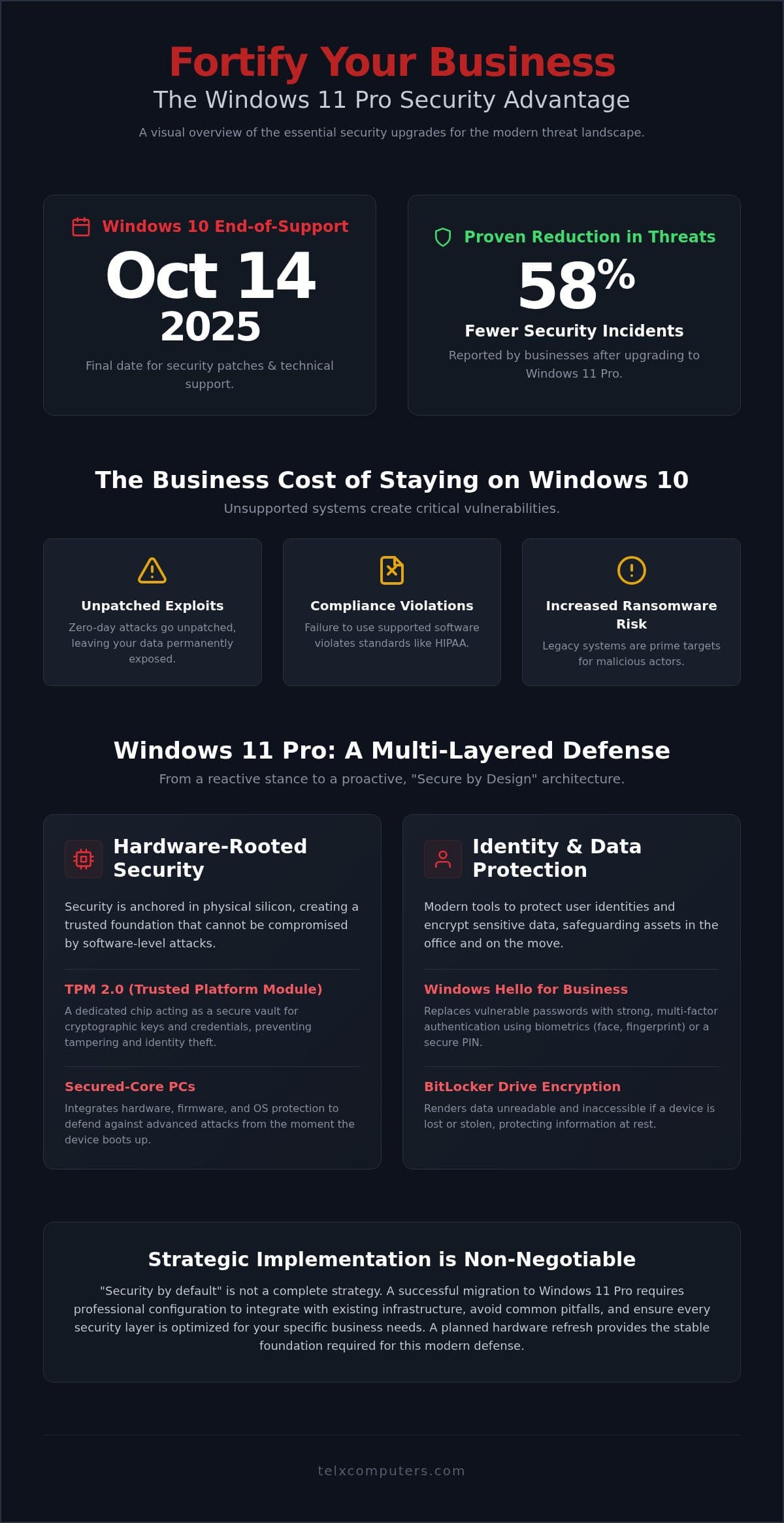
Did you know that organizations upgrading to Windows 11 Pro report up to 58% fewer security incidents than those on older systems? With the October 14, 2025, end-of-support deadline for Windows 10 looming, the pressure to migrate is no longer just a technical update; it’s a business necessity. You likely feel the weight of increasing ransomware threats and the complexity of managing a remote workforce. We understand these anxieties, and we’re here to ensure your transition is seamless. By mastering the windows 11 pro security features for business, you aren’t just checking a compliance box; you’re deploying a sophisticated, hardware rooted defense.
This article explores how Windows 11 Pro’s advanced security architecture protects your critical data through features like TPM 2.0 and the Microsoft Pluton processor. You’ll learn why professional implementation is the key to a resilient defense and how to avoid the common pitfalls of “security by default” configurations. We’ll provide a clear roadmap for your transition, offering the peace of mind that comes with having a dedicated IT partner as your expert guardian. From the latest version updates to AI-driven threat detection, we’ll show you how to turn your operating system into a strategic shield.
Key Takeaways
- Prepare for the October 14, 2025, Windows 10 end-of-support deadline by transitioning to a proactive security model designed for the modern threat landscape.
- Understand how windows 11 pro security features for business, such as TPM 2.0 and the Microsoft Pluton processor, create a hardware-rooted defense against firmware attacks.
- Eliminate password vulnerabilities by deploying Windows Hello for Business and protecting mobile data with BitLocker drive encryption.
- Discover why professional configuration is vital to avoid security by default pitfalls and ensure your new OS integrates seamlessly with existing server monitoring.
- Learn how a strategic hardware refresh can reduce security incidents by up to 58%, providing a stable foundation for your remote and hybrid workforce.
Why Windows 11 Pro Security is Non-Negotiable for Businesses
Cybersecurity isn’t a luxury; it’s the foundation of your daily operations. For years, legacy operating systems relied on a reactive approach, patching vulnerabilities only after they were discovered by threat actors. Windows 11 Pro shifts this paradigm by being “Secure by Design.” This means security isn’t just an added layer; it’s baked into the very core of the OS. Organizations that have already made the switch report up to 58% fewer security incidents compared to those running older systems. By utilizing windows 11 pro security features for business, you move from a defensive crouch to a proactive stance that anticipates threats before they reach your network.
The most pressing reason to upgrade is the impending October 14, 2025, Windows 10 end-of-support deadline. After this date, Microsoft will stop providing security patches, technical support, or bug fixes for the older OS. This creates a massive window of opportunity for hackers. We see this deadline not just as a technical hurdle, but as a strategic moment to refresh your hardware and fortify your digital perimeter. Don’t wait for a breach to realize your legacy systems are no longer viable.
The Business Cost of Staying on Windows 10
Staying on an unsupported operating system is a gamble with your company’s future. Once support ends, zero-day exploits will go unpatched, leaving your data exposed to any attacker who finds a way in. Beyond the immediate threat of ransomware, there’s the issue of compliance. Regulatory frameworks like HIPAA and various legal standards mandate that businesses use supported, secure software to protect sensitive information. If your systems are out of date, you’re likely in violation of these rules. At Telx, we integrate these upgrades into our comprehensive cybersecurity audits to ensure you remain both compliant and protected. It’s about maintaining your reputation and avoiding the catastrophic costs associated with data recovery and legal penalties.
Zero Trust Architecture in the Modern Workplace
The traditional “castle and moat” security model is dead. In a world of remote and hybrid work, you can’t assume that anyone inside your network is safe. This is where Zero Trust comes in. The core philosophy is simple: never trust, always verify. Windows 11 Pro implements this at the hardware level, requiring specific Windows 11 hardware security requirements like TPM 2.0 to ensure the integrity of the boot process and identity management. This modern architecture is essential for protecting a distributed workforce. It ensures that whether an employee is in the office or at a coffee shop, their device remains a hardened endpoint. By leveraging windows 11 pro security features for business, you’re providing your team with the tools they need to work anywhere without compromising the security of your corporate assets.
Hardware-Backed Protection: TPM 2.0 and Secured-Core PCs
Software defenses are only as strong as the foundation they sit on. If an attacker compromises your system before the operating system even boots, standard antivirus tools become secondary. Windows 11 Pro addresses this by anchoring its defense in physical hardware. This architectural shift is why many older business machines can’t run the new OS; they simply lack the physical components needed to support modern windows 11 pro security features for business. By moving the root of trust from the software layer to the silicon, Microsoft has created a environment where identity and data are protected by physical barriers.
TPM 2.0: The Foundation of Modern Trust
The Trusted Platform Module (TPM) 2.0 is a dedicated microcontroller that acts as a secure vault for your most sensitive information. It stores cryptographic keys, digital certificates, and biometric data in a location physically isolated from the main processor. This isolation is crucial because it prevents attackers from “spoofing” a device identity or stealing login credentials through memory scraping. TPM 2.0 is the primary engine behind BitLocker drive encryption, ensuring that if a laptop is lost or stolen, the data remains a scrambled mess without the unique hardware key. These identity and data security features represent a massive leap over legacy systems that relied primarily on software-based protection.
Secured-Core PCs for High-Stakes Industries
For organizations in healthcare and law firms, the standard for data protection must be absolute. Secured-core PCs are a specific class of devices designed to handle the most sensitive data by blocking attacks that target the firmware level. These machines utilize the Microsoft Pluton security processor, which is built directly into the CPU of modern hardware like the Intel Core Ultra 200V or AMD Ryzen 9000 series. By integrating security directly into the processor, Pluton eliminates the communication bus between the CPU and the TPM that hackers previously exploited.
Transitioning your fleet to these hardened devices isn’t just about getting new laptops; it’s a strategic move to future-proof your business against sophisticated firmware-level exploits. If your current hardware was purchased before 2021, it likely doesn’t meet the rigorous standards required for these windows 11 pro security features for business. Our team simplifies this transition by assisting with strategic hardware procurement and professional configuration, ensuring your new infrastructure is resilient and ready for the modern threat landscape.
Identity and Data Security: Beyond the Password
While hardware roots provide the foundation, your employees’ identities are the most frequent targets for cybercriminals. In fact, credential phishing accounted for 94% to 96% of all malicious payload attacks each month during the second quarter of 2026. Traditional passwords are no longer sufficient to protect sensitive corporate data. Windows 11 Pro addresses this vulnerability by moving beyond the password, utilizing sophisticated windows 11 pro security features for business to verify users and protect data at rest. This shift doesn’t just improve security; it streamlines the user experience and reduces the administrative burden on your IT team.
Eliminating the Weakest Link: Passwordless Security
Windows Hello for Business is a central component of this strategy. It replaces easily stolen passwords with strong multi-factor authentication (MFA) tied directly to the device. By using biometric data like facial recognition or a fingerprint scan, your team can log in securely in seconds. Because this data is stored locally on the hardware vault we discussed earlier, it never travels across the network where it could be intercepted. This transition significantly reduces help desk tickets related to password resets, allowing your staff to focus on higher value tasks. It’s a win for both security and productivity.
To further harden identity, Windows 11 Pro includes Enhanced Phishing Protection. This proactive feature detects when a user enters their work credentials into a malicious website or an insecure application and provides an immediate warning. This real-world defense is critical because even the best-trained employees can occasionally fall for a sophisticated deepfake or phishing attempt. Additionally, App Control for Business allows you to define exactly which applications are trusted to run on your devices, effectively blocking unauthorized software before it can execute.
Safeguarding Data at Rest with BitLocker
Mobile workforces face the constant risk of physical device theft. BitLocker Drive Encryption provides full-disk protection, ensuring that your data remains inaccessible even if a laptop falls into the wrong hands. It integrates seamlessly with cloud-based management tools, allowing IT administrators to manage recovery keys centrally and verify compliance across the entire organization. This level of control is a vital part of a broader ransomware protection strategy. When combined with windows 11 pro security features for business, BitLocker ensures that your company’s intellectual property and client data are shielded from prying eyes, regardless of where the hardware is located. We help you configure these settings correctly from day one, so your defense is active and invisible to your users.
Implementation Strategy: Migrating Your Business Securely
Moving from legacy systems to a modern environment requires more than just a software license. It’s a strategic migration that demands precision to ensure your operations remain uninterrupted. While the windows 11 pro security features for business offer a formidable defense, they only provide value when properly configured and deployed across your entire fleet. A haphazard update can lead to application conflicts and security gaps that leave your business vulnerable during the transition. We focus on a logical, organized flow that identifies risks before they impact your productivity.
Fleet Audit and Compatibility Testing
Before the first machine is upgraded, a comprehensive audit of your existing infrastructure is essential. Many business fleets contain a mix of hardware ages. Identifying which devices lack TPM 2.0 or compatible processors is the first step in avoiding deployment failures. Beyond hardware, you must verify that your critical business applications, especially legacy software, are fully compatible with the new OS architecture. We recommend using managed IT services to conduct these bulk audits efficiently. This proactive approach ensures you have a clear roadmap for hardware refreshes and software updates before you commit to a full-scale rollout.
Policy Configuration and Centralized Management
Once compatibility is confirmed, the focus shifts to the centralized management of security policies. Deploying windows 11 pro security features for business at scale involves configuring tools like Microsoft Defender SmartScreen for every user. This ensures that phishing protection and malicious site blocking are active across the whole team from day one. Additionally, setting up automated update cycles is crucial for perpetual patching, keeping your systems ahead of the 723 Windows-specific vulnerabilities identified in recent security updates.
A staged rollout strategy allows your team to migrate in phases, minimizing operational downtime and allowing for real-time troubleshooting. Having access to a 24/7 help desk during this migration provides your employees with immediate support, reducing technical anxiety and keeping productivity high. By leveraging cloud management tools, you can push these security configurations to remote and hybrid workers simultaneously, ensuring a uniform defense regardless of location.
If you’re ready to secure your infrastructure and modernize your defense, request an instant quote to begin your strategic migration today.
The Telx Advantage: Managed Windows 11 Security
While the architecture of Windows 11 Pro offers a powerful toolkit, technology alone isn’t a strategy. A tool is only effective when it’s configured correctly and monitored by experts who understand your operational needs. This is where Telx Computers steps in as your strategic ally. We don’t just provide software; we deliver a comprehensive security ecosystem that bridges the gap between sophisticated windows 11 pro security features for business and your daily business continuity. By positioning ourselves as an extension of your own team, we ensure your migration is a catalyst for growth rather than a source of technical anxiety.
Strategic Hardware Procurement and Setup
Our physical presence in Miami, NYC, and LA allows us to offer a level of localized service that global software providers simply can’t match. We source and configure Secured-core PCs tailored to your specific industry requirements, ensuring every device meets the rigorous hardware standards discussed earlier. Our white-glove delivery includes on-site setup and professional configuration, which is vital to avoid the “security by default” pitfalls that leave many organizations exposed. By optimizing your IT budget through a strategic hardware refresh, we help you transition from aging legacy systems to a high-performance, secure fleet without the typical migration headaches. We take pride in being the silent engine behind your success, handling the granular technical details so you can focus on your core objectives.
Continuous Monitoring and Threat Response
Even the most advanced operating system requires human oversight to combat evolving threats like AI-driven phishing. We integrate the native windows 11 pro security features for business with our own proactive server monitoring and endpoint protection services. This creates a multi-layered defense where automated systems catch the bulk of threats and our expert team handles the sophisticated anomalies. Our fixed-price plans provide peace of mind by covering the entire migration and support lifecycle, ensuring your IT spend remains predictable while your defense remains impenetrable.
You don’t have to face the October 2025 deadline alone. Our vigilant, forward-thinking approach keeps you one step ahead of potential breaches, providing the stability and reliability your modern enterprise demands. If you’re ready to secure your infrastructure with a partner who treats your data as their own, request an instant quote today to begin your journey toward a more resilient digital future.
Securing Your Competitive Edge with Modern Infrastructure
The transition to Windows 11 Pro is more than a required software update; it’s a strategic investment in your company’s long-term resilience. By leveraging the full suite of windows 11 pro security features for business, you move from a reactive defense to a proactive posture that anticipates sophisticated threats before they reach your network. You’ve seen how hardware-rooted trust and passwordless authentication eliminate traditional vulnerabilities. Now, the focus shifts to a seamless execution that preserves your productivity and protects your reputation.
With over 20 years of expertise and a physical presence in Miami, New York, and Los Angeles, we stand ready to serve as your expert guardian. Our fixed-price, unlimited support plans ensure your migration is smooth, predictable, and fully optimized for your specific industry needs. Don’t let the October 2025 deadline create technical anxiety for your team. Take the first step toward a hardened digital perimeter and a more efficient workforce today. Secure Your Business with a Professional Windows 11 Migration from Telx Computers. We look forward to building a safer, more stable future for your organization.
Frequently Asked Questions
Is Windows 11 Pro more secure than Windows 10 for my business?
Windows 11 Pro is significantly more secure because it shifts from reactive to proactive defense. Organizations report 58% fewer security incidents thanks to mandatory hardware requirements. By integrating windows 11 pro security features for business into the core OS, it blocks advanced threats that bypass legacy software. This “Secure by Design” approach ensures your Miami office remains resilient against evolving phishing and deepfake attacks.
What are the minimum hardware requirements for Windows 11 Pro security features?
To run these features, your devices need a compatible 1GHz 64-bit processor, 4GB of RAM, and 64GB of storage. Crucially, the system must support UEFI Secure Boot and have a Trusted Platform Module (TPM) version 2.0. For the highest protection levels, we recommend Secured-core PCs that include the Microsoft Pluton security processor, which is built directly into modern CPUs from Intel, AMD, and Qualcomm.
Do I really need a TPM 2.0 chip for my office computers?
You absolutely need a TPM 2.0 chip to run Windows 11 Pro securely. It acts as a physical vault for cryptographic keys and biometric data, keeping them isolated from the main processor. This hardware root of trust prevents attackers from spoofing device identities or stealing credentials through memory scraping. Without it, you can’t use essential tools like BitLocker drive encryption to protect your sensitive business data.
How does Windows Hello for Business improve security for remote workers?
Windows Hello for Business replaces vulnerable passwords with strong biometric authentication like facial recognition or fingerprints. This is vital for remote workers in Miami and Fort Lauderdale who often use public or home networks. Because the biometric data stays on the local hardware vault, it never travels across the internet where it could be intercepted. This significantly reduces the risk of credential theft and phishing for your distributed team.
Can Telx Computers help my Miami business migrate from Windows 10 to 11?
Yes, Telx Computers specializes in helping businesses in Miami, Aventura, and Fort Lauderdale with secure migrations. We provide comprehensive managed IT services that include hardware audits, procurement, and professional configuration. Our team ensures your windows 11 pro security features for business are active and optimized from day one. We handle the technical complexity through our fixed-price plans, allowing you to modernize without unpredictable costs or downtime.
What happens to my business security if I don’t upgrade by October 2025?
If you miss the October 14, 2025, deadline, your systems will stop receiving critical security updates. This leaves your network exposed to unpatched zero-day exploits and increases the risk of ransomware attacks. Additionally, using an unsupported OS often results in compliance violations for regulated industries like healthcare or law. Staying on Windows 10 after this date is a major liability that can lead to catastrophic data breaches.
Does Windows 11 Pro include built-in ransomware protection?
Windows 11 Pro includes several built-in layers to combat ransomware, such as Enhanced Phishing Protection and App Control for Business. These tools detect when users enter credentials into malicious sites and prevent unauthorized software from running. While these features are powerful, they work best when combined with Telx’s proactive server monitoring and 24/7 help desk support to ensure your Miami business has a holistic defense against sophisticated threats.
Is it better to upgrade existing hardware or buy new Windows 11 Pro PCs?
Buying new hardware is generally the better strategic choice for most businesses. Most computers purchased before 2021 lack the TPM 2.0 chips or Pluton processors required for modern OS security standards. New Secured-core PCs provide a hardware-rooted defense that simply isn’t possible on older machines. A hardware refresh ensures your team has the performance and security needed to maintain a competitive edge in a digital landscape.