




25 Sep Tech Support for Art Galleries in Wynwood: Keep Your Technology Exhibition-Ready
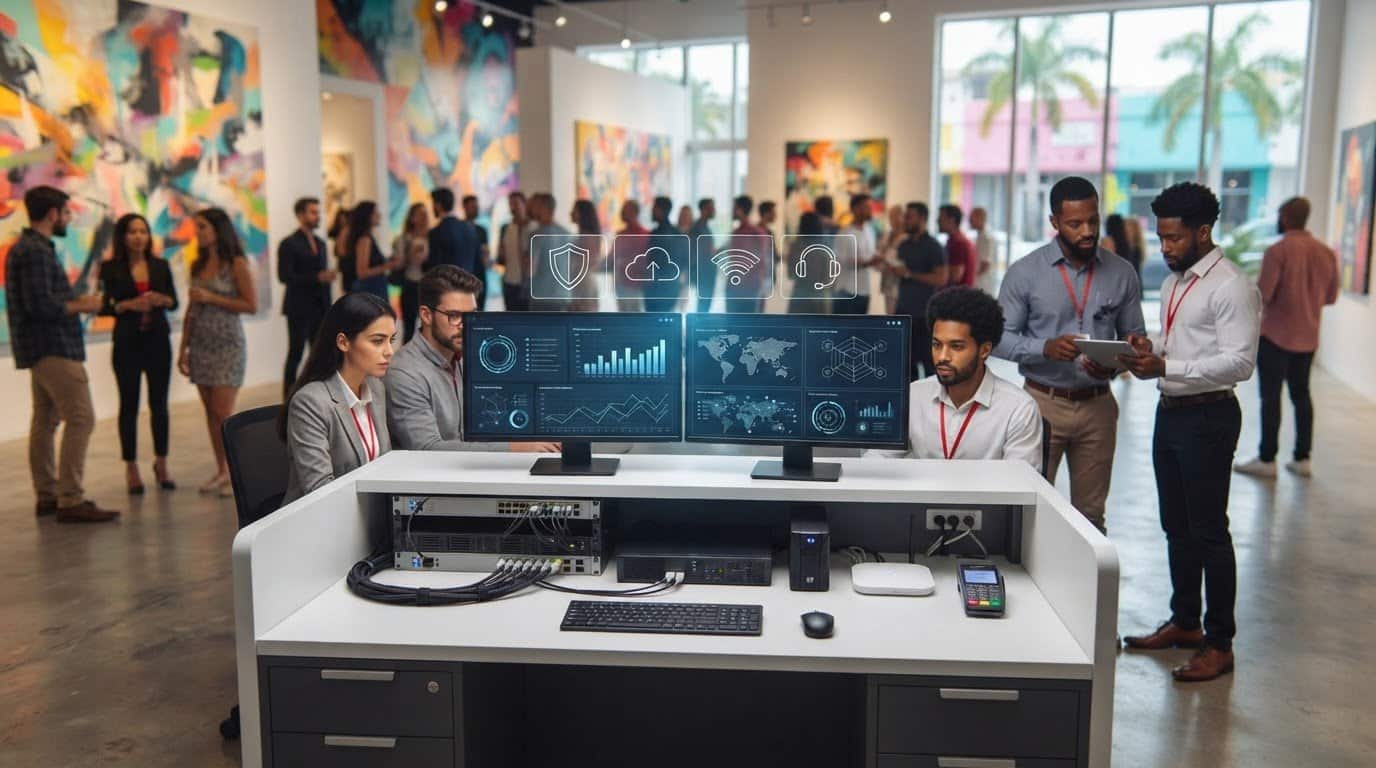
A gallery opening can be going smoothly until a payment terminal drops offline, staff can’t access artwork records, or visitors lose their connection. Tech support for art galleries in Wynwood should do more than fix problems after they appear. It should help keep essential systems secure, supported, and recoverable, so technology doesn’t distract from the work on display.
That matters in the day-to-day running of a gallery, too. Visitor services, staff devices, business files, and high-resolution artwork images all depend on technology that works reliably. Separating staff and guest networks may also help organize access. When you evaluate an IT provider, find out what support is included, whether on-site assistance is available at your address, and how the provider handles issues that affect operations.
This article explains how managed IT services, help desk support, network security, monitoring, and backup and recovery planning can work together to reduce avoidable disruption and protect important digital assets. You’ll also find practical questions to ask when comparing IT providers serving Miami-area businesses, including Wynwood, Aventura, and Fort Lauderdale.
Key Takeaways
- Map the technology your gallery depends on, from staff accounts and connectivity to visitor-facing systems and business applications.
- Tech support for art galleries in Wynwood should coordinate maintenance, security, monitoring, and recovery planning around the gallery’s operations.
- Compare providers by their support model, security practices, backup approach, escalation process, and clear explanation of service scope.
- Use a practical readiness checklist to identify system owners, document risks, and prioritize the technology that matters most to daily operations.
- Before choosing an IT partner, confirm coverage for your gallery’s address, on-site availability, response expectations, and plan inclusions.
Why Tech Support Matters for Art Galleries in Wynwood
A gallery’s technology supports more than office work. Staff may depend on internet access to communicate, shared files to coordinate tasks, and connected workstations to handle daily administration. Visitors may encounter technology at the entrance, during an event, or while exploring digital information about an exhibition. When one of these systems fails, staff can end up troubleshooting instead of helping visitors.
The impact depends on how each gallery operates. An internet disruption could affect business email or cloud-based files. If the gallery uses a point-of-sale or ticketing system, a problem could complicate sales or check-in. A workstation issue might slow office tasks, while trouble with a visitor-facing display could interrupt an interactive experience. These are examples, not universal requirements. They show why IT support should be planned around the systems a gallery actually uses.
Business IT support is different from residential troubleshooting or a one-off device repair. It considers how connected systems, staff access, security, and recovery fit together over time. The aim is to understand operational dependencies and reduce disruption, rather than address one device in isolation. Since every gallery’s technology setup differs, a provider should assess your environment instead of assuming particular software, equipment, or visitor services are in place.
Which gallery operations depend on reliable IT?
Start with a practical inventory. What do staff use to handle administration, communicate, manage files, and serve visitors? Include internet access, business email, shared files, and connected workstations where applicable. Then list any gallery-specific tools. Sales, ticketing, and collection-management systems vary from one organization to another, so each needs to be identified and assessed individually.
Next, consider what a disruption would mean during a normal workday or an event. Could staff still reach essential information? Would visitor services have a workable alternative? Which systems would need attention first? The answers help distinguish critical systems from useful but nonessential tools, giving an IT partner a clearer picture of where support and recovery planning matter most.
Why local support matters in Wynwood
Wynwood’s identity as an arts neighborhood gives galleries a distinct business context. The Wynwood Art District is closely associated with art and creative businesses, but each gallery still has its own operations and technology needs. A provider with a presence in the Miami area can be a useful starting point for discussing those needs and the local business context.
Local presence alone doesn’t establish whether a provider can support a particular site in person. Before choosing, ask whether on-site support is available at your exact Wynwood location, which situations it covers, and what response expectations apply. Clear answers help you assess the fit without relying on assumptions about neighborhood coverage or arrival times. Galleries and businesses in Miami, Aventura, and Fort Lauderdale should likewise confirm support availability for their specific addresses.
What Gallery-Focused IT Support Should Protect and Keep Running
Reliable gallery technology depends on coordinating support, maintenance, security, and monitoring, rather than treating each issue as an isolated repair. A managed IT partner can help staff get assistance, keep business systems under oversight, and plan for disruptions. Telx Computers provides managed IT services, help desk support, network security, cloud computing, server monitoring, and data backup and disaster recovery. Which services are relevant depends on the gallery’s systems and priorities.
Technology also shapes how art is created, presented, and experienced. The World Economic Forum’s discussion of how technology has impacted the art world offers a wider view of that connection. For a gallery, the practical task is to identify which technology supports staff and visitors, then make sure those systems are supported without assuming every space uses the same tools.
For a closer look at the provider’s managed service approach, review managed IT support services. Ask what the plan includes, how requests are handled, and how monitoring and maintenance apply to your specific environment. Identify gallery-specific applications, such as collection-management or sales platforms, during discovery. Don’t assume they are automatically included or supported.
Network security and staff access
Network planning should account for who needs access to which systems, how user accounts are managed, and what security measures protect business operations. If a gallery offers visitor Wi-Fi, ask whether it should be separated from staff systems and files. That is a design question to assess against the gallery’s layout and needs, not an assumption about its existing network. Telx’s network IT support in Miami provides more information about its network services.
Backups, cloud services, and digital files
Artwork images, collection records, business documents, and shared working files may have different access and recovery needs. Cloud computing and data backup can support availability and protection, but galleries should establish exactly what is covered, how often backups occur, and how recovery is tested. Ask who can restore files and what staff should do if access is lost.
Disaster recovery is a planned process for restoring business data and services after a disruption. A clear plan helps staff understand what can be recovered and how to resume essential work. As you review Tech support for art galleries in Wynwood, use these questions to check whether a provider’s services match your systems, support expectations, and recovery priorities.
How to Compare IT Support Providers for a Wynwood Gallery
Choosing Tech support for art galleries in Wynwood starts with comparing what providers will actually do, not just the name of a service plan. A break-fix arrangement may suit a gallery with limited support needs and staff who can handle routine technology tasks. Managed support takes an ongoing approach that can coordinate assistance, maintenance, security, and monitoring. Neither model fits every gallery. The right choice depends on your systems, risk priorities, and the support your team expects.
Use this comparison to guide provider conversations. Ask for specific explanations in writing, especially when plan language sounds broad.
| Area | What to clarify |
|---|---|
| Support model | Is help provided when you report an issue, or are monitoring and planned maintenance also included? |
| Security | Which security services are in scope, and how are risks or identified issues communicated? |
| Backups | Which data and systems are covered, and who is responsible for recovery planning and testing? |
| Escalation | Who handles a request that affects an essential business system, and how is it routed to the appropriate support level? |
| Transparency | Are inclusions, exclusions, response expectations, and plan terms documented clearly? |
Pay close attention to phrases such as “unlimited help desk.” Ask which users, devices, applications, and request types that wording covers. Clarify exclusions, how requests are submitted, and whether work outside the agreed scope requires separate approval. Don’t assume a broad phrase automatically includes every gallery-specific application or device.
Questions to ask before choosing a managed IT provider
Ask how the provider monitors systems, what happens when it identifies an issue, and how your team is notified. Find out which requests are covered and how escalation works if a problem disrupts daily operations. For backups, ask what is included, who owns each recovery task, and how the plan is documented and reviewed. Specific answers make it easier to see whether the provider’s process matches your team’s needs.
How to assess security and continuity capabilities
Request a plain-language breakdown of the security services in the proposed scope. Discuss how user accounts and devices are managed, including how access is handled when staff join or leave. Ask how the provider’s ransomware protection services relate to your broader security and recovery plan. A service name alone doesn’t explain what’s covered.
Finally, confirm whether the provider supports your exact Wynwood address, whether on-site assistance is available, and what response expectations apply. A clear agreement gives both sides a shared understanding of responsibilities before an issue arises.
A Practical IT Readiness Checklist for Wynwood Galleries
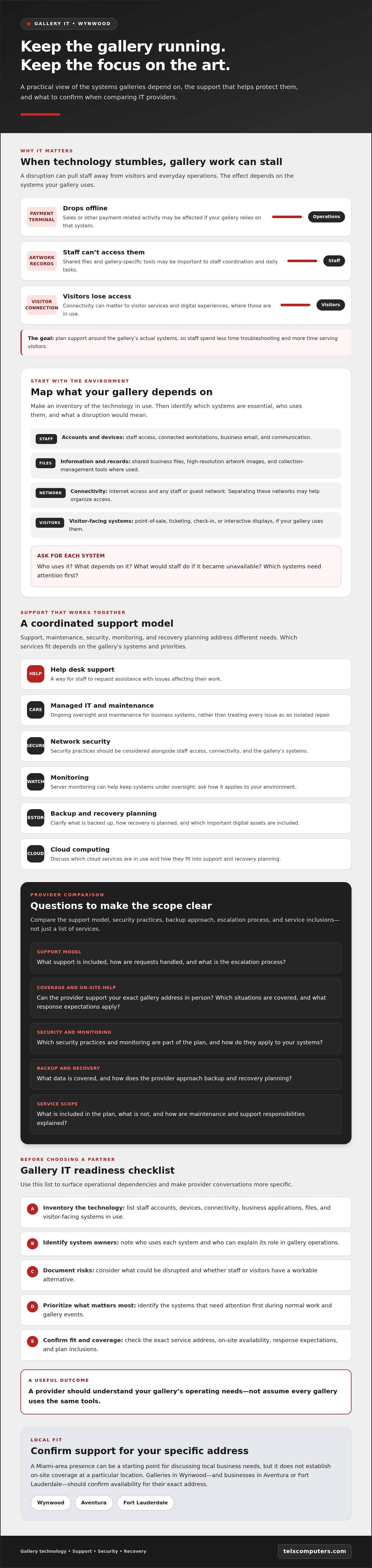
A clear inventory turns a general conversation about Tech support for art galleries in Wynwood into a practical review of your gallery’s needs. It doesn’t have to be technical or complete on the first pass. Record what you know, flag what you don’t, and ask staff who use the systems every day to fill in the gaps.
Start an IT assessment with the systems a gallery cannot afford to lose. Use these steps to prepare:
- Inventory systems. List essential devices and connectivity, such as staff workstations, internet access, and equipment that supports daily administration or visitor services. Add business email, shared files, and applications used for sales, ticketing, or collection records where applicable.
- Identify owners. Note which staff members use each system, who approves account access, and who makes urgent technology decisions. Include outside technology vendors and record who to contact about their services.
- Document risks and unknowns. Identify files the gallery needs to protect, including artwork images, business documents, or records. Note current backup arrangements and who manages them. If you’re unsure which provider manages an account, how the network is configured, or who owns a software subscription, mark it as unknown instead of guessing.
- Prioritize support and recovery. Ask staff to rank systems by the operational impact of an outage. Discuss what they would need during an incident, who they should notify, and how they should report a problem. This helps a provider understand where support and recovery planning matter most.
Prepare a simple inventory of systems and responsibilities
Keep the inventory in a shared document that authorized staff can update. For each device, account, application, or vendor, record its purpose, the people responsible for it, and any known support contact. Don’t include passwords in the inventory. If responsibilities aren’t clear, list that as an issue to resolve during an assessment.
Set priorities for support and recovery
Rank systems by the impact an outage would have on your gallery, not by technical complexity. Staff might, for example, consider access to business email or shared records more urgent than a workstation used only occasionally. If the gallery relies on a server, ask whether monitoring is relevant to its setup and what oversight is included. Telx’s server monitoring systems page can help you prepare questions about that capability. Use your completed checklist to discuss service scope, support responsibilities, and recovery priorities with a prospective provider.
How Telx Computers Can Support Business IT in Wynwood
Once you’ve mapped the systems your gallery relies on and set support priorities, you can assess providers against those needs. Telx Computers serves Miami businesses and offers managed IT services, 24/7 help desk support, network security, cloud computing, server monitoring, and data backup and disaster recovery. Its services can connect day-to-day assistance with security and continuity planning, but the right scope depends on your gallery’s actual setup.
For example, help desk support gives staff a channel for technology issues, while network security and monitoring address other parts of business IT. Cloud computing and data backup and disaster recovery may be relevant to how your gallery accesses and protects files. Confirm directly whether a particular gallery application, device, or workflow is supported rather than assuming it is included.
Telx has a Miami location and describes on-site response capability. That local presence can make it easier to discuss your business context, but it doesn’t confirm coverage for every address or establish an arrival time. Verify on-site availability for your specific Wynwood location and ask what response expectations apply. Galleries in Aventura and Fort Lauderdale should also confirm coverage and service terms for their addresses.
What to discuss in an initial IT conversation
Bring your system inventory, staff priorities, and notes about recurring technology issues. Explain which systems support daily administration or visitor services, and identify the files you need to protect. Then ask the provider to connect its proposed services to those specific needs.
Telx describes its recurring plans as fixed-price with unlimited help desk support. Ask how a plan defines “unlimited,” which users, devices, and request types are covered, what exclusions apply, and how other plan terms work. Clarify how requests are escalated, which responsibilities remain with gallery staff, and whether on-site support is available at your location. Get the answers in writing before choosing a provider.
Choose a support relationship built around gallery operations
Proactive managed support can bring daily assistance, monitoring, security, and recovery planning into an ongoing relationship, rather than leaving the gallery to coordinate disconnected fixes. The value lies in agreeing on clear responsibilities and priorities, not assuming every plan or provider works the same way. For more local context, explore Telx’s information about IT companies serving Miami.
If you’re evaluating Tech support for art galleries in Wynwood, use your inventory and questions to start a practical conversation about scope, existing systems, support expectations, and plan terms. Talk with Telx about business IT support and confirm how its services may fit your gallery’s needs.
Build a More Resilient Gallery Technology Plan
Reliable gallery IT starts with knowing which systems staff and visitors depend on, what information needs protection, and who is responsible when a problem arises. A clear inventory and recovery plan give you a practical foundation for choosing support that fits your operations, rather than paying for assumptions or relying on disconnected fixes.
Tech support for art galleries in Wynwood should be evaluated by its fit with your actual systems, service scope, security needs, and recovery priorities. Telx Computers has a Miami location and offers managed IT services, 24/7 help desk support, network security, cloud computing, and data backup and disaster recovery. Ask about plan terms, escalation, and on-site availability for your specific gallery address before deciding.
Bring your questions and system priorities to the conversation, then explore whether Telx’s business IT support aligns with your needs. Talk with Telx about business IT support and take the next step toward steadier gallery operations.
Frequently Asked Questions
Is managed IT support a good fit for a small art gallery?
Managed IT support may suit a small gallery if staff rely on connected systems, need ongoing help, or want structured security and recovery planning. It coordinates support and maintenance over time, while break-fix assistance addresses issues as they arise. The right choice depends on your gallery’s tolerance for disruption and day-to-day needs. Review the provider’s service scope, exclusions, and plan terms rather than assuming every small gallery needs the same level of support.
Can an IT provider support a gallery’s artwork images and digital records?
An IT provider can help assess how a gallery stores, accesses, backs up, and recovers digital files. Artwork images, business documents, and collection records may have different needs depending on file volume, existing systems, and who manages collection software. Identify which files are critical, then ask exactly what the provider will manage, what backups cover, and how recovery responsibilities are handled before relying on the arrangement.
What should art galleries look for in a Wynwood IT support provider?
Compare providers on business support experience, security practices, backup planning, help desk scope, communication, and verified local coverage. Ask how staff report an issue, how it’s escalated, and whether on-site support is available at your specific address. A Miami location can offer useful local context, but it doesn’t guarantee a particular response time or establish gallery-specific expertise. Tech support for art galleries in Wynwood should fit the gallery’s actual systems and service expectations.
How can a gallery keep visitor Wi-Fi separate from business systems?
A network can be designed to separate visitor access from staff and business systems, but the right approach depends on the gallery’s existing network, equipment, and operational needs. Have a qualified IT provider assess how users connect, which systems need protection, and what visitors require. Don’t assume separation is already in place or adopt a configuration without reviewing the environment. Ask the provider to explain the proposed design and its scope clearly.
What happens if a gallery’s business files are lost or inaccessible?
Recovery depends on whether backups exist, which files they cover, and whether restoration has been tested. Start by identifying the gallery’s critical files, such as business documents, artwork images, or records, and find out who manages their backups. Ask the provider to explain recovery responsibilities and steps. Don’t assume every file can be restored or that access will return within a particular timeframe without a clear assessment and documented service terms.
Does Telx Computers provide on-site IT support for Wynwood businesses?
Telx Computers has a Miami location, and its business information describes rapid on-site response capability. Confirm current availability for your exact Wynwood address, the conditions for on-site visits, and applicable service terms directly with Telx. A Miami presence doesn’t establish a guaranteed response time or confirm coverage for every location. Telx serves Miami businesses, and galleries should verify their specific support needs before choosing a provider.
How much does managed IT support for an art gallery cost?
There isn’t enough information here to quote a price or industry estimate. The appropriate service arrangement depends on the gallery’s systems, users, support needs, and desired scope. Telx describes its recurring plans as fixed-price, but galleries should request a quote based on their own requirements. Before committing, confirm which services and help desk requests are included, what exclusions apply, and how billing and other plan terms work.