





08 Oct IT Support in Aventura: How to Choose the Right Business Partner
The best IT support Aventura businesses can choose does more than close tickets quickly. It helps prevent recurring disruptions, assigns clear ownership for connected technology needs, and sets practical expectations for support. When staff lose time to repeated issues and cybersecurity, backups, and recovery are handled separately, quick fixes can leave the underlying risks untouched.
Expect responsive help desk support and reliable day-to-day maintenance, but look beyond those basics. A strong support relationship should make it clear who handles each responsibility, what the monthly plan covers, and how local assistance works. Those details help you compare providers based on the service they deliver, not just promises to fix problems.
This article explains the difference between break-fix and managed IT support, the capabilities to look for, and how to assess scope, accountability, billing, and response expectations. You’ll get a practical framework for choosing an Aventura IT partner that supports daily operations and helps build a more resilient technology environment. Telx Computers brings help desk support, proactive maintenance, security, and recovery into a coordinated managed IT approach, with fixed-price plans that make routine support easier to budget.
Key Takeaways
- Inventory critical systems, recurring disruptions, employee support needs, and recovery priorities before comparing support models.
- Evaluate IT support Aventura providers by service scope, support access, monitoring, security, recovery, and clear ownership.
- Separate routine support from project work and cloud subscriptions to understand what monthly billing covers.
- Use a step-by-step selection process to match support capabilities with daily operations and resilience goals.
- Consider how coordinated help desk support, security, cloud services, monitoring, and recovery can reduce disconnected technology handoffs.
What Aventura Businesses Need from IT Support
Recurring outages cost more than the time a system is offline. Staff can lose momentum, customers may wait, and managers can end up coordinating multiple vendors without knowing who owns the problem. Slow fixes and unclear responsibilities turn routine technology issues into operational distractions.
Business IT support combines day-to-day help for employees with ongoing care for the systems they rely on. Managed IT support is a continuing partnership that helps employees resolve technology issues while keeping business systems monitored, maintained, and ready for work. This reflects the broader Managed Services model, in which an external provider takes ongoing responsibility for defined technology functions. For businesses seeking managed IT support services, the key is connecting practical assistance with proactive systems care.
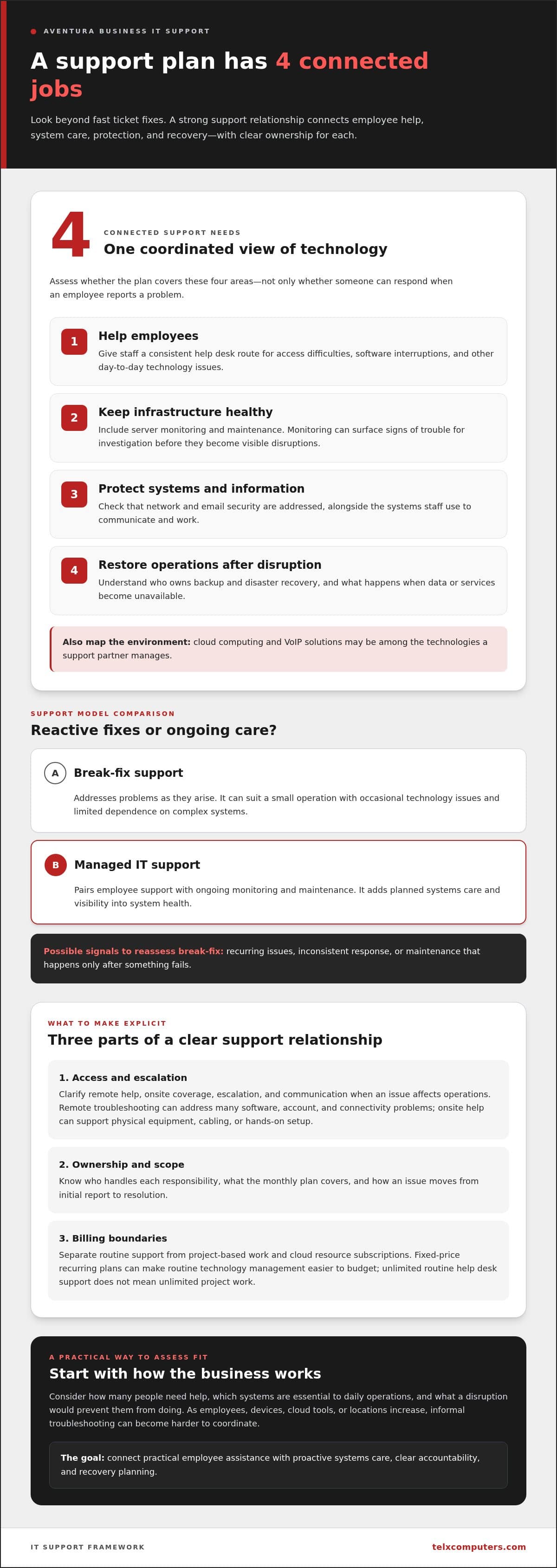
Reactive troubleshooting can suit a small operation with occasional technology issues and limited dependence on complex systems. It addresses problems as they arise. Ongoing managed support adds planned maintenance and monitoring, giving a business more visibility into system health and a way to address potential problems. The right level depends on staff needs, business growth, and how directly daily work relies on technology.
When does a business need more than break-fix support?
Recurring issues, inconsistent response, and maintenance that happens only after something fails can signal that break-fix support no longer fits. The same unresolved problem may consume employee time repeatedly, while unplanned updates or equipment issues can interrupt work at inconvenient moments.
Proactive monitoring can surface signs of system trouble before they become visible disruptions, giving a support team an opportunity to investigate. As a company adds employees, devices, cloud tools, or locations, informal troubleshooting can also become harder to coordinate. Consider how many people need help, which systems are essential to daily operations, and what a disruption would prevent them from doing. These answers help determine whether ongoing support is a practical next step.
What does local support mean for an Aventura company?
Remote troubleshooting lets technicians diagnose many software, account, and connectivity problems without traveling to the workplace. Onsite assistance can help when an issue involves physical equipment, cabling, or hands-on setup. A dependable support plan explains how these options work together and how a problem moves from initial report to resolution.
For an Aventura business, local support means clear expectations for remote help, onsite coverage, escalation, and communication when an issue affects operations. The same questions matter for businesses in Miami and Fort Lauderdale. Map which systems need hands-on attention and which employees may need remote assistance. Then make sure responsibilities and escalation paths are clear, so staff know where to turn and decision-makers know who owns the next step.
Which IT Support Services Should an Aventura Business Expect?
A useful support plan covers more than employee questions. Assess its scope across four connected needs: helping staff, keeping infrastructure healthy, protecting systems and information, and restoring operations after a disruption. This makes gaps easier to spot, such as having someone to reset a password but no clear owner for server health or recovery planning.
Day-to-day help desk support gives employees a consistent route for resolving technology issues. Infrastructure care includes server monitoring and maintenance, while network and email security help protect the systems staff use to communicate and work. Backup and disaster recovery address what happens when data or services become unavailable. Cloud computing and VoIP solutions may also be part of the technology environment a support partner manages.
How do help desk and proactive monitoring work together?
Help desk support responds to employee-reported problems, from access difficulties to software interruptions. Server monitoring complements that work by keeping watch over infrastructure, so potential issues can be investigated before an employee submits a ticket. Proactive monitoring gives a business earlier visibility into technology issues and more opportunity to address them before they interrupt work. Telx’s server monitoring systems support this infrastructure-focused approach.
Coordination matters as much as the individual services. If separate vendors manage user support, network security, backups, and cloud systems, employees may be passed between teams while each determines who owns the issue. A coordinated support plan gives routine technology management a clearer point of accountability and can reduce handoffs. For example, when a staff member can’t access a business application, the support team can investigate the user’s issue alongside relevant infrastructure instead of treating each part as unrelated.
Review the billing structure as carefully as the service list. Telx offers fixed-price recurring plans for routine technology management and unlimited help desk support. This can make routine support easier to budget. The written scope should also distinguish recurring services from project-based work and cloud resource subscriptions. Unlimited routine help desk support does not mean unlimited project work; projects and subscriptions are separate items in the overall service arrangement.
How should security and recovery fit into IT support?
Security and recovery are related, but they solve different problems. Network and email security focus on protecting systems and communications. Ransomware protection services address exposure to a disruptive threat. Backups preserve copies of business data, while disaster recovery planning addresses how systems and operations can be restored after an incident. A backup alone doesn’t define the recovery steps, so both responsibilities belong in a resilient support approach.
When evaluating IT support Aventura businesses can depend on, assess whether employee help, infrastructure oversight, protection, and recovery connect under clear ownership. Telx brings managed IT services together with help desk support, security, monitoring, cloud computing, and recovery solutions. Explore managed IT support services to align routine assistance with ongoing systems care.
How to Compare IT Support Providers in Aventura
Compare written responsibilities, not broad promises such as “full-service support.” A useful proposal should show what the team handles routinely, how employees get help, how issues are escalated, and who owns security and recovery tasks. For an Aventura business, this makes it easier to judge whether the support model fits actual operations instead of simply comparing service lists.
Use a framework like this to identify gaps and clarify differences between plans:
| What to compare | What the written scope should clarify |
|---|---|
| Service scope | Which routine technology tasks and systems are managed, and which are outside the recurring service? |
| Support access | How employees submit requests, what help desk support covers, and how urgent issues are escalated. |
| Monitoring | Which infrastructure is monitored, and how identified issues are followed up. |
| Security | How network and email security responsibilities are assigned and coordinated. |
| Recovery | What backup tasks are included and how recovery planning is handled. |
| Billing model | Which services recur, and how projects, professional services, and cloud resource subscriptions are treated. |
A clear scope gives both sides a shared reference point. It also separates recurring service fees from project-based work, such as a major migration or infrastructure change, and cloud subscriptions tied to resource use. These items may have different billing arrangements, so look for them as distinct categories in the written proposal rather than assuming they’re part of routine support.
Managed IT support or break-fix: which model fits?
Break-fix support is purchased as individual issues arise. It may suit a business with simple technology, few recurring problems, and limited need for ongoing oversight. Managed support generally combines recurring assistance with planned maintenance and monitoring. It can be a better fit when employees depend on technology throughout the day or the business wants predictable access to support. Choose based on your company’s systems, support demand, and operational priorities.
What should you compare in support plans and service commitments?
Look beyond the monthly figure. Compare help desk coverage, routine maintenance, monitoring, security responsibilities, recovery planning, and escalation steps. Check whether the written terms explain how requests are handled and who takes ownership when an issue crosses systems. Clear commitments make it easier to understand the service, not just the sales description.
A fixed monthly plan may include more than your business needs. Start with the systems employees rely on, how often support is needed, and the impact of interruptions. Then match the scope to those realities. A smaller operation may need a narrower arrangement, while technology-dependent teams may value ongoing maintenance and predictable routine support. Compare each plan against the same needs and written criteria, not a headline claim.
A Practical Checklist for Choosing Aventura IT Support
A clear selection process turns general concerns into criteria you can compare. Start with operating needs, then assess service scope, local coverage, accountability, and transition planning. This helps you choose IT support that fits your team’s actual workflows rather than making a decision based on broad claims alone.
How can a business assess its IT support needs?
Build a short inventory before reviewing proposals. Record your employee count, business-critical systems, recurring issues, current technology responsibilities, and upcoming growth or infrastructure changes. Separate problems that need attention now from longer-term plans, such as adding staff or moving more work to cloud platforms.
- Step 1: Map your environment. List core devices, servers, business applications, network needs, and who is responsible for each today.
- Step 2: Identify support demand. Note common employee requests, persistent disruptions, and the teams or workflows they affect.
- Step 3: Set priorities. Decide whether your leading outcomes are fewer interruptions, stronger security, dependable recovery, or more predictable budgeting.
- Step 4: Assess local coverage. Clarify which issues can be handled remotely, when onsite assistance may be needed at your Aventura workplace, and how escalation and communication work.
- Step 5: Review scope and transition. Compare written responsibilities, identify separate project or subscription costs, and understand how systems will be documented and onboarded.
Use a decision matrix to keep priorities visible. Assign each need a weight, such as high, medium, or low, based on its effect on operations. Then rate each proposed support approach against the same criteria, using a simple scale such as 1 to 3, where 3 means the written scope clearly addresses the need. Adjust the weights to reflect your business, not a provider’s preferred selling points.
Priority: Help desk access | Weight: ___ | Scope rating: ___
Priority: Monitoring and maintenance | Weight: ___ | Scope rating: ___
Priority: Security and recovery | Weight: ___ | Scope rating: ___
Priority: Aventura onsite coverage and escalation | Weight: ___ | Scope rating: ___
What should a smooth transition to a new provider cover?
A thoughtful transition starts with discovery: understanding systems, existing responsibilities, employee needs, and known issues. Documentation and access coordination help establish a reliable operational picture, while onboarding clarifies who owns each system and how staff report concerns. Defined escalation paths reduce uncertainty when an issue crosses several areas of technology. An integrated managed IT support service can bring these responsibilities into a coordinated relationship. Use this checklist to shape your evaluation and explore managed IT support services for your business.
How Telx Supports Businesses Looking for IT Support in Aventura
Choosing support is ultimately about fit: the right responsibilities, clear ownership, and a coordinated approach that helps work continue. Telx Computers provides managed IT services to businesses in Aventura as part of its South Florida coverage, bringing day-to-day employee assistance together with proactive technology management. The goal is to support immediate operational needs and the systems a business depends on as it grows.
What can an integrated Telx support relationship address?
Telx brings help desk support, proactive maintenance, network security, cloud computing, server monitoring, and data backup and disaster recovery into a connected support approach. Employees have a path for routine technology issues, while monitoring and maintenance focus on infrastructure health. Coordinating these capabilities can make responsibilities clearer than treating each technology concern as an isolated task.
Network infrastructure underpins access to business applications, devices, and shared resources. Telx’s network IT support aligns that foundation with broader technology management. Security and recovery add further layers: network protections help address threats, while backups and disaster recovery planning support continuity if data or systems become unavailable. Together, these capabilities help business leaders understand how support, protection, and recovery fit into daily operations.
Telx offers fixed-price recurring plans covering routine technology management and unlimited routine help desk support. A recurring structure can make everyday support easier to budget while giving the business a defined service relationship. The plan’s scope should reflect actual operating needs, from employee assistance to systems that require ongoing attention.
What is a useful next step for an Aventura business?
Before reviewing a service plan, document current pain points, critical systems, employee support needs, security priorities, and recovery requirements. Include upcoming changes, such as growth, new locations, or infrastructure projects. This gives the conversation a practical starting point and helps distinguish immediate needs from longer-term priorities.
Telx tailors its technology approach to a business’s operational requirements rather than treating every environment as identical. With those requirements in hand, you can discuss how managed IT, help desk access, security, monitoring, cloud services, and recovery should work together for your team. For businesses evaluating IT support Aventura, clear priorities help shape a support relationship around continuity, ownership, and predictable routine care.
Request an IT services quote to start a conversation about your business’s technology needs.
Build a Stronger Technology Foundation for What Comes Next
The right support relationship should do more than solve today’s disruption. It should give your team room to adopt new tools, improve workflows, and grow without leaving technology ownership unclear. Use your priorities to shape that partnership so IT decisions support your business instead of competing with it for attention.
For businesses weighing IT support options in Aventura, turn current challenges and future plans into a focused conversation about fit. Telx Computers, founded in 2002, brings experience to that discussion without taking a one-size-fits-all approach.
Ready to discuss support for your business? Request a quote for business IT support and take a practical step toward a more dependable technology foundation.
Frequently Asked Questions
Does Telx provide IT support for businesses in Aventura?
Yes. Telx provides IT support for Aventura businesses as part of its South Florida coverage, and the company has a Miami location. Remote assistance can resolve issues such as account access or software problems, while onsite support can help with physical equipment or workplace infrastructure. The best approach depends on the issue and business environment. Aventura companies should understand how support is accessed and escalated without assuming every problem requires a site visit.
What does managed IT support typically include for a business?
Managed IT support can include employee help desk assistance, routine technology management, system monitoring, security, cloud services, and backup or recovery planning. The specific scope depends on the service plan, so distinguish recurring support from separately scoped projects. Regular account and device support may fit ongoing operations, while a major office technology change may need its own project plan. Clear responsibilities help keep daily work and continuity planning connected.
Is managed IT support a good fit for a small business?
It can be, especially when employees rely on technology daily but the company doesn’t have a full internal IT team. Fit depends on how central systems are to operations, the expertise available in-house, recurring support demand, and whether proactive maintenance is a priority. A small firm with occasional, low-impact issues may need a different level of support than one whose client service depends on connected devices and cloud tools.
Are unlimited IT support plans really unlimited?
Telx offers fixed-price plans with unlimited routine help desk support. “Unlimited” applies within the written service scope, not as a blanket inclusion of every technology expense. Distinguish routine employee assistance from project work, cloud resource subscriptions, and hardware or software procurement. A recurring support request differs from a planned system migration. Reviewing these categories helps set clear expectations and makes routine budgeting more predictable.
Can an IT support provider help with cybersecurity and disaster recovery?
Yes. A coordinated IT support relationship can bring network and email security, backups, and recovery planning into a business’s technology operations. These functions serve different purposes: security helps protect systems and communications, backups preserve data copies, and recovery planning addresses how work can resume after disruption. No single measure removes every risk or guarantees recovery. Understand who manages each responsibility and how those duties fit together.
How should a business prepare before changing IT support providers?
Gather a current list of users, critical systems, recurring issues, technology vendors, and business priorities. Note who controls key accounts and where important system documentation is maintained. During onboarding, documentation and coordinated access establish a shared understanding of the environment, while named ownership and escalation routes reduce confusion when an issue arises. This preparation gives the incoming support team useful context and helps staff know how to report problems.
Does a business need both remote and onsite IT support?
Not for every issue. Remote support can address many user and system problems, while onsite assistance can help when physical equipment or workplace infrastructure needs hands-on attention. The right mix depends on the business’s setup and support requirements. For an Aventura workplace, consider which issues might require a visit, how remote requests are handled, and how onsite needs are escalated.