




07 Oct How to Secure a Hybrid Workforce in Miami
A secure hybrid team shouldn’t have to choose between strong protection and getting work done. How to secure a hybrid workforce in Miami comes down to making identity, devices, data, and incident response work as one system, whether employees are in the office, at home, or on the move. If responsibility for laptops, connections, and accounts feels scattered, that uncertainty can leave gaps attackers may exploit.
You need clear, consistent safeguards that protect the business without adding unnecessary friction for employees. This article lays out a practical, prioritized security plan, from account and device controls to everyday expectations for handling company data and recognizing phishing attempts.
You’ll also learn how to prepare for disruptions and restore operations if an incident affects access to systems or information. Telx Computers supports Miami businesses with managed IT, network security, monitoring, help desk support, and backup and recovery. Together, these services help connect security controls and support for teams working across Miami, Aventura, and Fort Lauderdale. The goal is a workforce that can work confidently from different locations, backed by safeguards and support that fit together.
Key Takeaways
- How to secure a hybrid workforce in Miami starts with mapping who uses each device, application, dataset, and access point across office and remote locations.
- Apply safeguards in sequence: strengthen sign-ins with multifactor authentication, protect endpoints, secure connections, and review access.
- Hybrid work changes how people connect, but consistent controls and clear employee practices help manage the risks without adding unnecessary friction.
- Set owners and a repeatable schedule for access reviews, software updates, backup checks, employee refreshers, and recovery tests.
- Managed IT support can help coordinate monitoring, security routines, employee assistance, and recovery planning across a distributed team.
Start with a Hybrid Workforce Risk Map for Your Miami Business
Your employees may work from the office, home, or changing locations around Miami. That flexibility changes where people connect, but a useful security review starts with the same core questions: who needs access, which devices and applications they use, what data they handle, and how they reach it. A brief introduction to understanding hybrid work can help frame its benefits and challenges, but your risk map should reflect your own operations.
Start by identifying business-critical systems and sensitive information, then record who needs access to each. For example, a staff member who handles customer records may need different access from someone who only uses shared scheduling tools. Priorities depend on your industry, workflows, and data sensitivity. The goal isn’t to treat every account and file as equally risky. It’s to identify where a compromised account, lost device, or interruption could have the greatest effect.
Which users, devices, and business systems need protection?
Build a practical inventory of employees, contractors, company-owned devices, and any approved personal-device use. Map each person or role to email, cloud services, file storage, and business applications. Flag accounts with administrative privileges or access to sensitive information for closer attention. This creates a working picture of who can reach what and helps expose outdated accounts, unnecessary permissions, or devices that fall outside routine oversight.
- People: List employees, contractors, and account owners.
- Devices: Record company devices and approved personal-device use.
- Systems and data: Connect applications to the business information they store or use.
- Access: Flag administrative accounts and permissions for sensitive information.
How should Miami businesses account for location and continuity?
Record where teams work and how they securely connect to business resources. Include office, home, and travel scenarios in one review rather than treating remote access as a separate issue. For each scenario, consider which systems employees need and what happens if a location or connection becomes unavailable. Severe weather and connectivity disruptions are useful continuity-planning scenarios, without assuming a particular event or its impact.
Use the map to rank initial actions. Prioritize sensitive data, essential systems, high-level access, and gaps that affect multiple locations. Revisit the map when roles, devices, applications, or work patterns change. Businesses coordinating technology across local offices and remote work can also explore network IT support in Miami as part of a broader security approach.
Secure Logins, Devices, and Connections Across Miami Work Locations
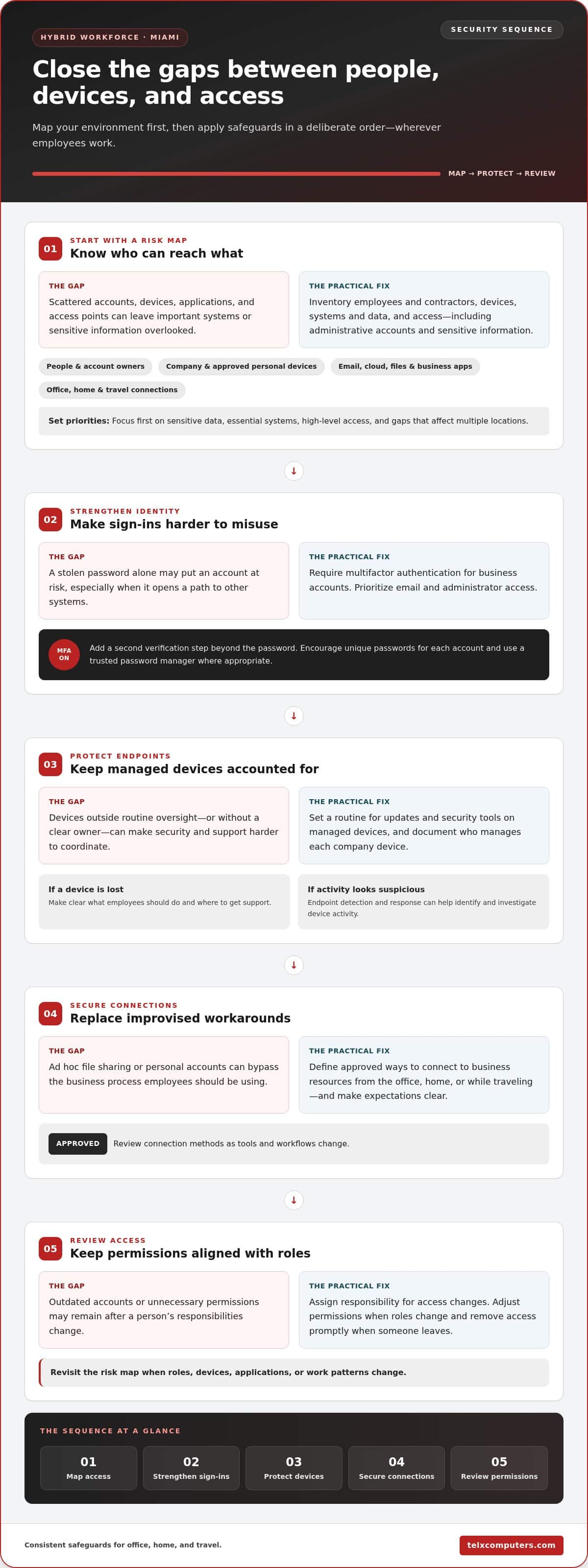
Once you’ve mapped users and systems, put safeguards in place in a deliberate order. How to secure a hybrid workforce in Miami starts with identity, then devices, connections, and regular access reviews. This sequence helps close common gaps while recognizing that employees may need different permissions for different tasks.
- Strengthen identity: Require multifactor authentication for business accounts, starting with email and administrator access.
- Protect endpoints: Manage updates and security tools on company devices, with a clear owner responsible for each device.
- Secure connections: Define how employees connect to business resources from the office, home, or while traveling.
- Review access: Adjust permissions when a person changes roles and remove access promptly when someone leaves.
How can a business reduce the risk of compromised accounts?
Multifactor authentication adds a second verification step beyond a password, making a stolen password alone less likely to grant access. Apply it consistently to business accounts, prioritizing email and administrative access because they can provide a path to other systems. Encourage unique passwords for each account and use a trusted password manager where appropriate. Assign responsibility for access changes so role transitions and departures trigger prompt updates, rather than leaving permissions in place after they’re no longer needed.
What should endpoint and network protections cover?
Set a routine for keeping operating systems, applications, and security tools updated on managed devices. Document who manages each company device and what employees should do if one is lost, behaves unexpectedly, or needs support. Endpoint detection and response can help identify and investigate suspicious activity on devices. Include it when it fits your business risk and IT plan.
Remote access should be a designed business control, not an improvised workaround. Establish approved ways to connect to company resources and make those expectations clear to staff. Avoid relying on ad hoc file sharing or personal accounts when a secure business process should be used instead. Review connection methods as your tools and workflows change.
Ongoing oversight can connect device practices with the security of the wider network. Miami network IT support can help coordinate oversight across office and remote teams, linking routine support with network security. Together, these controls give employees a consistent way to work while keeping account, device, and connection responsibilities clear.
Do Hybrid Teams Really Create More Cyber Risk? Compare the Controls
Hybrid work changes where employees connect and how they access company resources, but location alone doesn’t determine risk. Exposure depends on the controls in place and how people use them. A password-only account, an unmanaged laptop, or a file shared too broadly can create problems in an office just as they can at home. Choose safeguards that fit the work, then keep them coordinated.
Which controls offer a practical balance between security and usability?
Strong controls should reduce exposure while allowing employees to complete normal tasks. Multifactor authentication adds a verification step to sign-in, while managed devices give the business clearer oversight of updates and security tools. Role-based access keeps permissions tied to job needs rather than granting broad access by default. Review the tradeoffs together:
| Risk addressed | Practical control | Employee impact | Review cadence |
|---|---|---|---|
| Stolen or reused passwords | Use multifactor authentication (MFA), especially for email and sensitive accounts. | One additional verification step at sign-in. | Revisit when account access or sign-in needs change. |
| Malware or unprotected devices | Manage device updates and endpoint protection; consider endpoint detection and response based on business risk and IT plans. | Updates may require a restart or brief interruption; clear device ownership helps employees know where to get support. | Monitor devices routinely and review when alerts or device changes arise. |
| Unnecessary access to systems or data | Assign permissions by role and limit access to what each person needs. | Employees can use required resources without broad, unrelated access. | Review after role changes and during planned access reviews. |
| Unintended data exposure | Use approved file-sharing tools and set access permissions for intended recipients. | Staff follow a consistent process instead of choosing ad hoc sharing methods. | Reassess when teams, workflows, or sharing needs change. |
| Phishing and unsafe responses | Train employees to recognize suspicious messages and report them promptly. | Staff know how to raise a concern without fear of blame. | Include training at onboarding and in planned refreshers. |
How do phishing and unsafe file sharing affect remote teams?
A convincing message can prompt someone to click a harmful link or disclose sign-in details, especially when they’re working quickly across different channels. Clear reporting steps help the organization respond sooner. Treat a report as a useful warning, not a reason to blame the employee. Approved collaboration tools and carefully assigned permissions also reduce the chance that a shared link exposes information to unintended viewers.
No single tool replaces coordinated identity, device, data, and response practices. Connect malware prevention with a recovery plan so the team knows how to limit disruption if malicious software reaches business systems.
Create a Repeatable Hybrid Workforce Security Routine in Miami
Security controls work best when someone owns them and the team revisits them regularly. Build a routine that connects people, technology, and recovery rather than treating each task as a one-time setup. A practical sequence is to assign owners, configure controls, train staff, test recovery, and review what needs to change.
- Assign owners: Name who manages accounts, devices, employee guidance, backups, and continuity decisions. Make it clear who receives incident reports.
- Configure controls: Apply the agreed security settings to business accounts, devices, applications, and remote access.
- Train staff: Explain safe work practices and how to report suspicious activity.
- Test recovery: Practice restoring important data and accessing critical services.
- Review and adjust: Update the plan when systems, roles, or work arrangements change.
Set a cadence the team can sustain. As a starting point, review access quarterly and after role changes, install software updates through a managed process as they become available, and check backup status monthly. Use employee refreshers at onboarding and quarterly, then adjust the schedule to match your business risk and operational needs. Document the owner and completion date for each check so recurring work doesn’t disappear into informal reminders.
What should employees do when they suspect a security incident?
Give employees one clear reporting route, such as a designated IT contact or help desk, and ask them to report suspicious messages, unexpected sign-in prompts, or unusual device behavior promptly. They shouldn’t investigate or delete potential evidence on their own. IT can assess affected accounts, devices, and business data, then coordinate containment, investigation, and recovery. A no-blame response encourages people to raise concerns early, giving the business a chance to act sooner.
How can a business prepare for interruption and recovery?
Identify the services employees need to keep working, the people who decide priorities, and the alternatives available if the office or a network connection becomes unavailable. Include both Miami office operations and remote employees in continuity planning. Consider severe weather and connectivity loss as possible scenarios without assuming when or how they might occur.
Review which critical systems and data are covered by backups, then test recovery procedures against business needs. A backup check should confirm that the right information is protected; a recovery test helps establish whether the team can restore access and resume essential work. Include hosted resources in the plan, too, so employees know how they can reach approved business tools during an interruption.
Managed IT support can connect routine IT operations with security practices, including monitoring, employee support, and recovery planning across office and remote teams.
When Miami Businesses Should Bring in Managed IT Security Support
Internal teams may need additional support when routine security work competes with daily IT demands. Warning signs include gaps in system monitoring, delayed access changes, employees unsure where to get help, or backup and recovery plans that haven’t been tested. If security tasks depend on one person’s availability or are handled inconsistently between office and remote staff, it may be time to add coordinated support.
Managed IT can connect everyday assistance with security operations instead of treating them as separate tasks. Telx Computers supports Miami businesses with managed IT services, network security, server monitoring, backup and disaster recovery, and 24/7 help desk support. This support can help coordinate security practices and employee assistance across work locations. Learn more about managed IT support services.
What should a coordinated support model include?
A practical model brings help desk support, system monitoring, network security, and backup planning together under clear responsibilities. Employees should know where to report technical problems or suspicious activity, while designated IT owners handle access administration, monitoring, and recovery coordination. The right operating model depends on your organization’s size, systems, and risk. Define who owns each task and how internal staff and managed IT support work together.
How can a Miami business take the next step?
Start with a concise record of your current systems, where employees work, which business data and services matter most, and where responsibility or coverage is unclear. Use that snapshot to prioritize improvements rather than trying to change everything at once. For example, first clarify who handles access changes, then address gaps in monitoring or recovery planning.
Use that priority list to guide a practical sequence that fits your workflows. A tailored approach to how to secure a hybrid workforce in Miami should support employees in the office and remotely while keeping security responsibilities visible and manageable.
Explore Telx Computers’ managed IT support for a coordinated approach to hybrid-work security.
Build a Hybrid Security Plan That Grows With Your Business
How to secure a hybrid workforce in Miami starts with a clear view of who accesses your systems, from which devices, and under what conditions. Strengthen sign-ins, protect devices, and make secure access and file sharing part of everyday work. Then assign owners, review permissions, train employees, and test recovery so your safeguards stay useful as roles and workflows change.
Security is strongest when these practices work together. Managed IT can help connect routine support and monitoring with network security, cloud computing, and data backup and disaster recovery. Telx Computers supports businesses from Miami, helping teams work across office and remote settings with managed IT and 24/7 help desk support.
You don’t have to solve every gap at once. Start with your most important systems and the risks that could disrupt daily operations, then build a practical improvement plan around your business. Talk with Telx Computers about managed IT support and take the next step toward a more secure, confident hybrid workforce.
Frequently Asked Questions
How do I secure employees working remotely in Miami?
Protect remote employees with consistent identity, device, and access controls, then make the expected practices clear. Require multifactor authentication for business accounts, keep company devices and security tools updated, and limit access to the systems and data each person needs. Set an approved way to connect and share files, plus a clear route for reporting suspicious activity. Apply the same core expectations to employees working in Miami, Aventura, or Fort Lauderdale.
Is hybrid work less secure than working only in an office?
Not automatically. Hybrid work changes where employees connect and how they access business systems, but the level of risk depends on the controls and everyday behavior. An office-based team can still face compromised accounts, unsafe file sharing, or outdated devices. A hybrid team can manage exposure with consistent sign-in safeguards, managed devices, appropriate permissions, and a practiced response plan. Focus on closing gaps across locations rather than treating remote work as inherently unsafe.
What is the first step in securing a hybrid workforce?
Start by mapping people, devices, applications, data, and access. Identify the business systems that are essential to daily operations, the information that needs stronger protection, and who requires access to each resource. Include employees, contractors, company devices, and any approved personal-device use. This gives you a practical starting point for prioritizing improvements. How to secure a hybrid workforce in Miami depends on your specific systems, workflows, and data sensitivity.
Can employees use personal devices for hybrid work safely?
Personal devices can be part of hybrid work only when the business sets clear conditions and can manage the associated risks. Define which devices and uses are approved, how employees keep operating systems and applications current, and which business accounts or files they may access. Require multifactor authentication and avoid storing or sharing company information through personal accounts. If a device can’t meet your security expectations, direct employees to an approved company device instead.
How often should a business review hybrid-work security?
Use a regular schedule, and also review controls when a meaningful change occurs. For example, check access during planned reviews and after role changes, apply software updates through a managed process as they become available, and check backup status on a defined recurring schedule. Refresh employee guidance at onboarding and periodically afterward. Revisit the overall plan when your systems, workforce locations, or business processes change, so security practices stay aligned with how the team works.
What should a Miami business do if a remote employee reports a suspicious email?
Ask the employee to stop interacting with the message and report it through the designated IT or help desk channel. They shouldn’t click links, reply, forward it broadly, or investigate on their own. IT can assess whether an account, device, or business data may be affected, then take appropriate steps to contain and investigate the issue. A prompt, no-blame reporting culture helps employees raise concerns early, whether they’re working remotely in Miami or elsewhere.
Does a hybrid workforce need a VPN?
Not every hybrid workforce needs the same connection setup. Whether a VPN is appropriate depends on how your business systems are hosted, how employees access them, and the security controls already in place. Avoid treating a VPN as a complete security solution: it doesn’t replace strong account protection, managed devices, or careful access permissions. Define approved remote connections and explain the right method for each business resource as part of your IT security plan.
How can a hybrid business keep operating during a technology disruption?
Prepare by identifying essential services, the people who make continuity decisions, and how office and remote employees can access approved resources if a system or connection is unavailable. Include Miami-area office operations and remote work in the plan, and consider severe weather or connectivity interruptions as possible scenarios. Review backup coverage and test recovery procedures against business needs. Clear priorities and assigned responsibilities help your team restore critical work in an orderly way.