





04 Oct Google Workspace Security Assessment in Miami: A Business Checklist
A secure Google Workspace account can still expose your business if access, sharing, or connected apps no longer match how your team works. A Google Workspace security assessment in Miami can help uncover those gaps and clarify what to address first.
If you’re unsure who can access company accounts and files, or whether settings have kept pace with staffing and business changes, start with a structured review. The goal is not simply to find technical issues. It is to identify which gaps create meaningful exposure, who owns them, and what practical steps can reduce that risk.
This checklist covers key areas of Google Workspace security, including user access, email protections, file-sharing settings, administrator configurations, and third-party app connections. Use it to connect findings to business impact, set priorities, and prepare a focused review.
For Miami businesses, a Workspace review can also inform a broader security plan. Telx Computers provides cybersecurity audits, email security, and managed IT services, helping businesses connect assessment findings with ongoing support and practical improvements.
Key Takeaways
- Review identity, email, file sharing, connected apps, and administrative oversight to spot risks across your Workspace environment.
- Prioritize findings by considering exposure, business impact, affected users, and the effort required to address them.
- Prepare for a Google Workspace security assessment in Miami by defining business goals and involving people who understand account ownership and data workflows.
- Look for clear findings and practical recommendations that connect security controls to everyday business operations.
- Coordinate Workspace improvements with email security, network security, backup, and ongoing IT support for a more cohesive security strategy.
Why a Google Workspace security assessment matters for Miami businesses
A Google Workspace security assessment in Miami is a structured review of your organization’s Workspace settings, user access, data exposure, and security practices. It helps identify gaps, understand their business impact, and decide what to improve first. It cannot guarantee that an incident won’t occur, but it gives your team a clearer picture of where controls may need attention.
Workspace brings together business email, file storage, and collaboration tools, so one access or sharing decision can affect several parts of daily operations. The Google Workspace overview provides background on the platform. A focused review goes further by examining how your organization uses its tools, who can access them, and whether current practices still fit your workflows.
For a practical look at security settings, watch this overview:
Which business risks can a Workspace review help uncover?
A review can uncover weaknesses that build up as teams and responsibilities change. For example, an account may lack sufficient protection, a former employee’s account may remain active, or a staff member may retain access they no longer need. Each can leave an unnecessary route to business information.
File-sharing settings also deserve close attention. A document intended for a small project team might be available to a much wider audience, or a file could be shared with the wrong person. Either situation can expose confidential client, employee, financial, or operational information. The review should also identify connected applications, since an app linked to Workspace may be able to access organizational data.
These gaps can complicate everyday work as well as security. Employees may struggle to get appropriate access, while unclear account ownership can slow response when someone changes roles. Assessment findings help separate immediate exposure from process and oversight improvements.
Who should consider a Google Workspace security assessment?
Consider a review when your business adds employees, changes roles, adopts applications, or reassesses how it protects information. It can be especially useful when Workspace holds sensitive client, employee, financial, or operational data. Set the scope around your company’s size, workflows, and priorities rather than applying the same checklist to every organization.
For Miami businesses, the goal is to connect technical findings to how local teams work, then turn them into manageable next steps. Telx Computers provides cybersecurity audits and managed IT support. Learn more about IT companies in Miami and how local IT support can fit into a broader security plan.
Google Workspace security assessment checklist: the controls to review
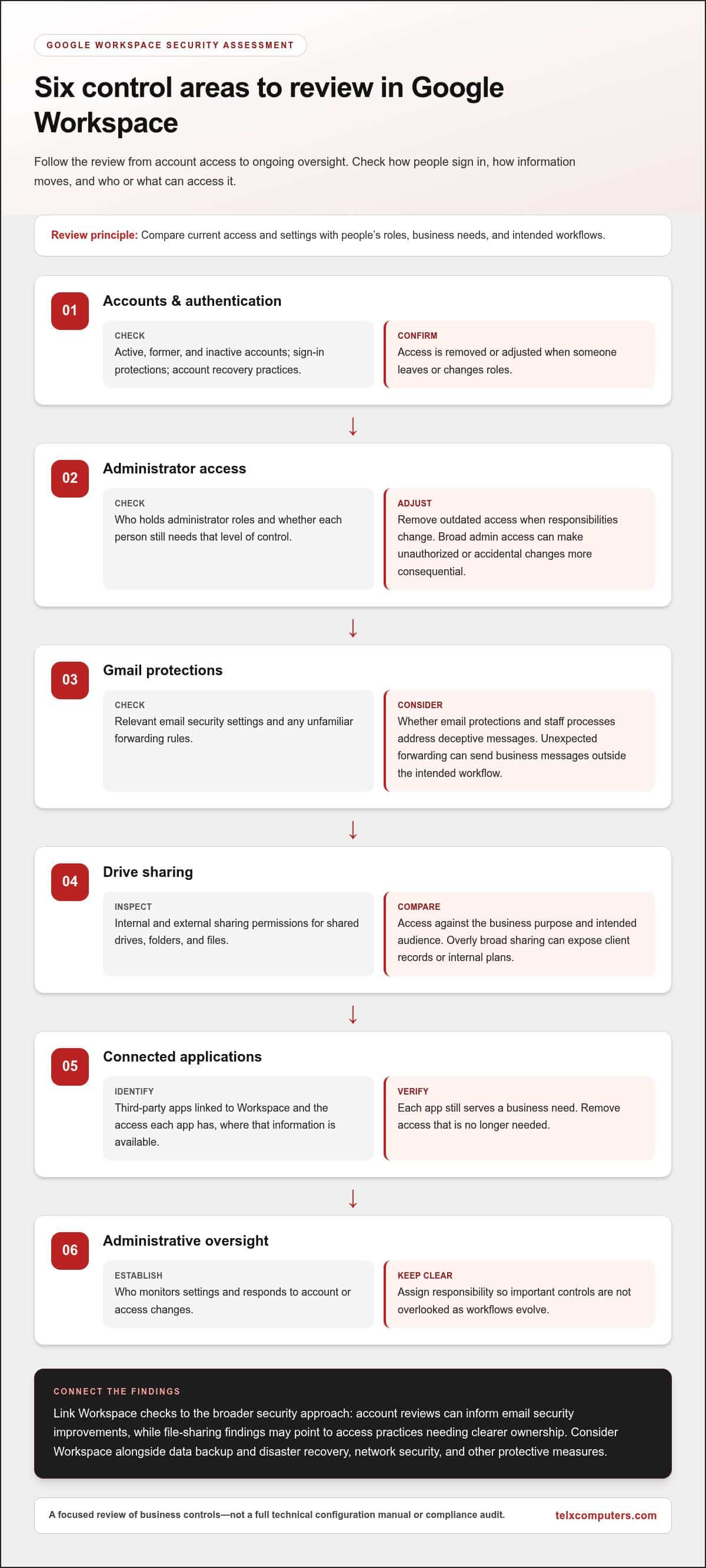
A useful Google Workspace security assessment in Miami checks how people sign in, how information moves, and who or what can access it. Treat this as a focused review of business controls, not a full technical configuration manual or compliance audit. The NIST definition of cloud computing provides context for the cloud model. Your review should focus on how your organization uses Workspace and manages its environment.
Use this checklist to identify areas that warrant a closer look. Verify current settings and available controls in your Admin console, since options and configurations can change.
- Accounts and authentication: Review active, former, and inactive accounts, sign-in protections, and account recovery practices. Confirm that access is removed or adjusted when someone leaves or changes roles. Check that account recovery is controlled and that employees have a clear process for regaining access.
- Administrator access: Check who holds administrator roles and whether each person still needs that level of control. Remove outdated access when responsibilities change. Broad or unnecessary admin access can make accidental or unauthorized changes more consequential.
- Gmail protections: Review relevant email security settings and check for unfamiliar forwarding rules. Unexpected forwarding can send business messages outside the intended workflow. Consider whether email protections and staff processes address deceptive messages.
- Drive sharing: Inspect internal and external sharing permissions for shared drives, folders, and files. Compare access with the business purpose and intended audience. A document shared too broadly can expose client records or internal plans.
- Connected applications: Identify third-party apps linked to Workspace and confirm that each still serves a business need. Review the access each app has, where that information is available, and remove access that is no longer needed.
- Administrative oversight: Identify who monitors settings and responds to account or access changes. Assigning clear responsibility helps prevent important controls from being overlooked as workflows evolve.
Connect individual controls to layered security
These checks work best as part of a broader security approach. For example, an account review can inform email security improvements, while file-sharing findings may point to access practices that need clearer ownership. Consider how Workspace safeguards fit alongside data backup and disaster recovery, network security, and other protective measures.
Record each gap in plain language: what is exposed, who or what is affected, and which business process depends on it. A Miami business can then connect technical observations to practical priorities rather than treating each setting as an isolated task. Telx Computers provides managed IT support to help connect security findings with ongoing IT operations.
How to prioritize Google Workspace assessment findings
A useful Google Workspace security assessment in Miami turns observations into a business-led action plan. Don’t treat every configuration difference as a vulnerability. First determine whether the setting creates meaningful exposure in your environment, then consider the sensitivity of the information, the number of people affected, and how readily the issue can be addressed.
Start with findings that could expose administrator access or sensitive business data, or that involve an account without a clear owner. A risk affecting organization-wide access may need attention before an issue limited to one user. But scope alone does not determine priority: a single account with broad access to critical information could matter more than a minor setting affecting a larger group.
Which findings should receive attention first?
Use business context to set the order. Consider what information is involved, which workflows depend on it, and what disruption a change could cause. An exposed folder containing sensitive client materials may call for prompt access changes, while a documentation gap may fit a longer-term governance plan. Consider remediation effort, too, but don’t let an easy fix distract from a higher-impact exposure.
A simple findings table keeps decisions visible and accountable:
| Finding | Affected assets | Business impact | Priority | Owner | Next action |
|---|---|---|---|---|---|
| Unneeded broad access | Shared business folder | Information visible beyond intended team | Set by exposure and sensitivity | Folder owner | Review permissions and narrow access |
| Unclear account ownership | Workspace user account | Access changes may be missed | Set by account privileges and activity | IT or department lead | Confirm ownership and appropriate status |
How should teams document remediation and accountability?
For each agreed action, record a responsible owner, the next step, and a status such as open, in progress, or complete. Include the reason for its priority so decision-makers understand why one item comes before another. If the business approves an exception, document its rationale and who accepted it. An exception records a decision, but it does not remove the exposure, so set a time to review it when circumstances change.
Some improvements need ongoing attention as employees, roles, and workflows evolve. Connecting agreed actions with managed IT support can help keep remediation and routine oversight aligned with business operations.
How to prepare for a Google Workspace security assessment in Miami
A focused Google Workspace security assessment in Miami starts with business context, not a pile of technical records. Define what the review should help your organization understand, such as account ownership, access to important information, or the security implications of newly adopted applications. Clear goals keep the work relevant and make findings easier to act on.
What information should a business gather before the review?
Use approved internal records to prepare an inventory of accounts and administrators. Include relevant ownership and role information, but never put passwords in spreadsheets, email, or assessment notes. Arrange assessment access through an approved, controlled process and provide only the access needed for the agreed review.
Next, note how teams depend on Gmail, Drive, and connected applications. A department lead can explain which shared files support client work, while an operations manager can identify business-critical apps and workflows. Flag recent staffing changes, role transitions, new tools, or process updates that may have affected access needs. This context helps distinguish a genuine exposure from an intentional business arrangement.
How can teams keep the assessment practical and low-disruption?
Agree on the scope, participants, communication plan, and business priorities before the review begins. Useful stakeholders may include the person responsible for IT, department managers who understand information flows, and application owners who can explain why a connected tool is needed. Set expectations for any employee actions so people know what is being requested and why.
Plan the findings discussion as part of the review, not as an afterthought. Give account owners and business leads time to explain how a setting supports daily work, identify dependencies, and discuss realistic next steps. That context helps the team avoid changes that interrupt essential workflows while still addressing meaningful gaps.
For Miami organizations, local coordination can bring business and IT perspectives into the same conversation. Telx Computers has a Miami presence and connects technical review with broader IT support. Explore the Miami IT company and support overview to learn about its local business IT focus.
Before the review, gather relevant context, protect account credentials, and make time to discuss the results. These steps help turn the assessment into a practical plan that fits how your team works.
Choosing a Google Workspace security assessment partner in Miami
A useful Google Workspace security assessment in Miami should produce more than a list of technical settings. It should explain what each finding means for your business, why it matters, and what practical action could address it. The review should also define its scope, so you understand which parts of your Workspace environment and related security practices are being considered.
What makes an assessment useful after the review ends?
Look for findings presented in plain language and tied to business context. For example, a note that external sharing is enabled is more useful when it identifies affected files or teams, explains the potential exposure, and outlines a reasonable way to review access. Recommendations should distinguish urgent fixes from longer-term improvements, rather than treating every configuration difference as an emergency.
Follow-through matters. Give agreed actions owners and status updates, and revisit relevant controls as teams, roles, and workflows change. Assessment results can inform broader planning, too: an email-related finding may connect to email security, while access or recovery concerns may prompt discussion of network security, data backup, or managed IT operations. This joined-up view helps keep protections aligned and technical fixes accountable.
How Telx Computers can support Miami businesses
Telx Computers supports Miami-area businesses through cybersecurity audits, email security, and managed IT services. A focused review connects technical observations to how your organization handles information and keeps essential work moving. Local coordination can also bring the people who understand your systems and workflows into the conversation, so recommendations reflect business priorities.
The goal is a clear path from assessment to action, not a promise that incidents can never happen. Telx Computers can help relate Workspace findings to wider security and IT planning, including email and network safeguards and ongoing support. The scope and recommendations should reflect your environment and the way your organization operates.
Ready to discuss a review aligned with your Workspace environment and business priorities? Request an IT project quote to start the conversation with Telx Computers.
Turn your Workspace review into a practical security plan
A Google Workspace security assessment in Miami is most useful when it turns account, email, file-sharing, and app-access findings into clear business priorities. Review the controls that shape how information is accessed, then weigh each gap by exposure, impact, and the effort needed to address it. Assign owners to agreed actions so improvements don’t get lost after the review.
Security findings also matter beyond Workspace. Connecting them with email security, network protection, and managed IT can help your business build a more coordinated approach. Telx Computers offers cybersecurity audits, email security, and managed IT services for businesses in Miami, Aventura, and Fort Lauderdale.
Take the next step with a partner who can connect technical findings to your business priorities. Talk with Telx Computers about a business-focused security assessment and move forward with a clearer plan.
Frequently Asked Questions
What does a Google Workspace security assessment include?
A Google Workspace security assessment reviews how your organization manages accounts, sign-in protections, administrator access, Gmail settings, Drive sharing, connected applications, and security oversight. It helps identify gaps, relate them to business impact, and decide what to address first. The scope should fit your organization’s workflows and priorities. It is a focused security review, not a guarantee that incidents cannot occur or a substitute for every technical or compliance audit.
How often should a business review Google Workspace security?
Review Workspace security when your environment or business needs change, such as after hiring, staff departures, role changes, adoption of new applications, or shifts in how teams share information. A recurring review can also help catch access and configuration drift over time. There is no single schedule that fits every organization. Set a cadence that reflects your data sensitivity, operational changes, and available oversight, then revisit controls when meaningful changes occur.
Can a Google Workspace security assessment identify risky file sharing?
Yes. A review can examine whether Drive files, folders, or shared drives are accessible to more people than their business purpose requires. For example, a folder created for a project team may remain available to a broader group after the project ends. Findings should identify the affected information and access scope, then help owners decide whether to narrow permissions, remove access, or document a business reason for keeping it.
Is a Google Workspace security assessment disruptive to employees?
A well-scoped review can limit disruption by agreeing on the activities, stakeholders, timing, and any employee actions in advance. Some follow-up changes, such as adjusting access or authentication practices, may require coordination with affected users. Explain what is changing and why, and plan conversations around business needs. The goal is to assess controls and plan improvements without interrupting essential workflows more than necessary.
What should a business prepare before a Google Workspace security review?
Prepare an account and administrator inventory using approved internal records, and identify key workflows that depend on Gmail, Drive, and connected applications. Note recent staffing or role changes, new tools, and changes to information-sharing practices. Include stakeholders who understand account ownership and business-critical processes. Don’t send or store passwords in review documents; arrange assessment access through an approved, controlled process.
How are Google Workspace security findings prioritized?
Prioritize findings by considering the information exposed, potential business impact, number of affected users, and effort needed to address the issue. An administrator account or broadly shared sensitive information may need prompt attention, while a process or documentation improvement may be planned over a longer period. Findings need context: a configuration difference is not automatically a vulnerability. Assign each agreed action an owner, next step, and status.
Can a Miami IT provider help remediate Google Workspace security findings?
Yes. A Miami-area IT provider can help interpret findings, plan remediation, and connect Workspace improvements with email security, network security, and ongoing managed IT. Telx Computers offers cybersecurity audits, email security, and managed IT services for businesses in Miami, Aventura, and Fort Lauderdale. The right next steps depend on your Workspace environment and business priorities, so findings can become a practical plan rather than isolated technical changes.