





20 Aug Business VPN Security Best Practices: A Strategic Framework for Enterprise Protection
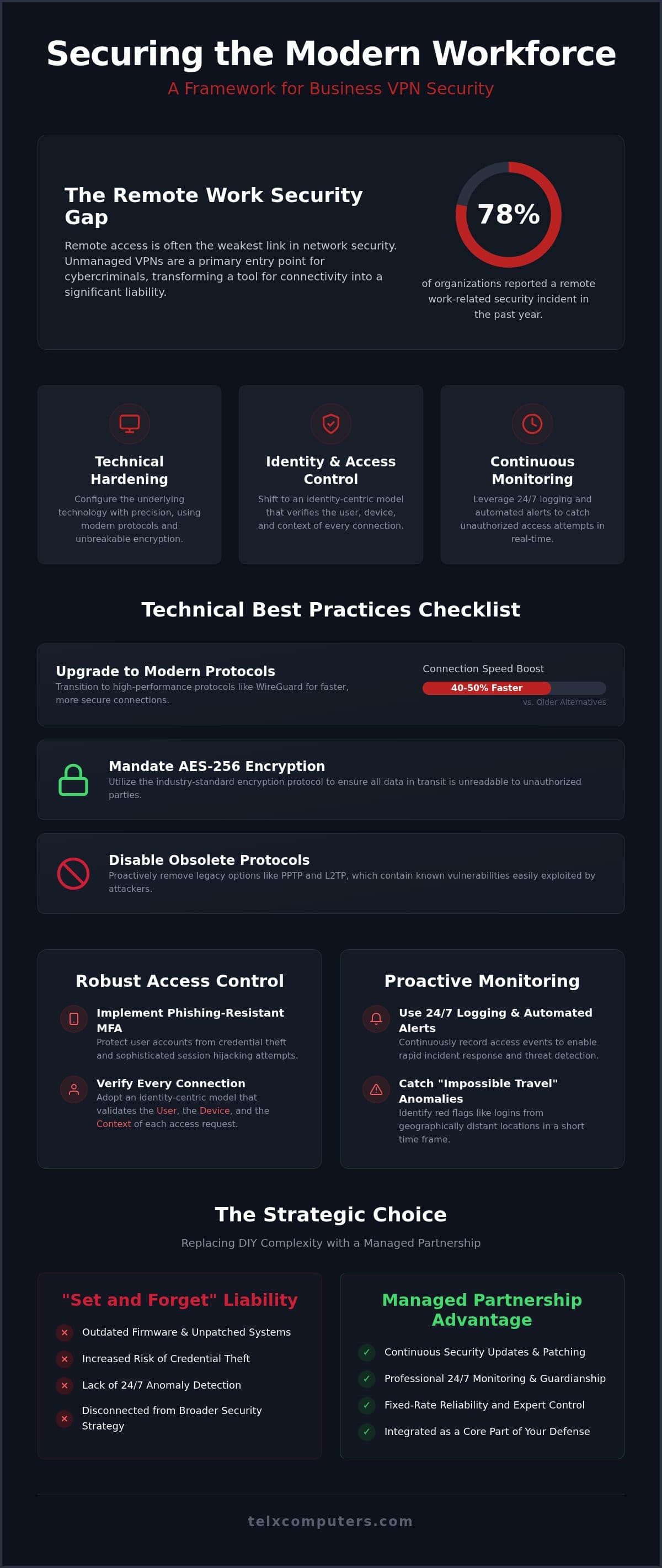
Did you know that 78% of organizations reported at least one security incident related to remote work in the past year? It’s a sobering figure that confirms a common concern; remote access is often the weakest link in your network. Managing a fleet of VPN clients across diverse devices often feels like a constant battle between high-level protection and user speed. We recognize the pressure of maintaining a technological edge while keeping your team’s workflow seamless. Implementing business vpn security best practices isn’t just a technical chore. It’s a vital part of a broader network security strategy that protects your company’s future and provides genuine peace of mind.
You can transform your remote access from a potential liability into a hardened, reliable gateway. This strategic framework helps you master essential security protocols like AES-256 encryption and modern standards like WireGuard. We’ll show you how to integrate these solutions with 24/7 server monitoring and professional cybersecurity audits to ensure your perimeter remains airtight. You’ll gain a clear checklist of security standards and a confident strategy to manage your enterprise protection. By the end of this article, you’ll have the tools to replace technical anxiety with a sense of stability and proactive, expert control.
Key Takeaways
- Transition to high-performance protocols like WireGuard and mandate AES-256 encryption to maintain a technological edge without sacrificing connection speed.
- Implement phishing-resistant MFA to protect user accounts and prevent the sophisticated session hijacking attempts that target today’s distributed workforces.
- Apply business vpn security best practices to move beyond basic connectivity and build a proactive defense against modern ransomware groups.
- Leverage 24/7 logging and automated alerts to catch “impossible travel” anomalies and other unauthorized access red flags in real time.
- See how a managed IT partnership replaces the complexity of DIY maintenance with fixed-rate reliability and continuous security updates.
The Evolution of Business VPN Security in 2026
The role of a Virtual Private Network (VPN) has shifted from a simple remote access tool to a critical infrastructure component. In 2026, a business VPN acts as a secure, encrypted tunnel that protects your distributed workforce from prying eyes. However, the threat environment has grown more aggressive. Ransomware groups now view traditional, unmanaged VPNs as the primary door into corporate databases. They don’t just look for open ports; they exploit the gap between basic connectivity and true security.
Modern business vpn security best practices require a shift toward identity-centric models. It’s no longer enough to just have a password. We now focus on verifying the user, the device, and the context of the connection every single time. This evolution moves us away from “simple access” and toward a model where the VPN is a vigilant guardian of your most sensitive assets. It’s a proactive approach that treats every connection attempt as a potential risk until proven otherwise.
Why “Set and Forget” VPNs Are a Liability
Many businesses treat their VPN hardware like a utility; they plug it in and expect it to work forever without intervention. This “set and forget” mentality creates a massive liability. Outdated firmware and unpatched vulnerabilities are the low-hanging fruit for cybercriminals. If your remote access points aren’t updated regularly, you’re essentially leaving a key in the lock for anyone to find.
In South Florida, we see the impact of credential theft on business continuity daily. A single compromised password can bring a firm’s operations to a standstill. Proactive network security acts as a preventative measure. It ensures your gateway is always running the latest patches and that anomalies are caught before they turn into breaches. We’ve seen that consistent maintenance is the only way to stay ahead of AI-driven credential stuffing attacks that have become common this year.
Integrating VPNs into Your Cybersecurity Strategy
A VPN shouldn’t exist in a vacuum. To be effective, it must integrate seamlessly with your broader defense layers. For example, your remote access strategy directly supports your ransomware protection efforts by ensuring that only authenticated traffic enters the network. It’s about building a cohesive shield rather than relying on disconnected fixes.
Effective business vpn security best practices also rely on high-tier network IT support in Miami. When your VPN is part of a managed ecosystem, it benefits from 24/7 monitoring and professional guardianship. This transition from a standalone tool to an integrated component provides the stability and peace of mind you need to focus on growth. We act as your strategic ally, ensuring your “silent engine” of remote work remains fast, secure, and resilient.
Technical Best Practices for VPN Configuration
Setting up a remote access tunnel is only the first step. To protect your enterprise assets, you must configure the underlying technology with precision. Choosing the right protocol is the cornerstone of business vpn security best practices. In 2026, WireGuard has become the preferred choice for many organizations due to its modern cryptography and connection speeds that are often 40-50% higher than older alternatives. OpenVPN remains a reliable standard, particularly with the release of version 2.7.6 in August 2026, which addressed critical stability and security fixes.
Encryption standards are equally vital. You shouldn’t settle for anything less than AES-256. It’s the industry baseline for a reason. While you’re hardening these settings, you must also disable obsolete protocols like PPTP and L2TP. These legacy options are riddled with known vulnerabilities that modern attackers exploit in seconds. We recommend a proactive approach that removes these “side doors” before they can be discovered.
Split tunneling is another area where balance is key. This feature allows you to route sensitive business traffic through the secure tunnel while letting general internet traffic use the local connection. It saves significant bandwidth and improves user speed, but it requires careful management. If not configured correctly, it can lead to data leakage or expose the user’s device to threats that bypass your central security stack.
Hardware-Based VPN vs. Software Solutions
Terminating your VPN at the firewall level provides a significant security advantage. By using enterprise-grade hardware, you offload the encryption processing from your servers, which improves overall network performance and stability. This is why professional hardware procurement is a strategic decision rather than just a purchase. Dedicated appliances offer built-in security features and higher throughput that software-only solutions simply can’t match. We’ve found that this approach creates a much more resilient perimeter for our clients.
IP Whitelisting and Geofencing
You can drastically reduce your attack surface by implementing geofencing. If your team only operates within specific regions, there’s no reason to allow connection attempts from other continents. Restricting access to specific geographic locations can block up to 90% of automated international threats. For administrative access, we recommend static IP whitelisting. This ensures that only known, trusted locations can manage your core infrastructure. If you’re unsure if your current setup meets these standards, our team provides network IT support in Miami to help you audit your perimeter and close these gaps.
Access Control and Identity Management
Access control is the heart of any modern security framework. While we’ve already discussed the technical “how” of encryption, business vpn security best practices must also address the “who” behind every connection. Multi-Factor Authentication (MFA) is no longer a luxury; it is a baseline requirement for every single account. However, not all MFA is created equal. In 2026, we are seeing a necessary shift toward phishing-resistant standards like FIDO2 and WebAuthn. These protocols use hardware-based keys or biometrics to negate the risk of session hijacking, a common tactic where attackers steal a live connection token after a user logs in.
Integrating your VPN with a centralized Identity Provider (IdP) such as Azure AD or Okta streamlines this process. It allows your IT team to manage permissions from a single dashboard rather than juggling disconnected lists. This visibility is essential for applying the Principle of Least Privilege (PoLP). By restricting users to only the specific files and folders they need for their roles, you ensure that a single compromised account doesn’t lead to a total network breach. It’s a strategic move that transforms your VPN from a wide-open door into a series of carefully guarded checkpoints.
Five Steps to Hardening VPN Authentication
Securing your gateway requires a methodical approach. We recommend these five steps to ensure your authentication process is airtight and resilient against modern threats:
- Audit Permissions: Start by removing “ghost” accounts from former employees or contractors. Dormant accounts are a primary target for credential stuffing.
- Deploy Hardware Keys: Use FIDO2-compliant security keys or biometric-backed mobile authenticators to provide the highest level of protection.
- Enable Conditional Access: Set policies that automatically block logins from unauthorized geographic locations or unmanaged devices.
- Set Session Timeouts: Implement aggressive timeouts to close dormant connections that attackers could exploit to stay persistent on your network.
- Rotate Credentials: Regularly update administrative certificates and keys to limit the window of opportunity for any potential breach.
The Role of Device Posture Checking
Authentication is only half the battle. You must also verify that the device itself is safe. Device posture checking ensures that any remote laptop or mobile device has an active antivirus and the latest OS patches before it can enter the tunnel. Integrating this with Endpoint Detection and Response (EDR) provides a real-time shield against threats already lurking on a user’s machine. For many organizations, ensuring these standards are met across a diverse fleet is a primary benefit of managed it support services. We act as your expert guardian, verifying that every device meets your strict security criteria before it ever touches your corporate data.
Continuous Monitoring and Security Auditing
Visibility is the final pillar of a robust remote access strategy. Establishing business vpn security best practices doesn’t end with configuration; it requires ongoing vigilance to ensure your gateway remains secure. We mandate 24/7 logging of every connection attempt, success, and failure. This data provides the digital paper trail needed to investigate incidents and refine your defense. Without these logs, you’re essentially flying blind, unable to distinguish between a legitimate employee and a malicious actor trying to brute-force your perimeter.
Automated alerts for “impossible travel” are a game-changer for modern enterprises. If a user logs in from Miami and then attempts a second login from NYC five minutes later, our systems flag this anomaly instantly. This suggests a credential compromise rather than a legitimate user movement. Similarly, we monitor for large data egress through VPN tunnels. Sudden spikes in outbound traffic often signal data exfiltration, allowing us to terminate the connection before sensitive files leave your network. These proactive measures turn your VPN from a simple tunnel into an intelligent sensor.
Proactive Server and Network Monitoring
Real-time server monitoring is the silent engine that catches unauthorized lateral movement. If an attacker gains entry through a VPN, they often try to hop from the gateway to more sensitive internal databases. By establishing a baseline of “normal” traffic patterns, we can quickly spot these deviations. Our 24/7 help desk acts as your first line of defense, responding to lockout alerts or anomalies in real time. This ensures that technical anxiety never disrupts your operations, as an expert guardian is always watching the pulse of your network.
Compliance and Regulatory Auditing
For healthcare practices in Miami and specialized legal firms, security isn’t just a choice; it’s a regulatory mandate. Maintaining HIPAA compliance or attorney-client confidentiality requires strict encryption and documented access logs. We ensure your remote access strategy meets the rigorous standards of FINRA, GDPR, and other local regulations. Regular cybersecurity audits are essential to identify configuration drift and keep your compliance documentation current. It’s about maintaining a technological edge while meeting every legal obligation with confidence.
Don’t leave your network’s safety to chance. If you’re ready to harden your perimeter, you can request an instant quote for a comprehensive security assessment today.
The Managed Approach: Why Strategic Partnership Wins
DIY setups often lead to fragmented security. While an in-house team might configure a basic tunnel, they often lack the specialized resources to maintain a holistic architecture. A managed approach replaces these disconnected fixes with a unified strategy. By following business vpn security best practices through a professional lens, you ensure that every update, patch, and configuration change is handled by specialists. This isn’t just about technical maintenance; it’s about positioning your business for secure, scalable growth.
Fixed-rate IT plans offer a significant advantage for modern enterprises. You get continuous security updates and 24/7 monitoring without the worry of budget surprises. We act as your expert guardian, staying ahead of the emerging threats of 2026 before they can impact your operations. Our physical presence in Miami, NYC, and LA also provides a unique benefit. If a critical firewall or hardware component fails, we provide the rapid, on-site response that remote-only providers simply can’t offer. We’re the silent engine behind your success, ensuring your perimeter is always one step ahead of potential threats.
Eliminating Technical Anxiety with Managed IT
Technical anxiety often stems from the fear that remote access is your weakest link. By outsourcing IT services, you transfer this complex burden to a team of dedicated specialists. This partnership allows you to focus on your core business goals while we secure your remote perimeter. Our service guarantee provides the emotional grounding and peace of mind you need to operate with confidence. We handle the granular details of business vpn security best practices, so you don’t have to. It’s a strategic move that replaces uncertainty with stability.
Getting Started: A Roadmap for Your Business
Securing your enterprise begins with a preliminary network security assessment. This audit identifies vulnerabilities in your current remote access strategy and provides a clear path toward a hardened gateway. In 2026, security is no longer an optional expense; it’s a vital investment in your company’s resilience and long-term stability. If you’re ready to transform your network from a potential vulnerability into a secure asset, you can request an instant quote for a comprehensive security overhaul. We’re here to serve as your strategic ally, ensuring your business remains protected, efficient, and ready for whatever the future holds.
Securing Your Enterprise Gateway for the Future
Protecting your network in 2026 requires more than basic software; it demands a comprehensive framework. Mastering business vpn security best practices involves a commitment to vigilant, continuous guardianship. By adopting phishing-resistant MFA and real-time anomaly detection, you transform a potential remote access vulnerability into a hardened gateway. This proactive approach ensures your distributed workforce stays productive while keeping ransomware groups at bay. It’s a vital step in maintaining your company’s technological edge and operational resilience.
You don’t have to manage these technical complexities alone. We serve as your strategic ally, offering 24/7 expert guardian monitoring and fixed-price unlimited IT support plans that eliminate financial surprises. Our physical presence in Miami, NYC, and LA guarantees a rapid on-site response for any hardware needs that arise. Secure your remote workforce today and get an instant IT quote from Telx Computers. Take the lead in your industry with the stability and peace of mind that comes from professional, reliable protection.
Frequently Asked Questions
Is a business VPN enough to protect against all cyberattacks?
A business VPN is a foundational security layer, but it isn’t a silver bullet. While it creates a secure tunnel for your data, it doesn’t stop phishing or prevent an employee from downloading a malicious file. You need a multi-layered approach that includes email security, endpoint protection, and regular cybersecurity audits. Think of the VPN as your front door; it’s vital to have one, but you still need internal sensors to be truly safe.
How does MFA improve our VPN security posture?
Multi-Factor Authentication hardens your network by requiring a second form of verification beyond just a password. Even if an attacker steals a user’s credentials, they cannot gain entry without the physical security key or biometric confirmation. Implementing phishing-resistant MFA is one of the most effective business vpn security best practices because it stops session hijacking. It replaces technical anxiety with the confidence that your gateway is protected by more than just a single point of failure.
Why is my business VPN slowing down internet speeds for employees?
VPN speeds are typically affected by the encryption process, the distance to the server, or the protocol in use. Older protocols can be slower, while modern ones like WireGuard offer connection speeds that are often 40-50% higher than OpenVPN. If your employees experience significant lag, it may be time to upgrade your hardware or optimize your configuration. Our 24/7 help desk often identifies throughput bottlenecks caused by legacy hardware that lacks the processing power for modern encryption.
What is the difference between a consumer VPN and a business VPN?
Consumer VPNs focus on individual privacy and bypassing geographic restrictions for personal use. In contrast, a business VPN provides secure, encrypted access to a specific corporate network and its internal resources. Business solutions offer centralized management, detailed activity logging, and integration with your company’s identity providers. They are designed to act as a secure gateway for a distributed workforce, whereas consumer tools are primarily meant for personal anonymity on public networks.
How often should we audit our VPN security settings?
We recommend performing a formal audit of your VPN security settings at least once per quarter. This frequency allows you to catch configuration drift and ensure all firmware patches are current. You should also conduct an immediate review after any significant organizational change, such as a large hiring wave or a shift in network architecture. Regular cybersecurity audits ensure your remote access strategy remains aligned with evolving threats and that no dormant accounts remain active.
Can a VPN protect my business from ransomware?
A VPN helps prevent ransomware by securing the remote entry points that attackers often exploit. By encrypting traffic and requiring MFA, you make it much harder for malicious actors to gain the initial access needed to deploy a payload. However, a VPN alone isn’t enough; you must pair it with dedicated ransomware protection and proactive server monitoring. This combination ensures that if a threat does bypass the gateway, your internal systems can detect and isolate it immediately.
What should I do if I suspect a VPN account has been compromised?
If you suspect a compromise, immediately disable the affected VPN account and terminate all active sessions. You should then perform a mandatory password reset and rotate any associated security certificates or keys. Review your VPN logs for any unusual activity or data egress that occurred during the suspected window. Our team provides 24/7 monitoring to catch these anomalies early, ensuring a rapid response that minimizes the potential impact on your business continuity.
Does my business need a dedicated hardware firewall for a secure VPN?
While software-only VPNs exist, a dedicated hardware firewall is the superior choice for enterprise protection. Terminating your VPN at the firewall level offloads the heavy encryption processing from your servers, which improves overall network stability. Hardware appliances also provide built-in security features like intrusion prevention and geofencing. This approach is a core part of business vpn security best practices because it creates a resilient perimeter that is easier to manage and monitor at scale.