




01 Aug Virtual Desktop Infrastructure (VDI): A Strategic Framework for Modern Enterprises
Your IT budget shouldn’t have to grow every time your team does. Yet for many enterprises, that’s exactly what happens: another hire means another workstation, another license to manage, another endpoint to secure, and another potential gap in your defenses. Virtual desktop infrastructure breaks that cycle entirely, shifting the compute power away from individual machines and into a centralized, controlled environment that your team can access from virtually anywhere.
If you’ve been wrestling with the cost of maintaining a sprawling fleet of physical workstations, the security headaches that come with a distributed workforce, or the sheer complexity of pushing software updates across dozens of different devices, you already understand why this conversation matters. These aren’t minor inconveniences; they’re compounding risks that quietly erode both your budget and your operational resilience.
This guide cuts through the complexity. You’ll come away with a clear understanding of how VDI works, why it’s become a cornerstone of modern enterprise security strategy, and what a well-structured deployment actually looks like in practice. From hardware cost reduction to seamless remote access, we’ll walk through the full strategic picture so you can make decisions with confidence.
Key Takeaways
- Virtual desktop infrastructure decouples computing environments from physical hardware, giving enterprises centralized control over every desktop, application, and data asset from a single, secure location.
- A well-architected VDI deployment relies on key components like connection brokers and desktop pools — understanding how these work together is what separates a high-performance rollout from a costly misstep.
- VDI isn’t just an infrastructure upgrade; it’s a frontline ransomware defense strategy that allows IT teams to revert compromised desktops to a clean state in minutes rather than days.
- Successful migration starts long before a single virtual machine is provisioned — a structured network audit and user persona analysis are the two steps most enterprises skip, and the reason many deployments underperform.
- Moving from a self-managed VDI setup to a fully managed environment eliminates the hidden operational costs that erode ROI and ensures your virtual workforce has reliable, around-the-clock support.
Understanding Virtual Desktop Infrastructure (VDI) in the 2026 Digital Landscape
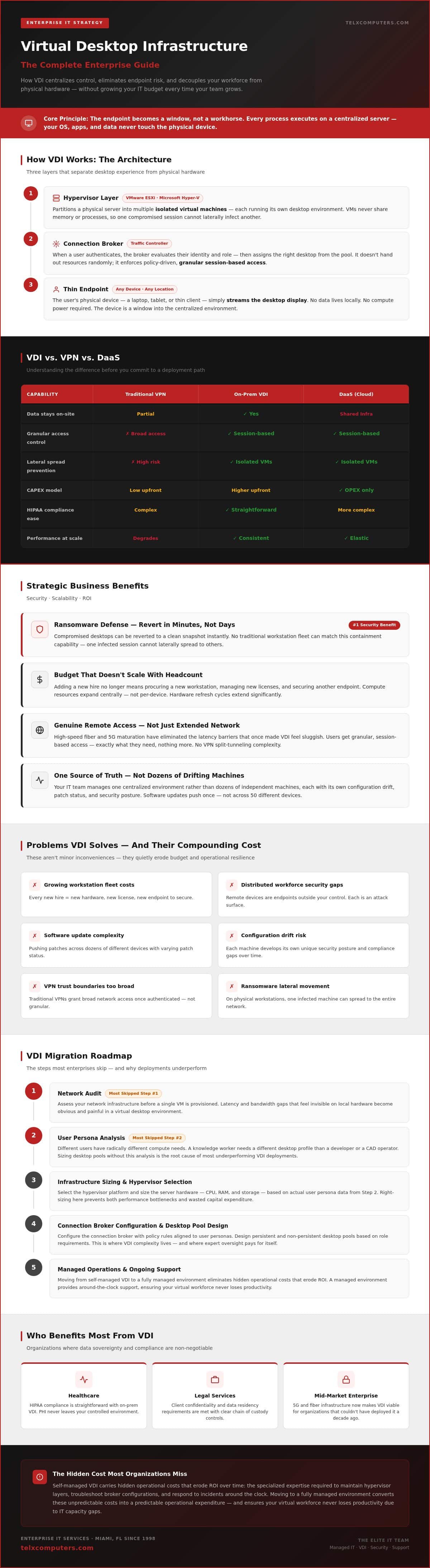
At its core, virtual desktop infrastructure is the strategic consolidation of compute resources into a secure, manageable hub, separating the desktop environment entirely from the physical device a user holds in their hands. Instead of running applications and storing data locally on a workstation, every process executes on a centralized server. The endpoint becomes a window, not a workhorse.
This architectural shift has profound implications. When the operating system, applications, and data all live in a controlled server environment, your IT team manages one source of truth rather than dozens of independent machines, each with its own configuration drift, patch status, and security posture. That’s not just operationally cleaner; it’s a fundamentally different risk profile.
The Evolution of the Virtual Workspace
VDI wasn’t always accessible to organizations outside the Fortune 500. For years, the infrastructure costs and the specialized expertise required kept it firmly in the enterprise tier. That’s changed. High-speed fiber and the widespread maturation of 5G connectivity have eliminated the latency barriers that once made virtual desktops feel sluggish, making the experience genuinely comparable to a local machine for most business workloads. Mid-market organizations now have the network infrastructure to support VDI deployments that simply weren’t viable a decade ago.
Traditional VPNs were designed to extend a corporate network, not replace the corporate office. They’re inherently trust-heavy, often granting broad network access once a user authenticates. Today’s distributed workforce demands something more precise: granular, session-based access where the user gets exactly what they need and nothing more. VDI delivers that control natively, without the performance degradation and complex split-tunneling configurations that VPN-dependent architectures require.
A hypervisor sits at the center of this model. Software like VMware ESXi or Microsoft Hyper-V partitions a physical server into multiple isolated virtual machines, each running its own desktop environment. Critically, those VMs don’t share memory or processes. One compromised session cannot laterally infect another, which is a containment capability that no traditional workstation fleet can match.
VDI vs. Desktop as a Service (DaaS): Key Differences
The distinction matters more than most organizations realize before they’ve committed to a deployment path. On-premises or private cloud VDI keeps your infrastructure under your direct control; your team manages the hypervisor, the storage, and the connection broker. DaaS offloads that responsibility to a third-party provider, shifting your spending from capital expenditure to a predictable operational expenditure model.
For regulated industries, including healthcare and legal services, data sovereignty is often the deciding factor. On-premises VDI keeps sensitive data within your physical environment, making compliance with frameworks like HIPAA demonstrably straightforward. DaaS providers have made significant strides in compliance certifications, but the audit trail and chain of custody for data remain more complex when infrastructure is shared. If your organization operates under strict data residency requirements, a managed IT approach that combines private VDI with expert oversight typically provides the cleaner compliance posture.
The Technical Architecture: How VDI Delivers Enterprise-Grade Performance
Understanding why virtual desktop infrastructure performs the way it does requires looking past the hypervisor layer covered earlier and into the components that directly govern user experience. The hypervisor creates the virtual machines; what happens next determines whether those machines feel fast or frustrating.
The connection broker is the traffic controller of your VDI environment. When a user authenticates, the broker doesn’t simply hand them a desktop at random. It evaluates their identity, their role-based access policy, and the current load across your server pool, then routes them to the most appropriate available session. This happens in seconds. For IT administrators, the broker is also the enforcement point for session policies: idle timeouts, resource caps, and application entitlements all flow through it. Without a well-configured broker, even a generously resourced VDI deployment will produce inconsistent experiences.
Desktop pools extend that logic across your workforce. Rather than provisioning desktops individually, IT teams create standardized templates and deploy them at scale. A pool for your finance team carries the approved accounting applications and data access permissions. A pool for remote contractors gets a stripped-down environment with tighter restrictions. Managing one template is exponentially simpler than managing forty individual machines, and it eliminates the configuration drift that quietly creates security gaps in traditional workstation fleets.
Display protocol selection is where performance becomes tangible. Protocols like PCoIP and Blast Extreme don’t simply stream a video feed of the desktop. They intelligently prioritize what the user is actively looking at, compressing and transmitting only what’s changed on screen rather than the full frame. On a high-latency connection, this adaptive compression is the difference between a session that feels local and one that feels like a slideshow. Blast Extreme adds the advantage of UDP transport, which handles packet loss more gracefully than TCP-based alternatives, making it particularly effective for distributed teams working across variable network conditions.
Storage architecture is the variable most organizations underestimate. During morning login windows, dozens or hundreds of users simultaneously boot their virtual desktops, pulling operating system files from the same storage infrastructure. On spinning-disk or even standard SSD arrays, this creates a “boot storm” that degrades performance for everyone. NVMe storage, with its dramatically lower access latency, absorbs that concurrent I/O demand without the bottleneck. It’s a targeted infrastructure investment that pays for itself in user satisfaction alone.
Persistent vs. Non-Persistent VDI: Choosing Your Model
The choice between persistent and non-persistent desktops isn’t a technical preference; it’s a workforce design decision. Persistent VDI assigns each user a dedicated virtual machine that retains their settings, locally installed tools, and saved files between sessions. It mirrors the experience of a personal workstation, which makes it the right fit for developers, designers, or any role where a highly customized environment is part of how the work gets done.
Non-persistent desktops take the opposite approach. Every session starts from a clean, standardized image, and nothing persists after logoff. For administrative staff, call center teams, or any role defined by structured, repeatable tasks, this model is operationally superior. Patching is instant because you update one master image, not hundreds of individual machines. Security is structurally stronger because there’s no accumulated user data or installed software to become an attack surface.
- Persistent VDI: Best for power users, developers, and roles requiring deep application customization or local data persistence.
- Non-persistent VDI: Best for task-based roles, high-turnover positions, and environments where security and patch consistency are the priority.
- Hybrid approaches: Many enterprises deploy both models simultaneously, segmented by department, using desktop pools to manage each group independently.
The Critical Role of Server Monitoring
A VDI environment is only as stable as the servers running beneath it. One user running a memory-intensive process can degrade performance across an entire desktop pool if resource contention goes undetected. Real-time server monitoring gives IT teams the visibility to catch that contention before it becomes a complaint, identifying which sessions are consuming disproportionate resources and rebalancing the load proactively. Automated scaling takes this further, spinning up additional server resources during peak demand windows and scaling back during off-hours, so your infrastructure matches your workforce’s actual usage patterns rather than being sized for a worst-case scenario that only occurs two hours a day.
Strategic Business Benefits: Security, Scalability, and ROI
The architecture described in the previous sections isn’t just technically elegant; it translates directly into business outcomes that your CFO, compliance officer, and security team will all care about. Centralized compute means centralized control, and centralized control is where real enterprise risk reduction lives.
When sensitive data never leaves the data center, the attack surface shrinks dramatically. A lost laptop becomes an inconvenience rather than a reportable breach. An employee working from a hotel lobby isn’t carrying your client records on a local drive; they’re accessing a session that exists entirely within your controlled environment. The endpoint is disposable. The data isn’t.
Ransomware is where this architectural advantage becomes most concrete. Traditional workstation environments force IT teams into a painful triage process after an infection: isolate the machine, wipe it, rebuild from backup, restore data, and hope the recovery is complete. With virtual desktop infrastructure, that entire process compresses into minutes. A compromised virtual desktop gets reverted to a clean snapshot. The user logs back in. Work resumes. Effective ransomware protection isn’t just about prevention; it’s about minimizing dwell time and recovery cost when prevention isn’t enough, and VDI’s snapshot capability is one of the most underutilized tools in that fight.
Compliance audits tell a similar story. For healthcare organizations navigating HIPAA requirements, demonstrating that patient data never resided on an unmanaged endpoint is a powerful audit defense. Law firms face comparable pressure around client confidentiality and data handling. Centralized management means a single, auditable environment rather than dozens of individual machines with inconsistent configurations. When an auditor asks where your data lives and who has access to it, the answer is precise and provable.
Hardware lifecycle extension adds a financial dimension that compounds over time. Thin clients and older laptops that would otherwise be retired can serve as capable access points to powerful virtual machines. You’re no longer buying a new workstation every three to four years; you’re buying a browser-capable device that connects to centrally managed compute. Software licensing and updates are centralized as well, eliminating the per-device sprawl that inflates total cost of ownership across large teams.
Scaling Your Workforce Without the Hardware Headache
Onboarding a new contractor in a traditional environment involves ordering hardware, imaging a device, shipping it, and waiting. With VDI, provisioning access is a configuration task, not a logistics operation. A new team member can be working in a fully configured, policy-compliant desktop environment within the same business day. When the engagement ends, access is revoked instantly, with no device to retrieve and no data to scrub from a returned laptop.
That same logic applies to distributed teams. Whether you’re expanding into a new market or absorbing a remote workforce, VDI scales horizontally without requiring proportional hardware investment. Centralizing software licensing and updates through a single managed environment further reduces TCO by eliminating redundant per-device license fees and the labor cost of pushing updates across a fragmented fleet.
Disaster Recovery and Business Continuity
Local disruptions don’t have to mean operational paralysis. For businesses with offices in Miami, New York, or Los Angeles, a building outage, a weather event, or a network failure at a single location doesn’t interrupt work when sessions exist in a centralized environment. Employees pick up from a different device, in a different location, and the session resumes exactly where it left off.
This capability integrates directly with broader data backup and disaster recovery planning. Virtual machine snapshots serve as recovery points, and because the entire desktop state is captured at the infrastructure level, recovery is consistent and verifiable rather than dependent on individual users having backed up their own machines. That consistency is what transforms a disaster recovery plan from a document into a dependable operational safeguard.
A Roadmap for VDI Implementation and Migration
Most virtual desktop infrastructure deployments don’t fail because of the technology. They fail because the groundwork was rushed. A structured, phased approach is what separates a deployment that delivers on its promise from one that generates help desk tickets and user frustration from day one.
The five-step framework below reflects what a disciplined implementation actually looks like, from initial assessment through continuous optimization.
- Step 1: Network audit. Before a single virtual machine is provisioned, your network infrastructure needs a thorough assessment. Bandwidth capacity, latency thresholds, and packet loss rates all determine whether your VDI sessions will feel responsive or sluggish. This isn’t a box-checking exercise; it’s the diagnostic that shapes every infrastructure decision that follows.
- Step 2: User persona analysis. Not every employee needs the same compute resources. A data analyst running complex queries has fundamentally different CPU, RAM, and GPU requirements than a customer service representative working in a browser-based CRM. Mapping your workforce into defined personas prevents both over-provisioning (wasted budget) and under-provisioning (frustrated users).
- Step 3: Deployment model selection. Private cloud keeps sensitive data within your controlled environment, which matters enormously for regulated industries. Public cloud offers elasticity and reduced capital expenditure. Hybrid models let organizations place workloads where they make the most sense operationally and financially. The right answer depends on your compliance posture, your existing infrastructure, and your long-term growth trajectory.
- Step 4: Pilot testing. A controlled pilot with a representative cross-section of users, typically 10 to 20 people spanning different roles and locations, surfaces application compatibility issues, image performance gaps, and user experience friction before they scale into organization-wide problems. Treat the pilot as a diagnostic, not a formality.
- Step 5: Phased rollout and optimization. Deploy by department or user group, not all at once. Collect performance metrics and user feedback at each phase, then refine your desktop images, resource allocations, and session policies before expanding further. Optimization is ongoing, not a one-time event.
Assessing Network Infrastructure
Your network is the circulatory system of a VDI environment. If it’s congested or unreliable, no amount of server hardware will compensate. Professional network IT support provides the structured assessment that most internal teams don’t have the bandwidth to perform themselves, identifying latency bottlenecks and capacity gaps before they become deployment blockers.
Bandwidth requirements vary significantly by workload type. A task-based user in a standard office application environment typically requires between 150 and 200 Kbps per session under normal conditions. Media-rich workflows or video-heavy applications can demand considerably more. Calculating these requirements per persona, rather than using a single organization-wide estimate, gives your infrastructure sizing far more precision.
For organizations with distributed offices, SD-WAN is worth serious consideration. It prioritizes VDI display protocol traffic over less time-sensitive data, reducing the latency variability that makes remote sessions feel inconsistent. For teams in regional offices connecting to a centralized data center, SD-WAN can meaningfully close the performance gap between on-site and remote users.
Overcoming Common Implementation Challenges
Technology is rarely the hardest part of a VDI migration. People and legacy systems are. User resistance tends to stem from unfamiliarity rather than genuine objection; structured change management, including role-specific training and clear communication about what’s changing and why, dramatically reduces friction during the transition period.
Legacy applications present a more technical challenge. Software that was built for a specific local hardware configuration, or that relies on direct device access for licensing, may not behave predictably in a virtualized environment. Application compatibility testing during the pilot phase is where these issues surface, giving your team time to implement compatibility layers or application streaming solutions before the broader rollout is affected.
Peripheral compatibility deserves its own attention. Printers, scanners, and specialized hardware like signature pads or barcode readers often require specific USB redirection configurations to function correctly within a virtual session. Identifying these dependencies early, and testing them explicitly during the pilot, prevents the kind of day-one disruptions that erode user confidence in the new environment.
Organizations in Miami, New York, and Los Angeles also face a regional dimension that generic implementation guides consistently overlook: local compliance requirements, building infrastructure constraints, and the availability of on-site technical support when remote troubleshooting isn’t sufficient. A managed IT partner with physical presence in your market can bridge that gap in ways a cloud-only vendor simply can’t. Explore how IT outsourcing services can support your VDI rollout with the local expertise and proactive oversight your deployment deserves.
Securing Your Virtual Future with Telx Managed IT Services
Building a virtual desktop infrastructure is one decision. Keeping it running at peak performance, around the clock, across every user, every timezone, and every edge case that your workforce throws at it, is an entirely different discipline. Most organizations discover this gap only after they’ve gone live, when the help desk tickets start accumulating and the internal IT team that designed the deployment is now buried in day-to-day support requests it was never resourced to handle.
That’s the hidden cost of self-managed VDI: the infrastructure works, but the operational burden quietly consumes the ROI you built the business case around. Telx Computers closes that gap by taking full ownership of your virtual environment, from proactive server monitoring to end-user support, under a fixed-price unlimited managed IT support service that turns an unpredictable operational expense into a line item your CFO can plan around.
24/7 help desk coverage means your virtual desktop users get responsive support whether they’re logging in at 7 AM in Miami or troubleshooting a session issue at 11 PM from a client site in Los Angeles. That consistency matters. A remote employee who can’t access their virtual desktop at a critical moment doesn’t care that it’s outside business hours; they care that the problem gets solved. Telx’s support model is built around that reality, not around a Monday-through-Friday service window.
The Partner-Oriented Approach to Virtualization
Telx doesn’t hand you a deployment and step back. The approach is genuinely collaborative: your infrastructure is treated with the same urgency and attention as if it were our own. That means proactive monitoring catches resource contention before it degrades a session, not after a user complains. It means strategic IT consulting aligns your VDI architecture with where your business is actually heading, not just where it was when the project kicked off. Physical presence in Miami, Fort Lauderdale, New York, and Los Angeles also means that hybrid hardware needs, the edge cases no remote-only vendor can address, get rapid on-site response from a team that knows your environment. Every managed transition is backed by Telx’s 100% satisfaction guarantee, so your confidence in the process isn’t based on a sales promise; it’s contractually grounded.
Getting Started: Your Custom VDI Assessment
A Telx technology audit begins with the specifics of your environment: your current network infrastructure, your user personas, your compliance requirements, and your growth trajectory. Nothing is templated. Whether you’re a professional services firm in Aventura evaluating a first-time VDI deployment or a multi-office operation in Los Angeles looking to consolidate a fragmented virtual environment, the feasibility study is built around your operational reality, not a generic checklist.
The outcome isn’t a vendor pitch. It’s a clear, actionable picture of what your virtual desktop infrastructure should look like, what it will cost to run predictably, and where the highest-impact improvements are. From there, the path forward is yours to define. Request an instant quote for your VDI transformation and take the first concrete step toward a virtual environment that performs as well as it was designed to.
Your Workforce Deserves Infrastructure That Keeps Up
Virtual desktop infrastructure isn’t a future-state technology; it’s the operational foundation that modern enterprises are building on right now. Throughout this guide, we’ve covered what makes VDI architecturally sound, how it fundamentally changes your security posture, and what a disciplined migration actually requires. The common thread is control: over your data, your costs, and your workforce’s ability to stay productive regardless of where they’re working from.
What separates organizations that realize that potential from those that don’t is rarely the technology itself. It’s the expertise managing it day after day. That’s where 24/7 proactive monitoring, fixed-price unlimited IT service plans, and local expertise in Miami, New York, and Los Angeles make a measurable difference. You get a virtual environment that performs consistently, not just at launch.
The next step doesn’t have to be complicated. Secure your workforce with a custom VDI strategy from Telx Computers and get a clear, actionable plan built around your specific environment. Your most resilient, cost-efficient infrastructure is closer than you think.
Frequently Asked Questions About Virtual Desktop Infrastructure
What is the main difference between VDI and a VPN?
A VPN extends your corporate network to a remote device, meaning the actual computing still happens on the user’s local machine. Virtual desktop infrastructure is fundamentally different: the computing happens on a centralized server, and the endpoint only displays the result. Your data never touches the user’s device at all. That distinction is the source of VDI’s security advantage; a VPN authenticates a user and then trusts their machine, while VDI keeps everything inside your controlled environment regardless of what device is being used.
Does virtual desktop infrastructure require a constant internet connection?
Yes, an active connection is required to maintain a live session, since processing happens server-side rather than locally. That said, brief interruptions don’t necessarily mean lost work; most modern display protocols will attempt to reconnect and resume the session automatically. The practical implication is that network reliability matters more in a VDI environment than in a traditional setup, which is why a thorough bandwidth and latency assessment before deployment isn’t optional; it’s foundational to the entire rollout.
Can VDI handle resource-intensive applications like CAD or video editing?
It can, but it requires deliberate infrastructure planning. GPU-accelerated virtual machines, using technologies like NVIDIA vGPU, allow graphics-intensive workloads to run in a virtualized environment without the performance degradation you’d expect from a standard VM. The key is accurate user persona analysis before deployment. A designer or engineer needs a very different resource allocation than a task-based office user, and provisioning both groups from the same desktop pool template is a configuration mistake that produces frustration rather than savings.
How does VDI improve my company’s cybersecurity posture?
Virtual desktop infrastructure removes data from the endpoint entirely, which eliminates the most common vector for data loss: the physical device. Beyond that, non-persistent desktops reset to a clean image after every session, giving malware no surface to persist on between logins. Compromised sessions can be reverted to a clean snapshot in minutes rather than requiring a full machine rebuild. For organizations facing ransomware risk specifically, that recovery speed is one of the most consequential security capabilities available.
Is VDI more cost-effective than buying new laptops for every employee?
Over a multi-year horizon, yes, for most enterprise deployments. The upfront infrastructure investment is real, but existing thin clients and older devices can serve as access points instead of being replaced on a three-to-four-year hardware cycle. Software licensing and patch management are centralized, which eliminates per-device sprawl and the labor cost of managing a fragmented fleet. Pairing VDI with a fixed-price managed IT plan converts what was an unpredictable capital expenditure cycle into a predictable operational line item, which is where the budgeting clarity becomes most tangible.
What happens to my data if an end-user’s physical device is stolen?
Nothing is lost, because nothing was stored there. In a properly configured virtual desktop environment, data lives on the server, not on the endpoint. A stolen laptop is an inconvenience, not a breach. IT can revoke session access immediately, and the device itself contains no recoverable company data. This is one of the clearest practical demonstrations of why the endpoint being a “window rather than a workhorse” matters; the value isn’t in the glass, it’s in what’s on the other side of it.
Can I use my existing hardware to access a virtual desktop?
In most cases, yes. Any device capable of running a modern web browser or a lightweight client application can connect to a virtual desktop session, including older laptops, thin clients, and tablets that would otherwise be retired. The compute demands on the local device are minimal because the heavy lifting happens server-side. This is one of the more immediate cost advantages: hardware that no longer meets the specs for modern software can be extended significantly in useful life as a VDI access point.
How long does a typical VDI migration take for a mid-sized business?
A realistic timeline for a mid-sized organization runs between eight and sixteen weeks from initial assessment to full deployment, though that range depends heavily on workforce complexity, application compatibility requirements, and how much legacy infrastructure needs to be addressed first. The structured approach matters: network auditing, user persona mapping, and a controlled pilot phase each add time upfront but prevent the kind of post-launch disruptions that extend the overall project far longer. Organizations that compress or skip those early phases consistently see longer total timelines, not shorter ones.