





31 Aug Strategic Benefits of Cloud Computing for Small Business Growth
If you view your server room as the backbone of your office, you’re likely anchoring your company to depreciating hardware and rising maintenance costs. It’s frustrating to watch your internal team waste valuable hours on routine troubleshooting while IT budgets spiral out of control. You want to focus on expansion, yet the fear of ransomware or an inability to scale for new projects keeps you stuck in a reactive loop. Understanding the strategic benefits of cloud computing for small business allows you to break this cycle and transform your technology from a cumbersome cost center into a streamlined growth engine.
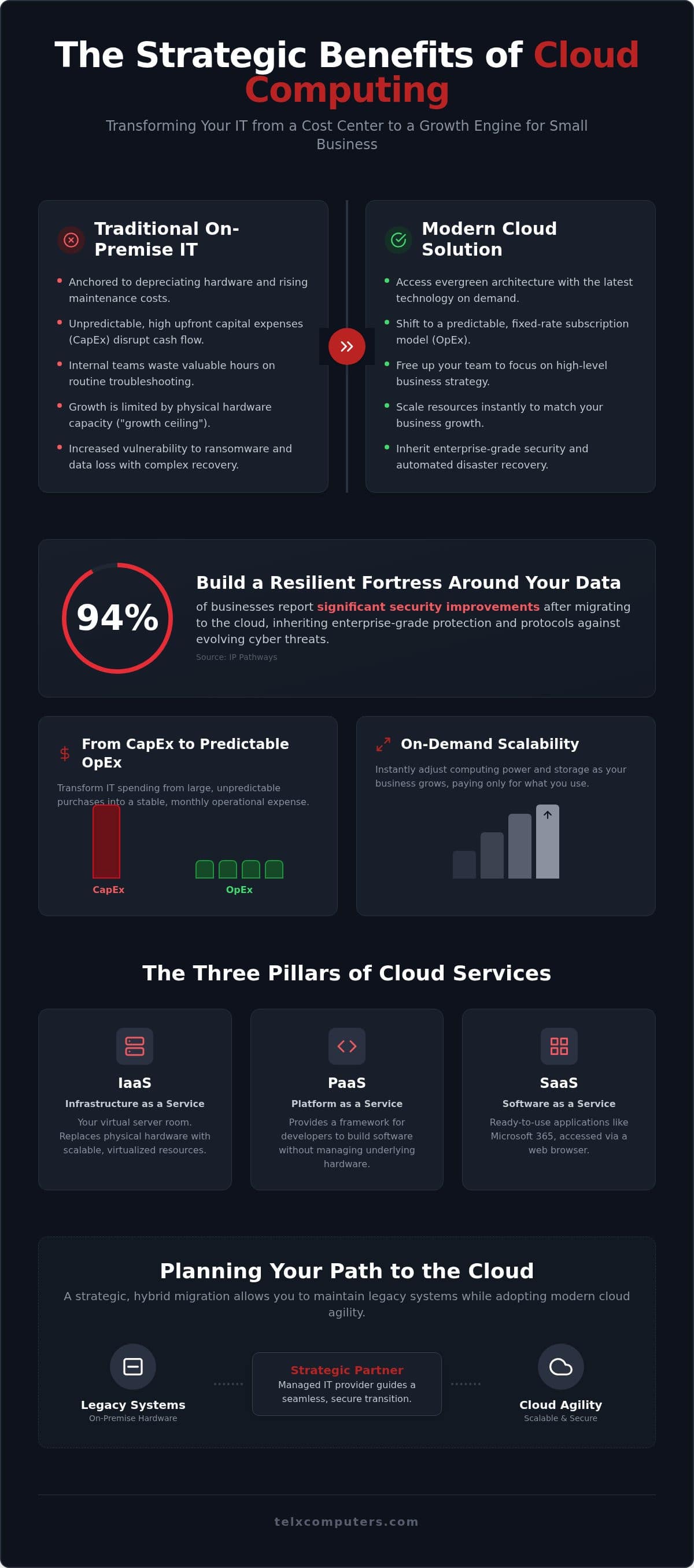
We’re here to help you navigate this transition with professional confidence. Research from IP Pathways indicates that 94% of businesses report significant security improvements after migrating to the cloud; this shift is about building a resilient fortress around your data. You deserve the peace of mind that comes with enterprise-grade protection and a technology stack that scales as fast as your ambitions.
This article provides a roadmap for achieving predictable monthly spending and accessing high-level tech on a modest budget. We’ll examine how to eliminate high upfront costs, implement bulletproof disaster recovery, and empower your team to work securely from any location. It’s time to turn your IT into a silent engine for your long-term success.
Key Takeaways
- Learn how to shift from unpredictable capital expenses to a fixed-rate subscription model to stabilize your operational budget.
- Understand the specific benefits of cloud computing for small business that allow for instant resource scaling as your company grows.
- Inherit enterprise-grade security protocols and automated disaster recovery to protect your assets from evolving cyber threats.
- Identify the advantages of a strategic, hybrid migration approach to maintain legacy systems while adopting modern cloud agility.
- See how a local managed IT partner acts as a silent engine for your success through personalized support and rapid response.
Breaking the Cycle: Why Cloud Computing is Essential for Small Business
Cloud computing is the on-demand delivery of compute power, database storage, and applications over the internet. It represents a fundamental shift from housing heavy, heat-generating servers in a closet to utilizing professionally managed, hosted environments. This transition is a cornerstone in realizing the benefits of cloud computing for small business, as it moves the burden of physical maintenance away from your internal team. You shouldn’t have to worry about hardware failure when you’re trying to close a deal.
Think of your IT partner as an expert guardian. By allowing professionals to manage the underlying technical pipes, you reclaim the mental space needed to focus on high-level business strategy. You don’t need to be a hardware specialist to run a successful company. You simply need reliable access to the tools that drive your revenue. Professional it outsourcing services ensure your foundation is secure while you build your future.
To better understand this concept, watch this helpful video:
Moving Beyond the ‘Feast or Famine’ IT Model
Traditional IT often forces small businesses into a feast or famine cycle. You buy a massive server to handle peak loads, but for most of the year, that expensive hardware sits idle. It depreciates every second. When it breaks, you’re hit with a surprise repair bill that disrupts your cash flow. This technical debt in aging server rooms creates a glass ceiling for growth. One of the primary benefits of cloud computing for small business is the ability to pay only for what you use, effectively leveling the playing field with global enterprises.
Defining the Three Pillars: SaaS, PaaS, and IaaS
Understanding the cloud requires a quick look at its three primary service models. Each offers a different level of control and management. Software as a Service (SaaS) is the most common layer. It includes applications like Microsoft 365 that you access via a browser. Infrastructure as a Service (IaaS) serves as your virtual server room, replacing physical hardware with scalable, virtualized resources. Finally, Platform as a Service (PaaS) provides a framework for businesses that develop their own proprietary software or tools without the headache of managing underlying hardware.
Maximizing Efficiency: Scalability and Cost-Effectiveness
Traditional hardware procurement is a gamble. You’re betting that the equipment you buy today will still be relevant and functional in three years. Most small businesses find themselves trapped in a cycle of heavy upfront costs followed by rapid obsolescence. One of the strategic benefits of cloud computing for small business is the move toward an evergreen architecture. You always have access to the latest processing power and software versions without ever having to unbox a new server or worry about a motherboard failing at midnight.
Shifting from CapEx to Predictable OpEx Models
For a non-financial CEO, the difference between CapEx and OpEx is the difference between a hurdle and a runway. Capital Expenditure (CapEx) involves spending large sums on physical assets like servers and cooling systems. This ties up cash that could be used for marketing or hiring. Operational expenditure is a tool for financial agility. It allows you to pay a monthly subscription for the resources you actually use. By utilizing a Managed IT Support Service, you transform your IT from a series of surprise bills into a predictable, fixed-rate line item. This stability allows you to forecast your growth with clinical precision.
On-Demand Scalability: Breaking the Growth Ceiling
Growth shouldn’t be limited by the number of ports on a router or the storage capacity of a hard drive. In a traditional setup, adding ten new employees might mean a week of hardware installation and thousands in costs. With the cloud, it’s often as simple as clicking a button to provision new virtual desktops. Understanding how cloud technology helps businesses scale is essential for any leader looking to stay competitive. It provides the same technological muscle used by Fortune 500 companies at a fraction of the price.
This concept of elasticity is one of the most significant benefits of cloud computing for small business. It doesn’t just mean scaling up. It means scaling down during seasonal lulls to preserve your capital. This flexibility ensures your technology spend always matches your current revenue. Cloud readiness also prepares your organization for future innovations like AI and advanced automation. You can integrate these tools into your existing workflow without a massive infrastructure overhaul. If you’re ready to see how this fits your specific needs, you can get an instant quote to start your transition with a partner who understands your local market.
Protecting Your Assets: Enterprise-Grade Security and Continuity
Many business owners mistakenly believe that keeping data on a physical server in their office is safer than storing it in the cloud. In reality, an office closet is vulnerable to theft, physical damage, and simple human error. One of the primary benefits of cloud computing for small business is the immediate access to security infrastructure that would otherwise be cost-prohibitive. You’re no longer relying on a single firewall; you’re leveraging the collective defense of global tech leaders who invest billions into their platforms.
Inheriting Multi-Billion Dollar Security Defenses
When you migrate to the cloud, you essentially inherit the massive security budgets of the world’s largest infrastructure providers. These platforms offer automated security updates and real-time threat monitoring that work around the clock. Your data is protected by sophisticated encryption both at rest and while in transit. To ensure these defenses remain impenetrable, regular Cybersecurity Audits validate your safety protocols and identify potential gaps before they can be exploited. This level of vigilance is nearly impossible to maintain with a small, on-site IT team.
Security in the cloud is a shared responsibility. While the provider secures the underlying infrastructure, you must secure your specific access points. Implementing multi-factor authentication (MFA) is a non-negotiable step in this process. MFA adds a critical layer of defense, ensuring that even if a password is stolen, your systems remain locked. This proactive approach is a cornerstone of modern Ransomware Protection, as it prevents the unauthorized access that precedes most data-locking attacks.
Resilience in South Florida: Cloud-Based Disaster Recovery
For businesses in Miami, Fort Lauderdale, and Aventura, the cloud isn’t just about efficiency; it’s about survival. Our region faces unique environmental risks including hurricanes, flash flooding, and power grid instability. If your primary server is sitting on a floor that floods, your business stops instantly. Traditional tape backups are slow, prone to failure, and often stored in the same vulnerable building as the server itself. This creates a single point of failure that can be catastrophic.
Cloud-based disaster recovery changes the math. Because your data and applications live in geographically dispersed data centers, your business continues even if your physical office is inaccessible. You can send your team home to work safely while maintaining full operational capacity. This shift from physical hardware to virtual resilience is one of the most vital benefits of cloud computing for small business in South Florida. It replaces technical anxiety with a bulletproof plan for continuity, ensuring you’re one step ahead of the next storm.
Strategic Migration: Planning Your Path to the Cloud
Migration is far more than a simple file transfer; it’s a strategic evolution of your entire business model. Moving from an on-premise environment to a hosted one allows you to shed technical debt and transition into a high-performance growth engine. You shouldn’t treat this transition as a weekend project or a minor update. One of the most overlooked benefits of cloud computing for small business is how a structured migration can actually optimize your existing workflows and eliminate legacy bottlenecks.
Success starts with choosing the right “flavor” of cloud architecture. Public clouds offer massive scalability and cost savings, while private clouds provide dedicated environments for highly sensitive data. Most local firms find the best balance in a hybrid approach. This allows you to keep legacy software on-site while moving modern, resource-heavy applications to the cloud. Engaging with professional it consulting early in the process helps you avoid common pitfalls like over-provisioning resources or creating security gaps during the move.
Assessing Your Current Infrastructure and Readiness
The “audit” phase is the foundation of your roadmap. We help you identify which applications are cloud-ready and which should remain on-premise to maintain performance. You must also evaluate your current bandwidth. A smooth remote work experience depends on having enough upload and download speed to handle cloud-based traffic without lag. Finally, we provide a rigorous checklist to evaluate data sensitivity. This ensures your migration plan adheres to industry-specific compliance standards like HIPAA or PCI DSS from day one.
Minimizing Downtime During System Transitions
We typically employ two main strategies: “lift and shift” or “refactoring.” Lift and shift is a fast way to move existing applications as they are, while refactoring involves optimizing software to take full advantage of cloud features. To protect your productivity, Telx manages these transitions after-hours. This proactive scheduling ensures your team arrives at work to a fully functional system without missing a single billable hour. A seamless migration is a carefully orchestrated transition where your systems move to the cloud with zero data loss and absolute integrity.
If you’re ready to stop managing hardware and start scaling your operations, our team is here to guide you. Contact us today for a comprehensive business it services miami consultation to build your custom migration roadmap.
The Telx Advantage: Managed Cloud as Your Strategic Partner
Telx Computers acts as the silent engine behind your operational success. We don’t merely provide technology; we function as a strategic ally that integrates seamlessly with your existing team. One of the most valuable benefits of cloud computing for small business is the liberation of your internal talent. When we manage the complexities of your cloud infrastructure, your staff can pivot away from routine maintenance and focus on high-value strategic work that directly impacts your bottom line. Since 2002, we’ve helped organizations replace technical anxiety with a sense of stability and proactive growth.
Our role as an expert guardian means we’re always one step ahead of potential threats. We provide 24/7 help desk support to ensure your team remains productive regardless of the hour. By offloading your server monitoring and network security to us, you gain the technological edge of a large-scale enterprise while maintaining the personalized, client-centric focus of a local partner. This collaboration is backed by our guarantee of unlimited service, ensuring you always have the support you need without fear of mounting costs.
Fixed-Price Managed Cloud: Eliminating Hidden Costs
Traditional IT support often relies on a “per-hour” billing model that creates a conflict of interest. The longer a problem takes to solve, the more you pay. We’ve eliminated this friction by offering a flat-fee model. This approach provides total transparency regarding your monthly managed IT service fees, allowing for predictable budgeting and long-term financial planning. You can finally exit the CapEx roller coaster and treat your technology as a scalable, predictable utility. This financial agility is a cornerstone of the benefits of cloud computing for small business, turning what was once a volatile cost center into a stable engine for expansion.
Partnering with a Local Expert Guardian in Miami
While the cloud is global, your business is local. A physical presence in Miami, Fort Lauderdale, and Aventura allows us to provide rapid on-site response when hybrid cloud setups require hands-on attention. We understand the specific regulatory and operational needs of South Florida’s core industries. We provide specialized, compliant solutions for law firms and healthcare providers who cannot afford downtime or data breaches. This localized focus ensures that your global technical standards are matched with a commitment to our regional business community. If you’re ready to secure your company’s future, you can get an instant quote today to begin your transition with a partner you can trust.
Scaling Your Future with Confidence
Embracing a hosted environment is no longer just a technical upgrade; it’s a strategic necessity for sustainable growth. By shifting from unpredictable capital expenses to a stabilized operational model, you gain the financial agility to outpace your competition. You’ve seen how the benefits of cloud computing for small business extend far beyond simple storage, offering enterprise-grade security and a resilient disaster recovery plan that protects your assets against regional threats. This transition allows you to shed technical debt and focus entirely on your core mission.
At Telx Computers, we act as your expert guardian, providing 24/7 proactive server monitoring and fixed-price unlimited IT support. Our localized teams in Miami, Fort Lauderdale, and NYC ensure you have rapid, personalized assistance whenever you need it. You deserve a technology stack that works as hard as you do. Get your instant quote and start your cloud journey today to transform your IT into a silent engine for success. Your path to a more secure and scalable future starts with a single strategic step. We’re ready to help you lead the way.
Frequently Asked Questions
Is cloud computing safe for sensitive business data?
Cloud computing provides superior protection compared to traditional on-premise servers. Your data is protected by multi-billion dollar security infrastructures, automated updates, and real-time monitoring. We utilize advanced encryption for data at rest and in transit. One of the key benefits of cloud computing for small business is the inheritance of these defenses, which are validated through regular cybersecurity audits to ensure your sensitive information remains impenetrable from external threats.
How much does it cost to move a small business to the cloud?
Costs vary based on your specific resource consumption, user seats, and data storage requirements. While we don’t provide generic price figures, our model focuses on fixed-rate monthly plans to ensure your IT budget remains predictable. This approach eliminates the surprise expenses associated with hardware failure and maintenance. You can shift from a capital-heavy model to a manageable operational expense that aligns with your company’s current growth phase and technical needs.
Can I access my cloud files without an internet connection?
You generally need an active internet connection to access live cloud files. However, many cloud platforms offer offline synchronization features that allow you to work on documents without a signal. Once you reconnect, your changes sync automatically to the central server. This ensures your team stays productive during travel or temporary outages, though a stable connection is required for real-time collaboration and accessing the full suite of hosted cloud resources.
What happens to my data if there is a hurricane or power outage in Miami?
Your data remains safe and accessible even if your Miami or Fort Lauderdale office loses power. Since your information lives in geographically dispersed, high-security data centers, a local hurricane won’t result in data loss. This is a critical advantage for South Florida firms. Your team can work securely from any location with an internet connection, ensuring your business continues to operate while your physical office recovers from the storm.
Do I still need an internal IT person if we move to the cloud?
Many small businesses find they no longer need a dedicated internal IT person for routine maintenance after migrating. Your cloud partner handles the heavy lifting of server monitoring and infrastructure management. This allows your internal staff to pivot toward high-value strategic projects that drive revenue. Alternatively, you can outsource your entire technology department to us, gaining access to a full team of experts for a single, predictable monthly fee.
What is the difference between public, private, and hybrid clouds?
Public clouds share infrastructure across multiple organizations to maximize cost-efficiency. Private clouds provide a dedicated environment for a single business, offering the highest level of control and security. A hybrid cloud combines both, allowing you to keep sensitive legacy data on a private server while using the public cloud for scalable applications. We help you choose the right configuration based on your specific operational needs and regional compliance requirements.
How long does a typical cloud migration take for a small business?
A typical migration timeline depends on the complexity of your data and the number of users involved. Smaller transitions might take a few weeks, while complex enterprise moves can span several months. We prioritize minimizing downtime by managing these transitions after-hours. A structured audit phase ensures we identify potential roadblocks early, allowing for a seamless migration that protects your daily productivity and ensures zero data loss during the system shift.
Will my existing software work in a cloud environment?
Most modern applications are fully compatible with cloud environments. If you use specialized legacy software, we can often host it within a virtual desktop infrastructure to maintain its functionality. This is one of the practical benefits of cloud computing for small business; it doesn’t always require a total software overhaul. We evaluate your current tools during the consulting phase to determine if they need a simple lift and shift or more detailed optimization.