





29 Oct IT Support for Property Management in South Florida
A property portfolio is only as dependable as the technology connecting each site. IT support for property management in South Florida helps businesses maintain reliable Wi-Fi, consistent operations across properties, stronger security, and dependable backups through coordinated, proactive IT management.
That matters when staff rely on property management platforms, connected devices, and timely communication to keep daily work moving. Inconsistent systems or outages that interrupt access can make routine tasks harder across multiple locations.
This article explains how managed IT supports property teams, from standardizing networks and protecting accounts to planning backups and recovery. It also covers what to consider when choosing support, how technology needs vary by property, and when a managed IT partner can help build a more reliable foundation for operations.
Key Takeaways
- Create consistent technology standards across properties and document the systems teams rely on to keep daily operations connected.
- Strengthen account and device security with safeguards such as multifactor authentication, least-privilege access, and clear backup and restore expectations.
- Compare in-house and outsourced IT by weighing the expertise, coverage, coordination, and oversight your portfolio needs.
- When technology support needs to span properties, Telx Computers can help through managed IT services, network security, cloud computing, and help desk support.
Multi-property standards and operational continuity
Property teams need connected systems that work consistently across offices, buildings, and tenant interactions. A shared network plan helps staff manage rent collection, maintenance requests, and property information through clear, consistent processes.
Consistent Standards Across Properties
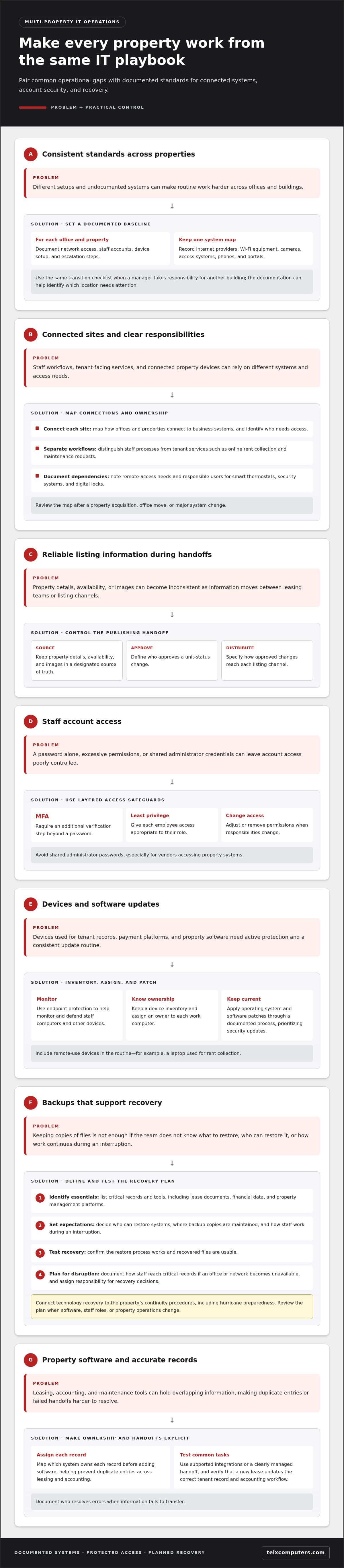
Set a documented baseline for each office and property, covering network access, staff accounts, device setup, and escalation steps. Record internet providers, Wi-Fi equipment, cameras, access systems, phones, and portals in one system map. For example, a new manager should be able to use the same transition checklist when taking responsibility for another building. Consistent documentation also helps teams identify which location needs attention.
For support across multiple properties and offices, map how each site connects to business systems and identify who needs access. Separate staff workflows from tenant-facing services, such as online rent collection or maintenance requests. Smart thermostats, security systems, and digital locks may also require remote access, so document their network dependencies and responsible users. Review the map after a property acquisition, office move, or major system change.
Multi-channel listing distribution also depends on a controlled handoff. Keep property details, availability, and images in a designated source of truth before publishing them across listing channels. When staff update a unit’s status, define who approves the change and how it reaches each channel. This helps prevent conflicting information during transitions between leasing teams or platforms.
Evaluating an IT Support Provider
Ask how the provider documents each property’s internet, Wi-Fi, cameras, access systems, phones, and portals. Clarify who coordinates changes across offices, how tenant-facing platforms connect to staff workflows, and what happens if a listing or rent collection system is unavailable. Request a sample transition plan for adding a property. Clear ownership, documented processes, and practical examples help show whether support fits a distributed portfolio.
MFA, endpoint protection, patching, and backups
Protect staff accounts with multifactor authentication (MFA), which requires an additional verification step beyond a password. Sun Life Tech recommends MFA and least-privilege access as security baselines for property management. Give each employee access appropriate to their role, then adjust or remove permissions when responsibilities change. Avoid shared administrator passwords, especially for vendors accessing property systems.
Endpoint protection helps monitor and defend the computers and other devices staff use to access tenant records, payment platforms, and property software. Keep a device inventory and assign an owner to each work computer. Apply operating system and software patches through a documented process, prioritizing updates that address security issues. For example, a laptop used for rent collection should remain in the patching routine even when its user works remotely.
Backups need a recovery plan, not just copies of files. Sun Life Tech recommends defining backup and restore expectations for critical systems. Identify essential records and tools, including lease documents, financial data, and property management platforms. Decide who can restore them, where backup copies are maintained, and how staff will work during an interruption. Test the restore process so the team knows whether recovered files are usable.
For hurricane preparedness, connect the technology plan to the property’s continuity procedures. Document how staff will reach critical records if an office or network becomes unavailable, and assign responsibility for recovery decisions. A partner supporting data backup and disaster recovery can help organize these plans; managed IT support planning can also bring account protection, patching, and recovery expectations into one coordinated process. Review the plan when software, staff roles, or property operations change.
Managed IT for real estate and property management
Property management firms rely on connected systems for property records, leasing, maintenance, accounting, email, and internet access. These tools should share accurate property and tenant information. For example, a signed lease should match the tenant record and billing details used by accounting.
A property management platform often serves as the operating hub for real estate teams. Staff use it to track vacancies, lease documents, tenant communication, and work orders. Before adding software, map which system owns each record. This helps prevent duplicate entries when leasing and accounting platforms handle information about the same investment.
Leasing workflows need tools for applications, document exchange, approvals, and electronic signatures. Maintenance workflows need a way to receive requests, assign responsibility, track progress, and close each ticket. For example, a tenant’s report of a leaking sink should reach the appropriate staff member and remain visible until resolved.
- Property management software: Centralizes building records, unit status, and tenant details.
- Leasing tools: Organize applications, lease documents, and communication with prospective tenants.
- Maintenance tracking: Records requests, assignments, updates, and completed work.
- Accounting software: Supports rent collection, expense coding, and property-level reporting.
Integration matters as much as choosing each system. Connect records through supported integrations or a clearly managed handoff, then test common tasks. For example, verify that a new lease updates the correct tenant record and accounting workflow. Document who resolves errors when information fails to transfer.
Property management companies should define user access by role. Leasing staff may need application and lease records, while accounting staff need financial workflows. Taking over a new building is a useful test: confirm staff can access the required systems, records remain organized, and reporting separates each property’s activity. This keeps technology aligned with daily real estate operations and investment oversight.
How can property management firms choose between in-house IT staff and outsourced IT support?
Choose based on the work your portfolio needs covered, not the label on the arrangement. An in-house employee offers direct coordination with leasing and accounting teams. Outsourced support can provide broader technical coverage without making one employee responsible for every system.
Start by mapping recurring tasks across offices and properties. Include staff onboarding, software access, network issues, device support, vendor coordination, and technology planning. If one internal employee handles daily requests as well as complex projects, record which tasks are delayed. That workload map shows whether the gap involves capacity, specialized expertise, or clearer ownership.
In-house support may suit firms that need frequent on-site coordination and can define a steady role. Outsourcing may suit teams that need support across multiple locations or technical disciplines. A hybrid model can keep an internal technology lead responsible for priorities while external specialists handle defined technical work.
- Portfolio complexity: List the systems and locations that need coordinated support.
- Workload: Compare daily troubleshooting with project planning and system oversight.
- Continuity: Document how requests move forward during staff transitions or absences.
- Accountability: Assign an owner for access, vendor coordination, and technology decisions.
Before changing support models, document current systems, support contacts, administrator access, and open issues. Define who approves changes and how staff report problems. For example, an issue with a leasing platform should have a clear owner, escalation path, and handoff record. Review the process after a property transition or major software change.
Use this assessment to shape a practical support model around your operations. If outsourcing fits your coverage needs, explore outsourced IT support as a way to coordinate ongoing technology work.
Telx Computers: Managed IT Services
Telx Computers helps property management teams coordinate the technology behind daily operations through managed IT services. When staff need help desk support, network security, or cloud computing aligned with their business systems, these services provide a more organized support model.
Consider managed IT support when technology issues cross property or office boundaries, internal staff need help with routine requests, or network security requires ongoing attention. A coordinated IT partner can align support priorities with the systems your team depends on, rather than treating each issue as an isolated fix.
To discuss managed IT support for your property management operations, contact Telx Computers.
Set a Stronger Technology Direction
Choose a support model that can grow with your property portfolio, not just address the latest urgent request. A practical next step is to identify your most important operational priority, such as smoother staff transitions, clearer system ownership, or a more coordinated technology plan. This gives your team a focused starting point for discussing IT support for property management in South Florida.
Telx Computers offers Managed IT Services, 24/7 Help Desk Support, and Network Security for business technology needs. Property management teams can explore these options when they want an ongoing partner to align technology support with daily operations and future plans. The right conversation should clarify your priorities and how support can fit your organization’s workflows.
Contact Telx Computers to discuss the technology needs of your property management business. A clear next step can help your team move forward with greater confidence.
Frequently Asked Questions
Ready for Real Estate IT That Actually Fits Your Business?
Match technology support to your portfolio’s workflows and plans. For firms evaluating IT support for property management in South Florida, priorities may include tenant communication, leasing access, or building systems. Identify the tasks that cause the most disruption, then use them to guide support priorities, system access, and technology decisions as operations change.
What IT support services do property management companies need?
Property management teams commonly need help desk support, network security, cloud services, server monitoring, email security, and backup planning. The right mix depends on the systems used for leasing, accounting, maintenance, and tenant communication. A company with remote leasing staff may prioritize secure cloud access, while a firm consolidating offices may need network coordination. Map the work each system supports before setting priorities.
Which South Florida IT providers specialize in property management companies?
Telx Computers provides IT support for property management in South Florida, serving businesses in Miami and the wider region, including real estate companies. To assess fit, consider how support would address distributed operations, property software, user access, and vendor coordination. Ask how the support approach would handle onboarding a property or transitioning an office, and look for answers based on your team’s actual workflows.
How do IT support providers compare on response times, service plans, and pricing?
Compare the written service scope, request-handling process, routine maintenance, and project billing. Response commitments should distinguish urgent outages from routine requests and explain how staff receive updates. Pricing depends on scope, users, locations, systems, and project work. Assess each plan against the same operational needs, such as supporting a new office or maintaining access to leasing and accounting systems.
What cybersecurity protections should South Florida property managers use to protect tenant and payment data?
Use multifactor authentication, role-based access, endpoint protection, timely software updates, and tested backups. For payment workflows, limit account access to employees who need it, and keep sensitive details out of shared spreadsheets and email. Train staff to report suspicious messages, especially requests to change banking or account information. Review permissions when responsibilities shift or a vendor relationship ends.
How can property managers improve Wi-Fi and network support across multiple buildings and offices?
Map internet connections, network equipment, and Wi-Fi coverage at each site. Test areas where staff work, such as leasing offices and maintenance rooms, and record dead zones or recurring interruptions. Determine whether an issue affects one device, one area, or the entire connection. Keep equipment labels and support contacts accessible so employees can clearly report the affected location and symptoms.