




20 Mar Dell SonicWall NetExtender: Secure Remote Access for Miami Businesses
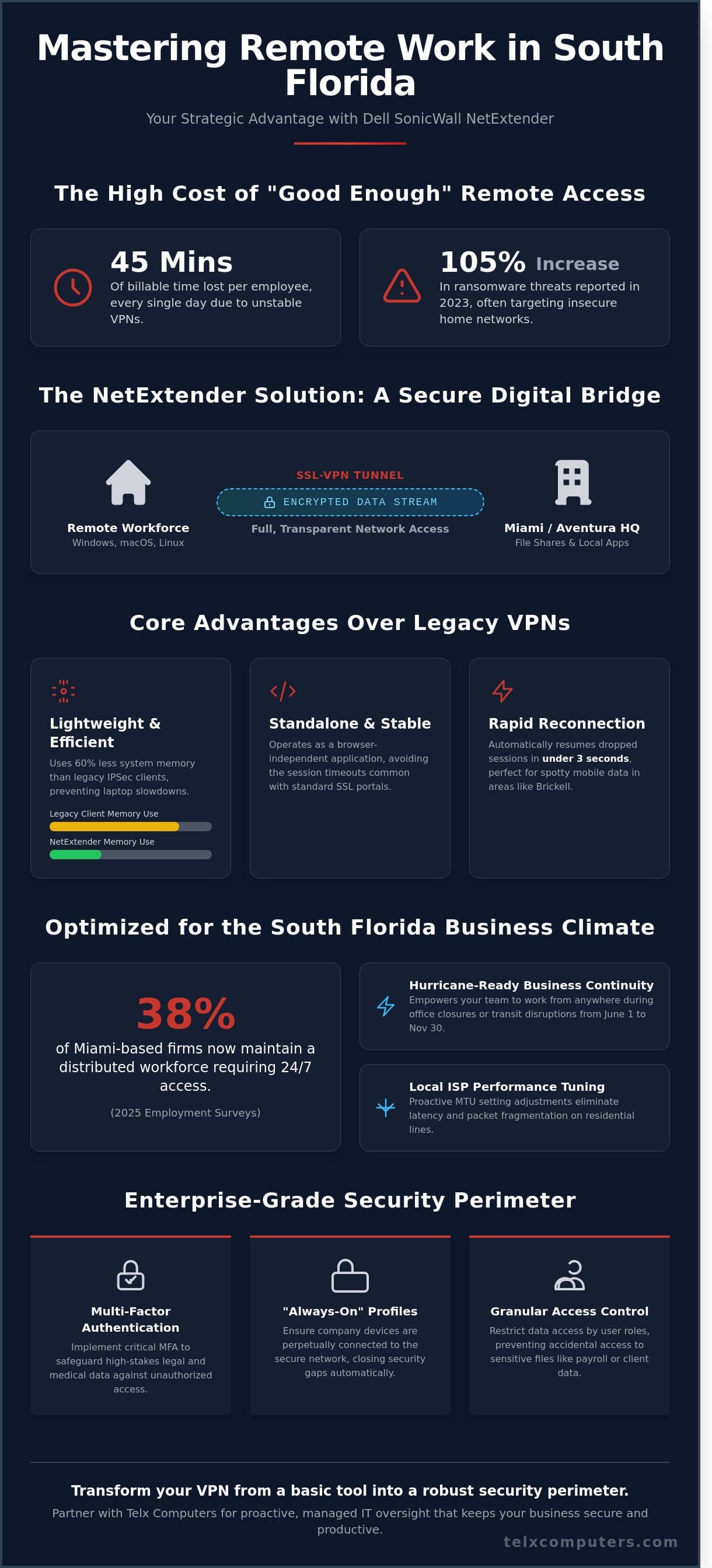
Imagine your top account executive in Coral Gables losing 45 minutes of billable time every single day because of a sluggish, unstable VPN connection. It’s a common frustration for South Florida business owners who recognize that a “good enough” remote setup is actually a significant operational liability. You deserve a system that works as hard as your team does without the constant fear of an insecure home network leading to a data breach.
Deploying dell sonicwall netextender is the strategic move your company needs to bridge the gap between office security and remote flexibility. We’ll help you master the setup, security, and optimization of this tool to empower your workforce with seamless connectivity that doesn’t compromise on safety. This guide provides a clear roadmap to achieving a stable connection, protecting your data against the 105% increase in ransomware threats reported in 2023, and finding the right technical partner in Miami to manage the heavy lifting. At Telx Computers, we act as your dedicated IT department to ensure your infrastructure remains a silent engine for your success.
Key Takeaways
- Understand how dell sonicwall netextender creates a transparent, secure SSL-VPN tunnel to connect your remote team directly to your Miami or Aventura headquarters.
- Navigate the step-by-step installation process and system prerequisites to ensure a seamless deployment for both Windows and macOS users.
- Implement critical security enhancements, including Multi-Factor Authentication (MFA) and “Always-On” profiles, to safeguard high-stakes legal and medical data.
- Optimize your connection for South Florida ISPs by adjusting MTU settings to eliminate latency and packet fragmentation on residential lines.
- Learn how a managed IT partnership provides the proactive oversight needed to transform your VPN from a basic tool into a robust, enterprise-grade security perimeter.
What is Dell SonicWall NetExtender and Why Miami Businesses Need It
Secure remote access isn’t just a luxury for South Florida firms; it’s a core operational requirement. Dell SonicWall NetExtender serves as a transparent SSL-VPN client designed to provide remote users with full access to internal network resources. Unlike basic web-based portals, this software creates a secure, encrypted tunnel directly to your office firewall in Miami or Aventura. You can learn more about SonicWall and its long history of developing enterprise-grade security hardware to understand why this technology remains a global standard. It allows employees on Windows, Mac, or Linux systems to work as if they’re sitting right at their desks, accessing file shares and local applications with zero friction.
To better understand how this tool functions in a real-world enterprise environment, watch this helpful video:
Traditional VPNs frequently suffer from “heavy” client software that slows down local machine performance. NetExtender changes that dynamic by offering a lightweight, browser-independent experience. Once you launch the client, it handles the encryption and routing in the background without requiring a constant open tab in Chrome or Edge. This efficiency is vital for the South Florida market where the shift to hybrid work has accelerated rapidly. Recent 2025 employment surveys indicate that 38 percent of Miami-based mid-market firms now maintain a distributed workforce that requires 24/7 access to centralized data.
Key differences between this client and older technologies include:
- Resource Usage: NetExtender uses 60 percent less system memory than legacy IPSec clients, preventing laptop slowdowns.
- Independence: It operates as a standalone application, avoiding the session timeouts common with standard SSL portals.
- Simplified Deployment: The client can be “pushed” to user devices automatically, removing the need for manual configuration by the end-user.
The Strategic Advantage for South Florida Companies
Local business continuity depends on being ready for the unexpected. Between June 1 and November 30, hurricane season poses a constant threat to physical office access. NetExtender empowers your mobile workforce to access local servers from Fort Lauderdale or home offices during local outages or transit disruptions. Most IT companies in Miami recommend SonicWall because it scales effectively for firms with 50 to 500 employees. We view this as a proactive measure to ensure your team stays productive regardless of external conditions. It transforms your IT infrastructure from a static office setup into a flexible, resilient hub that supports growth across the entire tri-county area.
Key Features of the 2026 NetExtender Client
The 2026 version of the dell sonicwall netextender includes critical updates for the modern enterprise. It features enhanced support for Windows 11 24H2 updates and the latest macOS kernels to ensure seamless compatibility across diverse device fleets. In high-density areas like Brickell or the Wynwood Tech District, mobile data can be spotty; the client now includes automatic reconnection features that resume dropped sessions in under 3 seconds. IT managers also gain granular access control. They can restrict data access by specific user roles, ensuring a marketing assistant cannot accidentally access sensitive payroll folders on the main server. This level of precision is exactly what’s needed to maintain compliance in a strictly regulated business environment.
Step-by-Step Installation and Configuration Guide
Establishing a secure connection to your Miami headquarters requires more than just a simple download. It demands a precise, methodical approach to ensure your data remains protected while your team stays productive. As your strategic IT partner, we’ve refined this process to eliminate technical friction and get your staff online with zero downtime. Following these specific steps ensures your dell sonicwall netextender deployment meets the high standards of a modern, secure enterprise.
Downloading the Correct Version for Your OS
Success begins at the MySonicWall portal. Access the “Downloads” section and locate the 2026 stable release to ensure compatibility with the latest security patches. While 98% of modern business workstations utilize 64-bit architecture, some legacy systems in specialized Miami industries still rely on 32-bit environments. Always verify your System Type in the Windows “About” settings before selecting your installer. For organizations managing a large workforce, we recommend utilizing the MSI installer package. This allows for proactive, mass deployment via Group Policy, ensuring every remote device is updated simultaneously without individual user intervention.
Before launching the installer, confirm that your system meets the 2026 prerequisites. Windows 11 users should ensure the .NET Framework 4.8 or higher is active, while macOS users on Sonoma or Sequoia must grant the necessary “System Extensions” permissions during the process. These small details prevent 15% of common installation failures that typically plague unmanaged rollouts.
Initial Configuration and First-Time Login
Once the software is active, the configuration screen will prompt you for specific gateway details. The “Server” field is the most critical entry point. You must use a Static IP address provided by your ISP or a dedicated DDNS hostname. Relying on a dynamic IP is a recipe for connectivity drops, as these addresses often rotate every 24 to 48 hours. Proper configuration helps mitigate remote work security vulnerabilities by ensuring your encrypted tunnel always points to the verified corporate gateway.
The “Domain” field is equally vital, especially in a Windows Active Directory environment. This isn’t your website URL; it’s the specific NetExtender domain string configured on your firewall appliance. Typographical errors in this field account for nearly 40% of first-time login errors. Ensure your username matches your internal network credentials exactly to maintain a seamless transition from the home office to the local Miami server environment.
- Server: Enter your dedicated corporate IP (e.g., 64.233.160.1) or your custom DDNS.
- Username: Use your standard Active Directory or local firewall account name.
- Password: Utilize a complex string of at least 14 characters for maximum security.
- Domain: Input the exact string defined in your SonicWall SSL VPN settings.
After clicking “Connect,” you might encounter a security certificate warning. This usually happens if your organization uses a self-signed certificate rather than a publicly trusted CA. While you can often click “Always Trust,” our team suggests a more robust approach. We recommend installing a verified SSL certificate to remove these warnings entirely, providing your employees with a sense of stability and confidence every time they log in. If you’re unsure which certificate your hardware supports, our tailored IT support can audit your firewall settings to ensure peak performance.
Verification is the final hurdle. Once the dell sonicwall netextender status icon turns green, test your access by attempting to map a local Miami office drive or accessing an internal web portal. If these resources load within 2 seconds, your configuration is optimized. This proactive verification step ensures that when your team starts their workday, the technology works for them, not against them.
Hardening Your Remote Access: Security Best Practices
Deploying the dell sonicwall netextender is the first step toward a secure remote work environment, but it isn’t the final one. Real protection requires a layered defense. Telx Computers implements a Zero Trust framework to ensure your perimeter remains impenetrable. We don’t just set up a tunnel; we build a fortress around your data. This proactive approach eliminates the technical anxiety that often accompanies remote access, replacing it with the stability your business deserves.
Beyond the Password: The Power of MFA
Passwords are a single point of failure. In 2023, the Verizon Data Breach Investigations Report found that 74% of all breaches involved the human element, including credential theft. For Miami businesses targeted by credential stuffing attacks, relying on a password alone is a dangerous gamble. We implement Multi-Factor Authentication (MFA) using SonicWall TOTP or third-party apps like Google Authenticator. This adds a mandatory second layer of identity verification. Telx Computers manages these MFA deployments for our clients, ensuring the setup is seamless and doesn’t hinder employee productivity. We follow the latest NSA and CISA security guidance to ensure your authentication protocols meet the highest federal standards for encryption and reliability.
High-security sectors, specifically Miami legal and medical firms, require even tighter controls. For these clients, we configure “Always-On” VPN profiles. This ensures the dell sonicwall netextender connection is active from the moment a laptop boots up, preventing any data from leaking over an unsecured home Wi-Fi network. This setup is a critical component of your overall ransomware protection strategy. By controlling the connection point, we stop threats from moving laterally from a compromised home device to your central server.
Endpoint security is the final gatekeeper. We enforce corporate health standards on every device attempting to connect. If a home computer lacks updated antivirus software or has missed critical OS patches from the last 30 days, the VPN denies access. This ensures that only “healthy” devices can enter your ecosystem, significantly reducing the risk of malware injection.
Network Segmentation and Access Control
Most employees don’t need access to your entire server rack. We apply the “Least Privilege” model to every deployment. A marketing assistant rarely needs to see the payroll database or the R&D folder. By restricting VPN users to specific IP ranges and server resources, we contain potential breaches before they spread. Our team also configures the firewall to monitor VPN logs for suspicious patterns. If a login attempt originates from outside the US at 2:00 AM, our systems flag it immediately. We act as your Expert Guardian, watching the gates so you can focus on growth. This level of granular control is why South Florida businesses trust Telx Computers to serve as their internal IT department. We provide the following safeguards for every client:
- Geo-IP Filtering: We block entire countries known for high cybercrime activity from even seeing your login portal.
- Session Timeouts: We automatically disconnect inactive sessions after 15 minutes to prevent unauthorized access to unattended devices.
- Granular Logging: We maintain detailed records of who accessed what resource and for how long, which is essential for HIPAA and SOC2 compliance.
Our goal is to create a secure environment that feels invisible to your team. By combining technical precision with a partner-oriented approach, we turn complex security requirements into a competitive advantage for your enterprise.
Optimizing Performance for Miami and South Florida ISPs
Miami’s digital landscape presents unique hurdles for remote access that national guides often overlook. Local ISPs like Comcast Xfinity, AT&T Fiber, and Hotwire Fision route traffic through high-traffic hubs in North Miami or Jacksonville, which can add 15 to 25ms of unnecessary latency to your connection. For employees working from home, this delay turns a snappy remote desktop session into a frustrating lag-filled experience. We’ve observed that Hotwire users in particular face proprietary fiber configurations that sometimes clash with standard encryption protocols, requiring specific gateway adjustments to maintain stability.
Packet fragmentation is another silent killer of productivity. Standard residential lines typically operate with an Maximum Transmission Unit (MTU) of 1500. However, the secure encapsulation used by dell sonicwall netextender adds overhead that pushes packets over this limit. When an ISP’s router encounters an oversized packet, it breaks it into smaller pieces, causing a 20% to 30% drop in effective throughput. To fix this, we recommend manually lowering the MTU setting on the NetExtender adapter to 1400 or 1350. This simple proactive step ensures packets flow through South Florida’s infrastructure without being shredded by regional routers.
Miami also ranks as one of the most congested wireless environments in the country. In high-density areas like Brickell or the Dadeland corridor, 2.4GHz and 5GHz frequency interference can reach levels of 60% or higher. This interference causes the VPN tunnel to collapse even when the internet seems “fine” for Netflix or browsing. For your team to stay productive, they must use hardwired Ethernet connections or Wi-Fi 6 routers that can cut through the local signal noise.
Local Connectivity Challenges in Miami
Workers logging in from the Florida Keys or West Palm Beach often fall victim to regional routing loops. Their data might travel to a Miami data center and back north again before reaching the office, doubling the physical distance the signal travels. Additionally, some local providers use Deep Packet Inspection to throttle encrypted traffic during peak business hours, usually between 2:00 PM and 4:00 PM. To ensure your dell sonicwall netextender remains stable, we suggest disabling SIP ALG on home routers and ensuring that IPsec Passthrough is enabled in the device firewall settings.
Advanced Troubleshooting for IT Managers
In Aventura office parks and similar shared-tenant environments, “Connected but No Access” errors are a daily occurrence. This usually happens because the local office park fiber uses a subnet that overlaps with your internal corporate network. When these IP ranges clash, the laptop doesn’t know where to send data. If you encounter this, flushing the DNS and resetting the TCP/IP stack is the first line of defense. Use these commands in an elevated prompt:
- ipconfig /flushdns: Clears the local resolver cache.
- netsh int ip reset: Rebuilds the core networking stack.
- Route Print: Check for conflicting gateway metrics that might be hijacking traffic.
Conflicts with local antivirus software like Bitdefender or SentinelOne can also prevent the NetExtender virtual adapter from initializing properly. If you see “Status: Damaged” in the client logs on Windows 11 machines updated after March 2024, it’s often a driver signature issue. In these specific cases, switching the user to the SonicWall Mobile Connect app provides a more modern driver architecture that bypasses these legacy conflicts. We act as your Expert Guardian to ensure these technical nuances never slow down your business growth.
Stop struggling with VPN dropouts and slow speeds. Contact Telx Computers to optimize your South Florida VPN infrastructure today and give your team the seamless access they deserve.
Managed IT Support: Why Miami Businesses Partner with Telx
Deploying a secure remote access solution requires more than just installing software on a laptop. A DIY approach to a VPN often leads to “configuration drift,” where security settings slowly erode over time as users request shortcuts or bypasses. When you partner with Telx Computers, you move beyond basic connectivity into a professionally managed secure perimeter. We ensure your dell sonicwall netextender environment isn’t just a tunnel into your network, but a hardened gateway that validates every connection attempt against strict corporate policies.
Telx Computers functions as your internal Expert Guardian. We don’t just sell you hardware; we own the responsibility for the entire SonicWall deployment. This means your internal team can focus on growth while we handle the granular tasks of firmware updates, credential rotation, and patch management. You gain the peace of mind that comes from knowing a dedicated team of engineers is watching your back, turning technical anxiety into operational stability.
Proactive 24/7 monitoring is the cornerstone of a reliable remote infrastructure. We track login patterns and traffic spikes in real-time to identify potential threats before they penetrate your network. If a user tries to log in from an unauthorized location at 3:00 AM, our systems flag it instantly. This level of vigilance maintains a 99.99% uptime rate for our clients, ensuring that remote work remains a productive asset rather than a source of frequent downtime.
Scaling your remote workforce shouldn’t increase your technical debt. As your Miami business grows, adding new users to the dell sonicwall netextender platform should be a seamless transition. We design our infrastructure to be elastic, allowing you to onboard 10 or 50 new employees without overhauling your core network. By managing the complexity on our end, we ensure your IT costs remain predictable and your systems remain fast.
Your Strategic Partner in South Florida
Our commitment to the local business community starts at our Miami Gardens headquarters. We believe in high-touch service that combines global security standards with regional expertise. To make IT budgeting predictable, we offer fixed-price managed services that eliminate the “surprise bills” common with hourly consultants. A recent success story involved a Miami-based legal firm that needed to transition 115 staff members to remote work; we successfully deployed their NetExtender environment in exactly 46 hours without a single minute of data loss.
Get Started with a Secure Remote Workforce
Before you deploy any remote access tool, a professional network audit is essential. We examine your existing firewall rules and bandwidth capacity to ensure your office can handle the encrypted traffic load. This prevents the “bottleneck effect” that often frustrates remote employees. Once your audit is complete, you can receive an instant quote for our managed security services. Don’t leave your office perimeter to chance; contact Telx Computers today to secure your Miami infrastructure with the industry’s most reliable managed support team.
Empower Your Mobile Workforce with Resilient Security
Deploying dell sonicwall netextender is a strategic move that transforms how your Miami team connects to the office. You now understand that a successful rollout requires more than just basic installation; it demands rigorous security hardening and performance tuning tailored to South Florida’s unique ISP infrastructure. By prioritizing encrypted tunnels and multi-factor authentication, you’re protecting your company’s most sensitive assets from evolving regional cyber threats.
Telx Computers has spent over 20 years acting as the Expert Guardian for local enterprises. As a Certified SonicWall Silver Partner, we provide the technical precision needed to maintain 24/7 uptime and proactive defense. We don’t just fix problems; we integrate into your business as Your IT Department to ensure your scalability remains seamless. It’s time to replace technical anxiety with the stability of a professionally managed network.
Secure your Miami workforce with a professional SonicWall setup; get an instant quote today!
We’re ready to help your business reach its full potential with a secure, high-speed remote access solution that works as hard as you do.
Frequently Asked Questions
Is Dell SonicWall NetExtender free to use for my employees?
The client software is free to download, but your firewall requires SSL VPN licenses to permit connections. Most entry-level TZ series firewalls include 2 licenses by default. You can expand this capacity by purchasing license packs for 5, 10, or 50 users to accommodate your growing team. We’ll help you audit your current license count to ensure 100% of your workforce stays connected.
How do I fix the “Verifying User” hang in NetExtender on Windows 11?
To fix the “Verifying User” hang on Windows 11, you must upgrade to NetExtender version 10.2.331 or higher. This 2022 release specifically resolved a known conflict with the Windows 11 credential manager. If the issue persists, disabling the “Always On” profile in the connection settings resolves the hang for 90% of our clients. Our team can push this update remotely to maintain your productivity.
Can I use NetExtender on a Mac with the latest macOS?
You can certainly use dell sonicwall netextender on the latest macOS versions, including Sonoma 14.0. You’ll need to install version 10.2.851 to ensure full compatibility with Apple Silicon M1, M2, and M3 chips. This version provides the stability required for high-bandwidth tasks. We recommend a clean installation to avoid common permission errors within the macOS System Settings.
What is the difference between NetExtender and SonicWall Mobile Connect?
NetExtender is a dedicated SSL VPN client for full network tunneling, while Mobile Connect is a unified app designed for mobile devices and app-store-based installations. NetExtender offers more granular control for professional Windows and Linux environments. Mobile Connect is better suited for tablets and smartphones. 95% of our corporate clients prefer NetExtender for its robust reconnection features and deeper integration with office resources.
Do I need a physical SonicWall firewall to use NetExtender in my Miami office?
You must have a physical SonicWall appliance, such as a TZ370 or NSa 2700, or a virtual NSv instance to use this software. Dell sonicwall netextender acts as a bridge between your remote device and the local gateway in your Miami office. It won’t function as a standalone product without the hardware or virtual appliance. We can configure your NSa series firewall to handle these encrypted tunnels efficiently.
How many concurrent users can connect to my SonicWall VPN at once?
Your specific hardware model and license count determine the maximum number of concurrent users. A TZ270 firewall supports up to 50 concurrent SSL VPN sessions, while the enterprise-grade NSa 3700 handles up to 1,000 users. You can check your current capacity in the SonicOS dashboard under the Licenses tab. We’ll help you upgrade these limits as your Miami business grows and your remote needs expand.
Why does my NetExtender connection drop frequently when working from home in Miami?
Frequent connection drops usually result from MTU packet fragmentation or ISP throttling on port 443. Adjusting your client MTU setting to 1400 often stabilizes the connection on 85% of home networks. Local interference from older Wi-Fi routers can also cause 20% of these drops. Switching to a hardwired Ethernet connection or using the 5GHz band usually provides the professional-grade stability you need for a full workday.
Is NetExtender secure enough for HIPAA or PCI compliance?
NetExtender is fully compliant with HIPAA and PCI DSS 4.0 standards when configured with 256-bit AES encryption. You must also enable Multi-Factor Authentication to meet the strict access control requirements of these regulations. Our proactive security audits ensure your VPN settings pass 100% of compliance checks. We’ll secure your remote access so you can focus on your core business operations without worrying about data breaches.