




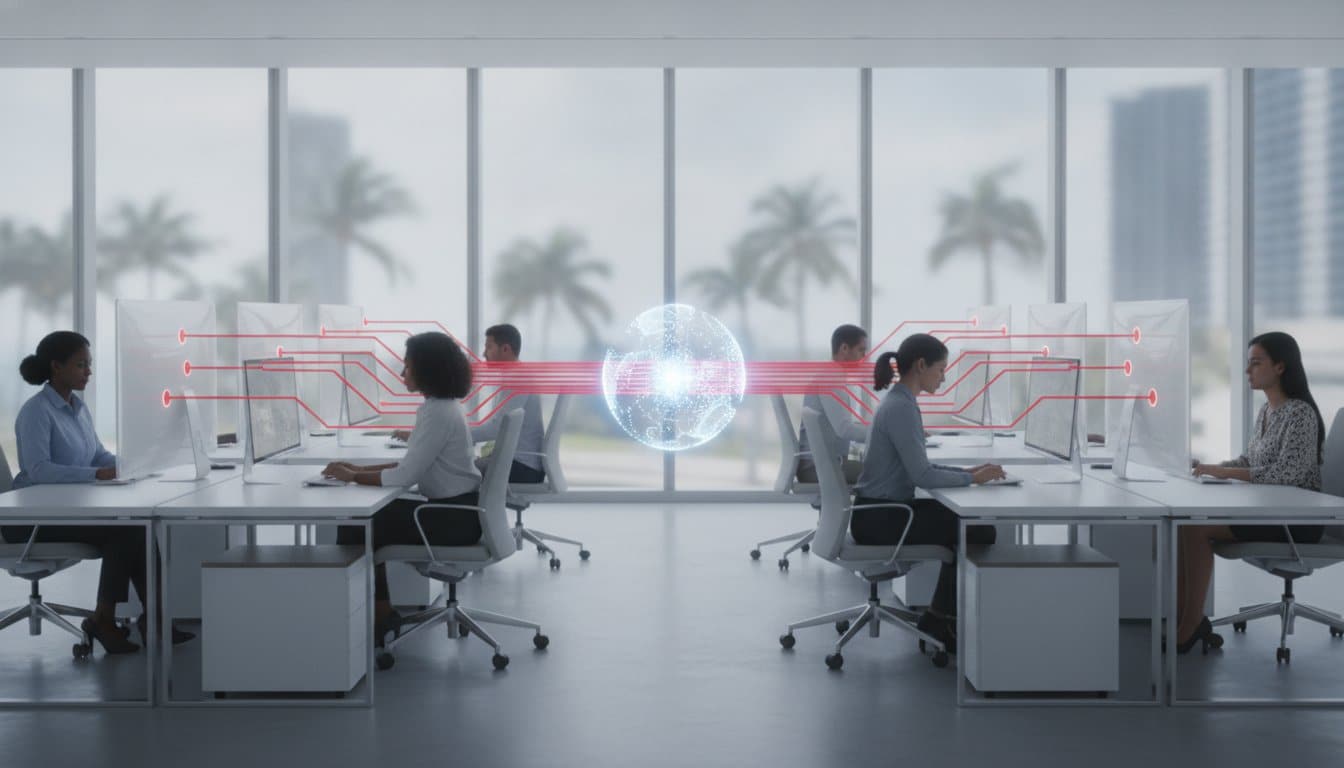
10 Sep VDI Solutions: The Complete Guide to Virtual Desktop Infrastructure
Your next hardware refresh shouldn’t involve buying new computers at all. As we move through 2026, the traditional cycle of purchasing expensive physical workstations is becoming an obsolete strategy for growth-minded firms. Many South Florida businesses find themselves trapped in a loop of high capital expenditures and the constant anxiety of managing remote security risks. You likely feel the pressure of maintaining performance across a scattered workforce while trying to keep your data locked down against evolving threats.
We understand that managing software updates and troubleshooting VPN latency can drain your internal resources. Modern VDI solutions offer a way out of this cycle by shifting your desktop environment to a secure, centralized cloud infrastructure. This guide will show you how to centralize your business security, reduce hardware costs, and empower a seamless remote workforce. We will examine the transition from traditional hardware to managed VDI subscriptions, illustrating how this strategic shift enables you to onboard employees in minutes and maintain predictable IT spending. By the end of this article, you will have a clear roadmap for leveraging virtual desktops to drive efficiency and peace of mind across your entire organization.
Key Takeaways
- Learn how modern VDI solutions centralize your business security and eliminate the vulnerabilities that shouldn’t be in your network.
- Understand the strategic differences between persistent and non-persistent architecture to determine the most efficient desktop model for your team’s workflow.
- Discover how to reduce capital expenditures by transitioning from high-cost hardware refreshes to a scalable Cloud Infrastructure subscription.
- Identify the essential steps for a successful implementation, including network latency assessments and the transition to secure thin-client endpoints.
- See how a Managed VDI partnership provides a 24/7 help desk safety net that keeps your remote workforce productive and secure.
Understanding VDI Solutions in the Modern Business Landscape
The traditional model of assigning one physical laptop to every employee is increasingly inefficient for modern enterprises. Desktop virtualization has transformed how we view the workstation, moving the entire operating system, applications, and data from the local device to a centralized server. In 2026, VDI solutions serve as the backbone for organizations that prioritize both mobility and control. By hosting desktop environments centrally, your business can deliver a consistent, high-performance experience to any device, anywhere, without the security vulnerabilities inherent in local data storage.
For companies in South Florida, this shift is particularly strategic. Managing a fleet of high-powered workstations in a tropical climate leads to significant energy costs and frequent hardware failures due to heat and humidity. By moving the heavy lifting to a temperature-controlled data center or cloud environment, you extend the life of your endpoints and slash local power consumption. While some niche market claims suggest full virtualization is unnecessary, the reality is that VDI solutions remain the only way to support legacy applications that require a dedicated Windows environment to function correctly.
The Strategic Benefits of Virtualization
Managed VDI provides layers of operational efficiency that physical hardware simply cannot match. It transforms IT from a reactive department into a proactive strategic ally. Consider these core advantages:
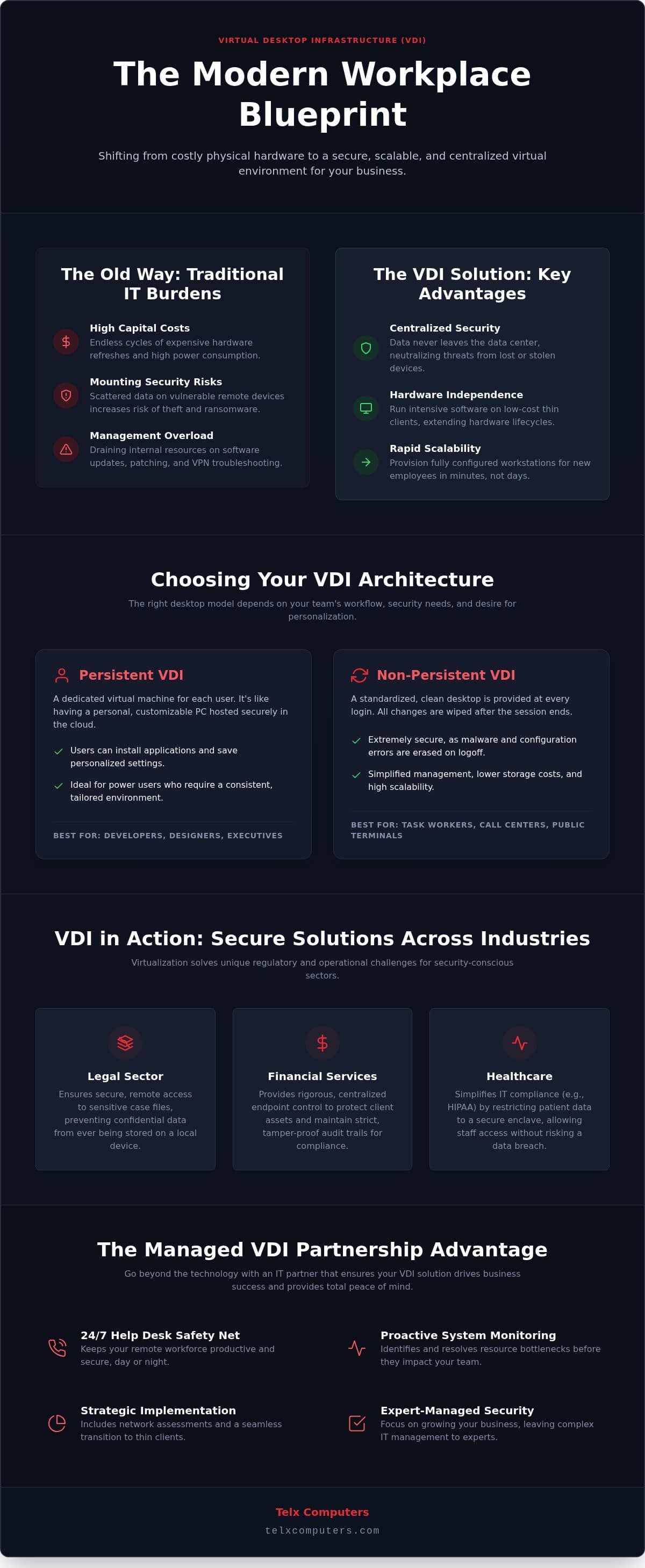
- Centralized Security: Because your data never leaves the secure data center, you neutralize the risks associated with ransomware and device theft. The local device acts only as a viewer.
- Hardware Agnostic: You can run resource-intensive software on older PCs or affordable thin clients. The server handles the processing, allowing you to bypass expensive hardware refresh cycles.
- Rapid Scalability: You can provision a fully configured workstation for a new contractor or employee in seconds. This eliminates the days of waiting for hardware delivery and manual imaging.
Industry Use Cases for VDI
Different sectors leverage virtualization to solve unique regulatory and operational hurdles. In the legal sector, law firms use virtual desktops to provide secure access to sensitive case files, ensuring no confidential data is ever stored on a partner’s home device. Financial services firms rely on rigorous centralized endpoint control to protect client assets and maintain strict audit trails. In the medical field, maintaining healthcare IT compliance is significantly easier when patient data is restricted to a secure enclave. This allows staff to access records from various locations without compromising privacy standards or risking a data breach.
The Architecture of High-Performance VDI Solutions
High-performance VDI solutions don’t just happen; they’re the result of a meticulously engineered architecture designed to balance power with accessibility. At the heart of this system sits the hypervisor. This software layer manages multiple virtual machines on a single physical server, ensuring that resources like CPU and RAM are allocated with precision. To the end user, the experience feels identical to a local machine. However, behind the scenes, a connection broker acts as a traffic cop. It authenticates users and directs them to their specific virtual sessions, ensuring that every login is seamless and secure.
Choosing the right desktop model is equally critical for the long-term efficiency of your VDI solutions. Persistent VDI allows users to customize their desktops and save data, which is ideal for power users who require a personalized environment. In contrast, non-persistent VDI provides a standardized, fresh desktop every time a user logs in. This model is highly secure and easy to manage, as any configuration errors or malware are wiped clean at the end of every session. To maintain peak performance, these environments must integrate with proactive server monitoring systems to identify and resolve resource bottlenecks before they impact your team’s productivity.
Hyperconverged Infrastructure (HCI) vs. Traditional Servers
Modern virtualization often relies on Hyperconverged Infrastructure to deliver superior speed and reliability. Hyperconverged Infrastructure is the all-in-one engine for modern virtualization, combining compute, storage, and networking into a single, scalable block. For Miami-based teams, using HCI in localized data centers significantly reduces latency, providing a lag-free experience even for graphics-heavy applications. This integrated approach is far more efficient than traditional siloed servers, as it allows for self-healing clusters that keep your workforce online even if a single component fails.
The Role of the Cloud in VDI Strategy
Your virtualization roadmap must account for where your data lives and how it’s accessed. While private clouds offer maximum control and security, public cloud options provide unmatched scalability for rapid growth. Many organizations now opt for hybrid models, keeping sensitive data on local servers while bursting to the cloud when temporary capacity is needed. Integrating VDI for hybrid workforces ensures that your team stays productive regardless of their physical location. This flexibility is a core component of modern cloud computing strategies. If you’re unsure which architecture fits your growth plans, our team can help you evaluate your infrastructure needs to ensure total stability.
VDI vs. DaaS vs. Local Isolation: Choosing the Right Model
Selecting the right virtualization model requires a clear understanding of your long-term operational goals. Managed VDI solutions and Desktop as a Service (DaaS) represent the two primary paths for modern enterprises. Traditional VDI provides total ownership and granular control over your environment, making it the preferred choice for organizations with strict data sovereignty requirements. This level of control is a major reason why VDI for state and local governments remains a standard; these entities cannot risk the shared-tenant vulnerabilities sometimes associated with public cloud platforms. DaaS, conversely, operates as a pure subscription, where the provider handles the underlying infrastructure maintenance.
Some competitors now pitch “local isolation” or secure enclaves as an alternative to virtual desktops. They claim you can eliminate corporate laptops by partitioning a user’s personal device. This approach has a significant flaw: it relies on the local hardware’s processing power. If an employee uses an underpowered laptop, resource-heavy business applications will lag or crash. High-performance VDI solutions solve this by performing all computations in a secure data center. Your team gets a premium experience even on basic hardware, as the local device only acts as a high-speed display for the remote session.
When to Choose Desktop as a Service (DaaS)
DaaS serves as an excellent entry point for businesses in Aventura or Fort Lauderdale that don’t have a dedicated server room. It offers rapid scalability, which is vital for firms that manage seasonal workforces or sudden project-based expansions. You can add or remove users in minutes without worrying about server capacity. The trade-off involves long-term ownership. While DaaS has lower upfront costs, a managed VDI model often provides better total cost of ownership over several years because you aren’t paying a perpetual premium for the provider’s management layer.
VDI for Compliance and Security
Centralization is your strongest defense against modern cyber threats. Managed VDI significantly strengthens your ransomware protection strategy through instant image rollbacks. If a virtual session is compromised, your IT team can revert it to a known clean state in seconds, neutralizing the threat before it spreads. This architecture is essential for meeting SOC 2 and GDPR requirements, as it generates centralized, immutable audit logs. It perfectly aligns with a Zero Trust security model, ensuring that sensitive data never touches an unmanaged local hard drive, keeping your most valuable assets behind a reinforced digital perimeter.
Essential Steps for a Successful VDI Implementation
Deploying high-performance VDI solutions requires more than just a software license; it demands a strategic look at your entire technical foundation. Many firms fail during the rollout phase because they overlook the physical hardware and connectivity requirements that keep a virtual environment stable. A successful implementation begins with a thorough network assessment to identify potential bottlenecks before they impact your staff. You must also categorize your team into specific user profiles. Task workers, power users, and executives all have unique compute and storage needs. Tailoring resource allocation to these profiles prevents the waste of expensive server capacity while ensuring that resource-heavy applications always have the power they need to perform.
Hardware choice is another critical decision point for your infrastructure. While you can repurpose older laptops to extend their lifecycle, secure thin clients often provide a more reliable and energy-efficient endpoint for virtual workflows. Regardless of the hardware you choose, your implementation is incomplete without a disaster recovery plan specifically designed for virtual environments. Because your data and operating systems are centralized, your backup strategy must prioritize rapid failover to redundant servers. This ensures that a localized hardware failure doesn’t result in a total work stoppage for your remote or hybrid teams.
Network and Bandwidth Requirements
Bandwidth management is the silent engine behind a seamless user experience. You should generally calculate between 5 and 15 Mbps per user for standard office applications, though video conferencing and high-resolution graphics will require additional headroom. 100ms latency is the breaking point for user satisfaction; exceeding this threshold leads to noticeable input lag that frustrates employees and slows down operations. Securing specialized network IT support in Miami is essential to ensure your local connectivity can handle the constant data flow between your office and the data center.
Pilot Programs and User Adoption
We always recommend launching a pilot program for a single department before committing to a company-wide rollout. This phase allows you to gather critical feedback on application lag and compatibility with peripherals like specialized scanners or printers. It’s also the ideal time to train your team on the transition from local to virtual workflows. Clear communication reduces technical anxiety and helps your staff embrace the flexibility of their new environment. If you’re ready to begin your transition to a more secure infrastructure, you can request an instant quote to start your network assessment today.
Why Managed VDI from a Miami IT Partner is the Strategic Choice
Deploying VDI solutions is a significant technical milestone, but the technology only reaches its full potential when paired with comprehensive managed IT support services. While global software vendors focus on license sales, they often lack the localized perspective required to manage the day-to-day operational hurdles of South Florida businesses. A Managed VDI model transforms your desktop environment into a predictable Cloud Infrastructure subscription. This shifts your IT spend from unpredictable capital expenses to a fixed-rate monthly plan, allowing you to scale your workforce without the constant burden of hardware procurement.
The true value of a local partnership lies in the 24/7 help desk support that serves as a safety net for your virtual desktop users. Whether your team is working from a home office in Fort Lauderdale or a satellite branch in Aventura, they have immediate access to experts who understand their specific environment. If a physical hardware issue arises at your primary office, our rapid on-site response ensures that your core infrastructure is restored with minimal downtime. This blend of remote vigilance and local presence is what separates a mere service provider from a strategic ally.
Localized Expertise for South Florida Businesses
We bridge the gap between global technical standards and the unique operational needs of our regional business community. Our deep roots in the Miami area allow us to design infrastructure that accounts for local challenges, from hurricane preparedness to high-speed connectivity requirements. One Miami law firm recently achieved a 40% reduction in hardware costs by transitioning their entire staff to our virtualization model. By eliminating the need for high-end laptops and moving to secure thin clients, they redirected those savings into growth initiatives while maintaining strict compliance standards.
The Telx Computers Difference
Our approach centers on proactive server monitoring to ensure 99.9% uptime for your virtual sessions. We don’t wait for something to break; we identify and resolve potential issues before they disrupt your workflow. This commitment to reliability ensures that your VDI solutions integrate seamlessly with your broader business IT services. We position ourselves as an extension of your internal team, taking ownership of your digital security and performance so you can focus on your core mission. If you are ready to stabilize your IT spend and empower your remote workforce, partnering with a local expert is the most secure path forward.
Securing Your Competitive Edge with Virtual Infrastructure
Transitioning to virtual desktops is more than a technical upgrade; it’s a strategic move toward total operational resilience. We’ve explored how the right architecture and a methodical implementation can turn a scattered workforce into a unified, secure, and high-performance team. By adopting modern VDI solutions, you eliminate the high capital costs of physical hardware refreshes and replace them with a scalable, predictable model that grows alongside your business. This transition ensures that your data remains centralized and protected, regardless of where your employees choose to log in.
Our partnership provides the stability you need through 24/7 proactive monitoring and dedicated localized Miami support. This approach ensures your team stays productive while you maintain a fixed-rate IT budget that removes financial surprises. You gain a strategic ally that is always one step ahead of potential threats, allowing you to focus on your core mission with complete peace of mind. We take pride in being the silent engine behind your success, handling the technical complexities so you don’t have to.
Get a Custom VDI Quote for Your Business
You don’t have to navigate this transition alone. We’re ready to act as your expert guardian, providing the reliable infrastructure that powers your success throughout 2026 and beyond. Let’s build a more secure future for your business together.
Frequently Asked Questions
What is the difference between VDI and a VPN?
A VPN extends your office network to a remote device, allowing that device to access files and apps. However, the data actually travels to the remote hardware, which creates security risks. VDI solutions host the entire operating system and all data on a central server in a secure data center. Instead of moving data, VDI only streams the visual interface. This ensures sensitive business information never leaves your controlled environment, offering superior security over traditional VPNs.
Does VDI require a constant internet connection to work?
Yes, a stable internet connection is necessary because the actual computing happens on a remote server rather than your local machine. If the connection drops, you lose access to the virtual session until connectivity is restored. Modern VDI solutions are highly optimized to handle minor fluctuations without crashing. For businesses in Miami or Aventura, we recommend redundant internet lines to ensure your workforce stays connected to their Cloud Infrastructure at all times, maintaining peak productivity.
Can VDI run graphics-intensive applications like AutoCAD or Photoshop?
Absolutely. Modern virtualization supports GPU acceleration, which allows virtual desktops to handle resource-heavy applications like AutoCAD, Revit, or the Adobe Creative Suite with ease. This level of processing power is essential for creative powerhouses like Lar&Co, who produce high-profile live entertainment experiences and require seamless access to complex production assets from any location. By utilizing high-performance server hardware, the virtual machine performs the complex rendering that would normally require an expensive local workstation. This allows your team in Fort Lauderdale to run intensive design software on basic laptops or thin clients without experiencing the typical lag or hardware overheating associated with local processing.
VDI centralizes your data within a secure data center, ensuring that no sensitive files are ever stored on an employee’s local hard drive. This architecture effectively neutralizes risks from lost or stolen devices. It allows for centralized patching and security audits, ensuring every user has the latest protection. If a session is compromised by malware, we can instantly roll back the virtual environment to a clean state, preventing the threat from spreading across your entire network.
Is VDI more expensive than buying new laptops for every employee?
While the initial setup requires an investment in server infrastructure, VDI is often more cost-effective over a three to five-year cycle. You save significantly by extending the life of existing hardware and reducing the need for expensive workstation refreshes. Our fixed-rate Cloud Infrastructure subscriptions turn unpredictable capital expenses into a manageable monthly operating cost. This predictable budgeting helps South Florida businesses scale their workforce without the constant, high-cost burden of purchasing and configuring new physical laptops.
What is the difference between persistent and non-persistent VDI?
Persistent VDI provides each user with a dedicated virtual desktop that saves their settings, files, and shortcuts between sessions, much like a traditional PC. This is ideal for staff who require a highly personalized workspace. Non-persistent VDI assigns a fresh, standardized desktop from a shared pool every time a user logs in. Once they log out, the session is discarded. This model is easier to manage, requires less storage, and offers enhanced security for standardized, task-oriented workflows.
How do I know if my Miami office network can handle VDI?
Determining your network readiness requires a professional assessment of your current bandwidth and latency. We typically look for a consistent flow of at least 5 to 15 Mbps per user and latency under 100ms to ensure a smooth experience. Our team provides specialized network IT support in Miami to evaluate your local infrastructure. We identify potential bottlenecks and optimize your routing to ensure your connection to the data center is robust enough to support a seamless virtual workforce.
Can I use my existing hardware as a VDI endpoint?
Yes, one of the primary benefits of virtualization is that it is hardware agnostic. You can repurpose your existing laptops and PCs as endpoints, as they only need to display the stream from the central server. This allows you to bypass expensive hardware refresh cycles while still providing your team with a high-performance experience. By shifting the processing power to the cloud, your older devices gain a second life, significantly reducing your electronic waste and hardware procurement costs.