




13 Jul Strategic IT Hardware Lifecycle Management: A Comprehensive Guide for 2026
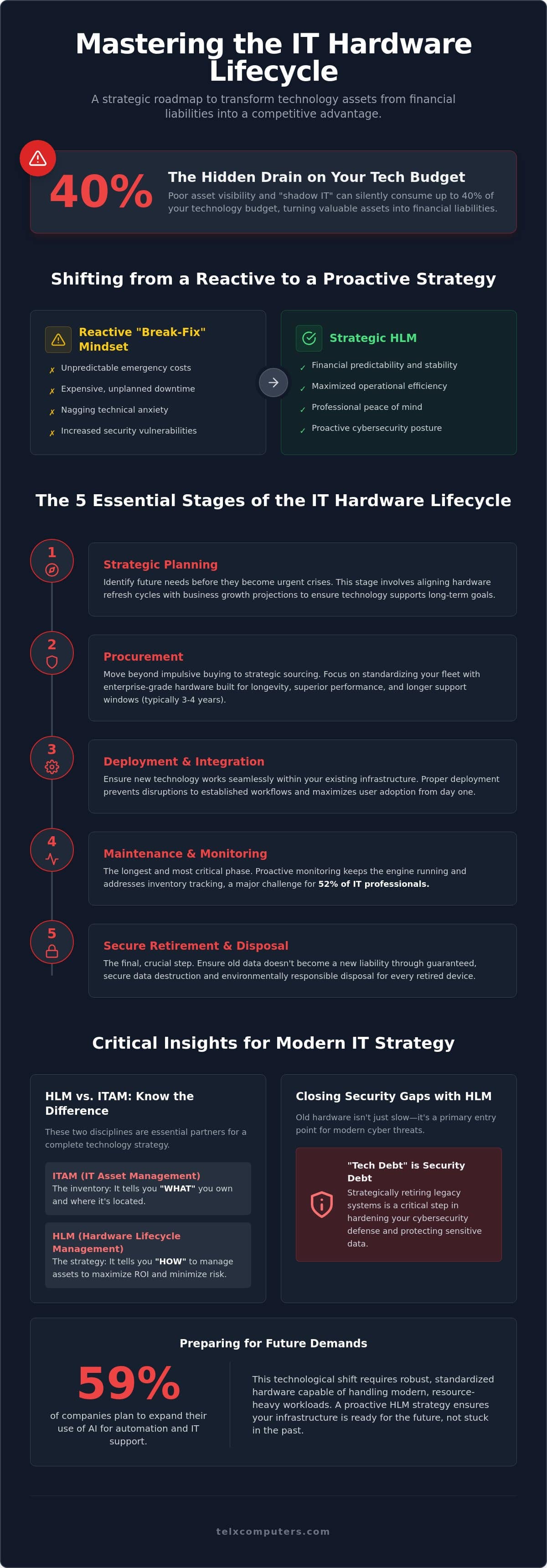
Did you know that poor asset visibility and “shadow IT” can silently drain up to 40% of your technology budget? It’s a staggering figure that highlights how easily poor IT hardware lifecycle management turns assets into financial liabilities when left to chance. Most leaders feel the weight of unpredictable emergency costs or the nagging fear that an aging laptop is one reboot away from a security breach. You deserve a technology environment that provides stability and reliability rather than a series of constant, expensive surprises.
Mastering this process is the key to replacing technical anxiety with professional peace of mind. We’ll show you how to slash operational costs and eliminate vulnerabilities by treating your assets as a strategic journey. This article provides a roadmap for your 2026 budget planning, zero-downtime maintenance, and secure data disposal. By the end, you’ll understand how to ensure your equipment remains a sharp competitive advantage and a silent engine behind your business success.
Key Takeaways
- Learn how to transition from a reactive “break-fix” mindset to a proactive strategy that ensures your technology remains a reliable asset rather than a liability.
- Understand the five essential stages of IT hardware lifecycle management to stabilize your budget and avoid the high costs of emergency equipment failures.
- Identify the hidden dangers of “tech debt” and discover how retiring legacy systems closes the primary entry points for modern cyber threats.
- Apply the “Rule of 3-5” to determine the exact moment when repairing old hardware becomes more expensive than investing in new, high-performance equipment.
- Discover how partnering with an expert guardian for managed IT support services streamlines logistics and guarantees secure data destruction for every retired device.
What is IT Hardware Lifecycle Management (HLM)?
Effective What is IT Hardware Lifecycle Management (HLM)? represents the intentional oversight of technology assets from the moment of purchase to the final, secure disposal. It marks a fundamental shift away from the traditional “break-fix” mentality. In that old model, businesses only reacted when hardware failed. This reactive approach creates technical anxiety and leads to expensive, unplanned downtime. Strategic lifecycle planning replaces this chaos with a sense of stability and professional peace of mind.
Modern HLM rests on three critical pillars: financial predictability, operational efficiency, and cybersecurity. A key component of this strategy is understanding the Total Cost of Ownership (TCO). While the initial purchase price of a laptop or server might seem like the main expense, it’s often just the tip of the iceberg. Hidden costs like maintenance, software licensing, and the productivity lost during equipment slow-downs can quickly eclipse the original sticker price. By tracking the entire journey, you turn your hardware from a series of disconnected fixes into a holistic business strategy.
To better understand this concept, watch this helpful video:
Why HLM is Critical for Business Growth in 2026
Unpredictable emergency spending disrupts annual budgets and stalls growth. According to industry data from GroWrk, 59% of companies plan to expand their use of AI for automation and IT support in 2026. This shift requires robust, standardized hardware that can handle modern, resource-heavy workloads. When your team uses uniform equipment, you see a direct reduction in help desk tickets and a surge in productivity. This consistency is especially vital for a hybrid-ready workforce, ensuring remote employees remain as secure and efficient as those in the main office.
HLM vs. IT Asset Management (ITAM): Knowing the Difference
While people often use these terms interchangeably, they serve different functions. IT Asset Management (ITAM) is essentially the inventory; it tells you “what” you own and where it’s located. HLM is the strategic framework that tells you “how” to manage those assets to maximize ROI and minimize risk. Whether you are managing an IT service in Miami or coordinating a distributed team in New York, combining these two disciplines is the only way to meet strict new standards like the NIS2 Directive. IT hardware lifecycle management serves as a proactive shield against tech obsolescence.
The 5 Essential Stages of the IT Hardware Lifecycle
A successful business doesn’t just buy computers; it manages a complex ecosystem. Effective IT hardware lifecycle management follows a structured five-stage path that ensures reliability and financial stability. This journey begins with strategic planning, where you identify future needs before they become urgent crises. Next comes procurement, where strategic sourcing replaces impulsive buying. Deployment and integration follow, ensuring new tech works seamlessly with your existing stack. The longest and most critical phase is maintenance and proactive monitoring. Finally, secure retirement and disposal ensure your old data doesn’t become a new liability.
Procurement: Buying for Longevity and Performance
Enterprise-grade hardware is built differently. While consumer laptops are designed for light home use, professional workstations feature superior cooling, durable chassis, and longer support windows. Enterprise hardware often lasts 3 to 4 years for standard users, whereas consumer devices frequently fail much sooner under heavy business use. Choosing the right equipment is about more than just specs; it’s about standardizing your fleet. When every employee in your Miami office uses similar hardware, support becomes faster and parts replacement is simplified. Working with a partner for hardware and software procurement allows you to bypass vendor markups and access enterprise-grade hardware at a better scale.
Maintenance: The Role of 24/7 Monitoring
The maintenance phase is where most businesses lose money through neglect. Proactive care is the only way to avoid the high cost of equipment failure. Utilizing real-time server monitoring allows us to identify symptoms of failure months before a crash occurs. This vigilant approach includes rigorous firmware updates and patch management to keep systems secure. By using RMM (Remote Monitoring and Management) tools, we track asset health across NYC and LA offices from a single pane of glass. This visibility is essential for Mitigating Security Risks and Tech Debt. Proactive monitoring acts as an early warning system, turning potential disasters into simple, scheduled maintenance tasks.
If you’re tired of guessing when your hardware will fail, consider a managed IT support service to handle the heavy lifting for you.
Mitigating Security Risks and Tech Debt
Tech debt represents the cumulative interest your business pays when you choose short-term fixes over necessary hardware upgrades. In the context of IT hardware lifecycle management, this debt manifests as increased maintenance costs and, more dangerously, expanded attack surfaces. Legacy systems are often the primary entry point for modern cyber threats because they lack the hardware-level security features found in contemporary silicon. Utilizing the NIST IT Asset Management Framework helps organizations identify these weak links before they can be exploited by malicious actors. With the first compliance audit deadline for the NIS2 Directive set for June 30, 2026, management bodies are now personally accountable for cybersecurity failures linked to unmanaged assets. Reliability is no longer just an operational goal; it’s a legal imperative.
When hardware reaches its “End of Life” (EOL), it stops receiving critical security patches. This makes EOL alerts the most vital notifications on your dashboard. There is a direct correlation between aging infrastructure and the need for advanced ransomware protection. Without modern hardware to support encryption and real-time threat detection, your business remains a soft target. Proper IT hardware lifecycle management ensures that retirement isn’t an afterthought but a planned defense strategy.
The Hidden Vulnerabilities of Legacy Hardware
Older CPU architectures and BIOS versions often harbor vulnerabilities that software alone cannot fix. This creates a “security lag” where even the best security suite cannot fully protect a machine that is fundamentally flawed at the hardware level. These aging components also struggle to run modern, resource-heavy security agents, leading to performance bottlenecks that frustrate employees. Additionally, old hardware is statistically more likely to fail during high-stress events. Imagine a server drive failing exactly when you are attempting a critical data recovery. That isn’t just bad luck. It’s the predictable result of ignoring hardware age.
Secure Disposal: Protecting Data at the End of the Road
The final stage of the lifecycle is often the most dangerous from a compliance perspective. Simply deleting files or formatting a drive is insufficient. To meet HIPAA or GDPR requirements, businesses must employ NIST-compliant data destruction methods. This ensures that sensitive client information is physically irrecoverable. Beyond security, businesses in Florida and California must also adhere to strict e-waste standards. Responsible recycling isn’t just about the environment. It’s about protecting your brand from the legal and reputational fallout of improper disposal. We act as your expert guardian, ensuring every retired device is wiped according to the highest global standards before it ever leaves your sight.
Optimizing ROI: When to Repair vs. Replace
Deciding whether to fix an old machine or invest in a new one is the most frequent dilemma in IT hardware lifecycle management. We follow the “Rule of 3-5,” which recognizes that most professional-grade equipment hits a performance wall after roughly 48 months of service. At this stage, the simple cost of a repair often pales in comparison to the opportunity cost of slow equipment. If an employee loses just ten minutes a day to boot-up lag or system freezes, that totals over 40 hours of lost productivity every year. For a high-tier professional, that lost time costs far more than a new workstation.
Environmental factors in South Florida play a surprisingly large role in these calculations. In cities like Miami and Fort Lauderdale, high humidity and heat accelerate the aging process of internal components. Salt air can lead to microscopic corrosion, while heat causes thermal throttling that slows down processors. As your expert guardian, we suggest looking beyond the purchase date. Use actual performance metrics to decide when a device is no longer serving your team’s needs. Reliability is a data-driven metric, not just a feeling.
Hardware Duration Benchmarks for 2026
- Laptops and Workstations: 3 to 4 years. After this point, battery health and processing speeds typically fall behind modern software requirements.
- Servers and Networking Gear: 5 to 6 years. You can extend this window significantly through proactive maintenance and 24/7 monitoring.
- Firewalls and Security Appliances: 3 years. The rapidly evolving threat landscape requires newer hardware to handle advanced encryption and deep packet inspection.
Signs Your Hardware is Costing You More Than a Replacement
Watch for a spike in help desk tickets for the same device; it’s often a sign of cascading hardware failure. Incompatibility with the latest OS or critical security patches is another red flag that your equipment has become a liability. When your team starts complaining about “wait time,” you’ve already lost the ROI battle. Upgrading isn’t just an expense. It’s a strategic move to reclaim lost hours and boost morale. If you’re ready to see how a refreshed fleet can stabilize your budget, get an instant quote today to explore your options.
Scaling Infrastructure with Telx Computers
At Telx Computers, we act as the expert guardian for your technology ecosystem. We integrate IT hardware lifecycle management directly into our managed IT support services, ensuring that every asset is tracked from procurement to secure disposal. This holistic approach eliminates technical anxiety by replacing “emergency” hardware costs with a sense of stability. Our physical presence in Miami, NYC, and LA allows for rapid on-site deployment and logistics support that purely remote providers cannot match. We take pride in being the silent engine behind your success, handling the tedious tracking so you can focus on growth.
One of the most significant benefits of our partnership is the shift in financial strategy. We help you transition from unpredictable capital expenses (CAPEX) to predictable operating expenses (OPEX). By using our fixed-price unlimited service plans, you can accurately forecast your technology spend years in advance. This financial clarity is backed by our 100% satisfaction guarantee on all strategic IT implementations. We believe in our role as a strategic ally, and we stand behind every server, laptop, and network switch we manage.
Customized Lifecycle Strategies for Every Industry
A one-size-fits-all approach doesn’t work for modern enterprises. For our clients in Healthcare IT, we provide compliance-heavy management that prioritizes data security and NIST-compliant disposal. In contrast, our work with Law Firms focuses on high-performance hardware that ensures zero downtime during critical litigation. Whether you are a growing business in Aventura or an established firm in Fort Lauderdale, we scale our procurement and maintenance to match your specific operational needs and regional requirements.
Getting Started: The IT Hardware Audit
The journey to a stable IT budget begins with a comprehensive audit of your current assets. We don’t just count devices; we evaluate performance, security age, and remaining useful life. From this data, we build a customized 3-year roadmap for your hardware refreshes. This plan ensures you never face a sudden wall of tech debt or unexpected failures. Our team works as an extension of your own, providing the technological edge you need to stay ahead. If you’re ready to secure your infrastructure and optimize your ROI, get an instant quote to see how we can transform your hardware lifecycle into a growth engine.
Take Control of Your Technology Roadmap
Mastering IT hardware lifecycle management is the most effective way to transform your technology from a source of technical anxiety into a reliable engine for growth. By moving away from reactive “break-fix” habits and embracing a structured journey from procurement to secure disposal, you protect your bottom line and your brand’s reputation. You’ve learned that hardware age is only one part of the equation; true ROI is found in maintaining peak performance and closing the security gaps left by legacy systems.
Telx Computers stands ready as your strategic ally. With physical locations in Miami, LA, and NYC, we provide rapid deployment and the localized expertise your business deserves. Our fixed-price unlimited service plans offer the financial stability you need to eliminate budget surprises; meanwhile, our 24/7 Help Desk Support ensures your team stays productive around the clock. Don’t let outdated hardware dictate your business success. Secure Your Business Future with a Free IT Consultation today. We’re here to ensure your technology remains your greatest competitive advantage.
Frequently Asked Questions
What is the typical lifespan of business hardware in 2026?
Standard business laptops and workstations typically provide peak productivity for 3 to 4 years before performance begins to lag behind modern software requirements. Power users or those running AI-intensive tasks should plan for a refresh every 2 to 3 years to maintain efficiency. Servers and networking equipment generally remain viable for 5 to 6 years when supported by rigorous, proactive maintenance and climate-controlled environments.
How does hardware lifecycle management reduce cybersecurity risks?
Strategic IT hardware lifecycle management reduces risk by ensuring all devices on your network are capable of running the latest security patches and firmware updates. Older hardware often lacks the silicon-level security features required to defend against modern threats like ransomware. By retiring assets before they reach “End of Life” status, you close the primary entry points that cybercriminals exploit during a breach.
Is it cheaper to lease or buy IT hardware for a small business?
The choice between leasing and buying depends on your cash flow strategy and how quickly you need to scale your infrastructure. Buying is often cheaper in the long run for stable teams, but leasing allows you to treat hardware as a predictable operating expense (OPEX) rather than a large capital hit (CAPEX). Many small businesses prefer leasing because it simplifies the refresh process and ensures employees always have access to current technology.
What should I do with my old company laptops to ensure data security?
You must use NIST-compliant data destruction methods to ensure that sensitive company information is physically irrecoverable. Simply deleting files or formatting the drive is insufficient and leaves your business vulnerable to data breaches and legal penalties. Partnering with a provider that offers certified disposal protocols is the only way to meet strict legal requirements like HIPAA or GDPR during the retirement phase.
How does heat and humidity in Miami affect server lifespan?
High heat and humidity in Miami accelerate the degradation of internal components through microscopic corrosion and thermal stress. These environmental factors can shorten a server’s expected lifespan significantly compared to hardware kept in low-humidity environments. Regular physical cleaning, professional monitoring, and robust cooling systems are essential for maintaining equipment reliability in the South Florida climate.
Can managed IT services help with hardware procurement and setup?
Managed IT services streamline the entire procurement process by leveraging established vendor relationships to access enterprise-grade hardware at better scales. We handle everything from identifying the correct specifications for your specific industry to the final on-site setup and network integration. This ensures your new equipment is configured correctly from day one, which reduces the risk of initial downtime or security misconfigurations.
What is ‘Tech Debt’ and how do I know if my company has it?
Tech debt is the hidden cost of maintaining outdated hardware that is no longer efficient, compatible, or secure. You likely have tech debt if your employees frequently complain about slow boot times or if your help desk tickets for the same devices are steadily increasing. Another clear sign is the inability to run modern operating systems or the latest security software without experiencing significant performance lag.
How do I create an IT hardware inventory for my business?
Start by conducting a comprehensive audit that records the purchase date, serial number, current user, and performance health of every device in your office. Using Remote Monitoring and Management (RMM) tools can automate this process by providing a real-time view of your entire network across multiple locations. This inventory serves as the foundation for a 3-year hardware roadmap, allowing you to predict future costs and avoid expensive emergency spending.