





12 Oct VoIP Phone Systems for Multi-Location Businesses in South Florida
What if customers reached the same business but got a different calling experience at each office? Choosing a VoIP phone system for multi-location businesses in South Florida means more than connecting phones. Separate locations need coordinated call workflows, and the system must fit each office’s network and day-to-day needs.
A practical evaluation starts with how employees handle calls across locations, then checks the network requirements behind those workflows. Documenting both helps decision-makers compare options, plan a rollout, and account for continuity before the transition.
This article covers how to evaluate multi-office VoIP capabilities, connectivity, support, and implementation. You’ll find practical questions to ask about office networks and employee workflows, plus ways to fit VoIP into a broader business technology plan. Telx Computers provides VoIP solutions alongside managed IT and network support for businesses in Miami, Aventura, and Fort Lauderdale.
Key Takeaways
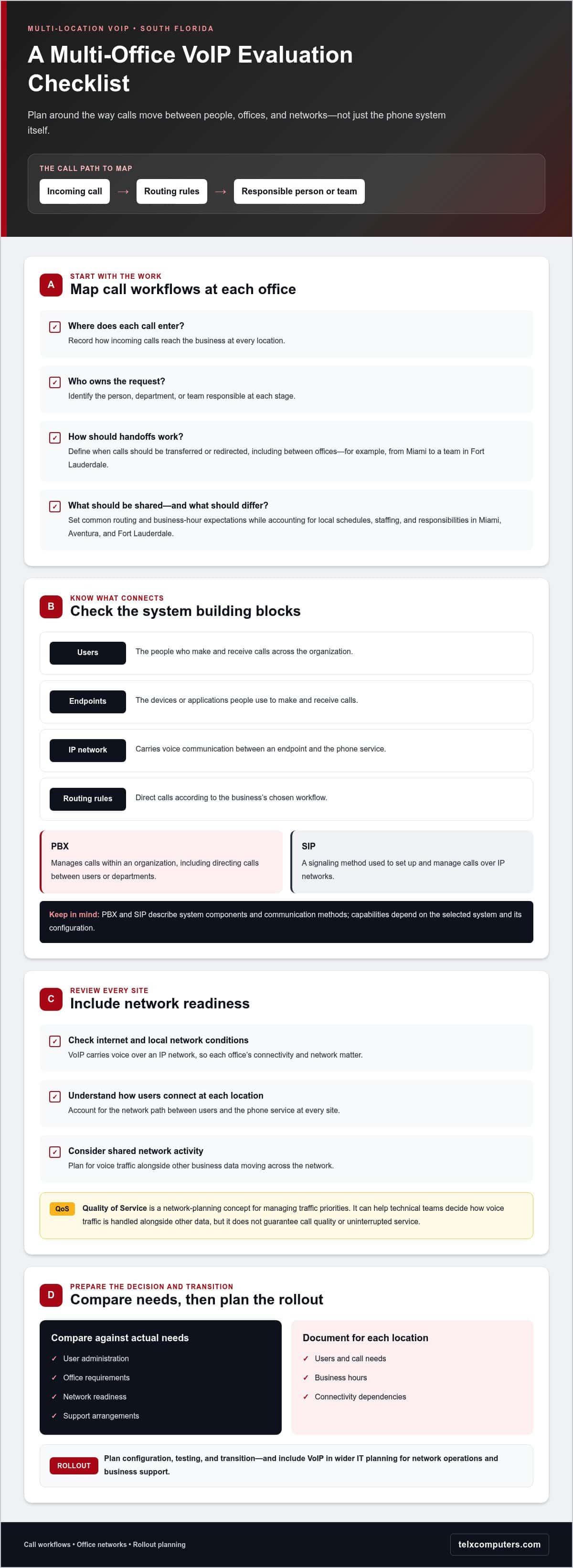
- Map incoming, internal, and outgoing call workflows at each office. Identify where processes should align and where local needs differ.
- Understand how users, phone endpoints, IP networks, and routing rules work together before comparing a VoIP phone system for multi-location businesses in South Florida.
- Compare user administration, office requirements, network readiness, and support arrangements against your actual business needs.
- Prepare for rollout by documenting each location’s users, call needs, business hours, and connectivity dependencies. Then plan configuration, testing, and transition.
- Include VoIP in your wider IT planning so phone-system decisions fit with network operations and business support.
Why South Florida businesses need a consistent VoIP phone system across locations
When a business operates from separate offices, a caller’s experience can depend on which location answers. One team may route calls directly to a department, while another relies on staff to transfer callers manually. Employees can lose time figuring out which office owns a request, too. A consistent call-handling plan helps employees coordinate and gives customers a more familiar experience across locations.
A VoIP phone system for multi-location businesses in South Florida should set shared expectations without assuming every office works the same way. A Miami office, an Aventura location, and a Fort Lauderdale team may have different staffing patterns, business hours, call responsibilities, or network conditions. Document those differences before deciding which processes should be consistent and which should vary by site.
This overview introduces cloud-based business phone systems:
What changes when a business operates from multiple offices?
Each location needs clear expectations for how calls enter the business, who handles them, and when they should be transferred or redirected. Shared routing rules and business-hour expectations can simplify coordination while allowing for office-specific schedules and responsibilities. Without agreed processes, employees may need to remember different procedures at each site, and administrators may have to manage disconnected phone arrangements.
For example, a customer calling about an order could be routed to the team responsible for that request, even if the team is based in another office. Define how that handoff should work instead of leaving callers to guess which location to contact. Clear ownership helps employees know who handles the request and gives customers a more consistent path to the right team.
What does VoIP mean for a business phone system?
Voice over Internet Protocol (VoIP) is voice communication carried over an IP network rather than through traditional telephone service. The term describes the communication method, not a fixed set of features. Call routing, user administration, and other capabilities depend on the system and its configuration. A broader overview of Voice over IP (VoIP) technology explains how the method is used across different settings.
With traditional phone service, calls are carried through conventional telephone networks. With VoIP, voice travels as data over an IP network, so network readiness is part of phone-system planning. Each office’s internet connection and local network matter. A review of business network support can help frame how communications fit into the wider IT environment. Evaluating a multi-office phone system therefore means looking at both call workflows and the infrastructure that supports them.
How a multi-location VoIP system connects offices, users, and calls
A multi-location phone system brings together users, phone endpoints, IP networks, and call-routing rules. An endpoint is the device or application a person uses to make and receive calls. The IP network carries voice communication between that endpoint and the phone service. Routing rules determine where a call goes based on the business’s chosen workflow.
A PBX, or private branch exchange, manages calls within an organization, including directing calls between users or departments. SIP, short for Session Initiation Protocol, is a signaling method used to set up and manage calls over IP networks. These terms describe system components and communication methods, not a fixed package of features. Capabilities depend on the selected system and its configuration.
For example, a customer might call a Miami office with a question for a department based in Fort Lauderdale. A configured call path could direct the caller to that team instead of requiring them to find the office’s direct number. The path depends on the business’s routing rules and system setup.
How call routing can support more than one location
Routing rules put business decisions into action. A company might direct callers to a department first, then route calls to another office when that team is responsible for the request. These are possible workflows, not features included in every system by default.
Before choosing a configuration, map how calls move today. Note where each call enters, which person or team is responsible at each stage, and what should happen when a call needs to move between offices. This makes it easier to distinguish workflows that should be consistent across locations from those that need to remain specific to one team or site.
How the office network fits into VoIP
VoIP depends on network connectivity between users and the phone service. Each office’s network conditions matter, so planning should account for how users connect at every site and how voice traffic shares the network with other business activity.
Quality of Service, or QoS, is a network-planning concept for managing traffic priorities. It can help technical teams decide how voice traffic should be handled alongside other data, but it does not guarantee call quality or uninterrupted service. Network layout, connectivity, and configuration all remain relevant to the design.
Businesses planning a VoIP phone system for multi-location businesses in South Florida can treat the phone system and network as connected parts of their IT environment. Reviewing network IT support in Miami can help bring infrastructure considerations into the same discussion as call flows, so the system reflects how employees work across offices.
What to compare when choosing VoIP for multiple South Florida locations
Compare how a phone system would fit the work at each office, not just whether it can connect locations. Customer-facing teams may need clear handoffs between departments, while back-office staff may rely more on direct team communication. Employees working across locations add another consideration: how their calling responsibilities fit into the shared plan. Writing these needs down before comparing configurations keeps the decision grounded in real workflows.
Use this framework to organize the decision. It focuses on business requirements rather than provider claims or product specifications.
| Need to evaluate | What to document | Why it matters |
|---|---|---|
| Call workflows | How calls arrive, which teams handle them, and where cross-office handoffs happen | Helps align call handling with the way employees serve customers and each other |
| User administration | Who manages users, role changes, and routine phone-system administration | Clarifies ownership as staff and responsibilities change |
| Location requirements | Office-specific hours, staffing patterns, and teams responsible for calls | Identifies what should be consistent and what needs to differ by site |
| Network readiness | Each office’s internet connection, local network, and dependencies | Highlights where connectivity planning is needed before rollout |
| Support arrangements | Who handles system questions and how support fits into business operations | Sets clear expectations for ongoing administration and assistance |
Which calling and administration requirements should you prioritize?
Start with the calls employees handle every day. Record the number or entry point callers use, the team responsible, any transfers between departments, and when another office needs to take over. Separate essential workflows from optional capabilities so the comparison stays focused on business needs rather than a long feature list.
Then assign administrative ownership. Identify who will add or remove users, manage office changes, and handle routine system administration. Clear ownership helps keep everyday changes from becoming unresolved tasks.
How should you assess connectivity and business continuity?
VoIP relies on network connectivity, so map the internet and network dependencies for every location. Note which teams depend on calling to serve customers or coordinate operations, and include those priorities in continuity planning. Backup connectivity and alternate call-handling plans are options to consider based on the business’s needs, not assumptions about how a system will behave.
Continuity planning should spell out what employees should do if an office’s connection is unavailable. The plan might define alternate ways to handle calls or who communicates next steps, depending on the organization and system configuration. Don’t assume a system provides automatic failover, a particular uptime level, or a specific service response unless those terms are established for the solution.
This review gives decision-makers a practical basis for comparing a VoIP phone system for multi-location businesses in South Florida. Documenting call flows, administrative ownership, location needs, connectivity dependencies, and support expectations helps shape a solution around business operations rather than forcing every office into the same pattern.
How to plan a VoIP rollout across Miami, Aventura, and Fort Lauderdale
A coordinated rollout starts with understanding how each office works, then translating that information into a deployment plan. A Miami team may have different users, call responsibilities, and network dependencies than an Aventura or Fort Lauderdale office. Documenting those differences helps shape a solution around actual operations instead of assuming every location needs the same configuration.
Use this sequence as a planning framework. Adjust the pace and level of detail to fit your organization’s size, existing infrastructure, and business requirements.
- Inventory each location. Record staff and team roles, phone endpoints, business hours, and the people responsible for day-to-day administration. Include office-specific call needs and shared communication processes.
- Map current workflows. Trace how calls arrive, which teams handle them, and where employees transfer or redirect callers. Note which workflows should be consistent across locations and which depend on a particular office.
- Review networks and dependencies. Document each office’s internet connection, local network, and systems that support business communications. Identify connectivity dependencies that could affect calling and include them in the deployment plan.
- Plan the configuration. Translate documented workflows into a proposed call-handling approach. Align user administration and location-specific requirements with business priorities, separating essential needs from optional capabilities.
- Test representative workflows. Before a wider transition, have selected users try everyday calling scenarios, including relevant transfers between teams or offices. Testing can surface configuration questions while there is still time to address them before broader adoption.
- Transition with clear guidance. Communicate the changeover plan, explain where employees can find operational instructions, and define how they should report issues. Keep responsibilities clear as each office moves to the new system.
What should each location document before deployment?
Build a location record covering team roles, how staff use phones, existing call paths, business hours, and local operating needs. Add network dependencies and any shared systems connected to business communications. This baseline helps coordinate phone planning with the wider technology environment, including managed IT support services.
How can teams prepare employees for a coordinated transition?
Choose representative users at each office to validate the calling tasks employees perform in their normal work. Tell staff what will change, when the transition will occur, and where they can find practical guidance. Establish a simple reporting path for issues, including who receives each report and how it reaches the person responsible for resolving it.
A VoIP phone system for multi-location businesses in South Florida benefits from a rollout plan that reflects shared workflows and office-level differences. Telx Computers provides VoIP solutions and can connect phone planning with broader business IT and network operations.
How Telx Computers can support a multi-location VoIP decision
A multi-office phone plan is also an IT decision. Call handling depends on how employees work, how offices connect, and how communications fit into the wider technology environment. Telx Computers provides VoIP solutions alongside managed IT services and network support, helping businesses consider these needs together rather than treating a phone system as an isolated purchase.
For a VoIP phone system for multi-location businesses in South Florida, start by outlining each location’s responsibilities and requirements. Review current call workflows, user groups, business hours, connectivity dependencies, and the support the organization needs as its operations change. These priorities will vary with the business and its office structure.
Why consider VoIP alongside broader IT support?
Phone service uses the same business technology environment that supports other connected work. Considering VoIP alongside managed IT and network operations brings call requirements and infrastructure planning into one discussion. Telx’s Miami business IT services provide a local point of reference for organizations planning technology across South Florida offices.
Telx Computers has a physical location in Miami and serves businesses in Miami, Aventura, and Fort Lauderdale. Planning across these locations means accounting for each office’s workflows, users, and network needs, rather than assuming one configuration will suit every site.
What information helps start a useful VoIP discussion?
Bring a concise picture of how the business operates. Approximate user groups help show who needs calling access, while existing call workflows reveal how departments and offices coordinate today. Include the needs of customer-facing teams, back-office staff, and employees working across locations. This context gives the discussion a clear operational starting point.
It also helps to outline connectivity and transition considerations for each office. Useful details include:
- Office locations and the teams based at each site
- Approximate user groups and the roles that handle calls
- Current call paths, cross-office handoffs, and business hours
- Network dependencies and any shared systems involved in communications
- Business priorities and considerations for testing and employee guidance
These details help frame a solution around your locations and workflows. They also connect the phone decision to the broader work of coordinating business technology, networks, and employee needs.
Discuss your business technology needs and the requirements behind your multi-location VoIP plans.
Set your multi-location phone strategy in motion
A phone system decision can shape how employees coordinate as your business changes. Treat the plan as part of your operating model: clarify who owns future adjustments, how new locations or teams will be considered, and how you’ll revisit call workflows as responsibilities evolve. This keeps the decision useful beyond the initial transition.
As you move forward with a VoIP phone system for multi-location businesses in South Florida, focus on an approach that reflects your organization’s priorities rather than forcing every office into the same setup. Telx Computers provides business technology services, including VoIP solutions, managed IT, and network support for businesses in the Miami area.
Plan a tailored VoIP approach with Telx Computers for your Miami, Aventura, or Fort Lauderdale locations.
Frequently Asked Questions
What is a VoIP phone system for a multi-location business?
A VoIP phone system for a multi-location business carries voice calls over IP networks and can connect users working across separate offices. Routing and administration depend on the selected service and configuration. For example, a customer calling about billing could be directed to the team responsible, even if that team works at another site. Mapping who handles each call type clarifies the system’s purpose before comparing options.
Can a VoIP phone system connect offices in Miami, Aventura, and Fort Lauderdale?
Yes. A VoIP solution can be planned for teams in Miami, Aventura, and Fort Lauderdale. The design should reflect how each office operates rather than assume identical staffing or call needs. One location might answer general inquiries while another handles a specialized function. Documenting those responsibilities and each office’s connectivity gives decision-makers a clearer basis for coordinating users and calls across the region.
Does VoIP require an internet connection at every business location?
VoIP relies on IP network connectivity to carry calls, so each participating office needs network connectivity suited to its intended use. Requirements depend on the service and the office environment. Include the connections and network equipment that calling depends on in the planning discussion. Also decide what employees should do if a connection is disrupted, so continuity planning accounts for both technical dependencies and customer communication.
What should a business compare when choosing a multi-location VoIP system?
Compare how each approach aligns with your operating priorities, not just the features presented. Rank requirements by their importance to customer service and internal coordination, then identify which are essential and which are optional. A team handling time-sensitive customer calls may prioritize a clear handoff process, while a back-office group may value straightforward user administration. This makes trade-offs easier to discuss.
Can employees use a business VoIP system from different offices?
Yes. A multi-location setup can be planned for employees based at separate offices, though access and administration depend on the configuration. Start by identifying each team’s work location, calling responsibilities, and necessary handoffs. An employee temporarily working from another company office, for example, may need a defined way to coordinate with their usual team. Base the plan on actual work patterns and the system configuration.
How should a business prepare for a multi-location VoIP rollout?
Assign an internal owner for decisions and communication during the change. Along with documenting office needs, decide who will gather employee feedback, track issues, and determine when the business is ready to move forward. A shared record of questions and outcomes helps teams spot location-specific concerns without relying on informal updates. This creates a more orderly transition and gives employees a clear way to raise operational issues.
What happens to business calls if an office loses connectivity?
The effect depends on the system configuration and the continuity arrangements designed for the business. Calls that rely on the affected office’s connection may be disrupted, so decide in advance who will assess the situation and communicate next steps. A continuity plan can identify backup connectivity or an alternate call-handling approach, but don’t assume calls will reroute automatically or remain uninterrupted. Define a response that fits each office’s responsibilities.