





22 Oct Outsourced IT Help Desk Support for Fort Lauderdale Businesses
For a 50-person business, an outsourced IT help desk should give employees a clear path to technical support and keep the systems they rely on under active oversight. Choosing an outsourced IT help desk for 50 employees in Fort Lauderdale means weighing support availability, monitoring, service scope, and how pricing is structured, not just comparing a monthly figure.
It’s reasonable to expect responsive help when technology interrupts work, along with proactive attention that can help identify issues before they spread. The right arrangement should fit your team’s needs and give you a clear understanding of what support covers.
This article explains what help desk support can include, how availability and monitoring affect daily operations, and what to compare when assessing a provider. It also covers pricing models and cost factors, helping you choose support that fits your business.
Key Takeaways
- Compare help desk providers by the service-level commitments and performance metrics they use to track support quality.
- Evaluate response times and first-call resolution together to understand how quickly employees get back to work.
- Compare pricing models by the support scope, ticket complexity, and coverage your business needs, not just the billing structure.
- Assess how round-the-clock support and monitoring fit your operations and help surface technology issues.
- Map the services your team relies on, from everyday user support to security and cloud needs, before selecting a support arrangement.
What are the key benefits of outsourcing IT help desk services?
For a 50-person business, outsourcing can combine employee support with oversight of workplace technology. During onboarding, the provider inventories devices, configures access, and documents each employee’s support route. Staff then report issues through the agreed help desk channel, while the provider tracks and escalates requests.
Fort Lauderdale businesses can compare providers by location, service scope, and documented accountability. RevenueBase identified 28 IT support outsourcing company matches associated with Fort Lauderdale as of September 2026. A local presence may matter for work requiring an onsite visit, while remote help desk services can address many user issues. The Fort Lauderdale IT company page describes the local service context.
This video explains how managed service providers structure outsourced IT support:
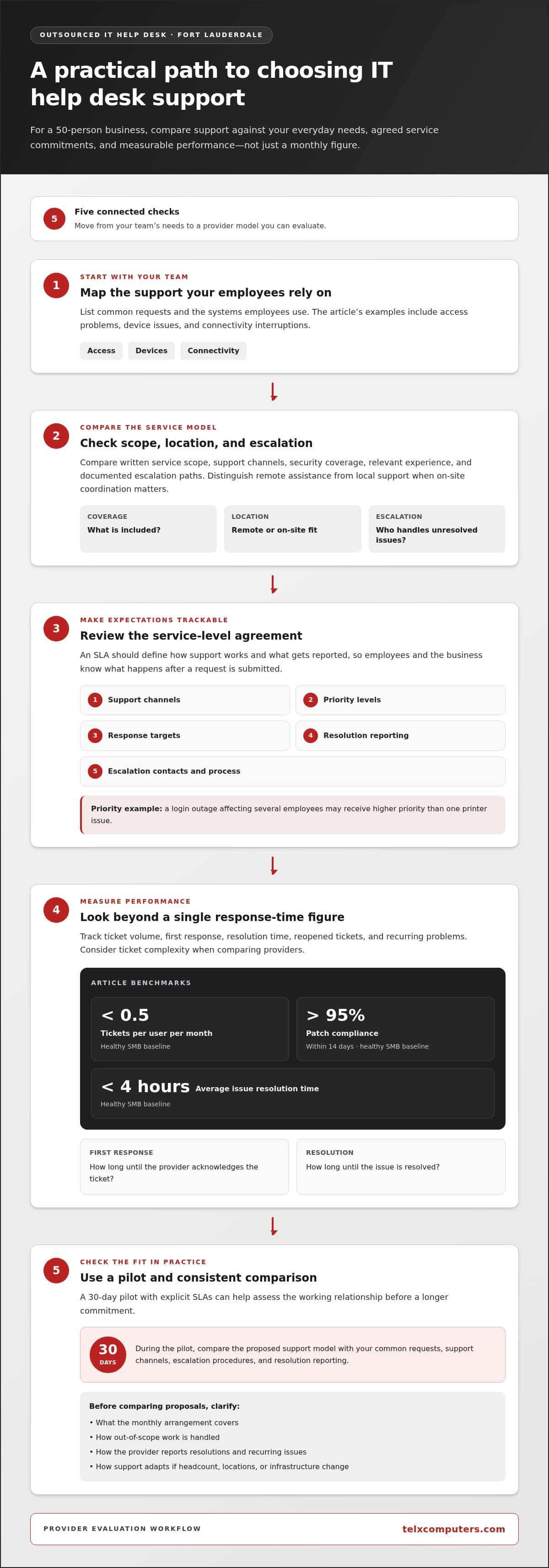
A service-level agreement (SLA) turns expectations into trackable commitments. It should define support channels, priority levels, response targets, resolution reporting, and escalation contacts. For example, a login outage affecting several employees may receive a higher priority than one printer issue. Clear definitions help the client understand what happens after submitting either request.
Review performance using several measures rather than one headline response time. Track ticket volume, first response, resolution time, reopened tickets, and recurring problems. A healthy SMB baseline is under 0.5 tickets per user per month. Another baseline is more than 95 percent patch compliance within 14 days. These indicators help connect help desk activity with infrastructure reliability.
The escalation process should explain who handles an unresolved issue and when it moves to a specialist. A password reset might go to frontline support, while a wider access failure is routed to the relevant technical team. Reviewing SLA performance can reveal recurring delays and show whether support procedures or employee guidance need adjustment.
Industry experience also shapes useful support. A healthcare office may prioritize access to clinical systems, while a law firm may focus on secure document access and dependable communications. These examples are starting points for discussing your needs, not universal rules. Ask how the help desk workflow, IT consulting, and escalation paths adapt to your systems and daily work.
How can I choose the right Managed IT Help Desk provider?
Compare providers against your actual support needs, not polished descriptions alone. For businesses in Fort Lauderdale, response handling, local knowledge, staffing, and service scope all affect whether support is a fit.
Response Times and First-Call Resolution
Separate the time a provider takes to acknowledge a ticket from the time needed to resolve it. A healthy SMB baseline is under 4 hours for average issue resolution time. First-call resolution adds another useful measure: it shows how often a support request is resolved during the initial interaction. Review both measures alongside ticket complexity, since a network outage differs from a routine account question.
Provider Background and Location
Review the provider’s service description, operating locations, and founding date. A founding date offers context, but does not establish current staffing or technical fit. Fort Lauderdale businesses should also distinguish a local provider from one serving the area remotely. Consider whether its model fits your need for on-site coordination or remote assistance. Telx Computers provides managed IT support in Miami and South Florida, including Fort Lauderdale, with on-site and remote support.
The median employee-size band for Fort Lauderdale IT support outsourcing companies was 1-10 employees as of September 21, 2026. Treat that range as market context, not a measure of service quality. Ask how the provider assigns support responsibilities, handles absences, and routes issues requiring specialist attention. A smaller firm may suit a focused environment, while a larger operation may offer different staffing options.
Provider Selection Criteria
Build a shortlist using written service scope, documented escalation paths, security coverage, and relevant experience. Then compare each provider’s proposed support model against your devices, network, and employee workflows. For predictable planning, clarify what the monthly arrangement covers and how out-of-scope work is handled. A 30-day pilot with explicit SLAs can help assess the working relationship before making a longer commitment.
Use a consistent comparison process. First, list common requests, such as access problems, device issues, and connectivity interruptions. Then compare support channels and escalation procedures with those needs. Finally, review how the provider reports resolutions and recurring issues. This makes proposals easier to assess than broad claims about “complete support.”
Scalability matters when headcount changes. Ask how support adjusts if your team grows by 20 employees, adds a location, or changes its infrastructure. The answer should explain how onboarding, ticket routing, and service coverage adapt. For Fort Lauderdale businesses, this practical discussion can reveal whether a provider’s support services remain aligned with daily operations as the organization evolves.
For a local comparison point, review Fort Lauderdale IT company services alongside the criteria above. Focus on the service descriptions that match your needs, then use the same questions to evaluate every proposal.
Pricing models and small-business pricing
For a 50-person Fort Lauderdale business, service pricing depends on scope, coverage, ticket complexity, and security needs; a quote follows a request. Contract risks include unclear exclusions, added charges for out-of-scope work, and vague offboarding terms.
Compare the billing method with your expected support needs. A low starting figure is hard to assess if routine support, security, and project work are billed separately.
Business-Hours and 24/7 Coverage
Business-hours coverage may suit teams whose support needs mostly fall within standard operating hours. Round-the-clock help desk coverage can fit organizations with evening operations, distributed staff, or critical systems that need attention outside the workday. Compare coverage hours, escalation procedures, and included tasks. The right model depends on when employees need help and which interruptions can wait.
Ask how the agreement treats after-hours incidents, planned work, and urgent security concerns. If the contract includes 24/7 access, clarify whether that means ticket intake, live troubleshooting, or escalation to a specialist. These distinctions affect the practical value of coverage, even when two proposals use the same label.
Contract Risks and Hidden Fees
Review exclusions before comparing proposals. Check whether onboarding, device setup, security tools, software licensing, onsite work, or major infrastructure changes carry separate charges. Hourly agreements may bill in 15- or 30-minute increments, so small tasks can accumulate across repeated tickets. Ask for examples showing how common requests are categorized and billed.
Look for clear terms covering ticket limits, support tiers, response obligations, renewal, and termination. A 30-day exit clause with documented offboarding can help define the transition process. Confirm who returns credentials, system records, and configuration details, and how responsibilities transfer. A vague exit process can create operational friction even when monthly invoices appear predictable.
Security and data protection also affect the value of a plan. Compare how the proposal addresses account access, email threats, backups, and incident escalation. A service rating alone does not explain those protections, so check how the scope fits your infrastructure and business risks. Distinguish included safeguards from optional tools to avoid mistaking a basic help desk package for broader security coverage.
Scalability matters as a company changes. Model what happens if the team adds 20 employees, opens another location, or adopts new cloud systems. Per-user plans can change with headcount, while fixed-fee arrangements may define user limits or scope adjustments. Ask how an expansion affects onboarding, support routing, and recurring charges before growth makes the current agreement a poor fit.
For a clear comparison, place each proposal beside the same checklist: billing basis, coverage hours, included services, exclusions, security scope, and exit terms. Then consider a realistic example, such as an after-hours access problem affecting several employees. The provider’s written explanation can show whether the agreement supports predictable budgeting and consistent help desk services.
24/7 Help desk availability and monitoring
For a 50-person business, round-the-clock availability and system monitoring address different operational needs. A help desk responds to employee requests, while monitoring watches infrastructure for alerts, failures, or unusual activity. Defining both functions helps Florida businesses understand who acts after hours and which issues can interrupt work.
Start by mapping operating hours and critical workflows. If employees access shared systems overnight, an outage may need attention outside normal office hours. If the team works standard daytime hours, monitoring that detects overnight issues before staff arrive may matter more. Reviewing the schedule helps match coverage to operations instead of assuming every company needs the same support.
Read “24/7” carefully in the service agreement. Confirm whether it means employees can submit tickets at any time, receive live assistance, or reach an escalation contact for urgent incidents. For example, a locked account may wait until regular hours, while a company-wide network outage could require immediate escalation. Clear priority definitions prevent confusion during a disruption.
Monitoring needs clear ownership, too. Identify which systems are watched, how alerts are reviewed, and who receives alerts outside business hours. A server warning, failed backup, and unavailable business application each require a different response. Ask how monitoring records an event, assigns follow-up, and communicates status to the appropriate business contact.
Separate alerts from action. An automated notification does not restore a service or explain its impact. If monitoring detects a server issue, for example, the response process should identify the affected system, assign an owner, and update employees who rely on it. Documenting these steps makes accountability clear and distinguishes detection from resolution.
Third-party vendors can affect response coordination. List the providers responsible for internet access, cloud platforms, and business software, then define who contacts each one during an incident. A shared contact record and escalation path can prevent employees from reporting the same outage to multiple parties without clear ownership.
Review monitoring outcomes alongside operational priorities. Track recurring alerts, unresolved problems, and incidents that disrupt employee access. An annual risk assessment against the NIST CSF can help Fort Lauderdale businesses review cybersecurity priorities and identify areas needing attention. Use those findings to refine coverage, alert routing, and staff communication.
Finally, test the process with a tabletop scenario, such as an after-hours application outage. Confirm who receives the alert, who coordinates vendor support, and how employees learn about progress. This exercise can expose gaps in availability and monitoring before a real incident. A clear response path helps limit avoidable downtime and makes support responsibilities easier to understand.
What does outsourced IT help desk support typically include for a 50-person company?
For a 50-person company, the help desk usually serves as the central route for employee technology issues. Employees report problems, support staff log and prioritize them, then resolve routine requests or escalate complex faults. A clear process covers everyday access problems alongside incidents affecting several people, such as a shared application outage.
Common help desk requests include troubleshooting accounts, computers, email, business software, printers, and connectivity. An employee who cannot access a work account, for example, can submit a request, receive guided troubleshooting, and have unresolved access problems escalated. The service scope should explain which devices and applications are covered, how employees reach support, and how they receive updates.
Onboarding turns that support into an organized working relationship. During days 1 through 15, an onboarding plan can cover discovery, asset inventory, multifactor authentication enforcement, backup validation, and critical patching. These steps help establish which devices, accounts, and systems support the business. A device inventory also helps support staff identify the right equipment when an employee reports a fault.
- Access support: Help employees address account, password, and permission issues.
- Device troubleshooting: Diagnose computer, printer, and connectivity problems.
- Ticket coordination: Record requests, set priorities, and route issues needing specialist attention.
- Employee onboarding and offboarding: Coordinate account and device changes as staff join or leave.
- Security escalation: Route suspicious email or unusual account activity for appropriate review.
These categories need defined boundaries. A routine software question differs from a broader network fault, and a suspicious email may require security escalation rather than standard troubleshooting. The agreement should identify covered systems, employee support channels, and how the help desk coordinates with other technical teams. That detail helps a 50-person organization understand what happens after each type of request.
Support can also include reports on recurring issues. Repeated connection problems in one department, for example, may point to a shared network or device issue. Reviewing ticket patterns helps distinguish individual questions from broader infrastructure concerns. Ask how reports summarize recurring requests, escalations, and unresolved issues, so operational decisions are based on clear service records.
To define the right scope, list the systems employees use daily, the problems that interrupt their work, and the support process they need. Then compare those needs with a managed IT support plan to see how service coverage can align with your operations.
Telx Computers: Managed IT Services
Telx Computers helps Fort Lauderdale businesses coordinate employee support with broader technology needs through Managed IT Services. Its 24/7 Help Desk Support gives employees a support channel, while Network Security and Cloud Computing address connected infrastructure priorities.
If your team needs help desk coverage alongside security and cloud support, rather than disconnected fixes, consider a coordinated managed IT service. It can align daily support with the systems employees rely on and the needs of a growing business in Fort Lauderdale, Aventura, or Miami.
Contact Telx Computers to discuss managed IT support for your business.
Make Support Part of Your Next Growth Decision
Your support model should keep pace with the way your Fort Lauderdale team works. Before choosing an outsourced IT help desk for 50 employees in Fort Lauderdale, identify which workflows depend on reliable access, where delays affect customers, and what support employees need as your business changes. Those priorities give you a practical basis for shaping the next conversation.
Telx Computers brings Managed IT Services together with 24/7 Help Desk Support and Network Security. This combination can help businesses connect employee assistance with broader technology operations, rather than treating each issue as an isolated fix. Use your workflow priorities to discuss the support structure that fits your organization.
Contact Telx Computers to talk through your business’s IT support needs. A clearer support plan can help your team move forward with greater focus.
Frequently Asked Questions
How much does outsourced IT help desk support cost for 50 employees in Fort Lauderdale?
The quoted price depends on support scope, coverage hours, security needs, device count, and ticket complexity. An outsourced IT help desk for 50 employees in Fort Lauderdale can be structured around a fixed monthly plan or another billing model, depending on what the business needs covered. For Telx Computers’ pricing, the amount is provided after a quote request. Compare what routine support includes and which projects or tools may be billed separately.
Which managed IT service providers offer outsourced help desk support in Fort Lauderdale?
Telx Computers provides managed IT support for businesses in Fort Lauderdale and across South Florida. Its services include Managed IT Services and 24/7 Help Desk Support, giving businesses a local option for employee technology assistance. To assess fit, compare each service description with your company’s systems, preferred support channels, and operational needs. A provider’s stated service scope is more useful than a general claim of comprehensive support.
What are typical per-user monthly prices and contract terms for Fort Lauderdale IT support providers?
Monthly pricing depends on the users, systems, support coverage, and security services included in the agreement. Telx Computers offers fixed monthly pricing with unlimited proactive support and no per-ticket fees. The agreement should spell out included services, exclusions, project charges, renewal, cancellation, and transition responsibilities. Compare the full scope rather than relying on a per-user figure alone, since plans may cover different tools or tasks.
What help desk response and resolution times should a 50-employee business expect?
The agreement should define separate targets for acknowledging a request, beginning troubleshooting, and resolving the issue. A password reset and a network interruption affecting an entire office need different handling, so review priority definitions and escalation procedures. Ask how employees receive updates when a fix takes longer. Clear service-level terms help managers assess performance without treating every ticket as equally urgent.
How do outsourced IT help desk providers compare with hiring an in-house IT technician?
An in-house technician works within the organization and can become familiar with its workflows. An outsourced help desk provides external support, which may combine user assistance with broader technical services. Compare the coverage each model provides, how complex issues are escalated, and how support continues during staff absences. A business with specialized systems, for example, may value internal knowledge alongside outsourced capacity.
What questions should a business ask when evaluating an outsourced IT help desk provider?
Ask which devices, accounts, and applications the service covers, and how employees submit requests. Clarify how priorities are assigned, who handles escalations, and how recurring incidents are reported. Ask how onboarding documents existing configurations and how responsibilities change when employees join or leave. These answers show whether the provider’s operating model matches your environment, not just the wording of its proposal.
What cybersecurity, backup, and compliance services should be included in outsourced IT support?
Define the security scope in practical terms: account protection, email security, network safeguards, backup responsibilities, recovery coordination, and incident escalation. Ask how backup status is reviewed and restoration is tested rather than assuming data can be recovered. Telx Computers follows security best practices recommended by the National Institute of Standards and Technology (NIST). Compliance needs depend on the organization’s sector, data, and applicable requirements.