





19 Oct HIPAA Compliance for Miami Dental Offices: Who Must Comply
Using electronic patient information can bring a dental office under HIPAA, whether it’s a solo clinic or a multi-location practice. HIPAA compliance for dental offices in Miami generally applies when a practice handles protected health information electronically for billing, insurance claims, charting, or patient communication. Patient names linked to treatment plans, payment details, or medical histories may all be protected health information.
It’s understandable to wonder whether a small practice or a particular recordkeeping method changes the answer. The key question is whether the office handles protected health information through electronic transactions, not simply how large the practice is.
This article explains who must comply, which HIPAA rules shape daily dental-office operations, and when a Business Associate Agreement matters. It also covers practical checks for staff access, vendor relationships, breach notification duties, and patient-data security, helping you clarify where your office’s compliance responsibilities begin.
Key Takeaways
- Handling patient information electronically can raise privacy and security considerations for a dental practice.
- Business Associate Agreements help define responsibilities when vendors handle protected health information; the right agreement depends on the vendor’s role.
- Privacy, Security, and Breach Notification Rules shape how dental offices protect patient information, control access, and respond to incidents.
- According to the U.S. Department of Health and Human Services, the current HIPAA breach notification reporting window is 60 days.
- According to the U.S. Department of Health and Human Services, patients have 30 days from the first request to access their medical records, making clear record-handling processes important.
Does HIPAA Apply to Dental Offices?
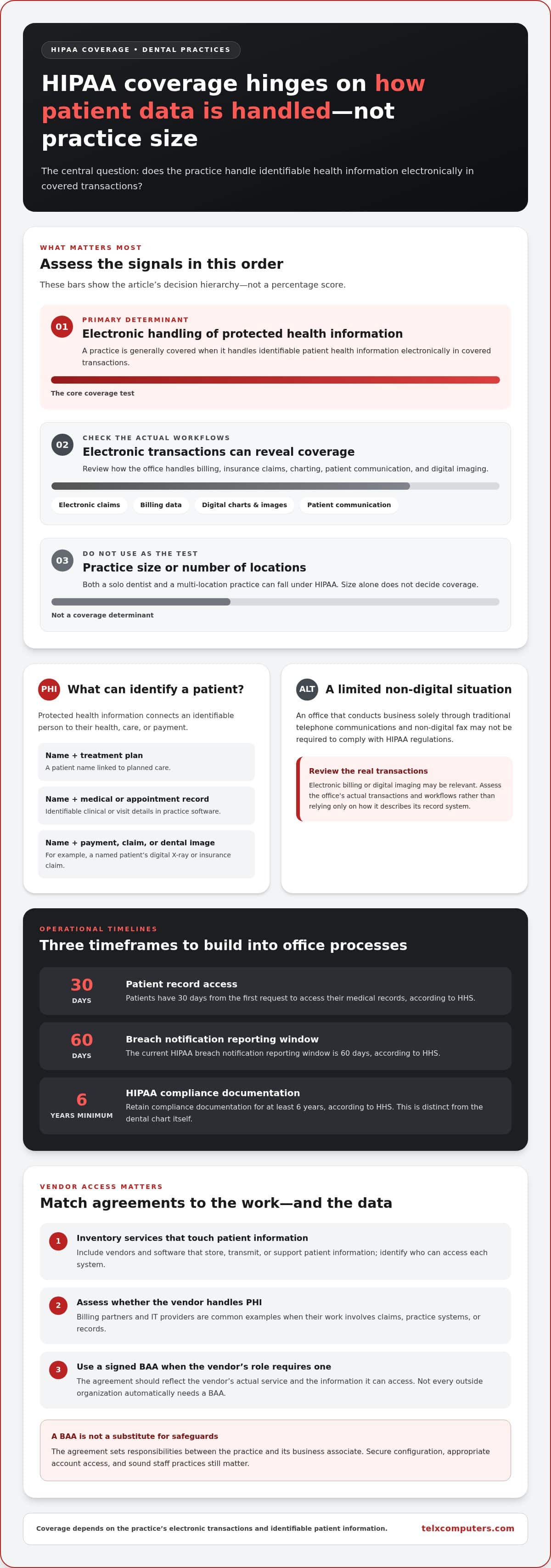
HIPAA generally applies when a dental practice handles protected health information electronically for billing, insurance claims, charting, or patient communication. For HIPAA compliance for dental offices in Miami, the key issue is how the practice handles identifiable patient information, not its size or number of locations.
Florida dental offices also need clear processes for patient access and compliance records. The requirements below help distinguish covered practices from offices that handle information only through traditional, non-digital channels.
HIPAA Coverage for Dental Practices
A dental practice is generally a HIPAA-covered entity when it handles protected health information electronically in covered transactions. Examples include electronic insurance claims and billing data. Both a solo dentist and a multi-location practice can fall under HIPAA, so practice size alone doesn’t determine whether the rules apply.
An office that conducts business solely through traditional telephone communications and non-digital fax may not be required to comply with HIPAA regulations. Electronic billing or digital imaging may be relevant when assessing whether HIPAA applies. Review the actual transactions and workflows rather than relying only on how the office describes its record system.
Protected Health Information in Practice Software
Protected health information is identifiable information connected to a patient’s health, care, or payment. In practice-management software, examples include a patient’s name linked to a treatment plan, medical history, payment details, appointment record, or dental image.
For example, a digital X-ray linked to a named patient’s chart can reveal protected health information. Billing software can do the same when it connects a patient’s identity to treatment charges or insurance claims. HIPAA compliance for dental offices in Miami therefore requires attention to how software combines identifiers with clinical or payment details, not just where files are stored.
Training, Violations, and Dental Records
HIPAA requires covered practices to train workforce members on privacy policies and procedures relevant to their work. The Security Rule also requires security-awareness training. Receptionists handling access requests and hygienists viewing charts need role-appropriate guidance. Common risks include unauthorized record access, overheard patient discussions, and posting identifiable details online.
Patients have rights to access their dental records. According to the U.S. Department of Health and Human Services, HIPAA gives patients 30 days from the first request to access their medical records. HIPAA compliance documentation must be retained for at least 6 years, according to the U.S. Department of Health and Human Services. That documentation is distinct from the dental chart itself.
Make the records process practical: log incoming requests, assign responsibility for locating the chart, and track the response. Keep compliance records, such as policies and training documentation, separate from clinical files. This helps staff respond consistently and makes it easier to see how the practice manages patient information.
Business Associate Agreements
A vendor that handles protected health information for a dental practice may be a business associate, making a written agreement an important part of the relationship. The agreement connects the vendor’s work and access to patient information with its security responsibilities, rather than leaving expectations implicit.
HIPAA defines “business associate” at 45 CFR §160.103. Dental practices should obtain a signed Business Associate Agreement (BAA) from vendors that handle protected health information. Billing partners and IT providers are common examples because their work may involve practice systems, claims, or records. The agreement should reflect the vendor’s actual role and the information that role can access.
Start with a vendor inventory. Include software and services that store, transmit, or support patient information, then identify who can access each system. A billing partner may handle claim details, while an IT provider may maintain systems containing dental records. These different tasks call for clear agreement terms that match the work being performed.
For cloud platforms, the agreement matters when the platform handles protected health information. Microsoft 365 is one example to assess if a practice uses it for email, file storage, or collaboration involving patient information. Review whether the signed BAA covers the specific Microsoft 365 services and workflows in use. A product name alone doesn’t establish that the practice’s agreement covers every way staff use the platform.
Email security and a BAA serve related but different purposes. The agreement sets responsibilities between the practice and its business associate; technical safeguards help protect information as staff send and access messages. For example, a dental office can map which employees use email for patient-related work, restrict access to appropriate accounts, and align those workflows with the vendor agreement. An agreement doesn’t replace secure configuration or sound staff practices.
Not every outside organization automatically needs a BAA. Under most circumstances, a dental practice doesn’t need one with a dental laboratory. The laboratory’s role and the circumstances of the relationship matter, so avoid treating every vendor contract as interchangeable.
To create a consistent process, document the vendor’s service, the patient information involved, and the systems it can access. Match each relationship to a signed BAA where required, keep the agreement with vendor records, and revisit it when software or services change. A new email workflow or cloud storage arrangement can change how a vendor handles patient information.
When vendor access and technical safeguards need to work together, network security planning for Miami businesses can help align system protections with the practice’s operational needs.
Which HIPAA laws apply to dentists?
HIPAA’s Privacy, Security, Breach Notification, and Enforcement Rules shape how dental practices handle protected health information. The Security Rule focuses on administrative, physical, and technical safeguards for electronic patient data.
Technical Safeguards and Access Controls
The Security Rule requires safeguards to protect electronic protected health information from unauthorized access or disclosure. For a dental practice, role-based permissions and individual logins help limit each employee to the records needed for their work. Strong passwords and multi-factor authentication where possible add access controls, reducing the chance that one compromised account exposes patient charts or billing information.
Encryption protects electronic patient information in transit and at rest. For example, a practice can use encrypted email or a secure patient portal instead of sending treatment details through personal email or messaging apps. HIPAA doesn’t always prohibit unencrypted email; a patient may accept it after the practice explains the risks. Appointment reminder texts are also permitted when the messaging process is HIPAA compliant.
Apply the same review to VoIP calls and digital forms. Identify which systems collect or transmit patient details, who can access them, and how they’re protected. A digital intake form containing a patient’s medical history needs safeguards appropriate to the information. The practice’s administrative policies should support these technical controls, so staff follow consistent procedures instead of choosing communication methods individually.
The proposed Security Rule update is separate from current requirements. It was issued as a Notice of Proposed Rulemaking in January 2025 and remained unfinalized as of June 2026. If finalized, the proposed updates would require vulnerability scanning twice a year and annual penetration testing. An annual Security Risk Analysis cycle for dental practices is proposed for 2027, not required by current law.
Backups and Physical Security
Physical safeguards protect the places and devices where patient information is stored or accessed. Staff can position screens away from public waiting areas, secure workstations, and limit access to rooms containing records or network equipment. These measures complement technical controls: a strong password can’t prevent someone from viewing an unattended, unlocked screen.
The Security Rule’s contingency plan standard, §164.308, includes a data backup plan, an emergency mode operations plan, and a disaster recovery plan. A dental practice should document how it restores access to electronic records after events such as a fire, flood, or hurricane. Test the recovery process so staff understand how to continue essential operations and retrieve protected information securely.
Risk assessments should consider administrative, physical, and technical security together. A missing backup or unlocked workstation can expose records even when email is encrypted. Reviewing these connected safeguards helps a practice identify weaknesses before they contribute to a violation, enforcement action, or penalties.
Enforcement and Breach Notification Rules
A suspected breach calls for a prompt, documented response, not an assumption that every incident triggers the same notices. Dental practices should assess what happened, whose information was involved, and which reporting duties apply.
Penalties and Breach Reporting
The Office for Civil Rights (OCR) enforces HIPAA, and penalties depend on the severity of the violation and whether it involved willful neglect. A dentist’s response after discovering an incident can matter: document the facts, preserve relevant records, and assess whether protected health information was accessed or disclosed improperly.
HIPAA’s breach definition includes exclusion criteria under 45 C.F.R. §164.402, so an impermissible use or disclosure must be assessed against those criteria. A mistaken email, for example, requires a review of its recipient, contents, and circumstances rather than an automatic conclusion about reportability.
Keep an incident record of when the issue was discovered, which systems were affected, what information was involved, and the response decisions. This gives the practice a clear basis for determining notifications and demonstrating how it handled the event if OCR reviews the matter.
Dental Office Breach Notifications
The HIPAA Breach Notification Rule sets reporting duties when an incident qualifies as a breach. The U.S. Department of Health and Human Services states that the current HIPAA breach notification reporting window is 60 days.
A breach affecting more than 500 people may require reporting to the media, according to the U.S. Department of Health and Human Services. The breach’s scale also affects reporting to federal authorities; covered entities report breaches affecting fewer than 500 individuals through an annual report to HHS.
Dental practices may need to notify affected patients, HHS, and, depending on the breach’s scale, the media. Build a response process that identifies who prepares patient notices, who submits required reports, and how the office records each action. For example, if a practice discovers exposed medical files, first establish which patients and records were affected.
Cybersecurity and Data Breaches
A data breach can follow a cyberattack, a stolen device, or an employee’s improper disclosure. Treat unusual account activity, missing files, and misdirected messages as signals to investigate, not as proof of a breach.
Preserve useful evidence as the response begins. Record when the event was detected, which account or device was involved, and what access logs show. Don’t delete affected files or messages before documenting them; those details can help determine the scope and support accurate breach notification.
Florida’s breach-notification requirements add another layer to HIPAA. Coordinate the incident review with both federal and applicable state obligations, while avoiding premature claims about what happened. A defined escalation path helps staff alert decision-makers quickly, preserve evidence, and begin assessing notifications within the federal reporting window.
HIPAA compliance checklists for dental offices
A useful checklist connects patient rights, written policies, electronic safeguards, vendor records, and incident procedures. For a Miami dental practice, assign an owner to each area and keep evidence of how the office handles protected health information.
Start with patient-facing requirements. Give each new patient a copy of the Notice of Privacy Practices, make it readily available in the office and on the website, and document a good-faith effort to obtain acknowledgement of receipt. HIPAA doesn’t require patients to sign an agreement accepting the notice’s policies. Keep the notice and acknowledgement processes distinct.
Build a clear process for records requests. According to the U.S. Department of Health and Human Services, HIPAA gives patients 30 days from the first request to access their medical records. Patients generally retain access rights even if they haven’t paid their bill, subject to limited exceptions. Staff should log the request date, identify the records requested, and track the response.
When a patient asks the practice to send records to another person, the written request must be signed and clearly identify the recipient and destination. HIPAA generally doesn’t require written authorization to transfer records to another healthcare provider for treatment, although state law may require consent or authorization. Keep marketing separate: written authorization is needed before using protected health information for marketing or posting patient testimonials or before-and-after photos.
- Review safeguards: document access controls, encrypted communications, and audit trails showing who accessed records and when.
- Review providers: identify vendors handling patient information and maintain signed Business Associate Agreements where required.
- Review readiness: conduct a security risk assessment, and document how the practice restores electronic records after a fire, flood, or hurricane.
- Review policies: check that the Notice of Privacy Practices and procedures match the practice’s actual record and communication workflows.
Keep the evidence organized. HIPAA compliance documentation must be retained for at least 6 years, according to the U.S. This applies to compliance records, such as policies and related documentation, not as a blanket statement about how long every dental chart must be kept. The HHS Security Risk Assessment Tool is a free resource for identifying cybersecurity risks.
A checklist works best as a recurring review, not a one-time document. Revisit it when the practice changes software, adds a provider, or changes how patients submit forms. These operational changes can affect access, vendor relationships, and safeguards for electronic information.
To connect healthcare workflows with practical technology safeguards, explore healthcare IT support for Miami practices.
Telx Computers: Managed IT Services
Telx Computers helps dental practices manage the technology behind patient records, email, and daily operations. Its Managed IT Services support offices that need coordinated oversight of business systems, while Network Security and Cloud Computing address technology environments that store or access practice information.
Consider this support when a software change, new location, or recurring technical issue affects how staff access work systems. Strong IT operations can support a practice’s safeguards, but HIPAA policies and legal decisions remain part of the practice’s own compliance program.
For Miami dental offices seeking dependable technology support, contact Telx Computers or visit telxcomputers.com.
Build a More Resilient Practice
HIPAA compliance for dental offices in Miami is an ongoing part of running a modern practice, not a document to set aside after review. A useful next step is to clarify technology responsibilities: identify who maintains systems, who supports staff, and how the practice manages changes that affect access to patient information. Clear ownership connects daily operations with the practice’s privacy and security policies.
Telx Computers can support that operational foundation through Managed IT Services, 24/7 Help Desk Support, and Network Security. These services address technology management and support; the dental practice remains responsible for its HIPAA policies and compliance decisions.
For a conversation about technology support that fits your practice’s needs, contact Telx Computers. A clear plan can help your team move forward with confidence.
Frequently Asked Questions
Who is Responsible for Dental HIPAA Compliance?
The dental practice is responsible for its HIPAA compliance as a covered entity. Practice leadership can assign staff to manage privacy procedures, system safeguards, and patient requests, but responsibilities need coordination across the office. For example, front-desk staff may handle incoming records requests, while a system administrator manages access permissions. Vendors that handle protected information have separate contractual duties under applicable Business Associate Agreements.
Are Dental Records Covered by HIPAA?
Yes, dental records are protected when an office is a HIPAA-covered entity and the records contain identifiable patient health information. A chart linking a patient’s identity with a diagnosis, treatment history, or dental image can qualify. Records don’t stop being protected because they’re stored on paper rather than in a computer. Coverage depends on the practice’s status and the information involved, not just the file format.
Can dental practices use regular email to communicate with patients?
Yes, HIPAA doesn’t always prohibit unencrypted email, and a patient may accept it after the practice explains the risks. Keep the message limited to what the patient needs. For example, an office might send a basic appointment reminder without diagnosis details or treatment notes. Staff should use the practice’s approved process and avoid personal email accounts, which can bypass established access and recordkeeping controls.
Do dentists need encrypted email?
Dental offices should use encrypted email when sending electronic protected health information, such as a treatment document attached to a message. HIPAA’s Security Rule requires safeguards for electronic information in transit and at rest. Because a patient may accept unencrypted email after a risk warning, practices should distinguish that situation from routine handling. Staff need a consistent method for identifying sensitive messages and securing attachments and replies.
How often must dental practices conduct a Security Risk Analysis?
Current HIPAA requirements don’t establish one annual Security Risk Analysis schedule for every dental practice. The analysis should reflect the office’s systems, information, and risks, and practices should revisit it when significant technology or workflow changes occur. An annual review is recommended in the article’s guidance, while an annual cycle for 2027 appeared in a proposed update, not as a current legal requirement.
What counts as PHI and ePHI in dentistry?
PHI is identifiable information about a patient’s health, care, or payment; ePHI is that information in electronic form. A paper referral connecting a patient to planned treatment can be PHI, while the same information in a digital imaging platform is ePHI. A file isn’t identifiable merely because it contains clinical details, but linking those details to a patient can make it protected.
What is Protected Health Information (PHI)?
Protected Health Information is individually identifiable information relating to a person’s health, care, or payment for care. In dentistry, a patient’s name linked to a medical history, treatment plan, or insurance payment details can qualify. Context matters: a clinical detail tied to an identifiable patient differs from information that cannot reasonably identify anyone. Treat connected patient and care information as sensitive.
What HIPAA rules apply to dental offices in Miami, Florida?
Covered dental offices in Miami follow HIPAA’s Privacy Rule, Security Rule, Breach Notification Rule, and Enforcement Rule. The Privacy Rule addresses uses and disclosures of patient information; the Security Rule covers safeguards for electronic information. Standard transactions are governed by 45 C.F.R. Part 162. Florida breach-notification requirements add another layer, so an incident response should account for applicable state requirements alongside HIPAA.