





18 Jul Cloud Server Monitoring: A Strategic Approach to Business Continuity in 2026
Most businesses don’t realize their cloud infrastructure is a ticking clock until the screen goes dark and the hidden costs of downtime start mounting by the second. You’ve likely felt the frustration of alert fatigue, where a constant stream of technical notifications makes it impossible to distinguish a minor glitch from a catastrophic failure. It’s exhausting to manage complex metrics when your internal team is already stretched thin. Effective cloud server monitoring shouldn’t be a burden you carry alone.
This article explores how a strategic approach to infrastructure management transforms your IT environment from a source of technical anxiety into a reliable engine for growth. You’ll learn how proactive oversight prevents downtime, secures your sensitive data against evolving threats, and brings predictability back to your IT budget through expert management. We’ll examine the shift toward unified observability and the specific tactics required to maintain 100% uptime for your critical applications, giving you the peace of mind to focus on your core business.
Key Takeaways
- Discover how shifting from reactive troubleshooting to a proactive “expert guardian” model ensures 100% uptime for critical business applications.
- Identify and eliminate “zombie” servers to reduce hidden costs and optimize your overall IT budget.
- Understand why robust cloud server monitoring requires a strategic blend of advanced software and professional expertise to bridge the interpretation gap.
- Learn to implement alert thresholds that eliminate notification fatigue while maintaining a vigilant watch over your digital assets.
- Explore the advantages of partnering with a managed service provider that offers both 24/7 oversight and rapid local response in Miami, NYC, and LA.
What is Cloud Server Monitoring and Why Does it Matter?
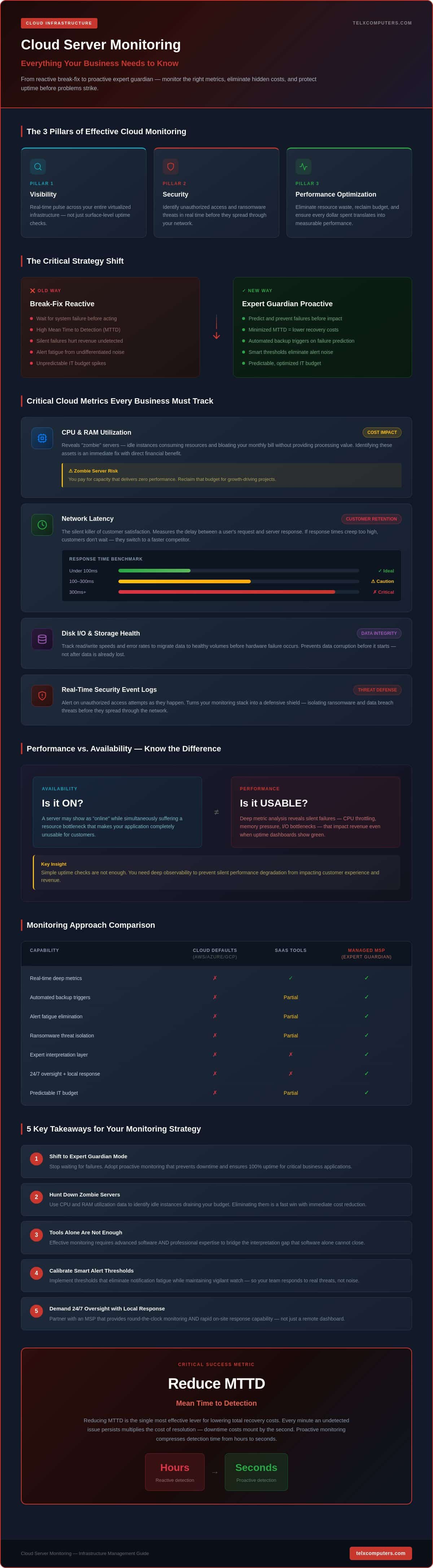
Cloud server monitoring is the continuous process of tracking resource health, performance, and security across your virtualized infrastructure. It provides a real-time pulse of your digital operations, ensuring every component functions as intended. This process represents a fundamental shift in IT strategy. Instead of waiting for a system to fail in a reactive “break-fix” cycle, you adopt an “expert guardian” model that prioritizes uptime and stability.
Effective cloud server monitoring rests on three essential pillars: visibility, security, and performance optimization. Because speed is a competitive advantage, simple uptime checks are no longer enough. A server might technically be “online” while suffering from a resource bottleneck that makes your applications unusable for customers. You need deep insights to prevent these silent failures from impacting your revenue.
To better understand how these systems look in practice, watch this tutorial on industry-standard monitoring tools:
The Cost of Invisibility: Why You Can’t Rely on Defaults
Basic monitoring tools provided by platforms like AWS, Azure, or Google Cloud often provide a surface-level view of your environment. They tell you if a server is running, but they rarely highlight the nuanced performance degradation that leads to a poor user experience. Relying solely on these defaults creates blind spots that lead to “silent” financial losses. Mean Time to Detection (MTTD) is the average time it takes for your IT team to identify an issue after it begins, and reducing this duration is the most effective way to lower total recovery costs.
Monitoring as a Foundation for Disaster Recovery
A robust monitoring strategy acts as the early warning system for your entire business. By utilizing advanced Remote monitoring and management (RMM) tools, your team can set triggers that initiate automated data backup protocols the moment a critical failure is predicted. This proactive stance is equally vital for ransomware protection. By identifying unusual data traffic or unauthorized access attempts in real time, cloud server monitoring helps isolate threats before they can spread through your network, securing your data and your reputation simultaneously.
Critical Cloud Metrics Every Business Should Track
Effective infrastructure management requires more than just knowing if a server is on or off. To truly master your environment, you must look at the specific data points that drive your operational efficiency. A standard cloud monitoring definition often focuses on basic health, but for a growing business, it’s about protecting the bottom line and ensuring every dollar spent translates into performance.
CPU and RAM utilization reveal the presence of “zombie” servers. These are instances that consume resources and bloat your monthly bill without providing any actual processing power. By identifying these idle assets, you reclaim your budget for projects that drive growth rather than wasting it on unused capacity. It’s a simple fix that yields immediate financial benefits.
Network latency is the silent killer of customer satisfaction. Latency represents the delay between a user’s request and the server’s response; for high-performance business applications in 2026, maintaining a benchmark of sub-100 milliseconds is essential for a frictionless interface. If your response times creep higher, customers don’t just wait; they leave for a competitor with a faster, more reliable interface.
Disk I/O and storage health monitoring prevent data corruption before it starts. By tracking read/write speeds and error rates, your team can migrate data to healthy volumes before a hardware failure occurs. Simultaneously, real-time security event logs alert you to unauthorized access attempts as they happen. This turns your cloud server monitoring stack into a defensive shield that protects your most valuable digital assets.
Performance vs. Availability: Understanding the Difference
A server can be “up” while still failing your business. If a database query takes thirty seconds instead of three, the availability metric looks perfect, but your operations are effectively paralyzed. Tracking End-User Experience (EUE) metrics ensures that your cloud server monitoring efforts align with how people actually interact with your software. It moves the focus from technical “green lights” to actual business outcomes.
Optimizing Cloud Spend Through Resource Monitoring
Monitoring data is your best tool for right-sizing your cloud infrastructure. By analyzing historical trends, you can move away from over-provisioned, expensive instances and toward a leaner, more efficient model. This historical perspective doesn’t just save money today; it provides the clarity needed for accurate long-term IT budget planning. If you’re ready to stop guessing and start optimizing, our team can help you refine your cloud strategy for maximum efficiency.
SaaS Monitoring Tools vs. Managed Service Providers
Choosing between a standalone SaaS tool and a managed service provider is a decision between buying a hammer and hiring a master carpenter. Many organizations fall into the trap of “tool fatigue.” They invest in high-end software, only to realize they lack the internal expertise to interpret the flood of data. This creates an expertise gap that software alone cannot bridge. Effective cloud server monitoring requires more than just a dashboard; it requires a team capable of acting on the insights those dashboards provide.
Some teams suggest using open-source tools to save on licensing fees. While platforms like Prometheus or Grafana are excellent, they aren’t truly “free.” They require significant time to configure, maintain, and secure. If your internal team spends dozens of hours every month managing a monitoring tool, you’re paying for that software through lost productivity. Managed cloud server monitoring removes this burden from your staff. It allows them to focus on high-value business goals while we handle the technical heavy lifting.
The Human Element: Interpreting the Data
Automated alerts are helpful, but they often lack context. An automated system might flag a spike in CPU usage, but it won’t necessarily know if that spike is a routine backup or a sophisticated cyberattack. This is where an expert guardian becomes invaluable. By partnering with a proactive IT consulting firm, you gain access to specialists who filter out the “noise” to focus on critical threats. In one instance, our team identified a subtle pattern of failed login attempts that standard automated software dismissed as simple user error. Our intervention stopped a brute-force attack in its tracks before it could breach the network. Understanding the various types of cloud monitoring, from database health to website performance, is only half the battle. The other half is having the human intelligence to connect those dots.
Predictable Budgeting with Managed Services
The financial side of SaaS monitoring is often more complex than it appears. Many providers use per-host or usage-based pricing models, which cause your costs to fluctuate wildly as your cloud footprint scales. These variable costs make it difficult to forecast your IT spend accurately. In contrast, Telx Computers offers fixed-price, unlimited service plans. This model provides total budget predictability. You’ll never face a surprise “emergency” bill when a technical issue arises. You get a single point of accountability for your entire infrastructure. Whether you’re managing a localized environment in Miami or a global cloud network, having a fixed cost for 24/7 oversight allows you to allocate resources toward innovation instead of maintenance.
Best Practices for Implementing a Cloud Monitoring Strategy
A successful implementation requires a structured roadmap that moves beyond basic setup. You need a strategy that integrates with your broader business goals and provides a clear path for action when things go wrong. By following these steps, you transform cloud server monitoring from a simple technical requirement into a strategic advantage for your organization.
- Audit Your Footprint: You can’t protect what you haven’t identified. Start by creating a comprehensive inventory of your cloud instances, storage volumes, and network gateways. Categorize these assets based on their criticality to your daily operations.
- Define Actionable Thresholds: Distinguishing between a “warning” and a “critical” alert is the only way to prevent notification fatigue. For example, a 70% memory spike might warrant a warning, while 95% usage requires immediate intervention.
- Integrate with Recovery Plans: Monitoring should be the trigger for your disaster recovery protocols. If a server fails, your system should automatically initiate failover procedures or alert the on-call team.
- Analyze Long-Term Trends: Schedule monthly reviews of your performance data. This helps you spot gradual degradations that real-time alerts might miss, such as a slow memory leak or increasing database query times.
- Partner with a Local Expert: Having a team that understands your regional business context in Miami, NYC, or LA ensures faster response times and a more personalized approach to your infrastructure’s health.
Establishing Real-Time Alerting Protocols
Setting up an escalation path ensures that the right person is notified at 3 AM without waking the entire department. You must differentiate between informational alerts, which can wait until business hours, and actionable incidents that require immediate attention. For a mid-sized Miami firm, the ideal escalation matrix involves an initial automated response followed by a direct notification to a tier-two engineer if the issue isn’t resolved within fifteen minutes. This structure guarantees accountability and prevents critical failures from slipping through the cracks.
Security-First Monitoring: Integrating Threat Detection
Your monitoring strategy is a vital part of your defensive perimeter. By tracking unusual traffic patterns, you can identify the early stages of a DDoS attack or unauthorized data exfiltration. Monitoring configuration changes is also essential for preventing accidental security gaps caused by human error. When combined with professional network security services, this creates a multilayered shield for your organization. If you want to ensure your strategy is airtight, you can request an instant quote to see how our expert guardians can support your business.
Why Telx Computers is Your Expert Guardian in the Cloud
Choosing a partner for your infrastructure oversight is about more than selecting a vendor; it’s about securing a strategic ally. At Telx Computers, we’ve spent over two decades refining our role as the silent engine behind our clients’ success. Our approach to cloud server monitoring is built on the foundation of absolute vigilance. We combine advanced automated systems with the human intelligence of our 24/7 help desk to ensure your business never misses a beat.
We understand that technical anxiety often stems from unpredictable costs and complex metrics. That’s why we offer fixed-price, unlimited support plans. This model removes the financial guesswork from your IT strategy. Whether you’re scaling your cloud footprint or navigating a security challenge, your monthly bill remains stable. This transparency allows you to treat IT as a growth driver rather than a fluctuating expense. We take pride in the efficiency of our operations, acting as a high-tier corporate department that remains accessible to organizations of all sizes.
The Telx Advantage: Proactive vs. Reactive
The traditional “break-fix” model is obsolete in a high-speed digital economy. Our team identifies and resolves 90% of potential system issues before they ever impact your workflow. This proactive stance is the core of our “expert guardian” persona. We monitor the subtle shifts in performance that software alone might overlook, intervening early to maintain total uptime for your critical applications. You gain the peace of mind that comes with our unlimited service guarantee, knowing that our experts are watching your infrastructure every second of the day.
Rapid Support for South Florida and Beyond
While cloud technology is global, local expertise remains a vital anchor for business continuity. As a premier IT company in Miami, we provide a level of regional insight that remote-only providers simply cannot match. We understand the specific needs of businesses in Aventura, Fort Lauderdale, and the surrounding communities. Our physical presence in Miami, New York, and Los Angeles allows for a rapid response when cloud issues intersect with local hardware or network environments. We blend global technical standards with a deep commitment to our regional business partners. If you’re ready to experience the stability of expert-led cloud server monitoring, you can get started today with a free instant quote.
Secure Your Infrastructure for the Road Ahead
Transitioning from a reactive IT posture to a proactive one is the most significant step you can take toward long-term business stability. By focusing on critical performance metrics and eliminating the noise of alert fatigue, you turn your digital environment into a reliable asset rather than a source of technical anxiety. Expert-led cloud server monitoring ensures that your applications remain available and your data stays protected, allowing your team to focus on innovation instead of troubleshooting.
Reliability isn’t a luxury; it’s a requirement for modern enterprise growth. Telx Computers stands as your strategic ally, offering 24/7 proactive monitoring and fixed-price unlimited support to keep your operations running smoothly. With rapid response teams located in Miami, NYC, and LA, we provide the localized expertise necessary for total peace of mind. You don’t have to manage these complexities alone. Secure your business today with a free IT consultation and instant quote from Telx Computers. We’re ready to help you build a more resilient future.
Frequently Asked Questions
Is cloud server monitoring included in basic cloud provider packages?
Basic packages from major providers usually offer surface-level metrics like whether a server is “up.” They don’t provide the deep visibility required for performance optimization or proactive security oversight. Effective cloud server monitoring requires additional management layers to interpret complex data and act on it. Relying on default tools often leaves businesses with blind spots that lead to silent performance degradation and unexpected downtime.
How does monitoring help prevent ransomware attacks?
Monitoring acts as a defensive early warning system by identifying anomalies in real-time. It tracks unauthorized login attempts and unusual spikes in data traffic that often precede a breach. If a ransomware strain begins encrypting files, the sudden surge in disk activity triggers an immediate alert. This allows your team to isolate the affected instance and initiate disaster recovery protocols before the infection spreads across your entire network.
Can monitoring help reduce my monthly cloud hosting bill?
Comprehensive monitoring directly impacts your bottom line by identifying underutilized resources. Many businesses pay for “zombie” servers that consume a budget while providing no operational value. By analyzing historical usage trends, you can “right-size” your environment to match actual demand. This process ensures you only pay for the capacity you need, significantly lowering your monthly infrastructure costs while maintaining peak performance.
What is the difference between agent-based and agentless monitoring?
Agent-based monitoring requires installing a small piece of software on the server to gather granular internal data like specific process performance. Agentless monitoring uses standard network protocols to check the server’s health from the outside. While agentless options are easier to deploy, agent-based solutions provide the deep visibility necessary for complex troubleshooting and precise resource optimization in a modern cloud environment.
Does my small business really need 24/7 monitoring?
Downtime doesn’t follow a nine-to-five schedule. For a small business, a single hour of offline operations can lead to lost revenue and damaged customer trust. 24/7 cloud server monitoring provides the stability needed to compete with larger entities. It ensures that critical issues are resolved while you sleep, so your team starts every morning with a fully functional digital environment and total peace of mind.
How often should I review my cloud server performance reports?
You should review performance summaries at least once a month to identify long-term trends and capacity needs. While real-time alerts handle immediate crises, monthly audits reveal gradual issues like slow memory leaks or creeping latency. This data-driven approach allows for strategic budget planning and helps you anticipate hardware or software upgrades before they become urgent problems that disrupt your workflow.
What happens if a server goes down in the middle of the night?
If a server fails overnight, our 24/7 help desk receives an immediate high-priority alert. Our team acts as your expert guardian, initiating remediation protocols without waiting for your staff to wake up. We often resolve these incidents before your first employee logs in for the day. This rapid response ensures your business continuity remains intact regardless of the hour or the complexity of the failure.
How do I choose between a monitoring tool and a managed service provider?
The choice depends on your internal capacity for 24/7 oversight. A monitoring tool provides the data, but your team must interpret it and perform the actual repairs. A managed service provider like Telx Computers combines elite software with human expertise. We don’t just hand you a dashboard; we take ownership of the infrastructure, providing a fixed-price solution that guarantees stability and removes technical anxiety.