





09 Oct Strategic IT Consulting for Startups in Wynwood: A Practical Selection Framework
The best first technology move for a startup may be to delay buying another tool. Founders in Wynwood often need to make technology decisions with limited time and budget while keeping security and reliability in view. Strategic IT consulting for startups in Wynwood should start with your business goals and risks, not a pitch for a particular product.
It’s reasonable to want advice that solves urgent problems without creating a bigger, more expensive setup than your team needs. The challenge is knowing which decisions can wait, which need attention now, and whether you need a focused project or ongoing support as the company grows.
This article offers a practical way to evaluate IT consulting options, set technology priorities, and weigh scoped projects against recurring managed support. You’ll also see how Telx Computers connects planning with implementation and ongoing operations for businesses in Miami, Aventura, and Fort Lauderdale, including startups in Wynwood.
Key Takeaways
- Set technology priorities around business goals, operational risks, and what your team needs to keep work moving.
- Use an IT roadmap to connect decisions about security, cloud, network reliability, backups, and employee support.
- Compare one-time projects, recurring managed support, and a combined model based on scope, continuity, budget predictability, and ownership.
- Make strategic IT consulting for startups in Wynwood more productive by documenting your goals, users, systems, recurring issues, and decision constraints.
- Connect planning with implementation and ongoing support so your technology can evolve with the business.
When Wynwood Startups Need Strategic IT Consulting
Moving fast can help a startup seize an opportunity, but quick technology decisions can create systems that are hard to secure, maintain, or hand off as the team grows. Strategic IT consulting for startups in Wynwood connects technology choices to business goals, operating risks, and the people responsible for keeping systems usable.
That’s different from troubleshooting a computer that won’t start or choosing software based on a feature list. The broader practice of IT consulting can include evaluating needs and recommending technology approaches. Strategic advice should also clarify why a decision matters to the business and what it will take to support it.
Strategic IT planning sets the direction for reliable systems; reactive technical support resolves problems as they arise. Both can be necessary, but treating recurring issues as isolated tickets can leave the underlying cause, ownership, or future impact unaddressed.
Which startup signals make IT planning timely?
Planning becomes useful when technology starts affecting the company’s ability to deliver. New employees may need consistent account access and device setup. Sensitive business or customer data can prompt a closer look at access controls and backup practices. Unreliable systems, a cloud migration, or uncertainty about who manages key accounts are also signs that decisions need a clear owner and rationale.
Watch for patterns, not just dramatic failures. Repeated interruptions can consume staff time, delay customer work, and leave people unsure who should act. Growth, a new location, or a shift in where and how employees work may expose assumptions that once seemed manageable, such as relying on one person to handle access or undocumented network settings.
An urgent incident needs immediate attention, but resolving it doesn’t automatically answer the longer-term planning question. Once operations are stable, review whether the incident revealed a recurring weakness, unclear responsibility, or a system that no longer fits the business.
What should a Wynwood founder expect from strategic advice?
Expect a working conversation about business goals, current systems, team needs, recurring friction, and practical constraints. A useful recommendation explains the trade-offs, identifies what needs attention first, and makes ownership clear. It shouldn’t begin and end with a product pitch. The right technology choice depends on how your startup works and what it needs to support next.
For example, a founder preparing to add employees might need to clarify account setup and access ownership before selecting additional tools. A team considering cloud changes should understand how the change affects daily workflows, reliability, and ongoing support. These discussions turn a broad concern into a decision the company can act on, while leaving room to revisit priorities as the business changes.
Local support can matter when a project calls for on-site work or when your team wants a nearby technology partner. Telx Computers serves businesses in Miami, Aventura, and Fort Lauderdale, and connects IT consulting with managed IT support for ongoing operational needs. For routine support, managed IT support can complement separately scoped project work.
Build a Startup IT Roadmap Around Business Priorities
An IT roadmap turns business goals into a sequenced plan for technology decisions. It identifies what needs attention, who owns each action, and when to review progress. For a startup, it doesn’t need to be a complex document. A clear list of priorities, reasons, owners, and next steps can keep spending focused and prevent urgent fixes from crowding out essential planning.
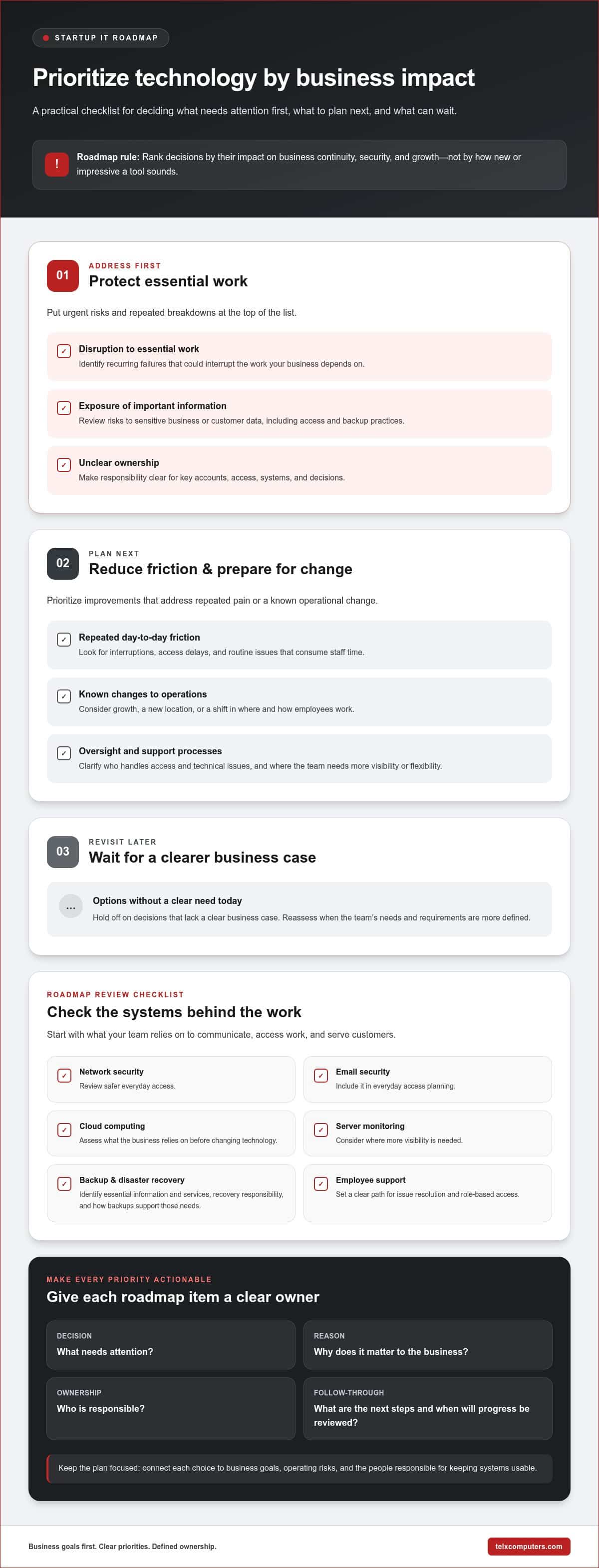
A useful IT roadmap ranks decisions by their impact on business continuity, security, and growth, not by how new or impressive a tool sounds. That principle helps founders separate immediate risks from improvements that can wait until the business has a stronger need or clearer requirements.
Which technology priorities belong on an early-stage roadmap?
Start with the systems your team depends on to communicate, access work, and serve customers. Network security and email security support safer everyday access. Cloud computing and server monitoring are also useful planning areas, but neither automatically means buying or changing technology. First identify what the business relies on and where it needs more visibility or flexibility.
Backup and disaster recovery also belong in the plan. Identify which information and services are essential to resume work, who is responsible for recovery decisions, and how the current backup approach supports those needs. Add employee support as a practical priority: people need a clear path to resolve technical issues and get access to the systems required for their roles.
- Address first: Risks or recurring failures that could disrupt essential work, expose important information, or leave no clear owner.
- Plan next: Improvements that reduce repeated friction, strengthen oversight, or prepare systems for a known operational change.
- Revisit later: Options that lack a clear business case today and can be assessed when the team’s needs become more defined.
How should founders connect technology choices to growth?
Map each proposed decision to current users, essential workflows, and a likely change in how the company operates. For example, if staff regularly lose access or wait for one person to resolve routine issues, improving ownership and support processes may matter more than adding another platform. If the team expects new employees or a different work pattern, consider how accounts, devices, access, and support responsibilities will scale.
Give every roadmap item an owner, a business reason, and a review point. This creates accountability without locking the startup into a rigid plan. Review priorities when the team, workflows, or core systems change. Keep immediate risks visible while allowing lower-priority improvements to move as capacity allows.
For a broader view of how ongoing support can fit alongside planning, Telx Computers provides managed IT services in Miami and nearby communities. A practical roadmap gives founders and their IT partner a shared basis for deciding what to address now, what to scope as a project, and what needs ongoing operational attention.
Compare IT Consulting and Support Models for a Wynwood Startup
The right support model depends on what needs to happen after the initial advice. A defined technology change may call for a project with a clear deliverable. Routine maintenance and employee requests may call for ongoing support. Some startups need both: a project to make a specific change, followed by a support arrangement that helps keep daily operations steady.
Telx Computers offers fixed-price managed IT plans for routine support, alongside project-based services scoped according to the work and technical complexity. A project and a managed plan serve different purposes, so don’t assume every project task is included in recurring support. Compare the options against your current workload, internal ownership, and need for continuity.
| Model | Scope | Continuity | Budget predictability | Internal ownership | Best fit |
|---|---|---|---|---|---|
| One-time project | Defined work and deliverables | Focused on the project period | Scoped for the planned work | Startup retains ongoing responsibility after handoff | A specific technology change or implementation |
| Recurring managed support | Routine operational support | Ongoing relationship for day-to-day needs | Fixed-price plan for routine support | Responsibilities are shared according to the support arrangement | Recurring maintenance and employee help needs |
| Combined approach | Project work plus recurring support | Connects implementation with ongoing operations | Project work is scoped separately from the recurring plan | Clarifies ownership during the project and after handoff | A startup changing systems while needing consistent support |
When does a scoped IT project fit better?
A network migration, server installation, or office relocation has a defined objective and a body of work that can be planned around the project’s scope and technical complexity. The deliverable might be a completed migration or an installed server. That focused engagement differs from continuous monitoring and routine support, which address ongoing operational needs rather than a single change.
Before a project begins, clarify the desired outcome, affected systems, dependencies, and who will own the environment afterward. This helps the startup understand where project work ends and ongoing responsibilities begin.
When can recurring managed support provide continuity?
Recurring managed support can suit a team that needs routine maintenance and help desk support without assigning every issue to a founder or an informal internal owner. Telx’s managed plans provide routine support and unlimited help desk support, with 24/7 help desk availability. Availability describes when support can be accessed, not a guaranteed resolution time.
For a startup weighing external operational support, outsourced IT services can provide a way to structure that relationship. The practical choice for strategic IT consulting for startups in Wynwood is the model that matches the work: scoped project services for defined changes, recurring support for routine needs, or both when implementation and continuity must connect.
Prepare a Decision-Ready IT Consulting Brief in Wynwood
A concise brief helps turn a broad request for IT advice into a focused working session. It gives an advisor context before recommendations begin and helps founders compare possible actions against real business needs. For strategic IT consulting for startups in Wynwood, clarity matters more than a polished presentation. A shared document with specific examples is enough to get the discussion moving.
Build the brief in sequence:
- State the business goal. Describe what the company needs technology to support, such as serving customers reliably, onboarding employees, or making a core workflow easier to manage.
- Describe the people and work. Note who uses the systems, what their roles involve, and which workflows depend on technology every day.
- Inventory essential systems. List the main devices, network, cloud services, servers, email, and business applications, along with who currently manages them.
- Record recurring disruptions. Capture what happens, how often it interrupts work, who gets involved, and the practical effect, such as delayed tasks or repeated workarounds.
- Set decision constraints and success criteria. Note budget considerations, timing, internal capacity, and any dependencies. Define success in operational terms, such as more reliable access, clearer ownership, or better visibility into system health.
What information helps clarify the startup’s needs?
Include the workflows that matter most, the systems they rely on, the employees or teams who use them, and the current support arrangement. A simple example is more useful than a label: explain that staff lose access to a shared system during a routine task, rather than writing only “network problems.” Record the disruption’s effect on daily work, but avoid guessing at causes before an assessment.
Also note possible business changes, such as adding employees, moving offices, or changing how the team works. Mark these as potential plans if they’re still under consideration. That distinction helps an advisor prepare for plausible needs without treating an early idea as a confirmed requirement.
How can founders assess a proposed recommendation?
Check that each recommendation points back to a stated goal, recurring issue, or business risk. Then distinguish immediate actions from separately scoped projects and ongoing operational responsibilities. A sound proposal should make dependencies visible, identify who owns each step, and explain how progress will be assessed. For instance, a goal of clearer ownership should result in named responsibilities, not just a new tool.
Use the brief as a reference during the discussion. If an action doesn’t connect to a priority, ask what need it addresses and what could wait. This keeps the conversation business-led and makes trade-offs easier to understand.
Network reliability may also be part of the plan. Telx Computers provides network IT support in Miami as part of its business technology services.
Turn Startup Priorities Into a Practical IT Plan With Telx Computers
A startup’s technology plan should lead to decisions the team can act on, not a list of disconnected tools. Telx Computers brings IT consulting together with managed IT services, network security, cloud computing, and data backup and disaster recovery. These services can be aligned with the company’s priorities, connecting planning to implementation and ongoing operations.
Telx has served businesses since 2002 and has a Miami presence. For a Wynwood startup, its local service in Miami, Aventura, and Fort Lauderdale provides a nearby option for business technology support. The right plan still depends on your systems, business goals, and operating constraints.
How can Telx connect planning with ongoing operations?
IT consulting helps clarify what the business needs from its technology and which decisions deserve attention. Managed IT support can complement that work by addressing routine operational needs, including maintenance and help desk support. Fixed-price recurring plans provide a predictable structure for routine support, while project-based work is scoped separately according to the work and technical complexity.
This distinction helps set expectations. A cloud or network project can have its own scope and deliverables; ongoing support can help with day-to-day operations after implementation. Plan the handoff by documenting who owns each system, how employees get help, and what operational responsibilities remain with the startup. That connection helps prevent a completed project from becoming an unsupported change.
What is a low-friction next step for a startup?
Bring the consulting conversation down to the decisions in front of you. A founder can prepare a short brief with business goals, key users and systems, recurring friction, current support arrangements, and open technology decisions. Add potential changes, such as hiring or a shift in work patterns, while distinguishing possibilities from confirmed plans. This gives the discussion useful context without requiring a lengthy technical inventory.
Then identify what you want to be clearer after the conversation. You might need to know which risk to address first, whether a proposed change should be a scoped project, or who will own routine support. Telx Computers can use those priorities to shape a practical discussion around your business needs. Learn more about Telx’s Miami-area business technology support.
Strategic IT consulting for startups in Wynwood should help founders make confident decisions that fit today’s operations and leave room for growth. You don’t need every future system mapped out before starting. Bring the questions you’re weighing, the constraints you’re working within, and the outcomes that matter most.
Explore Telx Computers’ business IT services to see how consulting and ongoing support can fit into a practical IT plan.
Make Your Next Technology Decision Deliberate
Your technology plan doesn’t have to predict every stage of growth. Treat it as a working set of decisions: act on the most important need, observe how the change affects daily operations, and adjust as the business evolves. That approach keeps strategic IT consulting for startups in Wynwood tied to real operating conditions rather than assumptions about what the company might need someday.
Choose one decision that’s slowing work or creating uncertainty. Write down the outcome you want, who will own the next step, and what evidence would show the change is helping. This gives your team a manageable starting point and a useful way to keep future choices grounded in business priorities.
Telx Computers can help you turn that priority into a practical technology plan. Discuss your startup’s IT priorities with Telx Computers and take the next step with greater clarity and confidence.
Frequently Asked Questions
Is strategic IT consulting useful before a startup hires an internal IT lead?
Yes. Strategic IT consulting for startups in Wynwood can help founders clarify which technology responsibilities need attention before deciding what an internal IT lead should own. For example, an advisor can help distinguish routine employee support from higher-level planning, security oversight, and project coordination. That gives founders a clearer picture of the role they may need to hire for, while helping the team manage current priorities in the meantime.
Can a startup get strategic IT advice without replacing its existing systems?
Yes. Advice can begin with reviewing how your current systems support daily work, where they create friction, and whether the team can manage them effectively. A recommendation might focus on improving configuration, access practices, documentation, or support processes rather than replacing a platform. If a change is proposed, consider what business problem it addresses and whether a smaller adjustment could meet the same need.
How often should a startup revisit its IT roadmap?
Revisit it when the business changes enough to affect technology needs, such as adding a team, changing core workflows, moving offices, or adopting a new cloud service. A review is also useful after a disruption reveals unclear ownership or a weak point in operations. Set a recurring check-in that fits your planning rhythm, then bring forward major changes as they arise instead of waiting for the next scheduled review.
Can strategic IT consulting support a remote or hybrid startup team?
Yes. Consulting can help assess how employees access shared systems, receive support, and protect company information while working from different locations. A practical review might look at account setup for a new remote hire, access changes when responsibilities shift, and how employees report technical issues. The goal is to align technology and support practices with the team’s actual work patterns, not assume everyone operates from one office.
Does IT consulting help a startup prepare for investor due diligence?
It can help organize a clear view of technology operations before investor discussions. A startup might document its key systems, who administers them, how access is managed, how backups are handled, and which technology risks remain open. This preparation can make it easier to explain the company’s setup and decision-making. It doesn’t guarantee an investor outcome or replace legal, financial, or other specialist due diligence.
Can an IT consultant advise a startup that already has a technology stack?
Yes. An existing stack gives an advisor something concrete to assess: which systems employees rely on, where information moves between them, and where overlapping tools or manual work create avoidable friction. The review can also identify systems with unclear ownership or support needs. Recommendations should explain the rationale for keeping, adjusting, or changing a component, so the startup can make deliberate decisions rather than replace tools by default.