





29 Sep Predictable IT Budgeting for SMBs in South Florida
What if the key to steadier IT spending isn’t putting every technology cost on one monthly bill, but knowing which costs belong there in the first place? For predictable IT budgeting for SMBs in South Florida, start by identifying the difference between routine support, project work, and usage-based expenses. Unexpected repair bills, unclear service-plan coverage, and separate cloud or hardware invoices can make it difficult to forecast what your business will spend.
For SMBs, a defined recurring support scope can make everyday IT costs easier to plan, but it doesn’t mean every project or subscription is included. Telx Computers’ managed IT plans use fixed-rate recurring billing for routine technology management and unlimited help desk support. Before adding a plan to your forecast, confirm its inclusions, exclusions, and billing terms.
This article will help you build a realistic monthly and annual forecast, sort expenses into recurring, variable, and one-time categories, and compare South Florida providers using clear scope and budget criteria. With the right breakdown, you can plan for routine support while setting aside room for change.
Key Takeaways
- Use a five-step process to inventory your technology, categorize expenses, forecast spending, set contingencies, and review the budget.
- Compare in-house, break-fix, managed, and hybrid support by billing pattern, coverage clarity, and the workload each places on your team.
- Make predictable IT budgeting for SMBs in South Florida easier by tracking cloud subscriptions separately and documenting the assumptions behind usage.
- Forecast project and equipment needs based on scope, complexity, and timing, and request estimates before approving changes.
- Evaluate providers with clear questions about plan scope, billing, exclusions, escalation, and reporting.
Why predictable IT budgeting matters for South Florida SMBs
When support, cloud subscriptions, equipment, and project work arrive on separate invoices, it’s hard to tell what routine IT actually costs. A repair may land in the same month as a planned upgrade, while cloud charges can shift as your team adds users or consumes more resources. The result is a budget that reacts to invoices instead of helping guide decisions.
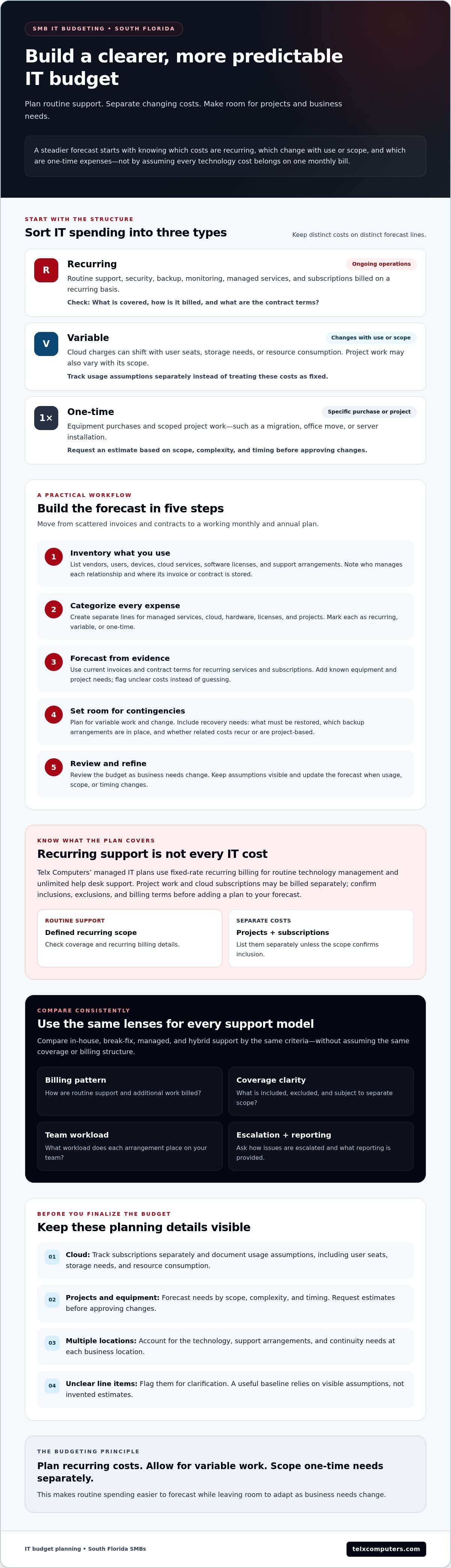
Predictable IT budgeting for SMBs in South Florida means planning for recurring costs and setting explicit allowances for variable work, not assuming every IT expense will stay fixed. That distinction gives leaders a clearer forecast while leaving room to adapt as business needs change.
A short overview of SMB financial budgeting can provide useful context before you map technology expenses:
A useful way to organize the forecast is to treat IT as a managed business function with planned resources and spending. Information technology management includes organizing technology resources, including budgeting. For your own plan, separate recurring costs that support ongoing operations from variable costs that change with usage or scope and one-time costs for a specific purchase or project.
Which IT expenses make SMB budgets unpredictable?
Routine support, security, backup, and monitoring are ongoing operational needs. Their costs may be easier to forecast when a service plan clearly defines what’s covered and how it’s billed. A migration, office move, or server installation is project work that should be scoped and estimated separately. Cloud charges can also vary with user seats, storage needs, or resource consumption. If you combine these expenses in one category, it becomes harder to see what is driving changes in your forecast.
Why South Florida businesses need a local planning lens
Your operating footprint affects what the budget needs to account for. A business with teams or offices in Miami, Aventura, and Fort Lauderdale should consider the technology, support arrangements, and continuity needs at each location. Include recovery planning in the forecast: identify what needs to be restored, which backup arrangements are in place, and whether related costs are recurring or project-based. For context on a local provider, see Miami IT company information.
A defined recurring support scope can make routine spending easier to plan, but confirm the inclusions, exclusions, and billing terms for your business. Project work and cloud subscriptions may be billed separately, so list them as distinct budget items instead of assuming they’re covered.
How to build a predictable IT budget in five steps
A useful budget starts with an accurate picture of what your business already uses and pays for. This five-step process turns scattered invoices and contracts into a working forecast, with separate lines for managed services, cloud subscriptions, hardware, software licenses, and project work.
Create a baseline from current IT spending
Review invoices and contracts across a representative period for your business. Record each vendor, user count, device inventory, subscription, and support arrangement. Separate recurring charges from one-time purchases and project invoices. If a line item is unclear, flag it for clarification rather than guessing. An accurate baseline depends on visible assumptions, not invented estimates.
- 1. Inventory. List vendors, users, devices, cloud services, software licenses, and existing support arrangements. Note who manages each relationship and where the related invoice or contract is stored.
- 2. Categorize. Assign each expense to a distinct forecast line: managed services, cloud, hardware, licenses, or projects. Mark whether each cost recurs, varies with use or scope, or is a one-time expense.
- 3. Forecast. Use current contract terms and invoices to project recurring services and subscriptions. Add planned equipment replacements and project work as separate items, based on known scope and estimates rather than assumptions.
- 4. Set contingencies. Identify potential needs that aren’t confirmed, such as an unapproved migration or additional equipment. Record them as scenarios or allowances, and explain what would trigger the spending.
- 5. Review. Assign an owner and review date to each major category. Update the forecast when users, devices, contracts, or business plans change, and compare actual invoices with the budget.
A budget is only useful when it labels its assumptions and exclusions, so everyone can see what’s planned, what may change, and what isn’t included. For example, a managed support agreement may use fixed-rate recurring billing for routine technology management, while project work and cloud subscriptions may be billed separately. Confirm the specific inclusions, exclusions, and billing terms before using a plan amount in your forecast.
Turn the baseline into a rolling forecast
Keep ongoing services and subscriptions distinct from upcoming changes. If you’re considering growth or a technology shift, build separate scenarios and document what each depends on rather than applying an unsupported percentage increase. Give security its own planning line. The FTC’s Cybersecurity for Small Business resource can help inform the questions you ask about safeguards and responsibilities.
Once the categories and assumptions are clear, compare the support scope with your forecast. Review managed IT support options to see how recurring coverage may fit your budget.
Compare IT support models by cost predictability and coverage
The right support model depends on your team’s technical capacity, coverage needs, and tolerance for variable spending. For predictable IT budgeting for SMBs in South Florida, compare more than the monthly fee. Consider what work is covered, what stays with your employees, and which expenses may still be billed separately.
| Model | Billing pattern | Internal workload | Coverage clarity | Variable expenses |
|---|---|---|---|---|
| In-house | Ongoing staffing and technology costs | Handled primarily by internal staff | Depends on team capacity and assigned responsibilities | Projects, equipment, and specialist needs may require separate planning |
| Break-fix | Charges arise as support is requested | Staff report issues and coordinate response | Defined by the service arrangement and each request | Repairs and urgent work can make monthly spending less consistent |
| Managed services | Recurring fee for a defined support scope | Some routine responsibilities shift to the provider | Should be documented in the service agreement | Projects, cloud subscriptions, hardware, and exclusions may be separate |
| Hybrid | Combination of internal costs and outside support | Shared according to assigned roles | Clear only when responsibilities and escalation paths are defined | Depends on what each party handles and what falls outside scope |
Fixed-rate managed services versus break-fix support
With break-fix support, spending follows incidents, so a quiet month may look different from one with several urgent issues. A fixed recurring fee can make covered routine support easier to forecast, but it doesn’t mean every IT expense is fixed or included. Review the agreement for emergency work, projects, hardware, third-party charges, and other exclusions. Ask how issues are handled and which services the recurring fee covers.
When a hybrid or in-house approach may fit
An in-house team may suit a business with the capacity to manage daily technology needs, while outside specialists can fill defined gaps. A hybrid model can work when internal staff own certain systems or user requests and a provider handles agreed support areas. Set responsibilities in writing to avoid duplicated work or uncovered tasks. Consider your team size, technical skills, operating hours, and the coverage employees actually need. If extended help desk coverage matters, verify the available arrangements and applicable terms directly.
No model is universally cheapest. Compare each option against the same scope, including support hours, escalation, security responsibilities, and separately billed work. Telx Computers’ recurring managed IT plans use fixed-rate billing for routine technology management and unlimited help desk support, while project work and cloud subscriptions may be billed separately. Confirm current inclusions and exclusions for your business. Review managed IT support options as one point of comparison.
How to forecast cloud, projects, hardware, and contingency needs
Once routine support has its own forecast line, account for costs that change with usage, business plans, or technology decisions. For predictable IT budgeting for SMBs in South Florida, avoid hiding these expenses inside a single monthly estimate. Track what drives each cost and what needs approval before it’s added to the budget.
Budget cloud subscriptions and changing demand
List cloud services separately, such as hosted servers, cloud storage, and virtual desktop services where applicable. For each subscription, record its billing basis and the assumptions behind the forecast: user seats, storage needs, or resource consumption. Note when the assumptions were last checked and who will review them. A hiring plan, new location, or change in how staff use cloud resources may alter expected spending, so revisit the forecast when those plans change.
Separate planned projects from routine support
Give migrations, installations, and office relocations their own budget lines instead of treating them as routine support. Before approval, ask the provider for a written estimate that explains the scope, complexity, assumptions, deliverables, dependencies, and exclusions. For example, a migration estimate should clarify which systems and tasks are included, what your team must provide, and which related purchases or subscriptions are separate. This makes estimates easier to compare and helps keep unplanned work from blending into operating costs.
Hardware and software procurement also deserve distinct lines. Track planned purchases separately from managed support and cloud subscriptions, and record the reason, expected timing, and business owner for each item. Don’t assume a device, license, or replacement is included in a recurring support plan. Confirm the agreement and billing terms for your business.
Set aside a contingency category for plausible needs that aren’t yet scoped, such as an unplanned replacement or a project change. There’s no universal amount that fits every SMB. Base the allowance on your own purchase history, known equipment needs, project estimates, and tolerance for uncertainty. Label the assumptions behind it, then adjust the category as estimates firm up or priorities change.
For South Florida businesses managing cloud services, equipment, and support across locations, a local provider can help clarify which costs recur and which need separate planning. Telx Computers offers managed IT services with fixed-rate recurring billing for routine technology management. Project work and cloud subscriptions may be billed separately, so confirm current plan scope and exclusions. Review managed IT support options to compare the support component of your forecast.
Choose a South Florida IT partner that supports budget clarity
A provider should make it easier to see what your support agreement covers and which costs sit outside it. For predictable IT budgeting for SMBs in South Florida, compare proposals by scope and billing details, not just by the headline monthly fee. Ask for clear answers in writing so you can map the service to your forecast and identify possible extra charges before work begins.
Questions to ask before signing an IT services agreement
Use these questions to check whether a provider’s terms match your operational needs and budget assumptions:
- Scope: Which routine technology services and help desk support are covered by the recurring fee?
- Billing: How are project work, cloud subscriptions, hardware, and software licenses charged?
- Exclusions: Which tasks or third-party costs aren’t included, and how are they estimated or approved?
- Escalation: How are issues assigned and escalated, and what support arrangements apply to your business?
- Reporting: What service and spending information will you receive, and how often?
- Terms and locations: Which agreement terms apply, and are the listed services and support arrangements available for each of your locations?
Ask the provider to distinguish recurring routine support from projects and procurement. For example, clarify whether a planned installation is covered by the agreement or quoted separately, and whether cloud subscriptions are billed through the provider or directly by the vendor. Confirm how changes to users, devices, or services affect the agreement and invoice.
Build a budget with a local managed IT partner
A managed IT partner can review your current systems and service arrangements with you, then help separate known recurring needs from projects and other variable expenses. Telx Computers has service locations in Miami, Aventura, and Fort Lauderdale. Its recurring managed IT plans use fixed-rate billing for routine technology management and unlimited help desk support, while project work and cloud subscriptions may be separate. Confirm current plan inclusions, exclusions, billing terms, and location-specific arrangements before relying on them in your forecast.
Choose a partner whose answers make the budget easier to understand. Look for a provider that can explain its scope, document what falls outside it, and align support arrangements with your business. Request a conversation with Telx Computers to discuss your IT budget and support requirements.
Turn IT spending into a clearer plan
Predictable IT budgeting for SMBs in South Florida comes down to knowing what recurring support covers and planning separately for projects, cloud usage, hardware, and other changing needs. Keep those costs visible, document assumptions, and review the forecast as your business changes. That gives you a clearer view of expected spending and decisions that may require additional investment.
A provider’s scope matters as much as its billing model. Telx Computers’ managed IT plans use fixed-rate recurring billing for routine technology management and unlimited help desk support. Project work and cloud subscriptions may be billed separately, so confirm each plan’s inclusions, exclusions, and terms before building them into your budget. Telx Computers serves businesses in Miami, Aventura, and Fort Lauderdale.
Ready to align your support plan with your business needs? Discuss your business’s IT budgeting needs with Telx Computers. A clear starting point can help you plan with greater confidence and keep technology decisions connected to your goals.
Frequently Asked Questions
How can a small business make IT costs more predictable?
Start by reviewing invoices and contracts, then classify each expense as recurring, variable, or one-time. Separate managed support from cloud subscriptions, licenses, hardware, and project work so you can see what drives each cost. Ask providers to document service coverage and exclusions, and update your forecast as staffing, technology, or business needs change. This improves visibility without assuming every IT expense can be fixed.
Are managed IT services billed at a fixed monthly rate?
Some providers offer fixed-rate recurring billing for a defined managed IT scope, but coverage and terms vary by agreement. Confirm which routine technology management and help desk services are included. Ask separately how projects, cloud usage, hardware, and software licenses are billed. A fixed recurring fee can make covered services easier to forecast, but it doesn’t mean every technology expense will stay fixed or be included.
What IT costs should an SMB include in its annual budget?
Include recurring support, security, backup, monitoring, cloud subscriptions, software licenses, hardware needs, and planned projects. Separate fixed commitments from expenses that depend on usage or project scope, and record renewal dates, assumptions, and budget owners. Your categories should reflect your actual systems and plans. Check current contracts and request project estimates rather than relying on generic benchmarks to predict what your business will spend.
Is break-fix IT support cheaper than managed IT services?
It depends on your support needs, internal technical capacity, incident patterns, and provider terms. Break-fix billing varies with the work requested, while managed services may provide more predictable billing for covered routine support through a recurring fee. Compare the complete scope, exclusions, project charges, and staff time required under each model. Don’t judge either option by its monthly fee alone; assess how well it fits your operations.
How should an SMB budget for cloud services?
List each cloud service separately and record its billing basis, such as user seats, storage, or resource consumption. Review usage and renewal terms regularly, then forecast expected changes separately from routine support. Ask how scaling, added resources, and related project work affect charges. Avoid assigning a flat amount unless it reflects current usage and the applicable contract. This helps explain why cloud spending changes and supports more informed planning.
Should IT projects be included in a managed services monthly fee?
Not necessarily. Providers may bill routine managed support differently from project work, depending on the agreement. Ask whether migrations, server installations, office relocations, and other defined projects are included or separately scoped. Before approving work, request written assumptions, deliverables, dependencies, and exclusions. If costs are unconfirmed, list the project separately in your forecast rather than assuming the recurring support fee covers it.
What should South Florida SMBs ask an IT provider about billing?
Ask which routine services and help desk support the recurring fee covers, and what the agreement excludes. Clarify billing for projects, cloud subscriptions, hardware, and software licenses. Confirm support arrangements, reporting, approval processes, and agreement terms for your business. If your operations span Miami, Aventura, or Fort Lauderdale, verify which services and arrangements apply at each location. Clear answers help you compare providers and plan with fewer surprises.