





20 Jul Business Wi-Fi Security Best Practices: The Comprehensive Strategy for 2026
Your office Wi-Fi is no longer just a convenience; it’s the most common “unlocked back door” for modern ransomware attacks. You likely recognize that keeping your team connected is vital for daily operations, yet the fear of a single unsecured mobile device compromising your entire server network is a valid concern. Implementing business wifi security best practices is the only way to protect your corporate data while maintaining the seamless connectivity your staff expects. It’s often difficult to distinguish between the necessity of WPA3 and the legacy of WPA2, or to manage guest access without creating internal vulnerabilities.
We’re here to replace that technical anxiety with a sense of total stability. This strategy moves beyond basic passwords to create a multi-layered defense system that ensures both high performance and strict industry compliance, such as HIPAA. We’ll walk through the essential layers of wireless security, from protocol selection to proactive monitoring, giving you the peace of mind that your digital perimeter is guarded by a vigilant ally. By the end of this article, you’ll have a clear roadmap for a secure, professional wireless environment that acts as a silent engine for your business growth.
Key Takeaways
- Learn how to stop sophisticated Man-in-the-Middle and Evil Twin attacks by moving beyond basic residential-grade security setups.
- Adopt WPA3-Enterprise and AES-256 encryption to meet the current gold standards for protecting sensitive corporate data transmissions.
- Implement business wifi security best practices by using VLANs and a Zero Trust approach to isolate guests and IoT devices from your internal servers.
- Ensure long-term network health through automated patch management and strategic physical placement of your wireless access points.
- Leverage 24/7 proactive monitoring to identify and neutralize wireless threats in real-time, providing total stability for your daily operations.
Beyond the Password: Why Business Wi-Fi Security is Critical in 2026
Many business owners assume that a complex password is enough to keep their data safe. In reality, residential-grade security focuses on convenience, while enterprise-grade systems focus on risk mitigation and granular control. A standard home router can’t distinguish between a trusted employee and a malicious actor once the password is entered. To truly protect your operations, you must implement business wifi security best practices that treat the wireless signal as a high-stakes entry point to your internal servers.
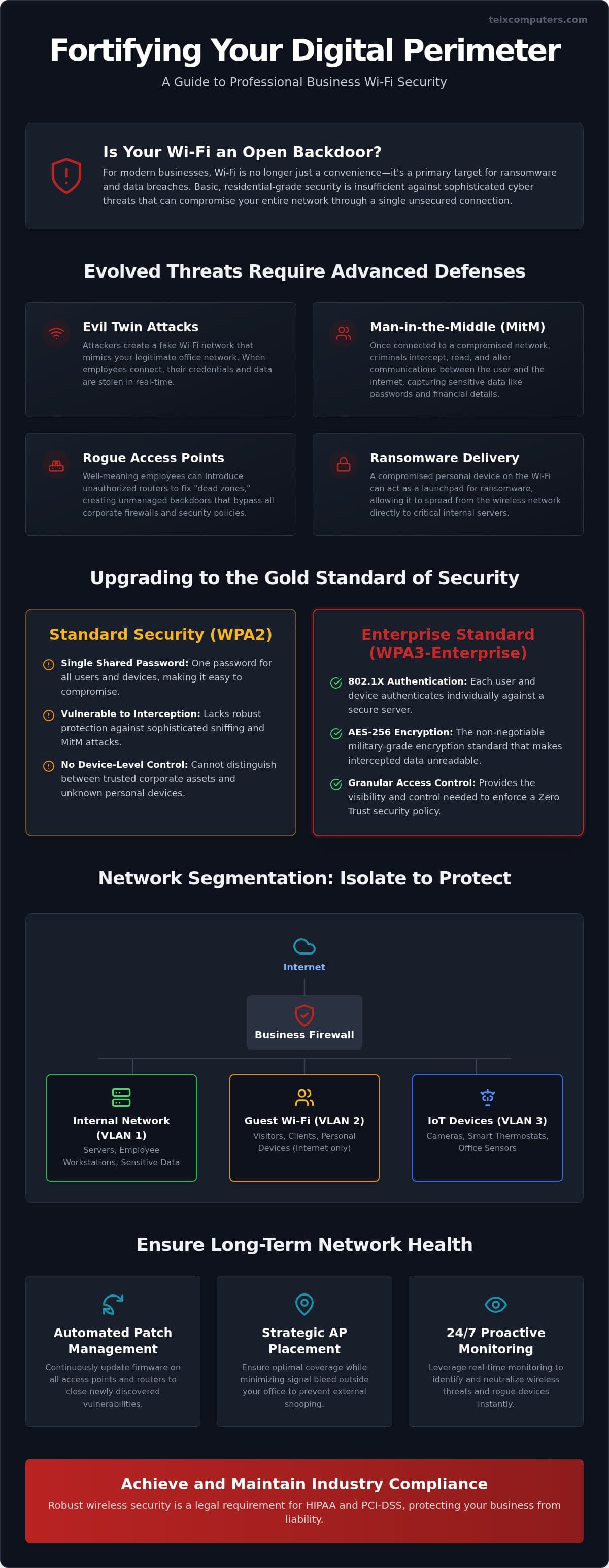
Modern wireless threats have evolved far beyond simple password cracking. Attackers now use “Evil Twin” setups, where they broadcast a signal that looks identical to your office network to trick devices into connecting. Once connected, they perform Man-in-the-Middle (MitM) attacks to intercept every packet of data, from login credentials to financial records. This sophisticated level of interception makes traditional, static security measures obsolete for a growing company.
To better understand how to lock down your network, watch this helpful video:
Unsecured Wi-Fi is now a primary delivery vehicle for ransomware. If a guest or a staff member’s personal phone is compromised, the infection can jump from the wireless network straight into your core business applications. The resulting downtime and brand damage are often more expensive than the security upgrades themselves. We position ourselves as your strategic ally to ensure these gaps are closed before they are exploited.
The Hidden Dangers of Rogue Access Points
Employees often bring personal routers from home to fix “dead zones” in their specific workspace. These rogue access points create unmanaged backdoors that bypass your corporate firewall entirely. Identifying this unauthorized hardware requires constant, automated network discovery. Without proactive monitoring, these silent vulnerabilities can remain active for months, offering a permanent invitation to cybercriminals.
Wireless Security as a Compliance Requirement
For organizations requiring healthcare IT services, HIPAA compliance mandates strict encryption for data in transit. PCI-DSS standards for credit card processing also demand high-level wireless isolation. “Best effort” security measures are no longer legally sufficient to protect your firm from liability. In 2026, the legal duty of care requires businesses to maintain documented, proactive wireless security measures that exceed basic industry standards to protect consumer privacy.
Implementing Advanced Encryption and Modern Network Protocols
Transitioning to WPA3-Enterprise represents the current peak of wireless defense for any growing organization. Unlike consumer setups that rely on a single password, enterprise protocols utilize 802.1X authentication. This framework allows for centralized access control, meaning every device is authenticated against a secure server rather than just a local router. It’s a cornerstone of modern business wifi security best practices because it provides the granular visibility needed to manage a professional workforce effectively. By moving away from shared credentials, you ensure that every connection is accounted for and authorized.
Encryption strength is equally critical to your data integrity. AES-256 (Advanced Encryption Standard with a 256-bit key) is now the non-negotiable baseline for all corporate traffic. It’s virtually impossible to crack with current computing power, ensuring that even if a signal is intercepted, the data remains unreadable. For firms seeking to harden their infrastructure, our team can provide a comprehensive network security assessment to identify where your encryption might be lagging. This proactive step replaces technical uncertainty with a verified roadmap for protection.
The End of the Shared Pre-Shared Key (PSK)
Relying on one “office password” is a massive liability. If one person shares it or an employee leaves the company under poor terms, your entire perimeter is compromised. The solution lies in individual user certificates or Dynamic PSK (DPSK). These tools assign a unique, temporary key to every user. When someone departs, you can revoke their specific access immediately without forcing the entire office to reconnect their devices to a new password. This streamlines offboarding and eliminates the “credential leak” common in smaller offices.
Beyond WPA2: Why WPA3 Matters Now
WPA2 has served the industry well for over a decade, but it’s increasingly vulnerable to offline dictionary attacks. WPA3 fixes this by using Simultaneous Authentication of Equals (SAE), which makes brute-force attempts significantly harder. It also introduces “Forward Secrecy.” This feature ensures that even if a session key is compromised in the future, the attacker cannot use it to decrypt data captured from previous sessions. While most new hardware supports WPA3, we recommend a compatibility audit for legacy devices in your Miami office to ensure a smooth transition without dropping connectivity for older, critical equipment.
Network Segmentation: Separating Guests, IoT, and Internal Assets
Strong encryption is only half the battle. If your entire office resides on a single, flat network, a breach on one device can quickly spread to every server and workstation you own. True business wifi security best practices require a shift toward a Zero Trust architecture. In this model, your network doesn’t automatically trust any device simply because it’s connected to your signal. Instead, we use logical segmentation to ensure that users only access the specific resources required for their roles, effectively containing potential threats before they can move laterally through your systems.
Virtual Local Area Networks (VLANs) serve as the primary tool for this isolation. By creating dedicated pathways for different types of traffic, you can shield your most sensitive assets from less secure devices. This is particularly vital for organizations handling healthcare data, where HIPAA regulations demand that patient records remain strictly isolated from general internet traffic. Segmentation ensures that a vulnerability in a staff member’s tablet doesn’t become a pathway to your core database.
Creating a Secure Guest Experience
Guest traffic should never touch your internal server environment. We recommend implementing a captive portal that requires visitors to agree to an Acceptable Use Policy (AUP) before they gain access. This doesn’t just provide a professional touch; it establishes a legal boundary for your network usage. Setting strict session timeouts and bandwidth limits prevents “parking lot” loitering and ensures that guest usage doesn’t degrade the performance of your mission-critical applications. It’s about providing hospitality without sacrificing your digital perimeter.
IoT Isolation Strategies
Smart thermostats, wireless printers, and security cameras often represent the weakest link in modern office tech. These devices rarely receive the same frequency of security patches as a standard laptop, making them prime targets for hackers. By placing all “Shadow IT” on a dedicated IoT VLAN with strict firewall rules, you prevent these devices from initiating any communication with your internal assets. It’s a sobering reality that an unpatched smart fridge can compromise a law firm server if both are left on the same unsecured subnet. We help you map these hidden risks to ensure every connected device is properly categorized and contained.
Proactive Maintenance and Human-Centric Security Policies
Security isn’t a one-time setup; it’s a continuous commitment to vigilance. While encryption and segmentation form the foundation, maintaining these defenses requires automated firmware and patch management. Manufacturers frequently release updates to close newly discovered vulnerabilities. If your hardware lags behind, it becomes a soft target for automated exploit kits. We act as your strategic ally by ensuring these updates happen silently and consistently, preventing any window of opportunity for attackers. This proactive stance replaces technical anxiety with a sense of total stability.
Adhering to business wifi security best practices also requires addressing the human element. Your staff represents both your greatest asset and a potential risk. Training employees to spot phishing attempts on mobile devices is essential, as these attacks often aim to steal the very certificates used to secure your network. Regular cybersecurity audits provide a clear, objective view of where your policies might be fraying, allowing for course corrections before a breach occurs. These audits ensure your network remains a silent engine behind your success.
The Physical Security of Wireless Hardware
Many organizations overlook the physical vulnerability of their network equipment. If an intruder can touch your access point (AP), they can likely reset it to factory defaults or plug in a hardware keylogger. Mount your APs in secure, monitored locations, such as high on walls or inside ceiling tiles, to prevent unauthorized access. In public-facing areas like lobbies or conference rooms, you should disable any unused Ethernet ports in the wall. Using Kensington locks or tamper-evident enclosures adds another layer of deterrence, ensuring that your hardware remains as secure as the data passing through it.
Establishing an Internal Wi-Fi Policy
A formal policy defines exactly which devices are permitted on your corporate network. We recommend implementing Mobile Device Management (MDM) to enforce security standards on every phone or tablet that connects to your signal. This allows you to remotely wipe company data if a device is lost or stolen. Clear reporting protocols ensure that your IT team can revoke access certificates the moment a device goes missing. This proactive approach transforms your workforce into a coordinated line of defense rather than a collection of vulnerabilities. If you’re ready to harden your physical and digital perimeter, you can get an instant quote for a comprehensive security review today.
Scaling Your Wireless Security with Managed IT Services
Maintaining high-level protection requires more than just an initial setup; it demands constant vigilance. For many organizations, managing business wifi security best practices internally becomes an overwhelming task as the company grows. This is where 24/7 monitoring becomes essential. Real-time detection allows us to identify and neutralize a threat the moment it appears, preventing a malicious actor from pivoting from a guest device to your core infrastructure. We act as your expert guardian, replacing technical anxiety with the stability of a professionally managed perimeter.
For firms with multiple locations across South Florida, outsourced IT support provides a unified security posture. Instead of managing fragmented networks in Miami, Aventura, and Fort Lauderdale, you gain a single point of professional authority. This centralized management ensures that a security patch or policy update in one office is instantly applied across all branches. It maintains a consistent shield for your corporate data, ensuring that your expansion doesn’t create new vulnerabilities for attackers to exploit.
We believe that financial predictability is just as important as network stability. Our fixed-price plans eliminate the fear of unexpected technical bills while providing a level of defense that emergency breach recovery simply can’t match. It’s far more cost-effective to invest in proactive guardianship than to face the astronomical costs of data restoration and legal liability after a successful attack. By positioning ourselves as your strategic ally, we ensure your IT budget is spent on growth rather than disaster management.
Proactive Server and Network Monitoring
Our team utilizes sophisticated tools to track unauthorized network spikes that often signal a brute-force attack or data exfiltration attempt. By integrating real-time server monitoring with your wireless security, we catch anomalies that would otherwise go unnoticed until it’s too late. These proactive hardware health checks also reduce downtime by identifying failing access points before they disrupt your team’s productivity. We don’t wait for things to break; we ensure they stay operational and secure around the clock.
Strategic Ally: Your Extended IT Department
Telx Computers acts as an extension of your own team, providing customized security roadmaps tailored to the specific operational needs of your local business. Whether you are operating out of Aventura or Fort Lauderdale, our unlimited help desk support ensures your staff always has a direct line to an expert for wireless troubleshooting. This removes the friction from secure connectivity and keeps your workforce moving at full speed. We take pride in being the silent engine behind your success. Secure your growth today by requesting a free instant IT quote to see how we can harden your environment.
Future-Proof Your Corporate Connectivity
Securing your office network requires more than a strong password; it demands a multi-layered approach that includes WPA3-Enterprise encryption and strict network segmentation. By isolating guest traffic and IoT devices—including media players used for an Edge IPTV subscription—you eliminate the lateral movement that ransomware depends on. Implementing these business wifi security best practices ensures your data remains protected while your team stays productive. It’s about building a perimeter that works as hard as you do.
Since 2002, we’ve served the Miami, Aventura, and Fort Lauderdale business communities by acting as a vigilant expert guardian. We provide 24/7 proactive network monitoring and fixed-price unlimited support plans to replace technical anxiety with operational stability. We don’t just fix problems; we prevent them before they impact your bottom line. Secure Your Business Network with Telx Computers and move forward with the confidence that your wireless environment is managed by a dedicated strategic ally. Your growth is our priority, and we’re ready to protect it.
Frequently Asked Questions
Is WPA3 significantly better than WPA2 for my business?
Yes, WPA3 provides superior protection against brute-force attacks and introduces Forward Secrecy to protect past data. While WPA2 is still common, it lacks the advanced handshake protocols that prevent offline dictionary attacks. Transitioning to WPA3 is a core component of modern business wifi security best practices because it hardens the network against sophisticated interception techniques used by modern hackers.
How often should I change my business Wi-Fi password?
You should change your password immediately whenever a staff member leaves the company or if you suspect a credential leak. However, if you implement individual user certificates or Dynamic PSK as discussed earlier, you don’t need to change a global password for the entire office. This individualized approach reduces administrative burden while maintaining a much higher level of security than static, shared keys.
Can I use a VPN to secure an unencrypted Wi-Fi network?
A VPN provides a secure tunnel for your data, but it shouldn’t be your only line of defense for a corporate environment. While it protects data in transit, it doesn’t prevent an attacker from seeing which devices are on the network or launching attacks against the hardware itself. You must still prioritize internal encryption and segmentation to ensure a truly stable and secure wireless environment.
What is a captive portal and do I need one for my office?
A captive portal is a web page that users must interact with before gaining internet access, and it’s essential for any business that offers guest Wi-Fi. It allows you to enforce an Acceptable Use Policy and ensures that guest traffic remains completely isolated from your internal servers. This setup is a vital part of managing business wifi security best practices for public-facing areas or conference rooms.
How do I detect if someone is stealing my business Wi-Fi?
You can detect unauthorized users by reviewing your wireless controller’s client list or using automated network discovery tools to spot unrecognized MAC addresses. Proactive monitoring services can also alert you to unusual bandwidth spikes or connections occurring outside of business hours. Keeping a vigilant eye on your connected device log is the most direct way to identify potential intruders before they cause damage.
Should I hide my SSID (Network Name) for better security?
Hiding your SSID provides very little actual security and can often cause connectivity issues for legitimate devices. Hackers use simple sniffer tools that can easily reveal hidden network names in seconds. Instead of relying on security through obscurity, focus on robust encryption like WPA3 and strong authentication protocols to create a genuinely hardened perimeter that doesn’t rely on being invisible.
What is the risk of employees using their personal phones on the corporate Wi-Fi?
Personal devices often lack the security patches and managed configurations of company-owned hardware, making them a high-risk entry point for malware. If a compromised phone connects to your internal subnet, it can serve as a bridge for ransomware to reach your servers. We recommend using a dedicated BYOD (Bring Your Own Device) VLAN to keep these unmanaged assets separate from your mission-critical data.