




15 Jul Business Laptops vs. Desktops: Strategic Hardware Choices for 2026
In a year where RAM prices surged by 90% in the first quarter alone, your hardware budget is likely under more scrutiny than ever before. Choosing between business laptops vs desktops is no longer just about deciding who works from home and who stays in the office. You’re likely facing the dual challenge of managing a remote fleet while hardware costs for essentials like SSDs have nearly quadrupled. It’s a stressful position for any leader trying to maintain a technological edge without overextending their resources.
We’re here to act as your strategic partner, helping you navigate these trade-offs with confidence and peace of mind. This article provides a clear framework for hardware procurement that prioritizes both employee productivity and long-term stability. We will examine the performance of the latest Intel Core Ultra “Panther Lake” and AMD “Gorgon Point” processors, evaluate the total cost of ownership for mini PCs, and outline security protocols to protect your mobile devices from evolving threats.
Key Takeaways
- Discover why the performance gap has vanished for most office applications. This shift allows laptops to function as high-performance primary workstations for your entire team.
- Learn to balance hybrid work flexibility with strategic ergonomic planning to maintain peak employee productivity across every environment.
- Evaluate the distinct security profiles of business laptops vs desktops to strengthen your defense against physical theft and unauthorized network access.
- Identify the hidden factors in Total Cost of Ownership (TCO). This ensures your hardware procurement supports long-term financial stability and lower maintenance costs.
- Develop a customized fleet strategy that leverages professional IT consulting to streamline deployment and lifecycle management.
Business Laptops vs. Desktops: The Modern Performance Landscape
The choice between business laptops vs desktops used to be a simple trade-off between raw power and mobility. If you needed to crunch massive datasets or edit high-resolution video, you bought a tower. If you traveled, you accepted a slower, more expensive laptop. That binary choice is dead. Today, laptops serve as the primary workstations for the vast majority of professionals, while desktops have evolved into specialized anchors for specific, high-intensity roles. We see this shift daily as we manage hardware fleets for organizations that prioritize both agility and stability.
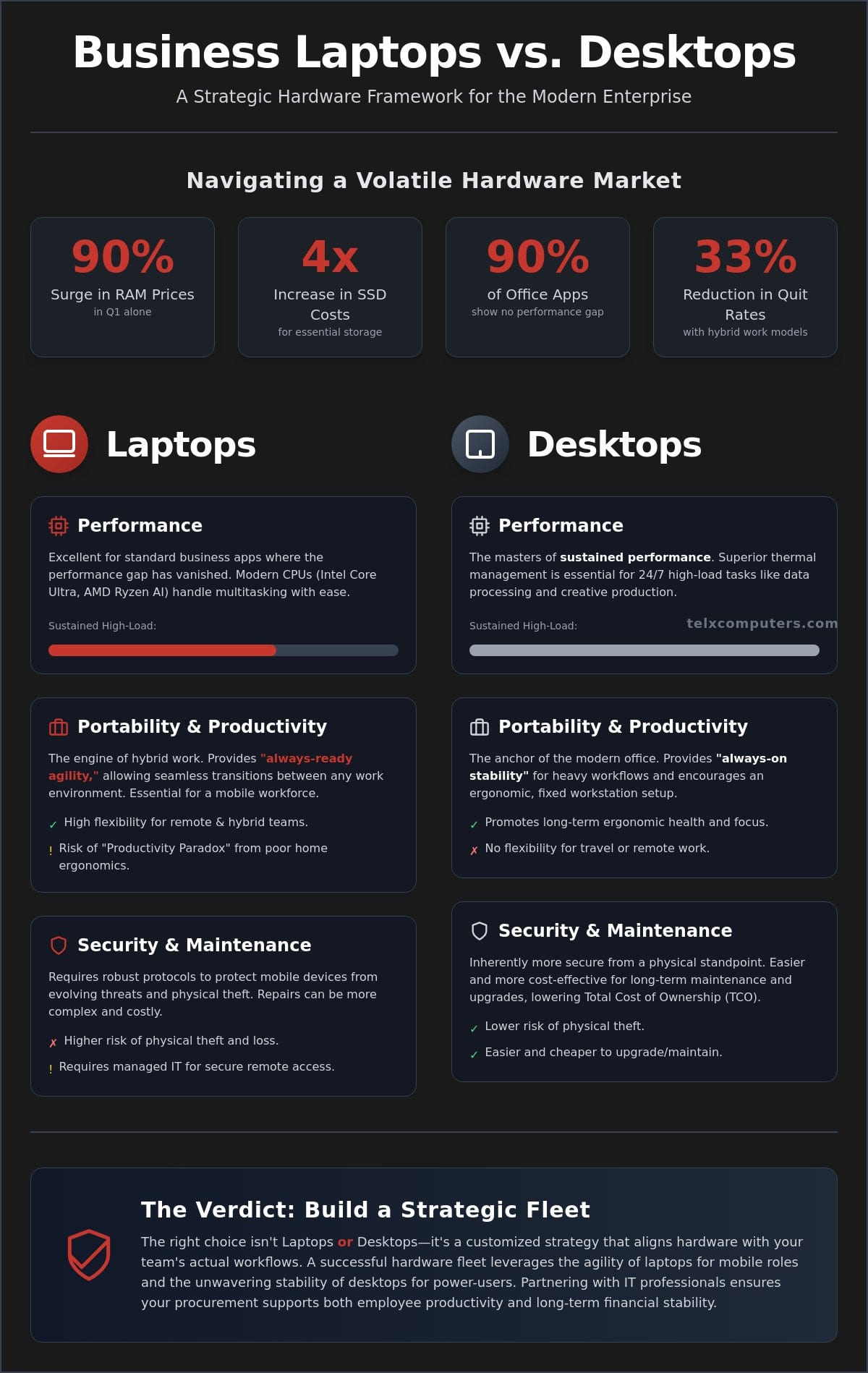
For roughly 90% of standard business applications, from cloud-based CRM platforms to complex collaborative suites, the performance gap has effectively vanished. A modern laptop equipped with 16GB of RAM and a high-speed NVMe SSD provides a user experience indistinguishable from a desktop for most office tasks. Choosing the right hardware isn’t about chasing the highest specs on a spreadsheet. It’s about aligning your technology with the actual workflows of your team. As your strategic ally, we focus on providing peace of mind by ensuring your hardware choices reflect your operational reality.
To better understand the core differences in today’s market, watch this helpful video:
The Rise of the Mobile Workstation
Modern mobile CPUs, such as the Intel Core Ultra “Panther Lake” series, AMD “Gorgon Point” Ryzen AI, or Apple’s M5 chips, handle enterprise multitasking with impressive efficiency. High-speed NVMe storage is now a baseline requirement, making laptop boot times and large file transfers feel instantaneous. For a dynamic workforce that values flexibility, a laptop is often the faster choice because it allows for an immediate transition between office, home, and client sites without syncing delays or hardware bottlenecks. This mobility doesn’t just support remote work; it fuels productivity for professionals who move between meeting rooms and departments throughout the day.
Desktops: The Unwavering Standard for Power and Reliability
While laptops have caught up in short bursts of speed, desktops remain the masters of sustained performance. Thermal management is the deciding factor. A desktop’s larger chassis allows for superior cooling, which is essential for 24/7 high-load tasks like complex data processing, creative production, or legal document archiving. Desktops also offer a better cost-per-performance ratio in fixed locations. When portability isn’t required, you get more processing power and easier long-term maintenance for every dollar spent. As an experienced IT company in Miami, we help you identify exactly which roles in your organization require this unwavering level of reliability.
Portability and Productivity in the Hybrid Work Era
Hybrid work isn’t a fleeting trend; it’s the standard for the modern enterprise. Recent peer-reviewed studies show that hybrid work reduces quit rates by 33% without sacrificing output. This shift forces a new evaluation of business laptops vs desktops. While portability offers freedom, it also risks the Productivity Paradox. This happens when mobile convenience leads to ergonomic strain because the home office lacks the professional infrastructure found in a corporate setting. Employees often find themselves working from kitchen tables or couches, which leads to physical fatigue and a drop in long-term efficiency.
We help you bridge this gap through comprehensive managed IT support for your distributed team. Desktops offer an always-on stability that serves as a reliable anchor for heavy workflows. Laptops provide an always-ready agility, letting your staff transition between environments in seconds. Balancing these two tools requires a strategic partner who understands the operational flow of a mobile workforce. We ensure your team has the right hardware for their specific role, replacing technical anxiety with a sense of stability and peace of mind.
Optimizing the South Florida Hybrid Office
In expensive South Florida markets like Miami, Aventura, and Fort Lauderdale, office square footage is a premium resource. Many local businesses adopt hot-desking to maximize their physical footprint. A laptop-first procurement policy supports this, but the docking station is the real hero here. A high-quality dock provides the multi-monitor setup and full-sized peripherals that mimic a desktop experience. It allows for a seamless transition where an employee plugs in a single cable and immediately gains the productivity of a full workstation. If you’re planning a refresh, you can request an instant quote to see how these configurations fit your budget.
Reliability and Uptime: The Desk-Bound Advantage
Desktops still lead in long-term reliability. They don’t face the daily wear of commuting or the risk of spills in a coffee shop. Because they remain stationary, desktops usually survive a full five-year lifecycle with fewer hardware failures. Maintenance is also more straightforward. Replacing a failed monitor takes minutes, while a cracked laptop screen often sidelines an employee for days. For critical office roles, pairing fixed workstations with proactive server monitoring ensures maximum uptime and operational peace of mind. This approach keeps your silent engine running without unnecessary interruptions.
Security and Maintenance: The Managed IT Perspective
When evaluating business laptops vs desktops, the conversation often shifts from speed to safety. Security is no longer an afterthought; it’s the foundation of your operational stability. Laptops introduce a significant physical theft risk. A device left in a vehicle in Miami or a cafe in NYC is a potential gateway to your entire network. Conversely, desktops face a higher risk of unauthorized access if physical office security isn’t strictly maintained. We act as your expert guardian, ensuring that regardless of the form factor, your data remains shielded from evolving threats.
Integrating your hardware choice with robust ransomware protection is essential. Portable devices are frequently exposed to unsecured public Wi-Fi, making them prime targets for initial breaches. In a professional managed IT environment, we implement layers of defense that follow the user, not just the machine. This proactive stance replaces technical anxiety with the peace of mind that comes from knowing your fleet is monitored around the clock.
Securing the Mobile Perimeter
For every laptop in your fleet, Full Disk Encryption is mandatory. We utilize tools like BitLocker to ensure that if a device is stolen, the data remains unreadable. For our clients in mobile-heavy markets like LA and NYC, we deploy Remote Wipe and Find My Device capabilities. These tools allow us to neutralize a threat the moment a device goes missing. Our network security protocols for laptops prioritize secure VPN tunnels and multi-factor authentication. This ensures that a remote connection is just as secure as a hardwired office port.
Maintenance and Remote Monitoring (RMM)
Desktops generally offer a more straightforward maintenance path. Their modular design makes it easier to upgrade components or replace power supplies on-site, which helps control long-term IT outsourcing costs. Laptops require more specialized care, particularly regarding battery health and thermal throttling. As these devices age, their compact cooling systems can struggle, leading to performance drops. We use Remote Monitoring and Management (RMM) tools to track these metrics in real-time. When a mobile professional hits a technical snag at midnight, our 24/7 help desk support is ready to step in, keeping your team productive without missing a beat.
Total Cost of Ownership (TCO) and Lifecycle Management
Evaluating the total cost of ownership for business laptops vs desktops requires looking far beyond the initial invoice. While desktops often boast a lower purchase price for comparable power, the real financial story unfolds over a three to five year lifecycle. You must account for acquisition, deployment, maintenance, and the eventual residual value. With PC prices rising by up to 20% since late 2025 and RAM costs nearly doubling in early 2026, every procurement decision carries significant weight. We serve as your strategic ally to ensure these investments align with your long-term fiscal health.
Many organizations overlook the “hidden infrastructure” required to make mobile fleets truly productive. A laptop-first policy necessitates additional spending on docking stations, high-quality adapters, and dual-monitor configurations to prevent the ergonomic burnout mentioned earlier. However, the return on investment often appears in unexpected places, such as employee retention. 83% of workers now prefer hybrid arrangements, and many value this flexibility as much as an 8% salary increase. Investing in versatile hardware is a direct investment in your human capital. To begin planning your next refresh, you should consult with an expert who can align your hardware with a holistic growth strategy.
The 3-to-5 Year Lifecycle: A Comparison
Desktops generally offer a more favorable depreciation rate because their modular nature allows for targeted upgrades. Replacing a graphics card or adding more RAM is simpler and more cost-effective than replacing an entire laptop. Avoid the trap of “IT Debt” by shunning consumer-grade hardware. While cheaper upfront, consumer devices lack the durability and long-term support cycles required for a professional environment. We help you manage procurement to ensure your IT budgeting remains predictable and free from expensive emergency replacements.
Procurement Strategy for Scalability
Standardization is the secret to lower maintenance costs. Managing 50 identical laptops is significantly more efficient than troubleshooting 50 unique configurations. This approach allows for rapid imaging and deployment, ensuring new hires are productive on their first day. By leveraging bulk purchasing and our strategic hardware sales expertise, you gain access to vetted inventory even during supply chain volatility. If you’re ready to modernize your fleet, request an instant quote for a comprehensive hardware refresh tailored to your specific operational needs.
The Verdict: Building a Strategic Hardware Fleet
The debate between business laptops vs desktops should not end with a generic choice. Successful organizations instead adopt a workflow-first mentality that prioritizes actual usage over technical trends. You must evaluate the specific tasks your team performs daily to determine where mobility is a necessity and where raw, stationary power provides a superior return. We help you move past technical anxiety by providing a clear decision matrix that balances the high-speed demands of the modern market with the stability your business requires. Choosing the right tool for the job is the first step in building a resilient, future-ready enterprise.
Partnering with a professional IT company in Miami ensures that your procurement strategy is holistic rather than reactive. We position ourselves as your strategic ally, helping you navigate the complexities of hardware lifecycle management while keeping your data secure. Our goal is to alleviate the stress of technical management, allowing you to focus on your core business objectives while we act as your expert guardian and silent engine for growth.
The Ideal Hybrid Fleet Configuration
Most modern enterprises find their balance with an 80/20 deployment ratio. In this model, 80% of the workforce receives high-performance laptops to support hybrid flexibility, while 20% utilize desktops for power-intensive roles like complex data processing or sustained creative production. Some firms also utilize stationary laptops as a middle ground. These devices offer the mobility needed for occasional travel without sacrificing the ergonomic benefits of a permanent docking station. This approach ensures that every employee has the tools they need to maintain peak productivity.
Industry-specific compliance is another critical factor in your fleet design. We ensure all hardware deployments meet the rigorous security and privacy standards required for healthcare IT services and legal industry regulations. This attention to detail protects your organization from regulatory penalties and ensures that your client data remains confidential, regardless of where your team is working.
Next Steps: Your Strategic Hardware Audit
Your journey toward a more efficient fleet begins with a comprehensive hardware audit. We identify existing bottlenecks, outdated components, and security gaps that could expose your business to risk. By moving to one of our fixed-price managed IT plans, you gain the advantage of predictable budgeting and 24/7 support for your entire fleet. This proactive approach eliminates the hidden costs associated with reactive repairs and fragmented technology stacks.
To complement your IT fleet management, you can also explore Office Equipment Sales, Rentals, and Technical Services to maintain and upgrade your specialized office peripherals like plotters and scanners.
Furthermore, for organizations managing the physical logistics of a hardware fleet across different regions, postalxpressnmore.com provides professional shipping and business services that help streamline the distribution of equipment to your team.
We take pride in being the silent engine behind your success. If you’re ready to stop reacting to hardware failures and start planning for growth, our team is ready to assist. Contact us today for a professional consultation and let us help you build a tech stack that drives your business forward with confidence and peace of mind.
Securing Your Operational Future with the Right Technology
The debate over business laptops vs desktops is a strategic decision that defines your operational agility. You now have a clear framework to align hardware with actual workflows, ensuring that your team remains productive whether they’re in a Miami office or working remotely in NYC. Success depends on balancing the high-performance capabilities of modern mobile chips with the sustained reliability and lower lifecycle costs of fixed workstations. We’re here to simplify this complexity and act as your long-term ally.
As an authorized Microsoft and Dell partner, we provide the expert guardianship your business deserves through fixed-price unlimited IT support and a 24/7 help desk for all devices. This partnership replaces technical anxiety with the confidence that your fleet is always secure and optimized. Our team ensures that your technology remains a silent engine for growth, not a source of friction.
Ready to optimize your procurement? Get a Strategic Hardware Quote from Telx Computers to start your transition toward a more resilient tech stack. We look forward to helping you lead the way with confidence and peace of mind.
Frequently Asked Questions
Are desktops significantly more powerful than laptops for business use?
For roughly 90% of standard office tasks, the performance gap has effectively closed. Modern mobile processors handle multitasking and enterprise software with impressive speed. Desktops only pull ahead during sustained, high-load operations where their superior thermal management prevents the performance throttling that can occur in thinner devices. Most professionals won’t notice a difference in daily speed between high-quality business laptops vs desktops.
How much longer does a business desktop last compared to a laptop?
A business desktop typically enjoys a five-year lifecycle, whereas laptops often require replacement after three or four years. This difference stems largely from physical durability and environment. Desktops remain stationary, avoiding the daily rigors of travel, cable strain, and accidental drops that shorten a laptop’s lifespan. Their modular design also allows for easier component replacements that extend their operational utility over time.
Do I need a desktop for tasks like video editing or large data analysis?
High-intensity tasks like 4K video editing or massive data analysis still benefit greatly from a desktop’s architecture. These workloads generate significant heat that can cause laptops to slow down to protect internal components. Desktops offer the space for dedicated graphics cards and advanced cooling systems. This ensures consistent performance during long processing sessions that would eventually overwhelm the compact frame of a portable device.
What are the hidden costs of switching my entire office to laptops?
The most common hidden costs include high-quality docking stations, external monitors, and specialized adapters for peripherals. You must also budget for shorter replacement cycles and potentially higher insurance premiums for mobile devices. While laptops provide essential flexibility for a hybrid workforce, the total investment for a complete ergonomic workstation setup often exceeds the price of a standalone desktop tower and its associated peripherals.
Can my MSP manage and secure laptops as effectively as desktops?
Yes, we use advanced Remote Monitoring and Management (RMM) tools to secure portable devices regardless of their physical location. Through full disk encryption, secure VPN tunnels, and multi-factor authentication, we ensure that a laptop in a remote setting is just as shielded as a desktop in your main office. Our 24/7 help desk provides seamless support to keep your distributed fleet running without interruption.
Is it cheaper to repair a laptop or a desktop?
Desktops are significantly cheaper and easier to repair. Their components are standardized and easily accessible, allowing for quick swaps of power supplies, RAM, or storage drives. Laptop repairs often involve proprietary parts and intricate labor that can be cost-prohibitive. In many cases, a major laptop failure, such as a damaged motherboard or integrated screen, results in a full device replacement rather than a simple fix.
Why do IT companies in Miami recommend business-grade hardware over consumer models?
Business-grade hardware offers superior durability, longer warranty support, and essential security features like TPM chips for encryption. Consumer models often use cheaper components not designed for the rigors of a 40-hour work week. We recommend enterprise-level equipment because it integrates better with professional management tools and reduces the long-term technical anxiety caused by frequent hardware failures and limited driver support.
Does a hybrid work model require every employee to have a laptop?
Not every role requires a laptop in a hybrid environment. While a majority of workers benefit from portability, some employees may prefer a powerful desktop at the office while using secure cloud-based solutions or remote desktop protocols to work from home. We help you perform a hardware audit to determine the ideal mix based on actual job functions rather than a generic, one-size-fits-all procurement policy.