




12 Jul Virtual Desktop Infrastructure (VDI): The Strategic Business Guide for 2026
Did you know that over 50% of knowledge workers are now expected to work remotely at least part-time? If your business still relies on shipping physical laptops and managing local software updates, you’re likely feeling the strain of mounting hardware costs and the security risks of a distributed team. Deploying a robust virtual desktop infrastructure is no longer a luxury for the enterprise elite. It’s a strategic necessity for any organization that values security, scalability, and operational agility.
We understand the frustration of chasing down unpatched devices or worrying about data leaks on personal tablets. You deserve an IT environment that’s centralized, secure, and entirely predictable. This article provides the roadmap you need to empower your workforce with a high-performance virtual workspace while keeping your overhead under control. We’ll break down the latest shifts in the vendor landscape, the critical mid-2026 updates to the HIPAA Security Rule, and the logic behind moving toward a scalable cloud-based model. By the end, you’ll have a clear plan to transform your technology into a silent engine for your success.
Key Takeaways
- Discover how virtual desktop infrastructure replaces the physical hardware cycle with a centralized model to reduce operational overhead and simplify management.
- Learn to distinguish between persistent and non-persistent architectures to balance user personalization with storage efficiency and security.
- Identify why traditional VPNs create security gaps and how VDI offers a more robust, zero-trust alternative for remote access.
- Master the essential steps for a successful rollout, including network assessments and proactive server monitoring to ensure peak performance.
- Understand how a managed, fixed-price IT strategy provides budget predictability while empowering your team with a seamless remote experience.
Understanding Virtual Desktop Infrastructure (VDI) in the Modern Enterprise
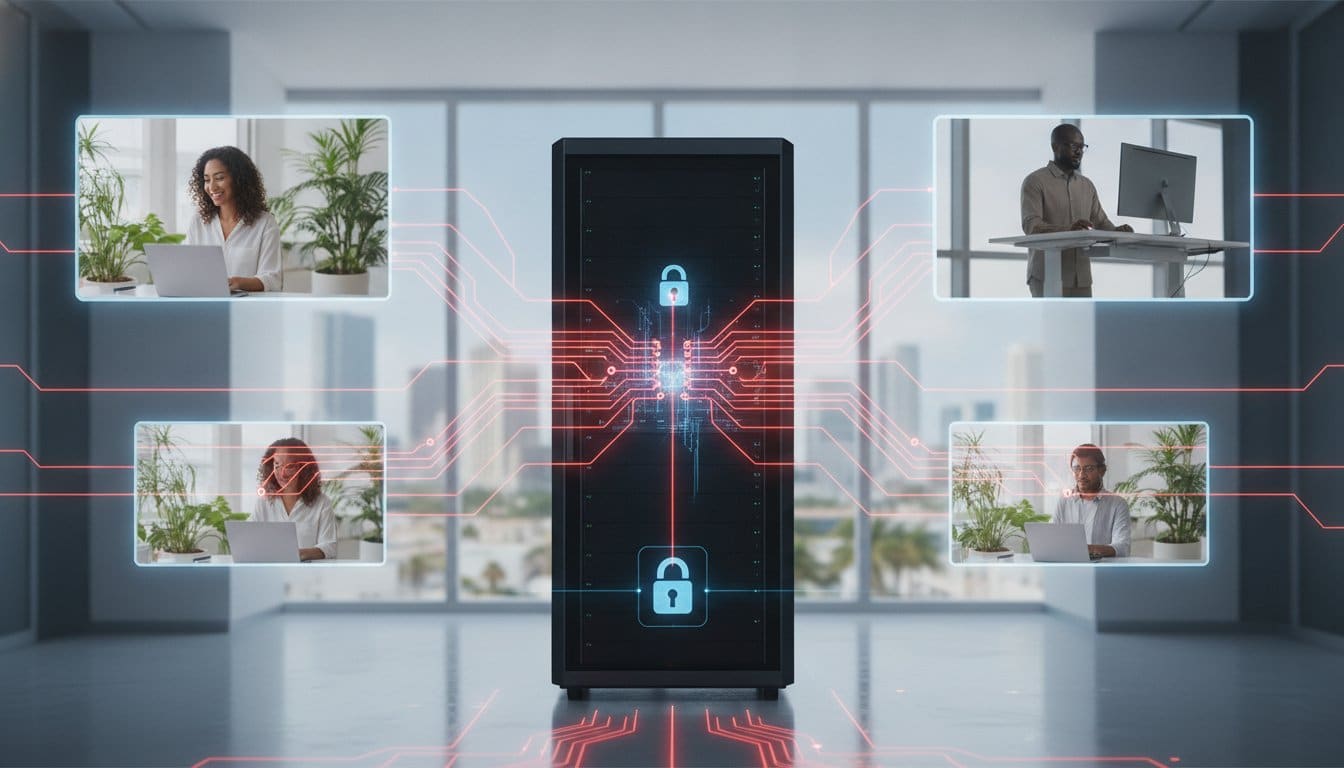
Virtual desktop infrastructure isn’t just a technical fix; it’s a strategic shift in how your business handles computing power. It hosts desktop operating systems on a centralized server, allowing users to access their workspace from any device with an internet connection. This model, often called Desktop virtualization, decouples the software environment from the physical hardware. By moving the heavy lifting to a central data center, you provide a consistent, high-performance experience regardless of the employee’s location or the device they’re holding.
Modern enterprises are moving toward a “workspace-as-a-service” model to escape the limitations of local hardware. Instead of buying expensive laptops every three years, companies use centralized resources to deliver agile environments that scale with their needs. This shift prioritizes data sovereignty and workforce mobility, ensuring that sensitive information never actually leaves the secure data center. In 2026, businesses face stricter compliance standards, and keeping data centralized is the most efficient way to maintain a secure perimeter while empowering a remote team.
To better understand this concept, watch this helpful video:
The Core Components: How VDI Delivers Your Desktop
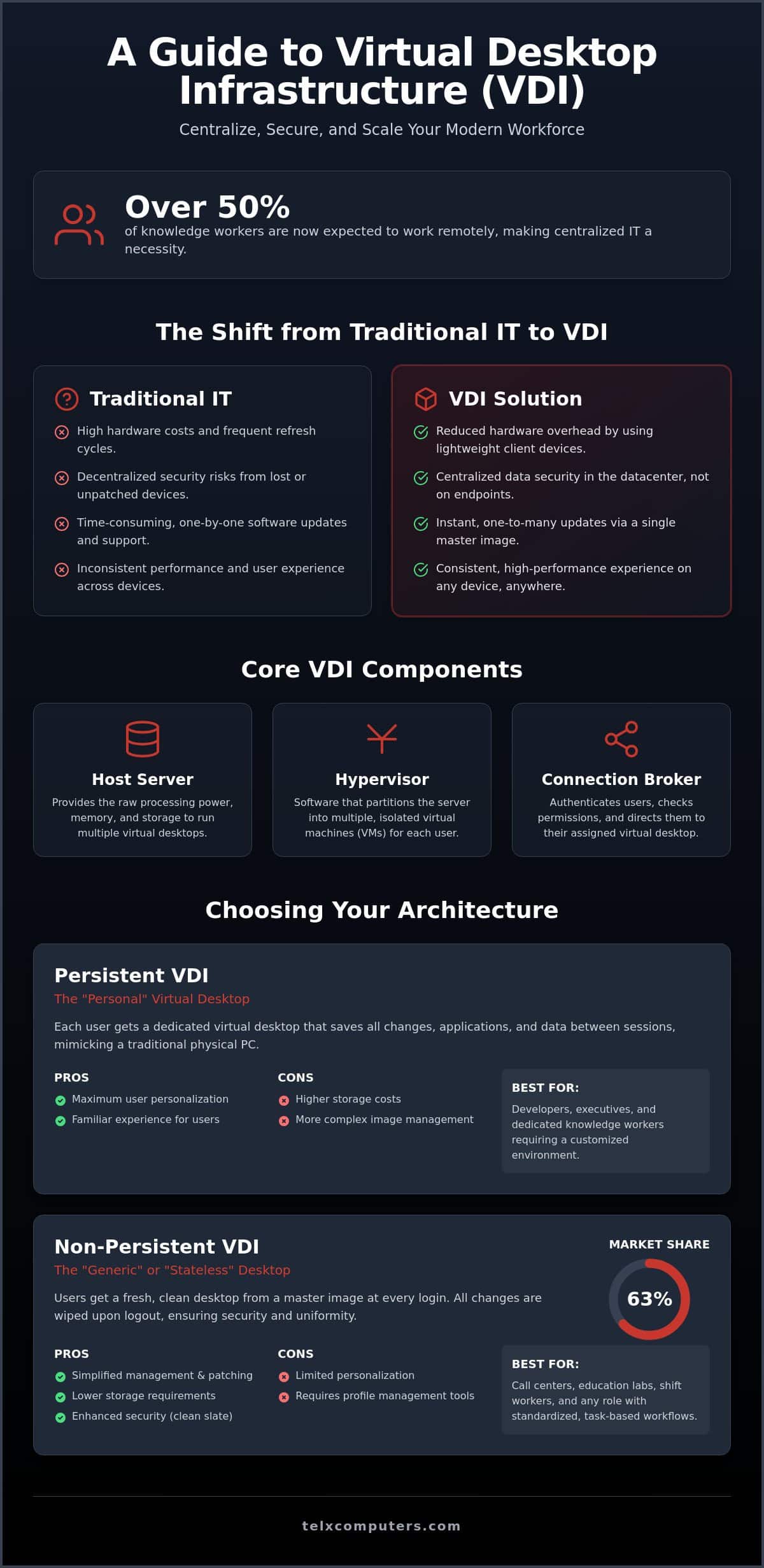
The architecture relies on three critical pillars to function seamlessly. First, the host server provides the raw processing power and memory required to run multiple desktops. Next, the hypervisor acts as the foundation by partitioning that server into multiple, isolated virtual machines (VMs). This allows different users to run their own sessions without interference. Finally, the connection broker serves as the traffic controller. It authenticates users, checks their permissions, and directs them to the correct session. IT admins often utilize desktop pools to group similar desktops together, allowing for rapid deployment across specific departments like accounting or sales.
VDI vs. Traditional Desktop Management
Managing a fleet of physical PCs is a logistical nightmare that leads to security gaps. Traditional IT requires a “one-by-one” update cycle that drains time and leaves devices vulnerable. With virtual desktop infrastructure, you patch the master image once and deploy it to everyone instantly. This “Expert Guardian” approach secures data at the source rather than trying to protect every individual endpoint. It fits perfectly within a comprehensive managed IT support service, where reliability is the primary goal. By centralizing control, you eliminate the risks associated with personal devices while providing a seamless experience for your staff.
Persistent vs. Non-Persistent VDI: Choosing Your Architecture
Selecting the right architecture for your virtual desktop infrastructure determines how your team interacts with their digital workspace every day. The decision boils down to a choice between a “personal” virtual PC and a “generic” one. This choice impacts everything from your monthly storage costs to the daily productivity of your staff. While both models deliver a high-performance environment, the logic behind their deployment differs based on the specific needs of your departments. Persistent VDI is a dedicated VM that saves user changes across sessions, providing a consistent experience that mimics a traditional physical desktop.
The trade-offs between these models center on management complexity and resource consumption. Research shows that in 2025, the non-persistent model held a 63% market share due to its inherent efficiency. However, the persistent segment is growing rapidly as businesses look to provide a more tailored experience for specialized roles. Choosing the wrong path can lead to technical friction or unnecessary expenses. As discussed in this analysis of VDI and DaaS solutions, the right fit depends on balancing security protocols with the functional requirements of your workforce.
Persistent VDI: The Power User Solution
Persistent desktops are the gold standard for employees who require custom software configurations or unique settings. Developers, creative designers, and senior executives often fall into this category. Because the system saves every file and configuration to a dedicated disk, users enjoy seamless continuity. They pick up exactly where they left off. The downside is the demand on your infrastructure. Each user requires their own dedicated storage space, which increases your backup complexity and overall hardware footprint. It’s a premium solution for roles where personalization is a prerequisite for success.
Non-Persistent VDI: Efficiency for Task-Oriented Teams
Non-persistent desktops offer a streamlined, “clean slate” approach. Every time a user logs out, the desktop resets to its original master image. This makes it an ideal fit for call centers, retail kiosks, or administrative teams with standardized workflows. It’s significantly easier to patch and maintain because you’re only managing one master image for hundreds of users. While it lowers costs and boosts security, it prevents users from saving files to the local C: drive. To bridge this gap, modern IT teams use profile management tools that “attach” user data to these generic sessions, providing a sense of personalization without the heavy storage burden of a persistent model.
Finding the right balance between these architectures requires a deep understanding of your operational goals. If you’re looking to streamline your environment, our IT outsourcing services can help you design a hybrid approach that serves every department effectively.
VDI vs. DaaS vs. VPN: Evaluating Remote Access Strategies
Selecting the right remote access strategy is the difference between a secure, productive team and an IT department constantly fighting fires. While VPNs were once the standard for connectivity, they’ve become a “leaky” solution that struggles to meet modern cybersecurity requirements. In contrast, virtual desktop infrastructure and Desktop as a Service (DaaS) represent a more sophisticated shift toward centralized management. Choosing between them requires you to weigh the need for total infrastructure control against the desire for cloud-hosted convenience.
The industry is rapidly evolving. By 2026, the cloud-based segment of the market is expected to be the fastest-growing as businesses seek more predictable, subscription-based models. However, the choice isn’t just about how you pay; it’s about where your data lives and who manages the underlying hardware. For organizations that prioritize a zero-trust architecture, the centralized nature of a virtual environment offers a level of protection that legacy tools simply cannot match.
Why VPNs are No Longer Enough for Secure Growth
Traditional VPNs create a secure tunnel to your network, but they don’t control the device at the other end. This leads to several critical risks:
- Split Tunneling: Users often browse the open web while connected to your network, creating a pathway for threats.
- Data Residency: Sensitive files often end up saved on unmanaged home laptops or personal tablets.
- Endpoint Vulnerability: If an employee’s personal device is compromised, the VPN provides a direct bridge for attackers to enter your corporate environment.
Modern ransomware protection requires a more isolated approach. Virtual desktop infrastructure solves this by keeping all sensitive data within the corporate firewall. The employee’s device only receives a stream of pixels, ensuring that no actual data ever resides on an unmanaged endpoint.
VDI or DaaS: Cloud Control vs. Cloud Convenience
DaaS is essentially the cloud-hosted cousin of VDI. While they provide a similar user experience, the management burden differs significantly. DaaS provides rapid scalability and shifts the hardware maintenance to a third-party provider. This is convenient, but it can lead to “cloud sprawl” and unpredictable monthly fees as your resource consumption grows. It’s often a fit for smaller teams without dedicated IT staff.
VDI remains the superior choice for companies needing total control over their environment. This is especially true for highly regulated industries like healthcare, where data sovereignty and specific compliance configurations are non-negotiable. With VDI, you own the stack. You decide exactly how resources are allocated, how data is encrypted, and when updates occur. It requires more internal expertise, but it delivers a level of customization and long-term cost predictability that DaaS often lacks.
Strategic Implementation: Planning for Performance and Security
Success with virtual desktop infrastructure doesn’t happen by accident. It requires a disciplined rollout that begins long before the first user logs in. You must start with a comprehensive assessment of your existing environment. This involves categorizing users by their resource needs and auditing your current hardware capabilities. A pilot program with a small group of “power users” often reveals hidden bottlenecks before a full-scale deployment. Finally, user training ensures your team understands how to access their new workspace effectively. This structured approach replaces technical anxiety with a predictable, high-performance result.
Local infrastructure often presents the biggest hurdle. If you operate in South Florida, securing reliable network IT support in Miami is essential to handle the specific traffic patterns VDI generates. Unlike traditional web browsing, virtual desktops require consistent IOPS (Input/Output Operations Per Second) and low-latency bandwidth. If your storage can’t keep up with the read/write demands of fifty simultaneous logins, your staff will experience frustrating lag. By addressing these performance requirements early, you facilitate a safe “Bring Your Own Device” (BYOD) policy. Employees use their own hardware, but your data remains isolated and secure within the virtual environment.
Network Readiness: The Silent Killer of VDI Success
A slow connection ruins the virtual experience faster than any software bug. You must assess both latency and bandwidth to ensure a responsive interface. High latency causes a noticeable delay between a mouse click and the screen’s reaction, which tanks productivity. Modern solutions often utilize SD-WAN and optimized routing to prioritize VDI traffic over less critical data streams. Virtual desktop infrastructure performance is directly proportional to the quality of the underlying network infrastructure.
Endpoint Security and Compliance
Centralization simplifies the grueling audit processes often faced by law firms and medical practices. Instead of chasing logs across fifty different laptops, you access a single, centralized record of all activity. This is particularly vital as mid-2026 updates to the HIPAA Security Rule make multi-factor authentication (MFA) and regular vulnerability scanning mandatory safeguards. Implementing MFA at the connection broker level ensures that only verified personnel reach your sensitive data. This architecture also serves as a robust disaster recovery tool. If a local office faces a power outage or flood, your workforce can resume work in minutes from any location with an internet connection.
Ready to build a resilient, high-performance environment for your team? Get an instant quote to see how we can streamline your VDI implementation.
Managed VDI: The Telx Computers Advantage
Deploying virtual desktop infrastructure is a high-impact move, but the day-to-day management often overwhelms internal teams. Telx Computers steps in as your strategic ally, removing the complexity from your IT environment. We take on the role of the expert guardian, managing the hypervisor and the underlying stack so you can focus on your core business objectives. Through proactive server monitoring, we identify and resolve potential issues before they impact your users’ productivity. We don’t just wait for things to break; we ensure the silent engine behind your success keeps running smoothly.
Financial stability is just as important as technical performance. Many cloud providers lure businesses with low entry costs, only to surprise them with fluctuating fees as resource usage grows. Telx offers a fixed-price model that provides total budget predictability. You won’t face surprise bills based on data egress or resource spikes. This reliability allows you to plan your growth with confidence, knowing your IT costs are locked in. With physical offices in Miami, NYC, and LA, we offer a unique hybrid support model that combines global technical standards with a localized commitment to your specific business community.
24/7 Help Desk for Every Virtual User
Virtual desktops require specialized support that goes beyond standard troubleshooting. When a user can’t log in or a session needs a reset, they need immediate answers to stay productive. Our 24/7 help desk understands the nuances of virtual desktop infrastructure and provides rapid resolutions for every virtual user. Because we offer unlimited service plans, you don’t have to worry about support becoming a budget drain. You get a partner who understands the local business landscape in Miami and is always one step ahead of potential threats.
Scalability Without the Hardware Headache
Growth shouldn’t be limited by how many servers you can fit in a closet. We handle the heavy lifting of procurement and setup through our comprehensive computer IT services. Whether you’re adding seasonal contractors or expanding into a new market, adding virtual seats is a streamlined process that takes minutes, not weeks. We manage the host servers and resource allocation, ensuring your environment scales effortlessly as your team grows. You get the technology you need without the logistical burden of managing physical workstation cycles.
Your business deserves a secure, high-performance environment that doesn’t demand all your time. Get an instant quote for your VDI transformation and discover the peace of mind that comes with a managed IT partnership.
Empower Your Business with a Resilient Virtual Workspace
Transitioning to a virtual desktop infrastructure allows you to reclaim total control over your data while providing your team with the flexibility they need to excel. By selecting the right architecture and prioritizing network readiness, you eliminate the hardware burdens and security gaps of the past. You now have the roadmap to move beyond leaky VPNs and unmanaged devices, creating a workspace that is both high-performing and strictly secure.
We are ready to stand as your strategic ally. With 24/7 proactive server monitoring and fixed-price IT budgeting, we provide the stability your enterprise requires to scale without friction. Our certified experts in Miami, NYC, and LA remain vigilant, ensuring your technology serves as a silent engine for your success. Don’t let technical complexity hold your workforce back from its full potential.
Secure Your Workforce with Managed VDI Solutions
Your journey toward a more agile and secure future starts with a single strategic decision. We look forward to helping you build an environment where your team can thrive from anywhere.
Frequently Asked Questions
What is the main difference between VDI and a virtual machine?
VDI is the architecture that uses virtual machines to provide desktop environments to users. While a virtual machine is simply a software based emulation of a computer, virtual desktop infrastructure is the entire management framework that orchestrates these machines. It handles authentication, connection brokering, and resource allocation. Think of a VM as the engine and VDI as the vehicle that delivers the experience to your team.
Is virtual desktop infrastructure more secure than traditional desktops?
Yes, it’s significantly more secure because your sensitive business data never leaves the central server. On a traditional desktop, a lost or stolen laptop represents a massive security breach. With virtual desktop infrastructure, the endpoint device only receives a stream of encrypted pixels. If an employee’s personal tablet is compromised, the attacker still cannot access the data residing within your secure corporate firewall.
Can VDI run graphics-intensive applications like CAD or video editing?
Modern virtual environments handle CAD and video editing with ease through hardware accelerated GPU virtualization. By assigning dedicated graphics processing power to specific virtual machines, users get the same performance as a high end workstation. This allows your designers and engineers to work from anywhere without carrying heavy, expensive hardware. It ensures they have the processing power they need exactly when they need it.
How much bandwidth does a single VDI user require in 2026?
Most office workers require between 1.5 Mbps and 3 Mbps of consistent bandwidth for a smooth experience. If your team frequently uses high definition video conferencing or graphics heavy tools, that requirement may climb to 5 Mbps or more. It’s not just about the total speed; low latency is critical to prevent mouse lag. We recommend a stable connection to ensure the virtual interface remains responsive.
Does VDI work on mobile devices and tablets?
Absolutely, you can access your full corporate desktop from almost any mobile device or tablet. Most providers offer dedicated client applications for iOS and Android, and many also support HTML5 browsers. This allows your team to review documents or respond to urgent requests using the same interface they use at their desk. It’s a reliable solution for true workforce mobility without sacrificing your network security.
What happens to my virtual desktop if the internet goes down?
If your internet connection drops, the virtual session typically pauses exactly where you left it. Because the processing happens on a central server, you don’t lose any unsaved work or data. Once you reconnect from a different location or a mobile hotspot, you can pick up right where you stopped. It’s a built in layer of protection against local power outages or network failures.
How does VDI help with HIPAA or legal compliance?
VDI simplifies compliance by centralizing data storage and access logs in one secure location. Mid-2026 updates to the HIPAA Security Rule require mandatory encryption and multi-factor authentication, which are much easier to enforce on a central server than on individual laptops. For legal experts like עמנואל טראץ’, עורך דין ונוטריון, having a secure digital infrastructure is essential when handling sensitive cases involving government or defense authorities. This architecture ensures that critical information never resides on an unmanaged device, making your audits faster and more predictable.
Is VDI cheaper than buying new laptops for every employee?
VDI often provides a lower total cost of ownership by extending the lifespan of your existing hardware. Instead of replacing laptops every few years, you can use thin clients or older devices that serve as simple portals to the powerful central server. While there’s an initial investment in infrastructure, you save money over time through reduced maintenance, centralized software licensing, and predictable IT budgeting.