





03 Jul The Ultimate IT Checklist for Office Relocation: A Seamless Strategy
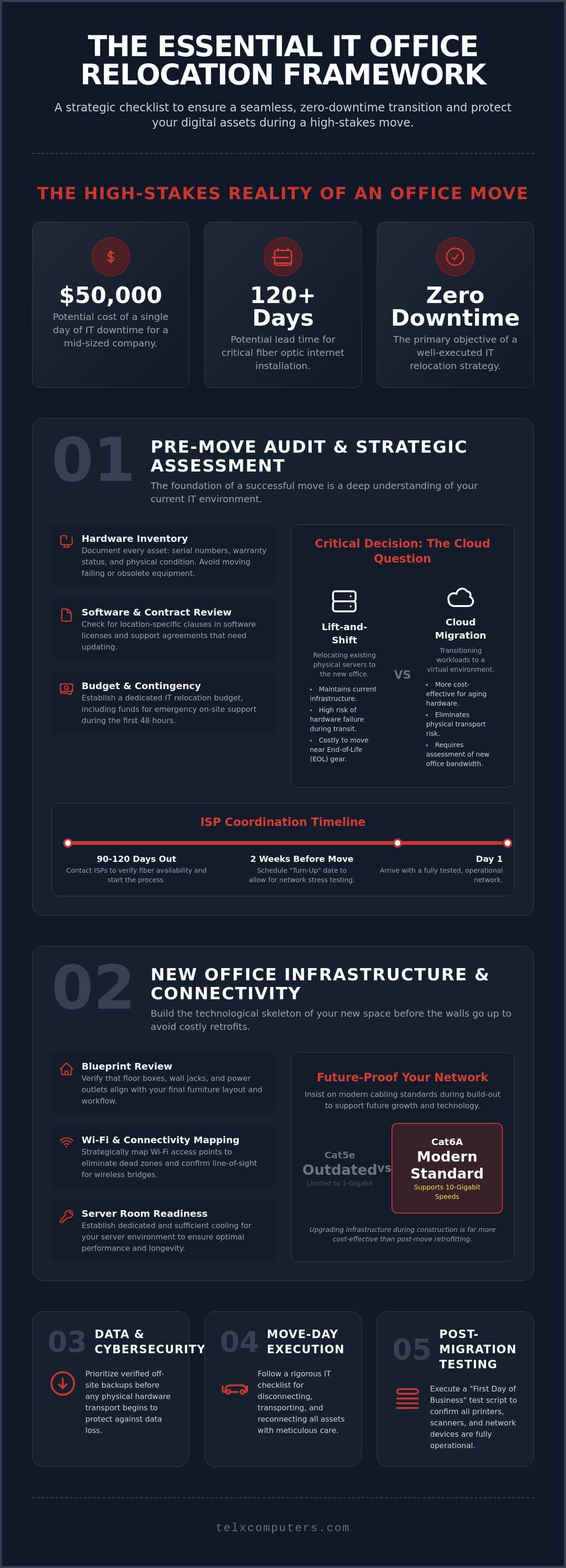
A single day of IT downtime during an office move can cost a mid-sized company up to $50,000 in lost revenue. It’s a high-stakes transition where a single oversight, such as failing to account for fiber installation timelines that can exceed 120 days, can stall your operations indefinitely. We recognize that moving your headquarters is a milestone for growth, yet the fear of data loss or hidden cabling costs often overshadows the excitement of a new space. That’s why a rigorous IT checklist for office relocation is essential to protect your digital assets and maintain total business continuity.
You deserve a migration that feels like a seamless step forward, not a frantic recovery effort. This framework is designed to help you achieve a zero-downtime transition while upgrading your infrastructure to modern standards like Wi-Fi 7. We’ll explore how to audit your hardware, secure your data during transport, and coordinate with vendors to ensure your network is faster and more resilient than the one you left behind. This guide provides the strategic clarity you need to turn a complex move into a controlled, successful deployment.
Key Takeaways
- Audit your hardware and evaluate server health to decide between a traditional “lift-and-shift” approach or a strategic transition to cloud computing.
- Ensure your new facility is mission-ready by reviewing blueprints for optimal connectivity and establishing dedicated cooling for your server environment.
- Protect your enterprise from data loss by implementing a rigorous IT checklist for office relocation that prioritizes verified off-site backups before physical transport.
- Execute a flawless “First Day of Business” test script to confirm that all printers, scanners, and network-accessible devices are fully operational before your team arrives.
Phase 1: Pre-Move IT Audit and Strategic Assessment
A comprehensive IT checklist for office relocation begins long before the first box is taped shut. A successful move requires a deep dive into your current environment to identify what’s coming with you and what’s better left behind. Start by conducting a thorough hardware inventory. You need more than just a head count of laptops; document serial numbers, warranty status, and the physical condition of every asset. This level of detail ensures you aren’t paying to transport equipment that’s already failing or out of warranty.
Beyond the physical gear, review your software licenses and support contracts. Many agreements include location-specific clauses that might need updating before you flip the switch at the new site. While you’re managing these logistics, understanding the relocation process from a strategic perspective helps you account for the operational stress on your team. We recommend establishing a dedicated IT relocation budget early. This budget should include a contingency for emergency onsite support during the first 48 hours in your new facility to handle any unforeseen connectivity hurdles.
To better understand this concept, watch this helpful video:
The Cloud Readiness Decision
The most critical question in your IT checklist for office relocation is whether to “lift-and-shift” your physical servers or transition to cloud computing. Moving heavy, sensitive server racks carries inherent risks of hardware failure. If your equipment is reaching its “End-of-Life” (EOL), it’s often more cost-effective to recycle those units and migrate workloads to a virtual environment. If you choose a cloud-first approach, assess your new suite’s bandwidth requirements to handle the increased data traffic. You might need a temporary hybrid environment to keep operations steady during the transition week.
Vendor and ISP Coordination
Don’t wait until the month of the move to call your internet service provider. In competitive markets like Miami or Fort Lauderdale, fiber installation can take anywhere from 45 to 120 days if construction or permits are required. Contact ISPs at least 90 days out to verify service availability at your specific suite number. Coax might be available immediately, but fiber often requires building access agreements that take time to negotiate. Schedule your “turn-up” date for at least two weeks before the official move. This buffer allows our team to perform rigorous stress tests on the network before your staff arrives, ensuring a zero-downtime experience from day one.
Phase 2: New Office Infrastructure and Connectivity
Phase 2 focuses on the skeleton of your new business environment. Reviewing blueprints early is non-negotiable. You need to verify that floor boxes and wall jacks align with your furniture layout before the drywall is finished. If you miss this window, you’ll face the hidden costs of post-construction cabling. A professional network it support miami partner will help you map out Wi-Fi access points to eliminate dead zones, ensuring your team stays productive anywhere in the suite. Key infrastructure checks include:
- Verifying optimal placement of power outlets near workstation clusters.
- Confirming line-of-sight for wireless bridges if connecting multiple floors.
- Ensuring floor boxes are positioned to avoid tripping hazards in high-traffic areas.
An effective IT relocation strategy treats infrastructure as the foundation of future growth. As companies move toward “Class A” office spaces to attract talent, the underlying technology must match that high standard. Don’t settle for outdated Cat5e wiring; ensure your new office utilizes Cat6A structured cabling to support 10-Gigabit speeds. This is a critical item on your IT checklist for office relocation because retrofitting a finished office is significantly more expensive than doing it right during the build-out phase. Proper cabling for a 30-person office can cost between $5,000 and $10,000; choosing the wrong standard now will cap your network’s performance for years.
Server Room and Rack Specifications
Your server room is the heartbeat of your operations. It requires more than just a locked door. Confirm the space has dedicated cooling that operates independently of the building’s main HVAC system, which often shuts down on weekends. Specialized power circuits must be installed to handle the load of your racks. To guarantee maximum uptime, Energy Control Systems provides advanced power quality solutions that protect sensitive equipment from electrical disturbances. We recommend installing all racks and cable management systems at least one week before the hardware arrives. This creates a professional, organized environment that simplifies future maintenance and prevents hardware overheating. Confirm the room is secure with restricted badge or key access to maintain physical security standards.
Telecommunications and VoIP Setup
Transitioning your phone systems requires surgical precision. Test the new internal wiring for managed it support service quality, specifically focusing on latency and jitter for VoIP solutions. Coordinate the porting of your local phone numbers with your carrier early; this process can take weeks and is a common point of failure in many moves. Set up temporary auto-attendants to bridge the gap, informing clients of the move while your lines are in transition. If you’re feeling overwhelmed by these technical requirements, you can request a tailored infrastructure assessment to ensure nothing is missed during the build-out.
Phase 3: Safeguarding Data and Cybersecurity During Transition
Physical relocation represents the most vulnerable moment for your company’s data. While your team focuses on packing crates, cybercriminals often target businesses in transition, knowing that monitoring systems might be offline or personnel distracted. A vital component of your IT checklist for office relocation is establishing a security-first mindset before the first server is powered down. This starts with a full system backup stored in a secure, off-site cloud location. Simply running the backup isn’t enough; you must verify its integrity by performing a sample restoration. As of January 1, 2026, new comprehensive data privacy laws in states like Indiana, Kentucky, and Rhode Island have increased the legal stakes for data protection, making a failed migration a potential regulatory disaster.
Protecting your environment requires active ransomware protection during the move. The updated NIST Cybersecurity Framework (CSF 2.0) now places a greater emphasis on governance and supply chain risk, which includes how you handle data during a physical move. Encrypt every hard drive on mobile workstations and servers before they leave the building. This ensures that even if a device is lost or stolen during transit, the information remains inaccessible to unauthorized parties. It’s a proactive layer of defense that replaces technical anxiety with the stability of knowing your assets are shielded.
Physical Security of IT Assets
Hardware transport is more than a logistics challenge; it’s a security mission. We recommend using GPS-tracked vehicles for high-value server transport to provide real-time visibility. Much like the precision required by AutoPlex Transport Company for vehicle shipping, your IT relocation demands a strict chain of custody. Maintain a log for every data-bearing device, requiring signatures at both the origin and the destination. During the teardown, assign “essential-only” access to the tech team; limiting the number of people in the server room reduces the risk of accidental damage or internal security breaches during the chaos of move day.
Disaster Recovery Contingency
Even the best-laid plans can face unexpected ISP delays, which can sometimes exceed 120 days for fiber installations if construction is required. Your IT checklist for office relocation must include a “Plan B” for remote work or cellular failover if the new office connection isn’t ready. Test your data backup & disaster recovery failover systems well in advance. Keep a physical folder containing your network topology, critical IP addresses, and vendor contact lists. Having this documentation offline ensures you can rebuild your environment even if your primary digital resources are temporarily unreachable.
Phase 4: The Move-Day IT Checklist and Execution
Move day transforms your IT checklist for office relocation from a strategic plan into an active operation. This phase begins with a documented shutdown sequence to prevent database corruption; simply pulling the plug is never an option for enterprise-grade systems. Your onsite IT “Strike Team” should arrive before the movers to begin packing servers in anti-static materials and specialized “server crates.” These crates protect delicate hardware from the vibrations and shocks inherent in transit. Label every cable and port at both ends with color-coded tags to ensure rapid reconnection. This meticulous approach prevents the “spaghetti cable” nightmare that often delays office re-openings and frustrates staff on their first day back.
Transport your “Core Network” components first. This includes the firewall, main switches, and the ISP modem. By setting these up at the new location while the rest of the office is still in transit, you create a functional environment for the technical team. This “first in, first out” strategy ensures that by the time the first workstations arrive, the backbone of your network is already live and tested. It’s the difference between a chaotic scramble and a professional deployment that respects your business’s need for continuity.
Workstation Reconnection Strategy
Consistency is the key to a fast recovery. Standardize every desk setup so peripherals like monitors, docking stations, and webcams are uniform across the office. This reduces troubleshooting time because the team isn’t hunting for unique cables or adapters for each user. Verify that each station has dedicated power and high-quality surge protection to shield against the electrical fluctuations common in new office builds. Once the LAN is live, perform a “ping test” on every physical port to confirm connectivity before the employees arrive on Monday morning.
Core Network Re-Establishment
Bring your firewall and main switch online before connecting peripheral devices to ensure a secure perimeter from the start. Verify VPN connectivity for remote employees immediately, maintaining business continuity for those not physically involved in the move. Check your server monitoring dashboards for any hardware alerts that may have triggered during transport, such as disk errors or fan failures. A green dashboard is the only acceptable signal for a successful relocation. If you want to ensure your move day is handled by experts who treat your hardware with the care it deserves, partner with our managed IT specialists to secure your transition.
Phase 5: Post-Migration Testing and Help Desk Readiness
The successful physical transport of your hardware is a major milestone, but the final phase of your IT checklist for office relocation determines the actual success of the project. Before your staff arrives on Monday morning, you must execute a comprehensive “First Day of Business” (FDOB) test script. This isn’t a casual walkthrough; it’s a structured validation of every critical workflow. We verify that all printers, scanners, and multi-function devices aren’t just powered on, but are fully network-accessible and mapped to the correct user groups. Small oversights in peripheral connectivity can lead to significant bottlenecks during the first few hours of operation, creating unnecessary friction for your team.
Testing must extend to your communication channels. Perform a rigorous check of the phone system, confirming both inbound and outbound external connectivity for every extension. It’s common for porting issues or firewall configurations to block specific traffic types, so testing a variety of call scenarios is essential. Additionally, confirm that all security cameras and access control systems are fully functional. With office utilization climbing to 53% in 2026, ensuring that your physical security infrastructure is live from the moment the first employee badges in is a non-negotiable requirement for a safe transition.
The “Go-Live” Support Plan
The first 48 hours in a new space are when technical anxiety is highest. To alleviate this, we recommend scheduling professional IT support in Miami to be onsite for the duration of the “go-live” period. Set up a temporary “Help Desk Station” in the new lobby or a central breakroom for employee walk-ins. This proactive presence allows for immediate resolution of minor issues, such as monitor alignment or docking station glitches. Gather direct feedback from department heads on network speed and application access to ensure the infrastructure meets the high-performance standards you planned for in the earlier phases.
Final Documentation and Decommissioning
Once the new office is stable, you must close the loop on your old facility. Update your network map with the new physical port locations and any changes made during the reconnection process. This documentation is the foundation for future server monitoring and troubleshooting. Finally, ensure your old office is completely “wiped” of any proprietary data or abandoned hardware. This is a critical compliance step, especially given the fragmented data privacy landscape and new state-level regulations. Conduct a post-mortem meeting with your IT managed services company to review the project’s performance against the initial goals. This final review transforms a one-time move into a strategic learning opportunity for your business’s long-term growth.
Secure Your Operational Future with a Strategic Move
Relocating your business is more than a change of address; it’s a strategic opportunity to modernize your infrastructure and harden your security posture. By following a rigorous IT checklist for office relocation, you transform a high-risk event into a controlled, value-driven transition. From verifying backbone connectivity weeks in advance to executing a documented “First Day of Business” script, every step ensures your team remains productive and your data stays protected.
Telx Computers brings over 20 years of experience managing South Florida office migrations. We provide fixed-price project fees to ensure your budgeting remains predictable, while including 24/7 proactive monitoring in our managed plans to safeguard your new environment. Don’t leave your business continuity to chance. Get a Professional IT Relocation Quote from Telx Computers and move with confidence. Your next chapter starts with a seamless connection; we’re ready to be the silent engine behind your success.
Frequently Asked Questions
How far in advance should I start planning my IT office relocation?
You should start your technical planning at least four to six months before your move date. This window allows you to audit your existing infrastructure and order new hardware that may have long lead times. Early engagement with your IT partner ensures that your relocation strategy aligns with your broader business goals and provides enough time to coordinate with building contractors for necessary infrastructure upgrades.
Does my business insurance cover IT equipment during a move?
Most standard business liability policies don’t automatically cover specialized IT equipment during a physical move. You should contact your provider to verify if your policy includes transit coverage or inland marine insurance. If it doesn’t, we recommend purchasing a specialized rider to protect against accidental damage or theft during transport. It’s a small investment that provides significant peace of mind during a high-stakes transition.
Should I move my own servers or hire a professional IT company?
You should always hire a professional IT company to move your servers. Physical servers are sensitive to static, vibration, and temperature changes. Professionals use specialized server crates and anti-static materials to prevent hardware failure. Attempting a DIY move risks permanent data loss and hardware damage that far outweighs the cost of expert assistance. It’s the only way to ensure your hardware arrives in mission-ready condition.
How long does a typical office IT relocation take?
A typical office IT relocation takes between 48 to 72 hours for the actual physical move and reconnection. However, the preparation phase spans several months. The goal is to shut down on a Friday evening and be fully operational by Monday morning. This timeline depends on the complexity of your network and the size of your server environment. It’s a sprint that requires precise, minute-by-minute coordination.
What is the most common IT failure during an office move?
The most frequent failure is an inactive internet circuit on move-in day, often due to miscommunication with the provider. This oversight can lead to costly downtime and lost productivity. By following a rigorous IT checklist for office relocation, you can track critical vendor milestones and ensure that all connectivity is verified and stress-tested long before your employees arrive at the new facility.
How do I ensure my internet is active the day we move in?
Schedule your internet turn-up date at least two weeks before your official move-in. This provides a buffer to troubleshoot signal issues or wiring defects. You should also have a secondary connection, such as a 5G business wireless backup, ready to act as a failover if the primary fiber line experiences unexpected delays. Don’t wait until move day to test your bandwidth; it’s often too late to fix issues then.
Can I use an office move to switch to a paperless cloud environment?
Yes, an office move is the ideal time to transition to cloud computing. Instead of moving aging physical servers, you can migrate your data to secure virtual environments. This reduces the physical footprint of your new office and eliminates the risk of hardware damage during transport. It’s a strategic way to modernize your operations while relocating, turning a logistics challenge into a technological leap forward.
What should I do with old IT hardware that we no longer need?
Old hardware should be handled by a certified e-waste recycler who offers documented data destruction. Simply erasing files isn’t enough to meet modern security standards. Your IT checklist for office relocation must include a decommissioning phase where all retired assets are inventory-checked and wiped. This process protects your sensitive company data and ensures you remain compliant with evolving state and federal privacy regulations.