





11 Oct UCaaS in Miami: Choose the Right Communications Solution for Your Business
What if the right communications solution for your Miami business is the one that fits your daily operations, not the one with the longest feature list? With unified communications as a service (UCaaS) in Miami, the decision involves more than replacing a conventional phone system. UCaaS can bring calling, video meetings, messaging, and collaboration tools into a connected, cloud-delivered platform.
Before making that shift, consider what will change for your team, whether your network can support reliable calls, and how platform capabilities and ongoing responsibilities compare. Internet service and network conditions can vary by location, so readiness deserves attention alongside features.
This article explains how to assess UCaaS against your business needs and compare options using practical criteria. You’ll learn about the main components and trade-offs, how to prepare your team, and how network support and managed IT can complement a communications initiative. Telx Computers offers VoIP solutions and IT support, bringing a local perspective to communications planning for businesses in Miami, Aventura, and Fort Lauderdale.
Key Takeaways
- Understand how UCaaS brings business calling and other communications together through a cloud-delivered service.
- Assess call quality by considering the full path between users, devices, internet connectivity, and the cloud service.
- Compare unified communications as a service (UCaaS) in Miami against your team’s needs, network readiness, support requirements, integrations, and administration priorities.
- Prepare for an evaluation by mapping users, locations, call flows, and business-critical communication processes.
- See how Telx Computers’ VoIP solutions connect with managed IT and network support to help coordinate communications with broader IT operations.
What UCaaS in Miami Means for Your Business Communications
Unified communications as a service (UCaaS) in Miami gives businesses a way to manage communications through a cloud-delivered service instead of relying solely on a traditional, on-site phone system. It can bring business calling and other communication methods into a shared environment, with employees using supported devices and an internet connection to access the tools they need.
The shift affects more than the phones on employees’ desks. It can change how teams communicate across locations, how IT manages the communications environment, and how much the business depends on its network. Consider these connections before comparing specific platforms so you can judge how well a solution fits daily operations.
For a quick overview of the concept, watch this introduction to UCaaS:
UCaaS and VoIP: How the Terms Relate
VoIP, or Voice over Internet Protocol, describes voice calls carried over an internet connection. UCaaS describes a cloud-based service model for business communications. VoIP can be one part of a UCaaS setup, but VoIP alone doesn’t define what else a service provides. For a foundation on unified communications, see Unified Communications (UC). Telx Computers offers VoIP solutions, providing a local resource for businesses planning their communications.
Which Miami Businesses May Consider UCaaS?
UCaaS may suit organizations whose employees coordinate across offices, work remotely, or handle customer conversations from different locations. A customer-facing team, for example, may need to manage calls while colleagues collaborate from another office or outside the workplace. The right arrangement depends on how people work, which communications are business-critical, and what the existing network can support.
Small businesses and larger organizations can both evaluate UCaaS, but the same setup won’t fit every team. A company with one location may have different needs from one coordinating employees across Miami, Aventura, and Fort Lauderdale. Map where people work and how they communicate before weighing a platform’s capabilities.
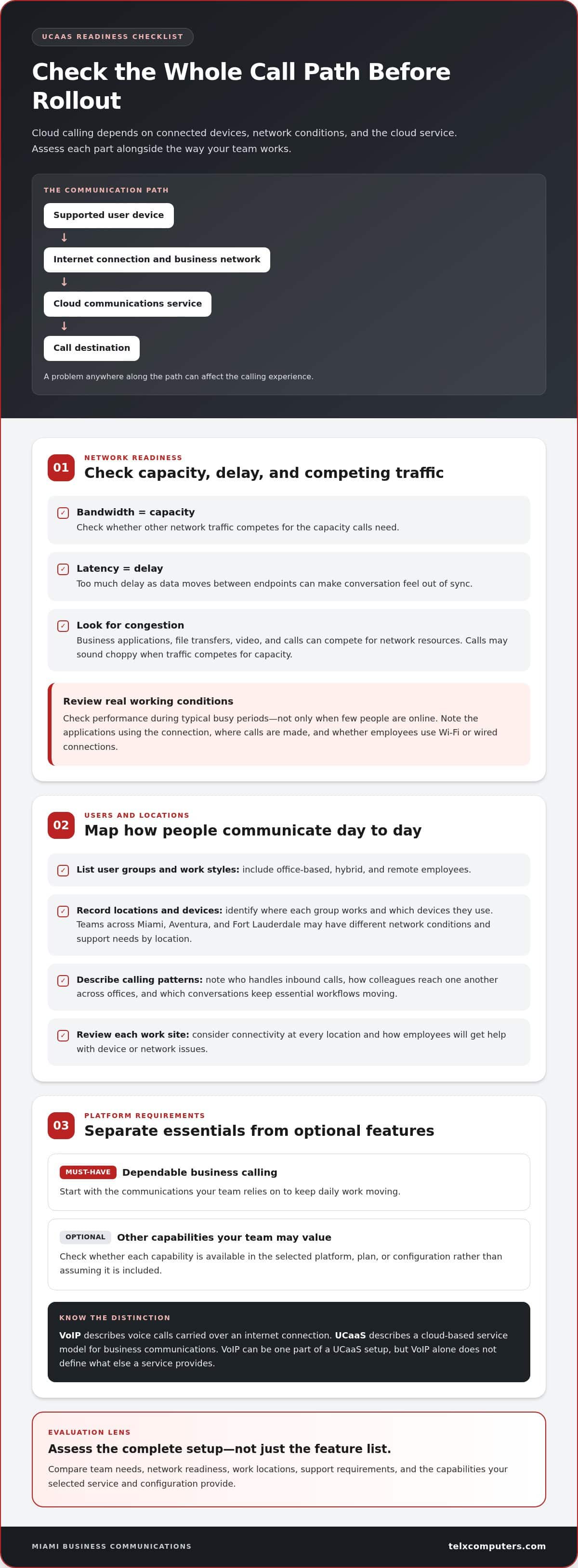
Include network readiness in that early assessment. Call quality depends on the full path between a user’s device, the local connection, and the cloud service, so a problem anywhere along the way can affect the experience. Review network performance and existing IT operations as part of the communications decision, rather than leaving them until rollout. Managed IT support can bring network and technology operations into a broader support strategy.
How UCaaS Works: The Network, Users, and Cloud Service
A cloud communications setup depends on three connected parts: the devices people use, the network that carries communications, and the cloud service that manages them. An employee might make a business call from a desk phone or another supported device. The device sends voice data through an internet connection to the communications service, which handles the call and connects it to its destination. The selected service and its configuration determine the available capabilities.
Cloud calling is only as dependable as the network path carrying the conversation. Understanding that path helps your business identify risks before they disrupt day-to-day communication.
What the Business Network Contributes
Real-time voice is sensitive to how smoothly data travels. Bandwidth is the network’s capacity to carry data. If other traffic competes for that capacity, calls may sound choppy. Latency is the delay as data moves between endpoints; too much delay can make conversation feel out of sync. Congestion can arise when business applications, file transfers, video, and calls compete for network resources.
Before rollout, review network performance during typical busy periods, not only when few people are online. Note which applications use the connection, where calls are made, and whether employees rely on Wi-Fi or wired connections. This gives your team a useful baseline for planning and troubleshooting. Miami network IT support can help assess the network as part of the communications environment.
How Users and Work Locations Shape Requirements
Start with how employees actually work. Map user groups, work locations, calling patterns, and the conversations that keep essential workflows moving. For example, a customer-facing team may rely on inbound calls, while employees across offices may need consistent ways to reach colleagues. Treat these as requirements to assess, not assumptions about what a particular UCaaS service includes.
Include office-based, hybrid, and remote employees in the same planning exercise. Record where each group works, which devices they use, and which business processes depend on timely calls. Teams distributed across Miami, Aventura, and Fort Lauderdale may have different network conditions and support needs by location. Review connectivity at each work site and plan how employees will get help with device or network issues.
Some capabilities associated with unified communications depend on the platform, plan, or configuration. Separate must-haves, such as dependable business calling, from optional features your team may value. This keeps a feature list from obscuring the operational question: can the complete setup support how your people communicate?
For Miami businesses, cloud communications planning works best alongside broader IT operations. Local IT support can help address the devices and network infrastructure employees use to connect. Telx Computers brings together Miami IT support and communications-focused planning, helping businesses consider their network and users as part of one operational picture.
How to Compare UCaaS Options for a Miami Business
Compare each option against the work your communications system must support, the network and IT environment it depends on, and who will manage issues. A feature checklist can organize your research, but more features don’t automatically make a service a better fit. For unified communications as a service (UCaaS) in Miami, prioritize essential needs, then weigh optional capabilities against their practical value.
| Comparison area | What to assess | Essential or optional? |
|---|---|---|
| User needs | Who communicates, from where, and which calls or workflows are business-critical? | Essential requirements should reflect daily work. |
| Network readiness | Can the network support real-time calls across relevant offices and work locations? | Essential to evaluate before rollout. |
| Support | Who handles service issues, user questions, devices, and the company network? | Clear ownership is essential. |
| Integrations | Which existing business tools need to work alongside communications? | Required connections are essential; others may be optional. |
| Administration | How will users, settings, and routine changes be managed? | Core responsibilities matter; available controls vary. |
Questions to Ask About Features and Integrations
Start with workflows, not advertised features. Identify how employees handle incoming customer calls, transfer conversations, reach colleagues, and coordinate across locations. Then list the software they already use and decide where connecting it to communications could save effort or reduce duplicate work. Evaluate each integration against the service documentation, including any setup and administration requirements. Don’t assume a particular connection or capability comes standard.
Assessing Reliability, Security, and Support
Changing a phone system can disrupt employees who rely on it every day. Reduce risk with a staged evaluation: document current call flows, test network readiness, trial the proposed setup with a limited group, and review the results before expanding. Decide how users will report problems and how IT will distinguish a network issue from a service or device issue.
Compare support ownership and operational fit, not feature counts alone. Define which responsibilities sit with the communications service and which remain within your IT environment, including network monitoring, user administration, and issue escalation. Review security responsibilities and access processes as part of that division instead of assuming every service handles them the same way.
A written comparison helps your team separate must-haves from optional capabilities and track unresolved operational questions. For broader IT coordination, managed IT support can complement communications planning by aligning network and technology support. Document requirements and responsibilities before a wider change reaches employees.
Prepare Your Miami Team for a UCaaS Evaluation and Rollout
A clear plan turns a communications change into a managed business project. Before evaluating unified communications as a service (UCaaS) in Miami, document how employees communicate today, who depends on each workflow, and what must remain available during a transition. Use the steps below to move from needs assessment to post-launch review, adapting the work to the platform and technical setup you select.
- Inventory users and locations. Group employees by role and communication needs. Record where each person works, including Miami-area offices and remote locations, and note the business numbers they use. This gives your team a practical view of who may be affected and where local network conditions or on-site IT needs could shape planning.
- Map call flows and critical processes. Document how calls enter the business, reach the right employees, and move between teams. Include workflows that affect customer service or daily operations, such as receiving inquiries or coordinating across departments. Mark the steps that cannot be disrupted so they receive focused attention during evaluation and testing.
- Review technical readiness and ownership. Assess network capacity and performance at relevant work locations, then identify who is responsible for network security, user access, devices, and communications-related issues. Set a clear escalation path: employees should know where to report a problem, and internal teams should know who investigates each type of issue. Managed IT support can connect communications planning with broader IT operations.
- Assign decision-makers and prepare employees. Identify the business stakeholders who approve requirements, coordinate technical work, and communicate changes. Give employees a clear explanation of what is changing, when each phase is planned, and where they can get guidance. Tailor training to job responsibilities, focusing on the calling workflows people need to perform rather than features they may never use.
- Test, transition, and review. Sequence deployment around business priorities and operational dependencies. Before broader adoption, test representative calling workflows with a limited group and document results, user feedback, and unresolved issues. Expand when the business is ready to proceed. After launch, review employee feedback and outstanding support needs, then assign owners for follow-up.
Keep assumptions out of the project plan. Base migration timing, service capabilities, and technical requirements on the details of the selected project, not generic promises or estimates. A written readiness checklist and clear decision ownership help your team make changes deliberately while keeping employees informed.
Telx Computers’ managed IT and VoIP solutions can help align communications planning with the wider IT environment for your Miami business.
How Telx Computers Supports Miami Business Communications
Choosing a communications service is only part of the work. Calling depends on the network, devices, user access, and support processes around it, so a change to business communications should fit into the wider IT environment. Telx Computers offers VoIP solutions alongside managed IT and network support, helping Miami businesses consider these connected needs as part of one operational picture.
Connect Communications with Managed IT Support
Cloud-based calling still relies on the systems employees use to connect. Network performance, device setup, security responsibilities, and clear issue escalation all shape how communications fit into daily operations. Coordinating these areas can help clarify who handles a problem and whether it relates to the communications service or the company’s IT environment.
Telx’s managed IT support services complement this broader planning. Its managed IT plans use fixed-rate recurring billing and include unlimited routine support. The 24/7 help desk gives employees a resource for IT issues. These services support ongoing IT operations and can be considered alongside communications planning.
Telx has a physical Miami location and serves Miami-area businesses. That local presence brings a Miami perspective to conversations about the network and technology environment supporting communications, including where on-site IT support fits alongside cloud-delivered services. Businesses evaluating unified communications as a service (UCaaS) in Miami can consider VoIP and managed IT together, rather than treating phones as a separate technology decision.
Choose a Practical Next Step in Miami
Start by bringing four points into focus: user needs, network readiness, support ownership, and rollout planning. Identify which teams rely on business calls, what the network must support, who will handle issues across the communications and IT environments, and how changes can be tested before wider use. This gives your evaluation a practical foundation based on your business priorities.
Telx’s broader IT support can help frame communications alongside network and operational needs. Prepare an outline of your current setup, the work employees need calling to support, and the questions you want to resolve. That creates a focused starting point for discussing VoIP solutions and related IT requirements.
Make Your Next Communications Decision Count
A communications decision should support the way your business plans to work next, not just replicate the setup you have today. As teams, customer expectations, and work patterns shift, revisit whether your communications approach still fits. A clear record of priorities and decision ownership makes future adjustments more deliberate and gives your team a useful starting point for reassessment.
For unified communications as a service (UCaaS) in Miami, a useful next step is to define your goals, review your current IT environment, and agree on what a successful change would mean for employees. Telx Computers can help you consider business communications alongside the technology and support needs connected to them, so decisions reflect your organization’s priorities.
Frequently Asked Questions
What is the difference between UCaaS and VoIP?
UCaaS is the broader cloud-delivered communications service model; VoIP refers specifically to voice calls carried over internet protocol. A business can use VoIP without adopting a broader unified service, while UCaaS may include voice alongside other communication capabilities, depending on the service and its configuration. Compare whether an option supports only business calling or also the communication workflows your team needs, rather than treating the terms as interchangeable.
Can UCaaS work with a business’s existing phone numbers?
Existing business numbers may be transferable, but feasibility and timing depend on the numbers, current carrier, and receiving service’s procedures. Before planning a change, list published and internal numbers, note where each one routes, and review the transfer requirements for the selected service. Keep the transition plan focused on maintaining access to important contact numbers, and test the relevant call routes as part of the changeover.
How much does UCaaS cost for a Miami business?
UCaaS costs depend on the selected service, user count, capabilities, billing terms, onboarding, number transfers, devices, and optional integrations. For unified communications as a service (UCaaS) in Miami, build a budget that separates recurring charges from one-time transition expenses. Estimate users across offices and remote teams, then weigh optional capabilities against their value to daily operations. This gives you a clearer basis for comparing total costs and requirements.
Is UCaaS reliable if the office internet connection goes down?
If an office loses internet access, internet-based calls at that location may be interrupted because the connection carries them. What happens next depends on the service configuration, other available connections, and continuity arrangements. Don’t assume calls will automatically reroute. Identify critical calling workflows, decide how employees should handle them during an outage, and test the agreed process in advance so the team knows what to do.
Can UCaaS integrate with CRM or business software?
Integration may be possible depending on the communications service, its configuration, and the CRM or business software involved. Begin with the tasks you want to improve, such as accessing customer information during a call or recording interaction details. Then compare those workflows with the service’s integration documentation and account for setup and ongoing administration. Don’t assume a particular connection is included by default.
How much internet bandwidth does UCaaS need?
There isn’t one bandwidth figure that fits every UCaaS setup. Estimate demand based on simultaneous calls, other real-time applications, and typical network use during busy periods, then compare it with the selected service’s technical requirements. Include each office and remote work location, since connectivity can differ across Miami, Aventura, and Fort Lauderdale. Reviewing network use during normal peak activity provides a more realistic planning baseline.
To discuss VoIP and managed IT support for your Miami business, contact Telx Computers about your business IT needs.