





07 Jun Server Virtualization Benefits for Small Business: A Strategic ROI Guide
Your physical server room is likely the most expensive ghost town in your office, consuming electricity and space while running at only a fraction of its capacity. You’ve likely felt the weight of rising hardware costs, especially with server DRAM prices jumping by 70% in early 2026. It’s frustrating to watch your IT budget vanish into cooling bills and maintenance for machines that can’t keep up with your growth or support a remote team. We understand that technical anxiety. Nobody wants to worry that a single hardware failure could bring operations to a standstill for days.
This guide shows you how to reclaim those costs and secure your future. You’ll discover how the specific server virtualization benefits for small business transform your infrastructure from a constant drain on resources into a resilient foundation for expansion. We’re going to explore the strategic logic behind modernizing your stack. This includes how to slash overhead, achieve faster recovery times, and build a technology environment that scales as fast as your ambitions.
Key Takeaways
- Consolidate multiple physical servers into a single high-performance machine to slash your hardware overhead and cooling costs.
- Leverage the server virtualization benefits for small business to achieve rapid disaster recovery through snapshot technology and hardware-independent restoration.
- Scale your operations instantly by deploying new virtual environments in minutes rather than waiting weeks for physical hardware arrivals.
- Extend the lifecycle of your critical software by decoupling it from aging physical components, ensuring a more resilient and sustainable IT foundation.
- Understand the strategic importance of expert oversight to prevent resource sprawl and maintain a secure, high-performance virtual environment.
What is Server Virtualization for Small Business?
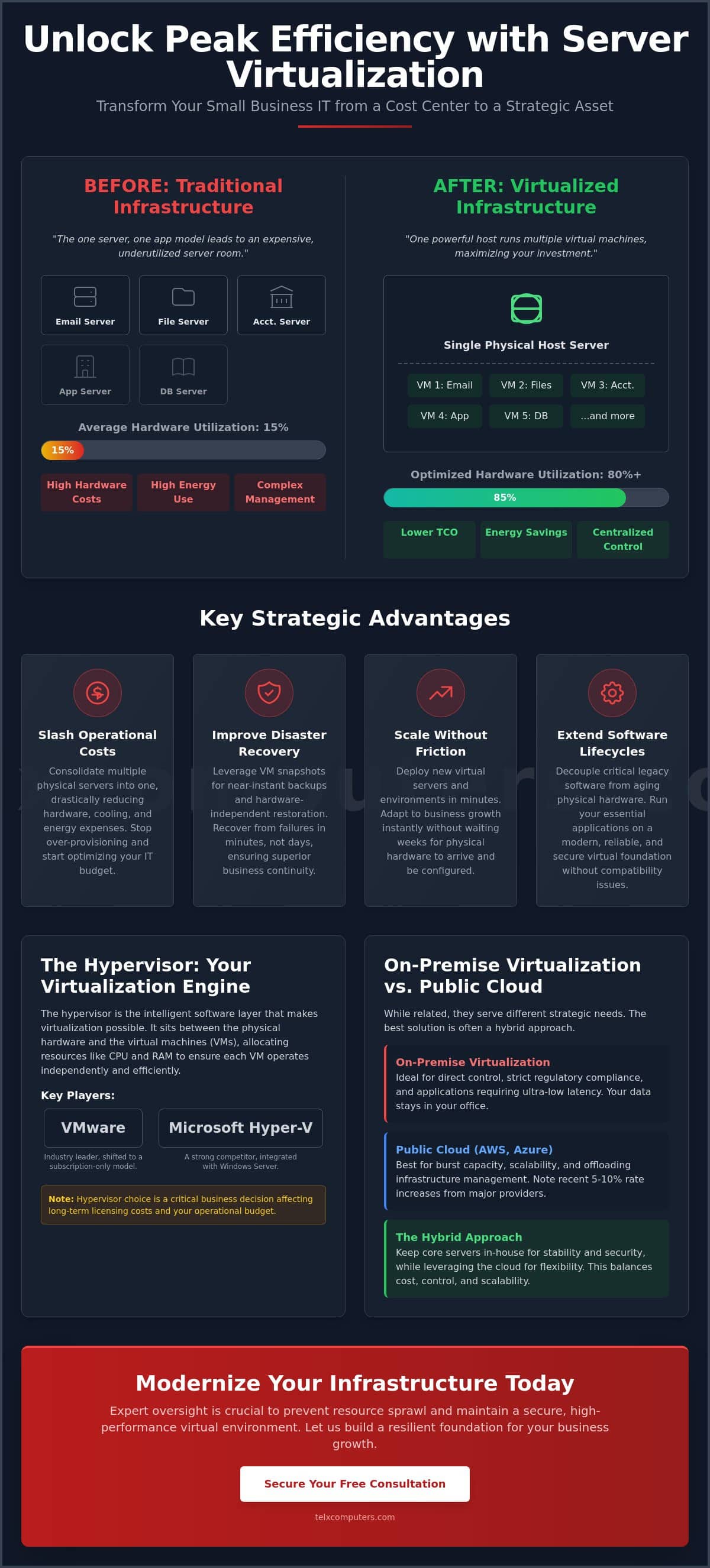
Think of your IT infrastructure like real estate. Historically, businesses bought a new physical server for every major application, like email, file storage, or accounting. This “one server, one app” model is now obsolete. It leads to a room full of expensive hardware that mostly sits idle, often using only 15% of its total capacity. Through server virtualization, we replace that inefficiency with a streamlined “apartment building” approach. One powerful physical machine, known as the Host, supports multiple independent Virtual Machines (VMs), or Guests. Each Guest operates as its own server with its own operating system, but they all share the same underlying physical resources.
Transitioning to this model is a strategic shift that serves as a bridge between your local office and modern cloud computing. By abstracting your software from the physical hardware, you gain the agility of a global enterprise. You’re no longer tethered to a specific box under a desk. This flexibility is one of the primary server virtualization benefits for small business owners who need to stay competitive. It allows you to move workloads between physical machines without downtime, providing a level of reliability that traditional setups simply cannot match.
To see how these virtual environments function in a real-world office setting, watch this brief overview:
The Role of the Hypervisor
The hypervisor is the intelligent software layer that makes this all possible. It manages the communication between the physical hardware and the virtual guests, ensuring each VM gets the CPU and RAM it needs. Industry leaders like VMware and Microsoft Hyper-V offer different paths for this technology. However, the landscape changed significantly following Broadcom’s acquisition of VMware. In 2026, VMware shifted to a subscription-only model, retiring popular entry-level options like the Essentials Plus Kit. This shift means your choice of hypervisor is now a critical business decision that affects your long-term licensing costs and operational budget.
Virtualization vs. Cloud: Clearing the Confusion
While they share similar DNA, on-premise virtualization and public cloud services serve different strategic needs. On-premise virtualization keeps your data and hardware under your direct control within your office. This is often necessary for industries with strict regulatory requirements or applications that require ultra-low latency. Many organizations now opt for a hybrid approach, especially as major cloud providers like AWS and Azure increased rates by 5-10% in late 2026. They keep core virtualized servers in-house for stability while using public cloud services for burst capacity. This provides a customized balance of security and scalability. For businesses looking to optimize this balance, our server monitoring systems ensure your virtual environment stays healthy and responsive.
Maximizing ROI: How Virtualization Slashes Operational Costs
Directly reducing capital expenditure is the most visible way virtualization impacts your bottom line. By consolidating five or more physical boxes into a single high-performance machine, you immediately stop the cycle of over-provisioning hardware that sits idle most of the day. This shift results in significant lower hardware costs and energy savings, as you’re purchasing and maintaining fewer physical assets. These server virtualization benefits for small business also extend the lifecycle of your existing software. By decoupling your applications from aging physical components, you can run legacy software on modern, reliable hardware without expensive upgrades or compatibility issues.
Management efficiency provides another layer of return on investment. Traditional IT environments require hands-on maintenance for every physical unit, driving up billable hours and administrative overhead. Virtualization centralizes these tasks. Patching, updates, and monitoring happen at the software layer, allowing your team to manage the entire environment from a single console. This streamlined approach reduces the complexity that often leads to human error and costly downtime. For organizations looking to optimize these workflows, partnering with an it outsourcing service can further refine operational spending.
Reducing Physical Footprint in High-Rent Markets
In competitive markets like Miami and NYC, every square foot of office space carries a premium price tag. Dedicated, climate-controlled server closets are a luxury many growing firms can’t afford. By virtualizing your stack, you reclaim that valuable real estate for revenue-generating activities or additional workstations. Beyond rent, a smaller hardware footprint can lead to lower business insurance premiums. Insurance providers often view a reduced count of high-value physical assets as a lower risk for fire, theft, or localized water damage, providing a subtle but steady boost to your ROI.
Energy Efficiency and the Green IT Advantage
The environmental impact of your server room is often hidden in your monthly utility bill. Moving to a virtual environment drastically cuts kilowatt usage by eliminating the need to power and cool redundant hardware. Modern virtualization platforms dynamically redistribute workloads, ensuring that physical hardware only draws significant power when actively processing data, effectively eliminating the wasted energy of idle servers. This efficiency supports your corporate sustainability goals while providing a predictable reduction in overhead. Maximizing server virtualization benefits for small business includes capturing these long-term savings found in reduced utility bills. As energy costs fluctuate, this leaner infrastructure serves as a hedge against rising operational expenses.
The Guardian’s Approach: Improving Business Continuity and Disaster Recovery
Protecting your data is about more than just simple backups; it’s about operational resilience. One of the most powerful server virtualization benefits for small business is the ability to take “snapshots.” These are point-in-time images of your entire server, including the operating system, applications, and configurations. If a software update fails or a file becomes corrupted, you simply revert to the previous snapshot. Because virtual machines are hardware-independent, you can restore them to any available physical host in minutes. You’re no longer waiting days for specific replacement parts to arrive just to get your team back online.
Speed is the ultimate metric in a crisis. Virtualization significantly reduces your Recovery Time Objective (RTO), ensuring that a hardware failure doesn’t turn into a week of lost productivity. This architecture also forms a critical layer of your ransomware protection strategy. If an attack occurs, we can often isolate the infected virtual environment and restore a clean version from a moment before the breach. Research into server virtualization benefits for SMBs highlights that this level of business continuity was once only available to large corporations. Now, it’s a standard requirement for any resilient small business.
High Availability and Zero-Downtime Maintenance
Maintaining high uptime requires proactive management rather than reactive fixes. With High Availability features, we can move live servers between physical hosts without users ever noticing a glitch. This allows us to perform hardware maintenance or upgrades during business hours without interrupting your workflow. It effectively eliminates the dreaded “Monday morning server crash” by allowing the system to automatically restart virtual machines on a healthy host if the primary hardware fails. Your team stays productive while the background systems heal themselves.
Regional Resilience: Miami and LA Context
For businesses in hurricane-prone regions like Miami, virtualization is a survival tool. It allows for rapid evacuation of your digital assets. You can failover your entire server environment to a remote data center or a secondary site in a different geographic zone in minutes. This level of availability is especially vital for law firms and healthcare providers who must meet strict data availability mandates. It ensures that your critical records remain accessible even when your physical office is unreachable. This geographic flexibility provides a sense of security that traditional physical servers can’t match.
Scaling Without Friction: Flexibility for Growing SMBs
Growth shouldn’t be a logistical nightmare. In a traditional physical environment, adding a new department often meant ordering a server, waiting weeks for delivery, and spending hours on physical installation. One of the most agile server virtualization benefits for small business is the ability to spin up new virtual servers in minutes. This rapid deployment allows you to respond to market opportunities or internal needs with immediate action. Whether you’re launching a temporary project or expanding a permanent team, your IT infrastructure finally matches the speed of your business decisions.
This flexibility extends to your workforce through Virtual Desktop Infrastructure (VDI). By virtualizing desktops, you provide a secure, consistent experience for a hybrid team regardless of their physical location. Employees access their work environment from any device while your sensitive data remains protected within your central virtual host. This setup eliminates the need to manage dozens of individual high-power laptops, centralizing control and simplifying your hardware strategy. It transforms your office into a location-independent hub where talent can contribute from anywhere.
Dynamic Resource Allocation
Most businesses face seasonal shifts in demand. A retail firm might see massive spikes in November, while an accounting firm hits peak usage in April. Virtualization prevents the common mistake of over-provisioning, where you buy expensive hardware to handle peak loads that only occur 5% of the year. Instead, you can dynamically reallocate CPU and RAM between virtual machines as needed. This ensures mission-critical applications always have the power they require without wasting your IT budget on idle resources during slower periods. It’s a smarter way to manage your technology spend while maintaining peak performance.
Streamlining Software Deployment
Testing new software used to be a risky gamble. Installing a new application on a live physical server could cause conflicts that bring down your entire operation. Virtualization allows you to create isolated sandbox environments. You can test upgrades or new business tools in a safe space that has no impact on your production systems. This isolation also simplifies the upgrade path for legacy software, allowing older applications to run in their own optimized virtual bubbles. This modern approach integrates seamlessly with advanced network IT support protocols, ensuring your connectivity and software stay in perfect sync.
If you’re ready to build a more agile infrastructure that grows with you, get an instant quote to see how we can streamline your scaling process.
Choosing Your Strategic Ally: Managed Virtualization Services
Transitioning from a traditional hardware setup to a virtualized environment is a high-stakes move. While the server virtualization benefits for small business are transformative, they require a level of technical precision that goes beyond basic IT maintenance. Without expert oversight, many organizations fall into the trap of “Virtualization Sprawl.” This occurs when new virtual machines are created too easily, eventually overwhelming the physical host and creating security vulnerabilities. We act as your expert guardian, ensuring your resources are allocated with surgical precision to prevent these inefficiencies before they start.
Capturing the full spectrum of server virtualization benefits for small business requires more than just installing a hypervisor; it demands ongoing strategic alignment. Our approach moves you away from the unpredictable “break-fix” cycle. By integrating virtualization into a managed service model, you transition to a predictable, fixed-price IT budget. This provides peace of mind, knowing that your infrastructure is being proactively managed by a team that understands your long-term business goals. We don’t just provide a service. We function as an extension of your internal team, taking ownership of the technical complexity so you can focus on growth.
The Telx Migration Framework
We follow a structured framework to ensure your migration is seamless. It begins with a comprehensive audit to identify which physical servers are the best candidates for virtualization based on their workload and hardware age. During the actual move, we prioritize data integrity and minimal disruption, often performing the heavy lifting during off-peak hours. Once live, our continuous server monitoring keeps a vigilant eye on your environment, identifying potential bottlenecks or hardware issues before they affect your users.
Local Expertise in Miami, NYC, and LA
Technology is global, but support is most effective when it’s local. Having a strategic ally in Miami, NYC, or LA means you have access to rapid on-site response if a physical hardware component fails. We also understand the specific regulatory landscapes that govern local healthcare and legal sectors. Whether you’re a Miami-based clinic needing HIPAA-compliant data availability or a New York law firm facing strict discovery mandates, our localized expertise ensures your virtual stack remains fully compliant. This combination of global technical standards and regional commitment makes us the silent engine behind your success.
Ready to modernize your infrastructure and secure your company’s future? Get an instant quote for your virtualization project today and let us build your resilient foundation.
Secure Your Competitive Edge with Virtualization
Modernizing your IT infrastructure isn’t just about technical upgrades; it’s about building a resilient, cost-effective foundation for your company’s future. You’ve seen how consolidating hardware and adopting snapshot technology eliminates the constant threat of downtime and high operational overhead. These server virtualization benefits for small business empower you to scale rapidly while maintaining total control over your digital assets. It’s time to replace technical anxiety with a scalable, secure foundation that supports your team’s long-term success.
Telx Computers stands ready as your strategic ally, bringing 20+ years of local IT expertise in Miami to every project. We provide 24/7 proactive server monitoring and unlimited help desk support plans to ensure your virtual environment remains a silent engine for your growth. Stop letting aging hardware or inefficient setups dictate your business’s speed. Get a Fixed-Price Virtualization Quote Today and take the first step toward a more agile enterprise. Your business deserves a technology stack that works as hard as you do.
Frequently Asked Questions
Is my business too small for server virtualization?
No business running critical applications is too small to benefit from this technology. If your office relies on even two or three physical servers for file sharing and accounting software, you’re already a prime candidate. The server virtualization benefits for small business apply to any organization that values uptime and wants to simplify its hardware footprint. Virtualization provides the same enterprise-grade resilience to a five-person office that it offers to a global corporation.
How much can a small business save by virtualizing their servers?
Savings vary but typically start with a 50% reduction in hardware acquisition costs over a five-year cycle. You’ll also see immediate drops in your utility bills by eliminating the power and cooling requirements of redundant machines. With server hardware prices from major vendors increasing by up to 20% in early 2026, consolidating your workloads onto fewer machines is a vital defensive strategy for your IT budget.
Does server virtualization require special hardware?
You don’t need a massive data center, but you do need a modern Host server with high-capacity CPU and RAM. Because one machine handles multiple workloads, the quality of these components is critical. We recommend investing in robust hardware to ensure performance, especially since DRAM and flash memory prices saw significant jumps in early 2026. A strategic partner ensures your hardware specifications perfectly match your virtualized workload demands.
What happens if the physical server hosting the virtual machines fails?
We mitigate this risk through High Availability (HA) and redundant hardware configurations. In a properly managed environment, if the primary physical host fails, the virtual machines automatically restart on a secondary host within minutes. This prevents the catastrophic downtime associated with traditional hardware failures. We also use frequent snapshots to ensure you can restore your entire environment to a healthy state almost instantly if a software-level failure occurs.
Is virtualization the same thing as moving to the cloud?
Virtualization is the underlying technology that makes cloud computing possible, but they aren’t the same. Virtualization allows you to run multiple servers on your own physical hardware in your office. The cloud involves running those same virtual machines on hardware owned by a provider like AWS or Azure. Many SMBs choose an on-premise virtual environment to maintain direct control over their data while avoiding the 5-10% rate hikes seen in public cloud services.
Can virtualization improve my business’s cybersecurity?
Virtualization strengthens your security posture by isolating sensitive applications into their own secure containers. If one virtual machine is compromised, the infection is trapped within that isolated environment, preventing it from spreading to the rest of your network. Additionally, the ability to take regular snapshots provides a critical layer of defense against ransomware. We can quickly revert an entire server to a clean state from just before an attack began.
How long does the migration process typically take for an SMB?
A typical migration for a small business usually takes between three and ten business days, depending on the complexity of your current setup. We perform the most critical data transfers during off-peak hours to ensure your team experiences minimal disruption. Our structured framework includes a thorough initial audit and testing phase. This ensures that when we flip the switch, your applications run smoothly in their new virtualized home.
Do I need to hire a full-time IT person to manage virtualized servers?
You don’t need a full-time internal hire to manage a virtualized environment. In fact, many organizations find that partnering with an it outsourcing company is more cost-effective and reliable. We provide the specialized expertise required to manage the hypervisor layer and prevent resource sprawl. This gives you enterprise-grade oversight and 24/7 monitoring without the high salary and overhead costs of a dedicated internal IT department.