




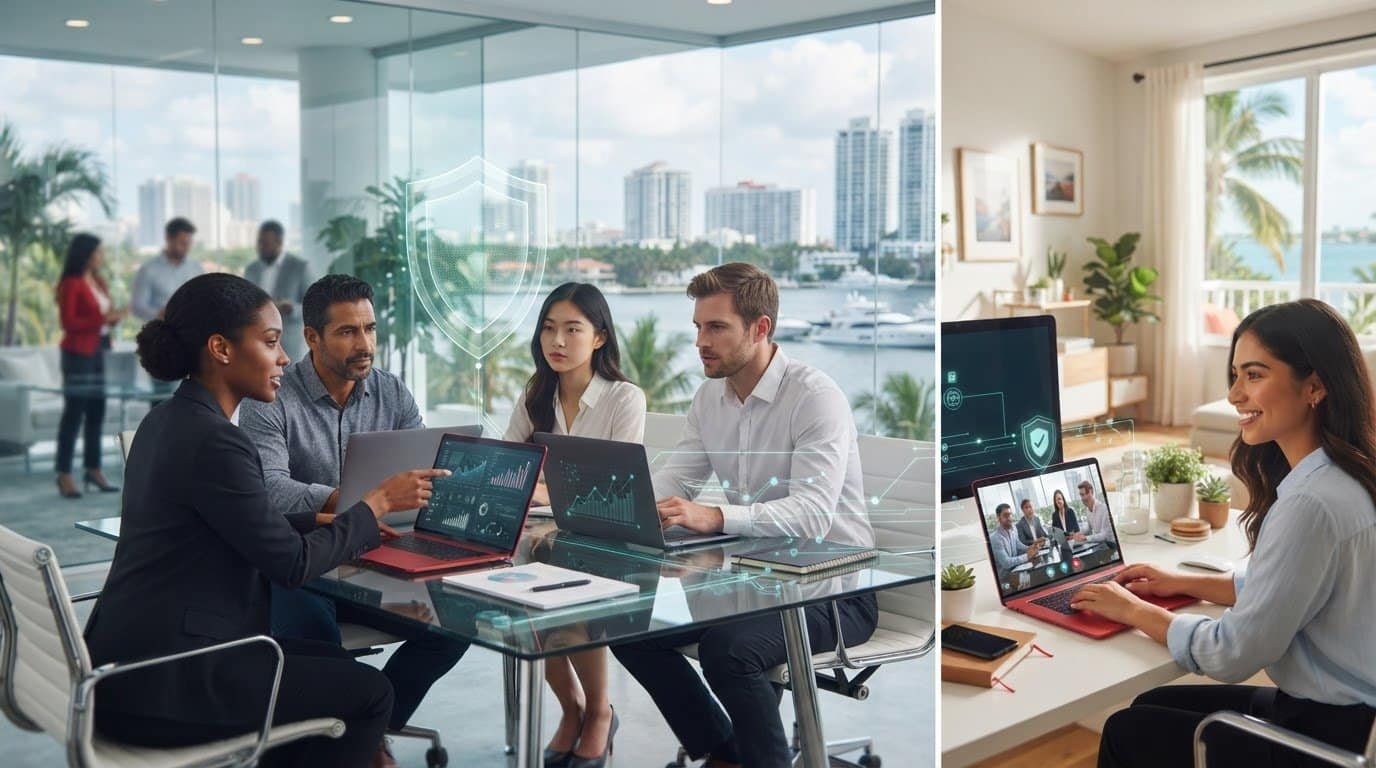
10 Oct Secure Remote Work Solutions for Hybrid Teams in Fort Lauderdale
When a Fort Lauderdale employee needs business data from home, the office, or on the move, every location adds something to manage, from device security and access controls to support when something goes wrong. Choosing secure remote work solutions for hybrid teams in Fort Lauderdale means looking beyond the connection itself and making sure protection works consistently wherever employees work.
Flexible access should not come at the cost of visibility over devices, data, or security risks. A practical approach coordinates these needs instead of leaving your team to manage disconnected tools and support channels. This article explains how to assess access controls, device management, cloud access, help desk support, and backup and recovery planning. It also covers how managed IT can bring these priorities together for businesses in Fort Lauderdale, Miami, and Aventura.
Key Takeaways
- Map where employees work, which devices they use, and what business data they need to access.
- Evaluate secure remote work solutions for hybrid teams in Fort Lauderdale by comparing identity controls, endpoint management, and visibility across devices.
- Compare managed IT, in-house tools, and disconnected products by looking at support, monitoring, security integration, recovery, and budget predictability.
- Assess onboarding, offboarding, access reviews, and home-to-office workflows to find gaps before choosing an approach.
- Managed IT, network security, cloud computing, monitoring, and backup can help coordinate hybrid-work operations.
Secure remote work for Fort Lauderdale hybrid teams: define the business need
Secure remote work is more than giving employees a way to log in from outside the office. It means coordinating protection for the people, devices, business data, and access involved in their work. For a Fort Lauderdale business, secure remote work solutions for hybrid teams in Fort Lauderdale should support employees at the office, at home, and while traveling without leaving security practices to chance.
Start with how work actually happens. Identify which roles need access to which systems, what information they handle, and what the business needs to keep operating if a device, connection, or service is disrupted. The broader Remote work information security and privacy context can help frame the trade-offs, but your controls should reflect your own workflows and data.
For a practical overview of secure remote access, watch this video:
Which hybrid-work risks should a business address first?
Map remote access before selecting tools. For each role, record the systems and information employees use, where they work, and what tasks they perform. This makes it easier to identify unnecessary access and differences between office and remote routines.
- Check whether employees use managed or personal devices, and identify how each device receives updates.
- Review how employees authenticate and whether their access matches their job responsibilities.
- Define where routine support ends and who handles security incidents or continuity risks.
A forgotten password is usually a support issue. A compromised account or unavailable business data may require a security response or recovery plan. Clear ownership helps employees know where to turn and helps the business respond consistently.
What does an integrated remote-work solution mean?
Identity controls establish who is signing in and what they can reach. Device protection and management help maintain a known security baseline, while secure connectivity supports access to business systems. Help desk support connects these controls to everyday work, so employees can resolve problems without relying on informal workarounds.
Integrated hybrid-work security coordinates identity, device protection, secure connectivity, and support under a consistent approach to access and risk. Separate tools can each serve a purpose, but purchasing them independently does not automatically connect their policies, alerts, or support responsibilities.
Consistency matters across offices in Fort Lauderdale, Miami, and Aventura, as well as home networks and travel. Telx Computers brings managed IT together with network security, cloud computing, monitoring, and data backup and disaster recovery to support these operational needs. Its IT services for Fort Lauderdale businesses provide a local starting point for aligning technology management with how your team works.
How to evaluate secure access, devices, and data protection
Once you understand how employees work, assess the safeguards around each account, device, connection, and business file. Consider the controls as a system: a strong login cannot compensate for an unmanaged laptop, and device protection alone will not prevent excessive access to sensitive information. This is the practical core of evaluating secure remote work solutions for hybrid teams in Fort Lauderdale.
How should hybrid teams control user access?
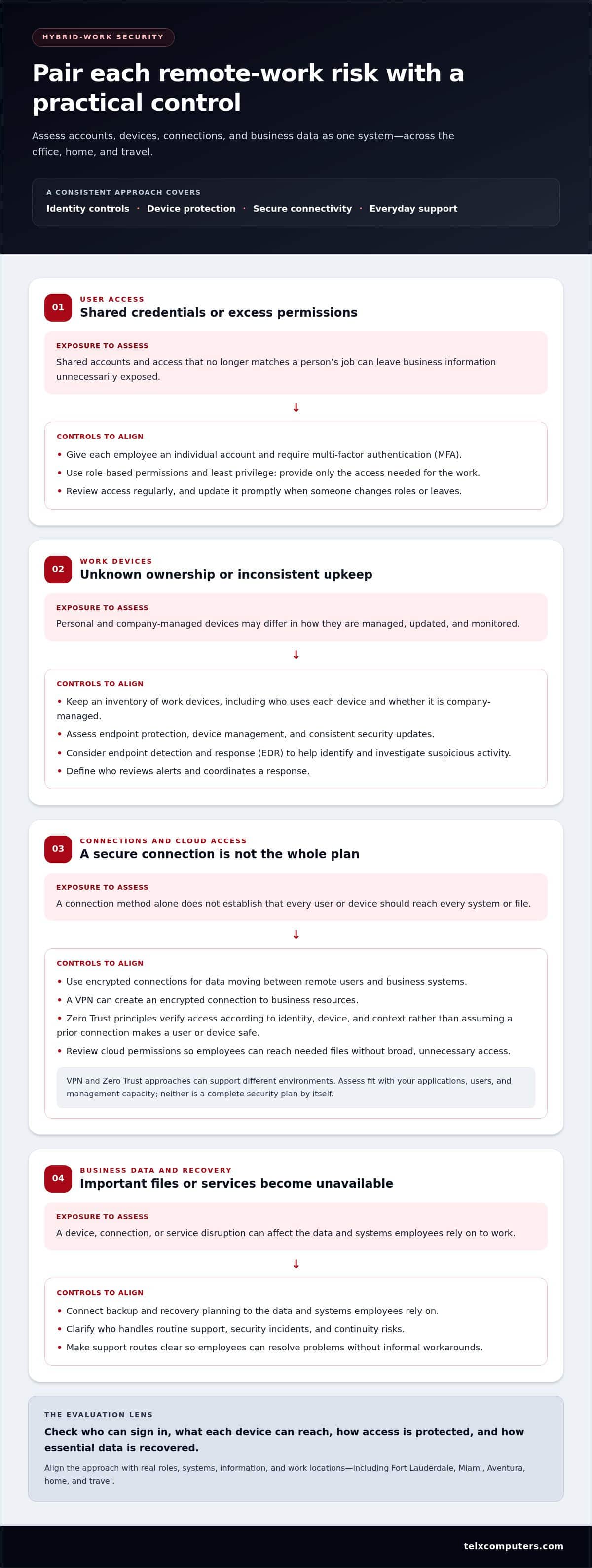
Give each employee an individual account rather than sharing credentials. Require multi-factor authentication (MFA), which asks users to verify their identity with an additional step beyond a password. Set permissions according to job responsibilities, then update them promptly when someone changes roles or leaves. Least privilege means giving each person only the access needed for their work, limiting unnecessary exposure if an account is misused.
Authentication checks who is signing in; role-based permissions limit what that account can reach, reducing the opportunity for account misuse to expose business data.
Review access regularly, especially for cloud applications and administrative accounts. The NIST Guide to Enterprise Telework Security offers guidance on remote access and personally owned devices. Use it as a reference while shaping controls around your systems and work requirements.
How can businesses protect remote devices and files?
Build a clear inventory of work devices, including who uses each one and whether it is company-managed. Assess endpoint protection, device management, update practices, and visibility into potential threats. Endpoint detection and response (EDR) tools can help identify and investigate suspicious activity on devices. As part of your evaluation, establish how alerts are reviewed and who coordinates the response.
- Set expectations for supported devices and consistent security updates.
- Use encrypted connections for data moving between remote users and business systems.
- Review cloud access so employees can reach the files they need without broad, unnecessary permissions.
- Connect backup and recovery planning to the data and systems employees rely on.
A virtual private network (VPN) can create an encrypted connection to business resources. Zero Trust principles take a different emphasis: do not assume a user or device is safe simply because it has connected before; verify access according to identity, device, and context. These approaches can support different environments, so assess how each fits your applications, users, and management capacity rather than treating one tool as a complete security plan.
Protection also means planning for files that become unavailable or encrypted by malicious activity. Confirm which data is backed up, who owns recovery decisions, and how the business will restore essential operations. Telx Computers provides network security and data backup and disaster recovery, bringing protection and recovery planning into a coordinated IT approach.
Compare managed IT, in-house tools, and disconnected security products
Choosing among in-house administration, separate security products, and managed IT is a decision about ownership as much as technology. A hybrid team needs someone to coordinate employee support, system monitoring, security controls, and recovery planning. As you compare secure remote work solutions for hybrid teams in Fort Lauderdale, weigh your internal IT capacity, the sensitivity of your business information, and the complexity of supporting people across locations.
When does managed IT make sense for a hybrid team?
Managed IT can suit a business that wants ongoing maintenance and a unified support relationship rather than assigning every task to internal staff or separate tools. A clear point of coordination helps employees get assistance across work locations and connects routine IT needs to security management. Telx Computers provides managed IT services and 24/7 help desk support through its managed IT support services.
What should a solution comparison table reveal?
Look beyond product features to see who owns the work: who monitors systems, receives support requests, coordinates security, and maintains recovery plans? The CISA Telework Essentials Toolkit offers practical telework security guidance to help frame those responsibilities. Compare the operating models against the needs your team has identified.
| Area | In-house administration | Separate tools | Managed IT |
|---|---|---|---|
| Support coverage | Internal staff receive and resolve requests. | Support may vary by product and supplier. | A managed support relationship coordinates employee assistance. |
| Monitoring | Internal staff configure and review monitoring. | Alerts may appear in separate consoles. | Monitoring is coordinated as part of managed operations. |
| Security integration | Internal teams connect policies and tools. | Products require deliberate integration and ownership. | Security and IT management can be aligned through one service relationship. |
| Recovery | Internal staff plan and coordinate recovery. | Backup tools may need separate oversight. | Backup and disaster recovery can be managed alongside IT support. |
| Budget planning | Staffing and tool costs are managed internally. | Separate contracts can make spending harder to coordinate. | Fixed-price, unlimited service plans provide a recurring budgeting model; project work is scoped separately. |
Comparison takeaway: In-house administration fits organizations with the people and processes to own daily operations. Separate products can address defined needs when someone actively coordinates them. Managed IT can fit teams seeking ongoing maintenance, joined-up support, and coordinated security and recovery responsibilities.
The right model depends on how much work your internal team can own consistently, not simply on how many tools you can deploy. Telx Computers combines managed IT with network security, monitoring, and backup and disaster recovery, helping businesses coordinate these responsibilities.
Build a Fort Lauderdale hybrid-work security checklist before choosing
A useful checklist turns security goals into operational requirements. For secure remote work solutions for hybrid teams in Fort Lauderdale, assess how employees move between office, home, and travel, then identify who will own each part of the support and security process. This helps you compare solutions against real workflows instead of a feature list.
How should a business map its hybrid-work requirements?
Begin with a working inventory. Record employee roles, locations, business applications, devices, and the sensitivity of the data each role handles. Note which systems employees need most to serve customers and keep operations moving, along with the consequences if those systems become unavailable. Businesses in Fort Lauderdale, Miami, and Aventura can use local IT services for Fort Lauderdale businesses as a regional reference point when planning support across their workforce.
Then follow this assessment sequence:
- Users: List roles, onboarding and offboarding steps, and who approves changes to employee access.
- Devices: Identify company-managed and personal devices used for work, along with who tracks updates and device issues.
- Access: Map applications and data by role, and set a process for reviewing permissions when job duties change.
- Support: Define where employees submit routine help requests, who monitors systems, and how security concerns are escalated.
- Recovery: Identify essential data and systems, backup ownership, and the steps needed to restore business operations.
- Ownership: Record which responsibilities stay with internal IT and which require coordinated external support.
Compare home and office workflows, too. For example, document whether employees use the same business applications in both locations, how they get help if access fails, and who acts if a device is lost or compromised. This reveals gaps that a general inventory can miss.
Which implementation and support questions matter?
Before choosing an approach, clarify how employees will be set up, supported, and removed from systems when their roles change. Establish who reviews access, who receives monitoring alerts, and how a suspected security incident moves from detection to response. Make those responsibilities visible to employees and internal teams.
Recovery deserves its own discussion. Determine how backup and disaster recovery fit the business continuity plan, who coordinates restoration, and which services take priority if operations are disrupted. The goal is not simply to have a backup process, but to know who is responsible for putting it into action.
Finally, compare the support model with your internal capacity. If ongoing maintenance, employee assistance, monitoring, and recovery planning need a clear operational owner, consider how managed IT support can align those responsibilities. Telx Computers provides managed IT, security, monitoring, and backup services for businesses in Fort Lauderdale, Miami, and Aventura. Use this checklist to shape a support plan around your team’s operating needs.
Choose a Fort Lauderdale partner for secure hybrid-work operations
A strong partner connects day-to-day support with security and continuity, rather than leaving your team to coordinate separate responsibilities on its own. As you evaluate secure remote work solutions for hybrid teams in Fort Lauderdale, look for clear service ownership, a defined process for employee requests, ongoing monitoring, integrated security, and recovery planning. The approach should fit your team’s locations, systems, and internal IT capacity.
What should ongoing support cover after rollout?
Security needs attention after implementation, too. Proactive maintenance helps keep systems managed, while help desk support gives employees a consistent route for resolving routine IT issues. A partner should make clear how support requests are handled and how issues affecting access, security, or business operations are escalated.
Review how the services connect in practice. Telx Computers provides managed IT, network security, cloud computing, server monitoring, and data backup and disaster recovery. These capabilities can be coordinated around the business’s systems and workflows rather than treated as unrelated tasks. That alignment matters when employees move between office and remote work, or when a technology issue affects more than one part of the operation.
- Integrated security: Confirm that security responsibilities are coordinated with ongoing IT management.
- Support ownership: Establish how employees submit requests and who oversees follow-up.
- Monitoring: Define who reviews system issues and communicates relevant findings.
- Recovery planning: Clarify how backup and recovery responsibilities support business continuity.
- Budget predictability: Fixed-price, unlimited service plans provide a recurring model for budgeting routine IT support.
These criteria help distinguish a lasting operating relationship from a collection of tools with unclear ownership. They also create a practical basis for reviewing service responsibilities as your team, applications, and work patterns change.
How can Fort Lauderdale businesses take the next step?
Prepare a short outline of where employees work, which users and systems need support, what matters most for security and continuity, and how your current IT responsibilities are divided. That context helps shape a solution around your operating model instead of a generic checklist. For regional context, explore IT services for Fort Lauderdale businesses.
Telx Computers helps businesses coordinate managed IT with related security, cloud, monitoring, and recovery services. Use your outline to focus the conversation on your hybrid team’s operating needs.
Review your business IT needs with Telx Computers.
Make secure hybrid work part of your operating plan
Hybrid work will keep evolving as teams, responsibilities, and business systems change. Treat security as an ongoing part of how your organization operates, not a one-time technology decision. Set a regular point to review whether your approach still fits the way employees work and the information they need to access.
Measure progress by whether employees can work productively while your business retains clear ownership of risk and support. Choosing secure remote work solutions for hybrid teams in Fort Lauderdale gives you an opportunity to build confidence around your team’s real operating needs, with room to adapt as those needs shift.
Use your priorities and current support model to identify the next steps. Explore a tailored IT approach with Telx Computers.
Frequently Asked Questions
Is remote work secure for a hybrid team?
Yes, remote work can be secure when a business manages access and devices consistently and gives employees clear steps for handling problems. For example, tell staff how to report a lost work phone or an unexpected sign-in prompt, and decide who can disable access while the issue is reviewed. These procedures help turn security controls into a routine employees can follow, whether they are at home, in the office, or traveling.
What should secure remote-work solutions include?
A complete approach should account for sign-ins, permissions, devices, connections, cloud applications, monitoring, employee assistance, and data recovery. Do not assess these as isolated features. Consider a new hire who needs access to email and shared files: the process should clarify who provisions access, what the employee can reach, and who handles setup issues. The right combination depends on your applications, work practices, and the sensitivity of the information being accessed.
Do hybrid employees need a VPN to work securely?
Not every workflow depends on a VPN, and using one does not secure every part of remote work by itself. A team accessing an internal file server may have different connection needs from employees working entirely in cloud applications. Map the systems people use first, then decide how those connections should be protected. Whatever the design, employees still need well-managed accounts, appropriate permissions, protected devices, and a clear way to report suspicious activity.
How can a business protect company data on remote devices?
Set a clear boundary around which devices may handle company information, and make reporting a lost or compromised device straightforward. For instance, employees should know whom to notify if a laptop goes missing so the business can review the account and revoke access as appropriate. Keep business files in approved systems rather than scattered personal storage, and ensure important data is covered by a recovery plan.
Should a Fort Lauderdale business use managed IT for hybrid work?
Managed IT can be a practical fit if your organization wants a partner to coordinate ongoing technology responsibilities alongside its internal team. Telx Computers provides managed IT services to businesses in Fort Lauderdale, Miami, and Aventura. Before choosing an operating model, identify which tasks your staff can own consistently and where outside coordination would help. That division of responsibility can support smoother operations as employees work across locations.
How do you compare secure remote-work providers?
Compare each proposed service by assigning real tasks to named roles: who responds when an employee cannot access a system, who reviews a security alert, and who coordinates recovery if critical files are unavailable? Then consider how the arrangement fits your applications and internal capacity. A useful comparison makes responsibilities and escalation paths understandable to both employees and business leaders, rather than relying on broad assurances about security.