





11 Nov Microsoft 365 Security Audit for Aventura Businesses
A Microsoft 365 security audit should test how access works in practice, not just whether security features are switched on. A Microsoft 365 security audit for businesses in Aventura should assess identity and privileged access, devices, email protection, data security, and user permissions, then identify gaps that need attention. Security settings can look complete while risky access or sharing remains in place.
A regular review helps you understand where your protections stand and what to address first. Plan to audit Microsoft 365 at least annually, and after a tenant migration, acquisition, Intune rollout, or security incident.
This article explains what an assessment covers, how often to review key settings, and what to expect from the findings, report, and remediation process. It also shows how least-privilege practices can help keep administrator access limited to the people and tasks that need it, so your next steps are clear and grounded in your business’s actual environment.
Key Takeaways
- Understand which identity, device, email, and data protections a Microsoft 365 assessment examines.
- Set a review rhythm that accounts for routine checks as well as major changes or suspicious activity.
- Use audit findings and remediation priorities to turn security gaps into a practical action plan.
- Keep administrator permissions focused on current responsibilities, and use a cybersecurity audit to identify areas that need attention.
What is included in a Microsoft 365 Security Audit & Assessment?
An independent assessment reviews how tenant settings work together across identity, devices, email, and data. It compares the Microsoft 365 environment’s configuration with business needs and identifies control gaps, not just enabled features.
Tenant Configuration and Security Controls
The assessment reviews conditional access, user authentication, device management, sharing, and administrator permissions. For example, it checks whether unfamiliar sign-ins require additional verification and whether OneDrive sharing settings expose files beyond the intended users. It also considers tenant-level services, whose settings may apply to some or all users rather than selected individuals.
Findings can be mapped to NIS2 and GDPR Article 32 requirements for MFA and privileged access, according to the European Union.
Common Tenant Misconfigurations
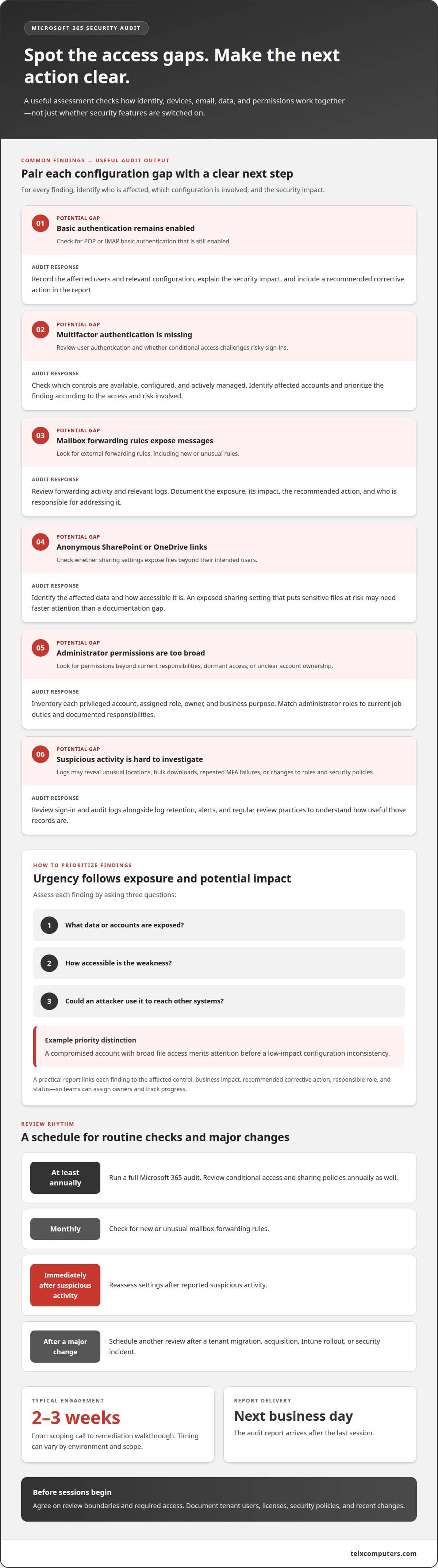
The assessment looks for weak or inconsistent settings, such as basic authentication still enabled for POP or IMAP, missing multifactor authentication, and external mailbox-forwarding rules. It also checks for anonymous SharePoint or OneDrive links, overly broad administrator permissions, and conditional access policies that do not challenge risky sign-ins. Each finding should identify affected users, the relevant configuration, and the security impact.
Licenses and Security Feature Coverage
Which Microsoft 365 licenses include the features needed for an audit? Coverage depends on the subscription: audit logging, security tools, and retention capabilities can vary by license. The assessment identifies which controls are available, configured, and actively managed in the tenant; there is no single license answer for every business.
What Secure Score should a small business target? There is no universal target number. Use the score to find opportunities for improvement, then prioritize controls according to business risk and operational needs.
Email, Defender, and Audit Log Reviews
Auditors review email and phishing protections, including Microsoft Defender settings, suspicious forwarding rules, and external sharing. They examine sign-in and audit logs for unusual locations, bulk downloads, repeated MFA failures, and changes to administrator roles or security policies. Log retention, alerts, and regular review determine how useful those records are.
Which Florida or U.S. regulations apply? Requirements depend on your industry, the data you handle, and contractual obligations. An assessment can map relevant controls to those requirements. To prepare, document tenant users, licenses, security policies, and recent changes, and arrange access for a clearly scoped review.
Security review frequency, reporting, and remediation
A review is useful when findings lead to clear ownership and timely action. Set a recurring schedule, and conduct additional reviews after major changes or suspicious activity.
Audit Reports and Remediation Plans
A useful report links each finding to the affected control, its business impact, and a recommended corrective action. It distinguishes urgent exposure from lower-priority improvements, helping teams assign owners and track progress instead of working through an unprioritized list.
For example, an exposed sharing setting that puts sensitive files at risk may need faster attention than a documentation gap. A remediation plan should record the action, responsible role, and status, then revisit unresolved items at the next review.
Review Frequency and Reporting Timeline
Plan a full Microsoft 365 audit at least annually. Review conditional access and sharing policies annually as well, and check for new or unusual mailbox-forwarding rules monthly. Reassess settings immediately after reported suspicious activity, and schedule another review after a tenant migration, acquisition, Intune rollout, or security incident.
The full engagement typically runs 2-3 weeks from scoping call to remediation walkthrough. The audit report arrives the next business day after the last session. Timing can vary by environment and scope, so agree on the review boundaries and required access before sessions begin.
Risk Prioritization
Prioritize findings by assessing what data or accounts are exposed, how accessible the weakness is, and whether an attacker could use it to reach other systems. A compromised account with broad file access merits attention before a low-impact configuration inconsistency.
Reports should make priorities practical: identify the risk, explain the consequence, and state the next action. Cover controls for SharePoint sharing, phishing protection, device management, and multifactor authentication. This context helps decision-makers sequence work without treating every finding as equally urgent.
For support aligning remediation with ongoing IT operations, explore managed IT support.
Administrative privileges and privileged accounts
In a Microsoft 365 tenant, administrative accounts can change security policies, user access, and application settings. An assessment should inventory each privileged account, its assigned role, its owner, and its business purpose. This makes dormant access, unclear ownership, and permissions exceeding current responsibilities easier to identify. Review administrator roles quarterly, including access retained by former employees or contractors.
Separate everyday work from administrative tasks. For example, an employee who reads email and manages user accounts can use distinct accounts for those activities. The assessment should identify which account performs each technical function and whether privileged sign-ins have appropriate authentication protections. It should also review service and application accounts, since unattended credentials may retain access after their original purpose changes.
- Match each administrator role to current job duties and documented responsibilities.
- Remove or adjust access when an employee changes roles or leaves.
- Review external sharing and application permissions alongside administrative access.
- Record an accountable owner and business reason for each privileged account.
These checks connect identity controls to actual business workflows. A finance administrator, for example, may need access to specific applications but not tenant-wide settings. The review should distinguish that task from broader configuration authority and document why each permission is needed. If an account has no active owner or clear purpose, flag it for investigation and a decision.
Policies should define how privileged access is approved, changed, and removed. Auditors can compare those policies with actual tenant role assignments and account activity, then record any mismatches. A quarterly review provides a repeatable checkpoint to confirm owners, validate duties, and resolve outdated access. This keeps privileged accounts aligned with current responsibilities rather than historical needs.
Administrator roles and least privilege
Least privilege means assigning each identity only the permissions needed for its current responsibilities. In Microsoft 365, this limits the impact of mistakes or compromised accounts by reducing unnecessary administrative authority. Review administrator roles and permissions quarterly, and check for former employees or contractors who retain access.
A role review compares assigned permissions with actual work. For example, a staff member who manages user accounts may not need authority to change organization-wide security policies. Document each role’s owner, business purpose, and scope, then identify assignments that exceed those needs. Review role membership alongside sign-in activity and recent changes to spot access that may no longer be appropriate.
- Confirm each role has a current owner and business purpose.
- Compare permissions with the user’s active responsibilities.
- Remove or adjust access after departures or role changes.
- Record approval and the reason for continuing elevated access.
Least privilege applies to applications and connected services, too. An application with broad tenant permissions may access more information or settings than its task requires. Review its purpose, permissions, and responsible owner, then reduce access that does not support an active business need. Include external sharing permissions when they expose resources managed by privileged accounts.
Clear policies make role decisions consistent. Define who approves elevated access, how role changes are recorded, and how access is removed when duties end. During an assessment, compare those policies with actual Microsoft 365 assignments and report mismatches as findings. Recommendations should identify the affected role, required adjustment, and accountable owner, helping teams address excessive permissions without disrupting necessary collaboration.
For a focused review of administrator roles and access controls, explore cybersecurity audit support.
Telx Computers: Cybersecurity Audits
Telx Computers provides Cybersecurity Audits to help businesses identify Microsoft 365 security gaps and prioritize practical remediation. Turn to this service when you need an independent view of tenant settings, administrator access, or unresolved findings, or after a significant change to your environment. The results can help your internal team understand which actions deserve attention first and how security controls fit together.
When audit findings connect to broader operational needs, Managed IT Services and Network Security can support an ongoing approach to technology and protection. The right next step is a review grounded in your business’s environment and priorities.
Contact Telx Computers to discuss a cybersecurity audit for your business.
Make your next security decision with confidence
A Microsoft 365 security audit for businesses in Aventura can turn technical findings into a clearer path forward. The next step is to connect those findings to your organization’s priorities, assign ownership, and decide which improvements fit your operations. That keeps security work grounded in business needs instead of becoming a disconnected list of settings.
Telx Computers can help businesses carry audit recommendations into day-to-day IT planning. Its 24/7 Help Desk Support can also support users as technology needs arise. With a defined plan and the right operational support, your team can move from identifying gaps to managing them with greater clarity.
Start a conversation with Telx Computers about your audit and take a practical next step toward stronger security.
Frequently Asked Questions
Ready to Strengthen Your Microsoft 365 Security?
Begin by assigning an internal owner and identifying the business decisions the review should support. For example, decide who can approve access changes and which teams need to coordinate remediation. Gather records of recent tenant changes, planned migrations, and security concerns. This establishes a clear scope and connects technical findings to operational priorities.
Should every user have multi-factor authentication enabled?
Yes. Require multifactor authentication for every user, including executives and administrators. A policy that covers most accounts still leaves uncovered identities that could become entry points. During the review, distinguish approved exceptions from overlooked accounts and document why each exception remains. Include service accounts and newly created users so coverage stays consistent as the tenant changes.
What happens if critical vulnerabilities are found?
Critical findings should enter a documented response process with an accountable owner and a clear action. The first step depends on the issue: restrict exposed access, correct a risky setting, or investigate suspicious activity. Preserve relevant records while making changes, then test the affected workflow. A follow-up review should confirm that the change resolved the finding without disrupting legitimate business access.
What does a Microsoft 365 security audit for a business include?
The assessment examines tenant settings and security controls, then records evidence for each finding. A practical review also identifies the affected business process, the control’s current state, and the recommended next action. For example, a report can connect a sharing configuration to a specific team workflow. This helps decision-makers understand both what needs attention and why the change matters.
Which Aventura IT providers offer Microsoft 365 security audits?
Telx Computers offers Cybersecurity Audits for businesses in Aventura. A business can turn to this service when it needs an assessment of Microsoft 365 security findings and a practical view of next steps. The audit can also help an internal IT team or existing provider understand the review results and coordinate follow-up work within the organization’s operating priorities.
How do Microsoft 365 audits assess MFA, conditional access, and identity security?
Auditors compare identity policies with how accounts are actually protected during sign-in. They check whether conditional access covers relevant users and scenarios, including unfamiliar locations, and look for gaps between policy intent and account coverage. They also review privileged identities separately because broad permissions carry different consequences. Findings should explain the affected access path and identify an appropriate corrective action.