




31 Oct Managed Cloud Backup for Accounting Firms in Aventura
After ransomware, recovery depends on restoring clean data from backups that were not compromised along with affected systems. Managed cloud backup for accounting firms in Aventura helps preserve recovery points, so your firm can restore files and systems from before an attack. A documented, tested restoration process gives staff a clearer path back to work.
Backups alone are not enough. Accounting firms also need to know how often data is captured, how much recent work a recovery point could leave behind, and how quickly critical operations can resume.
This article explains how backup and disaster recovery work after ransomware, what recovery points and recovery objectives mean, and which security and continuity practices matter for accounting firms. It also covers how managed IT and cloud services can coordinate backup, monitoring, and security for your Aventura practice.
Key Takeaways
- Use a written security plan to organize how your firm protects sensitive client and financial data.
- Set recovery points around how much recent work your team can afford to lose, then test the restoration process.
- Build continuity planning around incident response, critical operations, and seasonal workload demands.
- Compare providers by how they integrate cloud services, network security, and ongoing IT support into a coordinated approach.
Accounting firms’ data security and compliance needs
U.S. firms handling client records need a written security program, careful access controls, and a retention process. Backup planning should connect these practices to practical recovery goals and day-to-day operations.
Sensitive Financial Data Security
Protect financial data across devices, email, accounting software, and servers. Use multifactor authentication and role-based access controls to limit who can view or change client files. Review endpoint protection, security monitoring, software patching, vulnerability management, and employee awareness practices. The Federal Trade Commission identifies tax and accounting professionals as financial institutions under the Gramm-Leach-Bliley Act. A provider’s security approach should address risks across the systems that store or transmit sensitive records.
Accounting Data Compliance and Retention
Retention needs shape what a backup plan must preserve. Accounting firms should set appropriate retention periods for client records, financial statements, and tax documents. Treat these periods as separate records-management requirements, not as a reason to keep every backup indefinitely. The Internal Revenue Service’s Publication 5708 provides information on creating a written information security plan. Map record categories, access permissions, and retention schedules in that plan.
Financial Data Tracking and Backup
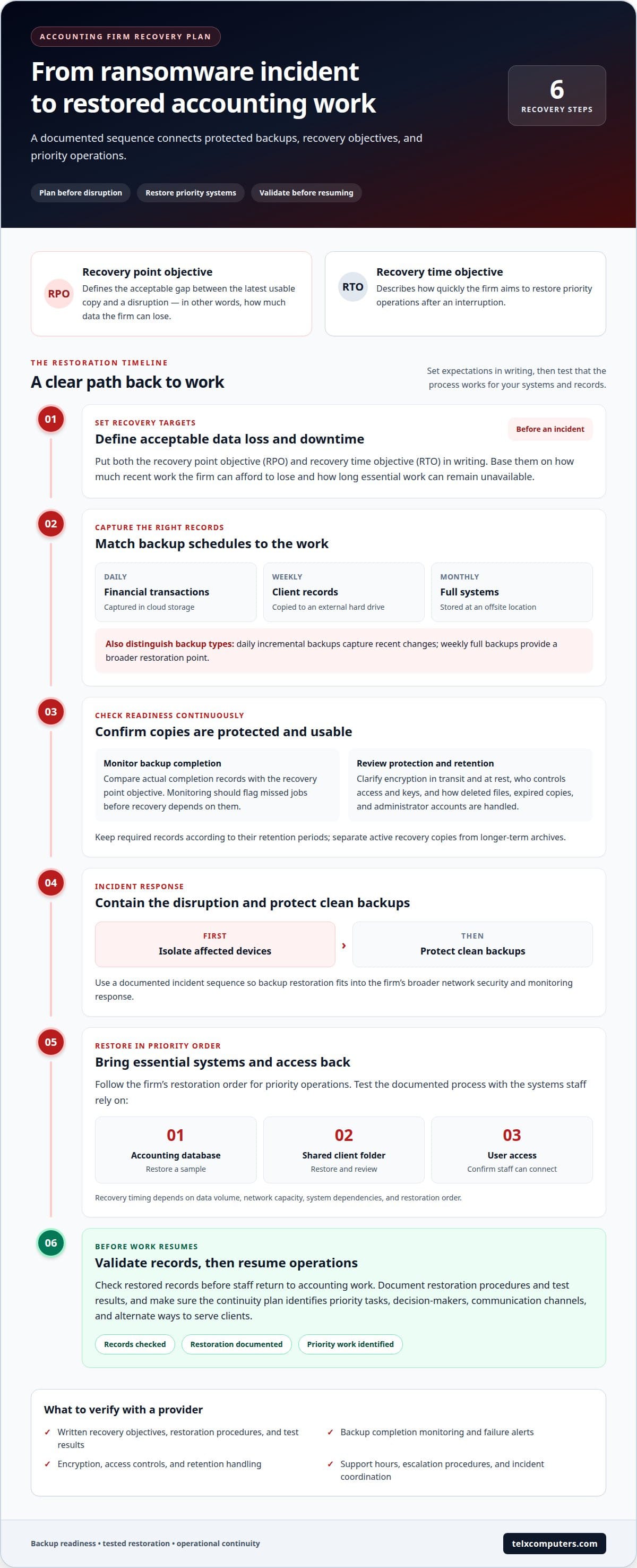
Track where each record is created, stored, and changed, including tax files, transactions, and client documents. A backup plan should capture financial transactions daily in cloud storage, client records weekly on an external hard drive, and full systems monthly at an offsite location. Also establish daily incremental backups and weekly full backups. These schedules serve different purposes: incremental copies capture recent changes, while full copies provide a broader restoration point. Ask how the provider protects backup access and monitors failures.
Data Restoration and Recovery Objectives
Recovery objectives clarify how much data the firm can lose and how long essential work can remain unavailable. Set a recovery point objective for acceptable data loss and a recovery time objective for restoring operations. Ask for both objectives in writing, alongside documented restoration procedures and test results. Review a SOC 2 report’s scope, controls, and audit period, then compare them with your systems and records. Risks include exposed credentials, incomplete backups, untested restores, and unclear retention boundaries, each of which can undermine recovery after ransomware.
Backup and disaster recovery
A recovery plan connects protected copies with the steps for restoring accounting work after ransomware or equipment failure. Its schedule, access methods, and recovery objectives should reflect how your firm operates.
Backup Schedules and Recovery Points
Backup schedules determine which version of a file can be restored after an incident. Match capture timing to changes in accounting applications, such as posted transactions, revised tax returns, and updated client ledgers. A recovery point objective defines the acceptable gap between the latest usable copy and a disruption. Compare that objective with actual backup completion records, not just the configured schedule. Monitoring should flag missed jobs before recovery depends on them.
A recovery time objective describes how quickly your firm aims to restore priority operations. Ask for documented targets and test results for restoring a sample accounting database, shared client folder, and user access. Timing depends on data volume, network capacity, system dependencies, and restoration order. These measures make expectations concrete and help prioritize essential operations.
Encryption and Retention
Compare encryption for data in transit and stored backup copies, then clarify who controls access and encryption keys. Retention settings should preserve required records while separating active recovery copies from longer-term archives. Ask how deleted files, expired copies, and administrator accounts are handled. These details show whether a backup remains protected and usable throughout its retention period.
Managed cloud backup providers can differ in encryption methods, retention controls, restoration procedures, and recovery performance. Compare written descriptions and test evidence, then assess expected recovery time against your firm’s data volume, network, and priorities.
For Aventura firms, support options may include remote restoration, remote access to recovered systems, and local technical assistance. Compare support hours, escalation procedures, and how teams coordinate during a disruption; a 24/7 support promise alone doesn’t guarantee immediate outage resolution.
Implement the plan with a documented incident sequence: isolate affected devices, protect clean backups, restore priority systems, and validate records before resuming work. A ransomware recovery plan should also account for network security and monitoring, so backup restoration fits into a broader response.
Business continuity and operational reliability
Business continuity planning links client deadlines, software dependencies, and staff responsibilities. During tax season, a desktop outage can disrupt filing work even when financial records remain accessible. A written continuity plan identifies priority tasks, decision-makers, communication channels, and alternate ways to serve clients.
Keep operations moving during busy periods
Map the accounting software, sensitive client files, email, and network access that staff need each day. Then document which tasks can continue remotely if the office or a desktop becomes unavailable. Providers should explain support hours, response procedures, and escalation paths in their service agreements. A 24/7 support promise does not guarantee immediate resolution of an outage, so define how major incidents are handled. Include seasonal employees in access and continuity procedures before their first shift.
Switching providers during a filing rush can add risk if responsibilities or access are unclear. Schedule the transition around your firm’s workload, assign an internal owner, and document who manages each system during the handoff. Cover incident response, staff communications, and coordination between current and incoming providers in the continuity plan. Review it before peak workloads, not during a disruption.
Migrate data with a controlled sequence
Move accounting data through a documented process that protects client access and preserves operational ownership:
- Inventory software, servers, shared folders, user accounts, and sensitive records; identify system dependencies and data owners.
- Agree on migration timing, access responsibilities, and the communication plan with staff and providers.
- Transfer data in stages, then compare key files and permissions against the source environment.
- Test staff access, accounting workflows, and remote connections before relying on the new backup process.
- Record unresolved issues, assign owners, and keep the continuity plan current after the transition.
IRS Publication 5708 supports written information security planning; continuity procedures should connect that plan to everyday work. Review response roles, seasonal staffing, and provider escalation steps together, so staff know what to do when software or network access fails.
Which managed cloud backup providers serve accounting firms in Aventura, Florida?
Aventura firms can evaluate providers by how well backup operations fit their accounting workflows. A cloud platform alone does not show who monitors failed jobs, manages access, or coordinates restoration. Compare documented responsibilities with your firm’s needs, including tax software, shared files, and remote staff.
Local service can include remote administration, onsite assistance, or both. Ask how support reaches an Aventura office during a disruption, which issues can be handled remotely, and how escalation works when a network or server problem blocks access. Look for a clear explanation of the responsible team, communication channel, and next action, not just general assurances.
Assess each provider using the same practical checklist. Request written details covering:
- Which systems, devices, and accounting applications the backup plan includes.
- How monitoring identifies failed backups and who follows up.
- How restoration is coordinated with your staff and software vendors.
- What support coverage and escalation process apply during peak workloads.
Then test the proposed process against a realistic example, such as restoring a client folder while staff continue using unaffected accounting software. Ask the provider to explain which files return first, how access is re-established, and how restored data is validated. This reveals whether the plan addresses both technology and daily operations.
When comparing managed cloud backup for accounting firms in Aventura, review the service agreement, security controls, retention settings, and documented recovery procedures together. A provider’s certification or security report can inform your review, but its scope matters: confirm that the controls cover the systems and services your firm will use. Base your comparison on evidence, responsibilities, and a defined transition plan, not broad claims of local availability.
Telx Computers: Managed IT Services
Telx Computers helps accounting firms bring core technology needs together through Managed IT Services, Network Security, and Cloud Computing. These services can support a coordinated approach to protecting systems, maintaining staff access, and planning for interruptions.
For an Aventura firm, planning starts with understanding how staff use accounting software, shared files, and network resources. This context helps align security and cloud decisions with daily operations instead of treating each system separately. Turn to Telx Computers to review your IT environment or strengthen business continuity alongside your technology strategy in Aventura and South Florida.
Visit telxcomputers.com to learn more about Telx Computers.
Make your next step a continuity decision
Choose an owner inside your firm to connect backup decisions with client work, staffing, and changing systems. That person can coordinate with your technology team, record unresolved risks, and include recovery planning in routine operational reviews. This makes managed cloud backup for accounting firms in Aventura an ongoing business decision, not just a technical purchase.
When you’re ready to align that plan with broader IT needs, Telx Computers offers Managed IT Services, Network Security, and 24/7 Help Desk Support. A conversation can help you identify which priorities deserve attention first and how technology support should fit your firm’s operations.
Contact Telx Computers to discuss your accounting firm’s IT needs. Take the next step toward a more deliberate continuity plan, with your team’s priorities guiding the way.
Frequently Asked Questions
How does disaster recovery work after ransomware?
Recovery starts by isolating affected devices and preventing further access to compromised systems. The response team identifies clean backups, then restores priority services and files in a controlled order. For example, a firm might restore its accounting database before archived reference material. Staff should validate restored records and confirm accounts and connected systems are safe before returning to normal work.
How fast can you restore?
Restore time depends on data volume, available network capacity, system dependencies, and the services your firm prioritizes. A shared folder and a full accounting environment have different restoration demands. Define a recovery time objective for critical work, then test a representative restore, such as opening a recovered company file and confirming staff access. The test gives your team a practical planning baseline.
What gets backed up?
Identify the records and systems employees need to serve clients, not just files stored on desktops. An inventory can include QuickBooks company data, tax-preparation files, email, shared folders, scanned documents, and server-hosted applications. Note where each item lives, who uses it, and which workflows depend on it. This can reveal gaps, such as client attachments saved only in an individual mailbox.
How often should accounting firms back up QuickBooks, tax software, email, and client files?
Set backup frequency according to how often each dataset changes and how much recent work your firm could recreate. QuickBooks transaction files may need more frequent capture during active bookkeeping than rarely changed reference documents. Include tax software data, email attachments, and client folders in the schedule, and adjust it as filing workloads rise. Review missed jobs and test restores to ensure the schedule matches actual work patterns.