





16 Oct Hurricane Preparedness for IT Infrastructure in South Florida: A Business Checklist
What if your backups are intact, but your team still can’t access the systems it needs to serve customers? In South Florida, a hurricane can disrupt power, connectivity, and office access at the same time. Effective hurricane preparedness for IT infrastructure in South Florida means planning how your business will keep working and recover, not just saving copies of its data.
The difficult part is deciding which systems come first, who owns each task, and what happens when a key dependency is unavailable. A practical plan turns those uncertainties into clear priorities, assigned responsibilities, and steps your team can follow.
This checklist helps you identify critical systems and data, map their dependencies, and organize preparation, response, and recovery. It also explains how tested recovery planning and managed IT support can contribute to continuity, from preparing staff before a storm to restoring operations afterward. The goal is a coordinated plan your business can act on when conditions change.
Key Takeaways
- Use hurricane preparedness for IT infrastructure in South Florida to set technology priorities before a storm disrupts business operations.
- Inventory critical systems, data locations, vendors, access methods, and owners. Connect each system to the business functions that rely on it.
- Understand how backups, cloud infrastructure, and a documented recovery plan serve different purposes. Backups alone don’t ensure recovery readiness.
- Organize staff actions by storm phase and assign each task to a specific role so preparation and recovery steps are clear.
- See how proactive monitoring, remote help desk support, cloud services, and Backup & Disaster Recovery can support a broader continuity plan.
Hurricane preparedness for IT infrastructure in South Florida: understand the business risk
Hurricane preparedness for IT infrastructure in South Florida means protecting access to essential systems and data while planning how your business will respond to disruption and restore operations. It’s not just about protecting equipment. A continuity plan also helps staff understand which technology-supported functions matter most and what to do if normal access is interrupted.
Power loss can affect office equipment and network devices. Internet disruption may prevent staff from reaching cloud applications or communicating through business systems. Building access may be limited, and employees may be unavailable or working from another location. These disruptions can overlap, so consider how each dependency affects daily operations.
For a broader overview of recovery planning, see Disaster recovery. The video below also discusses hurricane-season strategies for South Florida organizations.
An emergency supply checklist supports people and physical safety, but it doesn’t explain how the organization will keep technology-dependent work moving. An IT continuity plan fills that gap by documenting system dependencies, alternative access methods, recovery priorities, and who coordinates each action. Hurricane readiness depends on clear recovery priorities and assigned responsibilities.
Which South Florida business systems need continuity planning?
Start with the technology that supports essential work, then identify what each system needs to function. A customer-management application, for example, may depend on internet access, cloud services, staff credentials, and email for communication. A server-based accounting system may also rely on office power and network equipment. Mark what needs to be available first and what can wait.
- Core access: Business applications, servers, network access, and user accounts.
- Communication: Email and other systems staff use to coordinate work.
- Business data: The files and records needed to continue priority functions.
- Dependencies: Power, internet connectivity, cloud services, vendors, and key staff.
Why hurricane season changes the IT planning conversation
A storm can affect both the workplace and the technology people use, but the impact won’t be the same for every business. Staff may be unable to reach an office even when systems remain accessible remotely. Connectivity problems may also interrupt access to cloud services. Plan for these possibilities without assuming a particular local impact. Decide which functions can continue away from the office and what information staff need to do so.
For businesses in Miami, Aventura, Fort Lauderdale, and across South Florida, this means connecting emergency procedures with technology decisions. An evacuation or supply plan may help protect people, but it won’t identify who coordinates system recovery or which services take priority. Document those responsibilities as part of the wider continuity plan. Managed IT support can help align ongoing technology support with continuity planning.
Build an IT inventory and recovery priority list before a South Florida storm
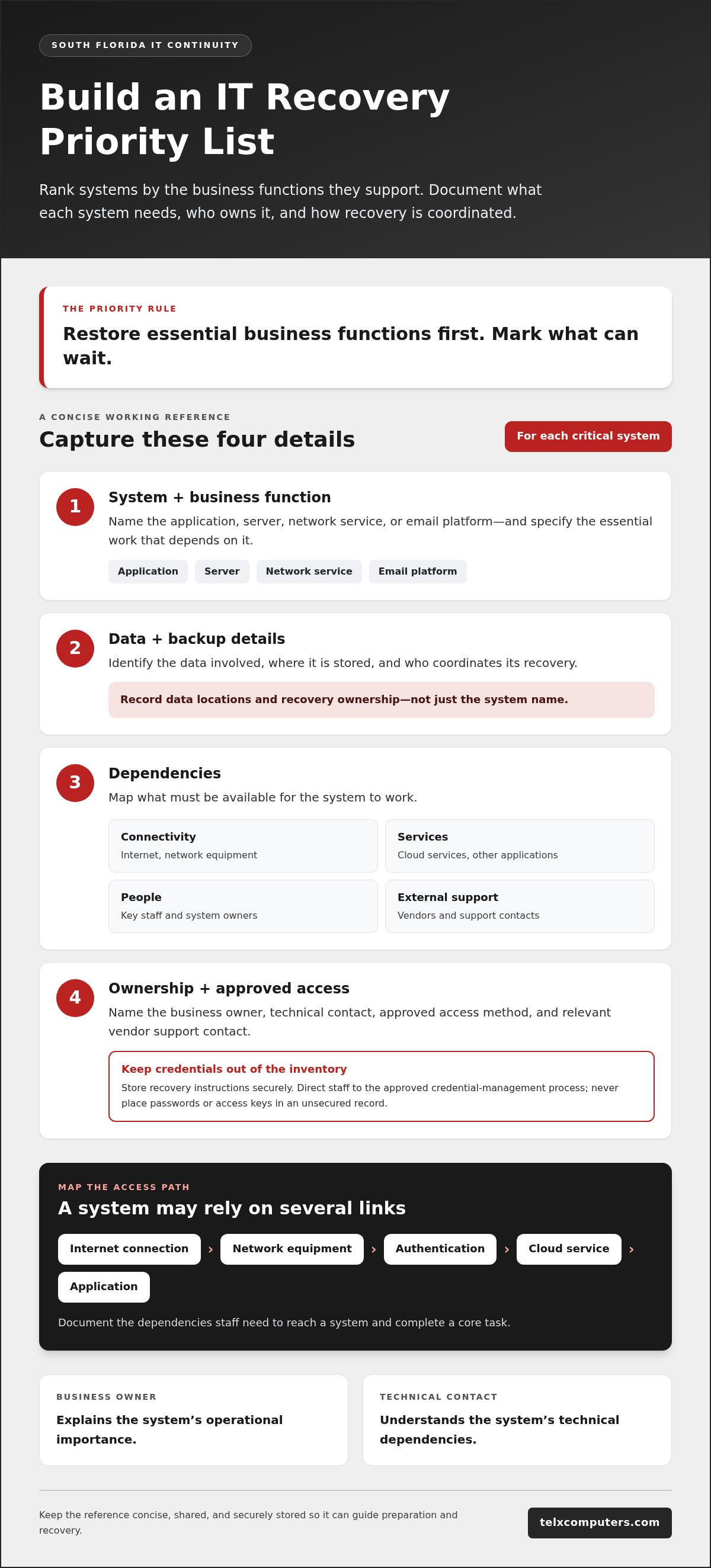
A useful inventory turns a broad continuity plan into a working reference for the people responsible for technology and business operations. For hurricane preparedness for IT infrastructure in South Florida, record not just what systems exist, but what each one supports, where its data resides, how authorized staff access it, and who coordinates recovery.
Keep the document concise enough to use under pressure. A shared, securely stored record can include:
- System and business function: Name the application, server, network service, or email platform, and state which essential work depends on it.
- Data and backup details: Identify the data involved, its storage location, and the person responsible for coordinating recovery.
- Dependencies: Note the internet connection, network equipment, cloud services, other applications, vendors, or staff needed for the system to work.
- Ownership and access: List a business owner, technical contact, approved access method, and relevant vendor support contact.
Record where approved recovery instructions are stored, but never put passwords, access keys, or other credentials in an unsecured inventory. Direct staff to the organization’s approved credential-management process instead. The University of Miami IT Hurricane Preparedness resource also discusses protecting equipment and data as part of storm planning.
Map technology dependencies and ownership
Give every critical system two clear owners: a business owner who can explain its operational importance and a technical contact who understands its dependencies. Map the steps required to access it. For example, an employee may need a working internet connection, network equipment, authentication, a cloud service, and an application before completing a core task. Businesses in Miami, Aventura, and Fort Lauderdale can include network support and dependencies in this review.
Then rank systems by business need. A useful IT recovery priority list ranks systems by the business functions they support, so teams know what to restore first and what can wait. If staff need email and a customer system to coordinate essential work, document that relationship rather than treating each application as an isolated asset.
Record backup and monitoring information
For each important dataset, write down what is backed up, where the backup is stored, who oversees recovery, and how staff find the relevant instructions. Telx Computers’ Backup & Disaster Recovery includes automated nightly backups. Add this information to the inventory, while keeping backup availability separate from assumptions about recovery timing or results.
Monitoring information can help technical contacts understand which systems need attention, but visibility doesn’t replace ownership or a documented recovery sequence. Keep system records current as vendors, applications, or responsibilities change. Telx Computers offers a free network audit as a starting point for reviewing network readiness.
Compare backup, cloud, and recovery planning for hurricane resilience
These three elements support continuity in different ways. Backups preserve data that may be needed later. Cloud infrastructure hosts or delivers systems through online services. A documented recovery plan defines how people coordinate the work of bringing priority business functions back. For hurricane preparedness for IT infrastructure in South Florida, assess all three together rather than treating any one as a complete solution.
What backups can and cannot do for business continuity
A backup can provide a copy of business data for recovery, but it doesn’t automatically restore the application, network access, user permissions, or staff processes needed to use that data. A business may have protected files and still need to determine how systems will be accessed and who will coordinate restoration. Telx Computers provides Backup & Disaster Recovery, including automated nightly backups.
Evaluate backups by asking practical questions: Which data is included? Where is it stored? Who oversees recovery? How will the business use it once available? Don’t assume that a backup alone establishes readiness or guarantees how quickly operations can resume. Those outcomes depend on the wider technology environment and the recovery work required.
How cloud infrastructure fits into a recovery plan
Cloud infrastructure can make systems accessible without relying solely on equipment in an office, but it isn’t a substitute for planning. Staff still need connectivity, approved access, and a working understanding of system dependencies. Review cloud services as part of the complete operating environment, not as a stand-alone promise of uninterrupted access.
- Purpose: Identify whether each component protects data, hosts a system, or guides recovery work.
- Dependencies: Consider internet connectivity, network services, applications, cloud platforms, and the people who manage access.
- Limitations: Record what the solution does not restore by itself, and what additional steps or systems are required.
- Ownership: Assign a person to coordinate decisions and communicate progress for each priority function.
For example, a cloud-based application may remain available while employees can’t reach it because of connectivity problems or missing access procedures. Restoring connectivity alone may also leave a business function unusable if its application or data still needs recovery. Document the sequence and responsible roles for each critical workflow.
Turn the comparison into a practical decision
Review each priority business function and note what backups, cloud services, and recovery instructions contribute to its continuity. Identify gaps between having protected data and being able to use the systems that support daily work. Avoid assigning recovery times unless your organization has established and validated them.
A free network audit can help your business understand its current IT readiness and network dependencies. Request a free network audit as one step toward connecting your technology environment with a documented recovery plan.
Use this before, during, and after-storm IT checklist
A checklist works best when each action has an owner and a place to record completion. Add these phase-based tasks to your business continuity plan, name the person responsible for each one, and identify a backup contact in case that person is unavailable. Keep staff communications, approved system-access procedures, and key IT contacts available to authorized personnel through an appropriate alternative to office systems.
Before a hurricane threatens the business
Review the IT inventory and recovery priorities with business and technical leads. Confirm that contact details, data locations, backup records, and vendor information are current. Make sure staff know where to find approved access instructions without putting passwords or other credentials in the plan.
- Business continuity owner: Review the plan, confirm task owners, and record outstanding actions.
- IT lead: Check system and equipment records, recovery contacts, and documented dependencies.
- Department leads: Verify which business functions rely on priority systems and who needs access to approved instructions.
- Communications owner: Confirm how staff will receive updates if normal email or office communication is unavailable.
Record current information about important systems and equipment so the recovery team can compare conditions after the event. Keep the plan and contact list in a secure location authorized personnel can access outside the office. Check current alerts and preparedness information from the Florida Division of Emergency Management and the National Hurricane Center. Follow official instructions for emergency decisions.
During disruption and after the storm
People come first. Follow official emergency, evacuation, and re-entry instructions. Don’t put staff at risk to protect equipment or restore business operations. Once it’s safe to begin technology recovery, follow the documented order and assigned roles instead of restarting systems without coordination.
- Communicate status: The designated lead shares verified updates through the plan’s approved communication method.
- Assess access and systems: The IT contact records what is available, what is disrupted, and any safety or access limitations.
- Restore priority functions: Work through the recovery order, coordinate dependencies, and document decisions as they’re made.
- Review and improve: Record unresolved issues and lessons for the next continuity-plan review.
In Miami, Aventura, Fort Lauderdale, and across South Florida, conditions and access can differ between locations. Don’t assume an office or system is ready because another part of the business is operating. Keep recovery notes factual: list affected services, actions taken, responsible roles, and next steps. This creates a useful record for follow-up and plan updates.
Make the checklist actionable before storm season by reviewing your IT readiness with a support partner. Request a free network audit to assess network readiness as part of your continuity planning.
How managed IT support helps South Florida businesses prepare and recover
A continuity plan works best when the people responsible for technology understand the systems, priorities, and recovery roles it covers. For businesses in Miami, Aventura, Fort Lauderdale, and South Florida, Managed IT Services can support this work through proactive monitoring, server administration, remote help desk support, cloud services, and Backup & Disaster Recovery. These capabilities contribute to readiness, but they don’t guarantee that a storm won’t disrupt service or determine how quickly every system can be restored.
Managed support can connect routine IT oversight with the business’s documented continuity plan. Align the technical view of systems with operational priorities: which functions matter most, who owns recovery decisions, and what dependencies may affect access. Managed IT support provides ongoing support for the technology environment your staff relies on.
What a technology support partner can contribute
Proactive monitoring and server administration help maintain visibility into the systems your business depends on. That visibility can inform planning and help technical staff understand what needs attention, but it doesn’t replace recovery instructions, assigned responsibilities, or safe decisions about office access.
Telx Computers provides 24/7 Technical Help Desk Support remotely. Remote support can be useful when staff need technical assistance without an in-person visit, though system access still depends on connectivity, devices, and user access. Telx Computers also provides cloud services and Backup & Disaster Recovery to support a broader continuity approach.
Some issues may require on-site attention. Telx Computers’ stated service term is: “On-site response within 3 hours of a service call.” This response detail is a support term, not a guarantee that a building is accessible, equipment is safe to use, or all business systems will be restored within that timeframe.
Turn the checklist into a business continuity conversation
Use the plan as a shared working document between business leaders and IT support. Review the systems your teams depend on, the role of backups and cloud services, and who is responsible for communicating or coordinating recovery. Clear ownership helps prevent important tasks from being overlooked when staff are working under pressure.
- Review priorities: Confirm which business functions need attention first and which systems support them.
- Discuss dependencies: Identify how connectivity, cloud services, servers, and user access affect those functions.
- Clarify responsibilities: Record who coordinates business decisions, technical work, and staff updates.
- Keep the plan current: Update contacts and recovery procedures when systems or responsibilities change.
A practical next step is to review your current network and identify gaps that could affect continuity. Telx Computers offers a free network audit for businesses in South Florida. Request a free network audit to start a focused conversation about your IT readiness.
Keep your continuity plan ready for the next decision
Preparedness is more useful when it stays current. Make technology continuity part of routine business planning by revisiting responsibilities and procedures whenever systems, vendors, or team roles change. That way, staff aren’t relying on outdated instructions when a disruption makes quick decisions harder.
For businesses in Miami, Aventura, Fort Lauderdale, and South Florida, hurricane preparedness for IT infrastructure in South Florida is an ongoing process, not a task to leave until a storm is approaching. Set a regular time to review the plan, confirm the right people can access it, and address gaps before they become urgent. A clear, maintained approach gives your team a stronger foundation for making informed decisions.
Take the next step toward a plan that fits your business and its technology priorities. Discuss your IT readiness with Telx Computers and move forward with greater clarity and confidence.
Frequently Asked Questions
What IT systems should a small business prioritize before hurricane season?
Prioritize the systems that support essential work, customer and employee communication, access to core data, and network connectivity. The right order depends on how your business operates. A company that relies on scheduling software may rank it ahead of reporting tools, while another may need its inventory system first. For hurricane preparedness for IT infrastructure in South Florida, document why each system matters and who can make priority decisions.
Can employees use personal devices to access business systems during a hurricane disruption?
Employees should use personal devices only if the business’s approved access and security policies permit it. Don’t improvise during an emergency or assume a personal device is secure simply because an employee owns it. The continuity plan should identify who’s authorized, which devices and access methods are permitted, and who can resolve access problems. Make these instructions available before a disruption so staff aren’t making security decisions under pressure.
How often should a business review its hurricane IT continuity plan?
Review the plan before hurricane season and after meaningful changes to systems, staff responsibilities, vendors, or business operations. For example, a new business application or a change in who manages a key service can make contact details and procedures outdated. During each review, confirm that system priorities, backup information, recovery responsibilities, and support contacts still reflect how the business works. Set a review owner and record updates in the plan.
What happens if a business loses internet access during a hurricane?
Internet loss can interrupt access to online applications, cloud services, and digital communication, depending on how your business is set up. Identify which tasks depend on connectivity and decide how the assigned person will share status updates if normal channels aren’t available. Follow only continuity steps your business has approved in advance. Don’t assume another connection will be available or that operations can continue without internet access.
Should a business keep its IT emergency contacts separately from its main systems?
Yes. Keep an up-to-date copy of essential contacts and recovery information where authorized staff can access it without relying solely on the systems they may need to restore. Include role owners, support contacts, and communication procedures, and limit access to people who need the information. Don’t store exposed passwords with the document. Review the copy whenever responsibilities or contact details change so it remains useful during an outage.
What should a business check before relying on its backups after a storm?
First, identify which backed-up data is available, where it’s stored, and who is responsible for recovery. Then check which business systems and functions depend on that data so the team understands what else may be needed to resume work. Follow the documented recovery process and record any access problems, missing information, or unexpected dependencies. A backup alone doesn’t guarantee a successful restoration or establish how long recovery will take.