





26 Oct Data Backup Solutions in Fort Lauderdale for Business Recovery
Backups need regular monitoring and restore tests, not just successful-looking status reports. For businesses using data backup solutions in Fort Lauderdale, the 3-2-1 rule offers a practical foundation: keep three copies of data on two types of media, with one copy off-site. Cloud storage alone doesn’t ensure data can be recovered, especially after ransomware or damage from a hurricane, flooding, or a power outage.
It’s understandable to want a clear recovery timeline. Critical systems with tested cloud failover environments can often be accessible within 30 minutes to a few hours, but the result depends on whether recovery has been planned and verified. This article explains how managed backups work, how to protect backup data, and how restore testing helps reveal problems before an incident. You’ll also learn how backup frequency and recovery priorities shape a plan that supports your business operations.
Key Takeaways
- Use restore tests to confirm backups can support real business recovery, not just report a successful backup job.
- Set backup frequency around how quickly each system and dataset needs to be restored.
- Protect backup copies with encryption and controlled access to reduce the risk of attackers altering or deleting them.
- Choose a provider that connects backup monitoring with recovery planning and your wider security needs.
How quickly can my business recover after a server failure or cyber incident?
Recovery speed depends on what failed, which systems matter most, and how well the recovery plan has been tested. For Fort Lauderdale businesses, hurricanes, flooding, power outages, ransomware, and accidental deletion can all interrupt access to business data.
Recovery Point and Time Objectives
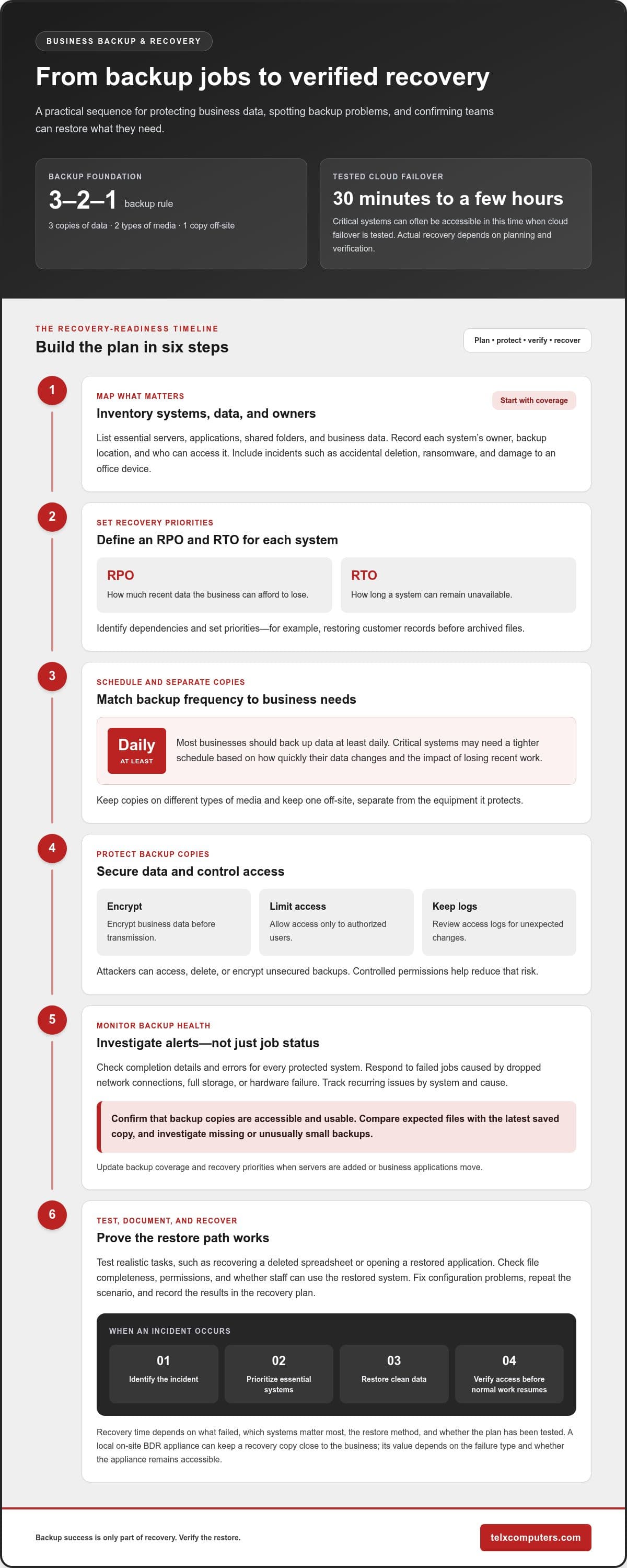
Recovery Point Objective (RPO) sets how much recent data a business can afford to lose. Recovery Time Objective (RTO) sets how long a system can remain unavailable. Together, these targets help prioritize systems and shape a practical recovery plan.
For example, a business may need customer records restored before archived files. List essential systems, identify their dependencies, then set an RPO and RTO for each. This makes continuity decisions clearer during a server failure or disaster.
Backup Frequency and Recovery Timelines
Backup frequency affects the gap between the latest saved copy and an incident. Microtech recommends that most businesses back up data at least daily. Critical systems may need a tighter schedule based on how quickly their data changes and the impact of losing recent work.
Recovery time also depends on the restore method and the systems involved. Tested cloud failover environments can often make critical systems accessible within 30 minutes to a few hours. A local on-site BDR appliance can support rapid recovery by keeping a recovery copy close to the business. Its value depends on the failure type and whether the appliance remains accessible.
Build business continuity around a clear sequence: identify the incident, prioritize essential systems, restore clean data, and verify access before resuming normal work. Test the sequence with realistic scenarios, including ransomware and server failure. A working backup is only one part of recovery; teams also need a known path to restore applications, access, and operations.
Fort Lauderdale businesses can align local planning with Fort Lauderdale IT services while documenting who leads each recovery step. This keeps decisions focused when problems affect staff, customers, or day-to-day operations.
How often are backups monitored and verified?
Monitor backup jobs for failures and test restores regularly. To plan for a Fort Lauderdale business, inventory data, prioritize systems, configure alerts, and restore sample files to verify recovery.
Backup Monitoring and Management
A backup dashboard should show job status, completion details, and errors for each protected system. Review alerts promptly when a network connection drops, storage fills, or hardware failure interrupts a job. Track recurring problems by system and cause, then address the source rather than repeatedly dismissing warnings.
Monitoring should confirm that backup copies remain accessible and usable, not just that a task finished. Compare expected files with the latest saved copy and investigate missing or unusually small backups. Keep access logs and limit backup permissions so unauthorized changes don’t quietly weaken protection.
Proactive monitoring links backup alerts to changes in infrastructure. If a server is added or a business application moves, update its backup coverage and recovery priority. A review of server monitoring systems can help connect infrastructure alerts with operational oversight.
Backup Plan Setup and Testing
Start by listing essential servers, applications, shared folders, and business data. Identify owners for each system, then record where its backup copy resides and who can access it. Include common incidents such as accidental deletion, ransomware, and a damaged office device. This inventory exposes coverage gaps before data loss occurs.
Configure alerts for failed jobs and assign someone to investigate each warning. Schedule restore tests that match real tasks, such as recovering a deleted spreadsheet or opening a restored application. Record whether files are complete, permissions work, and staff can use the restored system. Fix any problems in the backup configuration and repeat the scenario. Keep the results in the recovery plan so staff know the steps to follow during an incident.
Managed data backup
Managed backup brings scheduled copies of business data together with security controls, monitoring, and recovery planning. When comparing data backup solutions in Fort Lauderdale, treat these safeguards as one operational system, not separate tasks. A practical setup identifies essential systems, where their copies reside, and how staff can restore them after disruption.
The 3-2-1 backup rule offers a structure: keep three copies of data on two different types of media, with one copy off-site. An off-site copy can preserve business data if local equipment is destroyed. Fort Lauderdale businesses weighing data backup solutions in Fort Lauderdale should also consider how staff will access that copy and restore priority systems. Separate storage supports resilience, but recovery still requires clear steps.
Cloud backup security differs from ordinary cloud storage. A secure setup combines automated backups, encryption, access controls, and recovery testing. It encrypts business data before transmission and limits access to authorized users. Keep access logged and controlled, since attackers can access, delete, or encrypt unsecured backups.
- Separate storage: Keep an off-site copy apart from the equipment it protects.
- Protected access: Limit permissions and review logs for unexpected changes.
- Recovery readiness: Test restores to confirm files and systems are usable.
Managed disaster recovery connects safeguards to business priorities. For example, a firm might restore customer records and its core application before less urgent archives. That sequence can help reduce downtime while staff resume essential operations. Network security should support the same plan, so backup access, network protections, and incident procedures work together.
Assess storage, security, and restore readiness as one system. Backups support continuity when protected data remains accessible and recovery steps work in practice.
How do Fort Lauderdale businesses choose a reliable backup provider?
Assess recovery capability, security practices, and operational ownership when choosing backup support. A polished dashboard means little if staff can’t restore a working application after a server problem. Compare the service with your systems, data priorities, and continuity needs, rather than focusing on storage capacity alone.
Start with coverage. Ask how the plan accounts for servers, cloud applications, shared files, and employee devices. For example, a business using Microsoft 365 and an on-site accounting server needs both environments represented in its backup scope. Confirm who monitors failed jobs, investigates alerts, and updates coverage when infrastructure changes. A written responsibility map prevents overlooked tasks.
Assess security and access controls, too. Understand how business data is encrypted before transmission, who can access backup copies, and how access is logged. Consider how the setup limits the risk of an attacker changing or deleting backups. Make sure recovery planning accounts for ransomware as well as hardware failure or accidental deletion.
- Recovery evidence: Request a walkthrough of a restore process using a representative file or application.
- Reporting: Review sample status reports and how they identify failed jobs or unresolved problems.
- Continuity planning: Confirm that recovery priorities reflect essential business operations.
- Change management: Understand how new systems and data sources enter the backup scope.
Compare the recovery plan with your team’s actual workflow. Restoring customer records may not help if staff can’t access the system that uses them. The plan should identify system dependencies, decision-makers, and steps for validating restored access. Include restore testing, record the results, and address any gaps.
A strong selection process leaves you with clear coverage, defined responsibilities, and a recovery process your team understands. To discuss your business’s backup and recovery priorities, connect with a data backup specialist.
Telx Computers: Managed IT Services
Telx Computers helps businesses coordinate managed IT services, network security, and cloud computing. If backup responsibilities, security controls, or recovery procedures feel disconnected, Telx Computers can review how these systems support business continuity for businesses in Fort Lauderdale and across South Florida.
Its Managed IT Services and 24/7 Help Desk Support can support organizations that need ongoing technical oversight and assistance. Network security and cloud computing also fit into a wider approach to protecting business operations. The right next step is to identify where your current setup creates gaps, such as unclear ownership, limited visibility, or recovery steps that staff haven’t practiced.
Contact Telx Computers to discuss your business’s IT needs.
Build Recovery Into Your Next IT Decision
Make recovery ownership part of everyday technology planning. When assessing data backup solutions in Fort Lauderdale, consider how backup decisions connect with staff responsibilities, security practices, and business priorities. A written plan can help your team know who coordinates recovery and how to keep essential work moving during disruption.
Telx Computers offers Managed IT Services, 24/7 Help Desk Support, and Network Security to support businesses seeking coordinated technology management. Bring your recovery priorities and current concerns into a conversation, then identify practical steps for strengthening your IT environment.
Contact Telx Computers to discuss your business needs and move forward with greater clarity.
Frequently Asked Questions
What Happens Without Proper Backup?
Without usable backups, a business may lose access to records, applications, and work needed for daily operations. Ransomware could make files unavailable, while a damaged computer could erase locally stored documents. Staff may need to recreate information manually, delaying customer service and routine tasks. Identify essential records and systems first, so backup coverage reflects what your team needs to keep working.
What is the difference between backup and disaster recovery?
A backup is a copy of data; disaster recovery is the coordinated process of restoring technology and operations after an incident. Recovering a database file, for example, may not restore the application that uses it or employee access. A useful recovery plan maps those dependencies and assigns people to each step, so restoring a copy supports business operations rather than becoming an isolated technical task.
What types of business data can you back up?
Business backups can cover files, databases, email, application data, and information stored on servers or employee devices. A medical office, for example, may need to protect appointment records alongside shared documents and the systems staff use to access them. Create an inventory of storage locations and data owners, then identify what supports customer service, accounting, and other essential work.
What data backup solutions are available for businesses in Fort Lauderdale?
Businesses can use local backups, cloud-based copies, or a hybrid arrangement that combines both. Managed backup can add oversight of backup jobs, access controls, and recovery planning. For businesses in Fort Lauderdale, the right setup depends on where systems run, how staff access files, and which operations must continue during disruption. Match the solution to those needs, not storage alone.
Which Fort Lauderdale IT providers offer managed backup and disaster recovery services?
Telx Computers provides Data Backup & Disaster Recovery for businesses in Fort Lauderdale and South Florida. This service brings backup and recovery into the context of your broader IT environment. To get started, outline the systems and information your business relies on, who manages them, and the operational issues a recovery plan should address. Contact Telx Computers to discuss your business’s backup and recovery needs.
What are the differences between cloud, local, and hybrid backup solutions?
Cloud backups store copies in cloud-based infrastructure, while local backups keep copies on equipment at the business. Hybrid approaches combine both, such as retaining a local copy for nearby access and a cloud copy separate from office equipment. Each arrangement has different access and recovery considerations. Compare where data resides, how staff retrieve it, and whether a disruption could affect both the original and its copies.