




25 Oct Co-managed IT Pricing for Fort Lauderdale Businesses with Internal IT
Your internal IT team shouldn’t have to choose between handling every technical demand alone and handing IT over entirely. Co-managed IT for businesses with internal IT in Fort Lauderdale adds outside expertise and support while your in-house staff retains ownership of its systems and priorities. The partnership can cover specialized escalations, security monitoring, or cloud migration while your team remains involved in daily operations.
That balance matters when routine requests compete with complex projects, security work, or recovery planning. You’ll learn how co-managed IT differs from fully managed IT, where outside support can reinforce your staff, and how proactive monitoring and backup planning help reduce disruption. We’ll also cover the factors that shape service costs, so you can assess what support fits your team without giving up control of your technology.
Key Takeaways
- Define which responsibilities stay with your internal IT team and where outside expertise can close coverage or skills gaps.
- Use proactive monitoring and patching to identify issues before they interrupt business operations.
- Strengthen continuity by aligning backup and recovery planning with the systems your business depends on most.
- Compare pricing models by reviewing the scope of support, coverage, users, devices, and infrastructure involved.
Co-managed IT support for businesses with internal IT teams
Co-managed support adds capacity or specialized skills while your internal team keeps control of priorities. A clear division of responsibilities also helps businesses in Fort Lauderdale, Miami, Aventura, and across South Florida coordinate projects, service requests, and compliance support.
Local and On-Site Support
A local service provider can coordinate on-site work for office moves, device refreshes, and network changes that need hands-on attention. Remote support can handle many routine requests, while an on-site visit can help resolve issues involving physical equipment or office infrastructure. Review how support is coordinated across Fort Lauderdale and Broward County, and how urgent requests are prioritized. Telx Computers’ Fort Lauderdale IT services page provides local context.
For a migration, map the affected systems, users, and dependencies before scheduling the change. This helps internal staff coordinate access and limit disruption during the transition.
Shared Team Responsibilities
Internal IT can retain user relationships, business priorities, and system ownership, while the provider handles agreed tasks such as help desk requests, cybersecurity monitoring, or complex escalations. Before support begins, define who owns each queue, approval, and device. For example, internal staff might approve account changes while the provider documents and routes incoming tickets.
Ask how response targets vary by issue severity, support channel, and coverage hours. Record escalation contacts and handoffs in a shared process. For HIPAA, FINRA, or GDPR-related environments, clarify which technical activities the provider supports, such as access controls or security documentation. Keep compliance ownership and decisions with the appropriate business leaders.
Provider Selection and Transition Planning
Ask which systems the provider will support, how it documents changes, and how your team can access ticket history. Confirm how project work covers migrations, office moves, and system refreshes, including testing and rollback steps. Google Workspace or another cloud environment should have named system owners and clear access procedures.
Common challenges include overlapping responsibilities, undocumented configurations, and inconsistent escalation paths. Prevent them with a written responsibility matrix, an up-to-date system inventory, and agreed change approvals. To transition without disrupting existing systems, begin with a discovery review, choose a contained support area, test handoffs, and expand after your team validates the workflow.
Proactive monitoring and downtime prevention
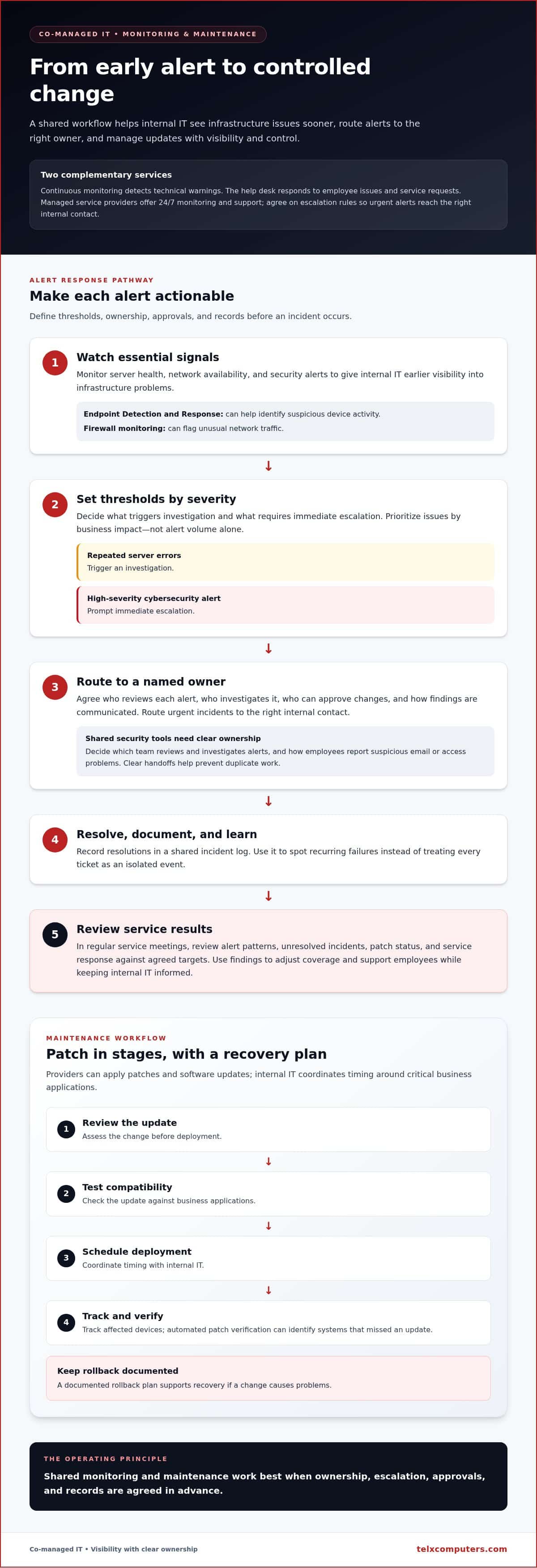
Proactive monitoring gives internal IT earlier visibility into infrastructure problems, before employees lose access to essential systems. A service provider can monitor server health, network availability, and security alerts, then route findings to the person responsible for action.
Monitoring and help desk coverage serve different needs. Continuous monitoring detects technical warnings, while the help desk responds to employee issues and service requests. Managed service providers offer 24/7 monitoring and support, giving businesses a way to handle alerts outside normal office hours. Agree on escalation rules so urgent incidents reach the right internal contact.
Set clear thresholds for action. For example, repeated server errors can trigger an investigation, while a high-severity cybersecurity alert can prompt immediate escalation. Define who reviews each alert, who can approve changes, and how the team records resolutions. A shared incident log helps internal IT identify recurring failures instead of treating every ticket as an isolated event.
Shared security tools also need clear ownership. Endpoint Detection and Response can help identify suspicious device activity, while firewall monitoring can flag unusual network traffic. Decide which team reviews and investigates alerts and communicates findings. This prevents duplicate work and gives employees a consistent way to report suspicious email or access problems.
Maintenance helps reduce avoidable exposure and performance issues. Providers can apply patches and software updates, while internal IT coordinates timing around critical business applications. Use a staged process: review the update, test compatibility, schedule deployment, and track affected devices. Automated patch verification can help identify systems that missed an update, while a documented rollback plan supports recovery if a change causes problems.
Review monitoring results in regular service meetings. Track alert patterns, unresolved incidents, patch status, and service response against agreed targets. Severity ratings help teams prioritize issues by business impact, not alert volume alone. This gives internal IT a practical basis to adjust coverage, assist employees, and protect essential infrastructure without losing visibility or control.
Business continuity, backups, and disaster recovery
Business continuity planning identifies the systems your South Florida business needs to keep operating during an outage. List critical applications, network services, employee devices, and the people authorized to approve recovery work. This inventory helps internal IT prioritize restoration instead of treating every computer and server as equally urgent.
Backups protect data, but a backup plan also needs defined recovery objectives. The Recovery Point Objective (RPO) sets how much recent data the business can afford to lose. The Recovery Time Objective (RTO) sets how quickly a system needs to return to service. Set both for each essential workload, such as accounting, email, or customer records.
Fort Lauderdale managed service providers offer immutable offsite cloud backups with RPO and RTO objectives. Immutable copies are protected from alteration, while offsite storage separates backup data from the primary environment. Map which servers, endpoints, and shared files each backup covers, then document who can access the copies during an incident.
Recovery also depends on redundancy and failover systems. Redundancy provides an alternate component or system; failover shifts operations when the primary resource becomes unavailable. Decide which services need this arrangement and document the activation sequence. For example, specify how staff can access essential files if the main server cannot be restored promptly.
Test recovery procedures, not just backup completion. A practical exercise can restore selected files or a server to a separate environment, then confirm that applications and user access work. Record the outcome, gaps, and follow-up tasks. Internal IT should coordinate the test with business owners, because technical recovery alone doesn’t establish whether the restored process meets operational needs.
Finally, connect backup access to network security. Limit recovery permissions to designated roles, protect administrative credentials, and keep recovery steps available if normal systems are unavailable. A current inventory, documented objectives, offsite copies, and tested restoration give teams a clear sequence to follow during disruption.
Managed IT pricing models and costs
Managed IT services in Fort Lauderdale commonly use per-user, per-device, or fixed monthly pricing. A per-user model ties the fee to supported employees, while per-device pricing counts workstations and servers. Co-managed support can also be scoped around specific gaps, such as security monitoring or complex escalations. Compare what each model covers, not just how it is billed.
For an internal IT team, a customized flat rate can make recurring support easier to budget. The agreement should define covered systems, help desk responsibilities, maintenance, security work, and response expectations. For example, clarify whether new hardware, project work, or support for an added office falls within the monthly scope. A written service boundary helps prevent unexpected work from being mistaken for routine coverage.
Build the scope from an inventory before comparing proposals. List users, devices, servers, cloud services, business-critical applications, and current vendor responsibilities. Then identify where internal staff need assistance, such as after-hours alert handling or a planned migration. This connects the managed service to operational needs and makes proposed scopes easier to compare consistently.
The price depends on your case and is provided after a quote request; scope, users, devices, infrastructure, and response coverage shape the estimate. Review how proposed coverage supports your strategic priorities, rather than choosing solely by the lowest initial figure. To outline your requirements and request a tailored estimate, request an IT services quote.
Telx Computers: Managed IT Services
Telx Computers can support Fort Lauderdale businesses that need additional IT capacity without sidelining their internal team. Its Managed IT Services can complement in-house work, while 24/7 Help Desk Support gives employees a channel for technical assistance. Internal staff can retain system ownership and business priorities while coordinating support responsibilities with the provider.
For organizations strengthening protection or modernizing infrastructure, Network Security and Cloud Computing address different parts of the technology environment. The right mix depends on where your team needs added coverage, such as security operations, cloud systems, or user support. Define those priorities and responsibilities before shaping a co-managed arrangement.
To discuss support for your internal IT team, contact Telx Computers or visit telxcomputers.com.
Set Your Internal IT Team Up for What’s Next
Co-managed IT for businesses with internal IT in Fort Lauderdale can be a practical operating model when responsibilities evolve with business needs. Treat the partnership as an ongoing planning decision, not a one-time handoff. As priorities shift, revisit which work belongs in-house, where additional expertise is useful, and how the arrangement supports upcoming projects.
A useful next step is to turn your priorities into a short scope for discussion. Identify your internal team’s current constraints, the systems or projects needing attention, and the outcomes you want the partnership to support. This gives both sides a grounded starting point for discussing fit and shaping a service plan around your business. Telx Computers can discuss how its IT support may complement your existing team and operational priorities.
Contact Telx Computers today to start planning a support model that works alongside your team.
Frequently Asked Questions
What is co-managed IT and how is it different from managed IT?
Co-managed IT for businesses with internal IT in Fort Lauderdale supplements in-house technology staff with outside support, while fully managed IT outsources a broader share of IT operations. Your team can retain system knowledge and business decisions, then assign defined support gaps to a provider. For example, outside specialists might assist with complex escalations while your staff manages employee priorities and internal applications.
How long does it take to get started?
Getting started involves documenting your systems, confirming access, assigning responsibilities, and setting up support workflows. The process depends on how complete your current inventory and system documentation are, along with the scope of support. A business with clear asset records and named system owners can move through setup more smoothly than one that first needs to map devices, accounts, and dependencies.
Do you work with companies that already have an IT person?
Yes. Telx Computers’ Managed IT Services can complement an existing IT employee or department rather than replace its business knowledge. For example, internal staff can direct priorities while outside support assists with user requests, network security, or cloud computing. Agree on approvals, system access, and escalation ownership so the employee knows which issues to handle and which to route.
What happens if something breaks after hours?
For after-hours emergencies, Telx Computers provides support through an automated phone system after 6:30 pm Monday through Friday and on weekends; additional charges may apply. Businesses should document who can report an incident, which systems count as urgent, and how internal IT receives updates. That escalation path helps staff respond consistently when a critical system fails outside normal office hours.
What is co-managed IT and how does it work with an internal IT team?
Co-managed IT for businesses with internal IT in Fort Lauderdale works through responsibilities shared between the internal team and outside provider. For example, an internal administrator might approve account changes while the provider handles assigned technical tasks and records them for visibility. A shared ticketing and change process helps prevent duplicate work, missed handoffs, or conflicting system changes as the partnership develops.
What co-managed IT services do Fort Lauderdale providers offer?
Fort Lauderdale providers may extend an internal team with Tier 3 escalations, SIEM monitoring, cloud migration support, or outsourced NOC and SOC coverage. They may also support endpoint detection, firewall monitoring, Microsoft 365 or Azure management, and backup planning. The useful scope depends on your internal team’s capability gaps and which systems require additional technical coverage.