




01 Nov Managed Data Backup for Coral Gables Accounting Firms
Protecting accounting records means planning for recovery, not just saving copies. Managed data backup for accounting firms in Miami, Aventura, and Fort Lauderdale should cover on-premises, cloud, and hybrid systems, with recovery objectives that clarify which data and operations need to return first. A backup preserves files, but it doesn’t restore the business by itself.
Accounting teams depend on timely access to client records, tax documents, and financial systems. Telx Computers helps address a practical concern: knowing what is protected and how work can resume after a disruption.
A sound plan reflects your firm’s systems, recovery priorities, and day-to-day workflows. This guide explains how to set recovery objectives, connect data protection with business continuity, and evaluate managed backup support as part of your IT strategy.
Key Takeaways
- Build business continuity around the systems and workflows your firm needs to resume, not backup copies alone.
- Set recovery time and recovery point objectives based on how quickly operations must return and how much recent data your firm can afford to lose.
- Map on-premises, cloud, and hybrid systems so backup coverage reflects where your accounting data and applications reside.
- Use managed IT support to bring backup planning into a broader approach to security, cloud services, and day-to-day operations.
Business continuity and disaster recovery planning
According to FEMA, 40% of businesses never reopen after a disaster, and another 25% fail within a year. FEMA’s OpenFEMA Disaster Declarations database includes Miami-Dade County in dozens of federally declared disasters over the past several decades. For a Coral Gables accounting firm, that makes continuity planning a practical part of protecting daily operations, not simply an IT task.
Disaster recovery and business continuity address different needs. Disaster recovery restores systems and data after a disruption; business continuity keeps essential work moving while recovery is underway. Restoring accounting files alone may not restore operations if staff cannot access applications, communicate with clients, or approve payments. Plan both the technical recovery steps and the alternate workflows your firm will use.
Start with a business-impact review. List the systems and records needed for bookkeeping, payroll, client communication, tax preparation, and financial reporting. Name the person responsible for each recovery decision, then document the order in which systems should return. NIST SP 800-34 is cited as a standard for building a full disaster recovery plan. Use its planning framework to connect recovery procedures with business priorities.
Accounting firms in Coral Gables may have compact teams handling several workflows. Trace one client engagement from receiving documents through preparing reports. Note where files are stored, who needs access, and what happens if a key system becomes unavailable. This exercise can reveal gaps that a simple backup inventory misses.
Connect backup planning with tax and compliance workflows, but do not treat it as a substitute for professional advice. Preserve the records and working files needed to resume tax preparation after an outage. Identify which reporting, cash-flow review, and advisory tasks must continue during a disruption. Revisit the plan when systems, staff responsibilities, or business priorities change.
Ready to Protect Your Coral Gables Business from Costly Downtime?
For an accounting firm, interrupted access can delay bookkeeping, client work, reporting, and financial decisions. Effective support connects data protection to the systems and workflows your team relies on.
IT Services for Accounting Firms
IT support for accounting firms can bring system monitoring, network security, email protection, cloud tools, and backup planning into one operational picture. Check that the approach covers the applications staff use for bookkeeping, tax preparation, document exchange, and client communication. A qualified accounting professional advises on accounting practices; IT support helps keep the underlying systems available and protected.
Map how a client document moves from secure receipt to bookkeeping records and final reporting. This shows which accounts, devices, and files need protection, as well as who needs access during an interruption.
Backup Providers and Data Protection Rules
Accounting firms in Florida should treat client financial and personal information as sensitive. Applicable data-protection obligations depend on the information held and the firm’s circumstances. Backup alone does not replace security controls or a response plan. In Coral Gables, choose support that accounts for recovery planning, protected access, and the firm’s actual applications and storage locations.
Ask how covered systems are documented, restoration is tested, and recovery steps are communicated. These practical details matter more than a general claim of serving financial businesses.
Plan the budget around the environment being supported, including system types, storage needs, security controls, and recovery requirements. Fixed-rate IT services can make ongoing support easier to budget, but compare the actual scope. Clear boundaries help prevent gaps between routine support and backup or disaster recovery work.
Accounting and bookkeeping depend on accurate, accessible records. A part-time CFO may also need timely reports for cash-flow review, forecasting, and growth planning. Include these workflows in continuity priorities so recovery planning supports both daily bookkeeping and financial advisory work. Identify which tasks can pause and which need prompt system access.
Recovery time and recovery point objectives
Recovery targets make a backup plan practical and measurable. Set them according to the accounting work employees need to resume first.
Recovery Time and Data Loss Objectives
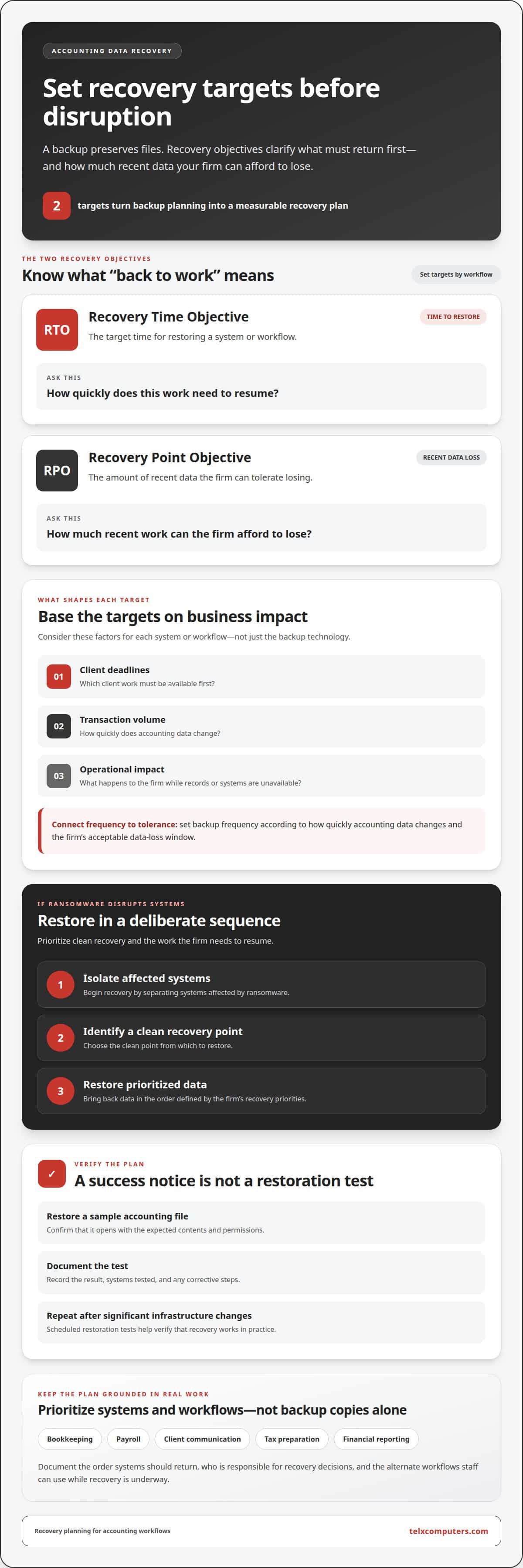
The recovery time objective (RTO) is the target time for restoring a system or workflow. The recovery point objective (RPO) defines how much recent data the firm can tolerate losing. Set each target by considering client deadlines, transaction volume, and the operational impact of unavailable records.
Compare managed IT providers serving Coral Gables by reviewing service coverage, recovery procedures, security controls, and documented restoration tests. Set backup frequency according to how quickly accounting data changes and the firm’s acceptable data-loss window. Retain the versions needed for business and recovery purposes, and limit access to authorized employees.
Ransomware and Data Restoration
After ransomware, restoration should follow a deliberate sequence: isolate affected systems, identify a clean recovery point, then restore prioritized data. Encryption protects stored or transferred backup data, while role-based access controls limit who can view, change, or delete it. Ask how these safeguards apply to backup systems and administrator accounts.
Verify backups with scheduled restoration tests, not success notifications alone. Restore a sample accounting file and confirm it opens with the expected contents and permissions. Document the result, systems tested, and any corrective steps. Repeat the test after significant infrastructure changes.
Recovery may also require rebuilding the network, servers, and connections used by accounting applications. Virtualization can restore a server environment as a virtual machine, helping teams bring systems online while underlying hardware is repaired. Include dependencies such as identity services, shared folders, and application access in the recovery sequence.
Backup across on-premises, cloud, and hybrid environments
Start with an inventory of where accounting data lives. A Coral Gables firm might store working files on an office server, client documents in Microsoft 365, and application data in a cloud platform. A hybrid backup plan should account for each location, its dependencies, and who needs access during recovery. A single protected system can’t cover records stored elsewhere.
For on-premises infrastructure, identify servers, network storage, and business-critical workstations. For cloud systems, document the services, accounts, and shared files employees rely on. Microsoft 365 management should include a clear view of which email, calendars, and documents need protection. Partners supporting South Florida firms should coordinate coverage across these environments, rather than assume cloud storage alone meets every backup need.
Automated cloud backups reduce reliance on employees remembering to make manual copies. Set the schedule according to how often records change and how much recent work the firm can recreate. Assign someone to review backup activity, investigate failures, and record restoration tests. A sample client folder, for instance, can confirm that files remain accessible and usable after recovery.
Plan for backup before migrating data to the cloud. Inventory applications and file locations, map dependencies, and migrate a representative set of records. Then validate access, permissions, and application workflows. Post-migration optimization can address outdated accounts, unnecessary data, or changed access patterns, reducing the risk of downtime from missing files or disrupted permissions.
Cloud access should enable approved work without exposing every record to every account. Assign permissions by role, such as restricting payroll folders to authorized staff, and review access when responsibilities change. Include remote employees and external accounting partners in the access plan, with clear rules for shared documents and recovery responsibilities.
For help aligning cloud services with backup and recovery planning, explore managed IT support services.
Telx Computers: Managed IT Services
Telx Computers helps accounting firms coordinate managed IT services with backup planning, network security, and cloud computing. Turn to the team when your firm needs a coordinated approach to protecting systems, setting recovery priorities, or managing cloud infrastructure.
For example, include backup and recovery needs in broader IT planning rather than treating each system as a separate concern. Network security helps protect access to business systems, while cloud computing supports the firm’s cloud environment. The right scope depends on your systems, workflows, and recovery priorities.
Contact Telx Computers to discuss managed IT support for your accounting firm.
Make Backup Planning Part of Your Firm’s Rhythm
A resilient backup strategy should evolve with your accounting firm. New software, changing staff responsibilities, and added client workflows can all affect how systems need to be protected. Schedule regular reviews with the people responsible for operations and technology, and update procedures when meaningful changes occur. This keeps recovery planning aligned with how your Coral Gables firm works.
For accounting teams considering managed data backup for accounting firms in Coral Gables, the next step is to turn priorities into a practical support plan. Telx Computers offers 24/7 Help Desk Support, giving your team a resource for IT issues as they arise. Discuss how your current environment, business needs, and support priorities fit together, then decide what to address first.
Contact Telx Computers to discuss backup and take a considered next step toward stronger business continuity.
Frequently Asked Questions
What managed data backup services are available for accounting firms in Coral Gables, Florida?
Managed data backup for accounting firms in Coral Gables can protect business files and systems through backup and disaster recovery support. Telx Computers offers Data Backup & Disaster Recovery alongside Managed IT Services, Network Security, and Cloud Computing. Start by listing accounting applications, document repositories, email, and locally stored files. Identify which records the firm needs after an interruption and include them in the protection plan.
How much does managed data backup cost for a small accounting firm in Coral Gables?
The cost of managed data backup for accounting firms in Coral Gables depends on the firm’s systems, storage needs, protection scope, and recovery requirements. The price is provided after a quote request. To outline the project, inventory servers, cloud accounts, devices, and essential applications. Note whether the environment includes on-premises, cloud, or hybrid systems so the scope reflects how the firm actually works.
Which cloud and local backup options work best for accounting software such as QuickBooks and tax platforms?
The right setup depends on how each application stores data and how staff access it. For QuickBooks, identify the company files and related documents the firm needs to recover. For hosted tax platforms, account for local exports, downloaded client records, and connected files. Keep an application and data inventory, then match each backup method to the software environment and recovery needs.
What recovery time and recovery point objectives should accounting firms require from a backup provider?
Set objectives for each critical system based on client deadlines and how much work staff can recreate. Compare the priorities for bookkeeping, payroll, and document access instead of assigning one target to every application. Put agreed objectives in writing, identify who approves restoration priorities, and use recovery tests to assess whether the plan meets operational needs.
What are the risks of ransomware, accidental deletion, or backup failure for accounting firms?
Ransomware can make active files inaccessible, while accidental deletion can remove records employees still need. A backup failure creates a different risk: a copy may be missing or unusable when restoration is needed. Reduce these risks by limiting access to backup controls, reviewing failure alerts, retaining usable recovery points, and testing sample files. Record who can authorize restoration and how affected systems will be handled.
How quickly can a Coral Gables provider restore accounting data after an outage or cyberattack?
Restoration speed depends on data volume, network capacity, affected infrastructure, and recovery order. Restoring a small set of documents differs from bringing accounting applications and connected systems back online. Ask how the restoration sequence will work in your firm’s environment, including which dependencies must return first. A documented test can demonstrate the sequence using representative files and systems.