





23 Oct How to Set the Scope of a Network Security Audit in Coral Gables
A network security audit in Coral Gables examines the devices, systems, access controls, and procedures that protect a business network. Its scope should identify the assets and risks to review, then assess controls such as firewall settings, user permissions, backups, and incident response. Organizations with sufficient budget should conduct audits at least once a year, with frequency also depending on industry.
Before an audit begins, decide whether it will focus on a critical network segment or cover more systems and security processes. This article explains what an audit checks, who can conduct one, and how to set objectives around your business risks. A clearly defined scope also helps guide threat detection, compliance reviews, and resilience planning.
Key Takeaways
- Set a clear audit objective, then define which network assets, locations, and systems the review will cover.
- Include firewall rules, VPN settings, user access, logs, backups, and incident response in the scope.
- Choose internal or external auditors based on your team’s expertise, independence needs, and the audit’s complexity.
- Align the review with relevant security frameworks and business obligations to identify gaps and strengthen resilience.
- Document findings, prioritize urgent risks, and turn the results into practical remediation steps.
What is a network security audit?
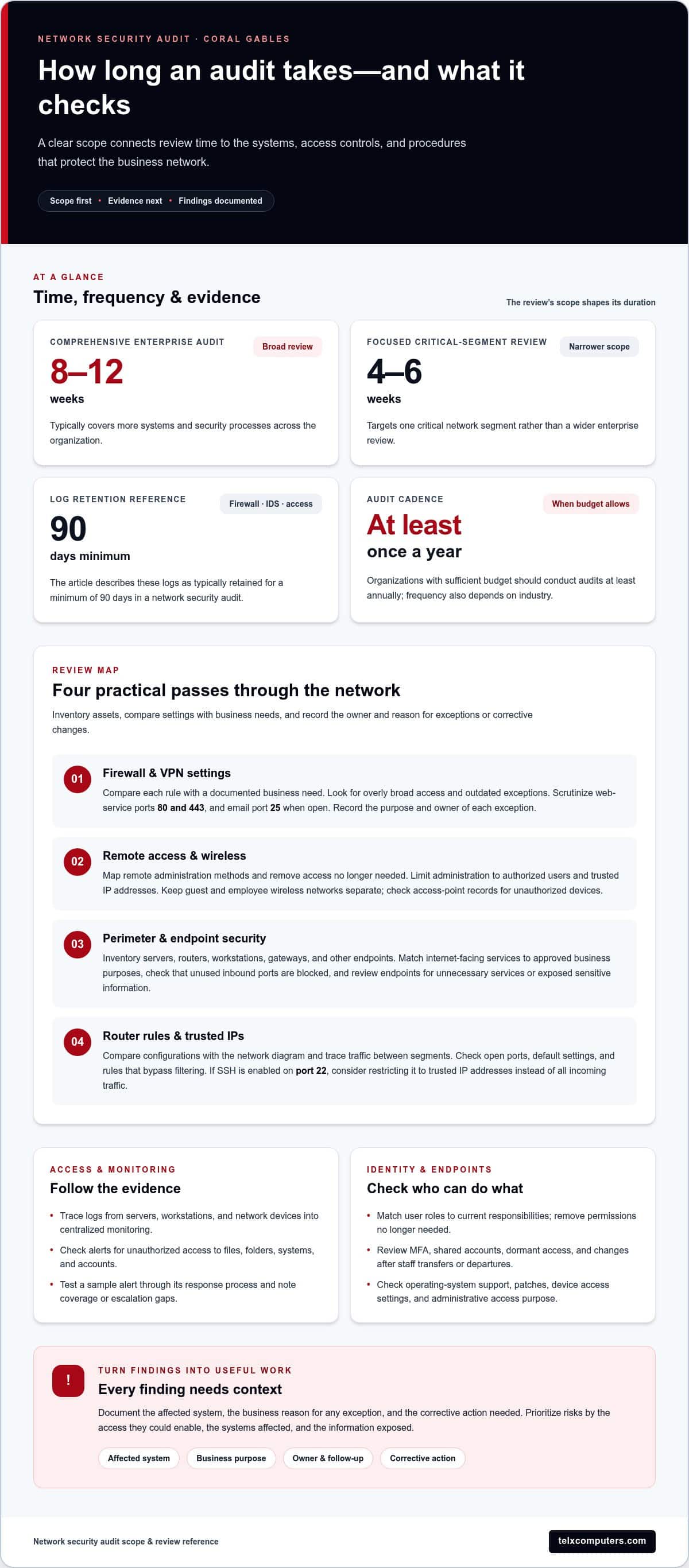
A network security audit examines an organization’s devices, configurations, and access controls for weaknesses. A comprehensive enterprise audit typically takes 8 to 12 weeks; a focused review of one critical network segment can take 4 to 6 weeks.
Use these steps to review firewalls, VPNs, remote access, wireless networks, and endpoints.
Review Firewall and VPN Settings
Collect current firewall rules and VPN configurations, then compare each rule with a documented business need. Check whether rules allow more traffic or broader access than employees require, and identify outdated exceptions that no longer support operating systems or services in use. For web services, scrutinize ports 80 and 443; for email, examine port 25 when it is open. Record the purpose and owner of each exception.
Inspect Remote Access and Wireless
Map each remote administration method, including VPN access and management interfaces, and remove access the organization no longer needs. Limit remote administration to authorized users and trusted IP addresses instead of allowing broad incoming traffic. Confirm that guests and employees use separate wireless networks. Review access-point records for unauthorized devices that could expose sensitive systems.
Check Perimeter and Endpoint Security
Inventory servers, routers, workstations, gateways, and other endpoints before assessing the network perimeter. Match each internet-facing service to an approved business purpose, and check that firewall policies block inbound traffic to unused ports. Review endpoint settings for unnecessary services and exposed sensitive information. For example, investigate a workstation reachable from an external network more closely than one without inbound access.
Review Router Rules and Trusted IPs
Compare router and firewall configurations with the organization’s network diagram, then trace how traffic moves between segments. Check for open ports, default settings, and rules that bypass intended filtering. If SSH is enabled on port 22, consider restricting access to trusted IP addresses instead of permitting all incoming traffic. Document each change needed, its affected system, and the business reason for keeping any exception.
The review can also cover firewall logs, alerts, backups, and incident response procedures. Check user permissions as well to identify access that could be restricted.
Network infrastructure and security controls assessed in an audit
A network security audit can uncover unpatched software, excessive user privileges, weak passwords, and monitoring gaps. It can also assess whether security policies and access controls help prevent unauthorized activity and limit exposure of sensitive information.
Review Access Controls and Monitoring
Map how access logs move from servers, workstations, and network devices into centralized monitoring systems. Check whether alerts capture unauthorized access to files, folders, systems, and accounts, then test a sample alert through to its response process. Firewall, IDS, and access logs are typically retained for a minimum of 90 days in a network security audit. Compare retention settings with investigation needs, and record gaps in coverage or escalation.
Use the findings to identify accounts or systems without adequate oversight. For example, a log that records sign-ins but not file access may miss activity involving sensitive data.
Verify Authentication and User Roles
Compare each user’s assigned role with their current responsibilities, then remove permissions they no longer need. Apply least privilege: staff who read reports do not automatically need administrator access to servers. Review role-based access controls across applications and infrastructure, including accounts used for routine maintenance.
Test authentication on representative systems, including remote and workstation logins. Check whether multi-factor authentication is enabled where stronger identity checks are required, and whether access changes follow staff transfers or departures. Record shared accounts, dormant access, and exceptions as findings that need an owner and follow-up.
Audit Operating Systems and Access
Inventory operating system versions on servers and workstations, then compare them with the organization’s supported software records. Examples to document include Windows Server 2019 on a server and Windows 10 on a workstation. Identify systems that lack current patches or use outdated configurations, since weaknesses can leave known pathways open to misuse.
Inspect local and network access settings on each sampled device. Check that computers require passwords after screen locks, including during recovery, and that administrative access has a defined business purpose. Link each finding to the affected device, its operating system, and the corrective action needed.
Examine Passwords and MFA
Review password policies and identify weak or reused credentials without exposing active passwords in the audit record. A simple example such as “123456” illustrates why easy-to-guess passwords create avoidable risk. Check whether accounts use distinct credentials and whether security policies explain how users should protect them.
Test multi-factor authentication settings on selected accounts and document where a second verification step is absent. Include administrator accounts and access to sensitive data in the sample. Rank findings by the access they could enable, the systems affected, and the information exposed, so remediation addresses the most consequential weaknesses first.
For help translating audit findings into practical infrastructure actions, network infrastructure support can connect security controls with day-to-day operations.
Internal, external, and consultant audit providers
Choose an audit approach that matches the review’s scope to your organization’s IT staff, expertise, and need for independence. Internal teams and external auditors can both assess network security, but they bring different roles and perspectives.
- Assess internal capability. List the skills your IT team can apply to devices, network configurations, access records, and known vulnerabilities. Internal auditors understand operating practices and can connect technical findings to everyday work. That familiarity may help uncover overlooked processes, such as temporary accounts left active after a project ends. Use an internal review when staff can examine systems objectively and document evidence consistently. If the team also manages the controls being reviewed, separate testing from implementation wherever practical.
- Define internal responsibilities. Assign an audit lead to set objectives, maintain the evidence record, and track findings through resolution. System owners should explain business use and validate asset records. Keep remediation approval separate from the assessment where possible. For example, the administrator who changes a firewall rule should not be the only person assessing whether it was appropriate. Clear ownership helps distinguish verified weaknesses from assumptions.
- Decide when external independence matters. An external auditor can bring a perspective outside the team operating the network. Consider this approach when internal staff lack the necessary expertise, the review includes systems they administer, or stakeholders need an independent assessment. External network security audits are typically occasional investments rather than ongoing solutions because of their cost and complexity. Before testing, define the systems, locations, access arrangements, evidence, and reporting expectations.
- Use a consultant for a defined gap. A consultant can conduct a scoped review when the organization needs specialized assessment or additional capacity. Set a written objective, such as examining a critical network segment or evaluating how access practices protect sensitive data. Agree on the devices and records in scope, how findings will be ranked, and who receives the report. Keep remediation ownership within the organization, even when an external specialist identifies an issue. This preserves accountability and helps staff turn recommendations into operational changes.
Before choosing an approach, compare the expertise, independence, and internal workload required with the audit’s purpose. An experienced internal team may suit a smaller review; a complex or sensitive assessment may benefit from outside scrutiny. In either case, require evidence for each finding and assign an owner and next action, so the audit produces a usable record rather than an untracked list of concerns.
Benefits for threat detection, compliance, and cyber resilience
Use audit findings to connect technical weaknesses with business risks, compliance priorities, and recovery readiness. A clear review helps determine which controls need attention first.
Assess Regulatory Compliance
Before testing network controls, map the data your organization handles to its applicable obligations. The U.S. Department of Health and Human Services describes HIPAA standards for safeguarding medical information in healthcare. GDPR is relevant when assessing personal data protections, according to the European Union. Identify the systems processing this information, then document the controls and evidence tied to each review objective.
Focus the assessment on your organization’s actual data flows and obligations. For example, a payment environment may need review against PCI DSS controls for cardholder data. Record gaps, identify affected systems, and prioritize fixes according to the information’s sensitivity and potential exposure.
Apply Frameworks and Manage Policies
Select a framework that matches your organization’s goals, such as NIST or ISO 27001, then use it to structure control testing. NIST Cybersecurity Framework 2.0 organizes network security under the Protect and Detect functions. These functions can help teams connect prevention controls with monitoring activities instead of treating them as separate projects.
For hybrid networks, compare security policies across on-premises systems, cloud services, and remote connections. Check whether the same access, encryption, and monitoring expectations apply in each environment. Document exceptions, assign policy owners, and update procedures when system changes create new pathways for unauthorized access.
- Use findings to strengthen threat detection. Review whether monitoring can identify suspicious activity across network traffic, user accounts, and connected devices. Intrusion detection systems can help identify potential breaches, while traffic analysis can reveal unusual data flows or unauthorized access. Link each gap to a control, responsible owner, and next action. This makes the audit useful for prioritizing cybersecurity work, not just cataloging technical issues.
- Connect security controls with resilience. Assess whether incident response plans, backups, and restoration processes work together during a disruption. Check that contingency plans identify decision-makers, communication steps, and the systems needed to restore business operations. Verify that sensitive data is encrypted at rest and in transit, and that recovery processes preserve this protection. Document test results and unresolved weaknesses, then use them to refine response procedures and future audit objectives.
Separate urgent security fixes from longer-term policy and resilience improvements. A prioritized findings register gives managers a clear sequence for reducing exposure, strengthening compliance evidence, and improving incident readiness.
Network security audit purpose and scope
Set the audit’s purpose before selecting systems or gathering evidence. A defined scope keeps testing focused on business risks, network exposure, and useful outcomes.
Set Audit Objectives
Write objectives that explain what the review must establish, not merely that an audit will take place. For example, aim to identify high-priority vulnerabilities, assess monitoring coverage, or evaluate incident response readiness. Make each objective measurable through evidence, such as whether a sample of alerts reaches an assigned responder. Connect the objective to a business decision, then use it to guide testing and reporting.
Keep objectives distinct. Identifying weaknesses attackers could exploit is different from testing whether teams detect unauthorized activity. A clear objective helps determine the review method, required access, and report structure.
Define the Audit Scope
For a Coral Gables business, a network security audit in Coral Gables should identify the systems, locations, network segments, and services included in the review. Include relevant cloud connections, remote access paths, and third-party connections that carry business data. Identify exclusions and explain their boundaries, so readers do not mistake an untested system for a cleared one. Set rules for testing production systems, particularly when automated scans could disrupt essential operations.
Match the scope to the objective. Reviewing one critical segment requires different access and evidence from an organization-wide assessment. Note system owners, approved testing windows, and the business processes that depend on each asset in scope.
Identify Applicable Regulations
Map the data and business processes in scope to applicable obligations and internal policies. Identify whether a reviewed system processes health, payment, or personal information, then document the related controls the audit will assess. Do not assume a framework or regulation applies to every device. Tie each compliance objective to specific systems, data flows, and evidence.
Record why each requirement is included, such as a contractual commitment or the organization’s own security policy. This gives auditors a traceable basis for testing and helps distinguish compliance gaps from general security improvements.
Gather Audit Evidence
Specify evidence sources before testing begins. These may include network diagrams, configuration records, access logs, vulnerability assessment results, and incident response documentation. Record the collection date, system owner, and connection to the review scope for each item. Use controlled access for sensitive evidence, and preserve enough context to make findings understandable without exposing unnecessary data.
Document tests, observations, and remediation decisions in one organized record. After major network configuration changes, an audit should be conducted within 30 days. Update network documentation as changes occur, so the next assessment starts from an accurate account of operating systems, connections, and controls.
To translate audit objectives into practical network work, discuss network infrastructure support for your organization’s systems and priorities.
Telx Computers: Managed IT Services
Telx Computers helps businesses in Coral Gables and across Miami and South Florida connect network security needs with daily IT operations through Managed IT Services. After an audit identifies gaps, proactive support can help align network controls, cloud computing, and ongoing technology management with your organization’s priorities. Turn to Telx Computers when your team needs a coordinated approach to managing IT systems and maintaining network security beyond the review.
Managed IT Services can complement internal teams by supporting the technology environment behind audit recommendations. Telx Computers also provides Network Security and Cloud Computing, helping businesses in Miami, Aventura, and Fort Lauderdale address connected infrastructure as part of their broader IT strategy.
Contact Telx Computers to discuss how Managed IT Services can support your organization’s next steps.
Turn Audit Findings Into a Clear Next Step
Use the audit as a decision point, not just a technical checkpoint. Once the review is complete, assign an owner to each priority, agree on how progress will be tracked, and connect remediation decisions to business operations. This keeps security work visible alongside the systems and services your team depends on.
A network security audit in Coral Gables can also help clarify where ongoing technical support fits after assessment. Telx Computers offers Cybersecurity Audits and 24/7 Help Desk Support for organizations addressing security concerns and day-to-day IT needs. The right next step is a focused conversation about your audit goals, the systems involved, and how findings should inform your plans.
Contact Telx Computers about an audit and take a practical step toward stronger security planning.
Frequently Asked Questions
Who Should Oversee the Audit?
A business leader with authority to set priorities should oversee the audit, while a qualified technical lead coordinates the review. The oversight lead can resolve access issues, approve testing boundaries, and ensure findings reach decision-makers. For example, a finance director might sponsor an audit involving payment systems while an IT lead manages evidence collection. Keep final risk acceptance with an accountable business owner, not solely the person responsible for a control.
What does a network security audit include?
A network security audit examines whether systems, policies, and operating practices work together to reduce exposure. Alongside technical configurations, define the evidence the report should provide: control gaps, affected business processes, risk priorities, and recommended actions. For example, a remote-access finding should identify the affected service and explain its operational impact. This helps leaders decide whether to remediate, document an exception, or change a business process.
What steps are involved in a network security audit?
A typical audit moves from planning to evidence review, technical testing, validation, and reporting. First, agree on objectives and testing boundaries. Next, review records and assess selected controls. Validate potential weaknesses with system owners before treating them as confirmed findings. Then prepare a report that separates urgent fixes from longer-term improvements. Assign an owner and due date to each action, and track closure so the assessment leads to accountable change.
How often should a business conduct a network security audit?
Organizations with sufficient budget should conduct network security audits at least once a year, with frequency also depending on industry. A major network configuration change is another useful trigger: an audit should be conducted within 30 days after such a change. Healthcare and finance organizations may need reviews quarterly or even monthly to meet strict standards. Align the schedule with business risk, operational changes, and applicable compliance needs.
How can a business prepare for a network security audit?
Prepare by gathering current network diagrams, asset records, recent change documentation, and a list of system owners. Identify business-critical services and periods when testing could disrupt operations, then establish access procedures for audit staff. Tell relevant employees what evidence they may need to provide, such as process records or system ownership details. Keep evidence in a secure, organized repository so auditors can trace documents to systems efficiently.
How do Coral Gables network security audit providers compare?
Internal auditors bring familiarity with daily operations and can be suitable when they have the expertise to assess systems objectively. External auditors offer independence and specialized expertise but are typically occasional investments because of their cost and complexity. Consultants can fill a defined expertise or capacity gap, while the organization remains responsible for remediation.