





03 Oct Microsoft 365 Security Configuration in Fort Lauderdale: A Business Checklist
If one employee account were compromised today, would your Microsoft 365 settings limit what an attacker could reach? Microsoft 365 security configuration in Fort Lauderdale should do more than switch on a few protections. It should help safeguard business email, files, and access as your team’s needs change.
That question can be hard to answer when security options are spread across admin settings and no one has clear ownership of alerts or configuration changes. A compromised account may provide access to messages, shared documents, and other resources available to that user. A one-time setup can also become outdated as employees, devices, and work practices change.
This checklist helps you review key areas, identify practical priorities, and plan for ongoing oversight. It covers identity and sign-in protection, email and file safeguards, access and devices, and the monitoring and support needed to maintain them. For businesses in Fort Lauderdale, Miami, and Aventura, treating Microsoft 365 configuration as part of a broader managed IT and security program connects settings to everyday operations.
Key Takeaways
- Use the Microsoft 365 security configuration in Fort Lauderdale checklist to review identity, email, data sharing, devices, and administrative oversight.
- Assess your tenant’s current settings and business impact before deciding which improvements to tackle first.
- Capture evidence for each control area so your review leads to clear priorities and assigned actions.
- Roll out changes in a planned sequence, communicate sign-in or access updates, and document what you tested.
- Schedule periodic reviews to keep Microsoft 365 settings aligned with changing users, workflows, and business needs.
Why Microsoft 365 security configuration matters for Fort Lauderdale businesses
Microsoft 365 security configuration is the connected set of settings and controls that helps protect an organization’s accounts, email, files, and access to work resources. These controls need to fit the way employees work and support one another. For a Fort Lauderdale business, configuration should reflect its users, workflows, and operating needs rather than assume every organization faces the same risks.
Default or inconsistent settings can leave avoidable gaps. For example, an employee may have more access than their role requires, or file-sharing permissions may be broader than the business needs. Start by listing the Microsoft 365 services your organization uses, who relies on them, and how employees access them.
For a visual overview of managing Microsoft 365 security settings, watch this video:
Which business assets depend on Microsoft 365 security?
Microsoft 365 commonly supports business email, collaboration, file storage, and access to shared work resources. Protecting identities, meaning employee accounts and their sign-in access, helps protect those connected resources. If an account is compromised, for instance, an unauthorized person may be able to access the email or files available to that user. The specific apps and controls in use depend on the organization’s subscriptions and setup.
Cloud security also means understanding which protections are handled by the platform and which decisions remain with the organization. These cloud computing security principles offer a vendor-neutral starting point for considering shared responsibility and managing access and information carefully.
What can go wrong when security settings are overlooked?
A compromised account could be used to send suspicious messages, access business conversations, or reach files the user can open. Separately, a sharing link with overly broad permissions could expose a document to people who do not need it. The possible impact depends on the account’s access, the file’s sensitivity, and the organization’s other safeguards.
Clear ownership matters. If no one is responsible for reviewing an alert or removing access when an employee changes roles, response may be delayed and outdated permissions may persist. Account and file controls also work alongside broader safeguards against malicious software and data loss. See how business ransomware protection services fit into that wider security picture.
For organizations in Fort Lauderdale, Fort Lauderdale business IT support can connect Microsoft 365 configuration with ongoing managed IT and security planning. A local support relationship helps keep settings connected to changes in staff, workflows, and business requirements.
Microsoft 365 security configuration checklist: identity, email, and data
Use this checklist to review how people sign in, communicate, share information, and work across devices. Microsoft 365 security configuration in Fort Lauderdale should match your organization’s subscriptions, setup, and business requirements. Use the checks to identify areas for attention, then consider how each finding affects your actual users and workflows.
How should a business review identity and administrator access?
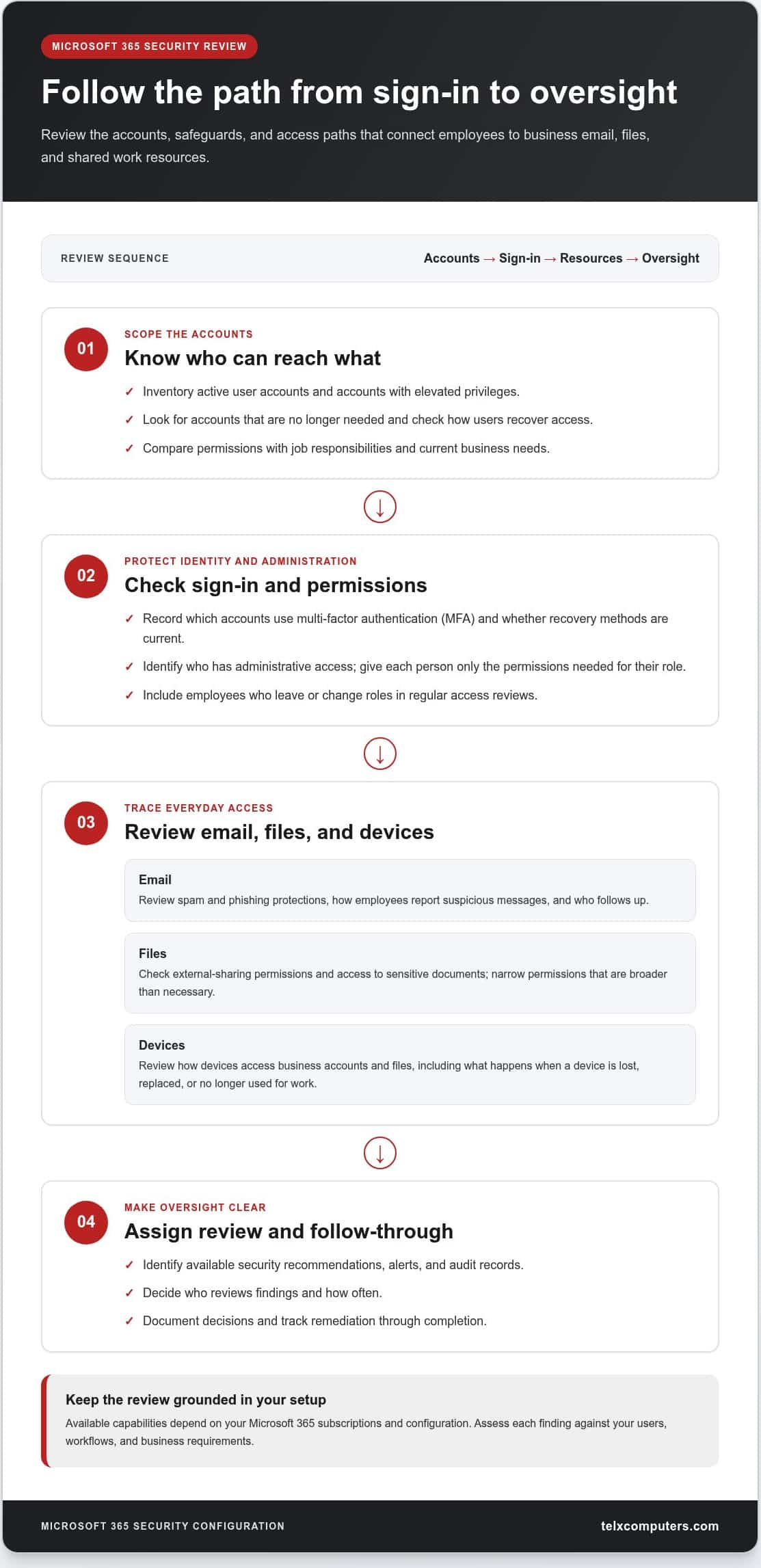
Start with an inventory of active user accounts and accounts with elevated privileges. Look for accounts that are no longer needed, and review how users recover access if they lose a sign-in method. Multi-factor authentication (MFA) adds a verification step beyond a password, so a stolen password alone may not be enough to sign in. Least-privilege access means giving each person only the permissions needed for their role.
Record which accounts use MFA, whether recovery methods are current, and who has administrative access. Compare permissions with job responsibilities, and remove or adjust access that no longer serves a business need. Include account changes for employees who leave or move to a different role in the organization’s regular access review.
Which email, file-sharing, and device settings deserve attention?
- Email: Review spam and phishing protections, how employees report suspicious messages, and who follows up. Make the reporting process easy to find so employees know what to do when a message looks unusual.
- Files: Check external sharing permissions and access to sensitive business documents. Compare permissions with the work being done, and narrow access that is broader than necessary.
- Devices: Review how devices access business accounts and files. Consider which endpoint controls apply to your environment and how access is handled when a device is lost, replaced, or no longer used for work.
- Oversight: Identify available security recommendations, alerts, and audit records. Assign an owner to review findings, document decisions, and track remediation to completion.
Layered security helps limit the effect of a weakness in any one control. For a reference point, compare your review with the CISA security configuration baselines. Use them as guidance, then assess how each recommendation fits your own workflows and risks.
What should be reviewed in Microsoft 365 security tools?
Identify the dashboards, recommendations, alerts, and audit records available in your tenant, then decide who reviews them and how often. Capabilities depend on licensing and configuration, so include the organization’s subscriptions in your review. For each finding, record what you observed, what action you took, and why a recommendation was deferred. That record gives the next review a useful starting point.
Telx Computers connects these checks with broader managed IT and security operations through managed IT support.
How to assess a Microsoft 365 setup and prioritize security improvements
A useful assessment turns settings into decisions. For Microsoft 365 security configuration in Fort Lauderdale, inventory users, administrator roles, authentication controls, sharing settings, available alerts, and the workflows that depend on them. Then compare the current setup with business needs: who can access sensitive information, what could be affected if an account were compromised, and who responds to security findings?
What should a Microsoft 365 security review document?
Capture observed settings and supporting evidence, such as account permissions or file-sharing configurations. Do not store passwords, recovery codes, or unnecessary sensitive information in assessment notes. Record relevant subscriptions, connected systems, and critical workflows because they can affect which changes are available or practical. Name an owner for alerts and findings so review work does not stall between teams.
How can teams prioritize findings without disrupting work?
Prioritize findings by business impact, degree of exposure, and the effort required to address them. An account with broad access to sensitive files may need attention before a lower-impact configuration refinement. Even a high-priority change, however, needs a rollout plan that accounts for affected roles and workflows.
Use a working table to connect each finding to evidence and a practical next step. These suggested priorities are starting points, not a security score or proof of compliance.
| Control area | Review question | Evidence to capture | Suggested priority |
|---|---|---|---|
| Accounts and access | Are active accounts appropriate, and is administrative access limited to people who need it? | Account and role inventory; authentication settings observed | High if a former user retains access or an account has unnecessary privileges |
| Sensitive files | Who can access or share important business information? | Relevant sharing settings and access permissions | High if access is broader than the business purpose requires |
| Alerts and ownership | Who reviews security alerts and decides what action to take? | Available alert records; named review owner and response process | High if important findings lack an accountable owner |
| Workflow-related settings | Could a proposed change disrupt a critical task or integration? | Dependencies, affected users, and planned test | Plan before rollout when business operations may be affected |
How can a business validate that changes worked?
Apply changes in manageable stages. After each meaningful change, test access for relevant user roles and confirm essential workflows still function. Review available sign-in, audit, or alert evidence using the tools supported by your tenant. Record the result, action owner, status, validation method, and follow-up date. Document exceptions with a review date as well. A completed change is a point-in-time result, not a reason to stop reviewing the setup.
A practical rollout checklist for Microsoft 365 security configuration
A disciplined rollout turns review findings into controlled changes, with clear ownership and a way to confirm each adjustment works. For Microsoft 365 security configuration in Fort Lauderdale, align technical steps with the business workflows and employees they affect. Avoid changing several controls at once if doing so would make it difficult to identify the cause of an access or usability issue.
What should happen before configuration changes begin?
Before making changes, document current settings, administrator access, important workflows, and relevant integrations. Agree on priorities and assign an owner to each action. Business leaders can identify critical operations, internal IT can provide user and system context, and managed IT support can coordinate configuration work and testing.
Choose a suitable change window and tell affected employees what may change, when to expect it, and where to report access problems. For sign-in updates, explain new steps in plain language before rollout. Plan how to test affected accounts and workflows, and establish a rollback or recovery approach in case a change disrupts work.
How should teams implement and test security changes?
Use a sequence that keeps decisions traceable and addresses higher-exposure findings first:
- Inventory: Record relevant accounts, settings, workflows, and dependencies.
- Review: Compare the current configuration with business needs and available controls.
- Prioritize: Decide which findings need attention first based on exposure and business impact.
- Plan: Assign owners, set timing, and prepare employee communications and recovery steps.
- Change and test: Apply settings in a controlled order, then test representative user roles, email handling, file access, and required workflows.
- Document: Record outcomes, exceptions, and follow-up actions.
If testing reveals unexpected access changes or usability problems, pause the rollout, investigate, and resolve the issue before closing the task. Consider a change complete only after you have checked both its intended effect and its impact on essential work.
What records make future reviews more effective?
Maintain a concise record of settings reviewed, changes made, test results, exceptions, responsible owners, and relevant subscription or integration dependencies. Microsoft 365 tenants do not all have the same features or setup, so note the environment your review covers. Set review triggers for staff or business changes and significant security events to keep the record useful as the organization evolves.
Telx Computers provides managed IT support to connect configuration work with broader IT needs.
Ongoing Microsoft 365 security support for Fort Lauderdale businesses
Security settings need periodic review because people, workflows, connected systems, subscriptions, and platform features can change. An account that made sense for a former role may retain access it no longer needs, while a new workflow may introduce different sharing or sign-in requirements. For businesses in Fort Lauderdale, ongoing oversight keeps Microsoft 365 configuration connected to the way the organization operates.
What should a recurring security review cover?
Revisit active accounts, administrator roles, authentication controls, file-sharing practices, and ownership of security alerts. Consider what has changed since the last review, including staff departures or role changes, new business processes, subscription changes, and connected systems. Record open items, assign an owner to each, and document the next action. Set review timing around the organization’s needs and meaningful changes instead of treating a one-time configuration as permanent.
How can local managed IT support help maintain security?
Microsoft 365 settings are one part of a broader IT environment. Managed IT support can connect configuration reviews with help desk needs, network security, and day-to-day operations, helping teams consider how proposed changes affect employees and business workflows. Telx Computers provides managed IT services, network security, cybersecurity audits, email security, and help desk support for businesses, with local coverage that includes Fort Lauderdale, Miami, and Aventura.
This coordinated approach gives business leaders and internal IT a clearer way to track findings and follow up. It also connects security work to operational priorities, rather than leaving settings, alerts, and user changes as separate tasks without clear ownership.
Learn more about Telx IT services in Fort Lauderdale and how local support can fit into your broader IT plan.
Make Microsoft 365 security an ongoing business practice
Strong Microsoft 365 security starts with understanding who can access accounts and information, then prioritizing improvements by business impact. A clear rollout plan helps teams make changes carefully, test important workflows, and record decisions. Regular reviews keep configuration aligned as staff, business needs, and available features change.
For businesses seeking Microsoft 365 security configuration in Fort Lauderdale, ongoing support connects settings with broader IT and security priorities. Telx Computers provides managed IT services with fixed-price recurring plans and 24/7 help desk support. This gives your team a consistent way to manage IT needs as they evolve.
Ready to plan your Microsoft 365 security review? Request an IT quote from Telx Computers.
Frequently Asked Questions
What should a Microsoft 365 security configuration include?
A sound configuration review should cover account access, administrator permissions, sign-in protections, email safeguards, file-sharing settings, devices, and security alerts. Start by identifying who can access business resources and whether that access matches each person’s role. Then check how suspicious messages are handled, how sensitive files are shared, and who reviews alerts. The right Microsoft 365 security configuration in Fort Lauderdale depends on your organization’s users, workflows, subscriptions, and existing setup.
Is Microsoft 365 secure by default for a business?
Microsoft 365 includes security capabilities, but a business still needs to review its settings and decide how to use the controls available in its environment. Default settings may not reflect your access requirements, file-sharing practices, or internal responsibilities. For example, a business may need to decide which employees can share files externally and who should hold administrative privileges. Review your actual tenant rather than assuming the default setup provides the right level of protection.
How do I secure Microsoft 365 email and user accounts?
Begin by reviewing active accounts, limiting administrator access to appropriate roles, and enabling available multi-factor authentication. MFA adds a verification step beyond a password. For email, review spam and phishing protections and establish a clear process for employees to report suspicious messages. Check account recovery methods and file access connected to user accounts, too. Test changes against business workflows so stronger controls do not unexpectedly block legitimate work.
Can a managed IT provider configure Microsoft 365 security?
A managed IT provider can help review security settings, prioritize changes, and coordinate configuration work with wider IT operations. Microsoft 365 security configuration in Fort Lauderdale works best when it accounts for the organization’s users, workflows, and available features. Telx Computers provides managed IT services, network security, cybersecurity audits, email security, and help desk support for businesses in Fort Lauderdale, Miami, and Aventura. The goal is to connect configuration decisions with ongoing business and security needs.
How often should a business review Microsoft 365 security settings?
Review settings periodically and whenever meaningful changes affect users, workflows, connected systems, or subscriptions. A new employee, a role change, or a departing staff member may require access updates. A new business process may also change how teams share information. Assign someone to track open findings and follow-up actions, then set review timing based on your organization’s needs. Regular oversight helps keep settings aligned with how the business operates.
Does Microsoft 365 security depend on the subscription plan?
Yes. The security features available to an organization can depend on its Microsoft 365 subscription and tenant configuration. Do not assume every business has the same tools, dashboards, or controls. As part of a review, document the subscriptions in use and identify the capabilities available in that environment before planning changes around them. This helps keep recommendations practical and aligned with the organization’s setup.
What should a business do after a Microsoft 365 security review?
Turn the findings into an action plan. Prioritize issues by potential business impact and exposure, assign an owner to each change, and plan how to communicate relevant sign-in or access updates. Test important user roles and workflows after making changes, then document results, exceptions, and follow-up dates. Revisit open items as staff, business processes, or security needs change.