





28 Aug Small Business Disaster Recovery: The Ultimate Guide
Ninety percent of small businesses that can’t resume operations within five days of a disaster will fail within a year. It’s a sobering reality that often keeps South Florida business owners awake during hurricane season. You’ve likely felt that knot in your stomach when thinking about a ransomware attack or a sudden server failure. While many believe a simple backup is enough, true resilience requires a comprehensive disaster recovery plan for small business operations. You understand that your data is your lifeblood, and the thought of losing it all isn’t just a technical worry; it’s a direct threat to your legacy.
We’re here to replace that anxiety with a sense of total stability. This guide shows you how to build a resilient strategy that protects your organization from data loss, costly downtime, and modern cyber threats. We’ll clear up the common confusion between simple backups and full disaster recovery while providing a clear roadmap for business continuity. From minimizing downtime to ensuring regulatory compliance, you’ll learn how to transform your IT infrastructure into a secure, silent engine that powers your success even during a crisis.
Key Takeaways
- Learn the critical difference between technical disaster recovery and broad business continuity to ensure your operations never skip a beat.
- Master technical metrics like Recovery Time Objective (RTO) and Recovery Point Objective (RPO) to set clear expectations for data restoration.
- Identify regional threats like South Florida hurricanes alongside internal risks like human error to build a comprehensive defense strategy.
- Follow a step-by-step roadmap to build a robust disaster recovery plan for small business that prioritizes your most critical assets.
- Discover how proactive server monitoring and managed IT services act as a vigilant guardian, catching potential failures before they lead to downtime.
What is a Disaster Recovery Plan for Small Business?
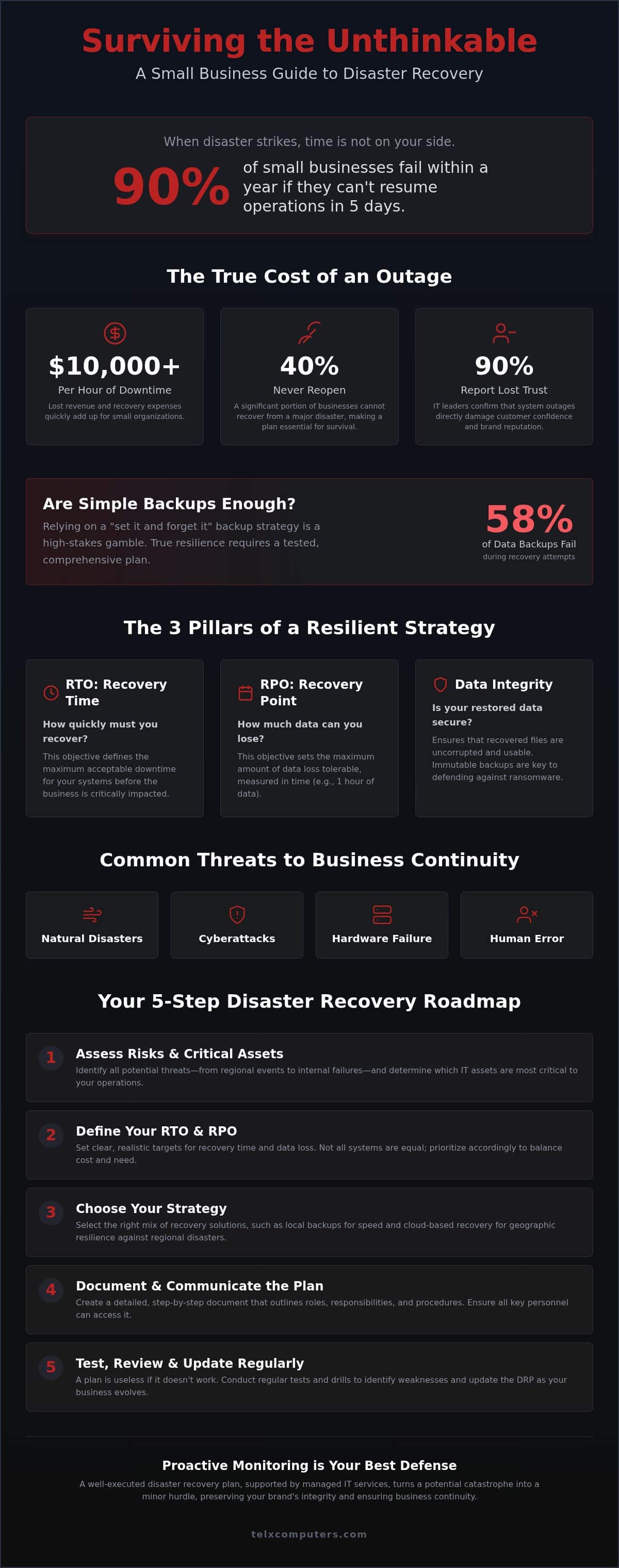
A Disaster recovery plan (DRP) is far more than just a digital insurance policy. It’s a documented, step-by-step process designed to restore your critical IT systems after a crisis strikes. Whether it’s a hardware failure, a cyberattack, or a natural event, your DRP serves as the technical playbook that ensures your business stays operational. Relying on a simple “set it and forget it” backup strategy is no longer enough in a world where 58% of data backups fail during recovery. A modern disaster recovery plan for small business must be proactive, tested, and ready for immediate deployment.
DRP vs. Business Continuity: Why You Need Both
While people often use these terms interchangeably, they serve distinct functions. Business Continuity Planning (BCP) is your broad operational strategy. It answers questions like: “Where will staff work if the office is flooded?” or “How do we handle customer calls?” In contrast, your DRP is the technical backbone. It focuses on the granular steps required to get your servers back online and your data accessible. During a regional outage, your BCP keeps the business moving while your DRP restores the technology that powers it. This integrated approach ensures that your team and your tech work in perfect harmony.
The High Cost of Downtime for Small Organizations
Downtime isn’t just an IT headache; it’s a massive financial drain. For a small organization, a single hour of system downtime can cost over $10,000 in lost revenue and recovery expenses. Beyond the immediate hit to your bank account, you have to account for hidden costs like lost employee productivity and missed sales opportunities that never return. According to industry data, 40% of businesses do not reopen after a major disaster, making rapid recovery a matter of survival rather than just convenience. Implementing proactive server monitoring acts as your first line of defense, catching issues before they escalate into expensive outages.
Maintaining customer trust is perhaps the most valuable benefit of a solid DRP. When your systems go down, your reputation is on the line. In fact, 90% of IT leaders report that outages have directly reduced customer trust. By ensuring your doors stay open when your competitors are struggling, you position your brand as a reliable partner. This level of stability isn’t just about technology; it’s about the peace of mind that comes from knowing you’re protected by an expert guardian. A well-executed disaster recovery plan for small business turns a potential catastrophe into a minor hurdle, preserving your brand’s integrity.
The Core Technical Pillars: RTO, RPO, and Data Integrity
A robust disaster recovery plan for small business relies on two critical metrics: Recovery Time Objective (RTO) and Recovery Point Objective (RPO). These aren’t just technical jargon; they define how your business survives a crisis. RTO measures how quickly you need to be back up and running before the financial damage becomes terminal. RPO, on the other hand, determines how much data you can afford to lose between backups. If your RPO is 24 hours, you’re essentially saying you’re comfortable losing a full day’s worth of work. Setting these targets correctly is the first step toward true operational stability.
Data integrity is the third pillar of a secure infrastructure. It ensures that when you hit the restore button, the files are actually usable and uncorrupted. Modern threats like ransomware often target backups first, which is why immutable backups, data that cannot be changed or deleted for a set period, are essential. Implementing these safeguards provides the peace of mind that your last line of defense is truly secure. If you’re unsure where your current RTO stands, our team can help you calculate your recovery needs to build a more resilient future.
Setting Realistic RTO and RPO Targets
Not every application requires the same recovery speed. Your customer-facing website and transaction database likely need a much lower RTO than your archived emails. You must prioritize critical assets to balance the cost of speed with business necessity. While zero downtime sounds appealing, it’s often cost-prohibitive for smaller firms. We help you find the sweet spot where rapid recovery meets fiscal responsibility, ensuring your most vital operations resume first. For a deeper look at how this fits into your overall strategy, you can explore Ready.gov business preparedness resources.
Cloud-Based Recovery vs. Local Backups
A hybrid approach is the gold standard for modern infrastructure. Local backups offer speed for minor file restores, while cloud computing solutions provide the ultimate safety net for catastrophic site failures. Virtualization allows us to spin up a digital twin of your server in the cloud, often reducing recovery times by up to 70% compared to traditional hardware restores. This technological edge ensures that even if your physical office is inaccessible, your business remains open in the digital space. By blending local speed with cloud security, you create a redundant system that is always one step ahead of potential threats.
Identifying Modern Threats: From Hurricanes to Ransomware
A comprehensive disaster recovery plan for small business must account for a spectrum of risks that threaten operational continuity. While we often think of dramatic events, the reality is frequently more mundane. Hardware failure remains a constant threat as components age and wear down over time. Implementing strict hardware lifecycle management ensures you replace aging equipment before it becomes a liability. However, technical failure is often secondary to human error. Mistakes made by employees, such as accidental deletions or falling for phishing schemes, are the leading cause of data loss. Your plan must include both technical safeguards and proactive monitoring to catch these errors before they spiral into a crisis.
South Florida Specifics: Preparing for Hurricane Season
Hurricane season in Miami and Fort Lauderdale isn’t just about wind; it’s about the intense humidity and erratic power grid that follow. Power surges can destroy hardware instantly, while high humidity levels in a non-climate-controlled office can lead to rapid equipment degradation. Moving critical infrastructure to the cloud provides a layer of regional resilience that physical servers simply can’t match. Relying on it support in Miami ensures you have a strategic ally on the ground for rapid response. We also recommend redundant internet connectivity, such as satellite or cellular failover, to maintain operations when local infrastructure is compromised.
Ransomware: The Disaster That Targets Your Backups
Malware has transformed into a targeted strike against your ability to recover. Modern attackers know that backups are your lifeline, so they design software to crawl your network and corrupt or delete those files first. This makes traditional local backups a secondary defense at best. To secure your future, your disaster recovery plan for small business must incorporate immutable cloud storage. This technology creates a digital vault where data cannot be altered or deleted for a set period. Integrating robust ransomware protection into your strategy ensures that even the most aggressive encryption attempts cannot touch your recovery points.
Building Your Step-by-Step Disaster Recovery Roadmap
Creating a disaster recovery plan for small business isn’t a one-time administrative task; it’s the development of a living roadmap. This document ensures that when a crisis occurs, your team doesn’t waste precious minutes debating what to do next. You need a structured approach that moves from identifying risks to documenting specific restoration steps. A well-organized plan replaces chaos with a sequence of high-speed, logical actions. By following these five essential steps, you transform your IT infrastructure from a point of vulnerability into a fortress of reliability.
- Step 1: Conduct a Business Impact Analysis (BIA). Determine which systems are vital for daily operations and which can wait.
- Step 2: Inventory Your Assets. Catalog all hardware, software licenses, and vendor contact information in a single, accessible location.
- Step 3: Appoint a Disaster Czar. Designate a single point of contact who has the authority to lead the recovery effort and coordinate with your IT partners.
- Step 4: Establish a Communication Plan. Create clear protocols for notifying employees, clients, and stakeholders about the status of your services.
- Step 5: Document the Restoration Process. Write out the technical steps for restoring data and systems so clearly that they can be executed under high pressure.
Conducting a Simple Business Impact Analysis
Your BIA is the foundation of your entire strategy. It helps you identify your “crown jewels,” the data and applications that are absolutely essential for your business to function. You must also map dependencies to understand how different systems rely on each other. For instance, if your CRM requires a specific database to run, both must be prioritized equally. Utilizing server monitoring allows you to identify high-traffic critical nodes and ensure they receive the highest level of protection in your plan.
Testing and Updating Your Plan Regularly
A plan that sits on a shelf for two years is a liability, not an asset. Your technology and staff change, and your recovery strategy must evolve alongside them. We recommend a “Paper Test” every quarter where your team walks through the plan to find logical gaps. At least once a year, conduct a “Full Simulation” to verify that your backups actually restore within your RTO. Statistics show that businesses with a tested plan are 2.5 times more likely to recover quickly from a disaster. If you’re ready to build a roadmap that actually works, get an instant quote for a customized recovery strategy today.
The Strategic Ally: How Managed IT Services Simplify Recovery
Small businesses often struggle with DIY disaster recovery because it requires a level of constant vigilance that most owners simply can’t maintain. While you’re focused on serving clients and growing your brand, technical details like backup verification and server patches can easily slip through the cracks. This is where a managed IT partner steps in to act as your expert guardian. By outsourcing these complexities, you gain access to enterprise-grade tools and 24/7 proactive monitoring that stops disasters before they start. We don’t just wait for things to break; we actively scan for vulnerabilities to ensure your disaster recovery plan for small business is always ready for action.
Relying on a strategic ally replaces technical anxiety with a sense of total stability. Instead of worrying about whether your data is secure, you can rely on a team that treats your infrastructure as their own. This partnership model ensures that your technology remains a silent engine behind your success, rather than a source of constant stress. With a professional team managing your recovery strategy, you can face hurricane season or cyber threats with the confidence that your business is protected by a vigilant, forward-thinking entity.
Unlimited Support and Rapid Response
The value of a localized IT partner becomes clear the moment a crisis hits. Whether you’re in Miami, NYC, or LA, having a local team ready to deploy provides a level of security that remote-only services can’t match. Utilizing it outsourcing services gives you an entire department of specialists for the cost of a single employee. This model provides predictable budgeting through fixed-rate plans, making high-tier recovery infrastructure accessible to organizations of any size. You won’t have to worry about surprise fees during a recovery effort; our priority is getting you back to work as quickly as possible.
Getting Started: Your Free IT Strategy Session
Building a resilient future starts with understanding your current vulnerabilities. Every successful disaster recovery plan for small business begins with a comprehensive cybersecurity audit to identify gaps in your defense. We specialize in customizing recovery strategies for specific industries, including legal and healthcare, where data compliance is non-negotiable. This personalized approach ensures your plan meets both your operational needs and industry regulations. Don’t wait for a disaster to test your limits. Take the first step toward peace of mind and get an instant quote for your recovery plan today.
Building Your Foundation for Uninterrupted Growth
Resilience isn’t about hoping for the best; it’s about being prepared for the worst. You’ve seen how a robust disaster recovery plan for small business transforms technical vulnerabilities into operational strengths. By defining your RTO and RPO targets, you set the stage for a recovery that’s measured in minutes rather than days. Whether you’re facing South Florida’s hurricane season or the persistent threat of ransomware, your strategy must be proactive and tested. You’ve built a legacy; now it’s time to protect it with a partner who understands that your success depends on stability.
We’re here to serve as your expert guardian. Our approach combines 24/7 proactive server monitoring with fixed-price unlimited IT support to ensure your costs remain predictable while your security stays absolute. With our local Miami and Fort Lauderdale rapid response team, you’re never alone when a crisis strikes. We’re ready to help you turn technical anxiety into a competitive advantage so you can focus on what matters most: growing your business. Secure your business future with a custom disaster recovery plan.
Your journey toward total peace of mind starts today. We’re proud to be the silent engine behind your success, ensuring your doors stay open no matter what challenges come your way.
Frequently Asked Questions
Is a cloud backup the same as a disaster recovery plan?
A cloud backup is only one component of a comprehensive disaster recovery plan for small business operations. While backups store your data, a DRP outlines the specific technical steps to restore your systems and resume work. Without a documented plan, you might have the data but lack the infrastructure or instructions to access it quickly during a South Florida power outage or server failure. A true DRP ensures your business remains functional, not just your files.
How often should a small business test its disaster recovery plan?
We recommend testing your plan at least once every quarter to ensure your strategy remains effective as your team and technology evolve. A “paper test” can identify logical gaps in your communication chain, while a full simulation verifies that your backups actually restore within your required timeframes. Regular testing turns your recovery strategy into a reliable asset rather than an outdated document that fails when you need it most. It’s the best way to maintain total peace of mind.
What is the most common cause of IT disasters for small businesses?
Human error remains the leading cause of data loss and system downtime for organizations in Miami and Fort Lauderdale. This includes everything from accidental file deletions to employees clicking on malicious phishing links that trigger ransomware attacks. While natural events like hurricanes are high-profile risks, your daily defense must focus on proactive monitoring and technical safeguards that catch simple mistakes before they escalate into full-scale digital disasters. Vigilant oversight is your first line of defense.
How much does it cost to implement a professional disaster recovery plan?
The cost of a professional disaster recovery plan for small business depends on the complexity of your network and the volume of data you need to protect. Many owners overestimate the investment, but modern managed services make enterprise-grade recovery accessible through predictable, fixed-price unlimited service plans. This approach allows you to secure your infrastructure without the anxiety of surprise fees, making professional protection a sustainable part of your operational budget while ensuring you have an expert guardian on your side.
Can a small business survive a major data loss without a plan?
Survival is statistically unlikely for businesses that suffer a major data loss without a recovery strategy. Research indicates that 90% of small businesses failing to resume operations within five days of a disaster will fail within a year. Without a plan, the financial burden of downtime and the loss of customer trust often become insurmountable. Investing in a documented roadmap is the only way to ensure your doors stay open after a crisis strikes your infrastructure.
What is the difference between RTO and RPO in simple terms?
Think of Recovery Time Objective (RTO) as a stopwatch that measures how quickly you need to be back online before the financial damage becomes terminal. Recovery Point Objective (RPO) is more like a calendar that determines how much work you can afford to lose between backups. If your RPO is four hours, your backups must run at least that often. Balancing these two metrics ensures your recovery speed matches your operational needs while keeping your most critical data secure.
Do I need a disaster recovery plan if I use Microsoft 365 or Google Workspace?
Yes, relying solely on cloud providers like Microsoft or Google is a common mistake that leaves your data vulnerable. While these platforms ensure the service itself is available, they don’t provide comprehensive protection against accidental deletion or ransomware encryption within your specific account. A dedicated recovery strategy ensures you have independent, immutable copies of your cloud data, allowing you to restore your business environment even if your primary cloud account is compromised or becomes inaccessible.
What should be the first thing I do if my business is hit by ransomware?
Your first priority is to isolate the infected systems by disconnecting them from the internet and your internal network to prevent the malware from spreading. Once you’ve contained the threat, contact your IT partner immediately to begin the restoration process from your secure, off-site backups. Never attempt to pay the ransom or run decryption tools yourself, as these actions can often lead to permanent data loss and further complicate the recovery effort. Let your expert guardian handle the technical restoration.