





21 Jun IT Support Ticket Best Practices: Optimizing Your Business Technology Workflow
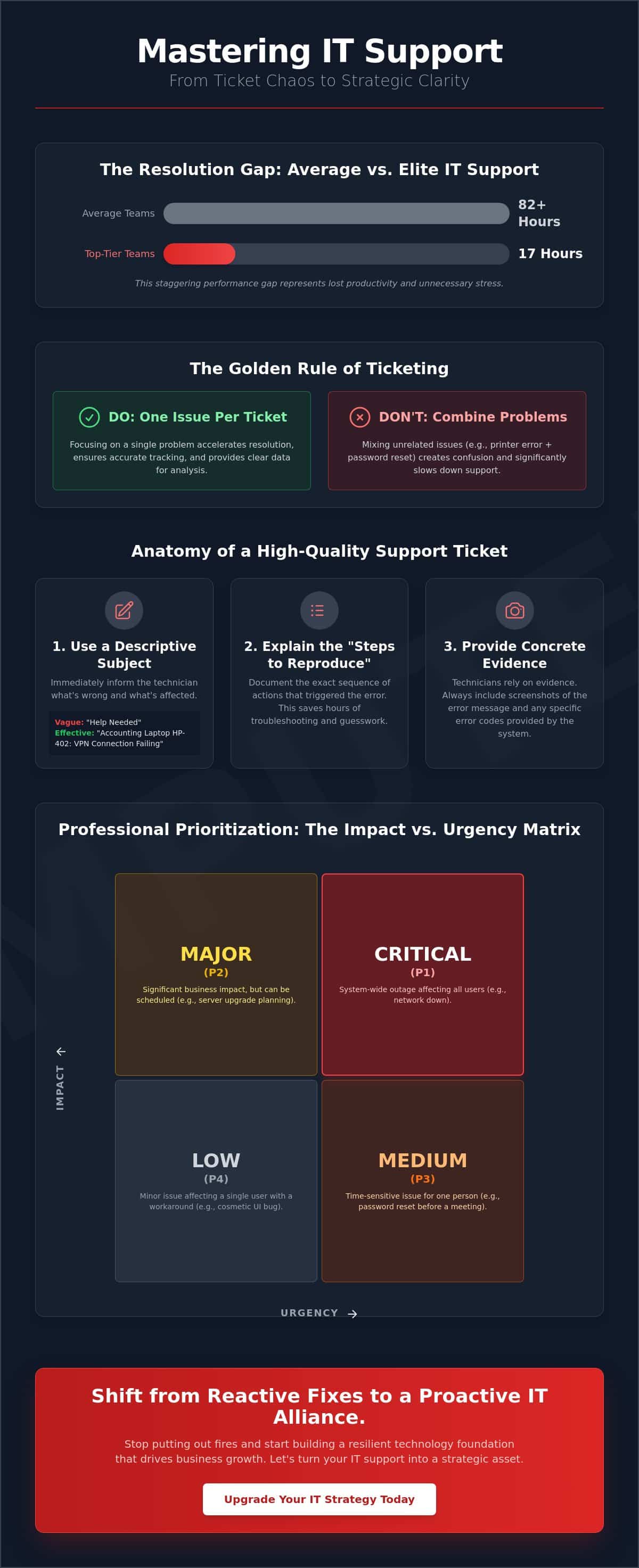
Did you know the average IT support ticket takes over 82 hours to resolve, while top-tier teams finish the same task in just 17? This staggering gap represents lost productivity and unnecessary stress for your employees. You’ve likely felt the frustration of watching a critical issue vanish into a “black hole” with no status updates in sight. It’s a common pain point, but your technology shouldn’t hold your team back. By mastering IT support ticket best practices, you can bridge this performance gap and turn your support workflow into a streamlined asset. We understand that you need reliability and a clear path to resolution, not just another ticket number. This article provides the strategic framework needed to reduce downtime, improve transparency, and use data to stop repetitive problems for good. We’ll examine how modern automation and clear communication protocols ensure your technology finally serves your long-term business goals.
Key Takeaways
- Understand how a structured ticketing system acts as the central nervous system for your business technology, ensuring no request is ever lost or ignored.
- Learn the essential IT support ticket best practices for your team, including the “Golden Rule” of one issue per ticket to accelerate resolution times.
- Discover how professional classification and the “Impact vs. Urgency” matrix help prioritize critical technical issues through clear Service Level Agreements.
- Explore the “Shift Left” methodology to empower employees with self-service knowledge bases that resolve recurring tech frustrations before they escalate.
- Shift from a reactive “pay-per-ticket” mindset to a proactive strategic alliance that incentivizes root-cause resolution and long-term business growth.
The Strategic Role of IT Support Ticketing in Business Growth
Think of an IT support ticket as more than just a digital post-it note. It’s a formal record of a service request or technical incident that ensures accountability within your organization. In a high-functioning professional environment, an issue tracking system acts as the central nervous system for your business technology. It provides a structured way to capture, prioritize, and resolve issues without anything falling through the cracks. By implementing IT support ticket best practices, you shift your focus from simply “fixing things” to managing a strategic asset that drives efficiency.
To better understand this concept, watch this helpful video:
Many business owners view ticketing as a cost of doing business. We view it as a goldmine of business intelligence. When you track every incident, you gain clear visibility into the health of your operations. This data allows you to identify which systems are underperforming and which processes are slowing your team down. When we integrate these records with proactive server monitoring, we can spot hardware trends before they result in expensive downtime. It turns your IT department from a reactive help desk into a forward-thinking guardian of your productivity.
Beyond the Help Desk: Tickets as Data
Recurring tickets are often symptoms of a larger problem. If your team frequently submits tickets for slow application performance, it’s a clear signal that you might need infrastructure upgrades or a hardware refresh. IT support ticket best practices involve analyzing these patterns to justify IT budget allocations. Instead of guessing where to spend money, you use historical data to drive procurement and disaster recovery planning. It’s about making informed decisions that facilitate future scaling rather than just putting out fires.
Centralizing Communication in a Hybrid Work Era
Relying on email for tech support is a recipe for disaster. Requests get lost in crowded inboxes, and email lacks the security of an authenticated portal. For businesses with teams distributed across Miami, NYC, or LA, a centralized ticketing system serves as the single source of truth. It maintains high security standards and ensures that every team member, regardless of location, receives the same level of professional care. This centralized approach eliminates confusion and ensures that technical issues never derail your business momentum.
End-User Best Practices: How to Submit a High-Quality Ticket
Efficiency isn’t just a backend responsibility. It begins the moment an employee hits “submit” and provides the necessary context for a fast resolution. Following IT support ticket best practices ensures your request doesn’t stall in the diagnostic phase where time is often wasted on back-and-forth emails. The “Golden Rule” of ticketing is simple: one issue per ticket. Combining multiple unrelated problems, like a printer error and a forgotten password, creates confusion. It makes it impossible for a technician to close the ticket until every minor detail is resolved, which skews your data and slows down help desk performance.
The subject line of your ticket is your first opportunity to speed up the process. Vague titles like “Help” or “Broken” tell a technician nothing about the severity or the system involved. A high-quality ticket uses a descriptive subject line that identifies the specific asset and the immediate impact. For example, “Accounting Laptop HP-402: VPN Connection Failing” allows for immediate triage. It tells the support team exactly what is wrong and which department is affected before they even open the message.
Technicians rely on evidence to solve problems quickly. Always include screenshots of the error and the specific error codes provided by the system. Detailed descriptions save hours of troubleshooting. When you explain the “Steps to Reproduce” the error, you allow the technician to skip the guesswork. If clicking a specific button in your CRM triggers a crash, document that exact sequence. This level of detail is a cornerstone of professional IT support and helps in prioritizing IT requests effectively across the entire organization.
The Anatomy of a Perfect IT Support Ticket
The perfect ticket contains the user’s name, the asset ID, a clear error description, and an honest urgency level. “My computer is broken” is the most expensive sentence in business IT because it forces a technician to spend 30 minutes just figuring out what is actually wrong. Always note exactly when the issue started and if you recently installed new software or changed hardware settings. This context allows the guardian of your systems to identify if the problem is isolated or part of a larger network trend.
Categorizing Urgency vs. Importance
Not every issue is an emergency, and mislabeling requests can lead to “alert fatigue” for support teams. Teaching employees to distinguish between “I cannot work” (Urgency) and “I have a question about a software feature” (Importance) is vital for a healthy workflow. Proper triage speeds up the entire queue for everyone in the company. For high-priority emergencies that require an expert touch, our managed IT support service provides the rapid, reliable response needed to keep your business running without interruption.
Backend Excellence: Classification, Prioritization, and SLAs
Professional IT management relies on a structured backend where every request is measured against established standards. At the heart of this process is the Service Level Agreement (SLA). This isn’t just a document; it’s a commitment that defines exactly how quickly we respond to and resolve your technical issues. Adhering to IT support ticket best practices at the backend allows us to maintain a technological edge while providing a personalized, client-centric experience. We ensure that your business-critical operations never stall due to preventable delays.
We categorize every ticket using an “Impact vs. Urgency” matrix. Impact measures how many users or systems are affected, while urgency determines how quickly the business needs a fix. A server outage affecting an entire department is a high-priority event that triggers immediate action. Conversely, a single user requesting a software update is handled within a standard timeframe. This logical approach prevents the “loudest voice” from dictating the queue and ensures resources go where they’re needed most. These benchmarks are similar to the rigorous Gwinnett County IT Service Desk Standards, which emphasize clear documentation and strict KPI adherence for organizational success.
Measuring performance requires tracking two distinct metrics: Initial Response Time and Time to Resolution. The initial response acknowledges your issue and begins the diagnostic phase. However, the time to resolution is the metric that truly impacts your bottom line. High-performing teams aim to minimize both, ensuring you aren’t just heard but helped quickly. Implementing IT support ticket best practices means constantly refining these workflows to reduce friction for your employees.
Defining Realistic SLAs for Modern Enterprises
A “one size fits all” SLA often fails because it ignores the unique pressures of different industries. A retail business might prioritize POS systems, while IT services for law firms must account for strict court deadlines and document security. We tailor our response times to match your specific business-critical functions, ensuring that payroll, sales, or patient records always receive the highest level of protection and priority.
The Escalation Framework
Not every issue can be solved by a generalist. Our escalation framework defines clear criteria for moving a ticket from Level 1 support to Level 3 senior engineering or security specialists. This prevents tickets from sitting in “Level 1 limbo” where progress stalls. Criteria for escalation typically include:
- The need for advanced network configuration or security clearance.
- Issues that threaten the integrity of core data backups.
- Technical problems that persist beyond the initial resolution window.
Your Technical Account Manager oversees these complex ticket chains, acting as a vigilant guardian to ensure that even the most difficult technical challenges move toward a streamlined resolution.
Proactive Prevention: Knowledge Bases and Self-Service
True efficiency isn’t just about resolving tickets faster; it’s about preventing them from being created in the first place. This strategy is known as “Shift Left,” which involves moving the resolution of technical issues as close to the end-user as possible. By implementing these IT support ticket best practices, your organization empowers employees to handle minor hurdles independently. This shift frees up your IT team to focus on high-level strategic projects that actually grow your business instead of being bogged down by repetitive password resets or printer configurations. It’s about building a culture of competence where technology is an enabler rather than a barrier.
A modern ticketing portal does more than just receive requests. It uses automated “Suggested Solutions” to scan a user’s input and offer immediate answers from your knowledge base before they even hit the submit button. Data indicates that AI-powered automation can reduce ticket backlogs by 35% to 55% by addressing common queries instantly. This proactive approach significantly reduces ticket volume and minimizes downtime. It transforms your IT infrastructure from a reactive help desk into a self-sustaining ecosystem where common problems find instant solutions without human intervention.
Building a Living Knowledge Base
A knowledge base shouldn’t be a dusty digital manual. It must be a living document fed by the real-world experiences of your technicians. We require our experts to document the “Root Cause” for every closed ticket; this becomes the foundation for new articles. We focus on curating “Top 10” guides for frequent tasks like VPN setup or mobile email synchronization. To make these resources even more accessible, we often use video walkthroughs. These visual aids remove the intimidating nature of technical jargon and provide clear, step-by-step guidance that anyone can follow, regardless of their technical background.
The Link Between Ticketing and Cybersecurity
Your ticketing system is also a vital layer of your defense strategy. Patterns in ticket submissions often reveal a coordinated phishing attempt or a developing ransomware threat before it spreads throughout the network. If multiple employees report similar “suspicious” pop-ups or login requests, our team can identify the trend and intervene immediately. We treat “Security Incident” tickets with a separate, high-speed workflow to ensure immediate isolation of potential threats. Training your staff to report even minor anomalies via the ticketing system turns every employee into a vigilant guardian of your network security.
If you’re ready to transform your tech support into a proactive business asset, explore our managed IT support service today.
The Telx Computers Approach: Strategic Alliance Over Simple Ticketing
The traditional “pay-per-ticket” model creates a fundamental conflict of interest between a business and its IT provider. In that outdated system, the provider earns more when your technology fails more often. We reject this reactive approach. By shifting to a fixed-price, unlimited support philosophy, we align our success entirely with yours. This model incentivizes us to implement IT support ticket best practices that prioritize permanent resolutions over temporary patches. When your systems run flawlessly, our partnership thrives, creating a true strategic alliance where we act as the silent engine behind your growth.
Positioning ourselves as an extension of your internal team allows us to move beyond the role of a distant help desk. We take ownership of your technical landscape, ensuring that every digital asset serves your specific business goals. This level of integration replaces technical anxiety with a sense of stability and peace of mind. You aren’t just another ticket in a queue; you’re a partner whose operational continuity is our highest priority.
Why Unlimited Support Changes Everything
In a fixed-price model, every support ticket represents a cost for the managed service provider. This reality drives proactive innovation. Instead of waiting for you to report a problem, our “Expert Guardian” mindset pushes us to identify and resolve issues before they impact your workflow. We might detect a failing hard drive or a security vulnerability through our monitoring systems and fix it before an employee even realizes there was a threat. This proactive stance is the ultimate evolution of IT support ticket best practices, as it focuses on eliminating the root cause of technical friction entirely.
Local Expertise in South Florida and Beyond
Technology may be global, but business remains deeply local. Having a dedicated presence in Miami and Fort Lauderdale, as well as NYC and LA, allows us to combine 24/7 remote support with rapid on-site response. While many issues can be resolved through our authenticated portal, some hardware failures require a physical hand. Our technicians understand the specific regional business community and the unique challenges you face. We maintain a personalized, client-centric touch that software-only solutions simply cannot replicate. You get the benefit of global technical standards delivered by a team that knows your office, your staff, and your goals.
Stop settling for a support model that benefits from your downtime. It’s time to experience a partnership rooted in reliability and proactive care. Get an instant quote for unlimited IT support and see how a strategic alliance can optimize your business technology workflow.
Empower Your Business Through Strategic IT Management
Effective technology management goes beyond simply closing tickets; it’s about building a foundation for sustainable growth. By implementing IT support ticket best practices, you’ve learned how to turn daily technical hurdles into valuable business intelligence. From establishing clear end-user protocols to leveraging proactive knowledge bases, every step in this process reduces downtime and boosts employee productivity. You now have the framework to shift from a reactive “break-fix” mindset to a proactive strategy that keeps your systems ahead of potential threats.
At Telx Computers, we act as your expert guardian, ensuring your technology never becomes a bottleneck. Our model provides 24/7 Help Desk Support and Fixed-Price Unlimited Service Plans that align our success with yours. Whether you need remote assistance or Rapid On-Site Response in Miami, NYC, and LA, we’re ready to serve as a seamless extension of your team. Experience the Telx difference with unlimited, fixed-price IT support today. We’re committed to providing the stability and peace of mind your organization deserves to reach its full potential.
Frequently Asked Questions
What is the most important information to include in an IT support ticket?
The most critical details include a descriptive subject line, your specific asset ID, and any error codes generated during the incident. Technicians need to know exactly what you were doing when the issue occurred to skip the guesswork. Providing screenshots and a clear “steps to reproduce” section allows the support team to begin working on a fix immediately. Following these IT support ticket best practices ensures your request is handled with precision from the very start.
How long should I expect to wait for a response to my IT ticket?
Response times vary based on your specific Service Level Agreement, but industry data shows an average first response time of 7 hours and 4 minutes. In a professional managed environment, critical issues receive attention much faster. While the average ticket resolution takes roughly 82 hours across all industries, top performing teams resolve issues in just 17 hours. Your SLA defines these expectations clearly to ensure your business operations remain stable and predictable.
Why do IT companies prefer tickets over phone calls or emails?
Ticketing systems provide a single source of truth that phone calls and emails simply can’t match. They create a searchable, auditable trail of communication that ensures no request is ever lost or ignored. This structure allows for better security through authenticated portals and gives technicians the historical data they need to solve complex problems. It transforms a series of disconnected fixes into a cohesive, data driven support strategy for your entire organization.
What is an SLA, and why does my business need one?
An SLA, or Service Level Agreement, is a formal contract that defines the expected response and resolution times for your technical requests. Your business needs one to ensure accountability and to protect your operations from open ended downtime. It provides peace of mind by setting clear benchmarks for performance. Without an SLA, you have no guarantee of when an issue will be fixed, which can lead to productivity losses and operational uncertainty.
How are IT tickets prioritized in a professional environment?
Support teams prioritize tickets using an “Impact vs. Urgency” matrix to determine which issues require immediate intervention. Impact refers to how many users or systems are affected, while urgency measures how quickly the business needs a resolution. For instance, a server outage affecting an entire department always takes precedence over a single user’s software question. This logical approach ensures that critical business functions are restored first, maintaining overall organizational efficiency.
Can I track the status of my IT support ticket in real-time?
Yes, you can track every update to your request through an authenticated ticketing portal. This transparency eliminates the “black hole” feeling often associated with traditional IT support. You’ll see which technician is assigned to your case, the current status, and any progress notes. Real time tracking keeps your team informed and allows for better planning, as you’ll know exactly where your request stands in the resolution process at any given time.
What happens if my IT issue is an emergency and cannot wait for a ticket?
Critical emergencies that threaten your entire operation bypass the standard queue through a dedicated high priority workflow. While IT support ticket best practices encourage formal documentation, we understand that total system outages require an immediate response. In these cases, a ticket is often created by the technician on your behalf to document the fix while they work. This ensures you receive the rapid on-site or remote assistance needed to minimize downtime.
How does a ticketing system help with long-term IT budgeting?
Ticketing data reveals recurring hardware failures and software issues that signal the need for strategic upgrades. By analyzing ticket volume and root causes over time, you can identify which assets are costing you the most in lost productivity. This business intelligence allows you to move from reactive spending to data driven procurement. It helps you justify IT budget allocations by showing exactly where investments will have the greatest impact on your long term operational success.