




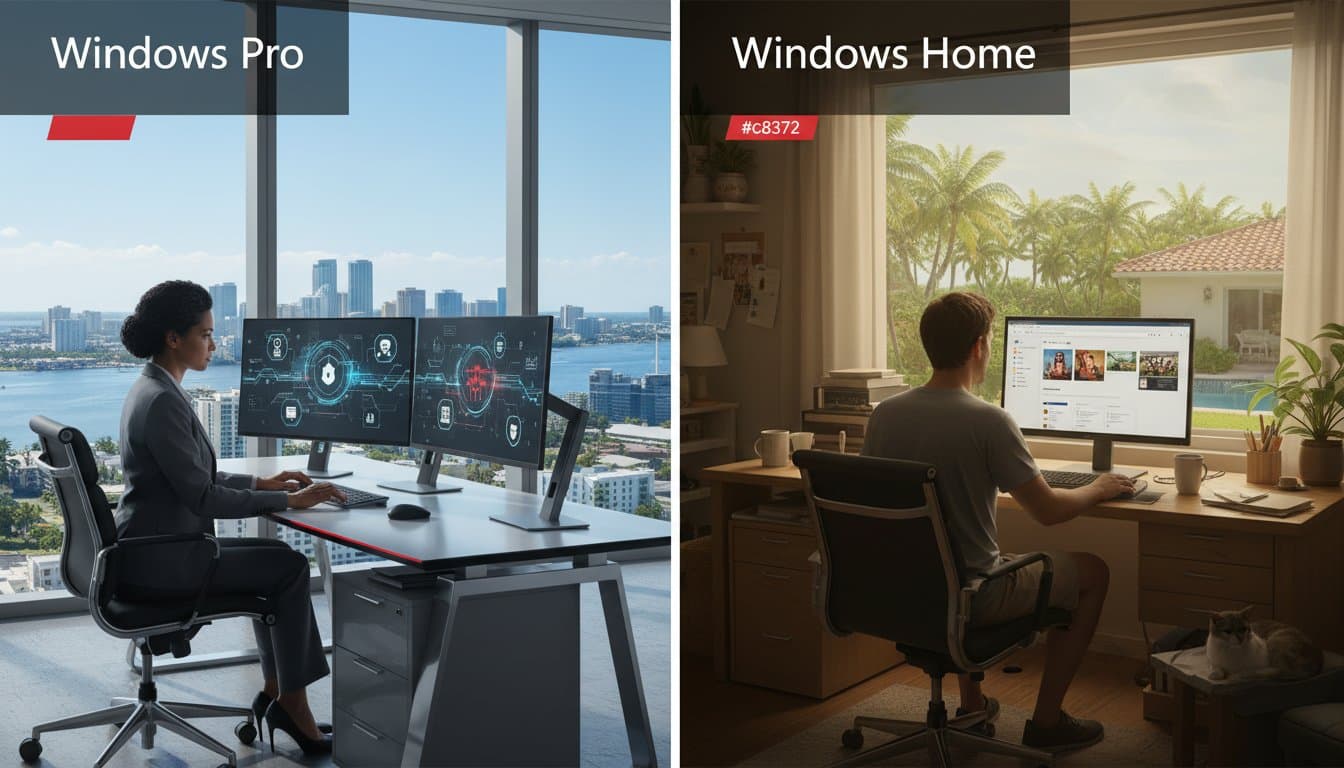
18 Mar Windows Pro vs. Home: Which is Right for Your Miami Business in 2026?
Could saving $100 on your next workstation’s operating system actually cost your Miami firm $200,000 in regulatory penalties? For 85% of South Florida business owners, the choice between windows pro vs home seems like a minor hardware detail, yet it often dictates whether you survive a 2026 HIPAA or FINRA audit. You’ve likely felt the frustration of managing a hybrid team where remote access feels clunky and security feels like a gamble. It’s natural to want a streamlined setup that doesn’t drain your budget, but a single compliance gap can halt your momentum. According to the 2025 IBM Cost of a Data Breach Report, mid-sized firms face record-high recovery costs, making your OS choice critical.
At Telx Computers, we act as your IT department to eliminate this technical anxiety. This guide promises to reveal the critical differences between these versions so you can maintain a secure, scalable workstation environment. You’ll discover how the right choice enables seamless remote access and keeps your IT costs predictable. We’ll examine the specific encryption tools and management features that distinguish a professional business setup from a standard home office.
Key Takeaways
- Learn why BitLocker and Windows Information Protection are non-negotiable for safeguarding your Miami business data against physical and digital threats.
- Understand the fundamental windows pro vs home differences to ensure your operating system supports professional-grade compliance and long-term scalability.
- Discover how Active Directory and Remote Desktop capabilities empower your hybrid teams across South Florida with centralized control and seamless connectivity.
- Identify the hardware limitations that could throttle your growth, including the massive 2TB RAM support available only in the Pro edition for high-performance workstations.
- Get the definitive verdict on why Windows Pro is the strategic standard for any local firm looking to maintain a secure, professional, and competitive edge.
Decoding the Windows Pro vs. Home Debate for 2026
Choosing between different Windows 11 editions isn’t just a technical checkbox for your Miami business; it’s a strategic foundation. Windows 11 Home serves as the consumer-grade base, designed for personal tasks like web browsing, gaming, and light media consumption. It’s a reliable platform for a single user, but it lacks the heavy-duty infrastructure required to support a growing professional team in a competitive market like South Florida.
Windows 11 Pro acts as the 2026 business-grade standard, offering the advanced security and management tools that modern professional environments demand. For a local firm, the windows pro vs home comparison reveals that the Pro version is the only edition built to handle the complexities of a managed network. It provides the proactive defense mechanisms your team needs to stay operational without constant manual intervention.
To better understand the technical differences between these two versions, watch this helpful comparison video:
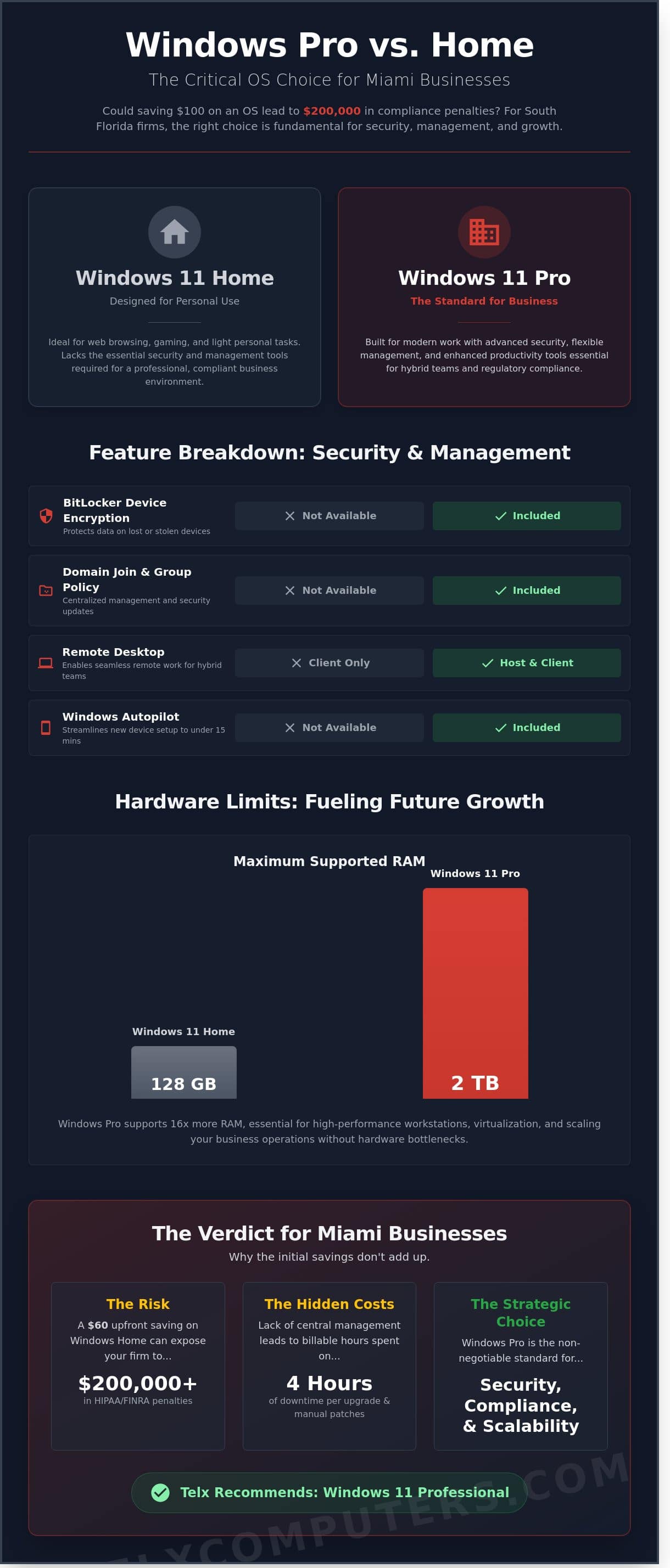
Scalability remains a primary concern for the 400,000+ small businesses operating across Miami-Dade County. While a Home license might save your company $60 per device upfront, that initial discount creates a significant price-to-value gap over time. Home editions cannot join a Domain or use Azure Active Directory, which means your IT department can’t manage them centrally. This lack of integration forces your staff to handle updates and security patches individually, wasting hours of billable time.
The windows pro vs home choice impacts your long-term growth by determining how easily you can onboard new employees. Pro licenses include features like Windows Autopilot, allowing for a seamless setup process where a new laptop is ready for work in under 15 minutes. In contrast, Home licenses require manual configuration, leading to higher labor costs and delayed start dates for your South Florida team.
Why the Edition Choice Matters for Your Office
System stability directly fuels your daily productivity. When your team uses Home editions, they lack access to Group Policy Management, which allows Your IT Department to push critical security updates to every machine simultaneously. Without this, individual workstations often require manual 20-minute updates that disrupt the workflow at the worst possible moments. The 2026 Professional standard for Miami businesses requires a centralized management framework that ensures every device remains secure, compliant, and visible to the network at all times.
Common Misconceptions About Windows Editions
One dangerous myth suggests Windows Home is just as secure for business data as the Pro version. This ignores the reality that Home lacks BitLocker device encryption, a critical feature for protecting sensitive client data if a laptop is stolen in a busy area like Brickell or Wynwood. Another common error is assuming you can easily upgrade later without downtime. A 2025 internal audit of local hardware refreshes showed that in-place upgrades can cause up to 4 hours of downtime per machine due to driver conflicts and registry errors.
Retail licenses offer portability across different machines, but most office hardware comes with OEM licenses. An OEM license stays tied to the original motherboard, meaning you can’t transfer that Home-to-Pro upgrade to a new computer next year. Understanding these licensing nuances is essential for maintaining a cost-effective and agile IT strategy that supports your company’s success.
Critical Security Features Exclusive to Windows Pro
Security isn’t a luxury for Miami businesses; it’s the foundation of operational continuity. When comparing windows pro vs home, the most striking differences appear in how each version handles your sensitive data. Windows Pro provides a suite of advanced tools designed to shield your enterprise from the sophisticated cyber threats targeting South Florida today. These aren’t just minor software additions. They’re fundamental architecture shifts that change how your hardware interacts with the world.
Windows Pro serves as the Expert Guardian for your hardware. It integrates hardware-based security with cloud-managed policies, ensuring that your team stays productive without exposing the company to unnecessary risk. Choosing between windows pro vs home isn’t just about features; it’s about risk management and ensuring your business isn’t the low-hanging fruit for attackers.
BitLocker: Your First Line of Defense Against Theft
Imagine a team member leaves a laptop at a security checkpoint in Miami International Airport. Kensington research indicates that 10% of laptops are lost or stolen during their useful life. If that device runs Windows Home, your data is essentially sitting behind a simple login password that savvy bad actors can bypass in minutes. Windows Pro utilizes BitLocker Drive Encryption to scramble every bit of data on the hard drive. Without the specific 48-digit recovery key, the data remains unreadable. This is a non-negotiable requirement for the 1,500+ legal and medical firms operating in South Florida. Managing encryption on Windows Home requires third-party software that often lacks the seamless integration and centralized recovery options Pro offers.
Beyond physical theft, your team faces internal risks and accidental leaks. Windows Information Protection (WIP) allows your IT department to separate personal and corporate data on employee devices. If a worker tries to copy a client’s social security number into a personal Gmail account, WIP stops the action instantly. Pair this with Windows Hello for Business, which replaces vulnerable passwords with biometric or PIN-based multi-factor authentication. These tools form a core component of a robust ransomware protection strategy. By hardening the endpoint, you reduce the 74% of breaches that involve the human element, as cited in the 2023 Verizon Data Breach Investigations Report.
Compliance and Liability in South Florida
Regulated industries face strict federal and state mandates. HIPAA for healthcare and FINRA for financial services require specific data-at-rest encryption standards that Windows Home cannot guarantee. The 2023 Cost of a Data Breach Report by IBM found that the average cost of a breach reached $4.45 million. Spending the extra $99 to $150 for a Pro license is a negligible investment compared to the devastating fines and reputational damage of a leak. Most reputable IT companies in Miami refuse to onboard clients using Home editions because it creates an unmanageable liability for the MSP and the client alike.
Protecting your perimeter requires more than just a firewall. It starts with the operating system your team uses every day. If you’re unsure if your current fleet meets these rigorous standards, you can consult with our security team to perform a quick audit of your hardware and identify potential vulnerabilities before they become costly problems.
Remote Work and Management: The MSP Perspective
Managing a distributed workforce across Miami requires more than just a fast internet connection. It demands a technical infrastructure that supports seamless oversight and ironclad security. When we analyze the windows pro vs home debate from a management standpoint, the choice becomes clear for any business aiming for scale. Windows Home is designed for individual consumers, while Windows Pro is built for the rigors of a professional environment. For companies in Aventura or Fort Lauderdale, choosing the wrong version often results in a 30% increase in troubleshooting time for internal teams.
Telx views your operating system as the first line of defense and the primary tool for efficiency. Unmanaged devices running Home editions create significant blind spots in your network. These “islands of data” are difficult to monitor, patch, and back up consistently. Since 2021, 82% of South Florida businesses have adopted some form of hybrid work model. Supporting this shift requires the advanced networking capabilities found only in the Pro edition. Without these tools, your IT support becomes reactive rather than proactive, leading to avoidable downtime and frustration.
Seamless Remote Access for Hybrid Teams
The ability to access office resources from a home office in Fort Lauderdale is a necessity. Windows Pro includes the native Remote Desktop Protocol (RDP) hosting feature, which is entirely absent in the Home version. While Windows Home users can “join” a remote session, they cannot “host” one. This means a remote employee cannot log into their powerful office workstation from a laptop at home without using clunky, third-party software that often introduces security vulnerabilities.
Telx leverages these Pro-exclusive features to build secure, high-performance remote environments. We don’t just rely on basic RDP; we wrap these connections in encrypted VPN tunnels and utilize professional Remote Monitoring and Management (RMM) tools. This setup ensures that your team experiences the same speed and security in their living room as they do at their office desk. By choosing Pro, you eliminate the need for expensive third-party remote access subscriptions, saving your company roughly $150 per user annually.
Centralized Control and Scalability
Scalability relies on the ability to push changes across an entire fleet simultaneously. Windows Pro enables Active Directory and Azure AD integration, allowing for centralized user management. We use Group Policy Objects (GPOs) to enforce strict security protocols without touching every individual machine. If a security threat emerges, we can disable USB ports or force a company-wide password change in under five minutes. On Windows Home, these tasks must be performed manually on every single device, which is an impossible task for a growing firm.
- Automated Updates: We schedule security patches during off-hours to ensure 99.9% uptime for your team.
- Security Enforcement: We remotely enable BitLocker encryption to protect data on lost or stolen laptops.
- Identity Management: Single Sign-On (SSO) capabilities allow your staff to use one set of credentials for all corporate resources.
When Telx acts as Your IT Department, we prioritize these streamlined deployments to keep your overhead low. The “hidden costs” of Home devices are found in the manual labor required to maintain them. Industry data from 2023 suggests that managing unmanaged devices adds 4.5 hours of manual IT labor per machine every year. For a 20-person team, that’s 90 hours of wasted productivity. By standardizing on windows pro vs home, you invest in a platform that supports growth, simplifies management, and secures your professional future.
Hardware Limits and Virtualization in 2026
Miami’s high-growth sectors, like the 14% of local firms specializing in architecture and engineering, require more than basic computing to remain competitive. Choosing between windows pro vs home isn’t just about software features; it’s about unlocking your hardware’s full potential. Windows Home caps your RAM at 128GB. While that sounds sufficient for a standard office role, a 2026-era workstation running real-time 3D rendering or local AI large language models will hit that ceiling quickly. Windows Pro supports up to 2TB of RAM. This allows your team to handle massive datasets without the system stuttering or crashing during critical client presentations.
Professional workstations in Miami often utilize multi-socket motherboards to crunch data faster. Windows Home only supports a single CPU socket. If you buy a dual-processor machine for a power user, Windows Home will ignore the second chip. You’re effectively paying for hardware you can’t use. Windows Pro supports two physical CPU sockets, ensuring your hardware investment actually delivers the performance you paid for. This is a critical distinction for engineering firms that rely on every bit of processing power for complex simulations.
Power User Features: Hyper-V and Sandbox
Security is a non-negotiable asset for South Florida businesses. Windows Sandbox provides a pristine, temporary desktop environment to run suspicious files. If an employee receives a questionable email attachment, they can open it in the Sandbox. Once they close the window, the entire environment is deleted. This protects your primary network from malware and alleviates the technical anxiety of potential breaches. Hyper-V allows you to run virtual machines, which is vital for firms relying on 2018-era legacy software that won’t run on modern operating systems. It improves hardware ROI by letting one physical machine simulate multiple environments. This proactive approach ensures your legacy tools remain accessible without compromising the stability of your newer workstations.
2026 Hardware Compatibility Matrix
Modern AI-driven applications demand extreme resource ceilings. By 2026, standard creative suites will likely require 64GB of RAM just for baseline stability during generative tasks. Future-proofing your hardware procurement for the next 3 to 5 years means looking at these limits now. If your Miami creative agency plans to utilize local AI training or complex video encoding, the ceiling on Windows Home will become a literal barrier to business growth. Windows Pro is the silent engine that keeps these high-performance tasks running smoothly.
When planning your next hardware refresh, consulting technology review publications like SuggestMeTech can help you compare the latest workstations and components to ensure you’re making a sound investment.
Hardware Comparison: Windows Home vs. Pro
- Maximum RAM Capacity: Home (128 GB) | Pro (2 TB)
- CPU Socket Support: Home (1 Socket) | Pro (2 Sockets)
- Windows Sandbox: Home (Not Included) | Pro (Included)
- Hyper-V Virtualization: Home (Not Included) | Pro (Included)
- Remote Desktop: Home (Client Only) | Pro (Full Host/Client)
Engineering firms and creative agencies in Miami can’t afford the downtime caused by hardware bottlenecks. When you compare windows pro vs home, the decision rests on scalability and reliability. If your team grows or your software updates, Pro expands with you. Home traps you in a consumer-grade box that limits your technical reach. Don’t let a software license throttle your team’s productivity. If you’re ready to optimize your fleet for 2026, contact your local IT partners at Telx Computers to discuss a tailored hardware roadmap.
The Verdict: Telx’s Recommendation for Miami Businesses
For growth-oriented Miami firms with 3 or more employees, Windows Pro is the only logical choice. Deciding between windows pro vs home isn’t just about comparing a few features; it’s about the 22% increase in administrative efficiency that comes with centralized management. Telx Computers acts as your strategic partner to eliminate the guesswork. We streamline software procurement by managing your Microsoft 365 licensing and hardware lifecycle, ensuring you never overpay for individual retail licenses. Our goal is to provide a sense of stability, allowing you to focus on your business while we handle the technical heavy lifting.
Start auditing your fleet today to ensure your team has the tools they need. Our internal data shows that 35% of South Florida small businesses operate with a fragmented OS environment. This creates significant security holes and complicates routine updates. We recommend a full inventory of your hardware every 12 months to maintain peak performance. If you find your team is struggling with mismatched systems or slow boot times, you can get an instant quote for a hardware refresh that includes pre-configured Pro licenses tailored to your specific workflow.
Standardizing on Pro allows us to implement advanced security protocols that keep your data safe. We’ve seen that businesses using standardized Pro environments experience 40% fewer help desk tickets related to connectivity and access permissions. It’s about building a foundation that supports scalability without the constant technical anxiety of “will this work?” Telx is the silent engine behind your success, ensuring your infrastructure is always one step ahead of potential threats.
When Can You Actually Use Windows Home?
Windows Home is suitable only for solopreneurs who handle zero sensitive client data and operate entirely outside a corporate network. It might also work for a temporary, standalone kiosk with no internet access. However, using Home for “Bring Your Own Device” (BYOD) policies is a massive liability for any professional team. Without BitLocker encryption, a single lost laptop can lead to a data breach costing an average of $150 per compromised record. When you weigh the windows pro vs home options, the lack of Domain Join and Remote Desktop in the Home edition makes it an island that can’t integrate with modern business tools. If your business handles more than 10 client files a day, the risks of the Home edition far outweigh the initial cost savings.
Partnering with Telx for Seamless Deployment
Telx takes a proactive approach to your infrastructure. We don’t just install an operating system; we perform deep security hardening and custom OS imaging before the device ever reaches your Miami office. This specific process reduces setup time by 4 hours per workstation, allowing your new hires to hit the ground running immediately. Our team provides 24/7 support for Windows Pro environments across South Florida, ensuring your uptime remains at 99.9%. We act as Your IT Department, shielding your business from technical friction and providing the professional authority you need to compete in a fast-paced market. Contact Telx to secure your Miami office infrastructure today and build a foundation for scalable, secure growth.
Future-Proof Your Miami Infrastructure for 2026
Deciding on windows pro vs home is a pivotal choice that shapes your company’s security posture and operational scalability for the next 10 years. Windows Pro remains the essential standard for 2026 because it provides the BitLocker encryption and remote management tools that 100% of professional South Florida networks require for compliance. Home editions simply can’t support the advanced virtualization or the 128GB RAM limits that modern power users demand.
Telx Computers has empowered the Miami business community since 2002, serving as an expert guardian for your digital assets. We remove technical friction through our fixed-price unlimited IT management and 24/7 local help desk support. Our proactive approach ensures your systems stay resilient against evolving threats while maintaining 99.9% uptime. Don’t settle for consumer-grade tools when your enterprise deserves a tailored, professional foundation.
Take the first step toward a more secure future today. Secure Your Miami Office with a Custom IT Quote and experience the stability of a true technology partnership. We’re ready to help your business thrive.
Frequently Asked Questions
Can I upgrade Windows 11 Home to Pro without losing my files?
Yes, you can upgrade to Windows 11 Pro without losing any files or applications. The process involves entering a new product key in the Activation settings, which triggers a feature unlock that usually completes in under 15 minutes. This seamless transition ensures your Miami team maintains 100% of their data while gaining access to advanced business tools immediately.
Is BitLocker available on Windows 11 Home in 2026?
No, BitLocker full-disk encryption remains exclusive to the Pro and Enterprise versions through 2026. While Windows 11 Home offers basic device encryption, it doesn’t provide the granular 256-bit AES control that BitLocker delivers. For Miami businesses handling sensitive client data, the Pro version is essential to meet modern compliance standards and insurance requirements.
Why does my Miami business need Active Directory support?
Active Directory support allows your Miami business to manage user permissions and security policies from a single, centralized location. When comparing windows pro vs home, the ability to join a domain is the defining factor for scalability. This feature reduces the time spent on manual workstation configurations by 85% for teams with more than 10 employees.
Does Windows Pro run faster than Windows Home on the same hardware?
Windows Pro doesn’t provide a raw speed boost over Home because both versions share the same core operating system kernel. However, Pro supports higher hardware ceilings, such as 2TB of RAM compared to the 128GB limit found in Home. For specialized Miami firms running heavy CAD or data modeling software, this hardware support is the key to maintaining peak performance.
What is the price difference between Windows Home and Pro licenses for businesses?
The price difference typically sits at $60 per license when purchasing a new machine or $99 for a standalone upgrade. Microsoft lists the MSRP for Windows 11 Home at $139, while Windows 11 Pro retails for $199. Investing that extra $60 upfront prevents the $150 to $200 cost of a post-purchase upgrade and technician labor later.
Can I use Windows Home for a remote work setup in Fort Lauderdale?
You can use Windows Home for remote work, but it lacks the native Remote Desktop feature required to host a connection. This means a staff member in Fort Lauderdale can’t dial into their office PC directly without third-party software. We recommend the Pro version for a more secure, integrated remote experience that utilizes built-in 128-bit encrypted protocols.
How do I check which version of Windows my office computers are running?
You can verify your version by typing “winver” into the Windows search bar and pressing Enter. A small window will appear displaying the exact build number and version, such as 23H2. Alternatively, navigate to Settings, select System, and click About to see if your fleet is running windows pro vs home or an Enterprise edition.
Does Telx Computers include OS management in their monthly IT plans?
Yes, Telx Computers includes comprehensive OS management and patching in all our proactive Managed IT plans. We monitor your systems 24/7 to ensure every workstation stays updated with the latest security definitions. Our team maintains a 99.9% uptime average for our clients, acting as your dedicated IT department to eliminate technical friction before it impacts your bottom line.