





18 Oct 24/7 IT Help Desk in Fort Lauderdale for Business Support
What happens when a system issue stops your team mid-task or disrupts customer service after the workday ends? A 24/7 IT help desk in Fort Lauderdale gives staff a clear way to report problems, but effective support also depends on knowing how remote troubleshooting, after-hours requests, and on-site service work together.
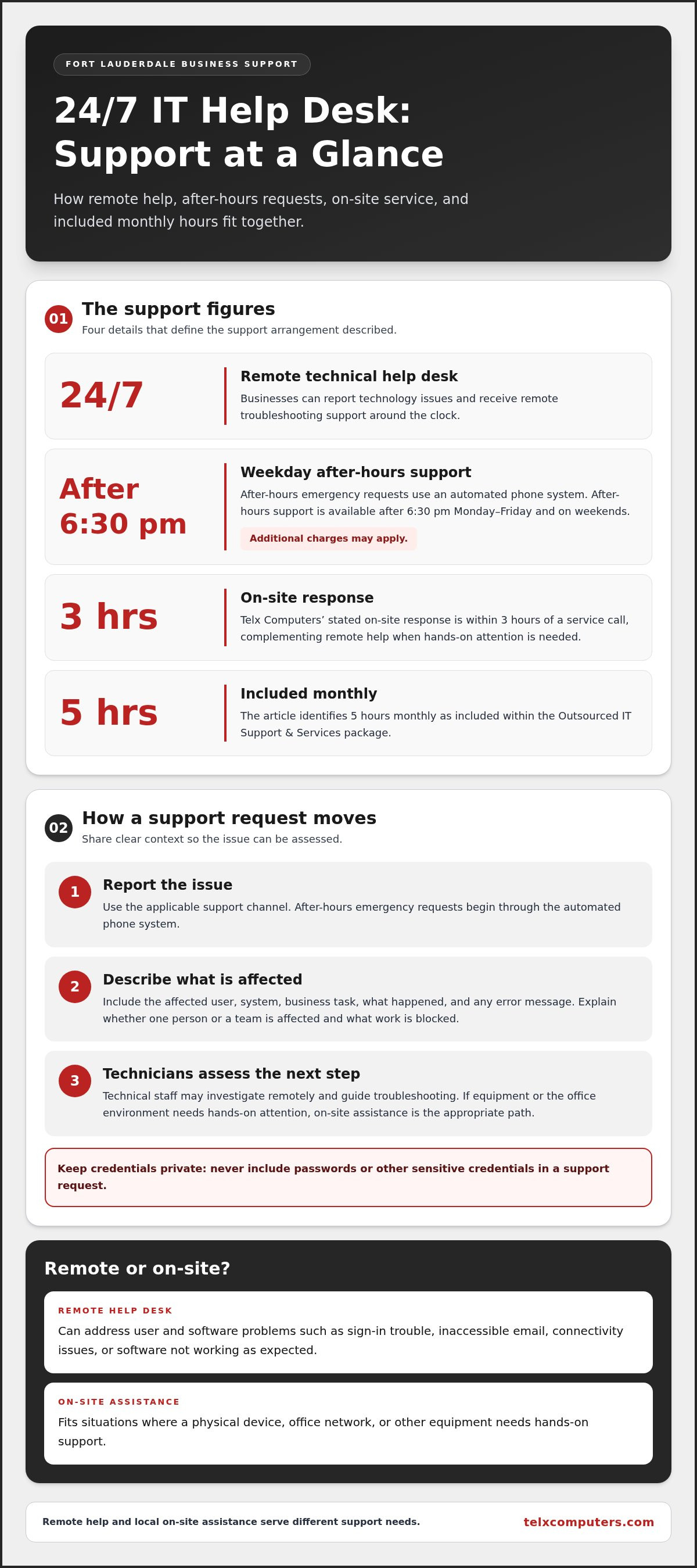
When technology interrupts business, teams need more than a ticket number. Telx Computers provides 24/7 remote technical help desk support to businesses in Fort Lauderdale, Aventura, Miami, and across South Florida. After-hours emergencies use an automated phone system. After hours support is available after 6:30 pm Monday-Friday, and on weekends (additional charges may apply).
This article explains which problems remote support can address, how the after-hours process works, and when local on-site assistance may be needed. Telx Computers’ on-site response within 3 hours of a service call complements remote help. Proactive support also focuses on spotting potential issues, not just responding to individual disruptions. You’ll learn what 5 hours monthly are Included within your Outsourced IT Support & Services package means for your business.
Key Takeaways
- A help desk gives staff a clear route to report technical issues affecting work or customer service.
- Remote troubleshooting and local on-site assistance can work together when a problem needs more than remote support.
- When comparing a 24/7 IT help desk in Fort Lauderdale, review support channels, after-hours procedures, on-site response, and billing terms.
- Prepare a useful support request by noting who is affected, which system is involved, where and when the issue occurred, and its business impact. Never include sensitive credentials.
- Telx Computers’ fixed monthly pricing, unlimited proactive support, and no per-ticket fees can make IT support costs more predictable.
Why Fort Lauderdale Businesses Need a 24/7 IT Help Desk
A locked account can keep an employee from starting a shift. An email outage can delay a customer reply, while a network problem may interrupt access to shared files or business systems. These disruptions can stall work, add pressure to staff, and make routine service harder to deliver. A 24/7 IT help desk in Fort Lauderdale gives employees a channel to report technical problems outside a standard workday. It does not mean every issue will be resolved instantly.
A business IT help desk is a point of contact where users report technology issues and receive guidance or troubleshooting. Round-the-clock support matters because problems don’t always follow office hours. Planned maintenance is different: it is scheduled to update, inspect, or maintain systems. A help desk responds to user needs as they arise, while planned maintenance supports the ongoing health of business technology.
Which business problems can a help desk address?
Common requests include sign-in trouble, inaccessible email, connectivity issues, and software that isn’t working as expected. A remote technician can gather details, guide a user through troubleshooting, and assess whether the issue affects one person or a wider system. That assistance helps staff work toward resuming tasks while the support team determines the next step.
Specific reporting makes troubleshooting more useful. A user who explains what they were trying to do, what happened instead, and which work is blocked gives the support team practical context. For example, “I can’t open the shared scheduling software, and I can’t confirm today’s appointments” is more actionable than “the computer is broken.” Describe the problem, but don’t share passwords or other sensitive credentials.
Why local support matters in Fort Lauderdale
Remote troubleshooting can address many user and software problems, but some situations need in-person attention. A local response option matters when a physical device, office network, or other equipment needs hands-on support. Telx Computers supports businesses in Fort Lauderdale, Aventura, Miami, and across South Florida with remote help desk support and on-site assistance.
Fort Lauderdale businesses operate in a varied commercial environment. Fort Lauderdale’s economy and business environment includes activity across sectors that depend on accessible systems, reliable communications, and responsive customer service. When technology interrupts operations, a defined support path helps employees explain the impact and get the issue assessed. Telx Computers’ Fort Lauderdale IT services connect that local focus with broader South Florida business support.
A consistent support channel helps staff know where to turn, gives technicians context about operational priorities, and can reveal recurring issues that deserve attention. Paired with planned maintenance, that approach supports steadier operations while keeping routine upkeep distinct from urgent user assistance.
What 24/7 IT Help Desk Support Covers, and How It Works
Round-the-clock help desk support gives employees a way to report technical issues beyond the usual workday. Support may involve remote troubleshooting, while problems requiring physical attention follow an on-site process. After-hours emergency requests also have a separate contact procedure. Knowing the difference helps staff understand what to expect and what information to provide.
Telx Computers offers 24/7 Technical Help Desk Support (remote) for businesses in Fort Lauderdale, Aventura, Miami, and across South Florida. Technical staff assess reported issues and guide users through appropriate troubleshooting. Remote assistance can address some workplace technology problems, but it isn’t the right path for every issue. When equipment or the office environment needs hands-on attention, on-site assistance is the appropriate support path.
Remote help desk support for everyday technical issues
A remote support request starts with the user describing what isn’t working and how it affects their responsibilities. An employee may be unable to access a business application needed to prepare a report, or encounter an error while using workplace software. Technical staff can review the details, investigate remotely, and provide troubleshooting guidance. The assessment determines the next step.
To keep the conversation focused, users can explain what they were doing when the issue appeared, whether it affects one person or a team, and which work is delayed. Use approved support channels and never share passwords or other sensitive credentials. Clear details help technicians understand the operational impact and decide whether remote troubleshooting is appropriate.
A useful support journey is straightforward:
- Report the issue through the applicable support channel.
- Describe the affected user, system, and business task, along with any error message.
- Work with technical staff as they assess the problem and provide remote assistance or identify another support path.
After-hours emergency support and its stated terms
After-hours emergency support is separate from the remote help desk process during regular business activity. For emergencies outside the stated hours, the initial contact is handled through an automated phone system. This gives staff a defined way to submit an after-hours emergency request, but it should not be mistaken for a direct answer from a technician or an instant resolution.
After hours support is available after 6:30 pm Monday-Friday, and on weekends (additional charges may apply).
On-site support is a separate option when an issue needs physical attention at the business. Remote troubleshooting and local response serve complementary roles: a technician can assess an issue remotely, while equipment or workplace problems may need an in-person response. To explore how Telx Computers’ remote help desk support fits into a business support approach, consider the issue types, contact paths, and escalation needs your staff encounter.
How to Compare 24/7 IT Help Desk Options in Fort Lauderdale
A useful comparison looks beyond the phrase “24/7 support.” Focus on how users reach the help desk, what happens after hours, whether in-person help is available, and how ongoing support is billed. These details show whether the service model fits your team’s work patterns and customer-facing responsibilities. The table summarizes Telx Computers’ stated terms.
| What to compare | Telx Computers’ stated terms |
|---|---|
| Support hours | 24/7 remote technical help desk support. |
| Remote help desk | Technical staff provide remote assistance for reported business IT issues. |
| After-hours process | Emergency support uses an automated phone system after the stated weekday hours and on weekends. Additional charges may apply. |
| On-site response | On-site response within 3 hours of a service call. |
| Billing model | Fixed monthly cost with unlimited proactive support and no per-ticket fees. |
What to look for in support hours and escalation
Check what “24/7” means in practice. Telx Computers’ 24/7 help desk is remote technical support; after-hours emergency requests follow a separate automated phone process. This distinction helps employees understand how to report an urgent issue outside regular hours rather than assuming a technician answers the phone directly. Clear escalation terms also help managers set expectations when a problem affects customers, deadlines, or multiple employees.
Remote assistance is valuable, but it may not meet every business need. A problem involving physical equipment or a workplace network can call for an on-site response. Telx Computers states: On-site response within 3 hours of a service call. For businesses that rely on in-person operations, compare remote access and local response together rather than reviewing help desk hours alone.
How to understand fixed monthly and package terms
A fixed monthly cost can make support spending more predictable, while unlimited proactive support with no per-ticket fees avoids a separate charge for each support request. Review what the package includes and distinguish proactive support from separately billed emergency support. After-hours terms matter too, since additional charges may apply to emergency requests made through the automated phone system.
5 hours monthly are Included within your Outsourced IT Support & Services package. These hours are the package’s defined monthly allocation for on-site technician support. Consider that allocation alongside unlimited proactive support and the terms that may apply to after-hours emergencies.
When evaluating a 24/7 IT help desk in Fort Lauderdale, compare hours, contact methods, on-site response, and billing together. Map the support path from how staff raise an issue to how it is assessed and what happens if remote assistance isn’t enough.
How Fort Lauderdale Teams Can Prepare for an IT Help Desk Request
A well-prepared support request explains both the symptom and the work it interrupts. Staff don’t need to diagnose the cause. They should share clear observations, identify who or what is affected, and explain the business impact. This context helps the support team assess the issue and choose an appropriate response path.
What information to share when reporting an issue
Keep the report factual and use plain language. Describe what you were doing, what happened, and whether the problem is ongoing or intermittent. Record the affected user, system or device, work location, and when the issue began. Note any error message accurately, without guessing at its technical meaning.
Before submitting a request, use this sequence:
- State the task you were trying to complete and what went wrong.
- Identify the users, system, and location affected, along with when the issue started.
- Explain what work is blocked, delayed, or affecting customers.
- Include relevant observations, such as whether the same problem affects a colleague or another business function.
- Share the details through the appropriate support channel, without including passwords, authentication codes, or other sensitive login information.
For example, “The staff at the front desk can’t access the scheduling system from the Fort Lauderdale office, and we can’t update today’s bookings” gives the support team more context than “the network is down.” If several systems or departments are affected, say so. A wider connectivity problem may need a different assessment from an issue affecting one user. Network IT support in Miami also addresses broader business connectivity needs.
When an issue may need local on-site support
Some symptoms may point to a need for in-person attention, though staff should report what they observe rather than diagnose the cause. Examples include a physical network device that appears damaged or a server that can’t be accessed at the business location. Note where the equipment is, what users see, and whether the problem affects one area or the wider office.
Remote support helps technical staff assess a report, while an on-site response addresses situations that need physical attention. Both paths matter for Fort Lauderdale, Aventura, and Miami teams: some issues can be investigated remotely, while others involve equipment or conditions at the workplace. Telx Computers supports businesses across South Florida with remote help desk support and local assistance.
A clear request helps the support team understand the operational impact without asking staff to make assumptions about what failed. Keep the details concise, protect sensitive account information, and note any change in business impact if the problem spreads. For support tailored to your organization’s needs, connect with Telx Computers about business IT support.
How Telx Computers Supports Fort Lauderdale Businesses Around the Clock
Reliable IT support should do more than respond to individual requests. Telx Computers works with businesses in Miami and South Florida, including Fort Lauderdale and Aventura, through 24/7 remote technical help desk support and managed IT services. This gives teams a defined way to seek technical assistance, while proactive network monitoring keeps attention on business systems as well as individual interruptions.
For a business seeking a 24/7 IT help desk in Fort Lauderdale, support is most useful when day-to-day troubleshooting connects with ongoing IT oversight. Remote help desk support gives users a channel for technical issues, while network monitoring can identify concerns that may warrant attention before they disrupt work. The aim is a coordinated support approach rather than a series of disconnected fixes.
A proactive support partner for South Florida businesses
Proactive monitoring contributes to a broader view of the technology environment. When potential issues receive attention, businesses can make informed decisions about next steps and reduce reliance on purely reactive support. Telx Computers’ managed IT support services bring that ongoing perspective together with help desk assistance, aligning technical support with an organization’s operations and priorities.
Local response matters, too. Remote assistance can address issues without an on-site visit, while some situations call for hands-on attention. Telx Computers provides an on-site response option for South Florida businesses. On-site response within 3 hours of a service call. This complements remote help desk support when an issue needs someone at the business location.
Support costs also need to be understandable. Telx Computers offers fixed monthly pricing with unlimited proactive support and no per-ticket fees. This model helps businesses plan for ongoing IT support without treating every request as a separate ticket charge. The applicable package terms clarify how help desk coverage and proactive services fit together.
Clear next steps to explore help desk support
Consider the work your team depends on, the kinds of IT issues that interrupt it, and whether staff need remote assistance, local on-site support, or both. Those priorities help frame a support discussion around practical needs, such as keeping employees connected to business systems and maintaining continuity for customer-facing work.
Telx Computers offers a free network audit or free estimate on request. To explore local support for your organization, visit the Fort Lauderdale IT services page and request business IT support information. This is a practical next step toward understanding how 24/7 remote help desk support and managed IT services can fit your Fort Lauderdale business.
Build a Support Plan That Keeps Your Team Moving
Technology support works best when it fits the way your business operates. Consider which work is most critical, how staff should report disruptions, and what support path will help your team stay focused. A clear plan can turn an unexpected IT issue from a scramble into an organized next step.
Choosing a 24/7 IT help desk in Fort Lauderdale is an opportunity to align technical support with daily operations and future needs. Start with your priorities, from reducing workflow interruptions to helping employees know where to turn when they need assistance.
Explore support options for your business. Request business IT support information from Telx Computers and start shaping a support approach around your team’s needs.
With a thoughtful plan and a reliable support partner, your staff can move forward with greater confidence.
Frequently Asked Questions
What does a 24/7 IT help desk do for a business?
A business help desk gives employees a channel for assistance with technology problems affecting their work. Staff can report trouble accessing a business application or ask for help understanding an error message. Technical support can assess the issue and guide the next step. A 24/7 IT help desk in Fort Lauderdale provides a remote support option beyond standard business hours.
Does 24/7 IT help desk support mean a live technician answers every call?
No. Round-the-clock remote help desk availability doesn’t mean a live technician answers every call. Telx Computers handles after-hours emergency support through an automated phone system, the stated route for reporting an emergency outside regular hours. The remote help desk and the after-hours emergency process are distinct. Have the issue description and business impact ready so you can clearly explain the request through the applicable channel.
How quickly can Telx Computers provide on-site IT support in Fort Lauderdale?
On-site response within 3 hours of a service call. This gives businesses a clear response term for issues that need physical attention. If a workplace device or network equipment needs an in-person assessment, report its location and what you observe. Include how the issue affects business operations.
Is after-hours IT support available on weekends?
Yes. After hours support is available after 6:30 pm Monday-Friday, and on weekends (additional charges may apply). After-hours emergency support is available through an automated phone system, not a direct live answer to every call. Make sure staff know the reporting process and understand that additional charges may apply for after-hours emergency support.
How much does a 24/7 IT help desk cost?
Telx Computers offers fixed monthly pricing with unlimited proactive support and no per-ticket fees. Businesses can request a free estimate to discuss their support needs and the applicable terms. After-hours emergency support may involve additional charges, so include that possibility in your budgeting considerations.
Does managed IT support include on-site technician hours?
5 hours monthly are Included within your Outsourced IT Support & Services package. This is the package’s defined monthly allocation for on-site technician support. Businesses can factor those hours into planning for work that requires in-person technical attention, while using remote help desk support for issues that can be assessed remotely.
Can a small business in Fort Lauderdale use a 24/7 IT help desk?
Yes. Telx Computers provides managed IT support and help desk services for businesses ranging from small organizations to larger enterprises. A small team can use a help desk as a defined place to report technology problems instead of relying on one employee to troubleshoot every issue. Staff can document disruptions to shared systems and business tasks for technical review.
How can my business get started with Telx Computers?
Start by outlining the systems your team relies on, the support challenges you face, and whether you need remote help, on-site assistance, or both. Telx Computers offers a free network audit or free estimate on request to help frame a discussion around your business’s IT needs. Request business IT support information to take the next step.