





27 Sep Signs You’ve Outgrown Your Current IT Provider in Fort Lauderdale
What if the clearest sign your IT provider no longer fits isn’t one major outage, but the same small problems disrupting work month after month? The signs you’ve outgrown your current IT provider in Fort Lauderdale often include recurring support issues, unresolved tickets, and a provider that responds to incidents but rarely plans ahead. You should be able to get clear answers about security, backups, and system performance, and support that keeps pace as your business changes.
This checklist will help you assess your provider using observable evidence, not frustration alone. Review how issues are resolved, whether risks are monitored and explained, and whether your support plan matches your current operations. Then identify the capabilities you need and compare options, or plan a controlled transition if needed. The goal isn’t to change providers for its own sake. It’s to make an informed decision that supports business continuity and growth.
Key Takeaways
- Spot the Signs you’ve outgrown your current IT provider in Fort Lauderdale by looking for recurring patterns, not one frustrating support interaction.
- Separate documented service or process gaps from assumptions about security and compliance, then identify what needs clarification.
- Compare support access, security, monitoring, backups, and planning with your business’s actual needs and the provider’s written commitments.
- Before considering a switch, review your service terms and confirm who controls key accounts, system documentation, and vendor relationships.
- Use the checklist to decide whether a direct conversation could resolve the gaps or whether a careful provider comparison is the better next step.
Signs You’ve Outgrown Your IT Provider in Fort Lauderdale
Recurring IT problems don’t stay confined to the help desk. An unresolved ticket can interrupt staff workflows, repeated outages can affect customer service, and unclear answers about security or backups can pull leaders away from business priorities. Judge the Signs you’ve outgrown your current IT provider in Fort Lauderdale by looking for patterns over time, not by treating one bad interaction as a final verdict.
Look for tickets that reopen or recur, outages without a documented fix, security practices your team can’t get a clear explanation of, or no discussion of technology needs as the business changes. An unclear explanation doesn’t prove a security failure. It does mean you need better visibility into what’s managed, who is responsible, and what happens next.
Are recurring support delays and repeat problems a warning sign?
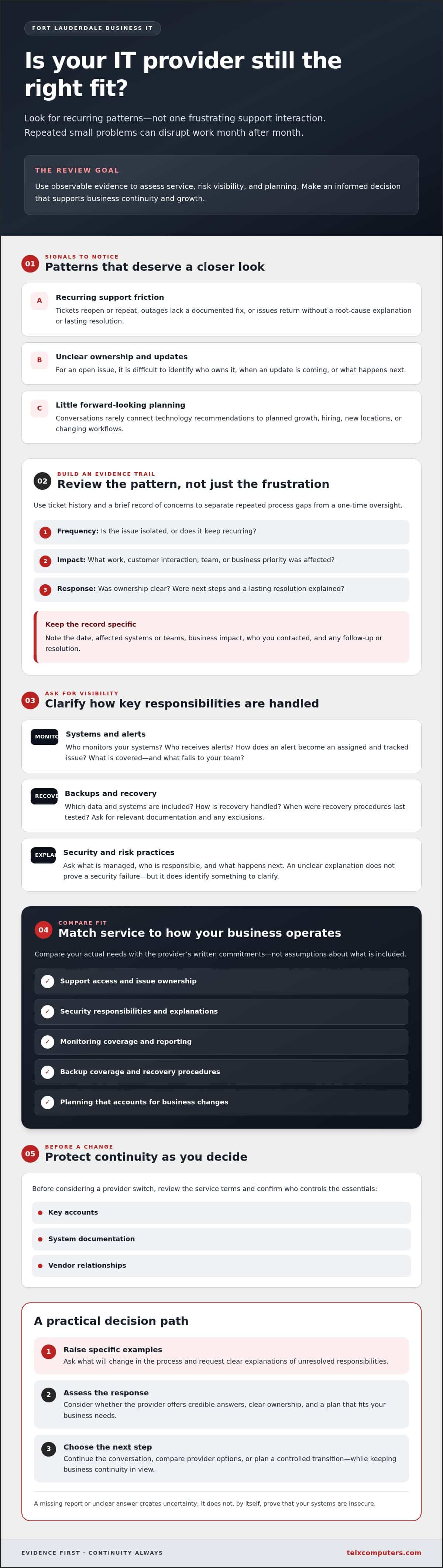
Review your ticket history. For each issue, note when it was reported, how long it took to resolve, whether it returned, and what work it interrupted. A one-off delay may have context. A recurring issue without a root-cause explanation or lasting fix deserves closer attention.
Communication matters, too. For each open issue, can you identify who owns it, when you’ll receive an update, and what the next step is? Clear ownership and status updates are part of effective IT service management. If those basics are consistently missing, raise specific examples with your provider and ask what will change in the process.
Does your IT provider understand where the business is going?
Consider whether provider conversations account for planned growth, hiring, new locations, or changing workflows. A business adding employees, for example, may need to review how access, devices, support, and security will scale. Useful recommendations connect technical work to a business priority instead of presenting disconnected fixes without explaining their purpose.
A lack of planning conversations doesn’t automatically mean the relationship has failed. Share your priorities and ask for a forward-looking discussion. The provider’s response can help you assess whether it understands your business and can connect technology needs to its direction.
- Frequency: Is this an isolated issue or a repeated pattern?
- Impact: What work, customer interaction, or business priority did it affect?
- Response: Did the provider explain ownership, next steps, and a lasting resolution?
An IT relationship may no longer fit when recurring service friction, unclear risk practices, and absent planning continue without a credible response. If you’re considering alternatives, review the IT company services for Fort Lauderdale businesses and confirm current service coverage and on-site arrangements directly.
How to Tell Whether IT Support Gaps Are Putting Business Operations at Risk
A missing report or unclear answer doesn’t prove your systems are insecure. It does create uncertainty about who is responsible, what’s being monitored, and how your business would respond if a problem disrupted work. To determine whether that uncertainty points to a persistent process gap, collect specific examples and ask your provider to explain the process in writing.
Keep a brief record of each concern: the date, affected systems or teams, business impact, who you contacted, and any follow-up or resolution. For example, note when staff couldn’t access a shared system, when the issue was reported, and whether you received an update or explanation. This record helps distinguish a one-time oversight from a pattern that warrants a formal review.
Can you see how incidents, backups, and risks are managed?
Ask who monitors your systems, who receives alerts, and how an alert becomes an assigned and tracked issue. If monitoring responsibilities are unclear, ask what the provider covers and what falls to your team. When reviewing server monitoring services, compare documented coverage and reporting with the systems your business relies on.
For backups, ask which data and systems are included, how recovery is handled, and when recovery procedures were last tested. Don’t assume a backup is complete or recoverable just because a service appears in an agreement. Request confirmation, relevant documentation, and an explanation of any exclusions. A clear answer gives you something to evaluate; an unresolved question gives you a specific follow-up item.
Are security conversations proactive and understandable?
Useful security recommendations explain the risk, why it matters to your operations, what action is proposed, and who owns the next step. Ask how your provider addresses email threats, network security, and ransomware. Request plain-language clarification when advice relies on jargon. A vague response isn’t proof that a protection is absent, but repeated inability to explain responsibilities or priorities is a process concern worth documenting.
If you want a focused reference for questions about ransomware defenses, review this ransomware protection overview. Compare its topics with the controls and responsibilities your provider confirms, rather than assuming any particular measure is in place.
These checks also support operational continuity. Knowing who owns key systems and recovery steps can help your team prepare for disruptions. Ready.gov offers guidance on protecting business continuity. Recurring unanswered questions, unclear ownership, and missing documentation together provide stronger evidence of a support gap than an isolated incident. The signs you’ve outgrown your current IT provider in Fort Lauderdale become clearer when you can show how often the gaps occur and how they affect work.
Before Switching IT Providers, Compare the Current Service With What Your Business Needs
Switching providers can introduce risks, including unclear account ownership or interrupted support during handoff. That’s a reason to evaluate carefully, not to accept a poor fit indefinitely. Compare your current service with your business’s actual needs, and check written commitments and exclusions rather than relying on broad assurances.
The right IT provider is the one whose support fits your business, not necessarily the one with the largest team. Consider how employees experience support, where the business is headed, and what your internal IT staff can realistically manage. A small organization with limited technical capacity may need different coverage and planning from a company with dedicated IT personnel.
Which support capabilities should a growing business evaluate?
Use this comparison to identify missing details and decide what to ask. Record both what your agreement promises and what your team needs in practice. A managed IT support service model can serve as a reference for the responsibilities to clarify.
Support access: Compare how employees submit requests, what response commitments are documented, and how urgent issues are escalated.
Security: Confirm which network and email protections are included, who is responsible for them, and what falls outside the agreement.
Monitoring: Check which systems are monitored, who reviews alerts, and what reporting you receive.
Backups and recovery: Clarify what data is covered, how recovery is handled, and which responsibilities remain with your team.
Planning: Assess whether the provider discusses upcoming hiring, growth, cloud needs, and technology changes in relation to your business priorities.
Test the comparison against real work. Do employees know where to get help? Are recurring requests consuming internal staff time? Can your current support model accommodate planned growth without leaving new systems or locations outside its scope? These questions make the review specific to your operations in Fort Lauderdale, Aventura, or Miami.
How can you distinguish a provider gap from a communication gap?
Bring specific examples to your provider, such as an unclear escalation, a missing report, or a recommendation with no assigned owner. Ask who is responsible, when you can expect an update, and what the next step will be. Set a review period that reflects the issue’s business impact and urgency. A routine reporting question and a disruption affecting core work don’t need the same timeline.
After the discussion, record what improves, what persists, and what remains unanswered. If expectations become clearer and agreed actions are completed, the issue may have been communication. If important gaps continue despite clear requests, you’ll have better evidence to compare alternatives. A structured assessment helps you weigh the risks of switching against the operational cost of staying with a service model that no longer fits.
Plan an IT Provider Review That Protects Business Continuity
Reviewing your provider doesn’t mean you need to switch immediately. A deliberate process lets you compare options while keeping control of access, responsibilities, and timing. The signs you’ve outgrown your current IT provider in Fort Lauderdale can prompt a review, but first understand what a change would involve for your specific environment.
Work through the decision in sequence:
- Document your needs: List the systems and vendors your team relies on, recurring incidents, support expectations, and workflows that must keep running.
- Review current terms: Check contract scope, renewal dates, notice requirements, and any stated transition responsibilities before making commitments.
- Compare options: Ask prospective providers to explain coverage, exclusions, access procedures, and how they would take responsibility for your environment.
- Plan any change: Agree on responsibilities, timing, communication, and what must be validated before the handoff is considered complete.
What should you prepare before evaluating another provider?
Confirm who owns or administers key accounts, where credentials are managed, and how your team can access system documentation. Identify which backups exist and who can authorize or perform recovery. Record vendor contacts and responsibilities, too. These details reduce assumptions during a transition and let you ask each provider how it would handle the systems and relationships your business depends on.
Don’t assume a new provider automatically receives every credential, document, or vendor relationship. Ask how information will be transferred, who approves access changes, and how responsibilities will be confirmed. The scope and timing of a transition depend on your systems, dependencies, and current arrangements. Build a plan around those facts rather than expecting a change with no interruption.
How do you assess a local provider’s fit in Fort Lauderdale?
Ask prospective providers to clarify service coverage for your location, escalation procedures, and whether on-site support is available when needed. Confirm response arrangements directly. A regional presence alone doesn’t establish what support your business can receive. You can review Fort Lauderdale IT company information, then verify current coverage and on-site arrangements before relying on them in your plan.
A provider review should reduce uncertainty, not pressure you to make a fast decision. Organize your requirements, then compare documented commitments against them. If you’re assessing whether broader support could suit your business, discuss your Fort Lauderdale IT support needs and confirm the service details that matter to your team.
Choose an IT Partner That Can Support Your Fort Lauderdale Business as It Grows
Persistent service friction, unclear risk management, and little forward planning are meaningful signals, but they don’t automatically mean you should switch. If your provider acknowledges specific gaps, assigns owners, and follows through on agreed improvements, working on the relationship may be the practical next step. If important issues remain unresolved or your needs exceed the documented scope, compare providers using the evidence and requirements you’ve gathered.
The signs you’ve outgrown your current IT provider in Fort Lauderdale matter most when they reveal a continuing mismatch between the support your business needs and what your current arrangement delivers. Keep the focus on fit: clear responsibilities, dependable processes, and support aligned with your operating requirements.
What should a managed IT partner make clear from the start?
Before agreeing to a service model, ask for clear explanations of its scope, support processes, responsibilities, and escalation paths. Understand how help desk access, network and email security, system monitoring, backups, and recovery planning fit together. These capabilities support shared business needs, so clarify where the provider’s responsibilities end and your team’s begin.
Telx Computers lists managed IT services, help desk support, network security, cloud computing, server monitoring, and data backup and disaster recovery among its offerings. Evaluate these capabilities against your requirements rather than treating them as an automatic recommendation. Confirm the exact scope, exclusions, and service arrangements, including how delivery aligns with your location and operating needs.
How can Fort Lauderdale businesses take the next step?
Start with a straightforward conversation. Share recurring issues, their business impact, and the support model you want as the company grows. Ask what coverage is available for your location and whether on-site support can be arranged if your business needs it. Don’t infer local response arrangements from a provider’s regional presence. Confirm them directly.
If you’re weighing whether to strengthen your current relationship or compare managed IT options, use the Fort Lauderdale IT company information as a starting point for a discussion with Telx Computers about your needs. Confirm current service coverage and on-site arrangements before making a decision. A careful review gives you room to choose based on documented fit, not pressure or promises.
Make Your Next IT Decision With Confidence
The Signs you’ve outgrown your current IT provider in Fort Lauderdale become clearer when you assess recurring service friction, ask for evidence about security and continuity, and compare documented support with your business’s needs. A provider review doesn’t commit you to switching. It gives you a stronger basis for improving the current relationship or considering another option.
Telx Computers lists managed IT services and 24/7 help desk support among its offerings. Its company information also describes fixed-rate plans with unlimited routine support. Confirm the exact scope and exclusions, along with service coverage and any on-site arrangements for your location.
If you’re ready to discuss your current challenges and the support model you need, discuss your Fort Lauderdale business’s IT support needs with Telx Computers. A clear conversation can help you identify a practical next step based on your business’s priorities and continuity.
Frequently Asked Questions
How do I know if my business has outgrown its IT provider?
Your business may have outgrown its IT provider when recurring support problems, unclear security or backup responsibilities, and limited technology planning continue to affect operations. Look for patterns rather than judging by one frustrating incident. Track repeat issues, how they affect employees or customers, and whether the provider assigns clear owners and next steps. The Signs you’ve outgrown your current IT provider in Fort Lauderdale are strongest when documented gaps persist after you’ve raised them.
When should a business switch managed IT providers?
Consider switching when important support gaps persist after you’ve explained the problem, agreed on next steps, and given the provider a reasonable opportunity to respond. Before deciding, check whether the issue reflects a service limitation, a communication breakdown, or unclear expectations. Compare the current agreement with your actual business needs, including support access, security, monitoring, backups, and planning. A provider change should follow a considered review, not an isolated bad experience.
What should I check before changing IT providers?
Review your current contract, renewal dates, notice requirements, and transition responsibilities. Make an inventory of systems, vendors, recurring issues, and business-critical workflows. Confirm who controls administrative accounts and credentials, where system documentation is held, what backup and recovery arrangements are in place, and how vendor relationships will be handled. Ask a prospective provider how it would manage those specific responsibilities. Clear ownership and a planned handoff can help you make a more informed decision.
Can changing IT providers disrupt business operations?
Yes, a provider change can affect operations if access, documentation, system dependencies, or support responsibilities aren’t coordinated. The scope and timing depend on your technology environment and the work involved, so don’t assume a transition will be disruption-free. Identify critical workflows, agree who handles each system during the handoff, and plan how employees will get support. A staged, documented transition can help your business prepare for the change and respond to issues as they arise.
What should a Fort Lauderdale business expect from managed IT support?
Expect clear documentation of service scope, support access, escalation procedures, responsibilities, security practices, monitoring, and backup and recovery arrangements. Ask how the proposed service supports your specific operations, including any on-site needs, and confirm coverage and response arrangements directly for your Fort Lauderdale location. Telx Computers lists managed IT services, 24/7 help desk support, network security, cloud computing, server monitoring, and data backup and disaster recovery. Confirm the exact scope and exclusions before choosing a plan.
How do I compare IT providers without focusing only on price?
Compare each provider’s documented service with your business requirements. Review help desk access, issue escalation, security responsibilities, monitoring coverage, backup scope, recovery planning, and technology guidance. Consider employee experience, upcoming growth, and the work your internal team can manage. Ask each provider to explain exclusions and responsibilities in writing, then assess how well the service model fits your operations. Telx describes fixed-rate plans with unlimited routine support, but you should verify the exact scope and exclusions.