




13 Oct IT Services for Fort Lauderdale Law Firms: Buying Guide
What happens when a network issue interrupts a client call or deadline-sensitive filing? A law firm’s IT support should be judged not only by how quickly someone answers, but also by how well support helps prevent disruption, protect confidential information, and restore access when systems fail. Choosing IT services for law firms Fort Lauderdale means matching support commitments to the way your team works.
Before choosing a support model, get clear answers about help desk access, onsite response, monitoring, backups, security, and costs. This guide offers a practical way to compare ongoing managed IT support with reactive, break-fix assistance, so you can set expectations and choose support that fits your firm.
Telx Computers provides managed IT support, network security, and backup and disaster recovery for businesses in Miami and South Florida, including Fort Lauderdale, Aventura, and Miami. On-site response within 3 hours of a service call. 5 hours monthly are Included within your Outsourced IT Support & Services package. After hours support is available after 6:30 pm Monday-Friday, and on weekends (additional charges may apply). Telx Computers follows security best practices recommended by the National Institute of Standards and Technology (NIST). The sections ahead explain how to assess service terms, security, and predictable support costs against your firm’s day-to-day needs.
Key Takeaways
- Map the systems and tasks your firm relies on, especially client communication, file access, and deadline-sensitive work.
- Compare help desk, monitoring, security, backups, cloud, and onsite support as distinct parts of an IT plan.
- Understand the difference between break-fix assistance and ongoing managed IT before choosing a support model.
- Evaluate IT services for law firms Fort Lauderdale against your firm’s workflows, risks, and support priorities.
- Review service commitments and project needs so your support plan fits everyday operations as well as major technology changes.
Why Fort Lauderdale Law Firms Need IT Support Built Around Their Work
Law firms depend on technology to manage confidential records, communicate with clients, coordinate staff, and keep deadline-sensitive work moving. A connection problem or server issue can make files difficult to access, delay internal handoffs, or interrupt a client conversation. Because the impact depends on each firm’s workflows, start your support assessment with how work gets done, not just with a list of devices.
Operational reliability and cybersecurity address related but different needs. Reliability is about keeping systems and information accessible; security is about managing risks to that information. A sound approach to IT services for law firms Fort Lauderdale considers both, along with the people and processes that rely on technology each day.
Which law firm workflows depend on reliable technology?
Map how attorneys and staff use documents, email, calendars, and case-management workflows from the start of a task to its completion. For example, trace how a client communication arrives, reaches the right team members, is connected to relevant records, and receives follow-up. The goal is to understand your firm’s dependencies without assuming every practice uses the same tools or process.
Next, identify where a disruption would create a bottleneck. Would staff lose access to shared files? Could they still coordinate meetings or locate key correspondence? Which tasks would slow down, and which might stop until access returns? This map helps distinguish routine inconveniences from interruptions that could affect client service or time-sensitive work. It also gives a support partner a clearer picture of your priorities. An approach such as IT Service Management (ITSM) centers support on user needs and ongoing improvement, not technology alone. Fort Lauderdale firms can explore local Fort Lauderdale IT support with these day-to-day requirements in view.
What should a firm protect and keep accessible?
List the information and systems your firm depends on. This may include confidential client files, business records, email, calendars, and the tools staff use to organize and advance matters. Note who needs access, where information is stored, and what would be difficult to recreate if it were lost or unavailable.
- Files and records: Identify important documents and business information, including where staff access them.
- Communications: Include email and the information needed to maintain client and internal correspondence.
- Core systems: Record the tools staff rely on to coordinate work and keep matters moving.
Backup and recovery planning helps a firm prepare for data loss and work toward restoring access to important information. Shape the plan around what needs protection and which systems are most important to resume operations. Security support can help manage risk, but it doesn’t guarantee legal or regulatory compliance. Telx Computers follows security best practices recommended by the National Institute of Standards and Technology (NIST).
What IT Services Should a Fort Lauderdale Law Firm Compare?
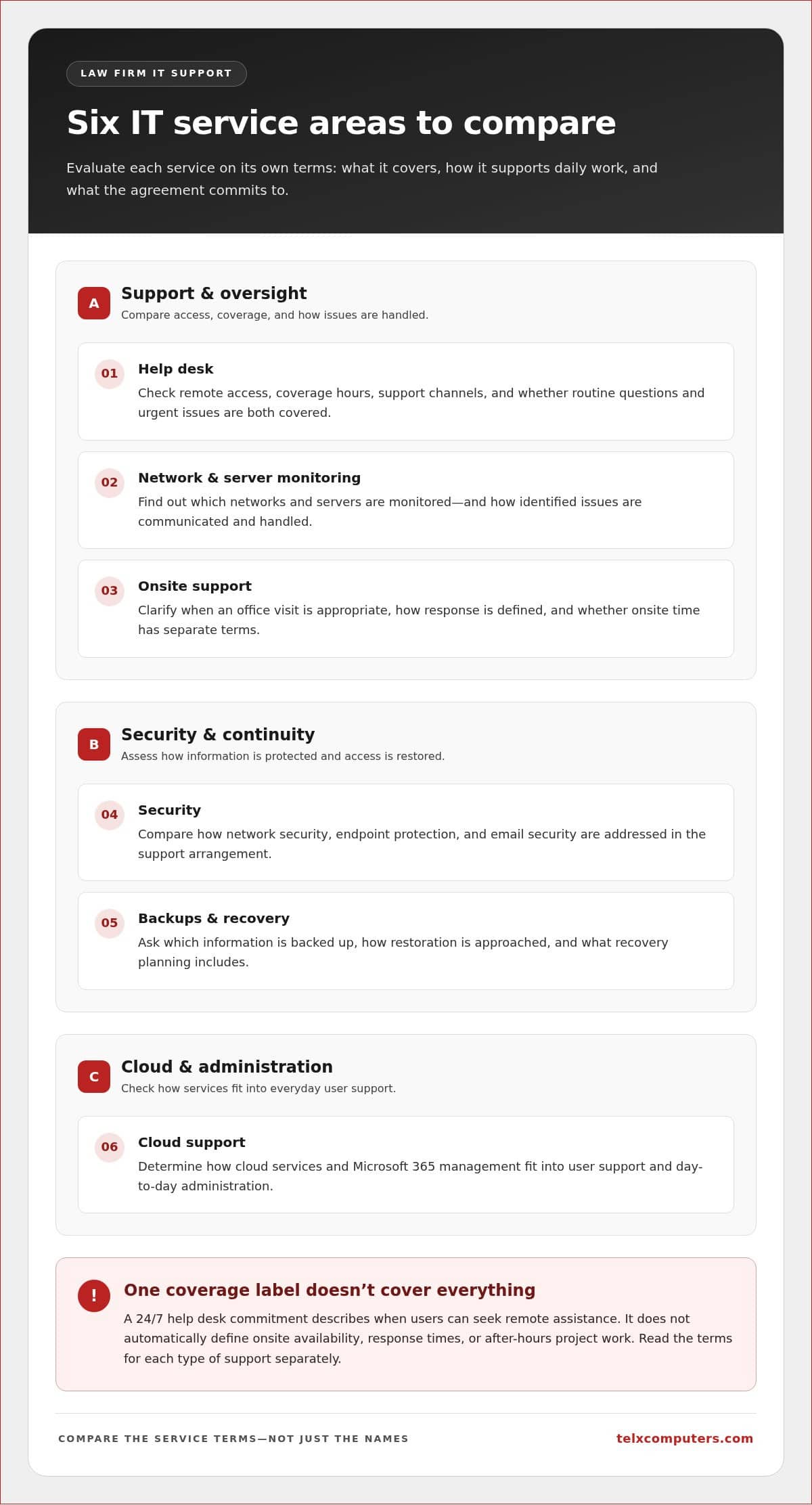
Look beyond service names. Compare what each service covers, how it connects to your firm’s daily work, and what the agreement commits to. For IT services for law firms Fort Lauderdale, separate routine support from project work, then assess help desk access, monitoring, security, backups, cloud support, and onsite response individually.
How do help desk, monitoring, and onsite support differ?
Remote help desk support addresses user issues without requiring a technician to visit the office. Network and server monitoring provides proactive oversight and can identify technical concerns that need attention. Onsite support is a separate commitment for issues requiring in-person assistance. Compare each service independently, including access hours, response expectations, and what the agreement covers.
| Service area | What to compare |
|---|---|
| Help desk | Remote access, coverage hours, support channels, and whether the commitment applies to routine questions as well as urgent issues. |
| Monitoring | Which networks and servers are monitored, and how identified issues are communicated and handled. |
| Onsite support | When an office visit is appropriate, how response is defined, and whether onsite time has separate terms. |
| Security | How network security, endpoint protection, and email security are addressed within the support arrangement. |
| Backups and recovery | Which information is backed up, how restoration is approached, and what recovery planning includes. |
| Cloud support | How cloud services and Microsoft 365 management fit into user support and day-to-day administration. |
Coverage labels alone can be misleading. A 24/7 help desk commitment describes when users can seek remote assistance. It doesn’t automatically define onsite availability, response times, or after-hours project work. Read the terms for each type of support rather than assuming one coverage statement applies to everything.
Which security and continuity services belong in the comparison?
Assess security as a combination of protections and ongoing support. Consider network security, endpoint security, and email protection alongside data backup and disaster recovery. Clarify what the backup plan covers and how the firm would work toward restoring access after data loss. Cloud support and Microsoft 365 management also matter because they affect how staff use email, files, and collaboration tools.
Routine managed support typically addresses ongoing user assistance, monitoring, maintenance, and security work. An implementation or migration, such as moving systems to a different cloud environment, is distinct project work that may need its own scope, schedule, and responsibilities. Separating these categories helps prevent confusion about what recurring service includes. A structured outsourced IT support services plan can help organize ongoing support around a firm’s operating needs.
Security practices can support risk management, but they don’t certify or guarantee legal compliance.
Managed IT or Break-Fix Support: Which Model Fits a Law Firm?
Break-fix support begins when something goes wrong; managed IT is an ongoing service relationship. Neither label alone tells you whether a plan fits your firm. Compare how support aligns with your users, systems, operating hours, and the work that can’t wait for a technical issue to be resolved.
What does each IT support model mean in practice?
With break-fix support, a firm typically seeks help after a computer, network, or other technology problem occurs. The arrangement focuses on troubleshooting the reported issue. This can suit firms that prefer to request assistance only when a problem arises, but maintenance and monitoring are outside the relationship unless arranged separately.
Managed IT provides ongoing support, which can include proactive maintenance and network monitoring. The support partner has a continuing role in the firm’s technology environment rather than responding only to separate incidents. Monitoring and maintenance can help identify concerns, but they can’t promise that interruptions will never happen. Choose based on your firm’s needs, not on the assumption that one model eliminates risk.
How can a firm compare the real service terms?
Look beyond a monthly figure or hourly rate and compare what the agreement actually covers. For each model, document:
- Included support: Which user requests and routine maintenance are covered, and what is treated as separate work?
- Billing structure: Is support fixed monthly, billed per ticket, or charged when work is requested?
- Response commitments: What applies to remote help desk requests, onsite visits, and urgent issues?
- Coverage hours: What does 24/7 help desk access mean in practice, and are after-hours arrangements billed separately?
- Project work: Are implementations and migrations scoped separately from ongoing support?
Telx Computers’ managed support uses fixed monthly pricing with unlimited proactive support and no per-ticket fees. The Outsourced IT Support & Services package includes: “5 hours monthly are Included within your Outsourced IT Support & Services package.” For onsite needs, the commitment is: “On-site response within 3 hours of a service call.” After-hours terms are separate: “After hours support is available after 6:30 pm Monday-Friday, and on weekends (additional charges may apply).”
These terms show why firms should compare remote availability, onsite response, included support, and additional charges separately. A firm with deadline-sensitive work may value ongoing maintenance; another may prioritize a different balance of support and project services. Match the terms to actual workflows and escalation priorities. For more on managed IT support services, consider how ongoing support can be structured around business operations.
How to Evaluate IT Support for a Fort Lauderdale Law Firm
Start with the firm’s operations, then test whether support terms match them. This keeps the decision grounded in actual users, systems, and priorities instead of broad promises. Use these steps to organize what your firm needs from IT services for law firms Fort Lauderdale.
- Map users and workflows. Record office locations, staff roles, and how attorneys and support staff use key systems during a typical workday. Note recurring technology issues and which tasks depend on reliable access.
- Inventory devices and information. List computers, servers, network equipment, core systems, and important data stores. Include where staff work and how they access files and email.
- Identify risks and recovery priorities. Consider which systems or information would be hardest to work without, and what the firm would need to restore first after a disruption. Document backup needs and escalation priorities without assuming a particular recovery time.
- Compare written service terms. Review help desk hours, remote support, onsite arrangements, monitoring, security, backups, and what the monthly service includes. Separate recurring support from projects such as a migration or implementation.
- Plan communication and escalation. Decide who reports issues, who can prioritize urgent requests, and how staff should distinguish a routine question from a work-stopping problem.
What should a firm map before comparing support?
Make the inventory specific enough to guide a support plan. List each location, the roles based there, the devices they use, core systems, and where important data is stored. Add recurring support issues and identify which can be handled remotely versus those that may require an onsite visit. This gives a support partner a useful operational picture without assuming every staff member has the same needs.
Set priorities according to the consequences of losing access. A firm might rank email, shared records, and systems used to coordinate active matters differently from tools used occasionally. That ranking can guide escalation planning and backup discussions without inventing a recovery deadline or service target.
Which commitments should be clear before service begins?
Read the service terms as an operating plan. Confirm how users reach the help desk, which hours apply, how after-hours requests are handled, and how onsite support is defined. Review what ongoing monitoring, backups, security support, and Microsoft 365 management include. Clarify how project work is scoped and billed separately from recurring service, so a planned change isn’t confused with routine support.
Local coverage can make onsite expectations more concrete for a firm that needs in-person attention. Telx Computers serves South Florida businesses, including law firms, and its Fort Lauderdale IT services page provides a local point of reference. For ongoing support, consider how managed IT services can be organized around your firm’s documented needs.
Bring your inventory and priorities into a support discussion to build a plan around how your firm works. Request an IT services estimate based on your operating needs.
Telx Computers IT Services for Law Firms in Fort Lauderdale
Telx Computers provides managed IT services to businesses in Miami and South Florida, including law firms in Fort Lauderdale and Aventura. For firms comparing IT services for law firms Fort Lauderdale, consider how remote help, proactive oversight, onsite response, and ongoing costs work together. Telx Computers provides 24/7 Technical Help Desk Support (remote) and proactive network monitoring, with distinct terms for routine assistance and in-person service.
What support commitments does Telx Computers state?
Remote help desk support and onsite response are separate commitments. Remote support gives users a way to get technical assistance without waiting for an office visit, while monitoring provides proactive oversight of the network. For in-person needs, Telx Computers states:
- On-site response within 3 hours of a service call.
- 5 hours monthly are Included within your Outsourced IT Support & Services package.
After-hours support has separate terms: After hours support is available after 6:30 pm Monday-Friday, and on weekends (additional charges may apply). These details distinguish onsite response, included monthly hours, and after-hours arrangements so a firm can compare each commitment with its support priorities.
How can a firm take the next step?
Telx Computers offers fixed monthly pricing with unlimited proactive support and no per-ticket fees. This predictable structure can make ongoing support easier to plan for, while keeping proactive work distinct from separately scoped projects. Firms can consider how managed IT services fit ongoing operations and the needs identified in their workflow and technology review.
A free network audit or estimate offers a practical starting point for understanding a firm’s IT environment and support needs. It can focus the discussion on the systems, users, and priorities that shape day-to-day legal work instead of relying on a generic service checklist.
For law firms seeking a local support partner in South Florida, explore Telx Computers and its approach to managed IT. Explore Telx Computers and start a conversation about support that fits your firm’s operations.
Set Your Firm Up for Steadier IT Support
Your support decision can be a practical starting point for improving how technology fits into the firm’s work. Keep your priorities visible as your team, workflows, and systems change. Revisiting them helps you spot when existing arrangements no longer match how staff need to work and gives your firm a clearer basis for future IT decisions.
For a Fort Lauderdale practice, choosing IT services for law firms Fort Lauderdale is about establishing a dependable support relationship that understands the firm’s operating needs. Use your documented priorities to guide the conversation and identify a support approach that can grow alongside your practice.
Explore Telx Computers’ IT support and take a confident next step toward a technology plan built around your firm.
Frequently Asked Questions
How much do IT services for law firms in Fort Lauderdale cost?
The cost depends on the firm’s size, technology environment, and scope of support. To make a useful comparison, list the users, devices, systems, security needs, and backup requirements to be covered. Then review an estimate that separates ongoing support from one-time projects such as a migration. Comparing what each plan includes is more useful than comparing monthly totals alone.
Can a law firm outsource IT and keep control of its systems?
Yes. Outsourcing technical support doesn’t automatically mean giving up ownership or decision-making authority. A firm can define who approves system changes, which staff members have administrative access, and how changes are recorded. Include account ownership, access permissions, data access, and the process for ending or changing the arrangement in your service documentation. Clear roles help the firm retain oversight while receiving technical assistance.
Does following NIST security practices guarantee a law firm’s compliance?
No. Following security practices recommended by NIST does not, by itself, guarantee that a law firm meets every legal, contractual, or professional requirement that applies to its situation. Technical safeguards can support a firm’s security program, but compliance depends on the firm’s broader circumstances and decisions. Treat security guidance as one input to risk management, not as a certification or substitute for legal analysis.
Can a law firm keep its existing case-management software when changing IT support?
Often, changing support doesn’t require replacing case-management software. Before a change, document the software version, licensing, hosting arrangement, user access, and connections to email, document storage, or other tools. This inventory helps identify transition tasks and potential compatibility issues. Plan how staff will access active matters during the change, and test routine workflows before relying on the new support arrangement.
Do law firms need to replace their computers before outsourcing IT support?
No. Outsourcing support doesn’t automatically require replacing existing computers. Review each device’s condition, performance, operating system support, and ability to run the applications staff need. A device that still meets the firm’s requirements may remain in use; one that can’t be maintained or reliably support essential work may need attention. An inventory helps distinguish a genuine replacement need from a change in support provider.
What is the difference between 24/7 remote help desk support and after-hours emergency support?
24/7 remote help desk support describes access to technical assistance remotely at any time. After-hours emergency support refers to arrangements for urgent issues outside standard business hours, which may have separate procedures or charges. Neither phrase alone describes onsite availability. Document how staff report an urgent issue, how it’s classified, which response channel applies, and whether separate charges may arise.