




14 Nov IT infrastructure management Coral Gables: Industry examples
A resilient network is designed around the work it must keep running, not a one-size-fits-all blueprint. Effective IT infrastructure management in Coral Gables means aligning systems with each organization’s operations, from data-center workloads to the communications that support daily continuity.
The need for resilience is visible in regional network standards: robust communications frameworks often rely on multiple layers of redundancy, utilizing fiber-optic, wireless, cellular, and satellite systems. Businesses face different risks and demands, but the principle is practical: when one connection is disrupted, alternate paths provided by experienced providers like Telx Computers can help essential operations continue.
If you’re weighing infrastructure priorities, the right design depends on your industry, the systems your team relies on, and how much interruption your operations can absorb. This article explores examples across industries, explains how data centers shape infrastructure decisions, and shows how redundant communications can support continuity in Coral Gables. You’ll get a clearer picture of which capabilities deserve attention and how professional management from Telx Computers can align technology with business needs.
Key Takeaways
- Map infrastructure priorities to the systems and workflows each industry depends on, including data-center requirements.
- Compare providers by how well their approach aligns with your operational needs, security priorities, and continuity plans.
- Understand how monitoring and support can help identify infrastructure issues and keep essential work moving.
- See how cloud migration, backup, and disaster recovery planning fit together to support business continuity.
IT infrastructure management companies in Coral Gables, FL
Coral Gables offers a useful local lens for infrastructure planning: city systems connect data, communications, and public services. Its Centre of Excellence had more than 30 AI initiatives under consideration or implementation. For businesses, the practical lesson is to align infrastructure decisions with operational needs, not adopt technology simply because it is new.
Case: Turning city data into operational insight
Situation: Coral Gables needed to process large volumes of information for urban analysis. Action: The city introduced an urban analytics platform in 2016-17 to process millions of data points. Result: The example shows why infrastructure planning should consider how systems collect, store, and make data usable for decisions.
The city’s Digital Twin OS portal launched in 2021 and brings together thousands of geospatial layers. For organizations managing complex sites or assets, this illustrates the value of connecting information sources so teams can see how systems relate, rather than treating each platform as an isolated tool.
Case: Supporting connected infrastructure
Situation: Public lighting and communications need to support multiple functions across Coral Gables. Action: The city uses infrastructure incorporating 5G, Wi-Fi, CCTV, and traffic, environmental, and safety sensors. Result: The example highlights the need to plan network capacity, device management, and security together.
Coral Gables was the first city in the United States to implement an AI-powered integrated or modular smart city pole. That example highlights a key planning step: assess how new devices will connect with existing systems before adding them to an operating environment.
Case: Coordinating enterprise systems
Situation: An Infrastructure Engineer Senior role in Coral Gables covers data-center infrastructure, network support, and internal systems. Action: Its environment includes VMware, Citrix, Active Directory, Microsoft Azure, Office 365, and storage platforms. Result: This mix illustrates why infrastructure management should account for dependencies across servers, identity, cloud services, and storage.
These examples offer Coral Gables organizations a practical way to frame requirements: identify critical systems, map their connections, and prioritize the infrastructure that supports essential workflows.
How to compare IT infrastructure management providers in Coral Gables
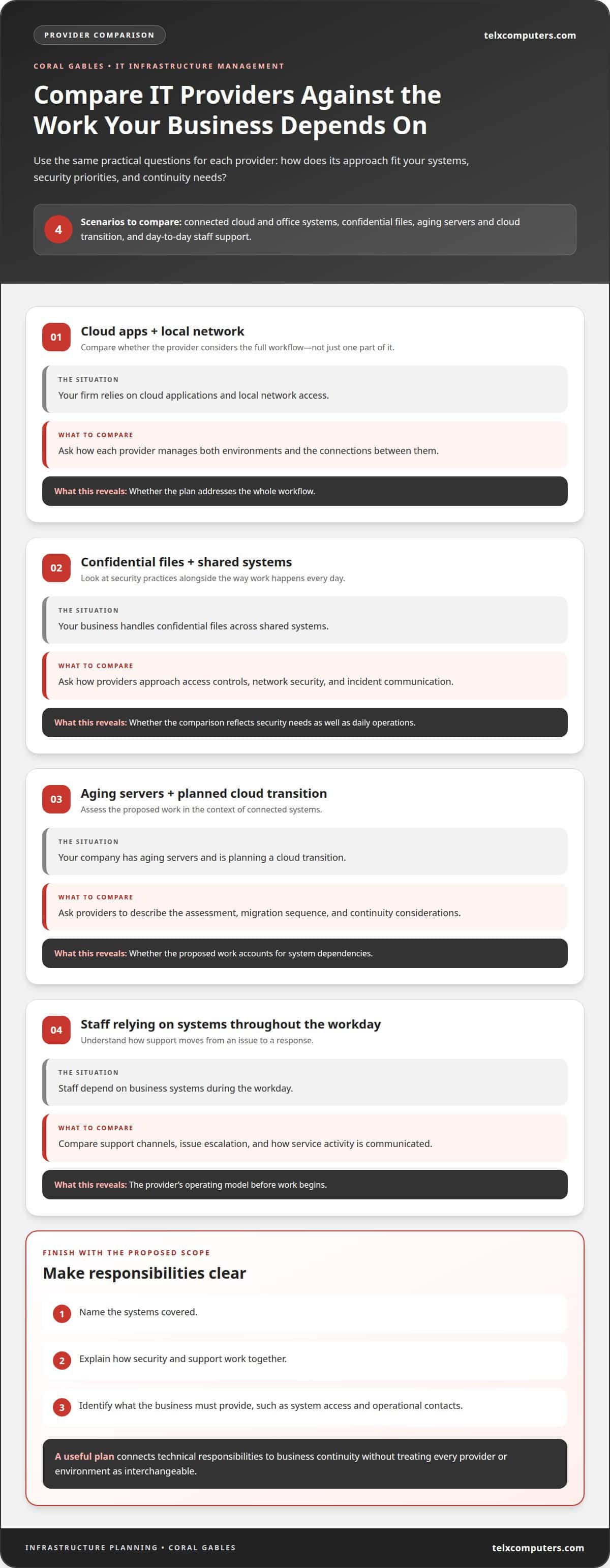
Compare providers against your business requirements, not a generic feature list. Start by mapping the systems your team depends on, such as cloud applications, office networks, servers, and data storage. Then consider the operational impact of an outage in each area. A scheduling system that stops work has different priorities from a secondary file archive.
Use the same evaluation steps for each prospective provider. Ask how its approach fits your environment, who manages routine oversight, and how it coordinates a response when an issue affects connected systems. The answers should clearly explain responsibilities and workflows, rather than rely on broad claims about reliability.
- Situation: A Coral Gables firm relies on cloud applications and local network access. Action: Compare how each provider manages both environments and their connections. Result: You can see whether the plan addresses the whole workflow.
- Situation: A business handles confidential files across shared systems. Action: Compare how providers approach access controls, network security, and incident communication. Result: The comparison reflects security needs alongside daily operations.
- Situation: A company has aging servers and plans a cloud transition. Action: Ask providers to describe the assessment, migration sequence, and continuity considerations. Result: You can evaluate whether the proposed work accounts for system dependencies.
- Situation: Staff depend on business systems throughout the workday. Action: Compare support channels, issue escalation, and how service activity is communicated. Result: The operating model becomes clearer before work begins.
Finally, compare the proposed scope with your priorities. A useful plan names the systems covered, explains how security and support work together, and identifies what the business must provide, such as system access and operational contacts. For IT infrastructure management in Coral Gables, this structured comparison connects technical responsibilities to business continuity without treating every provider or environment as interchangeable.
Coral Gables IT providers with 24/7 monitoring and support
Round-the-clock monitoring and support address different aspects of infrastructure care. Monitoring watches systems for signs of failure or unusual activity, while support responds to reported problems. For a Coral Gables business, useful coverage depends on which systems matter most: a server hosting business applications, an office network, or a cloud service staff use daily. Define those priorities before comparing support models.
Clarify the operational path from alert to resolution. A clear process identifies which conditions trigger review, how issues are prioritized, who receives updates, and when a problem moves to another support level. For example, a storage warning may need attention before it interrupts access to shared files. A failed login affecting one employee differs from one that blocks an entire department.
- Situation: A Coral Gables office loses access to a shared application. Action: The provider reviews the alert, identifies whether the server or network is affected, and communicates the next response step. Result: Staff receive a clearer explanation of the disruption and its handling.
- Situation: A business sees unusual account activity outside normal working hours. Action: The response process routes the event for review and documents the steps taken. Result: The organization can understand what happened and which systems need attention.
- Situation: A network slowdown affects several teams during a busy work period. Action: Support assesses the affected services and prioritizes the issue by business impact. Result: Staff know which workarounds or updates apply while resolution proceeds.
Compare providers by scope, escalation, and communication, not by the phrase “24/7” alone. Ask how monitoring covers servers, network devices, and business-critical services, and how staff report issues. A useful support model also records recurring alerts, since repeated warnings can point to a capacity or configuration problem. These details help Coral Gables organizations judge whether ongoing oversight matches their operating hours and continuity needs.
Coral Gables placed first in the Digital Cities ranking in 2018 for cities with populations up to 75,000, a local example of technology use at city scale.
AI-supported image analysis helped Coral Gables locate a missing six-year-old child within two minutes during a downtown event. Coral Gables was one of the first cities in the United States to use manned drone technology to monitor large crowds and respond to 911 calls before responders arrived.
Cloud migration, backup, and disaster recovery services in Coral Gables
Moving workloads to the cloud changes where applications run and how staff access them. In Coral Gables, a migration plan should map application dependencies, user access, data locations, and network connections before workloads move. This helps teams identify which systems must remain available together and plan the transition around business operations.
Backup and disaster recovery address different needs. A backup preserves copies of data for recovery; a disaster recovery plan sets out how systems and work resume after disruption. A Senior Infrastructure Engineer role in Coral Gables includes establishing and implementing backup and recovery policies for network applications, hardware, and software. That scope highlights the need to plan for applications and infrastructure as connected parts.
- Situation: A business is preparing to move an application to cloud computing. Action: The migration team maps its users, connected systems, and data needs, then sequences the transition. Result: The plan accounts for dependencies instead of treating the application as a standalone move.
- Situation: Staff update important files throughout the workday. Action: The recovery plan defines which data needs protection and how teams restore access. Result: Recovery priorities reflect the effect of missing files on daily work.
- Situation: A disruption affects a business application and supporting infrastructure. Action: The recovery process identifies restoration priorities and system dependencies. Result: Teams have a coordinated path for bringing essential services back.
For each workload, professionals assess its business role, dependencies, access requirements, and recovery priorities. These factors shape cloud placement, backup scope, and restoration sequence. A tailored plan also accounts for how employees use systems, so recovery supports real workflows, not just infrastructure.
Plan cloud migration and recovery support around your Coral Gables operations and critical systems.
Raimundo Rodulfo had 30 years of professional experience across sectors and industries while serving as a City of Coral Gables technology leader. That breadth of experience is relevant when considering migration and recovery across differing business settings: teams can evaluate how application dependencies, access needs, and restoration priorities fit their operations. For organizations in Coral Gables, applying that broad perspective alongside workload-specific planning can help keep cloud decisions connected to practical service needs, rather than treating migration, backup, and recovery as separate technical tasks.
Telx Computers
Telx Computers helps Coral Gables businesses align infrastructure decisions with operational priorities. Its Managed IT Services bring ongoing technology management together with network security, cloud computing, and support, so essential systems are managed as part of a coordinated environment.
Consider this approach when separate systems, recurring disruptions, or planned cloud changes make technology harder to manage as a whole. Telx Computers works alongside your team to understand which systems support daily operations and shape IT management around those needs.
If you’re ready to discuss your infrastructure needs, contact Telx Computers.
Set your infrastructure priorities in motion
For IT infrastructure management in Coral Gables, connect technical decisions to the outcomes your business needs. Identify the systems that enable essential work, the risks that could interrupt it, and the changes that would make operations more resilient. A focused discussion can turn those priorities into a practical management approach.
Telx Computers offers Managed IT Services that bring infrastructure oversight into a coordinated plan, supported by 24/7 Help Desk Support and Network Security. This can help businesses looking for a professional partner to manage technology while their teams focus on daily operations. The right starting point is a clear view of your environment and business goals.
Take the next step with contact Telx Computers to discuss your needs. With a thoughtful plan and the right support, your technology can better serve the work ahead.
Frequently Asked Questions
What IT infrastructure management services are available for Coral Gables businesses?
For IT infrastructure management in Coral Gables, businesses can use managed IT services covering network security, server monitoring, cloud infrastructure, backup and disaster recovery, and help desk support. Telx Computers coordinates these systems so issues such as server alerts or access problems are handled as part of ongoing IT operations. Its service area includes Miami and South Florida, including businesses in Aventura and Fort Lauderdale.
Risks of outsourcing IT infrastructure management and how to mitigate them
Risks include unclear responsibilities, gaps in security or support, and disruptions when connected systems or migration dependencies are overlooked. Reduce these risks by mapping critical systems and workflows, comparing service scope and security, and clarifying escalation, communication, access, and continuity plans before work begins.