





28 Oct Hipaa compliance IT for Aventura clinics: Who needs it and why
HIPAA responsibilities depend on the work, not a clinic’s size. For HIPAA compliance IT for clinics in Aventura, the key distinction is whether a provider transmits health information electronically or a vendor creates, receives, maintains, or transmits protected health information on the provider’s behalf. Before a vendor accesses that information for the practice, the practice must have a signed Business Associate Agreement in place.
That can make compliance broader than a clinic’s own systems: billing, transcription, cloud services, and other workflows may involve vendors handling patient data. Start by identifying who can access electronic protected health information and what safeguards protect it.
This article explains which clinics and vendors fall under HIPAA, what a documented security risk analysis should cover, and how administrative, physical, and technical safeguards work together. You’ll get a clearer picture of the responsibilities involved and how to organize a security-focused approach for an Aventura clinic.
Key Takeaways
- Determine whether your clinic is a covered entity and identify vendors that handle patient information on its behalf.
- Build a written security risk analysis around the electronic health information your clinic uses, stores, and shares.
- See how administrative, physical, and technical safeguards work together to protect patient data.
- Understand how coordinated IT support can help clinics manage security across their systems and workflows.
What difference does it make if I am a covered entity or business associate?
Clinics in Aventura can evaluate an IT provider by determining whether it handles protected health information, reviewing the Business Associate Agreement, and comparing its safeguards with the practice’s workflows. The provider’s role determines which HIPAA duties apply and how vendor oversight should work.
Covered Entity and Business Associate Roles
A covered entity is a healthcare provider that transmits health information electronically; a business associate handles protected health information for a covered entity. This distinction matters because a practice remains responsible for its own obligations while a vendor has duties tied to the work it performs. For example, a billing company processing patient claims on the practice’s behalf may be a business associate. The size of the clinic does not determine that status.
Business Associate Agreements and Vendor Oversight
A Business Associate Agreement sets the permitted handling of protected health information and the safeguards a vendor must apply. A practice must have the signed agreement in place before a vendor accesses patient information on its behalf. The agreement should address permitted uses and disclosures, breach reporting, subcontractors, cooperation with individual rights and HHS oversight, and return or destruction of information when feasible at termination. Assign someone to track each vendor, agreement, and service change. A business associate must notify the covered entity of a breach without unreasonable delay and no later than 60 calendar days after discovery.
Software Vendors and Business Associate Status
A software vendor’s role depends on whether it creates, receives, maintains, or transmits protected health information for the clinic. Evaluate the actual workflow, not just the product label: does the vendor host patient records, support a system containing them, or transmit them for the practice? If so, determine its business associate responsibilities before access begins. HIPAA’s conduit exception applies to certain couriers and electronic equivalents that merely transport information. It does not automatically cover vendors with ongoing access or storage.
Connect vendor oversight to clinic policies: document who approves access, how changes are reviewed, and who receives breach notices. For each agreement, compare the vendor’s stated duties with the systems and data it handles. This record helps the practice spot gaps when a service, workflow, or subcontractor changes.
How should clinics conduct and document a security risk analysis?
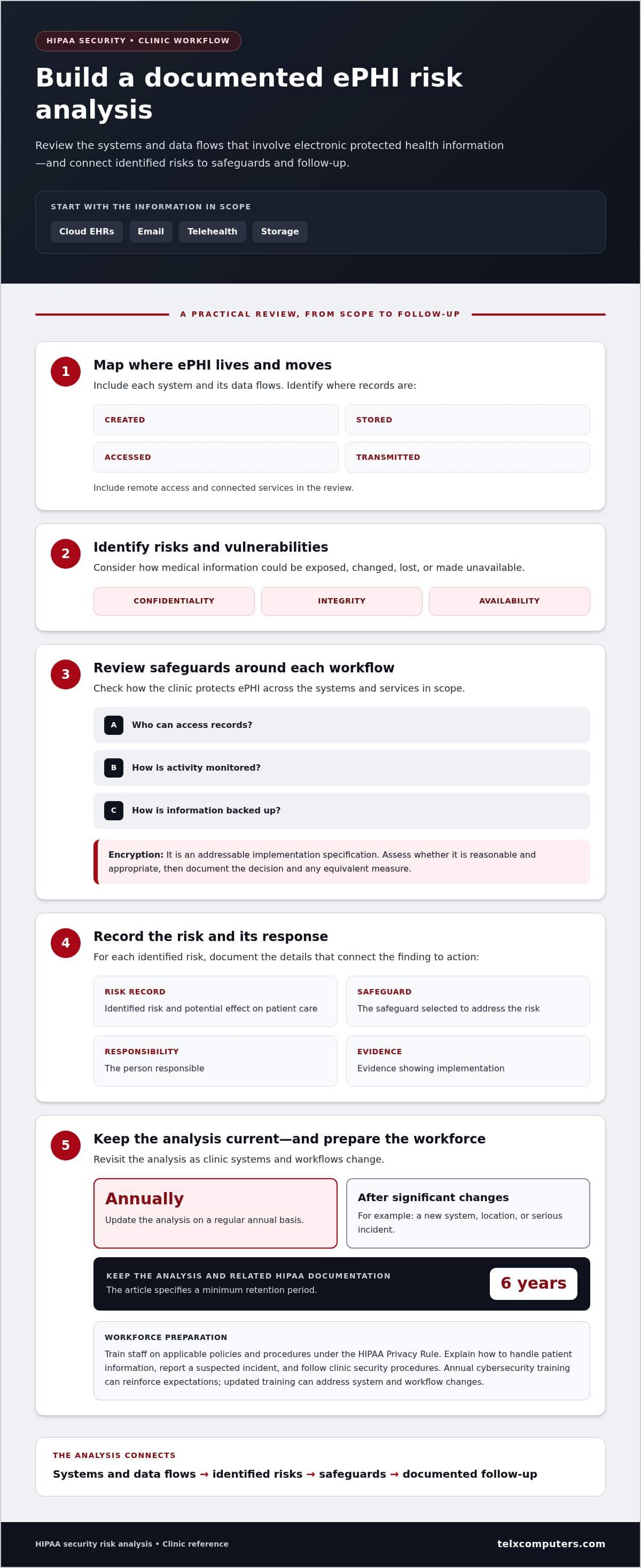
Clinics must protect electronic protected health information across cloud EHRs, email, telehealth, and storage. Include each system and its data flows in a documented risk analysis. For HIPAA compliance IT for clinics in Aventura, this analysis is a practical foundation for organizing security decisions.
Electronic PHI Security
A security risk analysis identifies potential risks and vulnerabilities affecting the confidentiality, integrity, and availability of electronic protected health information. It helps clinics understand how medical data could be exposed, changed, lost, or made unavailable. Map where records are created, stored, accessed, and transmitted, including remote access and connected services.
Review the safeguards around each workflow, including who can access records, how activity is monitored, and how information is backed up. HIPAA treats encryption as an addressable implementation specification: assess whether it is reasonable and appropriate, then document the decision and any equivalent measure. Update the analysis annually and after significant changes, such as a new system, location, or serious incident.
Clinic Compliance Challenges and Planning
Compliance planning connects security findings to practical policies and procedures. Record each identified risk, its potential effect on patient care, the safeguard selected, the person responsible, and the evidence showing implementation. Keep the analysis and related HIPAA documentation for at least 6 years.
Cloud EHRs and email systems require attention to access, storage, and transmission. Include telehealth workflows in the review when they involve ePHI. A clinic’s plan should address the Privacy, Security, and Breach Notification Rules, with a clear process for documenting incidents and handling required notifications. This makes responsibilities easier to follow when a system or workflow changes. A documented risk analysis is central to HIPAA compliance IT for clinics in Aventura because it connects identified risks with safeguards and follow-up actions.
Workforce preparation is part of the plan. The HIPAA Privacy Rule requires training on applicable policies and procedures under §164.530. Explain how staff should handle patient information, report a suspected incident, and follow the clinic’s security procedures. Annual cybersecurity training can reinforce those expectations, while updated training helps address changes to systems and workflows. For clinics aligning technology planning with care operations, healthcare IT planning can provide a useful next step.
What administrative, physical, and technical safeguards protect electronic PHI?
HIPAA’s Security Rule calls for administrative, physical, and technical safeguards to protect electronic protected health information. Clinics need a risk-based combination of policies, facility controls, and system protections, not a single IT product.
Managed IT, backups, and endpoint security can support this work, but each safeguard should address the clinic’s actual systems and risks.
Administrative Safeguards
Administrative safeguards are the policies and assigned responsibilities that guide how staff protect patient information. Technology cannot replace clear decisions about who receives access and how exceptions are handled. Write procedures for granting, changing, and ending access. Review clinic access quarterly, remove unused permissions, and record each review and any corrective action.
Train staff on the clinic’s policies and procedures, including how to report a suspected security incident. Document security responsibilities and follow-up actions so the practice can show how it addressed identified gaps.
Physical Protection of Records
Physical safeguards protect the spaces and devices where patient records can be seen, stored, or accessed. They matter for paper files as well as computers and other equipment containing electronic PHI. Keep records in controlled areas, limit access to rooms where systems are located, and position screens so visitors cannot casually view patient details.
Set procedures for handling equipment and records during moves, repairs, or disposal. Staff should know where to secure paper charts when not in use and how to prevent unattended devices from exposing information. These controls complement a business associate agreement when outside support involves access to clinic systems.
Technical Safeguards and Remediation
Technical safeguards protect electronic PHI through system-level controls. Use unique user credentials, automatic logoff, encryption, and audit controls to manage access and track activity. The U.S. Department of Labor notes that covered entities may use passwords to add security to computers maintaining PHI.
After finding a weakness, assign an owner, document the corrective action, and update the relevant safeguard. HIPAA’s contingency plan standard under §164.308 includes data backup, emergency mode operations, and disaster recovery planning.
Managed IT, Backups, and Endpoint Security
Managed IT can help coordinate security controls across clinic devices and systems. Backup and disaster recovery measures help preserve data access during disruptions, while endpoint security focuses on computers and devices used to reach patient records. These measures support the clinic’s work but do not replace its policies or risk decisions.
For a clinic reviewing how technical safeguards fit together, healthcare IT support can be a practical next step.
HIPAA applicability to clinics and healthcare vendors
For Aventura clinics, HIPAA applies to healthcare providers that transmit health information electronically and vendors handling protected health information for them. Practical requirements include identifying covered systems, assessing risks, documenting safeguards, and supporting patient access to records.
Understanding Protected Health Information
Protected health information (PHI) is identifying information related to a person’s past, present, or future health, treatment, or healthcare payment. Recognizing PHI helps a practice identify which records and workflows need protection. A patient’s name linked to treatment details, for example, can be PHI. Include those details in access policies, system inventories, and risk assessments.
HIPAA sets no minimum organization size for the responsibility to protect patient information. A small medical practice and a larger clinic both need to determine how their systems handle PHI. Vendors that create, receive, maintain, or transmit it on a clinic’s behalf may also have business associate responsibilities.
Encryption of Personal Health Information
Encryption makes electronic information unreadable without the means to decode it. Under the Security Rule, encryption is an addressable implementation specification, so a clinic must assess whether it is reasonable and appropriate for its environment. Document the decision and any applicable equivalent measure. Consider where information is stored and how staff or vendors access it.
That documented review explains why the clinic chose particular safeguards. Include the systems and workflows involved, the risks considered, and the controls selected. For example, assess email and cloud storage separately if each handles patient information differently. Revisit the rationale when systems or workflows change.
Patients may request access to and copies of their health records. Clinics should establish a process to receive requests, identify the records involved, and document how staff handle them. Clear responsibilities connect patient rights with everyday information management.
Keep compliance documentation aligned with actual clinic operations. Record which systems contain PHI, who is responsible for oversight, and how the risk assessment informs security decisions. This gives the practice a working record of how HIPAA requirements apply across its systems and vendor relationships.
Explore healthcare IT support to connect technology planning with clinic privacy and security needs.
Telx Computers: Managed IT Services
Telx Computers provides Managed IT Services to help clinics coordinate technology needs across their operations. For an Aventura practice, Network Security and Cloud Computing can support systems used to handle patient information. These services fit when a clinic needs to align its IT environment with documented security priorities, such as managing network protections or organizing cloud-based systems.
Technology support complements, but does not replace, the clinic’s HIPAA policies, risk analysis, or decisions about patient data. A clear view of systems, workflows, and responsibilities helps connect IT work with compliance planning. Clinics can discuss how managed services fit their operational needs and existing safeguards.
Contact Telx Computers to discuss your clinic’s IT needs, or visit telxcomputers.com.
Make your next IT decision with confidence
HIPAA compliance IT for clinics in Aventura works best when technology decisions stay connected to day-to-day operations. As systems, vendors, and workflows change, keep ownership clear: decide who tracks changes, reviews their impact, and coordinates follow-up across the practice. Ongoing coordination helps compliance planning keep pace with care delivery instead of becoming a document that sits untouched.
When your team needs help aligning technology with its operational priorities, Telx Computers offers 24/7 Help Desk Support alongside its business IT services. A focused conversation can help identify where managed support or network security fits into your clinic’s existing approach, without replacing the clinic’s responsibility for its own HIPAA policies and decisions.
Take the next step at Contact Telx Computers for HIPAA IT help. A thoughtful, coordinated approach can make the path forward clearer for your clinic and your team.
Frequently Asked Questions
Who Needs HIPAA Compliance Services?
Clinics that transmit health information electronically and vendors handling protected health information for them need HIPAA-focused compliance support. Aventura practices can start by mapping which services can access patient data and assigning oversight for each. Examples include an electronic records platform, claims processor, or transcription vendor. The goal isn’t to buy a particular tool, but to account for each role, system, and protection.
Who Needs to Follow HIPAA in a Medical Office?
HIPAA applies to a medical office’s covered entity and workforce members whose work involves protected information under its policies. Assign access based on job duties, remove permissions when responsibilities change, and review system activity for access that doesn’t match expected work. Role-specific training and documented follow-up help supervisors connect staff actions to privacy procedures and identify when access or responsibilities need adjustment.
How can workforce oversight and access monitoring reduce security risks?
Oversight reduces risk by connecting each person’s access to their assigned work. For example, a staff member who changes roles may need different permissions, while a departing worker’s access should be removed. Audit controls give the practice a record to review when access appears unusual. Documenting reviews and follow-up actions helps the clinic address gaps and improve access procedures.
What Is HIPAA and Why Does It Matter for Your Practice?
HIPAA, the Health Insurance Portability and Accountability Act of 1996, is a federal law governing the protection of health information. It matters because clinics use information to provide care and manage payment, while patients need their records handled responsibly. For a practice, understanding HIPAA clarifies who must protect data, which workflows need oversight, and how privacy, security, and breach response fit daily operations.
What must business associate agreements require?
A business associate agreement must define permitted and required uses and disclosures of protected health information, safeguards, and breach reporting. It must also address applicable subcontractor requirements, cooperation with individual rights and HHS oversight, and return or destruction of information when feasible at termination. Clinics should align agreement terms with the service’s actual access, such as claims processing or hosted records, and retain the signed document.
What steps are required after a breach of unsecured PHI?
After a suspected breach of unsecured PHI, assess the incident, identify affected people and information, document findings, and initiate required notices. Notify affected individuals without unreasonable delay and no later than 60 calendar days after discovery, according to HHS’ Office for Civil Rights. For 500 or more affected individuals, notify HHS within 60 calendar days. For fewer, annual HHS reporting is due within 60 calendar days after the calendar year ends.