





27 Oct 24/7 Network Monitoring Services for Aventura Businesses
A network issue can begin long before anyone notices it. 24/7 network monitoring services in Aventura track network components and endpoints continuously, 24 hours a day, seven days a week. That ongoing visibility helps reveal changes in performance or availability so teams can respond before a small disruption grows.
If your business depends on reliable access to systems, files, and cloud tools, it makes sense to want more than a notification after something breaks. Monitoring provides useful signals, but those signals matter most when they inform practical maintenance and fit the way your business operates.
This article explains what round-the-clock monitoring can cover, how to tailor it to your network, and how it supports proactive IT maintenance. It also covers how ongoing oversight connects with managed IT support and what to consider when deciding whether this approach fits your environment.
Key Takeaways
- Continuous oversight can track servers, network devices, endpoints, and alerts, helping reveal performance or availability issues.
- Shape monitoring around the systems your business relies on, including its network, devices, and cloud environment.
- Use monitoring signals to guide maintenance and address emerging issues before they disrupt daily work.
- Connect network oversight with managed IT support, security, and cloud services to align technology care with business needs.
Managed IT support and proactive maintenance
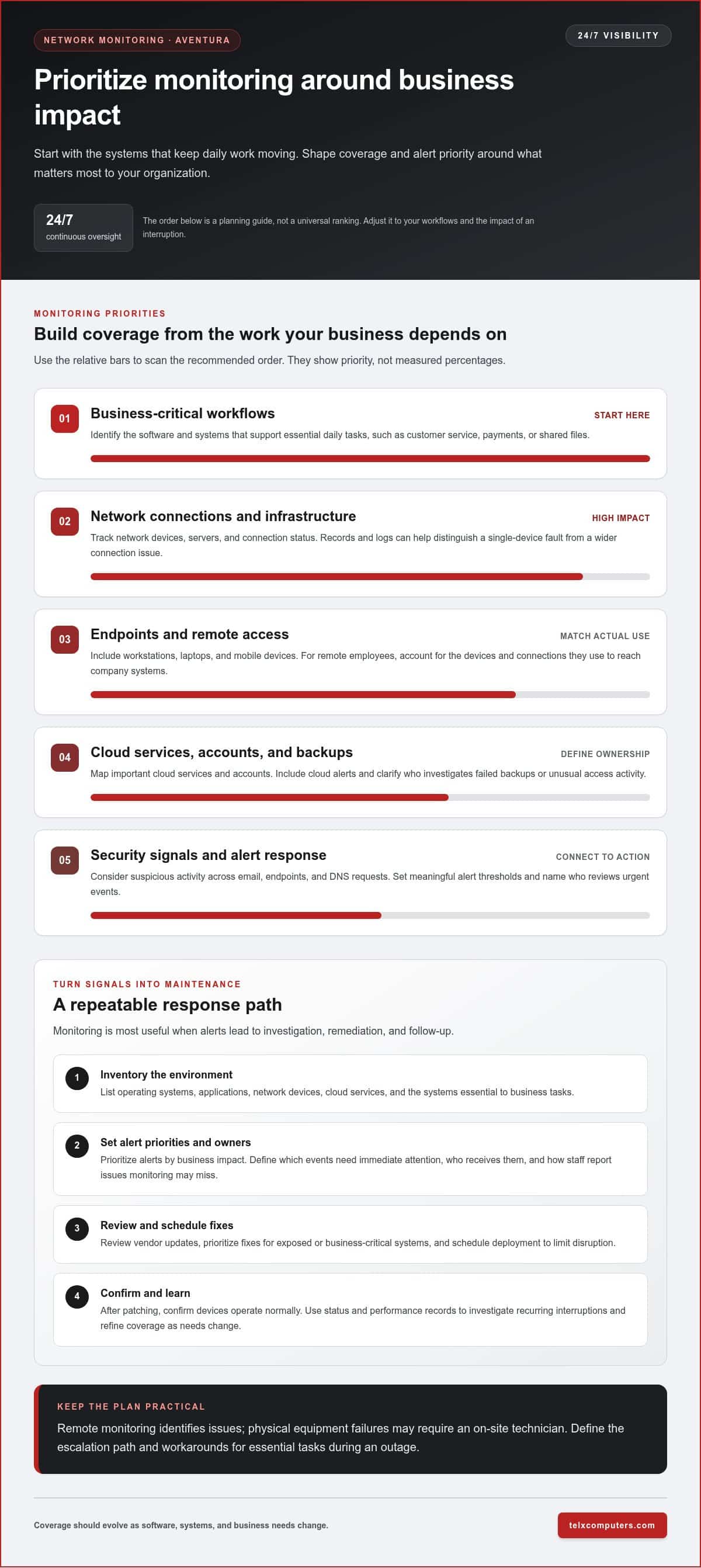
Managed IT support connects monitoring alerts to practical maintenance. If a server’s storage is nearing capacity, for example, a technician can investigate before users lose access to files. Monitoring network infrastructure also helps distinguish a single-device fault from a wider connection problem. That context focuses troubleshooting and helps teams prioritize critical systems.
When comparing network monitoring in Aventura, look at what each service monitors, how alerts are escalated, and whether support includes security maintenance. A sound process links a detected threat to investigation, remediation, and follow-up, while uptime monitoring helps reveal recurring interruptions. Ask how remote management handles routine issues, such as a misconfigured account or a slow server.
Patch and vulnerability management turns monitoring into ongoing risk reduction. Begin with an inventory of operating systems, applications, and network devices. Review vendor updates, prioritize fixes for exposed or business-critical systems, and schedule deployment to limit disruption. After patching, confirm that devices are operating normally. This repeatable process helps close known weaknesses instead of treating every alert as an isolated event.
Cloud management also needs clear ownership. For a Microsoft 365 environment, map important services and accounts, then check that backup and recovery processes match business needs. A backup is useful only when the right data can be restored and access is controlled. Include cloud-service alerts in the monitoring plan, and document who investigates failed backups or unusual access activity.
Monitoring and on-site response are separate functions: remote tools identify issues, while physical equipment failures may require a technician at your location. Define the escalation path, including who receives urgent alerts and how staff report problems that monitoring cannot detect. Telx Computers provides on-site support for businesses in Miami and South Florida, including Aventura.
For businesses aligning ongoing technology oversight with managed support, IT outsourcing services can connect monitoring, troubleshooting, and maintenance responsibilities through a coordinated approach.
What does 24/7 network monitoring include?
Continuous monitoring can track network infrastructure, servers, network devices, and endpoints around the clock. If a switch loses connectivity, for example, an alert can flag the issue before employees report lost access. Status and performance records give technicians useful context, while network logs can help show whether a disruption affects one device or several connection points.
Device health checks can track availability, unusual resource use, and connection changes across workstations, laptops, and mobile devices. A tailored monitoring plan identifies the systems essential to business tasks and sets meaningful alert thresholds for them. For remote employees, include the devices and connections they use to reach company systems. This helps distinguish a single-device issue from a broader infrastructure problem.
Security monitoring adds visibility into suspicious activity across email, endpoints, and DNS requests. Repeated sign-in failures or a device communicating with a suspicious domain, for example, can prompt investigation. Email protection can help identify phishing attempts, endpoint tools can flag unusual computer activity, and DNS filtering can restrict access to known malicious domains. Together, these services connect activity across different parts of the environment.
Common cybersecurity concerns for Aventura businesses include phishing, ransomware, compromised credentials, and unauthorized access. Compliance needs depend on the data a business handles and its sector. Map sensitive information, access permissions, retention practices, and security logs to the requirements that apply to your organization.
Useful alerts need an owner and a clear response path. Define which events need immediate attention, who reviews them, and how staff report problems monitoring might miss. An employee’s report of a suspicious email, for example, can help teams investigate a possible threat even if automated tools haven’t flagged it.
Businesses reviewing protection against ransomware can explore ransomware protection planning as part of a broader security approach.
Tailoring monitoring to a business environment
Start with the systems your organization depends on during daily operations. Map business-critical software, network connections, and data flows, then prioritize alerts according to their impact.
Monitoring for Small and Mid-Sized Businesses
Small and mid-sized businesses can tailor monitoring to their workflows instead of tracking every device equally. Identify the systems supporting customer service, payments, or shared files, then set alert priorities accordingly. A small office might prioritize its internet connection and file server, while a distributed organization may include remote access and cloud applications. Review coverage as software and business needs change.
Downtime Reduction and Business Continuity
To reduce interruptions, connect alerts to a response plan that identifies system owners, escalation steps, and workarounds. If a file server becomes unavailable, staff should know where to find essential information and who coordinates recovery. Disaster recovery and business continuity plans should clarify which data needs backup, how restoration is tested, and how employees can continue critical tasks during an outage.
How can a business assess its network and choose a monitoring provider? Inventory devices, cloud services, software, and dependencies, then identify recurring interruptions and essential workflows. Compare providers by their monitoring scope, alert handling, reporting, and fit with the organization’s existing systems.
Before signing, review which devices are covered, who is responsible for responding to alerts, what maintenance is included, and which services are excluded. Clarify how system access and monitoring logs are handled, along with data ownership, renewal, termination, and transition processes.
Log monitoring adds context across business systems. Bring together records from routers, servers, cloud applications, and security tools, then look for connected events. A failed login followed by a permissions change, for example, may warrant investigation. Set retention and review practices around operational needs, and route relevant alerts to the person responsible for responding.
Proactive network monitoring and maintenance
Monitoring creates value when detection leads to a defined maintenance action. Connect each alert to an owner, priority, and response step. Repeated storage warnings on a business server, for example, should prompt a capacity review, not just another notification. This proactive routine turns network coverage into operational decisions and helps teams address developing faults before they interrupt work.
Review coverage whenever your environment changes. A new access point, cloud application, or employee device can create a blind spot if it isn’t added to monitoring. Keep an inventory of devices and business dependencies, then compare it with monitored assets. This simple check helps identify systems that generate no alerts because they fall outside the monitoring scope.
Use trends to plan maintenance, not just react to individual events. If a server repeatedly slows during a particular business process, compare resource use and network activity during those periods. Then schedule software updates, configuration changes, or capacity adjustments around operational needs. Track the results after each change to confirm performance improved without disrupting connected services.
Security and compliance also shape maintenance. Map systems that store sensitive business information, restrict administrative access, and retain relevant security logs. Align monitoring alerts with internal policies and the obligations that apply to your sector. Unusual account activity, for example, should prompt a review of access records, affected devices, and response actions. Documenting this sequence supports consistent incident handling.
A useful review connects your business priorities with technical planning. Revisit alert thresholds, maintenance windows, and escalation contacts as teams, software, or workflows change. Record recurring incidents and their resolutions, then use that history to refine detection. This keeps monitoring relevant to current operations rather than relying on a static setup.
For focused oversight of business servers, explore server monitoring systems as part of a proactive maintenance approach.
Telx Computers: Managed IT Services
Telx Computers helps businesses connect day-to-day IT support with broader technology priorities through Managed IT Services. For businesses in Miami, Aventura, and South Florida, coordinated monitoring, maintenance, and security support can make it easier to manage issues across your environment.
Its Network Security and Cloud Computing offerings address key parts of that environment, while 24/7 Help Desk Support gives employees a point of contact for technical problems. This approach may suit Aventura businesses seeking ongoing IT support alongside their monitoring strategy, rather than treating alerts as isolated events.
Contact Telx Computers to discuss how managed support can fit your business.
Make monitoring part of your next IT decision
Use your next technology review to decide what reliable network performance means for your operations. Identify the systems employees need to do their work, the disruptions that would affect customers, and the information your team needs to respond. Those priorities can guide how 24/7 network monitoring services in Aventura fit into your broader IT plan.
Set a practical review rhythm and revisit monitoring priorities when your business changes, such as when you add cloud software, open a workspace, or shift how employees work remotely. A clear record of recurring issues and maintenance decisions helps your team spot patterns and make informed adjustments instead of relying on assumptions.
Telx Computers can help you consider how monitoring fits your business environment and ongoing IT needs. Contact Telx Computers to discuss monitoring, and take a considered next step toward technology support that aligns with how your business operates.
Frequently Asked Questions
How quickly are issues identified with continuous monitoring?
Monitoring identifies an issue when a device or system crosses a configured alert threshold. Repeated failed connections, for example, can trigger an alert before employees report an application problem. What monitoring detects depends on its checks, thresholds, and coverage. Detection time is not the same as resolution time: investigation and repair depend on the cause and response process.
Still Have Questions About Monitoring?
Before discussing monitoring, note which business systems matter most, what problems employees encounter, and what you want reports to show. A recent incident can provide a useful example: record the affected system, when users noticed the issue, and what work was interrupted. These details help frame a practical conversation about coverage, alert priorities, and how technical support should fit your operations.
Which IT providers offer 24/7 network monitoring services in Aventura, Florida?
Telx Computers serves businesses in Aventura and offers Managed IT Services, Server Monitoring, Network Security, and 24/7 Help Desk Support. These offerings can connect technical oversight with broader IT support. For a useful comparison, consider whether a provider can address both the monitored environment and the business impact of incidents, such as unavailable shared files or interrupted access to cloud applications.
What network devices and systems are included in 24/7 monitoring plans?
Coverage can include servers, routers, switches, workstations, laptops, mobile devices, cloud environments, and Microsoft 365 services. The exact monitoring scope depends on which systems the business brings into its plan. For example, a company that relies on cloud email should include that service alongside office network equipment. Keep an inventory of devices and applications to identify anything outside the monitoring scope.
What are the response times and service-level agreements for 24/7 network monitoring?
Response commitments depend on the agreement’s severity categories, escalation path, and covered services. Review whether the terms define alert acknowledgement, troubleshooting, and onsite dispatch separately. Telx Computers states on-site response within 3 hours of a service call; that commitment concerns onsite response, not a universal resolution time for every monitoring alert. Make sure the agreement clearly distinguishes those measures.
Do providers monitor networks remotely or provide onsite monitoring in Aventura?
Monitoring is commonly performed remotely using tools that collect status and activity from connected systems. On-site support addresses issues requiring physical access, such as inspecting a network device or replacing a failed connection component. Telx Computers provides remote technical help desk support and on-site support for businesses in Miami, Aventura, and South Florida. The right approach depends on the fault and affected equipment.