




21 Oct Secure Remote Access for Fort Lauderdale Teams and Its Controls
A VPN alone doesn’t make remote work secure. Secure remote access for employees in Fort Lauderdale combines controlled connections to company systems with safeguards such as strong authentication, appropriate permissions, protected devices, and activity monitoring. A VPN can encrypt a connection, but it cannot replace these other controls.
Employees should be able to reach the tools they need outside the office without gaining unnecessary access or creating avoidable risk. Match access to each person’s role, identity, device, and work requirements. This article explains how secure remote access works, how authentication and permissions shape it, what risks and costs to consider, and how VPNs, ZTNA, and SASE differ. Use these criteria to identify controls that support your team’s work while helping protect business systems and data.
Key Takeaways
- Make device health part of access decisions by considering updates, encryption, and endpoint protection.
- Match each employee’s permissions to their role, and review access as responsibilities change.
- Use multi-factor authentication and conditional access to strengthen sign-ins and account for context.
- Recognize how public Wi-Fi, exposed remote desktops, and personal file-sharing tools can put business data at risk.
- Compare VPN, ZTNA, and SASE based on whether your team needs network-wide connectivity or access limited to specific applications.
What Is Secure Remote Access?
Secure remote access lets employees reach approved business data, networks, and applications from outside an office while applying controls to the person and device connecting. A VPN can encrypt the connection, but it works best as one part of a wider plan covering identity, device health, permissions, and monitoring.
This video explains the difference between remote-access VPNs and site-to-site VPNs:
Authentication and Access Monitoring
Authentication and access monitoring help verify the user and device, then record activity during a remote session. According to Atlantic Health, multi-factor authentication (MFA) requires two or more credentials to authenticate identity. Pairing a password with another factor makes a stolen password less useful on its own.
Device authentication adds another check: is the endpoint recognized, managed, up to date, and protected by endpoint security? Policies can use these signals to allow, limit, or block access. Monitor unsuccessful logins, unusual locations, malware detections, missing updates, and devices that fall out of compliance. These records can help teams spot suspicious activity and assess whether security controls are working.
Rules and Connectivity for Remote Work
Applicable data-security obligations depend on the information and business activity involved, so Florida employers should map remote access to the data they handle. Examples include HIPAA for health information, PCI DSS for payment-card data, and the General Data Protection Regulation (GDPR), which the European Union identifies as including data-protection requirements for secure remote access. These examples do not establish one rule for every employer.
For connectivity, remote employees may use fixed broadband, a wired business network, or cellular service. Fort Lauderdale availability varies by address; assess connection stability, upload capacity, and latency against the work, such as video meetings or cloud applications. Local businesses can connect these needs with their Fort Lauderdale IT services.
Company-issued laptops should receive operating-system updates, endpoint security software, disk encryption, and centralized monitoring. These safeguards help protect stored data and give IT staff visibility into device health. A device that misses updates or loses endpoint protection can be treated differently from a compliant device, rather than receiving the same access by default.
Bring-your-own-device policies should define which personal devices can connect, which applications employees may use, and what business information may be stored locally. They should also explain how to report a lost device or suspicious login. Employees should not share work devices with family members, as separate use keeps business sessions and data under the employee’s control.
Granular access permissions and role-based controls
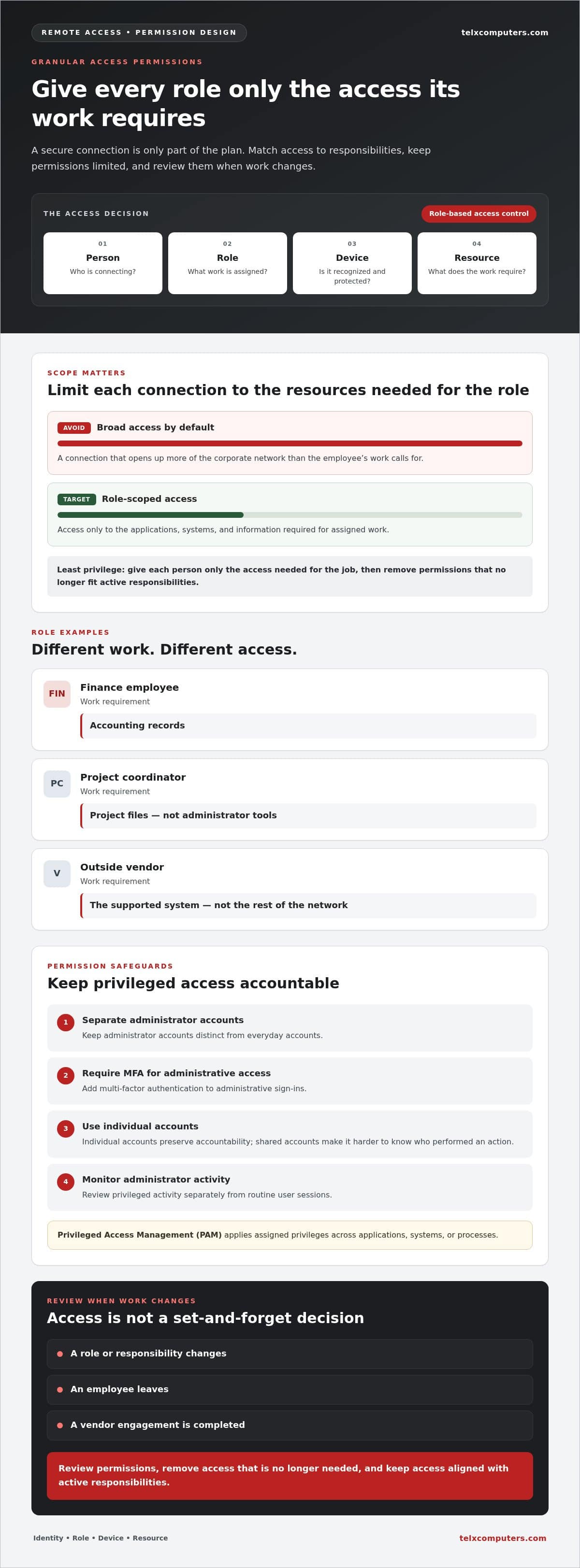
Role-based access control ties each person’s permissions to their work responsibilities. A sound strategy limits each connection to the corporate resources required for that role, rather than granting broad network access by default.
Role-Based Permissions
Role-based permissions define which applications, systems, and information employees can use. For example, a finance employee may need accounting records, while a project coordinator needs project files, not administrator tools. Privileged Access Management applies assigned privileges across applications, systems, or processes. This separation reduces unnecessary exposure and makes it easier to understand why a user can reach a resource.
Use the principle of least privilege: give each person only the access needed for assigned work, then review permissions as responsibilities change. Keep administrator accounts separate from everyday accounts, require multi-factor authentication for administrative access, and limit permissions for outside vendors. A vendor supporting one system does not automatically need access to the rest of the network. Individual accounts also preserve accountability; shared accounts obscure who performed an action.
Access control should reflect job duties, not convenience. A role change, departure, or completed vendor engagement should prompt an access review. Remove permissions that no longer match active responsibilities, and monitor administrator activity separately from routine user sessions. These practices make the permission model easier to maintain as teams and business systems evolve.
Cloud-Based Security Enforcement
Secure Access Service Edge (SASE) combines wide-area networking and network security in a cloud-delivered service model. Its cloud-based infrastructure can enforce security policies closer to remote users, rather than routing every connection through a central data center first.
This design can support consistent enforcement for employees using cloud applications from different locations. Centralized routing can add latency when traffic must pass through a hub before reaching an application outside the corporate network. SASE can also reduce the operational complexity of maintaining site-specific infrastructure for organizations with distributed teams. Access rules should still reflect user identity and job requirements.
VPNs and SASE address different access needs. A VPN typically creates an encrypted tunnel to a network segment and its available resources. SASE brings networking and security enforcement together through cloud-delivered services. Compare the applications, connection paths, and policy requirements before choosing an approach. Neither technology replaces careful permissions: a secure connection can still expose too much if the user has broad access.
For organizations refining network permissions or cloud access policies, a focused network security review can help connect access controls with the wider security strategy.
Multi-factor authentication and conditional access
Authentication should assess more than a password before a remote session reaches business applications. Combining additional identity checks with access conditions helps protect sign-ins without treating every connection as equally trustworthy.
Multi-Factor Authentication
Multi-factor authentication (MFA) adds an authentication step by requiring multiple credentials to verify identity. According to Atlantic Health, MFA requires two or more credentials. Pairing a password with another factor, such as an authenticator approval, makes a stolen password less useful to an attacker.
Apply MFA to Microsoft 365, cloud platforms, remote desktop environments, and administrative accounts. These are valuable access points, so a password-only sign-in leaves a preventable gap. Businesses should implement phishing-resistant MFA in front of all applications, rather than protecting only selected services. Consistent coverage matters: an account can remain a path into business systems if even one application lacks the stronger check.
Adaptive Authentication
Adaptive authentication adjusts the sign-in challenge based on context, such as identity, device posture, or session risk. It can help distinguish a familiar employee using a compliant device from a sign-in that departs from established patterns.
For example, access policies can consider whether a device is managed, up to date, and protected by endpoint security tools. A session from a noncompliant device can face a stronger challenge or lose access. This approach ties authentication decisions to endpoint health, not just the credentials entered at login.
Risk can change after a session begins. If behavior deviates from established patterns or session risk increases, Zero Trust Network Access policies can adjust or revoke access in real time. This response helps limit exposure when a session no longer meets the conditions for access.
Conditional Access Decisions
Conditional access applies rules to determine whether a user can sign in, what they can reach, and under which conditions. MFA verifies identity, while conditional access evaluates signals such as device compliance and application sensitivity before granting access.
Set policies around specific work requirements. An employee accessing a cloud application from a managed, updated device may receive approved access; an administrator signing in to a sensitive system should face stronger authentication. If a device lacks required updates or endpoint protection, the policy can restrict the session until its security posture improves.
Review unsuccessful logins, suspicious locations, malware detections, and compliance changes alongside authentication records. These signals help teams identify repeated failures or risky sessions, then refine policies to address the cause. A clear access decision should consider the user, device, application, and current risk, creating a more controlled path into business systems.
Remote access risks, costs, and implementation obstacles
Remote access risks arise when a user, device, or connection exposes business systems beyond the office perimeter. Organizations can reduce exposure by restricting access, monitoring activity, and keeping sensitive files within approved business systems.
Public Wi-Fi, personal email, and consumer file-sharing can weaken control over business traffic and stored data. Remote work also makes consistent policies harder to apply across different devices and networks.
Remote Access Security Risks
Remote access security risks include stolen credentials, unsafe networks, and data leaving systems an organization can monitor. A hotel Wi-Fi connection, for example, should not be treated as a trusted corporate network.
Reduce these risks by requiring approved access paths, limiting what users can reach, and monitoring suspicious activity. Employees should avoid sending sensitive files through personal email or consumer file-sharing tools, which can put organizational control over storage locations at risk. Clear reporting steps for lost devices and suspicious logins help teams respond promptly.
Costs extend beyond the technology used to connect employees. Remote access implementation costs depend on existing infrastructure, the applications employees need, device management requirements, and ongoing support. A rushed deployment can lead to rework if access rules do not fit actual job responsibilities.
Implementation challenges often arise when legacy applications, vendor accounts, and employee workflows require different access paths. Teams may also need to balance tighter controls with usable connections to cloud applications. Map applications and user groups first, then identify traffic routes and systems that need special handling. Tested backups and a documented recovery process can help employees resume work if systems become unavailable.
Remote Desktop Access Risks
Remote desktop access lets users control a computer or server from another location, but it can expose a direct route into corporate systems. Directly exposing remote desktop services to the public internet creates a serious security risk.
Remote desktop should not be a general-purpose access method without deliberate safeguards. A properly configured remote desktop gateway can provide a more controlled path, while access limits and monitoring help reduce unnecessary exposure. Review which users need remote desktop, which systems they can reach, and whether a more restricted application-based connection would suit the task.
Web proxies raise a separate concern: they handle web requests but do not encrypt all device traffic, and their traffic is not typically inspected for threats. A secure web gateway can filter URLs, inspect malicious content, and enforce web access controls. Before implementing a remote-work design, compare how each connection is protected, what activity can be monitored, and how changes can be managed without disrupting essential work.
Secure remote access controls and technologies
For teams in Fort Lauderdale, secure remote access for employees in Fort Lauderdale depends on the applications staff use and how narrowly access should be defined. Start by mapping users, devices, and business systems, then match controls to each connection.
There is no single best technology for every team: VPNs suit network access, while ZTNA can limit access to specific applications. A sound setup maps business needs, selects a controlled connection, applies identity and device rules, tests access, and monitors activity.
Remote Access Solution Selection
Choose remote-access technologies based on the systems employees need, rather than software names alone. This matters because broad network access can expose more resources than an application-specific connection.
A VPN creates an encrypted tunnel and typically reaches a network segment and its resources. ZTNA can instead limit users to approved applications and services, including private or legacy applications. A cloud-hosted workspace or properly configured remote desktop gateway can offer another controlled route. Compare each option against application needs, access boundaries, device management, and how IT will monitor sessions.
SASE combines networking and security services through cloud-delivered infrastructure. It can suit distributed teams that need consistent enforcement across locations, while reducing the complexity of maintaining site-specific infrastructure. A secure web gateway can filter URLs and inspect malicious content; remote browser isolation keeps requested web content on an isolated server. Each technology addresses a different part of the connection, so align controls with actual traffic and work patterns.
Remote Access Setup Process
A secure setup connects employee roles, approved devices, and required applications to specific access rules. Following a clear sequence helps prevent broad permissions from becoming a shortcut to making a connection work.
Start by listing users, applications, and the data each role needs. Choose VPN, ZTNA, or a cloud-hosted workspace based on whether staff need network-level or application-level access. Configure individual accounts, multi-factor authentication, device requirements, and least-privilege permissions. Test representative users and applications, then monitor login activity, compliance, and access failures. This sequence gives secure remote access for employees in Fort Lauderdale a practical foundation without assigning every worker identical permissions.
Keep the process active after launch. Review permissions when roles change, remove accounts when employees leave, and adjust policies as applications or devices change. Use secure web gateway controls for internet traffic where appropriate, and keep work access separate from personal email or consumer file-sharing.
Technology choices also shape ongoing workload. A VPN may provide a familiar path into network resources, while ZTNA can apply narrower application rules. SASE can centralize cloud-based enforcement for distributed users. Compare traffic paths, legacy software needs, monitoring requirements, and operational complexity before implementation. Discuss your remote access strategy to align controls with your network.
Telx Computers: Managed IT Services
Telx Computers helps businesses align remote access with their wider technology environment through Managed IT Services, Network Security, and Cloud Computing. This support can help when employees need reliable access to business systems and administrators need consistent oversight of permissions, devices, and connections.
Rather than treating each access issue as an isolated fix, a coordinated approach connects security controls with the applications and workflows employees rely on. Managed IT Services can help businesses maintain that broader view as remote-work needs evolve.
Contact Telx Computers to discuss secure remote access for your team.
Make Remote Access Part of Ongoing IT Planning
Remote work changes as employees join, change roles, adopt new applications, and leave the organization. Treat access as an ongoing business process, not a one-time software deployment. Assign responsibility for reviewing permissions, tracking device compliance, and responding to suspicious activity. Clear ownership keeps security decisions aligned with how teams work.
Building secure remote access for employees in Fort Lauderdale also means planning for the support employees need when sign-ins or approved applications fail. Telx Computers brings Managed IT Services, Network Security, and 24/7 Help Desk Support into that broader operational picture, helping businesses connect access needs with ongoing IT support.
Choose a next step that fits your team’s priorities, whether that means reviewing existing access policies or planning a more controlled setup. Contact Telx Computers to discuss secure access and move forward with a clear plan for your workforce.
Frequently Asked Questions
How do organizations protect a remote workforce?
Organizations protect remote teams by combining technical safeguards with clear employee procedures. For example, set rules for approved business applications, local file storage, and reporting a lost device or suspicious sign-in. When an employee leaves, promptly remove access to email, cloud storage, phone applications, remote desktops, and shared passwords. Tested backups and a documented recovery process also help teams continue work if a system becomes unavailable.
What is the difference between a VPN and ZTNA?
A VPN typically creates an encrypted tunnel that connects a device to a network segment and its resources. Zero Trust Network Access (ZTNA) instead grants identity-based access to specific applications and services. For example, a worker who only needs a cloud application may not need broader network access. The better fit depends on whether employees need access across a network or to selected systems.
What is the cost of VPN, zero-trust network access, and remote desktop solutions for businesses?
Costs depend on the licensing model, number of users and devices, existing infrastructure, application requirements, and support needs. Remote desktop may also involve gateway or workspace requirements, while VPN and ZTNA costs can reflect different access architectures. For a specific service, pricing depends on the case and is provided after a quote request. Compare total implementation and ongoing management needs, not software licensing alone.
How do VPN and zero-trust access compare for employee remote access?
A VPN can suit employees who need access to a range of network resources, while ZTNA is designed to limit connections to approved applications. Consider a distributed team that works mainly in cloud software: application-level access may better match its daily workflow. Staff who need several internal systems may require a different design. The comparison should account for legacy applications, user roles, and how each access path will be managed.
What security features should businesses require for remote employee access?
Require more than a password: use multi-factor authentication, encryption, individual user accounts, and permissions matched to job duties. A secure design should also support monitoring sign-ins and device compliance, as well as limiting or removing access when risk changes. For web use, a secure web gateway can filter URLs and inspect malicious content. Choose safeguards that align with the applications and information employees handle.
What MFA and device security policies reduce remote access risks?
Require phishing-resistant multi-factor authentication across applications, including administrative accounts, and give each employee a separate account. Define which devices may connect, what business data may be stored locally, and how staff report a lost device. For example, a personal device that lacks required protection can be restricted from business systems. Promptly remove a departing employee’s access, including shared credentials that person could still use.
Are there Fort Lauderdale IT providers that install and manage secure remote access?
Telx Computers serves businesses in Fort Lauderdale with Managed IT Services and Network Security, which can support broader planning for employee access and business systems. Its 24/7 Help Desk Support is also relevant when staff need assistance with IT issues. Businesses seeking a coordinated approach can discuss how remote-work access fits their existing technology environment and security needs with the team.
What Florida and federal data security rules apply to remote employee access?
Applicable obligations depend on the information and business activity involved. Examples include HIPAA for health information, PCI DSS for payment-card data, and GDPR. Florida employers should map remote access to the data they handle.