





28 Sep VoIP Phone Systems in Fort Lauderdale: A Business Buying Guide
What if the most important part of a new phone system isn’t the phone at all? When comparing VoIP phone systems Fort Lauderdale businesses can rely on, call quality depends on more than a provider’s feature list. Your internet connection, network setup, and support plan all affect how the system works day to day.
Will calls stay clear when your team is busy? Which features will employees actually use? And how can you switch systems without disrupting customer calls? Start with your team’s calling needs, then compare solutions against those requirements rather than choosing based on a long list of extras.
This guide explains how to compare VoIP service models, identify useful capabilities, and evaluate providers on implementation, ongoing support, and fit with your wider technology environment. It also includes practical questions to ask before committing. Telx Computers offers VoIP solutions in the Fort Lauderdale area alongside broader IT services. Confirm which telephony capabilities and support arrangements are included in any proposal for your business.
Key Takeaways
- Review how your current phone setup supports team communication before comparing replacements.
- Prioritize VoIP capabilities based on your call workflows, then ask providers to demonstrate and document what’s included.
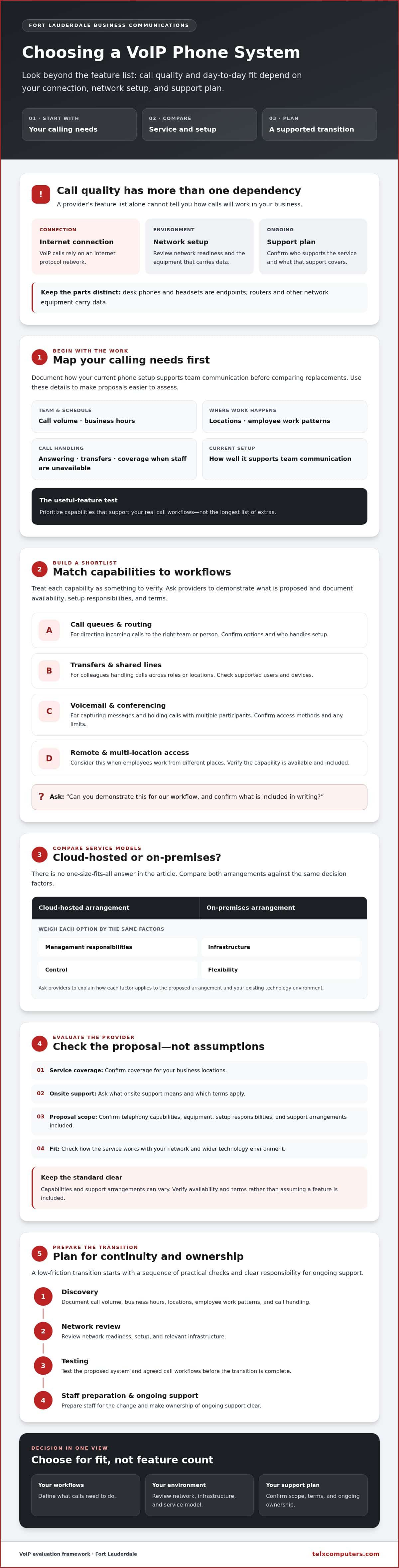
- Compare cloud-hosted and on-premises arrangements by weighing management responsibilities, infrastructure, control, and flexibility.
- When evaluating VoIP phone systems Fort Lauderdale providers offer, confirm service coverage, onsite support terms, and proposal scope.
- Plan the transition through discovery, network review, testing, and staff preparation, with clear ownership for ongoing support.
Why Fort Lauderdale businesses consider VoIP phone systems
Disconnected teams, changing work patterns, and aging phone infrastructure can make business calls harder to manage consistently. VoIP phone systems Fort Lauderdale companies consider carry voice communications over an internet protocol network. Whether a system fits depends on how your team works and whether your network can support it. Since calls rely on that connection, review network readiness and support arrangements alongside phone features.
VoIP can offer more flexibility than a traditional phone setup in how employees make and receive calls. The benefits depend on the service, your existing technology, and the way your business handles communication. Think of VoIP as part of your wider technology environment, not simply a handset purchase.
For a foundational overview, see Voice over IP (VoIP). This video also walks through practical setup considerations:
What does a business VoIP phone system do?
A business VoIP phone system carries voice calls over an internet protocol network rather than relying solely on traditional phone lines. The service converts speech into data that travels across the network to the other caller. The VoIP service is separate from the equipment used to access it: desk phones and headsets are endpoints, while routers and other network equipment carry data. Ask the provider which components and support are part of the proposed service.
Which Fort Lauderdale businesses may benefit?
VoIP may suit businesses that handle regular customer calls, coordinate across multiple locations, or have employees working from different places. For example, a team may need customer calls to reach the right staff member when employees are not all in one office. Call routing or shared access could support that workflow if the provider offers those capabilities. Verify availability rather than assuming they are included.
Start by documenting call volume, business hours, locations, and where employees work. Note how calls are answered and transferred, and how they’re covered when staff are unavailable. These details help you identify useful features and ask focused questions about service, network requirements, and ongoing support. Telx Computers lists VoIP solutions and serves the area. Learn more about its Fort Lauderdale IT services.
Which VoIP phone system capabilities should your business evaluate?
Start with the work your phone system needs to support, not the longest feature list a provider can supply. When comparing VoIP phone systems Fort Lauderdale businesses can choose from, a clear shortlist makes proposals easier to assess and helps reveal gaps before implementation. Treat each capability below as something to verify, not a standard feature included with every service.
Calling, routing, and team collaboration needs
Map common call paths first. A customer service team may need calls queued for the next available employee, while a small office may mainly need reliable transfers and voicemail. Conferencing, shared lines, and access for remote or multi-location staff are useful only if they support your workflows. Ask providers to demonstrate each proposed capability and confirm availability and terms in writing.
| Capability | Business need | Provider question | Verification required |
|---|---|---|---|
| Call queues or routing | Direct incoming calls to the right team or person. | Can calls be routed according to our call-handling process? | Confirm routing options and setup responsibilities. |
| Transfers and shared lines | Help colleagues handle calls across roles or locations. | How do users transfer or access calls on other lines? | Check which users and devices are supported. |
| Voicemail and conferencing | Capture messages and hold calls with multiple participants. | Are these capabilities included, and how do employees access them? | Confirm availability, access methods, and any limits. |
| Remote access | Keep distributed employees connected to business calling. | What options support our employees’ work locations? | Verify supported configurations and network requirements. |
Network readiness, security, and continuity
Clear calls depend on the network and system design. Ask a qualified IT provider to review available bandwidth, network configuration, and competing traffic before you select a solution. Clarify how the provider handles access controls, security, backups, and service continuity, including what happens to calling during an internet or power interruption. The FCC guide to VoIP is a useful reference for questions about emergency calling and number portability. Confirm how each applies to the proposed service.
Telx Computers offers network security and IT support. If you’re reviewing network readiness, explore its network IT support services and confirm directly which VoIP capabilities and support arrangements would apply to your environment.
Cloud-hosted or on-premises VoIP: how to compare your options
Choosing a deployment model is a decision about ownership as well as technology. With cloud-hosted VoIP, a provider manages some or all of the system infrastructure, though the exact division of responsibilities varies. With an on-premises arrangement, key system components are located at the business and may require more direct involvement from its IT team. Neither model is automatically the better fit.
When comparing VoIP phone systems Fort Lauderdale providers offer, consider your current systems, internal technical capacity, and priorities for control and support. Ask what the proposal includes, what your team must manage, and how the arrangement can accommodate future changes. PCMag’s business VoIP provider comparison provides another view of providers, but your own operational requirements should guide the deployment decision.
When a hosted model may fit
A hosted arrangement may be worth exploring if your business wants a provider to manage some underlying infrastructure or needs user administration that can adapt as the team changes. Don’t assume “hosted” means the provider handles every task. Ask who manages configuration, updates, security, user changes, and troubleshooting. Confirm which services are included and where support responsibilities begin and end.
Check the connectivity requirements and configuration options for your locations and employees. The provider should explain what your business needs to supply and how requested changes are handled.
When an on-premises model may fit
An on-premises approach may be worth considering if your business already has relevant infrastructure, internal technical expertise, or a preference for more direct control over system management. That control also comes with responsibilities. Ask who maintains hardware and software, oversees security, and manages backups, updates, and ongoing support. Confirm which tasks belong to your staff and which the provider will handle.
Compare the full lifecycle, not just the initial setup. Consider how the model fits existing equipment, what would need to change during migration, and who would coordinate the work. Avoid basing a decision on assumed costs or technical requirements. Request a proposal that explains responsibilities and dependencies for your environment.
A practical comparison can make the trade-offs clear:
- Management: Which party handles routine administration and maintenance?
- Infrastructure: What existing equipment or network resources does the arrangement rely on?
- Control: Which settings can your team manage, and which require provider involvement?
- Support and change: Who responds to issues, and how are user or configuration changes handled?
Telx Computers lists VoIP solutions among its offerings, but confirm its deployment options and included responsibilities directly. The right choice is the model that aligns with your systems, people, and support expectations.
How to select a VoIP provider in Fort Lauderdale
A provider proposal is useful only if it addresses your workflows and makes responsibilities clear. Give each provider the same requirements and questions so you can compare scope, support boundaries, migration responsibilities, and recurring service components on equal terms. For VoIP phone systems Fort Lauderdale businesses are evaluating, confirm local coverage and onsite support terms directly rather than assuming they’re included.
Build a short business requirements checklist
Before requesting proposals, document who uses the phones, where employees work, how calls move through the business, and when teams need coverage. Note current phone numbers and devices, relevant network dependencies, and integrations that need to be checked. Separate essential needs from optional features. This gives providers a consistent brief and helps your team distinguish a genuine operational requirement from a feature that sounds appealing but isn’t necessary.
Ask providers the questions that reduce uncertainty
Clarify who configures, monitors, and supports the system after deployment. Ask how the provider plans migration, testing, and staff training, and how your team should escalate issues. For local availability, confirm whether Fort Lauderdale is within the provider’s service area and ask what onsite support, if any, is available and under what terms. Telx Computers identifies Fort Lauderdale among its service areas. Review its Fort Lauderdale business IT services page and verify VoIP-specific arrangements directly.
Use this evaluation sequence to keep the decision practical:
- Gather requirements. Record user groups, locations, call workflows, business hours, accessibility needs, current numbers and devices, and any systems that may need integration.
- Prioritize. Mark each item essential or optional, and explain the workflow behind every essential requirement.
- Check readiness. Ask providers what network information they need and whether your existing environment requires review before deployment.
- Define responsibilities. Get clear answers on configuration, ongoing support, issue escalation, migration planning, testing, and staff preparation.
- Review proposals side by side. Compare what’s included, what remains your responsibility, which recurring service components apply, and how proposed capabilities map to your checklist.
Don’t rely on broad assurances. Ask each provider to document the proposed scope, support boundaries, migration roles, and assumptions about your network or equipment. If you’re ready to discuss how VoIP could fit your wider business technology environment, contact Telx Computers about VoIP solutions.
Plan a low-friction VoIP transition with the right IT partner
A smooth transition starts well before the first call. Discovery establishes who uses the system, how calls move through your business, and which existing numbers, devices, or integrations need attention. A network review can identify dependencies to address before configuration begins. Then your team and provider can agree on setup, testing, staff preparation, and post-deployment support.
Coordinating VoIP with the wider IT environment can clarify ownership and reduce gaps between separate technology responsibilities. It does not guarantee uninterrupted service or a trouble-free rollout, so define the work, decision-makers, and escalation path with the provider in advance.
What to confirm before deployment
Put the project plan in writing. Confirm the scope, each party’s responsibilities, network or equipment dependencies, how progress will be communicated, and what needs to work before the setup is considered ready. Test representative call flows, such as incoming calls, transfers, and voicemail, based on the capabilities in your proposal. Schedule staff orientation before employees rely on the new system, and agree on contingency arrangements and escalation contacts with the provider.
How Telx Computers can support your evaluation
Telx Computers lists VoIP solutions alongside managed IT services, network security, and other technology offerings. That broader context may help if you want to discuss phone service alongside your IT environment. Confirm which VoIP capabilities, deployment options, and implementation responsibilities are included in any proposed scope. Telx identifies Fort Lauderdale as a service area; see its Fort Lauderdale business IT services page. Ask directly about local coverage, onsite support terms, and escalation arrangements.
As you assess network readiness, you can also review Telx’s network IT support information. Confirm whether the services fit your Fort Lauderdale requirements and how responsibilities would be coordinated with any VoIP work.
For VoIP phone systems Fort Lauderdale businesses can use with confidence, start with a clear conversation about your users, call workflows, existing network, and support expectations. Contact Telx Computers to discuss those requirements and confirm what a proposed service would cover before making a decision.
Choose a VoIP plan that fits the way your team works
The right phone system should support your call workflows and fit your network, support expectations, and plans for change. As you compare VoIP phone systems Fort Lauderdale providers offer, prioritize capabilities your team will use, clarify who manages each part of the service, and compare implementation responsibilities and ongoing support.
A careful rollout also depends on clear coordination. Review network readiness, agree on project responsibilities, test important call flows, and prepare employees before relying on the new setup. These steps help your team assess the transition with fewer unknowns, without assuming every provider offers the same features or support.
Telx Computers lists VoIP solutions alongside managed IT services, network security, 24/7 help desk support, and server monitoring. Whether it fits depends on your requirements and the scope confirmed for your business. Talk with Telx Computers about your business VoIP requirements and clarify which capabilities, implementation services, and support arrangements are included. With the right questions and a practical plan, you can make a more informed decision.
Frequently Asked Questions
What is a VoIP phone system for a business?
A business VoIP phone system carries voice calls over an internet protocol network. Instead of relying only on traditional phone lines, it sends calls as data across a network connection. The service is separate from the devices employees use, such as desk phones or headsets, and the network equipment that carries the data. Businesses in Miami, Aventura, and Fort Lauderdale should assess how this setup fits their calling workflows and IT environment.
Is VoIP reliable for a small business in Fort Lauderdale?
VoIP can be reliable for a small business when its network, system design, and support arrangements suit its needs, but call quality depends on a stable internet connection. Before choosing a provider, ask how it assesses your network and what continuity arrangements it recommends for internet or power interruptions. Businesses in Fort Lauderdale, Miami, and Aventura should also clarify support hours, escalation steps, and any service commitments in writing.
Can a business keep its existing phone numbers when switching to VoIP?
In many cases, a business can request to transfer existing phone numbers to a new VoIP provider, but eligibility and timing must be confirmed with the providers involved. Ask who coordinates the transfer, what information is needed, and how the switch will be sequenced. Don’t cancel existing phone service until the new provider confirms the transfer plan and advises when it’s appropriate to do so.
What internet connection does a business VoIP phone system need?
There isn’t one connection specification that fits every business. The suitable setup depends on the number of simultaneous calls, network configuration, and other traffic competing for capacity, such as video meetings or large file transfers. Ask the prospective provider to assess your current connection and recommend what to check before deployment. A qualified IT provider can review network readiness and identify dependencies that may affect call performance.
How do cloud-hosted and on-premises VoIP systems differ?
With a cloud-hosted system, a provider manages some or all of the underlying infrastructure, depending on the agreement. An on-premises arrangement places key system components at the business, which may involve more direct responsibility for maintenance and support. Compare who handles configuration, security, updates, and backups, along with the control your team needs. The right model depends on your existing systems, internal expertise, and business priorities.
Can VoIP support employees working from different locations?
VoIP may support employees calling from multiple locations if the selected service and configuration accommodate your team’s devices and work patterns. Don’t assume remote access or shared calling features are automatically included. Ask the provider which options are available, what network conditions users need, and how support works across locations. Businesses serving customers from offices in Miami, Aventura, or Fort Lauderdale should verify that the proposed setup suits each location.
How should a Fort Lauderdale business compare VoIP providers?
Compare providers using the same checklist: required call workflows, included capabilities, network dependencies, migration responsibilities, ongoing support, and recurring service components. Confirm Fort Lauderdale service coverage and any onsite support terms directly rather than assuming they’re included. Telx Computers lists VoIP solutions alongside managed IT services, network security, 24/7 help desk support, and server monitoring. Businesses in Miami and Aventura can use the same questions when assessing local service fit.
What should a business plan before moving to a VoIP phone system?
Before switching, document users, locations, call flows, business hours, current numbers and devices, and any integrations that need checking. Agree with the provider on project scope, responsibilities, network dependencies, number-transfer coordination, testing, staff orientation, and escalation contacts. Test the call paths employees rely on before making the new setup their primary system, and confirm contingency arrangements. A clear plan helps teams coordinate the change without assuming a particular timeline or outcome.