





26 Sep Disaster Recovery Plan in Fort Lauderdale: A Business Checklist
What if your backups are intact, but no one knows which systems to restore first? For a business facing Fort Lauderdale’s hurricane and flooding risks, a disaster recovery plan Fort Lauderdale companies can rely on needs more than backup copies. It needs clear priorities, assigned owners, and recovery steps that have been tested.
It’s reasonable to want confidence that critical data can be restored and that recovery expectations fit your business. But answers can be hard to pin down when responsibilities are unclear or a provider describes capabilities without showing how they work. A documented plan turns uncertainty into decisions your team can act on.
Use this checklist to identify readiness gaps, set priorities with the people who depend on your systems, and compare providers against clear, verifiable capabilities. You’ll work through what to restore first, who makes key decisions, how to assess backup recoverability, and what to ask about testing, monitoring, and support. The goal is a recovery approach tailored to your operations, not a plan that only looks complete on paper.
Key Takeaways
- A disaster recovery plan Fort Lauderdale businesses can use defines recovery roles, priorities, and procedures. It is distinct from business continuity planning and backups.
- Map essential operations to the applications, data, devices, vendors, and people they depend on before setting recovery priorities.
- Assess backup readiness by checking documented scope, access controls, retention, recovery location, restore-test records, and unresolved gaps.
- Compare providers by asking about ownership, dependencies, testing, reporting, escalation, and plan maintenance. Verify their answers with evidence.
- Assign an owner, approve recovery priorities, document procedures, and revisit the plan when systems, vendors, staffing, locations, or business needs change.
What should a Fort Lauderdale business disaster recovery plan cover?
A workable disaster recovery plan documents who makes decisions, which technology to restore first, and the steps for bringing essential systems back after a disruption. For a disaster recovery plan Fort Lauderdale businesses can put into action, connect technical recovery to operational priorities. Identify what teams need to serve customers, access records, and carry out critical work. Name owners and clarify who coordinates with internal teams and technology providers.
For a brief overview of disaster recovery planning, watch this video:
Disaster recovery plan vs. backup: what is the difference?
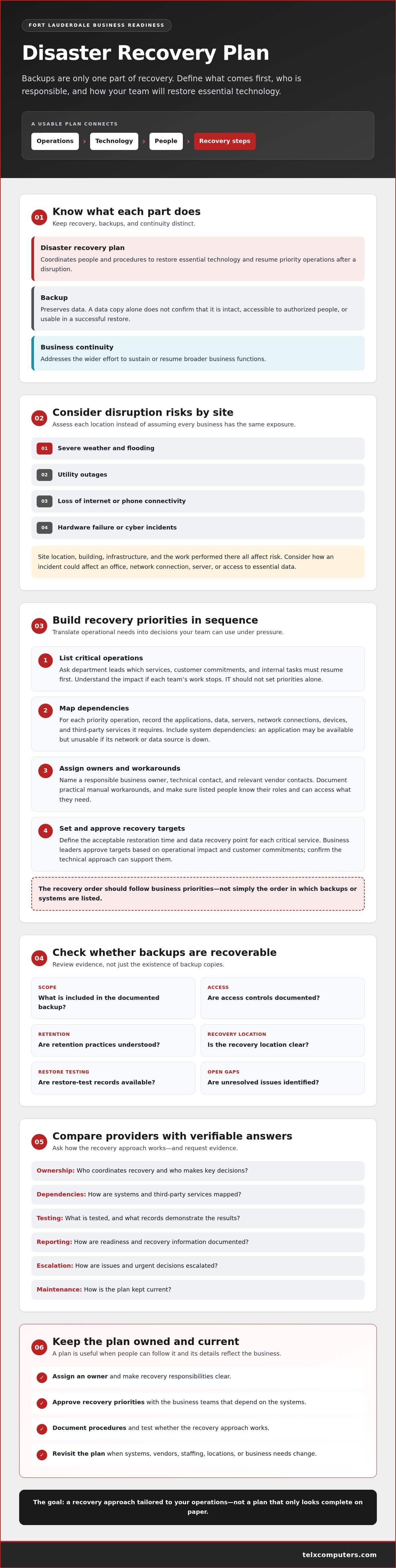
A backup preserves data; a disaster recovery plan coordinates how people restore essential technology and resume priority operations after a disruption. Backups are one resource a plan may rely on, not a complete recovery strategy. A data copy alone doesn’t confirm that it is intact, accessible to authorized people, or usable in a successful restore. Disaster recovery focuses on restoring technology, while business continuity addresses how the organization sustains or resumes broader business functions. Business continuity planning provides useful context for how the two efforts relate.
Which Fort Lauderdale business risks belong in the plan?
Assess realistic disruption scenarios for each site instead of assuming every business faces the same exposure. Consider severe weather and flooding, as well as utility outages, loss of internet or phone connectivity, hardware failure, and cyber incidents. A disruption may affect an office, network connection, server, or access to essential data. Consider how each scenario could interrupt your specific operations.
Risk depends on a site’s location, building, infrastructure, and the work performed there. Review conditions around each location and identify the systems and services that could be affected. Telx Computers provides Fort Lauderdale IT services. Use your own site assessment to set priorities, assign roles, and document restoration steps, since recovery needs vary by business.
Keep the distinctions clear: backups support data recovery, disaster recovery coordinates technology restoration, and business continuity addresses the wider effort to keep essential work moving. Together, these considerations provide a practical foundation for the checklist that follows.
Use this checklist to define recovery priorities and targets
Turn the risk assessment into decisions your team can use under pressure. A disaster recovery plan Fort Lauderdale businesses can rely on connects essential work to the technology it needs, sets business-approved recovery targets, and assigns people to carry out each step. Build the plan with input from both operational and technical teams.
- List critical operations. Ask department leads which services, customer commitments, and internal tasks must resume first. Have each team explain the impact if its work stops. Don’t leave IT to set priorities alone.
- Map dependencies. For every priority operation, record the applications, data, servers, network connections, devices, and third-party services it requires. Note system dependencies, too. An application may be available but unusable if its network or data source is down.
- Assign owners and workarounds. Record a responsible business owner, technical contact, relevant vendor contacts, and any practical manual workaround for each priority. Make sure the people listed know their roles and can access the information they need.
- Set and approve recovery targets. Define the acceptable restoration time and data recovery point for each critical service. Ask business leaders to approve targets based on operational impact and customer commitments, then confirm that the technical approach can support them.
- Document, review, and test. Write down the recovery sequence, required access, decision-makers, and escalation steps. Review the procedures with stakeholders and test them in a controlled way to uncover missing dependencies or unclear ownership. Track gaps and update the plan as systems and business needs change.
How do you identify the systems to restore first?
Start with the work, not a server list. For example, if a team needs an order-management application, customer records, and network access to process orders, document that chain. Ask the team leader what happens if each part is unavailable. The IT disaster recovery plan resource from Ready.gov can also help teams consider technology recovery as part of preparedness planning.
How should a business set RTO and RPO?
RTO concerns how soon a service should be restored; RPO concerns how much recent data a business can accept losing, measured by the recovery point. Neither target has a universal value. Leaders should weigh the consequences of interruption and data loss, approve targets, and verify that proposed recovery capabilities can meet them. Document both targets beside each system and its owner so expectations are clear.
To align technology priorities with business needs, explore managed IT and disaster recovery support as part of a broader recovery strategy.
How can you verify backups, security, and recovery readiness?
A backup status report can show that a job ran, but it doesn’t prove your business can restore a usable system. To assess a disaster recovery plan Fort Lauderdale providers propose, ask for evidence connecting backup activity to recovery: documented scope, named owners, restore-test records, and tracked follow-up actions. Review what is covered, what isn’t, and who is responsible for closing identified gaps.
Backup frequency, retention, access controls, and recovery location should align with your business’s approved requirements. For example, a department that changes critical records frequently may need a different recovery point than a system used occasionally. Confirm that access is limited to authorized people and that the recovery location remains available under the disruption scenarios in your plan. Don’t assume one configuration fits every system.
What evidence shows that a backup can be restored?
Request dated restore-test records that identify what was restored, whether the result worked, who reviewed it, and what happened next. A successful backup job report confirms that a process ran, not that an application and its dependent data can be brought back into service. Look for evidence that tests account for required credentials, connected systems, and key data.
Ask how the provider records failed or incomplete restores, missing data, and dependencies that weren’t available during testing. Each finding should have an owner and a documented remediation status. This helps distinguish an isolated test result from a repeatable recovery process while keeping unresolved limitations visible to business stakeholders.
How should recovery planning address ransomware?
Ransomware can affect production systems and potentially accessible backup resources. The plan should document how staff escalate a suspected incident, who controls access to backup environments, and how recovery decisions are coordinated with security responders. Ask how the team evaluates whether a recovery source is suitable for use and who approves system restoration. Protected backup access can reduce exposure, but no single measure makes recovery risk-free.
Ask the provider to explain how responsibilities and decision points are recorded for a ransomware scenario, including how the team handles compromised credentials, dependencies, and communication between recovery and security roles. Review evidence for claims about protection or recoverability rather than relying on broad assurances. For additional context, see ransomware protection services as part of planning for cyber incidents.
What should a Fort Lauderdale business ask a recovery provider?
A provider’s service label won’t tell you whether its recovery approach fits your business. Ask about specific responsibilities, documented procedures, and evidence for the capabilities being proposed. To find a disaster recovery plan Fort Lauderdale businesses can depend on, compare providers against the same questions and your approved priorities, not broad assurances.
Which questions reveal whether a provider can support recovery?
Start with ownership and accountability. Who maintains the plan? Who approves changes, and how will employees learn what to do? Ask how the provider’s role connects with your leadership, internal teams, third-party vendors, and insurer. Clarify who can authorize recovery decisions and how escalation works if a key contact is unavailable.
- Scope: Which systems, data, sites, and third-party services are included, and what falls outside the proposed work?
- Dependencies: How are connections among backup, cloud services, networks, servers, and security documented and coordinated?
- Testing: Can the provider share examples of restore-test documentation, including outcomes and reviewer sign-off?
- Follow-up: How are test failures and other gaps assigned, tracked, and confirmed as resolved?
- Reporting and maintenance: What records will your business receive, who reviews them, and how are plan changes handled as technology or operations shift?
Look for answers tied to your actual environment. If a provider says recovery is “covered,” ask which systems that includes, what evidence demonstrates readiness, and who owns unresolved issues. Clear documentation makes it easier to compare capabilities and identify assumptions before an incident.
How should you assess local support and service fit?
Confirm the provider’s service area and support model directly, including whether on-site assistance is available for your location and under what circumstances. Don’t infer coverage or response arrangements from a local service page. Telx Computers serves Fort Lauderdale and has a Miami location.
Check the fit against your systems, locations, staffing, and approved recovery priorities. A proposal should explain how provider responsibilities connect with your team’s decision-makers and other vendors, rather than leaving handoffs uncertain. Record unanswered questions and resolve them before relying on the plan.
If you’re evaluating how ongoing IT management can support recovery planning, explore managed IT support services and compare the documented scope with your business requirements.
Turn the disaster recovery checklist into an owned, tested plan
A checklist becomes useful when people know who maintains it and what to do. Assign a business owner to coordinate the plan, technical leads to document recovery steps, and decision-makers to approve priorities and recovery actions. Name alternates for essential roles so that an unavailable contact doesn’t leave responsibilities unclear.
Keep current procedures and contact details somewhere authorized staff can access during a disruption. Then use this cycle to put the plan into operation:
- Assign ownership: Name the business owner, technical leads, decision-makers, and alternates.
- Approve priorities: Confirm which systems and operations matter most, along with business-approved recovery targets.
- Document procedures: Record recovery steps, dependencies, access needs, escalation paths, and contacts.
- Test and track: Run agreed scenarios, document results, and assign owners to address gaps.
- Update the plan: Revise it after tests and material changes to systems, vendors, staffing, sites, or business requirements.
Who owns the plan and how is it kept current?
The business owner should coordinate updates with technical leads and department decision-makers, while each person remains clear about their responsibilities. Review changes after a test reveals a gap and whenever a significant operational or technology change could affect recovery. Keep revision details visible so staff can distinguish current procedures from outdated copies.
What should a recovery test demonstrate?
A test should show whether documented steps work for an agreed scenario, not promise a specific outcome in every incident. Record the systems covered, participants, results, issues found, and assigned follow-up. Compare what happened with approved RTO and RPO targets, then identify whether gaps stem from missing dependencies, unclear ownership, or procedures that need revision.
Recovery planning works best as a coordinated effort across backup, security, infrastructure, and business operations. Managed IT and data backup and disaster recovery support can contribute, but define responsibilities and verify capabilities rather than assuming a service label guarantees a result.
For local service context, review Fort Lauderdale IT services and discuss how a tailored recovery plan could fit your business. Telx Computers serves Fort Lauderdale and has a Miami location.
Make recovery readiness part of your business strategy
A useful disaster recovery plan Fort Lauderdale businesses can act on has clear ownership, stakeholder-approved priorities, and procedures that are tested and updated as needs change. Verify that backups can be restored, understand provider responsibilities, and track gaps instead of relying on broad assurances.
Recovery planning works alongside the wider technology environment. Telx Computers offers data backup and disaster recovery, managed IT services, and 24/7 help desk support. The company serves Fort Lauderdale and has a Miami location.
Start by reviewing your highest-priority systems and the evidence behind your recovery approach. Then discuss your business recovery needs with Telx Computers to explore how managed IT and disaster recovery support may fit your requirements. Clear ownership and a plan your team understands give you practical steps toward greater readiness.
Frequently Asked Questions
What should a disaster recovery plan include?
A disaster recovery plan should document recovery priorities, assigned roles, essential technology, and the steps for restoring systems after a disruption. Include dependencies such as applications, networks, data, devices, and third-party services, along with contact details and escalation procedures. Set business-approved recovery targets, describe how staff will coordinate decisions, and record how tests and plan updates will be handled. A disaster recovery plan Fort Lauderdale businesses use should reflect each site’s specific risks and operations.
Is a backup the same as a disaster recovery plan?
No. A backup preserves copies of data, while a disaster recovery plan explains how people coordinate the restoration of technology and priority operations. Having backups doesn’t prove that data is complete, accessible, or usable in a recovery. Ask for restore-test evidence, including what was restored, the result, and any follow-up actions. Backups support recovery, but they’re only one part of a documented plan.
How do RTO and RPO affect a disaster recovery plan?
RTO defines the target time to restore a service, while RPO defines the acceptable data recovery point, or how much recent data the business can tolerate losing. Together, they help teams set priorities and assess whether proposed recovery capabilities fit operational needs. Business leaders should approve targets based on the impact of disruption and customer commitments, then document them for each priority system. There isn’t one target that fits every business.
How often should a business test its disaster recovery plan?
Set a testing schedule with the people responsible for recovery, based on business needs, system changes, and the scenarios the plan addresses. Don’t assume one test interval applies to every organization. After each exercise, record which systems were covered, who participated, what worked, what gaps appeared, and who will address them. Test again when a material change could affect recovery steps, dependencies, or assigned responsibilities.
Can a managed IT provider create and maintain a recovery plan?
A managed IT provider can help develop and maintain recovery planning, depending on the agreed scope and responsibilities. Clarify who owns the plan, which systems and services are included, how testing and updates are handled, and what evidence you’ll receive. Telx Computers provides managed IT services and lists data backup and disaster recovery among its offerings. Confirm specific capabilities and service inclusions directly rather than assuming they’re part of every arrangement.
What should a Fort Lauderdale business consider when planning for severe weather?
Assess weather-related disruption for each business site rather than assuming risks are identical across Fort Lauderdale. Consider how flooding, wind, power loss, or internet disruption could affect facilities, equipment, connectivity, and access to critical systems. Decide who can make recovery decisions if a location is inaccessible, and identify dependencies on staff, vendors, and alternate work arrangements. Telx Computers serves Fort Lauderdale businesses and has a Miami location.
What is the first step in creating a disaster recovery plan?
Start by identifying the business operations that must be restored first. Ask department leaders what work is essential, what systems and data it relies on, and what the impact would be if those resources were unavailable. Then assign an owner to coordinate planning with technical leads and decision-makers. This gives the team a business-led foundation for documenting dependencies, setting recovery targets, and assigning responsibilities.