





11 Mar Cloud Computing for Miami Businesses: The 2026 Strategic Guide
On August 30, 2023, Hurricane Idalia forced thousands of Florida businesses to shutter, yet those with a mature cloud computing strategy maintained 100% uptime from remote locations. You likely feel that maintaining a physical server room in Miami is a constant gamble against the next Category 4 storm and a drain on your quarterly budget. It’s frustrating to watch 15% of your annual revenue disappear into hardware maintenance while you’re still untangling the complex difference between IaaS and SaaS platforms.
SaaS is the most common interaction most employees have with cloud computing. These are ready-to-use applications delivered directly through a web browser. There’s no local installation required, which eliminates the risk of software conflicts on individual workstations. Updates happen automatically on the provider’s end, ensuring every member of your team uses the same version of the tool at all times. Popular examples include Microsoft 365 for productivity and advanced VoIP solutions for crystal-clear communication; providers like Velox Networks focus specifically on delivering this type of business-grade cloud infrastructure.
We’re here to replace that technical anxiety with a scalable, disaster-proof infrastructure that turns your IT from a cost center into a growth engine. You’ll learn how to stabilize your spending and empower your mobile workforce without the confusing jargon. This guide provides your 2026 strategic roadmap to migrating your operations to a secure, high-performance environment tailored specifically for the South Florida market. We’ll show you how to bulletproof your data while ensuring your team stays productive from any location.
Key Takeaways
- Learn how to evolve your IT infrastructure from limited local hardware to a high-performance, virtualized environment designed for growth.
- Gain clarity on IaaS, PaaS, and SaaS models to identify the most cost-effective and scalable solutions for your unique business needs.
- Secure your operations against South Florida disasters by implementing cloud computing strategies that utilize global data redundancy for total peace of mind.
- Follow a proven roadmap for a seamless migration, starting with a comprehensive IT audit to ensure your transition is efficient and risk-free.
- Discover the strategic advantage of partnering with a local Miami expert to maintain global technical standards with proactive, on-site reliability.
What is Cloud Computing? A Miami Business Perspective
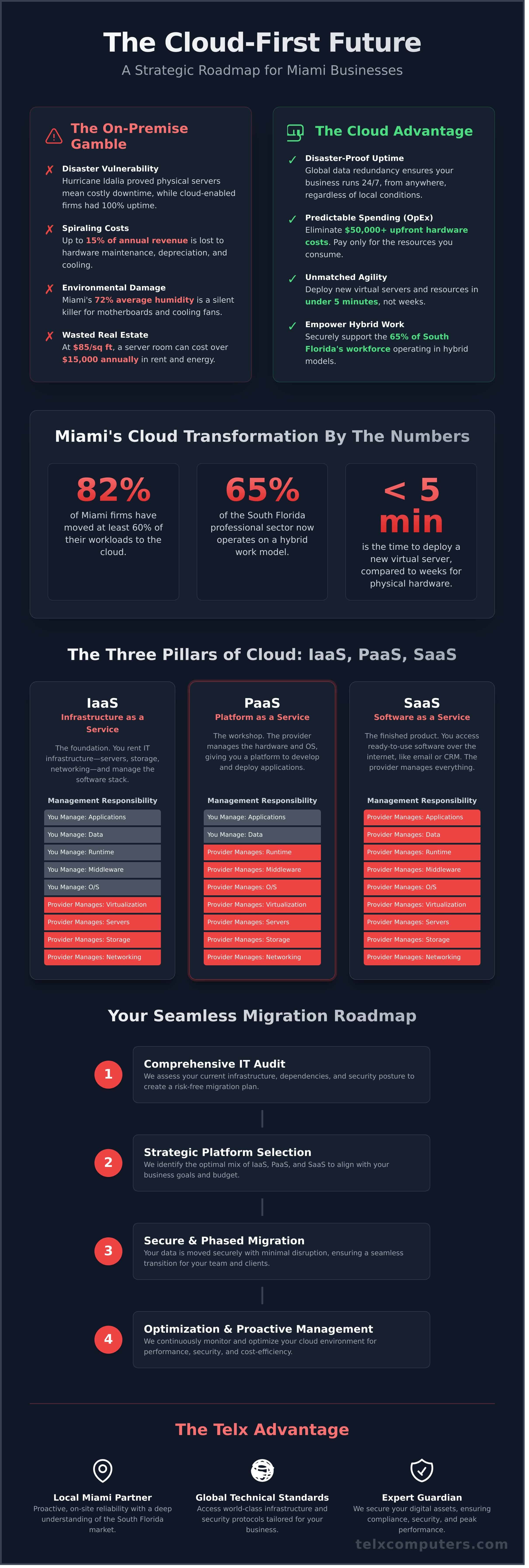
Miami’s business landscape is undergoing a radical transformation. In 2024, approximately 82 percent of local firms have moved at least 60 percent of their workloads to remote servers. This shift represents the end of the “server closet” era. For years, companies in the Greater Miami area struggled with physical hardware that fought a losing battle against the tropical climate. Today, cloud computing provides a reliable alternative that bypasses the limitations of local hardware by delivering IT resources like servers, storage, and software over the internet with a focus on speed and security.
Rather than waiting weeks for a new physical server to arrive, your team can deploy virtual resources in under five minutes. This comprehensive overview of cloud computing explains the transition from private data centers to the massive, virtualized global networks we use today. This agility allows a startup in Wynwood to compete with a global corporation by accessing the same high-tier infrastructure. Our role as Your IT Department is to ensure this transition is seamless, replacing technical anxiety with a proactive strategy that secures your data while fueling your expansion.
The Core Concept: Utility-Based Technology
The most significant benefit for the modern executive is the transition from ownership to access. You should view your technology through the same lens as your Florida Power & Light bill. You don’t build a power plant to turn on the lights; you pay for the exact amount of electricity you consume. This pay-as-you-go model transforms IT from a heavy capital expenditure (CapEx) into a manageable operating expense (OpEx). It eliminates the need for $50,000 upfront investments in hardware that depreciates the moment it’s unboxed. Cloud computing is a scalable business utility for 2026 that ensures you only pay for the growth you actually achieve.
Why South Florida Businesses Are Migrating Now
Environmental and economic pressures are forcing a faster adoption rate in our region. Miami’s humidity, which averages 72 percent annually, is a silent killer for on-premise motherboards and cooling fans. When you move to the cloud, you transfer that environmental risk to hardened, climate-controlled data centers located in safer geographic zones. It’s a move that provides immediate peace of mind during hurricane season.
Real estate costs also drive this trend. With Miami office rents climbing to an average of $85 per square foot in late 2024, every inch of your floor plan must generate revenue. Eliminating a dedicated server room can save a mid-sized firm over $15,000 annually in rent and cooling costs alone. We’ve observed that hybrid work models now dominate 65 percent of the South Florida professional sector. A cloud-first strategy ensures your team stays connected whether they’re in Coral Gables or working remotely from Fort Lauderdale. By leveraging these virtualized resources, you gain a competitive edge that traditional hardware simply can’t match.
Choosing to migrate isn’t just about following a trend. It’s about securing your company’s future in a market that moves at the speed of light. We act as the Expert Guardian for your digital assets, ensuring your cloud computing environment remains compliant, secure, and perfectly tailored to your specific operational goals. This approach allows you to focus on your core business while we handle the technical heavy lifting behind the scenes.
The Three Pillars: IaaS, PaaS, and SaaS Explained
The three service models serve as the building blocks of a modern digital strategy. Each offers a specific level of management, ranging from total hands-on control to fully outsourced convenience. The U.S. government definition of cloud computing established by the National Institute of Standards and Technology provides the framework for these categories. This standard ensures businesses have a reliable way to evaluate their technical needs against industry benchmarks. Selecting the right model isn’t just a technical choice; it’s a strategic decision that affects your operational speed and your bottom line.
Infrastructure as a Service (IaaS): The Foundation
Think of IaaS as renting your digital real estate. It replaces the expensive, heat-generating server room in your office with virtualized resources. Instead of purchasing physical hardware that typically depreciates over a 3 to 5 year cycle, you access servers, storage, and networking via the internet. This model is particularly effective for companies looking to eliminate the maintenance burden of a physical server room. Virtualization technology is the engine here, allowing a single physical machine to run multiple virtual environments. This process maximizes hardware efficiency by up to 80 percent, ensuring you aren’t paying for idle capacity.
IaaS gives your internal team total control over the operating system and middleware. It’s the preferred choice for businesses with complex, custom requirements that need a high degree of configuration. You manage the software and data, while the provider handles the power, cooling, and physical security of the data center. This partnership allows you to scale your resources up or down instantly as your project demands change.
Platform as a Service (PaaS): The Developer’s Suite
PaaS provides a streamlined environment where developers can build, test, and deploy custom applications without the headache of managing underlying infrastructure. It removes the need to handle operating system updates or hardware provisioning. This model is ideal for companies with internal development teams that need to reduce time-to-market for proprietary software. It strikes a logical balance, offering more convenience than IaaS while maintaining more creative control than SaaS. By using PaaS, teams can focus 100 percent of their energy on coding and innovation rather than server configuration.
Software as a Service (SaaS): The Daily Tools
SaaS is the most common interaction most employees have with cloud computing. These are ready-to-use applications delivered directly through a web browser. There’s no local installation required, which eliminates the risk of software conflicts on individual workstations. Updates happen automatically on the provider’s end, ensuring every member of your team uses the same version of the tool at all times. Popular examples include Microsoft 365 for productivity and advanced VoIP solutions for crystal-clear communication.
The primary benefit of SaaS is global access. Your team can reach critical data from any device with an internet connection, which is essential for modern hybrid work environments. It also simplifies your security posture, as reputable providers integrate robust email security suites and encryption directly into the platform. This model offers the highest level of convenience, as the provider manages everything from the hardware to the application itself.
Choosing the right pillar depends on your current business stage. A startup might rely 90 percent on SaaS to keep overhead low. However, a growing firm with 50 or more employees often finds that a hybrid approach provides the best balance of security and performance. If you’re unsure which model fits your current growth trajectory, our team can provide a tailored IT assessment to identify the most efficient path forward. Aligning your technology with your business goals ensures you remain competitive and secure in an ever-evolving market.
The Guardian Strategy: Security and Disaster Recovery
The most frequent objection we hear from leadership is a simple one: “Is my data actually safer in the cloud than in my own office?” It’s a valid concern. You can see your server. You can lock the room it’s in. However, physical proximity doesn’t equal protection. In reality, 60% of small businesses that suffer a major data loss close their doors within six months. Storing your sensitive information on a single physical box in a Midtown office creates a dangerous single point of failure. Cloud computing replaces this vulnerability with a fortress of distributed architecture. By adhering to the NIST definition of cloud computing, enterprise providers ensure your data lives across redundant data centers in multiple geographic regions. If a power grid fails in Virginia, your applications failover to a facility in Texas or Oregon in milliseconds.
We build our security protocols on top of these enterprise-grade platforms. This isn’t just about a password. It’s about multi-layered cybersecurity that includes advanced firewalls, intrusion detection systems, and AI-driven threat hunting. These systems monitor traffic 24/7/365. Most local setups lack the $1.2 million annual budget required to maintain this level of scrutiny. By shifting to the cloud, you’re leveraging the same security infrastructure used by 90% of Fortune 500 companies. This transition turns your IT from a liability into a resilient asset, directly integrating your operational workflow with professional data backup & disaster recovery protocols.
Hurricane Readiness and Business Continuity
We often discuss the “Miami Factor” with our clients because it represents the ultimate stress test for business continuity. When a Category 4 storm hits South Florida, local hardware becomes a liability. Our cloud computing architecture ensures zero downtime during these high-stakes events. We apply these same rigorous standards to our New York City partners. Whether it’s a localized power outage or a regional emergency, your team stays productive. Our proactive server monitoring detects anomalies before they trigger a crash. We don’t wait for your system to fail; we prevent the failure from happening.
Compliance and Data Sovereignty
Regulatory demands like HIPAA or PCI-DSS 4.0 are increasingly complex. Cloud providers now handle roughly 80% of the underlying compliance requirements automatically. This reduces your administrative burden and mitigates the risk of a $50,000 fine for non-compliance. We implement strict identity management and end-to-end encryption to ensure only authorized personnel access your files. Your data remains yours, protected by encryption keys that stay under your control. This isn’t just a technical setup; it’s a strategic alliance that guarantees your business meets every legal standard without breaking your internal workflow.
Strategic Migration: How to Move Your Office to the Cloud
Transitioning your Miami business to cloud computing requires a surgical approach. It isn’t just about moving data; it’s about re-engineering your operational flow to ensure your team stays productive. We treat every migration as a mission-critical operation where precision is the only acceptable standard. To achieve a seamless transition, your organization must follow a structured, five-step deployment plan designed to eliminate technical anxiety and maximize performance.
- Step 1: Conduct a comprehensive IT audit. We begin by identifying every workstation, server, and application in your current stack. A 2023 industry report found that 45% of mid-sized firms pay for software licenses they don’t actually use. Our audit identifies these redundancies, ensuring you don’t migrate digital waste into your new environment.
- Step 2: Identify “low-hanging fruit” for migration. We prioritize high-impact, low-risk assets like email systems and file storage. Moving these to platforms like Microsoft 365 or Google Workspace provides immediate wins in accessibility without disrupting core business logic.
- Step 3: Choose the right deployment model. We analyze your specific needs to decide between Public, Private, or Hybrid models. While the Public cloud offers massive scale, some Miami businesses require the dedicated security of a Private cloud to meet strict 2024 compliance regulations.
- Step 4: Execute a phased migration. We move your business in logic-based waves rather than a single “big bang” event. This reduces the risk of downtime to near zero. We often schedule these phases for 11:00 PM on Fridays, ensuring your staff logs in on Monday morning to a fully functional, faster system.
- Step 5: Optimize and monitor. Once the data is moved, we don’t just walk away. We monitor latency and resource allocation 24/7 to ensure your costs stay aligned with your actual usage.
Evaluating the Hybrid Cloud Model
A 100% move isn’t always the right first step for every Miami enterprise. You might need to keep legacy financial software or sensitive client records on a local server for specific regulatory or latency reasons. This is where strategic it consulting becomes vital. We help you find the balance between on-site security and cloud-based scalability, ensuring your infrastructure meets the 99.99% uptime standard our clients expect while keeping your most sensitive data under your direct physical control.
Predicting and Managing Cloud Costs
Cloud sprawl is a significant threat to your bottom line. Unmanaged subscription fees and ghost resources can increase operational costs by 22% to 30% annually if left unchecked. If this is a concern, it’s worth taking time to find out more about FinOps Cost Optimization. We prevent this through fixed-price managed IT services, providing your budget with total predictability. You’ll never see a surprise bill from us. We believe cloud ROI is measured in uptime and agility, not just hardware savings. We ensure every dollar spent translates into a proactive competitive advantage for your firm.
Ready to modernize your infrastructure without the typical migration headaches? Speak with our migration experts today to secure your company’s future.
The Telx Advantage: Your Local Cloud Partner in Miami
Telx Computers operates as the Expert Guardian for South Florida enterprises. While cloud computing offers global reach, local expertise ensures that your physical infrastructure and digital assets remain perfectly synchronized. Based in Miami Gardens, our team provides a rapid response that remote-only providers simply cannot match. We don’t just host your data; we protect your operational continuity through every hurricane season and market shift. Our engineers act as a silent engine, powering your success while you focus on high-level business goals.
Our “Unlimited Support” philosophy removes the friction from technical troubleshooting. Your team gains 24/7 access to engineers who understand the specific regulatory and economic climate of the Miami market. Since 2002, we’ve observed how localized disruptions, such as seasonal weather events or regional power grid fluctuations, can impact digital performance. Our local presence means we’re on-site within 60 minutes when a physical intervention is required. This level of dedication transforms IT from a cost center into a strategic advantage, allowing your cloud computing strategy to thrive without physical bottlenecks.
Proactive Management vs. Reactive Fixes
The traditional “Break-Fix” model is a significant liability for modern businesses. Research indicates that waiting for a system to fail before addressing it results in a 37% higher recovery cost compared to managed environments. Telx Computers utilizes 24/7 proactive monitoring to identify and neutralize threats before they trigger downtime. We manage the intricacies of your cloud architecture so you can focus on scaling your business operations. This deep integration is the cornerstone of our managed IT services Miami, where we serve as your dedicated internal IT department. We don’t wait for your phones to ring with complaints; we solve problems before your staff even notices them. Our goal is 100% stability, ensuring your workflow remains uninterrupted by technical glitches.
Next Steps: Your Free Cloud Readiness Assessment
Transitioning your infrastructure requires a precise blueprint, not a series of guesses. Our Cloud Readiness Assessment provides a granular look at your current bandwidth, security protocols, and hardware lifecycle. We’ve refined this process over 22 years to ensure zero data loss during migrations. You’ll receive a detailed report outlining cost-saving opportunities and performance bottlenecks. We analyze your current 99.9% uptime needs and map them against available cloud configurations to find the perfect fit. This consultation is designed to replace technical anxiety with a sense of stability. Secure your business future by leveraging two decades of technical mastery. Contact Telx Computers for a custom cloud roadmap today and stabilize your digital infrastructure for the long term.
- 24/7/365 Monitoring: Constant vigilance over your digital assets.
- Local Expertise: On-site support in Miami Gardens and the surrounding South Florida area.
- Scalable Solutions: Infrastructure that grows at the speed of your business.
- Predictable Costs: Flat-rate support that eliminates surprise invoices.
Your business deserves a partner that treats your technology as their own. By choosing a local leader, you ensure that your cloud environment is backed by people you can meet in person. We provide the security, reliability, and professional authority required to lead in a competitive market. Let us take the helm of your IT department so you can lead your industry.
Future-Proof Your Miami Enterprise for 2026
By 2026, the competitive landscape for Miami businesses will rely entirely on digital agility. A tailored mix of IaaS and SaaS provides the scalability needed to handle shifting market demands while keeping your overhead low. Security isn’t just a secondary feature; it’s a vital foundation. Implementing a Guardian Strategy ensures your data remains protected against evolving threats that target growing enterprises every day.
Transitioning to cloud computing shouldn’t be a source of technical anxiety. Since 2002, Telx Computers has acted as the dedicated IT department for firms across Miami, NYC, and LA. We replace unpredictable billing with fixed-price unlimited IT plans that keep your operational budget stable. Our 24/7 local help desk support ensures you’re never stuck in a global queue when you need immediate technical resolutions. You deserve a partner that treats your uptime as their own professional priority.
Secure Your Miami Business with a Strategic Cloud Migration Today
Your growth is our primary mission. Let’s build a more resilient future for your company together.
Frequently Asked Questions
Is cloud computing safe for sensitive business data in 2026?
Cloud computing is safer than traditional on-premise storage in 2026 because of advanced Zero Trust architecture and 256-bit encryption standards. Current industry data shows that 94% of businesses report significant security improvements after migrating to the cloud. Telx Computers implements proactive monitoring to catch threats before they reach your network. This ensures your sensitive data remains protected by the same security protocols used by Fortune 500 companies.
How does cloud computing help with hurricane disaster recovery in Miami?
Cloud computing secures your business against hurricane disruptions by storing data in geo-redundant data centers located outside the South Florida flood zone. When a Category 4 storm hits, your physical office might lose power, but your digital assets remain accessible. We’ve helped Miami firms maintain 99.99% uptime during major weather events by ensuring their critical applications run in the cloud rather than on a local server that’s vulnerable to water damage.
What is the difference between Public, Private, and Hybrid clouds?
Public clouds use shared infrastructure like Microsoft Azure, while private clouds offer dedicated hardware for 100% control over your environment. A hybrid cloud combines both, allowing you to keep sensitive financial records on a private server and use the public cloud for scalable web apps. Telx Computers designs tailored hybrid solutions that balance the cost efficiency of public platforms with the rigid compliance standards required by 21st-century regulations.
Will my business save money by switching to cloud computing?
Most companies save 30% to 50% on IT costs within the first 24 months of a cloud migration. You eliminate the need for $10,000 server refreshes every five years and replace them with a predictable monthly subscription. This shift from capital expenditure to operational expenditure frees up your budget for growth. Our team acts as Your IT Department to ensure you only pay for the exact resources your staff uses.
How long does it typically take to migrate a small business to the cloud?
A typical migration for a small business with 10 to 50 employees takes between 30 and 90 days to complete. The initial assessment and planning phase requires 14 days to ensure a seamless transition without downtime. We execute the actual data transfer during off-hours to prevent productivity loss. Your team can usually start working in the new environment by the start of the next business week after the final cutover.
Do I still need local IT support if all my data is in the cloud?
You still need local IT support to manage your physical hardware, local network connectivity, and end-user devices. While your data lives in the cloud, your team still relies on functional laptops, high-speed Wi-Fi, and secure firewalls to access it. Telx Computers provides a holistic managed IT strategy that covers both your cloud environment and your physical office. We handle the 15% of technical issues that require hands-on hardware troubleshooting.
Can cloud computing improve my team’s remote work productivity?
Cloud computing increases remote work productivity by 20% by enabling real-time collaboration on shared documents. Your staff no longer wastes 30 minutes a day searching for the latest version of a file in an email thread. Tools like Microsoft 365 allow multiple team members to edit a single project simultaneously. This streamlined workflow ensures your business stays agile and responsive regardless of where your employees are located.
What happens to my cloud data if the internet goes down in my Miami office?
Your data remains perfectly safe and synchronized in the data center if your Miami office loses internet connectivity. You won’t lose any work because the cloud saves progress in real-time. Employees can simply switch to a 5G mobile hotspot or work from a location with an active connection to resume their tasks. We often implement secondary fiber lines to ensure your office maintains the 99.9% connectivity required for modern operations.